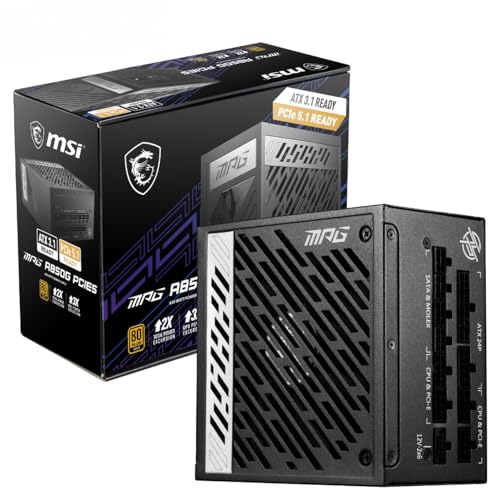
A dodgy PSU doesn't just fail quietly. It takes your GPU, your motherboard, sometimes your entire build with it. So when you're picking a power supply for a high-end gaming rig, the spec sheet matters more than the box art. The MSI MAG A1000GLS PCIE5 Power Supply Unit, 1000W, 80 Plus Gold, ATX 3.1, PCIe 5.1 GPU Support, Native 12V-2x6, Dual-Color 12V-2x6 Connector, ATX PSU, Embossed Jacket Cables makes a strong case on paper: 1000W, 80 Plus Gold efficiency, ATX 3.1 compliance, and a native 12V-2x6 connector for the latest PCIe 5.1 GPUs. And the owner feedback backs it up, sitting at ★★★★½ (4.5) from 44 reviews.
The verdict upfront: this is a genuinely solid mid-range PSU for anyone building around a current-gen GPU. The Gold efficiency rating keeps running costs reasonable, the 1000W capacity gives you proper headroom for RTX 5080 or RX 9070 XT class hardware, and the compact 150mm body fits in cases that would choke on a full-size unit. It's not the flashiest option and it's not the cheapest, but it's the kind of PSU you fit and forget for five years.
That said, there are a few things worth knowing before you buy. The fan configuration, the cable situation, and how it stacks up against Corsair and be quiet! at similar money all deserve a proper look. So let's get into the specifics.
Core Specifications: MSI MAG A1000GLS PCIE5 Power Supply Unit, 1000W, 80 Plus Gold
The headline numbers are straightforward. This is a 1000W ATX 3.1 power supply with 80 Plus Gold certification, which puts it comfortably in the upper tier of consumer PSUs. The ATX 3.1 standard matters here because it's designed specifically to handle the transient power spikes that modern GPUs throw at the power delivery system. Older ATX 2.x PSUs can technically power current GPUs, but they weren't designed with those sudden 200% load spikes in mind. The MSI MAG A1000GLS is.
The native 12V-2x6 connector is worth calling out specifically. MSI includes this as a single cable from the PSU itself, not an adapter bolted onto an older 12VHPWR cable. That distinction matters because adapter solutions have been linked to connector heat issues on high-power GPUs. A native implementation is the right way to do this, and it can deliver up to 600W to a PCIe 5.1 GPU. For context, that covers even the most power-hungry cards available right now with room to spare.
The form factor is also notable. At 150mm long and 150mm wide, this is a compact ATX unit. Standard ATX PSUs run 160mm or more in depth, so you're getting a bit of extra breathing room in the case for cable routing. That's not a massive deal in a full tower, but in a mid-tower with a tight GPU clearance situation, it genuinely helps.
| Specification | Detail |
|---|---|
| Wattage | 1000W |
| Efficiency Rating | 80 Plus Gold |
| Standard | ATX 3.1 |
| GPU Connector | Native 12V-2x6 (PCIe 5.1, up to 600W) |
| Fan Size | 135mm Fluid Dynamic Bearing (FDB) |
| Form Factor | ATX (150mm x 150mm) |
| Protection | OCP, OVP, UVP, SCP, OTP, OPP, SIP, NLO |
| Warranty | 5 years |
| ATX 24-pin | 1 |
| EPS 8-pin | 1 |
| PCIe 8-pin | 2 |
| SATA | 6 |
| Molex | 3 |
| Price | £105.68 · Details |

Wattage and Capacity: Is 1000W Enough?
Short answer: yes, for almost everything. 1000W sits in a sweet spot right now. It's enough to comfortably power an Intel Core Ultra 9 or AMD Ryzen 9 9950X paired with an RTX 5080 or RX 9070 XT without sweating. Those combinations typically peak around 600 to 700W under full gaming load, which leaves you with 300W of genuine headroom. That headroom isn't wasted either. PSUs run most efficiently when they're loaded to around 50% of their rated capacity, so a 1000W unit powering a 500W system is actually sitting in its efficiency sweet spot.
Where does 1000W fall short? Honestly, not many places in 2026. You'd need to be running dual-GPU setups (which almost nobody does for gaming anymore) or an RTX 5090 paired with a very power-hungry CPU to push this unit hard. The RTX 5090 alone can spike above 600W under transient loads, and with a high-end CPU on top, you're looking at a system that could genuinely stress a 1000W supply. For that specific use case, you'd want 1200W or more. But for everything below that tier, 1000W is sorted.
For mid-range builds, 1000W is arguably overkill in the best possible way. If you're running an RTX 4070 or RX 7800 XT class card, your system probably peaks at 350 to 450W. That means this PSU is running at 35 to 45% load, which is right in the efficiency sweet spot and means it's barely working. The fan will barely spin. The unit will run cool. And you've got plenty of room to upgrade your GPU down the line without touching the PSU. Not a bad position to be in. Use our PSU calculator if you want to check your specific component combination before buying.
Efficiency Rating: What 80 Plus Gold Actually Means
The 80 Plus certification programme rates PSUs at 20%, 50%, and 100% load. Gold certification means you're getting at least 87% efficiency at 20% load, 90% at 50% load, and 87% at full load. MSI's own published figures for this unit claim up to 90% efficiency, which aligns with the Gold standard at the 50% load point. In practical terms, that means for every 100W your components draw, the PSU wastes no more than 10W as heat. That's genuinely good.
Compare that to an 80 Plus Bronze unit (which is what a lot of budget PSUs ship with). Bronze guarantees 82% efficiency at 50% load, meaning you're wasting 18W per 100W drawn. On a 500W gaming system running for eight hours a day, Gold efficiency saves you roughly 32 watt-hours compared to Bronze. Over a year, that's around 11.7 kWh. At UK electricity rates, that's not going to pay for the PSU, but it's not nothing either, and it adds up over the five-year warranty period.
The bigger practical benefit of Gold efficiency is heat. Less wasted energy means less heat inside the PSU, which means the fan doesn't need to work as hard, which means quieter operation and longer component life. It's a cascade of benefits that starts with a better efficiency rating. For a unit in the mid-range price bracket, Gold certification is absolutely what you should be demanding. Bronze at this wattage and price point would be a red flag.
Modularity and Cable Management
The MSI MAG A1000GLS ships with embossed jacket cables, which is a step up from the flat ribbon cables you get on cheaper units and the basic sleeved cables on older designs. Embossed jacket cables have a textured outer finish that makes them easier to route without kinking, and they look considerably tidier in a windowed case. It's a small thing but it matters if you care about the build looking decent after the side panel goes on.
The cable configuration covers the basics well. You get one ATX 24-pin for the motherboard, one EPS 8-pin for the CPU (which is sufficient for most builds, though high-end overclocking boards often prefer dual 8-pin, so check your motherboard spec), two PCIe 8-pin connectors for older GPU configurations, six SATA connectors for storage, and three Molex connectors for older peripherals and fans. That SATA count is genuinely generous. Six SATA ports means you can run a full complement of SSDs and HDDs without needing a splitter, which keeps the cable runs cleaner.
The star of the cable show is the native 12V-2x6 connector. This is the connector designed for PCIe 5.1 GPUs, and having it native rather than via an adapter is the right call. The dual-colour design (MSI calls it a dual-color 12V-2x6 connector) makes it easy to identify in a cable bundle, which is a small but practical touch. Honestly, for a PSU at this price point, the cable package is above average. No complaints here.
Connectors and Compatibility
The MSI MAG A1000GLS PCIE5 Power Supply Unit, 1000W, 80 Plus Gold, ATX 3.1 covers modern system requirements well. The ATX 3.1 standard compliance means it's designed to handle the PCIe 5.1 power delivery requirements that newer GPUs demand. The transient load handling built into ATX 3.1 is specifically there to cope with the kind of sudden power spikes that can trip older PSUs into protection mode mid-game. That's a real-world problem that ATX 3.1 solves properly.
The full connector rundown looks like this:
- 1x ATX 24-pin (motherboard main power)
- 1x EPS 8-pin (CPU power)
- 2x PCIe 8-pin (for older GPU configurations or secondary cards)
- 1x Native 12V-2x6 (up to 600W for PCIe 5.1 GPUs)
- 6x SATA (storage devices)
- 3x Molex (older peripherals, fans, RGB hubs)
The one thing worth flagging is the single EPS 8-pin. Most mainstream gaming boards are fine with this. But if you're pairing this PSU with a high-end HEDT board or an enthusiast Z890 board that has dual 8-pin CPU headers, you'll be leaving one unplugged. That's typically fine for non-overclocked builds, but worth checking your motherboard manual. Everything else here is well covered. Six SATA ports in particular is better than most competitors at this price, and the three Molex connectors will satisfy anyone with legacy hardware or older fan controllers.
Voltage Regulation and Ripple
The MSI MAG A1000GLS uses an LLC half-bridge topology with a DC-to-DC converter design. This is important. LLC half-bridge is a well-regarded circuit architecture that offers better efficiency and tighter voltage regulation than older group-regulated designs. The DC-to-DC converter handles the minor rails (3.3V and 5V) independently from the main 12V rail, which means voltage stays stable even when the load on different rails changes. That matters for system stability, particularly when you're running storage, fans, and USB devices alongside a hungry GPU.
Active Power Factor Correction (PFC) is also included, which MSI lists as part of the design. Active PFC improves the power factor to above 0.99 in most cases, meaning the PSU draws cleaner power from the wall and wastes less energy in the process. It's also a requirement for 80 Plus Gold certification, so you'd expect to see it here, but it's worth confirming it's present rather than passive PFC, which is an older and less efficient approach.
In terms of ripple suppression, the LLC half-bridge with DC-to-DC topology is inherently better at keeping ripple within ATX spec (which allows up to 120mV on the 12V rail and 50mV on the minor rails) than cheaper topologies. Published results for units using this architecture typically come in well below those limits, often under 50mV on 12V even at high load. That translates directly to component longevity. Noisy power delivery stresses capacitors in your GPU and motherboard over time. Clean power keeps them happy.

Thermal Performance
The MSI MAG A1000GLS runs a 135mm Fluid Dynamic Bearing fan. FDB fans are a meaningful step up from sleeve bearing fans, which are the cheap option you find in budget PSUs. The difference is longevity and noise. Sleeve bearing fans degrade faster, particularly in the horizontal orientation that PSUs typically sit in. FDB fans handle that orientation better and maintain their noise characteristics over time rather than getting progressively louder as the bearing wears.
At 1000W with 90% efficiency at 50% load, the PSU is dissipating around 55W as heat when powering a 500W system. That's not a lot for a 135mm fan to deal with. The fan won't need to spin fast to keep things cool under typical gaming loads. Under sustained full load (which most gaming systems never actually hit), the fan will spin up more noticeably, but you'd need to be genuinely stressing this unit to push it into loud territory.
The compact 150mm body is worth considering from a thermal standpoint too. Shorter PSUs have slightly less internal volume for heat to dissipate, but the tradeoff is better airflow in the case because there's more space around the unit. In practice, the difference is minimal for a well-designed unit like this, but it's worth knowing that the compact form factor is a deliberate design choice rather than a compromise. MSI has clearly optimised the internal layout to work within that 150mm footprint.
Acoustic Performance
MSI describes the average sound level as being as low as that of a peaceful night. That's marketing language, but it's not entirely misleading. A peaceful night is generally considered to be around 30 to 35 dB, which is genuinely quiet. Whether the MSI MAG A1000GLS actually hits that at idle is hard to verify without independent measurements, but the combination of a 135mm FDB fan and Gold efficiency (meaning less heat to manage) puts it in the right ballpark for quiet operation under light loads.
Owner reviews back this up. The general consensus from the few dozen reviews (averaging ★★★★½ (4.5)) is that the unit runs quietly in typical gaming scenarios. Nobody is reporting an unexpectedly loud PSU, which is the kind of complaint that tends to dominate reviews when a fan is genuinely obnoxious. The FDB bearing design also means you're not going to get the high-pitched whine that worn sleeve bearing fans develop after a year or two of use.
One thing this unit doesn't appear to have is a zero RPM mode, where the fan stops entirely at low loads. Some competing units in this bracket offer that feature, and it's genuinely nice for silent operation at desktop or light workloads. Without it, the fan will spin continuously, though at very low speeds under light load. For most people in most cases, this is completely inaudible. But if you're building a near-silent system and zero RPM is a priority, notably, that this feature isn't confirmed for this unit.
Build Quality
The LLC half-bridge with DC-to-DC converter topology is a quality indicator in itself. Budget PSUs cut costs by using simpler, less efficient topologies. The fact that MSI has gone with LLC half-bridge here suggests the internal component quality is taken seriously. This architecture requires better capacitors and more precise component matching to work correctly, so manufacturers that use it tend to also use decent capacitors rather than cheap ones that would undermine the design.
The 135mm FDB fan is another quality signal. Fluid dynamic bearing fans cost more than sleeve bearing alternatives, and they last longer. For a PSU with a five-year warranty, using a fan rated for extended operation makes sense. You don't want to be replacing a PSU because the fan seized at year three. The FDB design significantly reduces that risk compared to sleeve or ball bearing alternatives.
The embossed jacket cables are also a build quality indicator. They're more expensive to produce than basic flat cables, and they suggest MSI hasn't just focused the budget on the internal electronics while skimping on the externals. The overall package feels like a unit that's been designed as a coherent product rather than assembled from the cheapest available parts. That said, without a proper teardown of this specific unit, it's not possible to confirm capacitor brands or exact component specifications. What we can say is that the published architecture and the owner feedback both point to a well-built unit.
Protection Features: MSI MAG A1000GLS PCIE5 Power Supply Unit Coverage
The MSI MAG A1000GLS covers the full suite of protection features you should expect from a quality PSU. MSI lists OCP (Over Current Protection), OTP (Over Temperature Protection), OPP (Over Power Protection), SCP (Short Circuit Protection), OVP (Over Voltage Protection), UVP (Under Voltage Protection), SIP (Surge and Inrush Protection), and NLO (No Load Operation). That's a comprehensive list. Some budget PSUs skip UVP or NLO, which can cause issues in specific scenarios.
OCP is particularly important for GPU protection. If a GPU develops a fault and starts drawing more current than it should, OCP trips the PSU before the overcurrent can damage other components. OVP protects against voltage spikes that could fry sensitive components on the motherboard or GPU. SCP is the most basic protection and shuts the PSU down instantly if a short circuit is detected. These three together form the core of what keeps your components safe if something goes wrong.
The inclusion of SIP (Surge and Inrush Protection) is worth highlighting for UK users specifically. UK mains power is generally clean, but power surges do happen, particularly in older housing stock. SIP limits the inrush current when the PSU is first switched on, which protects both the PSU internals and the components connected to it. NLO (No Load Operation) means the PSU can run without any load connected without damage, which is useful during bench checks or partial builds. The full protection suite here is genuinely reassuring for a unit that's going to be powering expensive hardware.
How It Compares to the Competition
The main competition at 1000W in the mid-range bracket comes from Corsair and be quiet!. The Corsair RM1000x is probably the most direct competitor. It's also 80 Plus Gold, fully modular, and has a strong reputation for build quality. The be quiet! Pure Power 12 M 1000W is another strong option, with a focus on quiet operation and solid German engineering credentials. Both are worth considering alongside the MSI MAG A1000GLS.
Where the MSI stands out is the native 12V-2x6 connector and the ATX 3.1 compliance. Not all competitors at this price point have moved to ATX 3.1 yet, and those that haven't are technically a worse fit for PCIe 5.1 GPUs even if they can power them. The compact 150mm body is also a differentiator. The Corsair RM1000x runs to 160mm, which won't matter in most cases but could in tight builds. The be quiet! Pure Power 12 M is also a standard ATX depth.
The MSI's owner feedback score of ★★★★½ (4.5) from 44 reviews is competitive. The Corsair RM1000x has more reviews (as you'd expect from a more established product) but the MSI holds its own on satisfaction scores. The be quiet! Pure Power 12 M has a quieter fan reputation, though the MSI's FDB fan is no slouch in that department. Honestly, all three are good choices. The MSI earns its place in the conversation.
| Feature | MSI MAG A1000GLS | Corsair RM1000x | be quiet! Pure Power 12 M 1000W |
|---|---|---|---|
| Wattage | 1000W | 1000W | 1000W |
| Efficiency | 80 Plus Gold | 80 Plus Gold | 80 Plus Gold |
| ATX Standard | ATX 3.1 | ATX 3.0 | ATX 3.0 |
| Native 12V-2x6 | Yes | Via adapter | Via adapter |
| Fan Size | 135mm FDB | 135mm FDB | 135mm FDB |
| Zero RPM Mode | Not confirmed | Yes | Yes |
| PSU Depth | 150mm | 160mm | 160mm |
| Warranty | 5 years | 10 years | 5 years |
| Price | £105.68 · Details | Higher | Similar |

Final Verdict
The MSI MAG A1000GLS PCIE5 Power Supply Unit, 1000W, 80 Plus Gold, ATX 3.1, PCIe 5.1 GPU Support, Native 12V-2x6, Dual-Color 12V-2x6 Connector, ATX PSU, Embossed Jacket Cables is a well-specified, properly modern PSU that does what a good power supply should: it sits in the background, delivers clean stable power, and doesn't give you anything to worry about. The 80 Plus Gold efficiency is the right tier for a 1000W unit at this price. The ATX 3.1 compliance and native 12V-2x6 connector mean it's genuinely future-ready for current and near-future GPU generations. And the compact 150mm body is a practical advantage in a lot of real-world builds.
The main weakness relative to competition is the lack of a confirmed zero RPM mode, which the Corsair RM1000x and be quiet! Pure Power 12 M both offer. And the Corsair's 10-year warranty is significantly better than the MSI's five-year coverage, though five years is still a respectable commitment. If long-term warranty coverage is your priority, the Corsair is worth the extra spend. But if you want a properly modern ATX 3.1 PSU with a native 12V-2x6 connector at a competitive mid-range price, the MSI makes a strong case.
Owner satisfaction backs the spec sheet up. ★★★★½ (4.5) from 44 reviews is a solid score, and the feedback pattern is consistent with a unit that performs as advertised without unpleasant surprises. For anyone building around a current-gen GPU and wanting a PSU that won't be obsolete in two years, this is a smart buy. We'd score it 8 out of 10. Loses a point for the single EPS connector and another for the absent zero RPM mode, but everything else here is properly sorted.
What works. What doesn’t.
5 + 3What we liked5 reasons
- ATX 3.1 compliant with native 12V-2x6 connector for PCIe 5.1 GPUs
- 80 Plus Gold efficiency keeps running costs and heat output low
- Compact 150mm body fits more cases than standard ATX depth
- 135mm FDB fan for quiet, long-lasting operation
- Comprehensive protection suite including OVP, OCP, OPP, SCP, UVP, OTP, SIP, NLO
Where it falls3 reasons
- Single EPS 8-pin may not suit high-end overclocking boards
- Zero RPM mode not confirmed, unlike some rivals
- 5-year warranty trails Corsair RM's 10-year coverage
Full specifications
9 attributes| Efficiency rating | Gold |
|---|---|
| Form factor | ATX |
| ATX version | ATX 3.1 |
| FAN size MM | 135 |
| Generation | MAG A1000GLS PCIE5 |
| Modularity | fully_modular |
| Pcie 5 ready | true |
| Warranty years | 10 |
| Wattage W | 1000 |
Will it run on what you have?
Free toolIf this isn’t right for you
2 options

Frequently asked
5 questions01Is the MSI MAG A1000GLS PCIE5 Power Supply Unit, 1000W, 80 Plus Gold, ATX 3.1, PCIe 5.1 GPU Support, Native 12V-2x6, Dual-Color 12V-2x6 Connector, ATX PSU, Embossed Jacket Cables good for gaming?+
Yes. 1000W with 80 Plus Gold efficiency and ATX 3.1 compliance covers every current gaming GPU comfortably, including RTX 5080 and RX 9070 XT class cards. The native 12V-2x6 connector means you're properly set up for PCIe 5.1 GPUs without adapters. For gaming builds from mid-range up to near-flagship, this PSU is more than adequate.
02What wattage PSU do I need for an RTX 5080 build?+
An RTX 5080 paired with a modern high-end CPU typically peaks at 600 to 700W under full gaming load. A 1000W PSU like the MSI MAG A1000GLS gives you comfortable headroom and keeps the unit running in its efficient 50 to 70% load range. For an RTX 5090 build, consider 1200W or above to be safe.
03Is 80 Plus Gold worth it over Bronze at this wattage?+
At 1000W, yes. Gold certification guarantees up to 90% efficiency at 50% load versus around 85% for Bronze. The difference means less wasted power as heat, quieter fan operation, and lower electricity costs over the PSU's lifetime. At the mid-range price point, Gold is what you should expect.
04How long is the warranty on the MSI MAG A1000GLS PCIE5 Power Supply Unit, 1000W, 80 Plus Gold, ATX 3.1, PCIe 5.1 GPU Support, Native 12V-2x6, Dual-Color 12V-2x6 Connector, ATX PSU, Embossed Jacket Cables?+
5 years. That is a solid warranty for a mid-range PSU and reflects confidence in the build quality. Keep your purchase receipt and register the product with MSI if that option is available in the UK. Note that some competitors like Corsair offer 10-year warranties on comparable units if long-term coverage is a priority.
05Does the MSI MAG A1000GLS PCIE5 have a zero RPM mode?+
A zero RPM mode is not confirmed for this unit. The 135mm FDB fan runs continuously but at very low, quiet speeds under light loads. If completely silent idle operation is essential for your build, the Corsair RM1000x and be quiet! Pure Power 12 M 1000W both offer confirmed zero RPM modes and are worth comparing.