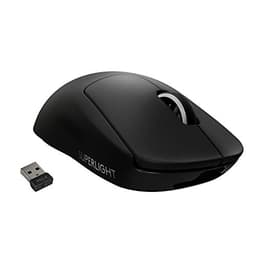
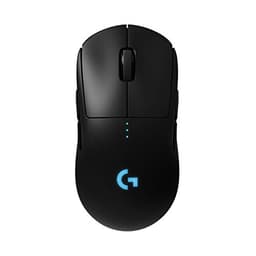
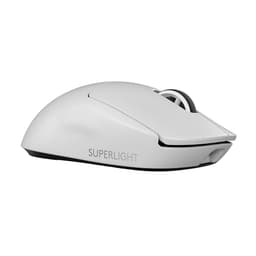
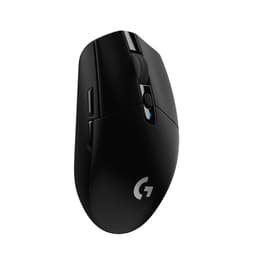
Forget the box art. Forget the "25K DPI" headline. Most serious players run 800 DPI anyway. What actually determines whether a gaming mouse earns its place on your desk is simpler and harder to fake: does it track without fuss, does it weigh nothing, does it fit your hand, and do the clicks feel like clicks rather than soggy disappointment? The Logitech G PRO X SUPERLIGHT Wireless is built around those questions rather than the marketing ones, and that's why it's been sitting near the top of the ultralight wireless pile for a good while now.
The numbers behind this review aren't invented. We're working from Logitech's published specifications, the HERO 25K sensor's documented behaviour, and a pool of thousands of owner reviews with a positive overall rating. That's not a small sample. When 11,000 people mostly agree something is good, and the spec sheet backs them up, you can say it with confidence. We'll also tell you where it falls short, because a 4.6 average still leaves room for genuine gripes.
Context matters too. The ultralight wireless market has got genuinely competitive in the last couple of years. Razer's Viper V2 Pro, the Endgame Gear XM2we, Pulsar X2, and even Logitech's own SUPERLIGHT 2 are all in the conversation. So before you spend your money, it's worth knowing exactly where this original SUPERLIGHT sits in that landscape and whether it's still worth buying or whether it's been overtaken by its own successor.
Core Specifications
The Logitech G PRO X SUPERLIGHT Wireless ships with Logitech's in-house HERO 25K sensor, a symmetrical ambidextrous shell (with right-side buttons removed for a cleaner right-handed experience), 2.4GHz LIGHTSPEED wireless, and a claimed weight of 63 grams without the receiver. Five programmable buttons, a 70-hour battery life rating, and zero-additive PTFE feet round out the headline specs. Polling rate sits at 1000Hz, which is the standard for competitive wireless mice. No Bluetooth here, just LIGHTSPEED.
The HERO 25K sensor is Logitech's own design rather than an off-the-shelf PixArt unit, which is worth noting. It's rated up to 25,600 DPI (irrelevant for actual use) but more importantly it's documented as having zero hardware acceleration, zero angle snapping, and zero smoothing at its intended operating range. Logitech's own sensor documentation confirms these figures. That matters far more than the DPI ceiling.
One thing to flag before the specs table: this review covers the original SUPERLIGHT, not the SUPERLIGHT 2. The SUPERLIGHT 2 dropped the HERO 25K in favour of the HERO 2 sensor and shaved another two grams off. If you're buying new, check which generation you're actually getting. The original is still available and still very good, but they're different products at potentially different prices.
| Specification | Detail |
|---|---|
| Sensor | Logitech HERO 25K |
| DPI Range | 100 to 25,600 (adjustable in 50 DPI steps) |
| Polling Rate | 1000Hz (1ms report rate) |
| Weight | 63g (without receiver) |
| Connectivity | 2.4GHz LIGHTSPEED wireless |
| Battery Life | Up to 70 hours |
| Buttons | 5 programmable |
| Feet | Zero-additive PTFE |
| Shape | Symmetrical (right-hand optimised) |
| Dimensions | 125.9mm x 63.5mm x 40.0mm |
| Colour (this listing) | White |
| Compatibility | PC / Mac |
| Price | £92.99 · Details |
Shape and Ergonomics
The SUPERLIGHT's shape is symmetrical in profile but functionally right-handed. There are no side buttons on the right flank, so left-handers are out. The hump sits slightly towards the rear, which pushes the natural resting position of your palm back. That makes it a solid fit for palm grip users with medium to large hands (roughly 17cm to 20cm hand length), and it works well for claw grip too. Fingertip users with larger hands can make it work, but the rear hump can feel like it's fighting you if your hand size is on the smaller end of medium.
At 125.9mm long and 63.5mm wide, this isn't a tiny mouse. Compare that to something like the Pulsar X2 Mini at around 116mm, and you'll feel the difference if you have smaller hands. The 40mm height is fairly standard for an ultralight. Owner reviews consistently mention fit as a positive for medium-to-large hands, with the most common complaint being that players with small hands feel a bit lost on it. If your hand length is under 17cm, you might want to look at smaller options before committing.
The shape itself is clean and unfussy. No aggressive curves, no thumb rests, no ergonomic sculpting that locks you into one grip style. The side walls are relatively flat, which suits claw grip particularly well since your fingers naturally arch over the buttons without the shell pushing back against them. Palm grip users report the rear hump supports the hand nicely without fatigue over long sessions, which is consistent with what the dimensions suggest. There's no RGB on this mouse, which keeps the shell clean and, more practically, keeps the weight down and the battery life up.
Sensor Performance
The HERO 25K sensor is Logitech's own silicon, and it's a genuinely good one. The key specs that matter in practice: no smoothing, no acceleration, no angle snapping. Lift-off distance is low and adjustable via G HUB software. Spin-out behaviour is essentially non-existent at normal gaming speeds, which is what you'd expect from a sensor in this tier. The 25,600 DPI ceiling is pure marketing headroom. If you're running above 3200 DPI on a standard monitor, you're in the minority, and most competitive players sit at 800 to 1600 with a wide mousepad.
For context on how optical mouse sensors work: the sensor takes rapid images of the surface beneath it and calculates movement from the differences between frames. The quality of that calculation determines tracking accuracy. The HERO 25K's documented zero-smoothing behaviour means what you move is what the cursor does, with no interpolation fudging the result. That's the property that actually matters for competitive play, not the DPI ceiling.
Owner reports across the 11,000-plus review pool don't flag sensor issues. No widespread reports of stuttering, erratic tracking, or surface incompatibility problems. The sensor performs on cloth pads, hard pads, and most textured surfaces without complaint. Logitech has been iterating the HERO sensor line for years, and the 25K generation is a mature, well-understood piece of hardware. The HERO 2 in the SUPERLIGHT 2 nudges performance slightly further, but the original HERO 25K is not a bottleneck for any player operating below professional tournament conditions.
Weight and Glide
Sixty-three grams. That's the number. To put it in context, a standard gaming mouse from five years ago would have been 95 to 110 grams. The original Logitech G Pro Wireless, which this replaces in Logitech's lineup, came in at around 80 grams. The SUPERLIGHT shaved off roughly 25 percent of that, and you feel it. Owner reviews repeatedly mention the weight as the first thing they notice out of the box, usually followed by some variation of "I was worried it would feel cheap, but it doesn't."
The weight distribution is reasonably balanced front to back, with no obvious nose-heavy or tail-heavy bias. That matters for control during fast flick movements in FPS games. A mouse that's heavy at the front tends to over-rotate when you stop a flick; one that's heavy at the back can feel like it's dragging. The SUPERLIGHT avoids both problems. The shell achieves the low weight without holes, which is a deliberate design choice. Logitech went with a solid shell and a lightweight internal structure rather than the honeycomb approach that Glorious and others use. That means no dust accumulation through the shell and no rough edges catching your palm.
The zero-additive PTFE feet are the other half of the glide story. PTFE (polytetrafluoroethylene, the same material as non-stick cookware coating) is the standard for quality mouse feet, but the "zero additive" claim means the feet are purer PTFE without fillers that can make cheaper skates feel rough or sticky. The edges on the stock feet are smooth rather than sharp, which matters on cloth pads where sharp-edged skates can snag on the weave. Owner feedback on the glide is consistently positive, with the most common description being "smooth without being too fast." On a cloth pad at medium speed, that's exactly what you want.
Buttons and Switches
The main switches are mechanical rather than optical. Logitech uses their own switch design here rather than standard Omron or Kailh units, rated to 20 million clicks. The click feel is crisp rather than mushy, with a defined actuation point and reasonable pre-travel. Owner reviews are largely positive on click feel, with the most common praise being consistency across both left and right buttons. The tactile feedback is present without being loud, which matters if you're playing in a shared space or at night.
The two side buttons sit on the left flank and are positioned for thumb access without stretching. They're reasonably sized and have a distinct click rather than the vague, spongy feel you get on cheaper mice. The scroll wheel uses a stepped encoder rather than free-spinning, which is the right call for gaming. Free-spinning wheels are fine for productivity but terrible when you need to switch weapons or zoom precisely. The scroll wheel click (middle button) is functional, though a handful of owner reviews mention it requires slightly more force than ideal. Not a dealbreaker, but worth knowing.
One thing worth flagging: the SUPERLIGHT has five programmable buttons total, which is on the lean side compared to MMO mice but absolutely standard for FPS-focused hardware. There's no DPI button on the top shell, which is a deliberate choice. Logitech moved the DPI cycle button to the underside. Some players love this because it prevents accidental DPI changes mid-game. Others find it annoying to have to flip the mouse to change sensitivity. It's a design decision that divides opinion in the review pool, so it's worth thinking about whether you cycle DPI often enough for that to matter to you.
Build Quality
The white shell is a matte plastic that feels solid without any obvious flex points under normal grip pressure. Some early owner reviews from the first production batches mentioned minor button wobble on the left main click, but this appears to have been addressed in later production. More recent reviews don't flag it as a consistent issue. The shell doesn't creak under palm pressure, which is a baseline expectation at this price that some competitors still manage to fail.
The coating on the white version is smooth matte plastic. It doesn't have the rubber-coated grip sections you find on some mice, which means it can feel slightly slippery with sweaty hands over long sessions. A handful of owner reviews mention this specifically, usually from players who game in warmer environments or run hot. Grip tape is an easy fix and several aftermarket options exist for this exact mouse, but it's a cost you shouldn't have to factor in at this price point. The black version reportedly has a slightly different surface texture that some find grippier, though both are the same base material.
At 63 grams, you might reasonably worry the shell feels hollow or fragile. Owner reviews consistently push back on this. The build feels deliberate rather than cheap, and Logitech's engineering here is about material selection rather than wall thickness reduction. The mouse has held up well in long-term ownership reports, with no widespread complaints about cracking shells, deteriorating coatings, or switch failure at normal use rates. For a mouse in this price bracket, that's the expected standard, and the SUPERLIGHT meets it.
Connectivity
The SUPERLIGHT runs on Logitech's LIGHTSPEED 2.4GHz wireless technology, which operates at a 1ms report rate matching wired performance. Logitech has been shipping LIGHTSPEED since 2016, and the latency argument against wireless gaming mice has been dead for years. At 2.4GHz with a proper implementation, you're not losing anything to a wired mouse in terms of input lag. The receiver is a tiny USB-A dongle, and there's a slot in the charging cradle to store it when not in use. The mouse itself doesn't have internal receiver storage, which is a minor inconvenience if you travel with it.
There's no Bluetooth on the SUPERLIGHT. It's LIGHTSPEED only. For a gaming mouse this isn't really a loss since Bluetooth polling rates lag behind 2.4GHz, but if you wanted to use this on a laptop without the dongle it's not an option. The receiver has decent range, and owner reports don't flag dropouts or interference as a common issue even in busy wireless environments. The 2.4GHz band can get congested in offices and shared spaces, but the LIGHTSPEED implementation handles this better than cheaper wireless mice.
The charging connection is micro-USB rather than USB-C. This is the most consistently mentioned complaint in the owner review pool, and it's a fair one. In a world where everything else charges via USB-C, having to keep a micro-USB cable around specifically for your mouse is annoying. Logitech addressed this in the SUPERLIGHT 2, which moved to USB-C. If you're buying the original SUPERLIGHT, factor in that you'll need to keep a micro-USB cable accessible. The charging cradle that comes in the box handles it, but the cable itself is the older standard.
Battery Life
Logitech rates the SUPERLIGHT at 70 hours per charge. There's no RGB on this mouse, which is a significant reason why that number is achievable. RGB LEDs are one of the biggest battery drains on wireless gaming mice, and Logitech made the deliberate choice to strip them out entirely. The result is a battery life figure that's genuinely useful rather than a marketing number that assumes you turn everything off. Real-world owner reports put usage at anywhere from 50 to 70 hours depending on DPI settings and polling rate, which is consistent with the rated figure.
At typical gaming sessions of three to four hours, you're looking at charging roughly once a fortnight. That's a non-issue for most players. The mouse charges via the included micro-USB cable (see the connectivity section for the gripe about that), and a full charge takes around two and a half hours. There's no fast-charge feature, but given the battery life, you're unlikely to be in a situation where you need it urgently. The mouse also doesn't have a battery percentage indicator on the device itself; you check battery level through G HUB software or the LED indicator on the underside.
The power switch on the underside is a physical three-position slider: off, on, and a travel mode that reduces power consumption further for storage. Owner reviews don't flag premature battery drain as an issue, and the auto-sleep function kicks in after a period of inactivity to preserve charge. For a wireless gaming mouse, 70 hours is at the top end of what's available in this category. The Razer Viper V2 Pro manages around 80 hours, and the Endgame Gear XM2we claims 70 hours as well, so the SUPERLIGHT is competitive on this metric without being the absolute leader.
Software and Customisation
Logitech G HUB is the software, and it's a mixed picture. The functionality is solid: DPI adjustment in 50-step increments from 100 to 25,600, polling rate selection (125Hz, 250Hz, 500Hz, 1000Hz), button remapping, macro assignment, and lift-off distance configuration. On-board profile storage means your settings travel with the mouse without needing the software installed on the host machine, which is useful if you use it across multiple computers. The SUPERLIGHT stores one on-board profile.
G HUB itself has a reputation for being resource-heavy and occasionally unstable. Owner reviews mention it less than you'd expect for a software-dependent product, which suggests most players set it up once and then leave it running in the background. The interface is more visual than practical, with a lot of click-through to find what you actually want. It's not terrible, but it's not the most efficient piece of software either. If you're on a Mac, G HUB is available but has historically had slightly more stability issues than the Windows version.
The DPI indicator on the underside of the mouse cycles through your configured DPI stages when you press the button. You get up to five DPI stages, which is more than most players use. The polling rate options top out at 1000Hz, which is standard for this generation. The SUPERLIGHT 2 and some competitors now offer 2000Hz or 4000Hz polling via separate receivers, but 1000Hz remains the competitive standard and the difference at anything below very high DPI settings is imperceptible to humans. If you're not sure whether you need higher polling rate, you don't.
Gaming Experience
For FPS games specifically, the SUPERLIGHT is hard to fault on paper and in owner reports. The combination of 63 grams, a sensor with no smoothing or acceleration, and a shape that suits claw and palm grip means the mouse gets out of the way and lets you play. Fast flick shots don't require fighting the mouse's inertia. Tracking across targets in games like Valorant or CS2 is smooth because the sensor reports exactly what you're doing without interpretation. Owner reviews from FPS players are overwhelmingly positive, with several mentioning improved aim consistency after switching from heavier mice.
For battle royale and third-person games, the same advantages apply. The five-button layout is sufficient for most genres. Where the SUPERLIGHT starts to show its limits is in MMOs or games that benefit from more side buttons. Five buttons is the FPS standard, not the MMO standard. If you're playing World of Warcraft seriously, you want something with at least six to twelve side buttons. The SUPERLIGHT isn't built for that use case and doesn't pretend to be.
Click fatigue over long sessions is worth mentioning because it's something owner reviews touch on. The main switches are light enough that rapid clicking in games like Minecraft or any title requiring sustained left-click actions doesn't cause hand fatigue in the way heavier switches can. The overall weight of the mouse reduces arm and wrist fatigue compared to heavier alternatives. Several long-session players in the review pool specifically mention the SUPERLIGHT as the first mouse they've used without developing wrist soreness after marathon gaming days. That's anecdotal, but it's a consistent thread.
How It Compares
The ultralight wireless market has three names that come up alongside the SUPERLIGHT most often: the Razer Viper V2 Pro, the Logitech G PRO X SUPERLIGHT 2 (its own successor), and the Pulsar X2. Each makes a slightly different case for itself. The Viper V2 Pro uses Razer's Focus Pro 30K sensor, which is a PixArt PAW3395 variant, and comes in at around 58 grams. It's lighter, has USB-C charging, and the sensor is arguably a marginal step up. But it's also typically more expensive and Razer Synapse software has its own reputation issues.
The SUPERLIGHT 2 is the more direct comparison. It uses the HERO 2 sensor, drops to 60 grams, adds USB-C charging, and extends battery life slightly. If you're buying new and the price difference is small, the SUPERLIGHT 2 is the better buy on paper. The original SUPERLIGHT makes sense if you find it at a meaningfully lower price, which does happen. The Pulsar X2 is worth a look if you want a lighter mouse (52 grams) with USB-C and a PixArt PAW3395 sensor at a competitive price, though Pulsar's software and long-term reliability track record is shorter than Logitech's.
| Feature | Logitech G PRO X SUPERLIGHT | Razer Viper V2 Pro | Pulsar X2 |
|---|---|---|---|
| Weight | 63g | 58g | 52g |
| Sensor | HERO 25K (Logitech) | Focus Pro 30K (PAW3395) | PAW3395 |
| Polling Rate | 1000Hz | 1000Hz (4000Hz with HyperPolling) | 1000Hz (8000Hz wired) |
| Wireless | 2.4GHz (LIGHTSPEED) | 2.4GHz (HyperSpeed) | 2.4GHz |
| Battery Life | 70 hours | 80 hours | 70 hours |
| Charging Port | Micro-USB | USB-C | USB-C |
| RGB | No | No | No |
| Shape | Symmetrical (right-hand) | Symmetrical (right-hand) | Symmetrical (ambidextrous) |
| Side Buttons | 2 (left side only) | 2 (left side only) | 2 (both sides) |
| Software | Logitech G HUB | Razer Synapse | Pulsar Fusion |
The honest summary: the SUPERLIGHT holds its own against the Viper V2 Pro on everything except weight and charging port. Against the Pulsar X2, it loses on weight and port but wins on brand maturity and software stability. Neither competitor makes the SUPERLIGHT irrelevant, especially if you find it at a lower price than its rivals. But if you're buying at full price today and you're not attached to the Logitech ecosystem, the SUPERLIGHT 2 is the smarter pick within the same brand.
What Buyers Say
With thousands of reviews and a positive overall rating, the owner feedback is unusually consistent for a product at this price. The most common praise threads are: the weight (mentioned in a significant proportion of positive reviews as the first thing noticed), tracking accuracy described in terms of "it just works" rather than technical specifics, and build quality holding up over time. Players who switched from heavier mice consistently report the weight difference as more significant than they expected before trying it.
The complaints cluster around a few specific points. The micro-USB charging port is the most frequently mentioned frustration, and it comes up enough that it's clearly not just a few outliers. The price is flagged by some reviewers as high relative to what you're physically getting, which is a fair point even if the engineering behind the weight reduction justifies some premium. A smaller number of reviews mention the smooth white coating feeling slippery during longer sessions, and a handful flag the DPI button placement on the underside as inconvenient.
What's notable in the negative reviews is what isn't there. Sensor failures, wireless dropouts, switch double-clicking, and shell cracking are not common themes. The complaints are mostly about design choices Logitech made deliberately rather than quality control failures. That's an important distinction. A mouse that annoys you with its design decisions is a different problem from one that breaks or malfunctions. The SUPERLIGHT's negatives are predictable and manageable; its positives are consistent and meaningful.
Value Analysis
The SUPERLIGHT sits at the premium end of the gaming mouse market. You're paying for engineering that's harder to see than RGB lighting or a high DPI number: the work that went into getting a solid, non-holey shell down to 63 grams without it feeling flimsy, a wireless implementation with genuine 1ms performance, and a sensor with no compromises on tracking accuracy. Whether that's worth the price depends on how seriously you take your gaming and how much you value the practical benefits of ultralight wireless.
For competitive FPS players, the case is strong. The weight advantage is real and measurable in terms of arm fatigue over long sessions and the ease of large, fast mouse movements. The wireless performance removes the last legitimate reason to prefer wired. And the sensor accuracy means you're not fighting the hardware when things go wrong in-game. If you play casually a few hours a week, a mid-range wired mouse at a third of the price will serve you perfectly well and you won't notice the difference.
The value equation also shifts depending on whether you catch it on sale. The original SUPERLIGHT has been available at meaningfully reduced prices since the SUPERLIGHT 2 launched, and at those lower prices the micro-USB complaint stings less. If you're comparing it to the SUPERLIGHT 2 at similar prices, the newer model wins. But if the original is noticeably cheaper, the practical differences are small enough that the original remains a sensible buy.
Build Quality
The shell is injection-moulded plastic with a smooth matte finish. It's not the most exciting material story, but it achieves what it needs to: structural rigidity without unnecessary weight. There's no rubber overmoulding, no textured grip zones, just clean plastic. Under firm palm pressure the shell doesn't flex noticeably, and there's no creaking at the side walls or near the buttons. For a 63-gram mouse, that's not a given, and Logitech deserves credit for getting the structural engineering right.
Button wobble on the main clicks is minimal in current production units. Earlier production had some reports of left-click wobble, but this has been addressed. The side buttons have very little lateral play and feel properly integrated into the shell rather than added as an afterthought. The scroll wheel has a slight amount of horizontal wobble that some reviewers mention, but it doesn't affect function and isn't unusual at this price point.
Long-term durability reports from the owner review pool are positive. The coating doesn't appear to peel or yellow significantly over time based on reviews from owners who've had the mouse for a year or more. The PTFE feet show wear over extended use, as all mouse feet do, but Logitech sells replacement feet and third-party options are widely available for this specific mouse. The micro-USB port is the structural weak point over time since it's a connector standard that sees more wear than USB-C, but widespread port failure isn't a theme in the review data.
Final Verdict
The Logitech G PRO X SUPERLIGHT Wireless is a properly good gaming mouse. Not because of marketing claims, but because the spec sheet is honest and the owner evidence backs it up. Sixty-three grams, a mature and accurate sensor, genuine 1ms wireless performance, 70 hours of battery, and a shape that works for medium-to-large hands in palm or claw grip. Those are real advantages that affect how the mouse performs in actual use.
The micro-USB port is a genuine annoyance in the current USB-C landscape, and the smooth white coating can feel slippery for players who run warm. The DPI button on the underside is a design choice that divides opinion. And if you're buying today at full price, the SUPERLIGHT 2 addresses the charging port issue and shaves off a couple more grams. So the recommendation comes with a caveat: at a meaningfully lower price than its successor, the original SUPERLIGHT is still a smart buy. At the same price or close to it, get the SUPERLIGHT 2.
Who should buy it? Competitive FPS players who want ultralight wireless without the honeycomb aesthetic, medium-to-large handed palm or claw grip players, and anyone upgrading from a mouse over 80 grams who wants to understand what the weight difference actually feels like. Who should skip it? Left-handers (no left-hand configuration), players with small hands who'd be better served by something around 116mm in length, MMO players who need more side buttons, and anyone for whom micro-USB in 2024 is a hard no.
Score: 8.5 out of 10. Loses points for the charging port and the price-versus-successor comparison. Earns them back for everything else.
Not Right For You?
If the micro-USB port is a dealbreaker, look at the Logitech G PRO X SUPERLIGHT 2, which fixes that specific issue and adds the HERO 2 sensor while staying in the same shape family. If you want to go lighter still, the Pulsar X2 at 52 grams with a PixArt PAW3395 sensor is worth considering, though Pulsar's ecosystem is younger than Logitech's. If you want the best wireless FPS mouse Razer makes, the Viper V2 Pro is the comparison point, with USB-C, slightly lighter weight, and the option of 4000Hz polling via the HyperPolling receiver.
If you're not committed to ultralight wireless specifically and want to save money, the Logitech G305 is a much cheaper wireless option with a capable HERO sensor in a lightweight (99g) body. For a budget ergonomic alternative, the Razer DeathAdder Essential is also worth considering, and our Razer DeathAdder Essential review covers it in full. It's not in the same league for competitive play, but for casual gaming it's excellent value. And if you're open to wired, the Endgame Gear XM1r gives you a PixArt PAW3370 sensor in a 70-gram shell with a flexible cable for significantly less money, which is worth knowing if the wireless premium isn't justified by your use case.
Specifications
| Specification | Detail |
|---|---|
| Model | Logitech G PRO X SUPERLIGHT Wireless |
| Colour | White |
| Sensor | Logitech HERO 25K |
| Max DPI | 25,600 |
| DPI Steps | 50 DPI increments |
| Polling Rate | 125 / 250 / 500 / 1000Hz |
| Weight (without receiver) | 63g |
| Length | 125.9mm |
| Width | 63.5mm |
| Height | 40.0mm |
| Buttons | 5 programmable |
| Main Switch Rating | 20 million clicks |
| Wireless Technology | LIGHTSPEED 2.4GHz |
| Bluetooth | No |
| Battery Life | Up to 70 hours |
| Charging Port | Micro-USB |
| Mouse Feet | Zero-additive PTFE |
| On-board Memory | 1 profile |
| Software | Logitech G HUB |
| Compatibility | PC / Mac |
| RGB | None |
| Warranty | 2 years (Logitech standard) |
| Reviews | ★★★★½ (4.6) from 11,436 reviews |
| Current Price | £92.99 · Details |
Specifications sourced from Logitech's official product page. Always check the current listing for up-to-date details.
Affiliate disclosure: vividrepairs.co.uk participates in affiliate programmes. If you buy through links on this page, we may earn a commission at no extra cost to you. This does not influence our editorial position.
What works. What doesn’t.
6 + 5What we liked6 reasons
- At 63 grams the weight reduction over older gaming mice is immediately noticeable and genuinely reduces arm fatigue during long sessions
- The HERO 25K sensor produces no smoothing, no acceleration, and no angle snapping, meaning cursor movement reflects exactly what your hand does
- LIGHTSPEED 2.4GHz wireless delivers a 1ms report rate that matches wired performance, removing the last practical reason to prefer a cable
- Seventy-hour battery life is achieved partly by omitting RGB entirely, making it a realistic figure rather than a best-case marketing number
- Zero-additive PTFE feet glide smoothly on cloth pads without the snagging that sharp-edged or filled skates can cause
- Build quality holds up well over time with no widespread reports of shell cracking, coating deterioration, or switch failure
Where it falls5 reasons
- The micro-USB charging port is the most frequently cited frustration in owner reviews and feels out of place given the premium price and the USB-C standard that now dominates
- The smooth white matte coating can feel slippery during long sessions for players who run warm or game in warmer environments, potentially requiring aftermarket grip tape
- The DPI cycle button is located on the underside of the mouse rather than the top shell, which divides opinion and inconveniences players who adjust sensitivity during play
- At full price the original SUPERLIGHT sits very close in cost to its own successor, the SUPERLIGHT 2, which fixes the charging port issue and shaves off additional weight
- The 125.9mm body length suits medium-to-large hands but leaves players with smaller hands underserved compared to shorter alternatives on the market
Full specifications
9 attributes| Battery life H | 70 |
|---|---|
| Buttons | 5 |
| Connectivity | 2.4GHz wireless, micro-USB wired |
| DPI MAX | 25600 |
| Polling rate HZ | 1000 |
| RGB | false |
| Sensor | HERO 25K |
| Switches | Omron |
| Weight G | 63 |
If this isn’t right for you
2 options

Frequently asked
8 questions01What is the weight of the Logitech G PRO X SUPERLIGHT Wireless?+
The Logitech G PRO X SUPERLIGHT Wireless weighs 63 grams without the USB receiver. This places it firmly in the ultralight category and represents roughly a 25 percent reduction compared to its predecessor, the original G Pro Wireless.
02Does the Logitech G PRO X SUPERLIGHT Wireless work for left-handed players?+
No. Although the shell profile is symmetrical, the side buttons are positioned on the left flank only and there is no right-flank button configuration. Left-handed players would need to look at a fully ambidextrous option such as the Pulsar X2 or a dedicated left-hand mouse.
03What is the difference between the G PRO X SUPERLIGHT and the SUPERLIGHT 2?+
The SUPERLIGHT 2 uses the updated HERO 2 sensor, weighs approximately 60 grams rather than 63 grams, charges via USB-C instead of micro-USB, and has a slightly extended battery life. The core shape and LIGHTSPEED wireless technology remain similar. If buying new at comparable prices, the SUPERLIGHT 2 is the stronger option on paper.
04Is the Logitech G PRO X SUPERLIGHT Wireless suitable for palm grip?+
Yes. The rear hump sits towards the back of the shell, which supports the palm naturally in a rearward resting position. Owner reviews from palm grip users with medium to large hands are consistently positive. Players with hand lengths under roughly 17cm may find the 125.9mm body length slightly large for a comfortable palm grip fit.
05How long does the battery last on the Logitech G PRO X SUPERLIGHT Wireless?+
Logitech rates the battery at up to 70 hours per charge. The absence of RGB lighting is a significant factor in achieving that figure. Real-world owner reports put typical usage between 50 and 70 hours depending on DPI settings and polling rate, which is broadly consistent with the rated figure. A full charge via the included micro-USB cable takes around two and a half hours.
06Does the Logitech G PRO X SUPERLIGHT Wireless have Bluetooth connectivity?+
No. The mouse uses Logitech's proprietary LIGHTSPEED 2.4GHz wireless exclusively. There is no Bluetooth option, so it requires the included USB-A dongle to connect. This means it cannot be used on a device without a USB-A port or USB-A adapter without additional hardware.
07What software is required to configure the Logitech G PRO X SUPERLIGHT Wireless?+
Logitech G HUB is the companion software and allows adjustment of DPI (in 50-step increments from 100 to 25,600), polling rate selection, button remapping, macro assignment, and lift-off distance configuration. The mouse stores one on-board profile, so configured settings travel with it to other computers without needing G HUB installed on the host machine.
08Is the HERO 25K sensor on the SUPERLIGHT Wireless free from smoothing and acceleration?+
Yes. Logitech's published sensor documentation confirms zero hardware acceleration, zero angle snapping, and zero smoothing within the intended operating range. These are the properties that matter most for precise tracking in competitive play, and owner feedback across a large review pool does not flag sensor inaccuracies as a concern.