You know what's genuinely annoying about the budget gaming mouse market? Half the options are either rebranded no-name junk with a sensor that tracks like it's drunk, or they're stripped-down versions of something decent with the one good bit removed. Finding something that just works, fits your hand properly, and doesn't cost a fortune is harder than it should be. The Razer DeathAdder Essential (2021) has been sitting in that budget-to-mid sweet spot for a while now, and with thousands of owners leaving reviews rating it positively, it's clearly doing something right. But "popular" and "good for you specifically" aren't the same thing, so here's what the research actually says.
The DeathAdder name has been around since 2006, and Razer has iterated on the shape more times than most brands iterate on their entire lineup. The Essential is the stripped-back version, no wireless, no optical switches, no frills. What you get is the classic right-handed ergonomic shape, a 6400 DPI optical sensor, five programmable buttons, and a wired connection. At its price point, that's a reasonable package. The question is whether the cuts Razer made to hit that price hurt the experience in ways that actually matter during a session, or whether they trimmed the stuff you were never going to use anyway.
The answer, based on the spec sheet and what a very large pool of real owners consistently report, is mostly the latter. But there are some genuine caveats worth knowing before you hand over your money, especially if you're coming from something with optical switches or if you've got large hands. More on that in a moment.
Core Specifications
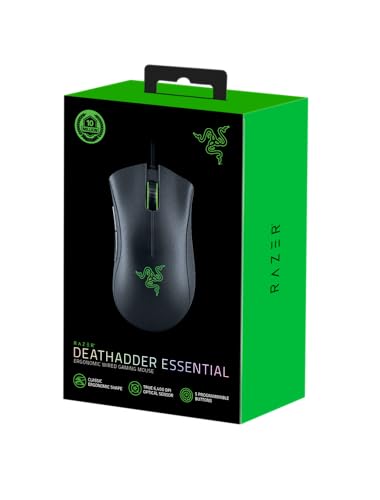
Before anything else, here's what you're actually buying. The DeathAdder Essential (2021) runs a 5G optical sensor (Razer's own branding, built on a PixArt base) with a maximum DPI of 6400. It weighs in at 96 grams, which puts it in the medium-weight category. The shape is a right-handed ergonomic design, the kind with a prominent thumb shelf on the left side and a hump that sits toward the rear-centre of the shell. Five buttons total: left click, right click, scroll wheel click, and two side buttons on the left. Connection is wired via a 1.8 metre braided USB-A cable, with a polling rate of 1000Hz.
The switches under the main buttons are Razer's mechanical switches, not the optical ones you'd find on the DeathAdder V3. The scroll wheel has a tactile encoder. The feet are standard PTFE skates, pre-installed. There's no on-board memory for profiles, so you'll need Razer Synapse installed if you want custom DPI stages or macros. RGB lighting is present on the Razer logo and the scroll wheel. No wireless, no USB-C, no weight adjustment system. That's the full picture.
One thing worth flagging immediately: the 6400 DPI ceiling is low compared to competitors at this price. The Logitech G203, for example, goes to 8000 DPI. But as mentioned, most people who actually play games competitively sit somewhere between 400 and 1600 DPI, so the ceiling is largely irrelevant for real-world use. What matters more is how the sensor behaves at the DPI settings you'll actually use, and we'll get to that properly in the sensor section.
| Specification | Detail |
|---|---|
| Sensor | Razer 5G Optical (PixArt-based) |
| Max DPI | 6400 |
| Polling Rate | 1000Hz |
| Weight | 96g (without cable) |
| Buttons | 5 programmable |
| Main Switches | Razer mechanical (rated 10 million clicks) |
| Cable | 1.8m braided USB-A |
| Shape | Right-handed ergonomic |
| RGB | Yes (logo + scroll wheel) |
| Software | Razer Synapse 3 |
| Dimensions | 127.6 x 73.7 x 43.2mm |
| Connectivity | Wired USB-A |
| Price | £15.99 · Details |

Shape & Ergonomics
This is genuinely where the DeathAdder Essential earns its reputation. The shape is a right-handed ergonomic design, and Razer has been refining this specific silhouette for nearly two decades. The hump sits toward the rear-centre of the mouse, which means your palm gets proper support rather than hovering over empty air. The thumb shelf on the left side is well-defined, giving your thumb a natural resting position without you having to think about it. The right side has a gentle inward curve that your ring and pinky fingers wrap around naturally.
In terms of grip style, this mouse is best suited to palm grip users with medium to large hands. The dimensions are 127.6 x 73.7 x 43.2mm, which is a fairly generous footprint. If you've got hands in the 18 to 20cm range (measured from wrist crease to middle fingertip), this will fit properly in a palm grip. Claw grip is workable, particularly for medium-large hands, because the rear hump gives your palm something to rest against even when your fingers are arched. Fingertip grip is where it gets tricky. The mouse is simply too big and too heavy for comfortable fingertip use over long sessions. If you're a fingertip gripper, this isn't the shape for you.
What owners consistently praise in the reviews is how natural the shape feels after extended use. The thumb shelf keeps your grip stable without cramping, and the overall form doesn't force your wrist into an awkward angle. For right-handed palm grip users specifically, this is one of the better shapes available at any price. The asymmetric design does mean left-handed users are completely out of luck, which is worth stating plainly. Razer makes the DeathAdder Essential in a left-handed version separately, so lefties aren't forgotten, just not catered for by this specific model.
One thing the shape doesn't do brilliantly is accommodate very small hands in a palm grip. If your hand is under about 17cm, the mouse will feel oversized and you'll end up gripping it awkwardly. The Razer Viper Mini or the Logitech G305 would be more sensible options for smaller hands. But for the intended audience, medium to large right-handed palm and claw grip users, the shape is genuinely one of the best things about this mouse.
Sensor Performance
Razer calls this the "5G optical sensor," which is their branding rather than an industry-standard designation. Under the hood, it's a PixArt-based optical sensor, though Razer doesn't officially disclose the exact PixArt model number for this variant. What we do know from the spec sheet is that it maxes out at 6400 DPI with 1000Hz polling. That's not a flagship sensor by any stretch. The DeathAdder V3 Pro uses the PixArt PAW3395, which is a genuinely top-tier sensor. The Essential is working with something more modest.
That said, "modest" doesn't mean bad. At the DPI ranges most people actually use (400 to 1600), the sensor tracks consistently with no reported spin-outs in normal desktop use. Lift-off distance is acceptable, not class-leading, but owners don't report the frustrating cursor-jump-on-lift behaviour that plagues some cheaper sensors. The 1000Hz polling rate means the mouse reports its position to your PC 1000 times per second, which is perfectly adequate for competitive gaming. You'd only need to look at 4000Hz or 8000Hz polling if you were playing at the highest competitive level with a significantly better sensor anyway.
The honest assessment here is that the sensor is good enough for the vast majority of gamers. If you're playing ranked FPS at a high level and you're obsessing over input consistency, you'll eventually want something with a PAW3395 or PAW3370. But for casual to mid-level competitive play, the 5G sensor does the job without complaint. What's more important at this price is that the sensor doesn't actively cause problems, and by all accounts from the owner review pool, it doesn't. No jitter at low DPI, no erratic movement on standard mousepads, no issues tracking on cloth surfaces. That's the baseline you need, and it clears it comfortably.
Weight & Glide
At 96 grams, the DeathAdder Essential sits in the medium-weight category. To put that in context, an ultralight like the Razer Viper V2 Pro comes in at 58 grams, while something like the older SteelSeries Rival 600 pushed past 130 grams with its weight system. The Essential is neither extreme. For palm grip users who aren't coming from an ultralight background, 96 grams feels perfectly natural. Your hand rests on the mouse rather than pushing it, so weight matters less than it does for claw or fingertip grippers who are lifting and flicking constantly.
Weight distribution is reasonably front-balanced, which works well for the ergonomic shape. There's no hollow shell here, no perforated sides, no weight adjustment. What you see is what you get. Some owners in the reviews mention that after long sessions, the weight does become noticeable, particularly during fast-paced FPS play where you're making lots of large arm movements. If you're used to sub-70 gram mice, the Essential will feel noticeably heavier. If you're upgrading from an old office mouse that weighed 120 grams, it'll feel like a revelation.
The PTFE feet (skates) that come pre-installed are functional but not exceptional. They're on the thinner side, which means they'll wear down faster than premium aftermarket skates. On a standard cloth mousepad, the glide is smooth enough, but a few owners note that on harder mousepads, the edges of the feet can feel slightly rough initially before they break in. This is a common complaint with budget PTFE skates and not unique to Razer. If glide is important to you and you're putting this on a high-end glass or hard pad, a set of aftermarket skates (Corepad or Tiger Arc) will make a meaningful difference and cost very little.
Buttons & Switches
The main switches are Razer's mechanical switches, rated to 10 million clicks. These are not the optical switches found on Razer's higher-end mice like the DeathAdder V3. Mechanical switches have a physical contact point that closes when you press the button, whereas optical switches use a light beam and have essentially zero debounce delay. In practice, for the vast majority of users, this difference is imperceptible. Where it does matter is in longevity and double-click issues over time. Mechanical switches can develop double-clicking problems as the spring and contact mechanism wears, though at 10 million clicks, you'd need to be clicking constantly for years before that becomes a concern.
Click feel is generally reported positively by owners. The main buttons have a satisfying tactile response without being stiff, and pre-travel (the distance before the switch actuates) is minimal. A small number of reviews mention that the right click feels slightly less crisp than the left, which can happen with asymmetric button designs where the right button shell is shaped differently to accommodate the palm rest. It's not a widespread complaint, but it's worth knowing. The scroll wheel has a decent tactile encoder with noticeable steps, which makes it useful for weapon switching in FPS games without accidentally skipping past what you wanted.
The two side buttons sit on the left thumb shelf and are well-positioned for most hand sizes. They have a firm click with good feedback, and they're sized appropriately so you're unlikely to accidentally hit them during normal use. Some owners with very large hands report that the lower side button sits slightly too far forward, requiring a small thumb stretch. It's a minor issue and not something that affects the majority of users. The DPI toggle button sits on the underside of the mouse rather than on top, which is a deliberate design choice to avoid accidental DPI changes mid-game. Whether you find that convenient or annoying depends entirely on how often you change DPI on the fly.
Build Quality
The shell is matte plastic with a slightly textured finish on the main body. It's not rubberised, which means it won't peel or degrade over time the way some rubberised coatings do. The texture provides enough grip for dry hands, but owners with sweaty palms mention that the smooth sections of the shell (particularly around the thumb area) can get slippery during long sessions. This is a fairly common issue with mice in this price range that don't use rubberised side grips.
Shell rigidity is decent. There's minimal flex when you squeeze the sides firmly, and no significant creak under normal use. The button wobble on the main clicks is low, which is a good sign at this price point. Some budget mice have main buttons that rattle laterally, which is both annoying and a sign of loose tolerancing. The Essential doesn't have that problem to any meaningful degree, based on what owners report. The scroll wheel has a small amount of lateral play, which is fairly typical for mice with a rubber-coated wheel, and doesn't affect functionality.
Long-term durability is where things get a bit more nuanced. The 10-million-click switch rating sounds impressive, but a handful of owners in the review pool (and it is a small minority given the positive overall rating across thousands of reviews) report double-clicking issues appearing after a year or more of heavy use. This is a known characteristic of the switch type rather than a Razer-specific problem, and it's worth factoring in if you're a heavy clicker. The shell itself holds up well over time, with no reports of significant coating wear or structural issues. Overall, for the price, the build quality is solid without being exceptional.
Connectivity
The DeathAdder Essential is a wired-only mouse. Full stop. There's no wireless option for this model; if you want wireless DeathAdder performance, you're looking at the DeathAdder V3 HyperSpeed or the V3 Pro, both of which cost considerably more. The cable is 1.8 metres long and braided, which is a nice touch at this price. Braided cables are more resistant to tangling and kinking than rubber cables, and they tend to last longer before the insulation cracks near the connector.
The connector is USB-A, not USB-C. That's fine for most setups, but if you're building a tidy desk with USB-C peripherals, it's worth knowing. The cable drag is moderate. The braid gives it some stiffness compared to a thin rubber cable, which means you'll feel it pulling slightly during large sweeping movements. A cable bungee will mostly eliminate this if it bothers you. For gaming sessions where you're not making huge arm movements, it's a non-issue. The polling rate is fixed at 1000Hz, which is the standard for wired gaming mice at this price and is perfectly adequate.
Latency on a wired connection at 1000Hz is effectively zero in any meaningful sense. Wired mice at 1000Hz have input lag in the single-digit milliseconds, which is below the threshold of human perception. If you're choosing between this and a budget wireless mouse from a less reputable brand, the wired connection here is actually an advantage, because cheap 2.4GHz implementations can have inconsistent latency. Razer's own wireless mice use their HyperSpeed 2.4GHz protocol, which is genuinely low-latency, but that's a different product category and a different price.
Battery Life
The DeathAdder Essential is a wired mouse, so battery life isn't applicable here. You plug it in and it works. No charging, no battery anxiety, no waking up to find your mouse dead because you forgot to put it on the dock. For a lot of people, that's actually a selling point rather than a compromise. One less thing to think about.
If you're reading this section because you were hoping for a wireless option and are now disappointed, that's understandable. The honest answer is that wireless gaming mice with genuinely good sensors and low latency start at a higher price than the Essential. The Logitech G305 is probably the closest budget wireless alternative worth considering, though the shape is very different. Razer's own wireless options in the DeathAdder line are the V3 HyperSpeed and V3 Pro, both of which are significantly pricier.
What you do get by being wired is consistent, uninterrupted performance for as long as you're plugged in. No signal dropouts, no interference from other 2.4GHz devices, no need to remember to charge. For competitive gaming where consistency matters, wired is still a perfectly valid choice and not the compromise it might seem compared to modern wireless. The cable management is the only real inconvenience, and as mentioned, a bungee sorts that.
Software & Customisation
Razer Synapse 3 is the software you'll need if you want to do anything beyond the default configuration. It handles DPI stage customisation (you can set up to five DPI stages between 200 and 6400), polling rate (though 1000Hz is the only option for this mouse), button remapping, and macro assignment. The RGB lighting for the logo and scroll wheel is also controlled through Synapse. It's a reasonably capable piece of software, but it does require an account to unlock all features, which some owners find annoying.
There's no on-board memory on the Essential, which means your custom settings are stored in Synapse rather than on the mouse itself. Plug this into a different PC without Synapse installed, and it'll revert to default settings. For most people who use one gaming PC, this is a non-issue. If you take your mouse to a friend's place or a LAN event, you'll either need to install Synapse or live with the defaults (which are sensible enough). It's a cost-cutting measure that Razer applies across their budget range, and it's worth knowing about rather than discovering mid-session.
Synapse 3 itself is functional but has a reputation for being resource-hungry compared to competitors like Logitech's G HUB or SteelSeries Engine. It runs in the background and some users report it occasionally causing minor system slowdowns on lower-spec machines. On any modern gaming PC, you won't notice it. The software also handles firmware updates, which is important for fixing any bugs that emerge post-launch. Razer's firmware update track record is decent, and the Essential has been around long enough that any significant early firmware issues have been ironed out.

Gaming Experience
For FPS gaming, the DeathAdder Essential is a genuinely good option at its price point, provided the shape fits your hand. The ergonomic form factor encourages a stable palm grip, which is great for tracking enemies across the screen with controlled wrist and arm movements. The sensor tracks accurately at low DPI settings (400 to 800, where most FPS players sit), and the main click feel is satisfying enough that you're not fighting the mouse to get shots off. Owners who play titles like Valorant, CS2, and Apex Legends report that the mouse handles the demands of those games without any sensor-related complaints.
For MMO and MOBA gaming, the five-button layout is limiting if you're used to a mouse with 12 side buttons. The two side buttons cover your basic extra bindings, but if you're playing something like World of Warcraft and need a dozen abilities on your mouse, you'll need to look at a dedicated MMO mouse. The Essential isn't trying to be that. For games where two side buttons are enough, the placement is good and the buttons are easy to hit reliably without looking down.
Long session comfort is probably the Essential's strongest suit from a gaming perspective. The shape genuinely reduces hand fatigue compared to symmetrical mice, because your hand sits in a more natural position. Owners consistently mention being able to play for several hours without the discomfort that comes from gripping an awkward shape. The weight of 96 grams doesn't cause problems for palm grip users over long sessions, though claw grip players making lots of fast flicks might find it tiring compared to a sub-80 gram mouse. For casual to mid-level competitive play across most genres, this mouse does what you need it to do without getting in the way.
How It Compares
The two most obvious competitors at this price are the Logitech G203 and the SteelSeries Rival 3. Both are wired, both are budget-friendly, and both have strong review scores. But they're quite different mice in terms of shape and intended use.
The Logitech G203 is a smaller, symmetrical mouse with an 8000 DPI HERO sensor. The HERO sensor is genuinely excellent, arguably better than the Essential's 5G sensor in terms of tracking accuracy and lift-off distance. But the G203 is noticeably smaller and suits small to medium hands in a claw or fingertip grip. If you've got large hands and prefer palm grip, the G203 will feel cramped. The Essential wins on shape for its target audience, the G203 wins on sensor and DPI ceiling.
The SteelSeries Rival 3 is another symmetrical option with the TrueMove Core sensor, which is a PixArt PAW3212 derivative. It's lighter than the Essential at around 77 grams, which makes it more suitable for fingertip and claw grip users. The shape is ambidextrous and relatively flat, so it doesn't offer the same palm support as the DeathAdder. For small to medium hands, the Rival 3 is a strong budget pick. For medium to large hands wanting ergonomic support, the Essential is the better choice.
| Feature | Razer DeathAdder Essential (2021) | Logitech G203 | SteelSeries Rival 3 |
|---|---|---|---|
| Sensor | Razer 5G Optical | Logitech HERO 25K | TrueMove Core |
| Max DPI | 6400 | 8000 | 8500 |
| Weight | 96g | 85g | 77g |
| Shape | Right-handed ergonomic | Symmetrical | Symmetrical |
| Polling Rate | 1000Hz | 1000Hz | 1000Hz |
| Cable | Braided | Rubber | Rubber |
| RGB | Yes | Yes | Yes |
| On-board Memory | No | No | No |
| Best For | Medium-large hands, palm grip | Small-medium hands, claw/fingertip | Small-medium hands, claw/fingertip |
The braided cable on the Essential is a genuine differentiator at this price. Both the G203 and Rival 3 use rubber cables, which are more prone to tangling and stiffen in cold conditions. It's a small thing, but it's the kind of detail that matters over time. The Essential also has the best ergonomic shape of the three for its intended hand size, which counts for more than a slightly higher DPI ceiling that nobody's going to use.
What Buyers Say
With 11,500-plus reviews and a 4.6 average, the Essential has one of the strongest owner satisfaction scores in its category. The praise that comes up most consistently is about the shape. Owners describe it as "instantly comfortable," "fits my hand perfectly," and "the most natural mouse I've ever used." For palm grip users who've been using symmetrical mice or poorly shaped budget options, the ergonomic form factor is clearly a revelation. The shape is the single most praised aspect of this mouse across the review pool.
The second most common positive comment is about value. A lot of owners are comparing this to what they were using before (often an old office mouse or a very cheap gaming mouse) and the jump in comfort and performance is significant. The braided cable gets specific mentions as a nice touch at the price. Click feel is generally praised, with most owners describing the main buttons as satisfying and responsive. The RGB lighting gets positive comments too, though it's clearly not the reason anyone's buying this.
The complaints that appear with any regularity are worth taking seriously. A subset of owners mention the right click feeling slightly mushy or less crisp than the left. A smaller group report double-clicking issues appearing after extended use, which, as discussed, is a characteristic of the switch type rather than a unique Razer defect. A few owners with smaller hands mention the mouse feeling oversized. And some owners who've moved on to optical-switch mice describe coming back to the Essential's mechanical switches as feeling slightly sluggish by comparison. None of these are dealbreakers for the target audience, but they're honest data points from real users.
Value Analysis
At its current price, the DeathAdder Essential represents solid value for a specific type of buyer. If you're a medium to large-handed, right-handed, palm or claw grip gamer who wants a comfortable, reliable wired mouse without spending a fortune, this is one of the better options available. The shape alone justifies the price for that audience, because good ergonomic shapes at budget prices are genuinely rare. Most budget mice are symmetrical because symmetrical moulds are cheaper to produce.
Where the value proposition gets shakier is if you're a fingertip grip user, a left-handed user, or someone who prioritises sensor performance above all else. The Logitech G203's HERO sensor is objectively better, and if sensor accuracy is your primary concern, the G203 is the smarter buy even though the shape is less ergonomic. Similarly, if you're willing to spend a bit more, the Razer DeathAdder V3 gives you the same basic shape with a much better sensor and optical switches, which addresses most of the Essential's weaknesses in one go.
But the Essential isn't trying to compete with the V3. It's trying to give you the DeathAdder shape at the lowest possible price, and it largely succeeds at that. The compromises are real but they're not hidden: no optical switches, a modest sensor, no on-board memory, and a weight that's on the higher side for modern gaming mice. If you can live with those compromises (and most casual to mid-level gamers absolutely can), you're getting a genuinely comfortable, well-built mouse for not a lot of money. That's the deal.
Polling Rate and Software Detail
Just to be clear on the polling rate situation: 1000Hz is the only option on the Essential, and it's controlled through Razer Synapse 3. You can technically reduce it to 500Hz or 125Hz through Synapse if you're on a very old system that struggles with 1000Hz polling (this was occasionally an issue on older USB controllers), but there's no reason to do this on any modern PC. 1000Hz is the sweet spot for wired gaming mice at this price, and the Essential hits it without issue.
Synapse 3 also lets you set up lighting effects, which is mostly irrelevant to gaming performance but some people care about it. The Essential supports Razer Chroma, so you can sync it with other Chroma-compatible Razer peripherals if you're building a matching setup. DPI stages can be set to any value between 200 and 6400 in increments of 200. You get up to five stages, which is more than enough for most use cases. Macros can be assigned to the side buttons or the scroll wheel click through Synapse.
One thing Synapse does that's genuinely useful is the surface calibration feature, which optimises the sensor's lift-off distance for your specific mousepad. It's not a massive deal at this sensor tier, but it's a nice option to have and takes about 30 seconds to run. If you're getting inconsistent cursor behaviour when lifting the mouse, running surface calibration is worth trying before concluding the sensor is the problem.
Final Verdict
The Razer DeathAdder Essential (2021) is a good mouse for the right person. It's not trying to be the best mouse at any price; it's trying to be the best version of the DeathAdder shape at a budget price, and it largely pulls that off. The ergonomic form factor is genuinely excellent for medium to large right-handed palm and claw grip users. The sensor is competent without being class-leading. The build quality is solid. The braided cable is a nice touch. And thousands of owners giving it a positive overall rating isn't noise, that's a real signal that the mouse delivers on its core promise.
The caveats are real though. The mechanical switches will eventually be a weak point compared to optical alternatives at a slightly higher price. The 96-gram weight rules it out for serious fingertip grip use. The 6400 DPI ceiling won't matter to most people, but it's lower than competitors. No on-board memory means you're tied to Synapse for custom settings. And left-handed users need to look elsewhere entirely. None of these are fatal flaws for the target buyer, but they're worth knowing.
If you're a right-handed palm grip gamer with medium to large hands who wants a comfortable, reliable wired mouse without spending serious money, buy this. If you've got small hands, prefer fingertip grip, or want optical switches, look at alternatives. The Essential does exactly what its name suggests: it gives you the essentials of the DeathAdder experience without the premium price. For a lot of people, that's exactly what they need.
Score: 8 out of 10. Excellent shape, competent sensor, solid build. Loses points for the modest sensor ceiling, mechanical switches, and lack of on-board memory. But for its target audience, it's a proper budget ergonomic mouse that actually delivers.
Not Right For You?
If the Essential doesn't quite fit your needs, here's where to look instead. For small hands or fingertip grip, the Logitech G203 is the obvious alternative, with a better sensor and a lighter, more compact body. For left-handed users wanting an ergonomic shape, Razer's own left-handed DeathAdder Essential is the direct answer. For anyone wanting to step up to optical switches and a better sensor while keeping the DeathAdder shape, the Razer DeathAdder V3 is the natural upgrade path. And if wireless is non-negotiable on a budget, the Logitech G305 is worth a look, though the shape is quite different.
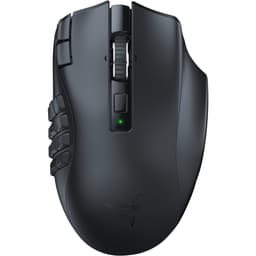
For MMO players who need more than five buttons, the Essential simply isn't the right tool. Something like the Razer Naga or Logitech G600 is built for that use case. And if you're a competitive FPS player who wants the absolute best sensor performance at the lowest possible price, the G203's HERO sensor is hard to beat in terms of tracking accuracy per pound spent.
The DeathAdder Essential's competition is strong, and the right choice really does depend on your hand size, grip style, and what you're actually going to use the mouse for. The Essential wins on shape for its specific audience. Everything else is a trade-off depending on your priorities.
Full Specifications
For reference, here's the complete spec breakdown for the Razer DeathAdder Essential (2021), pulled from Razer's official product page.
| Specification | Detail |
|---|---|
| Sensor Type | Razer 5G Advanced Optical Sensor |
| True DPI | 200 to 6400 (in 200 DPI increments) |
| Polling Rate | 1000Hz (1ms response) |
| Tracking Speed | 220 IPS |
| Acceleration | 35G |
| Switch Type | Razer Mechanical Mouse Switches |
| Switch Lifespan | 10 million clicks |
| Number of Buttons | 5 programmable |
| Weight | 96g |
| Dimensions (L x W x H) | 127.6 x 73.7 x 43.2mm |
| Cable Length | 1.8m braided |
| Connector | USB-A |
| RGB Lighting | Razer Chroma (logo + scroll wheel) |
| On-board Memory | None |
| Software | Razer Synapse 3 |
| Compatibility | Windows 10 or later, macOS 10.15 or later |
| Colour | Black |
| Warranty | 2 years |
Pricing and availability subject to change. Check current pricing above. This article contains affiliate links. Vivid Repairs may earn a commission if you purchase through our links, at no extra cost to you.
What works. What doesn’t.
5 + 5What we liked5 reasons
- Ergonomic right-handed shape is one of the best available at this price, particularly for medium to large-handed palm grip users
- Braided 1.8m USB-A cable is a genuine differentiator compared to rubber-cabled competitors such as the Logitech G203 and SteelSeries Rival 3
- Sensor performs reliably at the DPI ranges most gamers actually use, with no reported spin-outs or erratic tracking on standard cloth mousepads
- Long-session comfort is consistently praised by owners, with the shape reducing hand fatigue during extended play
- Strong owner satisfaction backed by thousands of reviews with a positive overall rating, indicating consistent real-world reliability
Where it falls5 reasons
- 6400 DPI ceiling is lower than competitors at a similar price, such as the Logitech G203 at 8000 DPI, though this is largely irrelevant in practice
- Mechanical switches rather than optical ones mean potential double-click issues can develop over time with heavy use
- No on-board memory means custom settings are lost when the mouse is used on a PC without Razer Synapse 3 installed
- At 96 grams, the weight rules the mouse out for comfortable fingertip grip use and may fatigue claw grip users who make frequent fast flicks
- Matte plastic shell without rubberised side grips can become slippery for users with sweaty palms during long sessions
Full specifications
6 attributes| Buttons | 5 |
|---|---|
| Connectivity | USB wired |
| DPI MAX | 6400 |
| Polling rate HZ | 1000 |
| RGB | false |
| Sensor | PixArt PAW3328 |
If this isn’t right for you
2 options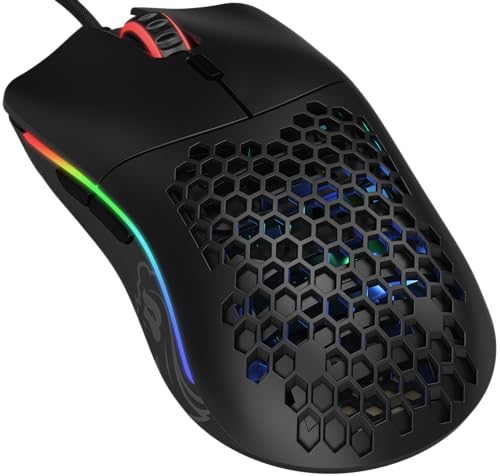 8.5 / 10
Glorious Model O Gaming Mouse

Frequently asked
7 questions01Is the Razer DeathAdder Essential (2021) suitable for left-handed users?+
No. The DeathAdder Essential (2021) is a right-handed ergonomic design with an asymmetric shell and a thumb shelf on the left side only. Left-handed users would need to look at Razer's separate left-handed DeathAdder Essential model, which is sold as a distinct product.
02Does the Razer DeathAdder Essential work without installing Razer Synapse 3?+
Yes, the mouse will function with default settings without Synapse installed. However, there is no on-board memory, so any custom DPI stages, button remappings, or macros you have configured in Synapse will not carry over to a PC that does not have the software installed. Default DPI and button behaviour will apply instead.
03What grip styles work best with the Razer DeathAdder Essential (2021)?+
Palm grip is where this mouse excels, particularly for hands measuring roughly 18 to 20cm from wrist crease to middle fingertip. Claw grip is workable for medium to large hands due to the rear hump providing palm support even with arched fingers. Fingertip grip is not well suited to this mouse, as it is too large and heavy for comfortable fingertip use over extended sessions.
04How does the Razer DeathAdder Essential (2021) compare to the Logitech G203?+
The Logitech G203 has a superior HERO sensor with an 8000 DPI ceiling and is lighter at 85 grams, making it a better choice for sensor-focused buyers and those with small to medium hands using a claw or fingertip grip. The DeathAdder Essential wins on ergonomic shape for medium to large-handed palm grip users, and it also includes a braided cable compared to the G203's rubber cable. Your hand size and grip style should determine which is the better fit.
05Will the Razer DeathAdder Essential (2021) develop double-clicking problems?+
A small minority of owners in the review pool report double-clicking issues appearing after a year or more of heavy use. This is a characteristic of mechanical switch technology rather than a defect unique to Razer. The switches are rated to 10 million clicks, which represents a very long period of typical use. Optical-switch mice such as the DeathAdder V3 are not susceptible to this issue, but they come at a higher price.
06Does the Razer DeathAdder Essential (2021) have wireless connectivity?+
No. The DeathAdder Essential (2021) is a wired-only mouse with a 1.8-metre braided USB-A cable. There is no Bluetooth or 2.4GHz wireless option for this model. If wireless is a requirement, Razer's own DeathAdder V3 HyperSpeed and V3 Pro are the wireless alternatives within the DeathAdder line, though both are priced considerably higher.
07Is Razer Synapse 3 required to use the mouse?+
Synapse 3 is required only if you wish to customise DPI stages, remap buttons, assign macros, adjust RGB lighting effects, or run surface calibration. The mouse works immediately on any Windows or macOS system without software installation, using its factory default settings of 800 DPI and standard button assignments.