Twitch streamers have a unique set of demands that casual gamers simply do not share. You need a mouse that performs reliably across long broadcast sessions, looks good on camera with RGB lighting that does not wash out under studio lights, and feels comfortable enough to use for four, six, or even eight hours at a stretch. Since last year, the wireless segment has become far more accessible at mid-range price points, and sensor technology across the board has improved to the point where even budget picks now offer near-zero acceleration and consistent tracking. Whether you are a variety streamer who hops between shooters and strategy titles, or a dedicated FPS player trying to climb ranked whilst keeping your audience entertained, the right mouse makes a measurable difference to both your gameplay and the professional impression you project on stream. This guide covers five carefully chosen options from the catalogue, spanning entry-level wired mice to premium wireless flagships.
Quick Verdict
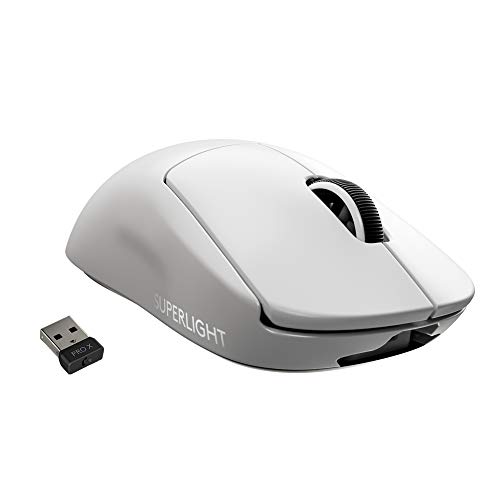
Best Overall: Logitech G PRO X SUPERLIGHT, offering wireless freedom, an elite 25K HERO sensor, and a featherweight 61 g build that suits virtually every grip style and streaming setup.
Best Value: Razer Basilisk V3, which packs a 26K DPI optical sensor, customisable scroll wheel, and full RGB into a sub-£40 package that looks superb on camera.
The Logitech G PRO X SUPERLIGHT is the mouse that professional esports players and full-time Twitch streamers keep reaching for, and it is not difficult to understand why. Designed in collaboration with Logitech's pro player network, it strips away every gram of excess weight to arrive at approximately 61 g, making it one of the lightest wireless mice ever produced at this performance tier. For streamers, that low mass translates directly into reduced wrist fatigue during marathon broadcast sessions, which in turn means fewer on-stream complaints about hand cramps and more consistent aim during the late hours of a stream.
At the heart of the SUPERLIGHT is Logitech's HERO 25K sensor, capable of tracking at up to 25,600 DPI with zero smoothing, filtering, or acceleration. In practical terms, this means the cursor goes exactly where your hand tells it to, whether you are playing a twitchy battle royale or a methodical strategy title. The LIGHTSPEED wireless connection operates at a 1 ms report rate, which is faster than most wired mice and eliminates any concern about input lag, a common viewer question that streamers can now answer with confidence.
The shape is an ambidextrous, low-profile design that works well for claw and fingertip grip users, though palm grip players with larger hands may find it slightly compact. Five programmable buttons are configurable via Logitech G HUB software, and the PTFE feet glide smoothly across both hard and soft surfaces. Battery life is rated at up to 70 hours, meaning you can stream for an entire week of daily sessions without reaching for the charging cable.
One notable trade-off is the absence of RGB lighting. Logitech deliberately omitted it to save weight, which means the SUPERLIGHT will not add colourful flair to your desk setup on camera. If RGB is a priority for your stream aesthetic, this is worth considering. That said, the clean, professional look has its own appeal, and many streamers pair it with RGB from other peripherals to maintain a vibrant scene.
Verdict: The SUPERLIGHT is the best all-round streaming mouse for performance-focused creators who prioritise precision and comfort over visual spectacle. It is an investment, but one that pays dividends across every session.
Pros
- Approximately 61 g weight reduces fatigue across long streaming sessions
- HERO 25K sensor delivers zero-acceleration tracking at up to 25,600 DPI
- LIGHTSPEED wireless runs at 1 ms report rate, matching wired performance
- Up to 70-hour battery life covers a full week of daily streams
Cons
- No RGB lighting, which may disappoint streamers who want a colourful desk aesthetic
- Premium price point is harder to justify for part-time or hobby streamers
The Razer Basilisk V3 is arguably the most camera-friendly gaming mouse in this entire list. Its 11-zone Razer Chroma RGB lighting system produces vivid, programmable colour effects that look spectacular in desk setup shots and B-roll footage, making it a favourite among streamers who invest in their visual brand. Beyond aesthetics, it is a genuinely capable performer that punches well above its price point.
The Focus+ optical sensor tracks at up to 26,000 DPI with 99.6 per cent resolution accuracy and a 20G acceleration rating. In gameplay, this translates to precise, responsive tracking across a wide range of surfaces, including the fabric and hard pads that streamers commonly use. The sensor performs consistently at both low and high DPI settings, which is useful for streamers who switch between titles requiring different sensitivity profiles.
The Basilisk V3's headline feature is its HyperScroll Pro tilt wheel, which offers both a clicky tactile scroll mode and a free-spinning mode that can cycle through long web pages or in-game inventories in a single flick. This is a practical benefit for streamers who regularly interact with chat panels, browser tabs, and overlay software between rounds. The wheel is also RGB-illuminated, adding to the overall visual impact.
Eleven programmable buttons give streamers plenty of options for binding macros, push-to-talk keys, or scene-switching shortcuts, reducing the need for a separate macro pad. The ergonomic right-handed shape with a prominent thumb rest suits palm and claw grip users with medium to large hands particularly well. At its price, the Basilisk V3 represents exceptional value for a feature set that would cost significantly more from competitors.
The wired connection uses Razer's SpeedFlex cable, which is thin and pliable enough to minimise drag, though some streamers may still prefer wireless for a cleaner desk look. Weight at around 101 g is on the heavier side, which could contribute to fatigue during very long sessions.
Verdict: The Basilisk V3 is the best value pick for streamers who want premium RGB, a feature-rich button layout, and a high-performance sensor without spending over £40.
Pros
- 11-zone Chroma RGB produces vivid, broadcast-friendly lighting effects
- HyperScroll Pro tilt wheel with free-spin mode is genuinely useful for streamers managing multiple windows
- 26,000 DPI Focus+ sensor offers accurate tracking across varied surfaces
- 11 programmable buttons allow macro and hotkey binding without extra hardware
Cons
- At approximately 101 g, it is heavier than ultralight competitors, which may cause fatigue on marathon streams
- Wired only, so cable management is required for a clean desk aesthetic on camera
The Logitech G502 LIGHTSPEED is the wireless evolution of one of the most popular gaming mice ever made, and it brings a compelling combination of power-user features and wireless convenience that suits streamers who like to have full control over their setup. If you are the type of streamer who spends as much time in menus, browsers, and production software as you do in-game, the G502's 11 programmable buttons and adjustable weight system give you a genuinely versatile tool.
The HERO 25K sensor is identical to the one found in the SUPERLIGHT, offering up to 25,600 DPI with no acceleration or smoothing. Tracking performance is therefore class-leading, and the LIGHTSPEED wireless connection maintains a 1 ms report rate that is indistinguishable from wired in competitive play. The G502 LIGHTSPEED can also be charged via a POWERPLAY wireless charging mat, meaning you can theoretically never run out of battery mid-stream, which is a significant practical advantage for marathon broadcasters.
The adjustable weight system is a distinctive feature: five 3.6 g weights can be arranged in different configurations inside the mouse body, allowing you to tune the feel from a lighter 114 g up to a heavier 121 g. This level of customisation is rare at any price point and lets you dial in the exact feel that suits your grip and play style. The shape is right-handed ergonomic with a pronounced thumb shelf, making it comfortable for palm grip users during extended sessions.
Lightsync RGB lighting adds a single illuminated zone that can be synchronised with other Logitech G peripherals via G HUB software, creating a cohesive desk aesthetic on camera. The lighting is not as elaborate as the Basilisk V3's multi-zone system, but it is clean and effective. At around £83, the G502 LIGHTSPEED sits at a premium price that is justified by its wireless performance and feature depth, but it is a significant step up from budget options.
The main drawback for some streamers is weight: even at its lightest configuration, 114 g is noticeably heavier than ultralight alternatives, and the ergonomic shape means left-handed streamers are excluded entirely.
Verdict: The G502 LIGHTSPEED is the best choice for streamers who want wireless freedom, a feature-rich button layout, and the option to charge continuously via POWERPLAY during live broadcasts.
Pros
- LIGHTSPEED wireless with POWERPLAY compatibility allows continuous charging during streams
- Adjustable weight system lets you fine-tune the feel between 114 g and 121 g
- HERO 25K sensor matches the performance of the SUPERLIGHT at a lower price
- 11 programmable buttons support extensive macro and hotkey configuration
Cons
- Minimum weight of approximately 114 g is heavy compared to ultralight alternatives, increasing fatigue risk on long streams
- Right-handed only shape excludes left-handed streamers entirely
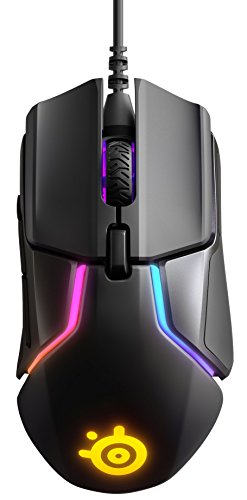
The SteelSeries Rival 600 takes a different approach to sensor technology from the rest of this list, using a dual optical sensor system that SteelSeries calls TrueMove3+. The primary TrueMove3 sensor handles cursor tracking at up to 12,000 CPI, while a secondary depth sensor detects lift-off distance with exceptional precision, preventing the cursor from jumping when you lift and reposition the mouse. For streamers who play FPS titles and use low sensitivity settings that require frequent repositioning, this is a genuinely useful technical advantage.
The Rival 600 also features an adjustable weight system using eight 4 g side weights that slot into compartments on both flanks of the mouse. This allows you to add up to 32 g of additional weight and, crucially, to shift the centre of gravity left or right to suit your grip. It is a more sophisticated weight customisation system than most competitors offer, and it makes the Rival 600 one of the most ergonomically tuneable mice in this price range.
The shape is right-handed ergonomic with a comfortable thumb rest and a textured side grip that prevents slipping during intense gameplay moments. Seven programmable buttons are configurable via SteelSeries Engine software, which also controls the two-zone RGB lighting. The lighting is not as elaborate as Razer's Chroma system, but the underglow zone in particular creates an attractive desk-level glow that shows up well on camera when positioned correctly.
At approximately 96 g in its lightest configuration, the Rival 600 is not an ultralight mouse, but it is manageable for most session lengths. The wired USB connection is reliable and introduces no latency concerns. The braided cable is reasonably flexible, though not as pliable as Razer's SpeedFlex. SteelSeries Engine software is well-regarded for its stability and ease of use, which matters for streamers who do not want to troubleshoot software issues mid-broadcast.
The 12,000 CPI ceiling is lower than some competitors, though it is more than sufficient for any realistic use case. Very few players use DPI settings above 3,200 in practice, so this is largely a specification on paper rather than a practical limitation.
Verdict: The Rival 600 is the best pick for FPS-focused streamers who want advanced lift-off detection, weight customisation, and reliable wired performance at a mid-range price.
Pros
- Dual optical sensor system provides precise lift-off detection, benefiting low-sensitivity FPS players
- Eight adjustable side weights allow centre-of-gravity tuning, not just mass adjustment
- SteelSeries Engine software is stable and straightforward to configure during live setups
Cons
- 12,000 CPI maximum is lower than competitors, though sufficient for all practical use cases
- Two-zone RGB is less visually impactful on camera than multi-zone alternatives
- Right-handed only shape limits its audience
Buying Guide
Wired vs Wireless
For Twitch streamers, the wired versus wireless question has both performance and aesthetic dimensions. Wireless mice like the G PRO X SUPERLIGHT and G502 LIGHTSPEED eliminate cable clutter from your desk, which looks cleaner on camera and removes the physical drag that wired cables introduce during play. Modern wireless gaming mice using 2.4 GHz proprietary connections, such as Logitech's LIGHTSPEED, operate at 1 ms report rates that are genuinely indistinguishable from wired in competitive play. The main practical concern is battery life: a mouse dying mid-stream is an embarrassing interruption, so look for options rated at 40 hours or more, and consider whether the mouse supports a charging dock or mat for continuous top-ups.
Sensor Performance
For the vast majority of streamers, any sensor in this list is more than capable. The practical difference between a 12,000 CPI sensor and a 25,600 DPI sensor is negligible in real gameplay, since most players use settings between 400 and 3,200 DPI. What matters more is sensor consistency: look for zero acceleration, zero smoothing, and a stable tracking surface range. Dual-sensor systems like the SteelSeries Rival 600's TrueMove3+ offer additional precision in lift-off detection, which benefits low-sensitivity FPS players specifically.
Weight and Ergonomics
Streaming sessions routinely last four to eight hours or longer. A mouse that feels fine for a 30-minute gaming session can become genuinely uncomfortable over a full broadcast. Ultralight mice in the 60 to 70 g range, such as the SUPERLIGHT and Viper Mini, reduce cumulative wrist and forearm strain significantly. If you prefer a heavier mouse for a more grounded feel, look for adjustable weight systems that let you tune the mass and balance point rather than committing to a fixed weight. Grip style matters too: palm grip users need a larger, more curved body, while claw and fingertip grip users can work with smaller, flatter profiles.
RGB and Aesthetics
On-camera aesthetics matter for streamers in a way they simply do not for offline players. RGB lighting that is visible from your webcam's perspective adds production value to your stream and reinforces your personal brand. Multi-zone systems like Razer Chroma offer more visual flexibility than single-zone alternatives, and software integration with popular games creates reactive lighting effects that give your audience something to watch. If your streaming setup uses a specific colour palette or theme, check whether the mouse's software allows custom static colours, not just animated effects.
Programmable Buttons
Streamers often need quick access to push-to-talk keys, scene switches, clip-saving shortcuts, and in-game macros simultaneously. A mouse with seven or more programmable buttons can absorb some of this workload, reducing reliance on keyboard shortcuts that may be awkward to reach mid-game. Mice with fewer buttons are not disqualified, but consider whether you will need a separate macro pad to compensate.
Software Stability
Driver and configuration software that crashes or conflicts with streaming applications like OBS or Streamlabs is a real problem. Logitech G HUB, Razer Synapse 3, and SteelSeries Engine all have broadly good reputations for stability on Windows, though individual system configurations vary. Where possible, test your mouse software alongside your streaming stack before going live to identify any conflicts early.
The Logitech G PRO X SUPERLIGHT is the overall winner for Twitch streamers who are serious about their craft. Its combination of elite sensor performance, wireless freedom, featherweight build, and exceptional battery life addresses the most important practical demands of long-form live broadcasting. It is an investment, but one that will serve you reliably across years of streaming. For those working with a tighter budget, the Razer Basilisk V3 delivers outstanding value: its 11-zone Chroma RGB looks superb on camera, its 26,000 DPI sensor is class-leading for the price, and its HyperScroll Pro wheel is genuinely useful for streamers managing multiple applications simultaneously. Between these four picks, the vast majority of Twitch streamers will find everything they need.