Working from home while also gaming in the evenings puts you in a curious position: you need a mouse that handles spreadsheets, video calls and late-night raids without making you swap peripherals or clutter your desk. The market has shifted noticeably over the past year, with wireless options dropping in price, sensor accuracy improving at every budget tier, and several manufacturers adding quieter click mechanisms to appeal to shared-office and open-plan environments. Whether you are a project manager who squeezes in an hour of competitive shooters after dinner, a developer who also plays strategy titles at the weekend, or simply someone who refuses to own two mice, this guide is for you. The five picks below cover a range of budgets and grip styles, all chosen because they perform credibly in both productivity and gaming contexts, look reasonably professional on a desk, and do not require you to sacrifice comfort during a long working day.
Quick Verdict
Best Overall: Logitech G PRO X SUPERLIGHT. Its featherweight build, flawless HERO 25K sensor and clean aesthetic make it genuinely excellent for both all-day mousing and competitive gaming, with no RGB distractions if you prefer a low-key desk setup.
Best Value: Logitech G305 LIGHTSPEED. Wireless freedom, a proven HERO sensor and a price that undercuts most wired rivals make it the shrewdest buy for WFH users who do not want to spend premium money.
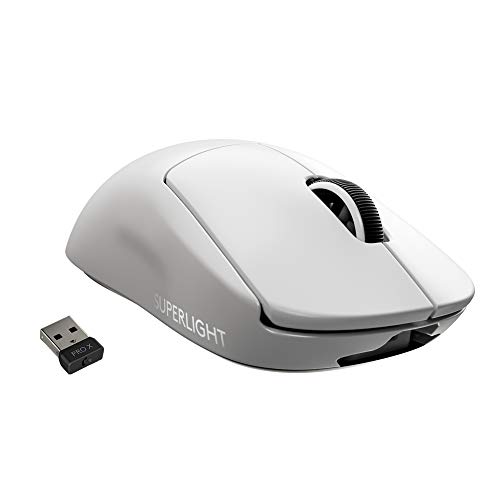
The Logitech G PRO X SUPERLIGHT is the pick for WFH professionals who refuse to compromise on either side of the equation. During office hours it is a precise, comfortable, cable-free mouse that tracks accurately across any surface and never tugs at your wrist. Come evening, it is one of the most respected competitive gaming mice on the market, used by professional esports players across multiple titles. That dual credibility is rare at any price point.
The headline figure is the weight: at 61 g, it is extraordinarily light for a full-size wireless mouse. Logitech achieved this by hollowing out the internal chassis and removing the RGB lighting entirely, which also means it looks completely professional on a corporate or home desk. There is no garish glow to explain to colleagues on video calls. The shell is smooth, understated and available in white or black, both of which read as premium office peripherals rather than gaming gear.
Underneath sits the HERO 25K sensor, which operates at up to 25,600 DPI with zero hardware acceleration or smoothing. For productivity work, you will typically run it at 800 to 1,600 DPI, where it tracks with the kind of accuracy that makes pixel-precise design work or spreadsheet navigation feel effortless. The LIGHTSPEED wireless connection operates at 1 ms report rate, matching wired mice for responsiveness, and the battery lasts up to 70 hours on a single charge. In practice, charging once or twice a week is all that is required.
The shape is a symmetrical, ambidextrous design with a low-profile hump that suits fingertip and claw grip styles particularly well. Palm grip users with larger hands may find it slightly short, but for medium to small hands it is close to ideal. Five programmable buttons via Logitech G HUB software allow you to assign macros, DPI shifts or application-specific shortcuts, which is genuinely useful for productivity workflows as well as in-game actions.
The price is the main barrier. It sits at the premium end of the market, but when you consider that it replaces both an office mouse and a gaming mouse, the value proposition improves considerably. If your budget stretches this far, it is the most versatile single mouse on this list.
Verdict: The best single mouse for WFH professionals who game seriously, combining featherweight build, wireless freedom and a world-class sensor in a desk-appropriate shell.
Pros
- 61 g weight reduces wrist fatigue during long working days
- LIGHTSPEED wireless matches wired latency at 1 ms report rate
- No RGB lighting keeps desk appearance professional
Cons
- Premium price is a significant outlay compared with most rivals on this list
- Symmetrical low-profile shape may not suit palm-grip users with large hands
The Razer Basilisk V3 is the pick for WFH professionals who spend the majority of their day doing productivity work but want a mouse that is genuinely feature-rich for gaming in the evenings. It is a wired, right-handed ergonomic mouse with an 11-button layout, a customisable scroll wheel and Razer's Focus+ optical sensor, and it brings more functionality to the desk than almost anything else at its price point.
The ergonomic right-handed shell is one of the most comfortable on the market for palm grip users. The pronounced thumb rest, sculpted side profile and textured grips make it easy to hold for hours without fatigue, which is a genuine advantage during a long working day. If you are someone who notices wrist discomfort after extended mouse use, the Basilisk V3's shape is worth seeking out specifically.
The Focus+ sensor operates at up to 26,000 DPI with 99.6 per cent resolution accuracy and intelligent tracking that adjusts to surface texture automatically. For day-to-day office use this is far more sensor than you need, but the practical benefit is that it tracks flawlessly on any surface you are likely to encounter, from cheap fabric pads to bare wooden desks. The optical switches beneath the main buttons have a rated lifespan of 70 million clicks and provide a crisp, tactile feel that suits both rapid clicking in games and deliberate clicking in productivity applications.
The scroll wheel is one of the Basilisk V3's standout features. It switches between a tactile clicky mode for precise line-by-line scrolling and a free-spinning mode for rapid document navigation, toggled by a button beneath the wheel. For WFH users who scroll through long documents, emails or code files regularly, this is a genuinely useful feature that most gaming mice lack.
Razer Chroma RGB lighting is present across 11 zones, which some users will appreciate and others will want to disable immediately. Fortunately, Razer Synapse software makes it straightforward to turn off all lighting for a more professional desk appearance. The 1.8-metre braided cable is flexible and well-relieved at both ends, minimising drag during use.
The wired connection and right-handed-only shape are the main limitations for WFH users, but if those constraints suit your setup, the Basilisk V3 delivers exceptional functionality for the price.
Verdict: The most feature-complete mouse on this list for right-handed palm-grip users, with a dual-mode scroll wheel that adds genuine productivity value alongside strong gaming credentials.
Pros
- Dual-mode scroll wheel switches between tactile and free-spin modes, improving document navigation
- Ergonomic right-handed shape reduces wrist fatigue during long working sessions
- Focus+ sensor tracks accurately on virtually any desk surface without calibration
Cons
- Right-handed shape excludes left-handed users entirely
- Wired connection requires cable management on a tidy home office desk
- Chroma RGB lighting requires Synapse software to disable for a professional appearance
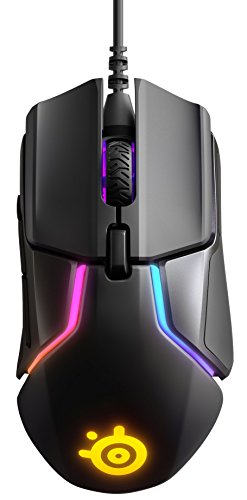
The SteelSeries Rival 600 is the most technically distinctive mouse on this list, featuring a dual optical sensor system and a unique weight-adjustment mechanism that allows you to tune the mouse's feel to your exact preference. For WFH professionals who take their ergonomics seriously and want a mouse that can be precisely configured for both office and gaming use, the Rival 600 offers a level of personalisation that no other mouse here can match.
The dual sensor system combines a primary TrueMove3+ optical sensor, rated to 12,000 CPI, with a secondary depth sensor that measures lift-off distance to within 0.1 mm. In practice, this means the mouse stops tracking almost immediately when lifted from the surface, which is useful both for gaming, where precise re-positioning is important, and for productivity work on cluttered or textured desks where accidental cursor movement during mouse lifts is a frustration.
The weight system allows you to add or remove up to eight 1.7 g weights distributed across four positions within the mouse body. This lets you tune the overall weight and balance point to suit your grip style and working habits. Heavier configurations suit palm grip users who prefer a more anchored feel during slow, deliberate movements, while lighter setups suit claw or fingertip grip users who prefer a more agile mouse. The ability to adjust this without tools, using a magnetic side panel, is a thoughtful design detail.
The right-handed ergonomic shell is large and well-sculpted, with a pronounced thumb rest and textured rubber side grips. It suits medium to large hands comfortably and provides excellent control during extended use. Seven programmable buttons are configurable via SteelSeries Engine software, which is straightforward and does not require a persistent background process in the way some competitor software does, a minor but genuine advantage for productivity-focused users who prefer a clean system tray.
The RGB lighting covers two zones and can be disabled or set to a static colour for a professional appearance. The 2-metre braided cable is well-built and provides ample reach for most desk configurations. The main limitations are the wired connection and the relatively large, right-handed-only shape, which will not suit all users. But for those it fits, the Rival 600 is a genuinely thoughtful mouse that rewards careful setup.
Verdict: The most customisable mouse on this list, ideal for WFH professionals who want to fine-tune weight, balance and lift-off distance for both all-day office use and evening gaming sessions.
Pros
- Adjustable weight system lets you tune mass and balance point to your exact preference
- Dual sensor system provides precise lift-off detection, reducing accidental cursor movement
- SteelSeries Engine software is lightweight and does not require a persistent background process
Cons
- Right-handed only shape excludes left-handed users
- Wired connection and larger form factor may not suit compact or cable-averse desk setups
Buying Guide
Wired vs Wireless
The most significant decision for WFH users is whether to go wired or wireless. Wired mice are simpler, cheaper and never run out of battery mid-presentation or mid-game. However, cables require management on a tidy desk and can create drag during fast mouse movements. Wireless mice have improved dramatically in recent years: Logitech's LIGHTSPEED technology, for example, operates at a 1 ms report rate that is indistinguishable from wired in real-world use. The trade-off is price. Wireless gaming mice typically cost more than their wired equivalents, and you need to factor in charging time or battery replacement. For WFH users who move their mouse between a desk and a lap desk or sofa setup, wireless is particularly valuable.
Sensor Quality and DPI
Marketing materials often lead with maximum DPI figures, but for WFH use the more important qualities are tracking accuracy at everyday DPI settings (typically 800 to 1,600 DPI), absence of hardware acceleration, and consistent performance across different surface types. A mouse with a 12,000 DPI sensor that tracks accurately at 1,000 DPI is more useful for office work than one with a 26,000 DPI sensor that introduces smoothing at low settings. All five mice on this list use sensors that perform well at practical DPI ranges, but it is worth checking whether your preferred mouse allows fine-grained DPI adjustment in small increments.
Ergonomics and Grip Style
Spending eight hours a day using a mouse that does not suit your hand size or grip style is a recipe for discomfort. Palm grip users, who rest the entire hand on the mouse, benefit from larger, sculpted shapes with a pronounced hump. Claw grip users, who arch the fingers and contact the mouse at the fingertips and lower palm, suit medium-size mice with a moderate profile. Fingertip grip users, who contact only the fingertips, typically prefer compact, lightweight mice. Measure your hand from wrist crease to middle fingertip and compare against manufacturer dimensions before purchasing.
Button Layout and Software
For productivity use, side buttons that can be assigned to browser back and forward, copy and paste, or application shortcuts add genuine efficiency. Most gaming mice include at least two side buttons, but some, like the Basilisk V3, offer up to 11 programmable buttons. Software quality matters too: some manufacturer applications are heavyweight and run persistent background processes, while others are lightweight and store profiles on the mouse itself, allowing you to use the mouse without installing software on a work-managed laptop.
Aesthetics and RGB Lighting
RGB lighting is a divisive topic for WFH users. On a home desk it is a matter of personal preference, but if you appear on video calls with colleagues or clients, a mouse with aggressive multicolour lighting can look unprofessional. Most gaming mice allow you to disable RGB entirely via software, and some, like the Logitech G PRO X SUPERLIGHT, omit it altogether. If desk appearance matters to you, check whether the mouse you are considering can be set to a static colour or switched off before purchasing.
The Logitech G PRO X SUPERLIGHT is the overall winner for WFH professionals who game seriously. Its combination of wireless freedom, 61 g weight, flawless HERO 25K sensor and understated no-RGB aesthetic makes it the most genuinely versatile mouse on this list. It performs as well during a full working day as it does in a competitive gaming session, and it looks like a professional peripheral rather than gaming hardware. The price is significant, but for users who want a single mouse that excels at both roles without compromise, it is worth the investment. For those with tighter budgets, the Logitech G305 LIGHTSPEED delivers wireless gaming performance at a fraction of the cost and remains one of the best value mice available in any category.