Working from home while also squeezing in gaming sessions demands a mouse that can handle a full day of spreadsheets, video calls and late-evening ranked matches without forcing you to swap peripherals. The dual-use gaming mouse market has matured considerably over the past year: wireless polling rates have jumped from 1,000 Hz to 4,000 Hz and beyond on mid-range models, battery life has stretched past 70 hours on several flagships, and ergonomic shapes borrowed from productivity mice are appearing on sensors that would have cost twice as much in 2022. This guide is aimed squarely at people who sit at the same desk for work and play, value wrist comfort across long hours, and do not want to juggle two mice. Whether you are a casual weekend gamer who needs something comfortable enough for eight hours of typing or a remote worker who moonlights as a serious FPS player, there is a pick here calibrated to your budget and grip style.
Quick Verdict
Best Overall: Logitech G PRO X SUPERLIGHT, which pairs a class-leading HERO 25K sensor with a 61 g frame that disappears under your palm during both work tasks and gaming sessions. Best Value: Razer Basilisk V3, a wired ergonomic mouse with a 26,000 DPI optical sensor and satisfying scroll wheel that costs well under £40 and handles office work with ease.
The Logitech G PRO X SUPERLIGHT is the mouse most WFH gamers should buy if budget allows. Designed in collaboration with esports professionals, it strips away every gram of unnecessary weight to arrive at just 61 g, yet it does not sacrifice the build quality or sensor accuracy that makes it equally capable during a full working day. The ambidextrous, slightly tapered shape suits palm and claw grips well, and the absence of side buttons on the right-hand side keeps the profile clean for right-handed users who spend hours navigating documents and spreadsheets.
At the heart of the SUPERLIGHT is Logitech's HERO 25K sensor, which tracks at up to 25,600 DPI with zero hardware acceleration and near-zero smoothing. For office work you will likely run it at 800 to 1,600 DPI, and the sensor handles that range with the same precision it delivers at 6,400 DPI mid-game. The LIGHTSPEED 2.4 GHz wireless connection operates at 1 ms report rate, meaning there is no perceptible latency difference compared with a wired mouse, which matters both for competitive gaming and for accurate cursor placement in design applications.
Battery life reaches up to 70 hours on a single charge, which equates to roughly two working weeks of combined office and gaming use before you need to plug in the included USB-C cable. The feet are PTFE and glide smoothly across cloth and hard-surface pads alike, which is useful when your desk doubles as a battlestation. Logitech's G HUB software lets you create separate DPI profiles for work and gaming, store them on the mouse's onboard memory, and switch between them with the DPI button.
The only meaningful concessions are the price, which sits at the premium end of the market, and the limited button count of five, which may frustrate users who rely on browser back/forward shortcuts mapped to side buttons. There is also no scroll-wheel tilt for horizontal scrolling, a feature some productivity users miss. That said, for anyone who wants one mouse to rule both worlds without compromise on either side, the SUPERLIGHT is the benchmark.
Verdict: The best single mouse for WFH gamers who prioritise low weight, wireless freedom and a top-tier sensor above all else.
Pros
- 61 g frame eliminates wrist fatigue across long work and gaming sessions
- HERO 25K sensor delivers class-leading accuracy at any DPI setting
- Up to 70 hours battery life covers roughly two weeks of mixed use
Cons
- Premium price puts it out of reach for budget-conscious buyers
- Only five buttons, so no dedicated horizontal scroll or extra macro keys
The Logitech G502 LIGHTSPEED is the choice for WFH users who want maximum button count and adjustable weight in a wireless package. Where the SUPERLIGHT prioritises minimalism, the G502 LIGHTSPEED leans into feature density: 11 programmable buttons, a hyper-fast scroll wheel with both ratchet and free-spin modes, and a removable weight system that lets you tune the mouse between 114 g and 121 g. That scroll wheel is genuinely transformative for office work, letting you flick through long documents or spreadsheets at speed before switching to ratchet mode for precise line-by-line navigation in code or data entry.
The sensor is the same HERO 25K unit found in the SUPERLIGHT, so gaming performance is identical in terms of tracking quality. The difference is in the shape: the G502 uses a right-handed ergonomic design with a pronounced thumb rest and two side buttons positioned exactly where your thumb naturally rests. This makes it exceptionally comfortable for palm grip users who spend long hours at a desk, though the 114 g weight is noticeably heavier than ultralight alternatives and may cause fatigue during extended low-sensitivity gaming where large arm movements are required.
LIGHTSPEED wireless runs at 1 ms report rate and battery life is rated at up to 60 hours, which is slightly less than the SUPERLIGHT but still more than adequate for most working weeks. The mouse charges via a micro-USB port, which is the one area where the design shows its age compared with newer USB-C competitors. Logitech's POWERPLAY wireless charging mat is compatible if you want to eliminate charging concerns entirely, though that adds to the overall cost.
In G HUB you can assign the 11 buttons to any combination of application-specific macros, making it straightforward to have one profile for Excel shortcuts and another for in-game abilities. The RGB lighting can be dimmed or disabled entirely for a more professional appearance during video calls. For WFH users who also play MMOs, MOBAs or strategy games where extra buttons genuinely matter, the G502 LIGHTSPEED is the most versatile option in this list.
Verdict: The best pick for WFH users who need a feature-rich wireless mouse and play games where extra programmable buttons provide a real advantage.
Pros
- 11 programmable buttons cover both productivity shortcuts and in-game actions
- Dual-mode scroll wheel with free-spin is genuinely useful for long documents
- HERO 25K sensor matches the SUPERLIGHT for tracking accuracy
Cons
- 114 g weight causes fatigue during high-sensitivity FPS play requiring large arm sweeps
- Micro-USB charging port feels dated when most competitors have moved to USB-C
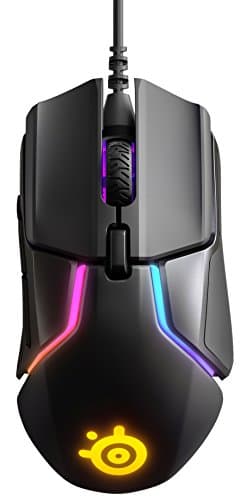
The Razer Basilisk V3 is the best value pick in this comparison, delivering a premium-feeling ergonomic mouse with an excellent sensor and a feature set that punches well above its price point. It is a wired mouse, which some WFH users will see as a limitation, but the braided USB cable is lightweight and flexible enough that it rarely creates drag during normal desktop use. For anyone who charges their wireless mouse overnight and occasionally forgets, the wired connection also means you will never be caught with a dead mouse mid-presentation.
The Focus+ optical sensor tracks at up to 26,000 DPI with Razer's Intelligent Tracking and Motion Sync technology, delivering smooth and accurate cursor movement across both cloth and hard-surface pads. For gaming, it handles everything from low-sensitivity tactical shooters to high-DPI MOBA play without any perceptible jitter or acceleration. The right-handed ergonomic shape features a sculpted thumb rest, a rubberised side grip and a slightly raised rear hump that suits medium to large hands in palm or claw grip.
One of the Basilisk V3's standout features for WFH use is its multi-function scroll wheel, which offers 11 resistance levels adjustable via Razer Synapse software. You can set a firm ratchet for precise spreadsheet navigation and a looser feel for rapid document scrolling, all without physically switching modes. The mouse also includes a scroll wheel tilt function for horizontal scrolling, which is genuinely useful in wide spreadsheets and timeline-based video editing applications.
With 11 programmable buttons, including a dedicated DPI clutch that temporarily drops sensitivity while held, the Basilisk V3 offers more configurability than mice costing twice as much. Razer Synapse 3 software is more polished than it used to be, though it still requires an internet connection for initial setup, which can be mildly frustrating. The 101 g weight is moderate rather than ultralight, but the ergonomic shape distributes it well enough that most users will not notice during normal office hours.
Verdict: Outstanding value for WFH users who want an ergonomic wired mouse with a top-tier sensor and productivity-friendly scroll wheel without spending over £40.
Pros
- Adjustable scroll wheel resistance suits both precise spreadsheet work and rapid document scrolling
- Focus+ 26,000 DPI sensor delivers accurate tracking across all surface types
- 11 programmable buttons including a DPI clutch for on-the-fly sensitivity changes
Cons
- Wired only, so cable management becomes a consideration on a busy WFH desk
- Razer Synapse requires an online account for full feature access during initial setup
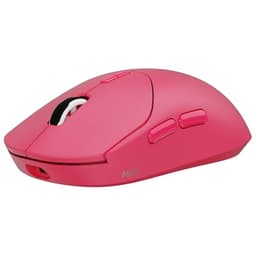
The Rapoo VT2 MAX is a relative newcomer that deserves serious attention from WFH gamers who want ultralight wireless performance without paying flagship prices. At just 53 g, it is actually lighter than the Logitech G PRO X SUPERLIGHT, and it pairs that featherweight frame with a PixArt PAW3395 sensor, which is one of the most respected optical sensors currently available and the same chip found in several mice costing over £100. The result is a mouse that competes with the best in terms of raw tracking performance while sitting in a more accessible price bracket.
The wireless implementation supports an 8,000 Hz polling rate, which is significantly higher than the 1,000 Hz standard found on most gaming mice and even exceeds the 4,000 Hz offered by some premium competitors. In practical terms for WFH users, the difference between 1,000 Hz and 8,000 Hz is imperceptible during office tasks, but for competitive gaming it translates to smoother cursor movement and reduced input lag at high DPI settings. The mouse also supports wired USB-C operation, so you can charge and play simultaneously without interruption.
Battery life is rated at up to 80 hours at standard polling rates, which is among the best in this roundup. The symmetrical ambidextrous shape suits both left and right-handed users, and the PTFE feet provide smooth, consistent glide. The build quality feels solid for the price point, with main buttons that have a crisp, satisfying click weight appropriate for both document navigation and rapid in-game clicking.
The software ecosystem is less mature than Logitech's G HUB or Razer Synapse, and the mouse has fewer buttons than the G502 or Basilisk V3, which limits its appeal for users who rely heavily on programmable shortcuts. The brand is also less established in the UK market, meaning community support and long-term firmware updates are less certain. However, for a WFH gamer who prioritises low weight, high polling rate and long battery life above all else, the VT2 MAX represents exceptional value.
Verdict: The lightest mouse in this roundup with a flagship-grade sensor and impressive battery life, ideal for WFH gamers who want ultralight performance without the flagship price tag.
Pros
- 53 g weight is the lightest in this comparison, reducing wrist fatigue across long desk sessions
- PixArt PAW3395 sensor matches the tracking accuracy of mice costing twice as much
- 8,000 Hz wireless polling rate future-proofs the mouse for competitive gaming
Cons
- Software ecosystem is less polished and feature-rich than Logitech or Razer equivalents
- Relatively unknown brand in the UK means long-term support is less certain
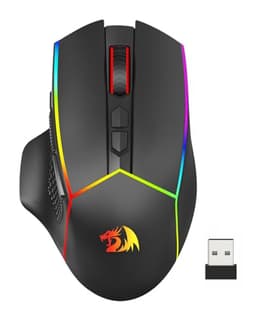
The Redragon M814 is the budget pick for WFH users who need a capable wireless mouse across both work and casual gaming without spending more than £20. It supports three connectivity modes, including 2.4 GHz wireless, Bluetooth and wired USB-C, which makes it unusually versatile at this price point. The Bluetooth mode is particularly useful for WFH setups where the mouse needs to switch between a work laptop and a personal gaming PC, as you can pair it to two devices and toggle between them without swapping a USB dongle.
The ergonomic right-handed shape features a sculpted thumb rest and rubberised side grips, and the overall form factor is comfortable enough for full working days in palm grip. Seven programmable buttons include two side buttons positioned conveniently for browser navigation, which is one of the most commonly used shortcuts in a WFH context. The scroll wheel is standard ratchet-only without the adjustable resistance of the Basilisk V3, but it is smooth and consistent for everyday use.
The PixArt sensor tops out at 12,800 DPI, which is more than sufficient for any gaming or office task, though it does not match the zero-acceleration precision of the PAW3395 or HERO 25K sensors found in pricier options. For casual gaming, including MOBAs, RPGs and slower-paced shooters, the tracking is perfectly adequate. Competitive FPS players who need pixel-perfect precision at low DPI settings may notice occasional inconsistencies under rapid movement, but this is only apparent in direct comparison with premium sensors.
Battery life is rated at up to 90 hours in Bluetooth mode and around 60 hours in 2.4 GHz mode, which is genuinely impressive for a mouse at this price. The USB-C charging port is a thoughtful inclusion that aligns with most modern laptop charging setups. Build quality is acceptable for the price, though the plastic shell feels less premium than Logitech or Razer equivalents, and the side buttons have a slightly mushy travel that more discerning users will notice.
Verdict: The best budget option for WFH users who need tri-mode wireless connectivity and a comfortable ergonomic shape without exceeding a tight spending limit.
Pros
- Tri-mode connectivity (2.4 GHz, Bluetooth, USB-C) allows easy switching between work and personal devices
- Up to 90 hours battery life in Bluetooth mode is exceptional for the price
- USB-C charging port aligns with modern laptop and peripheral ecosystems
Cons
- Sensor tracking lacks the zero-acceleration precision of premium options under rapid movement
- Side buttons have a mushy travel that feels noticeably cheaper than mid-range alternatives
Buying Guide
Wired vs Wireless
For a WFH setup, wireless is almost always the better choice. A wireless mouse eliminates cable clutter on a desk that already hosts a monitor, keyboard, webcam and charging cables, and modern 2.4 GHz wireless connections are indistinguishable from wired in terms of latency. The only scenario where wired makes clear sense is if you are on a very tight budget, as wired mice at a given price point tend to offer better sensors and build quality than wireless equivalents. If you do choose wired, look for a lightweight braided cable rather than a stiff rubber one, as cable drag is the main complaint among wired mouse users who game for extended periods.
Weight and Ergonomics
Weight matters more in a WFH context than in a pure gaming context because you are using the mouse for eight or more hours continuously, not just during a two-hour gaming session. Mice under 70 g significantly reduce wrist and forearm fatigue over a full working day. However, very light mice (under 60 g) often achieve their weight saving through a honeycomb shell that collects dust and debris, which is less ideal in an office environment. Ergonomic shape is equally important: right-handed ergonomic mice suit palm grip users who spend long hours at a desk, while ambidextrous shapes work for both hands and tend to suit claw grip players.
DPI and Sensor Quality
For office work, you rarely need more than 1,600 DPI, and most people find 800 to 1,200 DPI comfortable for precise cursor placement. For gaming, the sensor's accuracy at low DPI settings matters more than the headline maximum DPI figure. Look for sensors with zero hardware acceleration and minimal smoothing, such as the PixArt PAW3395 or Logitech's HERO 25K, as these translate mouse movement into cursor movement without any artificial modification.
Button Count and Programmability
A WFH mouse benefits from at least two side buttons for browser navigation and application switching. If you use Excel, Photoshop or any software with complex keyboard shortcuts, a mouse with five or more programmable buttons and good companion software lets you offload frequently used shortcuts to the mouse, reducing keyboard strain. Ensure the software allows per-application profiles so your gaming macros do not interfere with your work shortcuts.
Battery Life
Aim for at least 50 hours of battery life to avoid the frustration of a dead mouse mid-meeting. Mice rated at 70 hours or more can typically go a full working week and several gaming sessions before needing a charge. USB-C charging is strongly preferable to micro-USB, as it is faster, more durable and consistent with the charging cables you likely already have on your desk.
The Logitech G PRO X SUPERLIGHT is the overall winner for WFH gamers. Its 61 g weight eliminates fatigue across long desk sessions, the HERO 25K sensor is among the most accurate available, and the 70-hour battery life means charging is a fortnightly inconvenience rather than a daily chore. The wireless connection is rock-solid and the ambidextrous shape is comfortable across both grip styles most commonly used at a desk. Yes, it carries a premium price and lacks the button count of the G502 LIGHTSPEED, but for the majority of WFH users who want one mouse that genuinely excels at both jobs, it is the most balanced choice available. If budget is the primary concern, the Razer Basilisk V3 delivers a remarkable feature set including an adjustable scroll wheel, 11 programmable buttons and a top-tier sensor for well under £40, making it the best value option for those who can tolerate a cable on their desk.