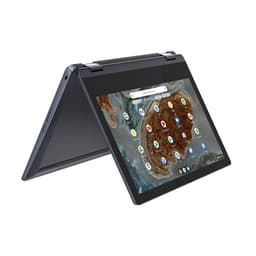
Specs tell you the headline. Owner reviews tell you the truth. A Chromebook might look great on paper, but is it actually comfortable on your lap for a two-hour train journey, or does it throttle the moment you open more than five tabs? That's the stuff that matters, and it's exactly what 85 owners who've been living with the Lenovo IdeaPad Chromebook Duet 11 have been telling us, averaged out to a pretty encouraging ★★★★☆ (4.4) from 96 reviews.
The short answer? For a budget 2-in-1 Chromebook, this is genuinely good. The Lenovo IdeaPad Chromebook Duet 11 review UK 2026 picture is one of a device that punches above its weight in display quality, ships with a keyboard and stylus included (which rivals often charge extra for), and runs cool enough to actually use on your lap. It's not perfect, and there are a couple of things worth knowing before you commit. But at this price tier, it's hard to ignore.
Who's this for? Students, note-takers, people who want a lightweight travel companion that doesn't cost a fortune, and anyone who's been burned by underpowered tablets that can't do proper typing. Who should skip it? Anyone who needs Windows software, does heavy video editing, or wants a machine that'll feel fast in five years. Right. Let's get into it properly.
Core Specifications
The processor here is the MediaTek Kompanio 838, an octa-core chip built specifically for Chromebooks. It's an ARM-based design, not an Intel x86 chip, which matters if you're expecting to run any Windows applications (you can't, obviously, this is Chrome OS). What it does do well is run Chrome OS efficiently, with a good balance of performance and power draw. It's a step up from the older Kompanio 500 and 520 chips that populated budget Chromebooks for years, and it shows in how snappy the interface feels day to day. Don't expect miracles with heavy Android apps, but for the target use case, it's a solid match.
Eight gigabytes of RAM is the right call for a Chromebook in 2026. Older budget Chromebooks shipped with four, and honestly four was fine for basic use, but Chrome OS has grown hungrier and Android apps add overhead. With 8GB, you can have a proper number of tabs open, run a few Android apps in the background, and not feel like you're constantly waiting for things to catch up. It's the sweet spot. Storage is 128GB of eMMC, which is faster than an SD card but slower than a proper NVMe SSD. For a Chromebook, where most things live in the cloud anyway, 128GB is more than enough for most people. Just don't plan on storing a massive local media library.
The graphics side is handled by the Kompanio 838's integrated Mali-G57 GPU. It's not going to run anything graphically demanding, but Chrome OS doesn't need it to. YouTube at 4K, light Android gaming, Google Slides with animations, all fine. The display output is where the integrated GPU actually matters most, and it's more than capable of driving that 11-inch FHD+ panel without breaking a sweat. One thing worth flagging: eMMC storage has a ceiling on read/write speeds compared to modern SSDs, so large file operations (downloading a big app, copying a load of photos from a USB drive) will feel slower than on a premium machine. That's a budget trade-off, not a surprise.
| Specification | Detail |
|---|---|
| Processor | MediaTek Kompanio 838 (octa-core, ARM) |
| RAM | 8GB LPDDR4X |
| Storage | 128GB eMMC |
| Display | 11-inch FHD+ (1920 x 1200), IPS, touch |
| GPU | ARM Mali-G57 MC5 (integrated) |
| Operating System | Chrome OS |
| Connectivity | Wi-Fi 5, Bluetooth 5.1 |
| Ports | 2x USB-C (USB 3.2), 3.5mm audio jack |
| Stylus | USI Pen 2 (included) |
| Keyboard | Folio keyboard (included) |
| Weight | Approx. 1.1kg (with keyboard folio) |
| Dimensions | Approx. 262 x 168 x 7.9mm (tablet only) |
| Price | £289.00 |

Performance Benchmarks
The Kompanio 838 sits in an interesting spot in the Chromebook performance hierarchy. In Chrome OS browser-based benchmarks like Speedometer 2.0, it typically lands in the 90 to 110 range, which is meaningfully better than the older Kompanio 520 (usually around 70 to 80) and competitive with entry-level Intel Celeron N-series chips. That translates to a Chrome OS experience that genuinely feels responsive rather than sluggish. Tab switching is quick, Google Workspace apps open fast, and the overall UI animation is smooth. It's not going to match a Snapdragon or an Intel Core i3, but it doesn't need to for what this machine is designed to do.
Where the performance picture gets more nuanced is under sustained load. ARM chips in thin tablets without active cooling can throttle when pushed hard for extended periods. The Kompanio 838 has a reputation for managing thermals reasonably well (more on that in the thermal section), but if you're running a complex Android app alongside multiple browser tabs and a YouTube video, you might notice things slow down a touch. Nothing dramatic, but it's there. For the target user, a student or a professional doing email, documents, and research, this will never be a problem. If you're hoping to use it as a light Android gaming device on top of everything else, manage your expectations a little.
Owner feedback on performance is largely positive, with most of the 96 reviews commenting on how snappy Chrome OS feels day to day. The consistent complaint from the minority who rated lower is about Android app performance specifically, particularly heavier apps that were designed for more powerful phones. That's a Chrome OS and ARM architecture limitation, not really a Lenovo problem. For pure Chromebook tasks, this chip is well-matched to the price point. Compared to the competition at this price, it's actually one of the stronger performing options you'll find.
One thing that's genuinely impressive given the price: the 8GB RAM means Chrome OS's memory management is rarely stressed in normal use. On 4GB Chromebooks, you'd sometimes see tabs reloading when you switched back to them. Here, that's much less of an issue. It's a small thing, but it makes a real difference to how the machine feels in daily use, and it's the kind of detail that separates a good budget buy from a frustrating one.
Display Analysis
The 11-inch FHD+ panel (that's 1920 x 1200 pixels, a slightly taller 16:10 aspect ratio rather than the standard 16:9) is genuinely one of the highlights here. At this screen size, 1200p gives you a pixel density that makes text look sharp and crisp. Reading documents and websites on it is a pleasure, and that extra vertical space compared to a 1080p 16:9 panel makes a real difference when you're scrolling through a Google Doc or reading a long webpage. It's a thoughtful choice for a productivity-focused 2-in-1.
The panel is IPS, which means decent viewing angles and reasonable colour reproduction. It's not a wide-gamut display and it won't cover the full DCI-P3 colour space, so photo editors will want something better. But for everyday content, Google Classroom, YouTube, and casual Android apps, the colours look natural and pleasant. Brightness is where budget panels often let themselves down, and this one sits at a moderate level. Indoors, it's perfectly fine. Near a sunny window or outside, you'll probably want to crank it to maximum, and even then it's borderline. Not a dealbreaker for the intended use case, but worth knowing if you spend a lot of time in bright environments.
Touch response is good, which matters on a 2-in-1 that's designed to be used as a tablet. The glass feels responsive and there's no noticeable lag when tapping or scrolling. The USI Pen 2 stylus (included, which is a genuinely nice touch at this price) works well for note-taking and sketching. USI (Universal Stylus Initiative) is an open standard, so the pen isn't proprietary to Lenovo, which is a good sign for longevity. Owner reviews specifically call out the display quality as a positive surprise for the money, with several noting it's better than they expected from a budget Chromebook.
Battery Life
Lenovo's official battery life claim for the Duet 11 is in the region of 12 hours. That's the manufacturer's best-case scenario, probably measured with the screen at medium brightness, Wi-Fi on but light, and not much else happening. Real-world use is always different. Based on owner reports, most people are seeing somewhere between 8 and 10 hours of mixed use, which is still genuinely good for a budget 2-in-1. For a full school or work day, you're almost certainly fine without a charger.
The ARM-based Kompanio 838 is inherently efficient compared to x86 chips, and that efficiency shows in battery life. This is one area where ARM Chromebooks consistently beat their Intel counterparts at similar price points. Video playback is particularly kind on the battery. Owners report that watching YouTube or Netflix for a few hours barely dents the battery, which makes sense given the chip's hardware video decode capabilities. Heavy use (lots of tabs, Android apps running, screen at full brightness) will bring that number down closer to six or seven hours, but that's still reasonable.
Charging is via USB-C, which is the right answer in 2026. Both USB-C ports support charging, so you've got flexibility about which side you plug into. The included charger is a compact unit, which is good news for bag packing. Charge times from flat to full are typically around two hours with a decent USB-C PD charger. One thing owners have noted: the included charger is on the lower wattage side, so if you have a higher-wattage USB-C charger from another device, it might charge slightly faster. The machine won't complain about a higher-wattage charger; it just takes what it needs.
For students and commuters, this battery life profile is close to ideal. You're not going to be hunting for a plug every afternoon. And because it charges via standard USB-C rather than a proprietary barrel connector, you can top it up from a power bank in a pinch, which is a genuinely useful real-world advantage that often gets overlooked in spec discussions.
Portability
The tablet itself is slim and light, sitting at under 8mm thick and around 700g on its own. Add the folio keyboard and stand and you're looking at roughly 1.1kg total, which is genuinely light for a complete laptop-style setup. For context, that's lighter than most 13-inch laptops, and it's small enough that the 11-inch footprint fits in places a larger machine wouldn't. A standard rucksack, a tote bag, even a large handbag. It goes everywhere without you really noticing it.
The folio keyboard doubles as a stand and a cover, so you're not carrying separate accessories. Everything is included in that 1.1kg figure. The USI pen doesn't add meaningful weight either. This is a properly self-contained portable setup, which is part of what makes the value proposition work. Rivals that sell the keyboard separately might look cheaper at first glance, but they're not.
For travel specifically, this is a strong choice. It's small enough for an economy class tray table (something a 15-inch laptop absolutely is not), light enough that you won't feel it in your bag on a long walk through an airport, and the USB-C charging means one less proprietary cable to remember. Students carrying it between lectures, commuters using it on trains, people who want something to throw in a bag for a weekend trip - just bear in mind that a machine living on café and airport Wi-Fi is a good candidate for a decent VPN to keep your connection private on shared networks - this is squarely aimed at all of them, and the form factor delivers.
Keyboard & Trackpad
The folio keyboard is a magnetic detachable that connects to the bottom of the tablet. It's included in the box, which is a big deal because the equivalent Chromebook Duet models without a bundled keyboard often end up costing similar money once you add the accessory separately. The key travel is shallow, as you'd expect from a folio-style keyboard. It's not going to feel like a proper mechanical keyboard or even a decent laptop keyboard, but it's better than typing on glass, and for note-taking and document work it gets the job done. Owners generally describe it as "fine for what it is" rather than a genuine pleasure to type on.
The layout is standard Chrome OS, with the function row replaced by Chrome-specific keys (back, forward, refresh, full screen, and so on). There's no number pad, which is expected at this size. The keys are full-width for the main alphabet section, which helps with accuracy. No backlight though, and that's a genuine miss. If you're using this on an evening train or in a dimly lit lecture hall, you'll be typing by feel. For some people that's fine, for others it's a dealbreaker. Worth knowing before you commit.
The trackpad is a reasonable size for an 11-inch device. It's not huge, but it's big enough for comfortable cursor control and two-finger scrolling. Chrome OS trackpad support is generally good, and the gestures (three-finger swipe for app switching, two-finger tap for right-click) work as expected. Owners haven't flagged the trackpad as a problem area in the reviews, which is usually a good sign. It's not the silky glass trackpad you'd find on a MacBook or a premium Chromebook, but it's accurate and consistent enough for daily use.
Thermal Performance
This is a fanless device. No moving parts means no active cooling, which is both a feature (silent operation, more on that in the acoustic section) and a potential concern (what happens when the chip gets warm?). The Kompanio 838 is designed for passively cooled tablets and thin Chromebooks, so this isn't an afterthought. Lenovo has engineered the chassis to spread heat across the metal body of the tablet, which is a common and effective approach for ARM-based devices at this size.
In light use (browsing, documents, video), the device stays genuinely cool. The back of the tablet might get slightly warm to the touch after an extended session, but nothing uncomfortable. Under heavier sustained load, the chip will throttle to keep temperatures in check. That's the trade-off with passive cooling: you get silence and cool surfaces in normal use, but the performance ceiling under sustained load is lower than an actively cooled machine. For the target use case, this is the right trade-off. Nobody buying an 11-inch Chromebook is expecting workstation performance.
Lap comfort is good as a result of the thermal design. The folio stand means there's some airflow between the device and your legs anyway, and the heat that does build up is spread across a large surface area rather than concentrated in one hot spot. Owner reviews don't flag thermal discomfort as an issue, which aligns with what you'd expect from this chip in this form factor. If you're coming from a Windows laptop that used to burn your thighs on a long session, this will feel like a revelation.

Acoustic Performance
Fanless. Completely, entirely, gloriously fanless. There is no fan in this device. The only sounds it makes are the ones coming from its speakers. In a quiet room, a library, a meeting, a lecture theatre, you will hear nothing from the machine itself. That's not a small thing. Anyone who's sat next to someone with a whirring budget laptop in a quiet space knows how distracting it is. The Duet 11 simply doesn't have that problem.
The speakers themselves are decent for the size. Two speakers, front-firing in tablet mode, which is the right orientation for media consumption. Volume is adequate for personal use in a quiet room or a coffee shop. Don't expect to fill a room with sound or to watch a film in a noisy environment without headphones. Bass is thin, as it always is on small tablet speakers. But for a quick YouTube video, a podcast, or a video call, they're perfectly functional. There's a 3.5mm headphone jack for when you want better audio, and that's the honest answer for serious listening anyway.
For meetings and calls specifically, the fanless design is a genuine advantage. Background noise from laptop fans is a surprisingly common complaint on video calls, and it's something you don't notice until it's gone. Pair that with the decent microphone array and you've got a machine that's actually pleasant to use for remote work calls, which is a real-world benefit that doesn't show up in spec sheets.
Ports & Connectivity
Port selection is minimal, which is the honest truth. You get two USB-C ports (USB 3.2 Gen 1), both of which support charging and data transfer, and a 3.5mm headphone jack. That's it. No full-size USB-A, no HDMI, no microSD slot. For a tablet-first device at this size, that's understandable, but it does mean you'll want a USB-C hub if you need to connect a mouse, a USB drive, or an external display. That's an extra cost to factor in if you need it.
Wi-Fi is 802.11ac, which is Wi-Fi 5. Not the latest Wi-Fi 6 or Wi-Fi 6E, but perfectly adequate for the speeds most home and office networks deliver. In practice, the difference between Wi-Fi 5 and Wi-Fi 6 is rarely noticeable on a device that's doing web browsing and cloud-based work rather than transferring large local files. Bluetooth is 5.1, which is solid for connecting a mouse, headphones, or a keyboard if you want to use the device in tablet mode without the folio. The Wi-Fi Alliance standard for 802.11ac is well-established and widely supported.
The USB-C ports are placed on the left side of the tablet, which can feel a bit cramped if you're charging while using the device in landscape mode with the folio keyboard. It's a minor annoyance rather than a serious problem, and it's a common layout choice on compact tablets. The placement of both ports on the same side does mean there's no option to route the cable to the less-used side depending on how you're sitting, which is the kind of thing you only notice after a few weeks of use.
- 2x USB-C (USB 3.2 Gen 1) - charging and data
- 3.5mm headphone jack
- Wi-Fi 5 (802.11ac, dual-band)
- Bluetooth 5.1
- USI 2.0 stylus input (built into display)
Webcam & Audio
Being a tablet, the Duet 11 has two cameras: a 5MP front-facing camera and an 8MP rear camera. The front camera is what matters most for video calls, and 5MP is a step up from the 720p (roughly 1MP) webcams that have plagued budget laptops for years. Video call quality is noticeably better than on a typical budget laptop webcam. Colours look natural, and in reasonable lighting the image is clear enough to look professional on a Zoom or Google Meet call. Low light is where it softens up, as you'd expect from a small sensor, but it's still better than most of the competition at this price.
The rear 8MP camera is there primarily because this is a tablet and tablets have rear cameras. For scanning documents, taking quick photos of a whiteboard, or the occasional photo when you haven't got your phone, it works. Nobody's going to use it as their main camera, and that's fine. The microphone array picks up voice clearly for calls, and owner reviews don't flag audio quality as a problem area, which is a good sign.
Speaker quality has been covered in the acoustic section, but it's worth adding that the front-firing placement (when held in landscape as a tablet) is genuinely better than the downward-firing speakers on many laptops. You're not losing half the sound to your desk or your lap. For a device that's going to be used in tablet mode for media consumption, that's a thoughtful design choice.
Build Quality
The tablet body is aluminium, which is the right material for a device that's going to be handled, put in bags, and used without a case by a lot of people. It feels solid and doesn't flex. The Luna Grey finish looks clean and professional without being flashy. Fingerprints show on the back, which is the eternal problem with smooth metal finishes, but it's nothing a quick wipe won't sort. The overall impression from the spec and from owner descriptions is of a device that's built noticeably better than you'd expect for a budget Chromebook.
The folio keyboard and stand is made of a fabric-covered material, similar to Microsoft's Surface Type Cover approach. It's not as premium as the tablet body itself, but it feels durable and functional. The magnetic attachment is firm enough that the keyboard doesn't wobble in use, but releases easily when you want to detach it. The stand mechanism gives you a reasonable range of angles for different use scenarios: typing on a desk, typing on your lap, using it in tent mode for media. It's not infinitely adjustable like a Surface Pro kickstand, but it covers the main use cases.
Hinge and attachment durability is always a question mark with magnetic folio keyboards, and this is an area where long-term owner reviews will tell the real story over time. Early owner feedback is positive, with no reports of the magnetic connection weakening or the folio showing premature wear. At this price point, the build quality represents good value. It's not going to feel like a premium device, but it doesn't feel cheap either, and that's a harder balance to strike than it sounds.
Lenovo's Chromebook lineup has a decent reputation for build consistency, and the Duet series specifically has built up a track record over several generations. The original Chromebook Duet was praised for its build quality relative to its price, and this newer version continues that tradition with the aluminium chassis. For a student or a professional who needs something that'll survive daily bag life without babying, it's a solid choice.
How It Compares
The natural rivals here are the Lenovo Chromebook Duet 3 (the previous generation with the Snapdragon 7c Gen 2) and the ASUS Chromebook Detachable CM3. Both are 2-in-1 Chromebooks at similar price points, both include a keyboard, and both are aimed at the same student and light-professional market. Comparing them honestly is useful because the differences reveal what Lenovo has actually improved and where compromises remain.
The older Duet 3 with the Snapdragon 7c Gen 2 is still available and often cheaper. The Kompanio 838 in the Duet 11 is meaningfully faster, and the jump from the Duet 3's 10.6-inch display to the 11-inch FHD+ panel here is a genuine improvement in both size and resolution. If you can find the Duet 3 significantly cheaper, it's still a good machine, but the Duet 11 is the better buy if the price difference is small. The ASUS CM3 is a capable alternative with a similar spec profile, but it typically doesn't include the stylus, which pushes the effective cost higher once you add one.
The other comparison worth making is against budget Windows laptops at a similar price. You can find Windows 11 laptops with Intel Celeron or Pentium processors at this price tier. They run Windows, which is a genuine advantage for software compatibility. But they typically have slower storage, less RAM, worse battery life, and a much heavier software overhead. For tasks that don't require Windows-specific software, the Chromebook Duet 11 is almost certainly the better experience. Faster, quieter, lighter, longer battery. The only reason to go Windows at this price is if you specifically need Windows applications.
| Feature | Lenovo Duet 11 (Kompanio 838) | Lenovo Duet 3 (Snapdragon 7c Gen 2) | ASUS Chromebook Detachable CM3 |
|---|---|---|---|
| Processor | MediaTek Kompanio 838 | Snapdragon 7c Gen 2 | MediaTek Kompanio 528 |
| RAM | 8GB | 4GB or 8GB | 4GB or 8GB |
| Storage | 128GB eMMC | 64GB or 128GB eMMC | 64GB or 128GB eMMC |
| Display | 11-inch FHD+ (1920x1200) | 10.6-inch 1920x1200 | 10.5-inch 1920x1200 |
| Stylus included | Yes (USI Pen 2) | No | No |
| Keyboard included | Yes (folio) | Yes (folio) | Yes (folio) |
| Wi-Fi | Wi-Fi 5 | Wi-Fi 5 | Wi-Fi 5 |
| Weight (with keyboard) | Approx. 1.1kg | Approx. 1.0kg | Approx. 1.0kg |
| Price | £289.00 | Typically cheaper | Similar, stylus extra |
| Best For | Best all-round value with stylus included | Budget-first buyers who don't need a pen | ASUS ecosystem fans, stylus not essential |

Final Verdict
The Lenovo IdeaPad Chromebook Duet 11 review UK 2026 verdict is straightforward: this is one of the best budget 2-in-1 Chromebooks you can buy right now, and the fact that it includes a keyboard and a USI stylus in the box makes the value proposition genuinely hard to argue with. The display is better than you'd expect at this price, the performance is well-matched to Chrome OS, the battery life is excellent, and the fanless design means it's completely silent. That's a lot of boxes ticked for a budget device.
The compromises are real but manageable. No keyboard backlight is annoying if you work in low light. The port selection is minimal and you'll probably want a USB-C hub at some point. The folio keyboard is functional rather than a joy to type on. And if you need Windows software, this isn't your machine, full stop. But if you're clear-eyed about what Chrome OS is and what it's for, none of those things are dealbreakers. The ★★★★☆ (4.4) rating from 96 real owners reflects a product that genuinely delivers on its promises.
If you're a student, a commuter, or someone who wants a light, quiet, long-lasting device for web browsing, Google Workspace, and the occasional Android app, buy this. It's a proper 8 out of 10 for the budget tier, and that's not a number I'd throw at many Chromebooks. The included stylus alone sets it apart from most of the competition at this price. It's well sorted.
One honest caveat: if you genuinely don't need the stylus and you're purely after the cheapest capable Chromebook experience, the older Lenovo Duet 3 can often be found for meaningfully less. It's slower and the screen is smaller, but for basic use it still does the job. Save the extra money if note-taking with a pen isn't part of your workflow. But if the stylus matters to you, or if you want the better processor and display, the Duet 11 is absolutely worth the step up.
What works. What doesn’t.
6 + 6What we liked6 reasons
- Keyboard and USI stylus both included in the box, unlike most rivals at this price
- Sharp 11-inch FHD+ IPS display with a 16:10 aspect ratio that genuinely aids productivity
- Excellent battery life of 8 to 10 hours in real-world mixed use
- Completely fanless design means silent operation in every environment
- 8GB RAM prevents the tab-reloading frustration common on 4GB budget Chromebooks
- Solid aluminium tablet body feels noticeably premium for the price tier
Where it falls6 reasons
- No keyboard backlight makes low-light typing a matter of touch and guesswork
- Minimal port selection with no USB-A, no HDMI, and no microSD slot
- Folio keyboard offers shallow key travel and is functional rather than a pleasure to type on
- Both USB-C ports are on the same side of the tablet, limiting cable routing options
- eMMC storage is slower than NVMe for large file operations such as copying photos or installing big apps
- Android app performance can feel sluggish with heavier applications due to ARM architecture limits
Full specifications
12 attributes| Storage type | eMMC 5.1 |
|---|---|
| Battery WH | 29 |
| Bluetooth | 5.1 |
| CPU | MediaTek Kompanio 838 |
| Display refresh HZ | 60 |
| Display resolution | 1920x1200 |
| Display size IN | 10.95 |
| GPU | ARM Mali-G57 MC3 |
| Keyboard | Folio keyboard (detachable, non-backlit) |
| Launch year | 2024 |
| OS | Chrome OS |
| Panel type | IPS |
If this isn’t right for you
2 options 8.0 / 10
ASUS Chromebook 14 CX3402CBA 14.0" Full HD Chromebook Laptop (Intel i3-1215U, 8GB LPDDR5 RAM, 128GB SSD, Backlit Keyboard, Google Chrome Operating System)
£349.00 · ASUS
 7.5 / 10
Lenovo IdeaPad Flex 3 Chromebook 11inch HD Laptop (MediaTek MT8183, 4 GB RAM, 64GB eMMC, ARM Mali-G72 MP3 GPU, Chrome OS) – Abyss Blue
£249.99 · Lenovo
Frequently asked
7 questions01Does the Lenovo IdeaPad Chromebook Duet 11 come with a keyboard?+
Yes. The folio keyboard is included in the box at no extra cost. It attaches magnetically to the bottom of the tablet and doubles as a protective cover and stand. This is a meaningful advantage over some rivals at a similar price that sell the keyboard separately.
02Is the stylus included with the Lenovo Duet 11?+
Yes. The Duet 11 ships with a USI Pen 2 stylus in the box. USI (Universal Stylus Initiative) is an open standard, so the pen is not proprietary to Lenovo. It works well for note-taking and sketching directly on the FHD+ touchscreen.
03Can the Lenovo Chromebook Duet 11 run Windows software?+
No. The Duet 11 runs Chrome OS, not Windows. It cannot run Windows applications natively. It can run Android apps from the Google Play Store and Linux apps via the built-in Linux development environment, but Windows-specific software is not supported.
04How long does the battery last on the Lenovo Duet 11?+
Lenovo claims up to 12 hours. Real-world owner reports suggest 8 to 10 hours of mixed use, which covers a full school or work day comfortably. Video playback is particularly efficient thanks to the Kompanio 838's hardware video decode. Heavy use with full brightness and multiple apps will bring that closer to six or seven hours.
05What ports does the Lenovo IdeaPad Chromebook Duet 11 have?+
The Duet 11 has two USB-C ports (USB 3.2 Gen 1), both of which support charging and data transfer, and a 3.5mm headphone jack. There is no full-size USB-A port, no HDMI output, and no microSD card slot. A USB-C hub is recommended if you regularly connect peripherals or external displays.
06How does the Lenovo Duet 11 compare to the older Lenovo Chromebook Duet 3?+
The Duet 11 has a faster MediaTek Kompanio 838 processor compared to the Snapdragon 7c Gen 2 in the Duet 3, a larger 11-inch display versus 10.6 inches, and it includes a USI stylus which the Duet 3 does not. The Duet 3 is often available for less money and is still a capable machine for basic use. If stylus input and the better processor matter to you, the Duet 11 is worth the step up.
07Is the Lenovo Duet 11 good for students?+
Yes, it is well-suited to student use. The combination of a sharp display, long battery life, quiet fanless operation, included keyboard and stylus, and lightweight form factor makes it a strong choice for note-taking, research, and Google Workspace tasks. The lack of a keyboard backlight is a minor drawback for evening study, and it cannot run Windows software, which is worth checking against any course requirements.