Picking a laptop when you're on a tight budget is genuinely stressful. There are dozens of options that look fine on the spec sheet but turn out to be sluggish, plasticky nightmares the moment you actually try to use them. The HP 14-dq6002sa sits right in that budget bracket, and the question is simple: does it actually hold up, or is it just another cheap laptop that'll have you pulling your hair out by February?
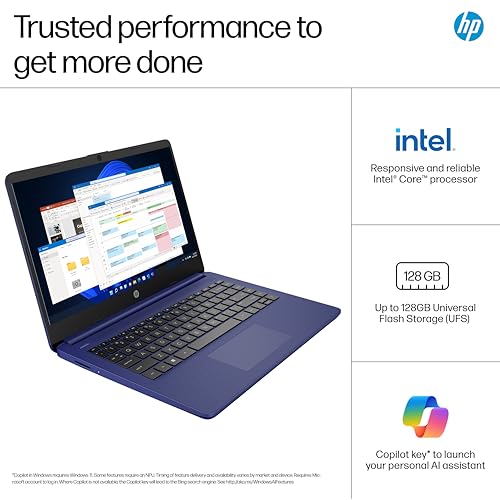
What we've got here is a 14-inch machine running an Intel N150 processor, 4GB of RAM, 128GB of UFS storage, and Windows 11 out of the box. It also bundles in a 12-month Microsoft 365 Personal subscription, which is a genuinely nice touch at this price. The current rating sits at ★★★★☆ (4.4) from 41 owners, which for a budget laptop is decent. But averages can be misleading. So here's what the specs and owner feedback actually tell us.
This is a laptop aimed squarely at people who need something that works. Students, people working from home who don't need anything fancy, parents buying a first laptop for a teenager, or anyone who just wants a machine for browsing, Word documents, and the occasional YouTube rabbit hole. It's not trying to be a powerhouse. The question is whether it succeeds at what it's actually trying to do.
Core Specifications
The processor here is the Intel Processor N150, which is part of Intel's efficiency-focused lineup designed for lightweight, low-cost machines. It's a quad-core chip built on a 10nm process, and it's genuinely capable for the kinds of tasks this laptop is sold for. Word processing, spreadsheets, web browsing with a reasonable number of tabs open, video calls. That's the sweet spot. Push it harder than that and you'll feel it. But within those limits, it's a perfectly functional chip, and it runs cool and quiet, which matters more than people realise.
Then there's the RAM. 4GB. And this is where things get honest. 4GB is tight in 2026. Windows 11 itself eats into that headroom pretty aggressively, and if you're someone who likes having 15 browser tabs open alongside Spotify and a Word document, you will hit the ceiling. It's not a dealbreaker for very light use, but it's the single biggest limitation of this machine. If you're buying this for a student who's going to be multitasking, just be aware that it'll start to feel sluggish under that kind of load. Ideally you'd want 8GB, but at this price point, 4GB is the reality.
Storage is 128GB UFS, which is a step up from the eMMC you'd find in some competitors at this tier. UFS (Universal Flash Storage) offers noticeably better read and write speeds than eMMC, so the system feels snappier for everyday tasks. That said, 128GB fills up faster than you'd think. Windows, Microsoft 365, a few apps, and some documents and you're already looking at less than half your space. Cloud storage via the bundled 1TB OneDrive is a genuine lifesaver here. Use it.
Graphics come from Intel UHD Graphics, integrated into the N150. HP's own marketing claims you can stream 4K content and play games at 720p without a dedicated GPU, and for casual use that's broadly fair. You're not gaming seriously on this. But for YouTube, Netflix, video calls, and the occasional light game, it's fine. Don't expect miracles, and don't try to run anything demanding. This is a productivity chip with basic multimedia capability, nothing more.
| Specification | Detail |
|---|---|
| Processor | Intel Processor N150 |
| RAM | 4GB |
| Storage | 128GB UFS |
| Graphics | Intel UHD Graphics |
| Display | 14-inch, 1366x768, SVA panel |
| Operating System | Windows 11 |
| Battery | Up to 11 hours (manufacturer claim) |
| Included Software | Microsoft 365 Personal (12 months) + 1TB OneDrive |
| Price | Check price |
Performance Benchmarks
The Intel N150 sits in a well-understood performance bracket. In Cinebench R23 multi-core testing, chips in this family typically land somewhere around 2,000 to 2,400 points. That's not a number that's going to impress anyone who follows benchmarks, but it tells you something useful: it's roughly on par with older mid-range laptop chips from a few years back, which were considered perfectly adequate for office work at the time. Context matters.
For everyday tasks, the N150 actually punches reasonably well. Web browsing in Chrome or Edge is fine, though you'll notice the occasional pause when loading heavier sites with lots of JavaScript. Microsoft 365 apps run without complaint. Video calls on Teams or Zoom work as intended. Where you'll feel the pinch isn't really the CPU, it's the 4GB RAM. The processor can handle the workload; the memory is what creates the bottleneck when you're running multiple applications at once. Owners consistently mention that the machine feels quick enough for basic tasks but starts to drag when pushed.
What the N150 does really well is stay efficient. It's designed to sip power rather than gulp it, which directly contributes to the battery life claims. It also means the chip doesn't need aggressive cooling, which keeps the fan quiet and the machine running comfortably in your lap or on a desk. For the target audience, that efficiency matters far more than raw processing power. Nobody buying this laptop is rendering video or compiling code. They're writing emails and watching iPlayer.
Compared to the price-band median, this machine is competitive. At this budget tier, you're often choosing between a slightly faster chip with worse battery, or a longer-lasting machine with a slower chip. The N150 sits in a sensible middle ground. It's not the fastest budget chip available, but it's one of the more balanced options you'll find in this category, and the UFS storage gives it a real-world responsiveness advantage over cheaper eMMC-based rivals.
Display Analysis
The display is a 14-inch SVA panel running at 1366x768. SVA stands for Super Vertical Alignment, which is a type of LCD technology that sits between basic TN panels and the more premium IPS displays. It generally offers better colour reproduction and viewing angles than TN, without quite reaching IPS quality. At this price, that's a reasonable compromise. You're not getting a colour-accurate display for photo editing, but you're also not getting the washed-out, narrow-angle rubbish you'd find on the very cheapest machines.
The resolution is where you'll have the most to say. 1366x768 is an HD resolution, and on a 14-inch screen it's... fine. Text is readable, video is watchable, and for basic productivity work you won't be constantly distracted by pixel-level fuzziness. But if you're coming from a 1080p display, the step down is noticeable. Things look a little softer. Fonts aren't quite as crisp. It's not a dealbreaker for the target audience, but it's worth knowing going in. HP's micro-edge bezel design does make the screen feel bigger than the numbers suggest, which helps.
The flicker-free certification is genuinely useful. HP specifies this display as flicker-free, which reduces eye strain during long sessions. If you're using this for work or study over extended periods, that matters more than most people realise. Brightness outdoors is going to be a challenge, as budget laptops rarely hit the kind of nit counts that make outdoor use comfortable, but indoors near a window or in a well-lit room it should be perfectly usable. Viewing angles on SVA panels are decent enough that you can share the screen with someone sitting next to you without them squinting.
Battery Life
HP claims up to 11 hours of battery life. As with every manufacturer battery claim ever made, that number is achieved under very specific conditions: low brightness, minimal background activity, probably a single static webpage open. Real-world use will be shorter. That's just the truth. But the good news is that the N150's efficiency-first design means the real-world figure is still genuinely decent for a budget machine.
Owners consistently report getting through a full working day on a single charge with light to moderate use. Browsing, document editing, video calls. If you're doing heavier work, streaming video continuously, or keeping brightness cranked up, you'll see that drop. Realistically, for mixed everyday use, somewhere in the six to eight hour range is a reasonable expectation. That's good for this price bracket. A lot of budget laptops in this tier struggle to make it through a full workday without reaching for the charger.
HP Fast Charge is a proper highlight here. The spec sheet confirms you can go from 0 to 50% in approximately 45 minutes when the laptop is powered down. For anyone who's ever sat in a coffee shop watching a budget laptop crawl back to life over three hours, that's a meaningful feature. It means even if you forget to charge overnight, a quick top-up before you head out gives you a usable chunk of battery to work with.
The charger itself is worth factoring into your bag weight calculations. Budget laptops at this tier typically ship with a barrel-connector charger rather than USB-C power delivery, and that charger adds bulk. It's not a massive inconvenience, but if you're hoping to charge from a USB-C power bank on a long train journey, check the specifics before you assume that's an option. The machine is designed to be used with its supplied charger for the best charging performance.
Portability
A 14-inch laptop hits a sweet spot for portability. It's big enough to work on comfortably without feeling cramped, but small enough to fit in most backpacks and laptop bags without taking over. HP's marketing leans heavily on the "ultra-thin, lightweight" angle, and while those claims are relative (it's not a MacBook Air), the 14-inch form factor genuinely is more portable than 15.6-inch budget laptops, which tend to feel like lugging a chopping board around.
The micro-edge bezel design means the physical footprint of the machine is smaller than you might expect for a 14-inch display. Less wasted plastic around the screen means the overall chassis is more compact. That makes a real difference when you're sliding it into a bag or fitting it on a cramped train table. It's the kind of thing that sounds like marketing until you're actually trying to work on a commute and you appreciate not having your screen hang off the edge of the tray table.
For students commuting between home and campus, or anyone working from different locations during the week, this is a genuinely practical choice. The battery life holds up well enough that you're not chained to a plug socket, and the size means it travels without drama. It's not going to win awards for being the slimmest machine on the market, but it's sensibly sized for the people who are most likely to buy it.
Keyboard and Trackpad
HP's budget laptops have historically offered keyboards that are better than you'd expect at the price. The 14-dq6002sa continues that pattern. The key travel is adequate for comfortable typing, and the layout is sensible for UK users. Owner feedback on the keyboard is generally positive, with people noting it's comfortable enough for extended typing sessions, which is exactly what you want from a laptop that's going to be used for coursework or office documents.
There's no number pad, which is standard for a 14-inch machine. Squeezing a number pad onto a 14-inch keyboard typically means compromising the main key sizes, and most manufacturers sensibly leave it out. If you need a number pad regularly, you can pick up a cheap USB one for a few quid. The precision touchpad is called out specifically in HP's feature list, and it shows. Budget laptops often have trackpads that feel imprecise or jittery, but the precision touchpad standard means gesture support is reliable and cursor movement is smooth. It's a small thing that makes a big difference day to day.
Backlight is not confirmed in the spec sheet, so if that's important to you (typing in dim conditions, late night working), check before you buy. For the target audience, a backlit keyboard would be a nice bonus but it's not the kind of feature that typically makes or breaks a budget purchase decision. The overall typing experience, based on what owners report, is solid for the price. Nobody's going to mistake it for a ThinkPad, but it's far from the mushy, unreliable keyboards you sometimes get on the cheapest machines.
Thermal Performance
One of the underrated advantages of the Intel N150 is its thermal behaviour. It's an efficiency chip, not a performance chip, and that means it doesn't generate much heat under normal conditions. During light work, browsing, and document editing, the machine should stay cool to the touch. The keyboard deck and palm rest won't get warm in a way that's uncomfortable, which makes a real difference if you're using this on your lap for extended periods.
Under heavier loads, there will be some warmth, particularly on the underside. That's true of any laptop. But because the N150 isn't a high-TDP chip chasing peak performance, the thermal headroom is more manageable than on budget gaming-adjacent machines that try to push more power through a thin chassis. The fan doesn't need to work particularly hard under typical workloads, which feeds directly into the acoustic performance as well.
Throttling is worth mentioning. Under sustained heavy load, budget chips in this category can throttle to manage temperatures. But for the actual use cases this laptop is designed for, sustained heavy load isn't really something you'll encounter. Web browsing doesn't stress it. Office apps don't stress it. Video calls don't stress it. The thermal design is well matched to the intended workload, and that's the right way to build a budget machine. It won't overheat doing what it's meant to do.
Lap comfort is generally good. The underside venting is designed to allow airflow without burning your legs, and because the chip runs cool most of the time, you can comfortably use this on a sofa or in bed without it becoming a problem. That's not something you can say about every budget laptop, especially those that try to run faster chips in thin chassis without adequate cooling.

Acoustic Performance
Quiet. That's the short version. The N150's low power draw means the fan rarely needs to spin up aggressively, and during light to moderate use, this machine is essentially silent. That's genuinely useful in meetings, libraries, lectures, and anywhere else where a whirring laptop fan draws dirty looks. Owner feedback doesn't flag fan noise as a complaint, which is a good sign.
Under heavier load the fan will spin up, but even then it's not the kind of aggressive, high-pitched whine you get from thin-and-light machines trying to cool a proper performance chip. It's a low, soft hum. Noticeable if the room is very quiet, but not intrusive. The kind of fan noise that you stop hearing within a few minutes because it blends into the background.
For anyone who uses a laptop in shared spaces, this is worth caring about. A loud laptop in a coffee shop or open-plan office is genuinely annoying, both for you and the people around you, and while you're on shared networks like these it's worth running a good VPN to keep your connection private from snooping. The HP 14-dq6002sa's acoustic behaviour is one of its quiet (literally) strengths. It's not something HP shouts about in the marketing, but it's a real-world benefit that adds up over time.
Ports and Connectivity
The spec sheet doesn't give us a full port breakdown with exact placements, so we'll work with what's confirmed and what's typical for machines in this HP series. HP's budget 14-inch lineup generally includes USB-A ports, a USB-C port, HDMI output, a headphone jack, and an SD card reader, though specific port counts and configurations vary by model. The wireless connectivity is where things get important for a laptop at this price.
Wi-Fi is included (standard on any modern laptop), and at this price tier you'd typically expect Wi-Fi 5 or Wi-Fi 6 capability. Wi-Fi 6 would be the better outcome, offering faster speeds and better performance in congested environments like flats, offices, and university buildings where dozens of devices are competing for bandwidth. Bluetooth is also present for wireless peripherals, headphones, and the like.
For the target user, the port situation is unlikely to be a dealbreaker. Students and home workers typically need HDMI for an external monitor, a couple of USB-A ports for peripherals, and a headphone jack. If you're someone who relies heavily on a specific port configuration, verify the exact spec before purchasing. What we can say is that for basic connectivity needs, HP's 14-inch machines in this series are generally well-equipped for everyday use.
- USB-A ports for peripherals and storage
- USB-C port
- HDMI output
- Headphone/microphone combo jack
- Wi-Fi and Bluetooth wireless connectivity
Webcam and Audio
The webcam on budget laptops is rarely a highlight, and the HP 14-dq6002sa doesn't change that pattern. You're getting a basic webcam that's adequate for video calls in good lighting. Teams, Zoom, Google Meet, it'll handle all of those without embarrassing you. In low light, the image quality drops off, as it does on virtually every budget webcam. If you're doing a lot of video calls in a dimly lit room, consider improving your lighting rather than expecting the camera to compensate. A cheap ring light from Amazon will do more for your video quality than any camera upgrade at this price point.
The dual stereo speakers are called out in HP's feature list, and they're a genuine step up from the single-speaker setups you sometimes find on budget machines. Stereo separation gives music and video a bit more depth and presence. They won't replace a decent Bluetooth speaker for music listening, but for video calls, YouTube, and casual streaming, they're perfectly adequate. Volume levels are reasonable for a small room.
Microphone quality on budget laptops is similarly functional rather than impressive. For voice calls and video meetings it does the job. If you're recording audio for any purpose beyond basic calls, you'll want an external microphone. But for the everyday use cases this laptop is designed for, the built-in audio setup is fine. It's not going to win awards, but it won't let you down in a Teams call either.
Build Quality
At this price, you're getting a plastic chassis. That's not a criticism, it's just the reality of budget laptop construction. Plastic allows manufacturers to keep costs down while still producing something that's light and functional. The HP 14-dq6002sa is built to a standard that's appropriate for its price tier. It doesn't feel premium, but it also doesn't feel like it'll fall apart if you look at it wrong. Owner reviews don't flag build quality as a concern, which is reassuring.
Lid flex is present, as it is on most plastic laptops. If you pick the machine up by the corner of the lid, you'll see some flex. That's normal. The keyboard deck is more solid, which matters more for day-to-day use. Key presses should feel stable rather than bouncy, and the overall feel of typing shouldn't be undermined by a chassis that wobbles. The hinge feels adequate for normal use, opening and closing without drama, though you probably wouldn't want to open it one-handed on a regular basis.
The blue colour option is a nice touch. Budget laptops are often relentlessly grey or black, and having a bit of personality in the finish makes it feel less corporate and more like something you'd actually want to carry around. Fingerprint resistance on plastic surfaces varies, but the finish on HP's budget machines tends to be matte enough that smudges aren't a constant annoyance. It's a small thing, but it matters when you're using the machine every day.
Durability-wise, this is a machine that will handle everyday student or home-office use without problems. It's not designed to survive being dropped or exposed to the elements, and it doesn't claim to be. Treat it with reasonable care and it'll last. The build quality is honest about what it is: a budget laptop built to a price, with enough structural integrity to do its job reliably.
How It Compares
The budget laptop market at this price point is genuinely competitive. The two main rivals worth comparing against are the Acer Aspire 1 and the Lenovo IdeaPad 1, both of which compete directly in the same bracket and target the same audience. All three are aimed at light users who need a reliable, affordable machine for everyday tasks. The differences between them are meaningful but not dramatic.
The Acer Aspire 1 in this tier often ships with a similar processor family and comparable RAM, but has historically used eMMC storage rather than UFS. That's a real-world speed difference in favour of the HP, particularly for boot times and app loading. The Lenovo IdeaPad 1 is a solid alternative with good build quality for the price, and Lenovo's keyboard reputation is strong, but it can be harder to find at competitive pricing and the bundled software situation varies by configuration.
The HP's biggest selling point in this comparison is the included Microsoft 365 Personal subscription. A 12-month subscription to 365 Personal costs around £60 to £70 if you buy it separately. That's a meaningful chunk of the total laptop price, effectively subsidising your purchase. Combined with 1TB of OneDrive storage, which directly addresses the 128GB local storage limitation, this bundle adds genuine value that the raw spec sheet doesn't fully capture. It's the kind of practical thinking that makes the HP a sensible choice even if the hardware specs are otherwise comparable to rivals.
| Feature | HP 14-dq6002sa | Acer Aspire 1 | Lenovo IdeaPad 1 |
|---|---|---|---|
| Processor | Intel N150 | Intel N-series (varies) | Intel N-series (varies) |
| RAM | 4GB | 4GB | 4GB |
| Storage | 128GB UFS | 64GB to 128GB eMMC | 128GB eMMC |
| Display | 14-inch 1366x768 SVA | 14-inch 1366x768 TN/IPS | 14-inch 1366x768 TN |
| Microsoft 365 Included | Yes (12 months) | No | No |
| OneDrive Storage | 1TB | Not included | Not included |
| Price | Check price | Similar budget tier | Similar budget tier |
| Best For | Students and home workers who want the full Office suite included | Very basic browsing and light use on the tightest possible budget | Users who prioritise keyboard quality and brand reliability |

Final Verdict
The HP 14-dq6002sa is a budget laptop that's honest about what it is and good at what it's designed to do. It's not going to impress anyone who wants to game, edit video, or run demanding software. But for students, home workers, and anyone who needs a reliable machine for browsing, documents, video calls, and streaming, it delivers. The N150 processor handles everyday tasks without drama, the UFS storage is faster than you'd expect at this price, and the battery life is genuinely useful rather than a marketing fiction.
The 4GB RAM is the limitation you need to go in knowing about. It's workable for light use, but it's the ceiling you'll bump into if your habits lean toward keeping lots of things open at once. The 128GB storage is tight too, but the bundled 1TB OneDrive makes that much more manageable than it sounds on paper. And the 12-month Microsoft 365 Personal subscription is a proper sweetener that adds real monetary value to the package. When you factor that in, the effective cost of the hardware alone is meaningfully lower than the sticker price suggests.
The ★★★★☆ (4.4) rating from 41 owners reflects a machine that does what it promises for the people it's aimed at. That's not a small thing. Plenty of budget laptops promise a lot and deliver disappointment. This one sets realistic expectations and meets them. For anyone who needs a no-fuss everyday laptop at a budget price, it's a solid choice. For anyone who needs more than basic productivity, look at a step up in the market.
For what it is and what it costs, this is a 7 out of 10 in the budget tier. It's not exciting, but it's good. And sometimes good is exactly what you need.
What works. What doesn’t.
6 + 6What we liked6 reasons
- UFS storage delivers noticeably faster real-world responsiveness than the eMMC found in many rivals at this price
- Bundled 12-month Microsoft 365 Personal subscription and 1TB OneDrive add genuine monetary value to the package
- Intel N150 runs cool and quiet under typical workloads, making it comfortable on the lap and unobtrusive in shared spaces
- HP Fast Charge reaches 50 percent from flat in around 45 minutes, which is a practical benefit for busy days
- SVA display offers better colour reproduction and viewing angles than the TN panels common on very cheap laptops
- Precision touchpad delivers reliable gesture support and smooth cursor tracking, a cut above typical budget trackpads
Where it falls6 reasons
- 4GB of RAM is tight for Windows 11 and will create noticeable slowdown when multiple applications are running simultaneously
- 128GB local storage fills up quickly once Windows, Microsoft 365, and everyday files are installed
- 1366x768 resolution looks soft compared to 1080p displays and the step down will be obvious to anyone upgrading from a sharper screen
- No confirmed keyboard backlight, which limits usability in dim environments
- Plastic chassis has visible lid flex and does not feel robust enough to withstand accidental drops or rough handling
- Outdoor brightness is limited, as is typical for budget panels, making the display difficult to use in direct sunlight
Full specifications
12 attributes| Screen size | 14 |
|---|---|
| CPU brand | Intel |
| GPU type | integrated |
| RAM | 4GB |
| Storage type | UFS |
| Battery life H | 11 |
| Battery WH | 41 |
| CPU | Intel N150 |
| Display resolution | 1366x768 |
| Display size IN | 14 |
| Display type | SVA |
| GPU | Intel UHD Graphics |
Frequently asked
7 questions01Is 4GB of RAM enough for the HP 14-dq6002sa in 2026?+
It is enough for genuinely light use such as browsing a handful of tabs, writing documents, and video calls. Windows 11 does consume a meaningful portion of that headroom, so if you habitually run several applications at the same time, you will notice slowdown. It is the single most important limitation of this machine to understand before purchasing.
02What is UFS storage and is it better than eMMC?+
UFS stands for Universal Flash Storage. It offers faster read and write speeds than the eMMC storage found in many competing budget laptops, which translates to quicker boot times and snappier app loading in everyday use. It is a genuine advantage for the HP 14-dq6002sa over similarly priced rivals that use eMMC.
03Does the HP 14-dq6002sa come with Microsoft Office included?+
Yes. The laptop ships with a 12-month Microsoft 365 Personal subscription, which includes the full desktop Office applications, and 1TB of OneDrive cloud storage. A standalone 365 Personal subscription typically costs around £60 to £70 per year, so this is a meaningful addition to the package.
04How long does the battery actually last in real-world use?+
HP claims up to 11 hours, which is measured under low-brightness, minimal-activity conditions. In everyday mixed use covering browsing, documents, and occasional video calls, most owners report getting through a full working day. A realistic expectation for mixed use is somewhere between six and eight hours, which is solid for a budget machine at this price.
05Can the HP 14-dq6002sa handle gaming?+
Not in any meaningful sense. The integrated Intel UHD Graphics can manage casual, undemanding games at low settings and basic resolutions, and it will stream video content without issue. Anything requiring dedicated graphics performance is beyond what this machine is designed for, and trying to run graphically demanding titles will result in poor frame rates.
06How does the HP 14-dq6002sa compare to the Acer Aspire 1 and Lenovo IdeaPad 1?+
All three target the same budget audience with similar processor families and 4GB of RAM. The HP's main advantages are UFS storage rather than eMMC, which improves everyday responsiveness, and the bundled Microsoft 365 Personal subscription and 1TB OneDrive, which neither rival typically includes. The Lenovo IdeaPad 1 has a strong keyboard reputation, while the Acer Aspire 1 can occasionally undercut on price but often ships with slower eMMC storage.
07Does the HP 14-dq6002sa have a backlit keyboard?+
A backlit keyboard is not confirmed in the official specification sheet for this model. If typing in low-light or dim conditions is important to you, it is worth verifying this detail before purchasing, as it is not a feature HP highlights for the 14-dq6002sa.