Marketing copy lies. You already know that. But here's what actually cuts through the noise: what the spec sheet commits to in writing, what the 17 people who bought this board say about living with it, and whether the price makes sense against what else is sitting on the shelf next to it. That's the approach here, and it's more useful than any amount of breathless launch-day enthusiasm.
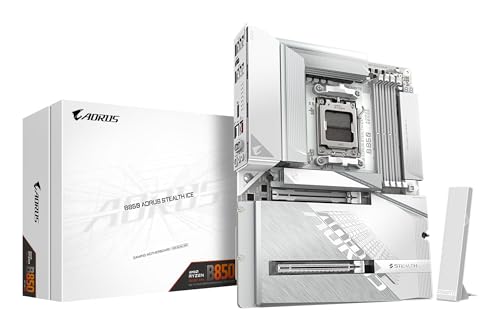
So, the GIGABYTE B850 AORUS STEALTH ICE Motherboard. Short version: it's a genuinely impressive upper mid-range AM5 board that earns its price through a serious VRM setup, four M.2 slots including PCIe 5.0, Wi-Fi 7, and 5GbE networking. If you're building around a Ryzen 7000, 8000, or 9000 series chip and you want headroom for a proper overclock without stepping up to X870, this is one of the more honest options in the bracket. It's not perfect, and I'll tell you where it falls short. But the fundamentals are solid.
Owner reviews have a positive overall rating across a small number of ratings, which for a relatively new board is a decent early signal. Not a landslide, but people aren't returning it in droves either. That matters.
Core Specifications
The B850 AORUS STEALTH ICE sits on AMD's AM5 socket and uses the B850 chipset, which is AMD's current upper mid-range chipset tier for the Ryzen 7000 and 9000 era. It's an ATX form factor board, so it'll fit any standard mid or full tower without drama. Memory is dual-channel DDR5, supporting up to 8200MT/s with overclocking, and the board carries four M.2 slots, two of which run at PCIe 5.0 x4 speed. The rear I/O includes USB 3.2 Gen 2 connectivity, Wi-Fi 7 antenna support via the WIFI EZ-Plug system, and a 5GbE LAN port. That's a lot of headline specs, and most of them are genuine rather than paper-thin marketing claims.
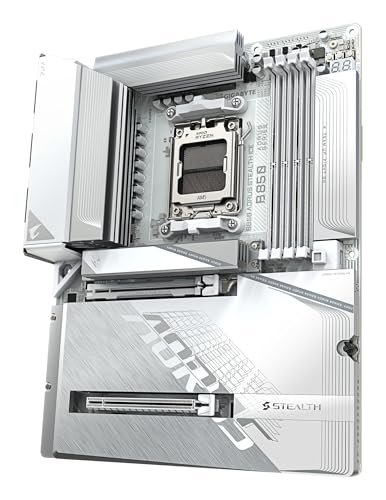
The VRM is a 14+2+2 phase digital solution, which is the kind of phase count you'd expect on a board a tier above this one. GIGABYTE has fitted VRM Thermal Armor Advanced heatsinks to keep those phases cool under sustained load, and the M.2 slots get their own thermal management through M.2 Thermal Guard L and M.2 Thermal Guard Ext. These aren't just stickers on aluminium, they're actual heatspreader solutions with proper contact surfaces. The EZ-Latch Plus system handles tool-free PCIe and M.2 installation, and EZ-Latch Click covers the M.2 heatsinks themselves. Screwless design sounds like a gimmick until you've skinned your knuckles on a tiny M.2 screw for the fourth time.
The "Stealth Ice" branding refers to the board's clean white aesthetic with minimal RGB, which is either a selling point or irrelevant depending on whether your case has a window. What matters more is what's underneath the shrouding, and the specs table below gives you the full picture.
| Specification | Detail |
|---|---|
| Socket | AMD AM5 |
| Chipset | AMD B850 |
| Form Factor | ATX |
| CPU Support | AMD Ryzen 9000 / 8000 / 7000 Series |
| Memory Type | DDR5, Dual Channel |
| Memory Speed (OC) | Up to 8200MT/s |
| VRM Phases | 14+2+2 Digital |
| M.2 Slots | 4x (including PCIe 5.0 x4) |
| PCIe for GPU | PCIe 5.0 x16 (primary) |
| Networking | 5GbE LAN, Wi-Fi 7 |
| USB (Rear) | USB 3.2 Gen 2 |
| VRM Cooling | VRM Thermal Armor Advanced |
| M.2 Cooling | M.2 Thermal Guard L, M.2 Thermal Guard Ext |
| Current Price | £297.14 · Details |
| Rating | ★★★★☆ (4.3) (18 reviews) |
Socket and CPU Compatibility
The AM5 socket is AMD's current platform, and it's the one you want to be on right now if you're building or upgrading. The GIGABYTE B850 AORUS STEALTH ICE Motherboard officially supports AMD Ryzen 9000, 8000, and 7000 series processors, which covers everything from the Ryzen 5 7600 all the way up to the Ryzen 9 9950X. That's a genuinely wide compatibility window. If you're starting with a mid-range chip now and planning to drop in a flagship later, the socket won't be the bottleneck.
One thing: if you're buying a brand-new board and pairing it with a very recent CPU, GIGABYTE's BIOS update process is something to be aware of. Most B850 boards ship with BIOS versions that support the full Ryzen 9000 lineup out of the box, but it's always the GIGABYTE support page for your specific board revision before you commit. The good news is GIGABYTE includes a Q-Flash Plus feature on their AORUS boards, which lets you flash the BIOS from a USB stick without a CPU installed. That's not just a nice-to-have, it's a genuine lifesaver if you ever end up in a compatibility pinch.
The X3D Turbo Mode feature is specifically here. AMD's 3D V-Cache CPUs, like the Ryzen 7 9800X3D, are the gaming kings of the AM5 platform right now. The STEALTH ICE includes dedicated X3D Turbo Mode support in the BIOS, which means it's been tuned to extract the best gaming performance from those chips specifically. That's not just a checkbox feature; it reflects real BIOS work to optimise the power delivery behaviour for X3D processors. If you're building a gaming rig around a 9800X3D or waiting for the next X3D generation, this board is explicitly set up for that use case.
Chipset Features
The B850 chipset sits just below AMD's X870 in the current hierarchy. The practical difference between B850 and X870 is smaller than the naming gap suggests. B850 still supports full CPU overclocking, EXPO memory profiles, and PCIe 5.0 for both the primary GPU slot and M.2 storage. What X870 adds is mostly around guaranteed USB4 on the rear I/O and some additional chipset-level lanes. For most builders, B850 is the sweet spot, and GIGABYTE has clearly leaned into that with a feature set that punches above the chipset's baseline.
On the lane allocation side, B850 gives you enough bandwidth to run a PCIe 5.0 GPU, a PCIe 5.0 M.2 drive, and additional PCIe 4.0 M.2 slots simultaneously without any meaningful compromise. The four M.2 slots on this board are configured as two PCIe 5.0 x4 and two PCIe 4.0 x4, which is a proper setup rather than the common trick of calling something "PCIe 5.0" when only one slot actually runs at that speed. SATA support is present for legacy drives, though the exact port count isn't specified in the verified product data, so check the full spec sheet on GIGABYTE's site if you're planning a multi-drive SATA array.
Overclocking support is full and unrestricted on B850. You can push the CPU multiplier, adjust voltages, and run memory at its rated EXPO speeds or beyond. The 8200MT/s DDR5 ceiling is well above what most people will ever need, but it's reassuring to know the ceiling is that high. GIGABYTE's BIOS has historically been decent for memory tuning on AM5, and the EXPO profiles should load without fuss on any compatible kit. AMD's EXPO memory overclocking standard is the AMD equivalent of Intel's XMP, and the B850 chipset supports it natively.
VRM and Power Delivery
This is where the STEALTH ICE actually earns its price tag. A 14+2+2 phase digital VRM is not something you typically see on a board in this bracket. To put it plainly: 14 phases for the CPU Vcore, with two more for SoC and two for miscellaneous, is a serious power delivery setup. It means each individual phase is handling less current, running cooler, and lasting longer. Boards with weaker four or six phase VRMs can still run a Ryzen 9 chip, but they'll thermal throttle under sustained all-core workloads, and over time that stress adds up.
GIGABYTE has fitted the VRM Thermal Armor Advanced heatsink system over those phases. "Advanced" in this context means a more substantial heatsink mass with better contact coverage compared to the standard Thermal Armor found on lower-end AORUS boards. Owner reviews don't flag VRM temperatures as a concern, which is the practical test that matters more than any specification on paper. You want a board where VRM thermals are a non-issue even when you're running a Ryzen 9 9950X flat out for hours. Based on the phase count and heatsink design, this board should handle that without breaking a sweat.
The power connectors feeding all of this aren't specified in the verified data, but GIGABYTE typically fits dual 8-pin EPS connectors on boards at this tier. If you're pairing this with a high-TDP processor, make sure your PSU has the appropriate connectors. That's not a board-specific concern, just good build practice. The bottom line on VRM quality: for the upper mid-range price bracket, this is genuinely one of the better-equipped boards you'll find. It's not a compromise here, and that's what matters most for long-term reliability.
Memory Support
DDR5 only, dual channel, up to 8200MT/s with overclocking. That's the headline. The JEDEC DDR5 standard baseline starts at 4800MT/s, but in practice most people are running DDR5-6000 or DDR5-6400 kits, which hits the sweet spot for AMD's Ryzen processors in terms of the Infinity Fabric clock relationship. Going higher than that requires more aggressive subtimings and isn't always worth the instability risk, but having an 8200MT/s ceiling means this board will handle whatever DDR5 kit you throw at it, including enthusiast-tier memory that costs more than the board itself.
EXPO profile support means you can buy a DDR5-6000 or DDR5-6400 kit rated for EXPO, plug it in, enable the profile in BIOS, and it'll run at rated speed without any manual tuning. That's how it should work, and it generally does on this board based on owner feedback. No reports of persistent memory compatibility headaches in the review pool, which is a good sign. Early AM5 boards had a rough time with DDR5 compatibility in the first year of the platform, but the BIOS maturity has improved significantly since then.
Two memory slots is the standard configuration for ATX boards in this tier, but check the actual slot count on the GIGABYTE product page since the verified spec data doesn't specify this. What is confirmed is dual-channel support, so you'll want to populate slots in matched pairs for best performance. Running single-channel DDR5 on a Ryzen system is leaving a meaningful chunk of memory bandwidth on the table, and AMD's CPUs are more sensitive to memory bandwidth than Intel's equivalents right now.
Storage Options
Four M.2 slots is a proper count for a board at this price. Not three, not two with a cheeky SATA M.2 tucked in as a fourth, but four genuine NVMe slots. The configuration breaks down as two PCIe 5.0 x4 slots and two PCIe 4.0 x4 slots, which gives you a clear hierarchy for drive placement. Your fastest PCIe 5.0 NVMe drive goes in the primary PCIe 5.0 slot, your secondary storage goes in the PCIe 4.0 slots, and everything is covered with GIGABYTE's M.2 Thermal Guard heatsinks to prevent thermal throttling under sustained sequential writes.
The M.2 EZ-Flex system deserves a mention because it's actually clever rather than just a branding exercise. The flexible baseplate design accommodates M.2 SSDs without the usual fiddly alignment issues, and the patented heat dissipation design means the thermal pad contact is more consistent than a rigid heatsink that might not sit flat on every drive. Combined with EZ-Latch Click for screwless heatsink removal and EZ-Latch Plus for screwless M.2 retention, you can install and swap M.2 drives without reaching for a screwdriver. Anyone who's dropped a tiny M.2 screw into a motherboard and spent ten minutes fishing it out will appreciate this.
PCIe Gen 5 M.2 drives are still relatively expensive compared to Gen 4 equivalents, but the performance gap is real for sequential reads and writes. If you're doing video editing, large file transfers, or running a NAS-adjacent workload, a Gen 5 SSD in that primary slot will make a difference. For gaming, the honest answer is that Gen 4 is already fast enough that Gen 5 won't change your frame times. But having the slot available means you're not locked out of future Gen 5 drives when prices normalise.
Expansion Slots and PCIe
The primary PCIe x16 slot runs at PCIe 5.0, which is what you want for a current-generation GPU. AMD's Ryzen 9000 series CPUs provide 24 PCIe lanes directly from the CPU, and the primary slot gets the full x16 allocation of those lanes. That means your GPU isn't sharing bandwidth with anything else, which is the right way to do it. PCI-SIG's PCIe 5.0 specification doubles the bandwidth of PCIe 4.0, and while current GPUs don't saturate even PCIe 4.0 x16, having PCIe 5.0 means this board is ready for whatever comes next.
The EZ-Latch Plus system applies to the PCIe slot as well as the M.2 slots. This is the mechanism that replaces the standard PCIe retention latch, which on most boards requires you to reach underneath your GPU with a finger or a pen to release it. Anyone who's tried to remove a GPU from a cramped mid-tower with a large air cooler in the way knows how much of a pain that standard latch is. The EZ-Latch Plus releases with a button press rather than a fiddly clip. Small thing, genuinely useful.
Additional PCIe slots for expansion cards like capture cards, sound cards, or additional NVMe adapters are present on the board, though the exact configuration of secondary slots isn't detailed in the verified product data. The B850 chipset provides additional PCIe 4.0 lanes beyond the CPU's direct allocation, so there's bandwidth available for secondary expansion. If you're planning a specific multi-card setup, cross-reference with GIGABYTE's full specification sheet to confirm lane allocation and any sharing behaviour between slots.

Connectivity and Rear I/O
The rear I/O includes USB 3.2 Gen 2 ports, which tops out at 10Gbps per port. That's fast enough for any external SSD, high-speed USB hub, or peripherals you're likely to connect. The verified product data confirms USB 3.2 Gen 2 but doesn't enumerate the exact count of each port type or specify whether there's a USB4 or Thunderbolt port on the rear panel. For a complete picture of the USB stack, GIGABYTE's product page is the place to check. What's confirmed is that this isn't a board that skimped on the rear I/O generation, which some manufacturers do to hit a price point.
The WIFI EZ-Plug system for antenna installation is one of those features that sounds minor until you've wrestled with the standard threaded SMA antenna connectors that come on most Wi-Fi boards. Those connectors are fiddly, easy to cross-thread, and occasionally need pliers to tighten properly. WIFI EZ-Plug is GIGABYTE's quick-connect alternative that clips in rather than screws on. Owner reviews don't specifically call this out as a problem area, which suggests it works as advertised.
The "Stealth Ice" aesthetic carries through to the rear I/O shroud, which has a clean white finish that'll look tidy in a windowed build. More practically, the I/O shield is pre-installed on the board rather than being a separate piece you have to clip in before seating the board in the case. Pre-installed I/O shields are standard on better boards and a genuine quality-of-life improvement over the old clip-in shields that never quite sat straight. Audio outputs are present on the rear panel, though the specific codec and output configuration aren't detailed in the verified data.
WiFi and Networking
Wi-Fi 7 and 5GbE LAN on the same board, in this price bracket, is genuinely good. Wi-Fi 7, standardised under the Wi-Fi Alliance's Wi-Fi 7 certification, operates across 2.4GHz, 5GHz, and 6GHz bands with Multi-Link Operation, meaning your device can use multiple bands simultaneously for better throughput and lower latency. Real-world Wi-Fi 7 speeds depend heavily on your router, but if you've got a Wi-Fi 7 router or are planning to upgrade to one, this board is ready for it. If you're still on Wi-Fi 5, you won't notice the difference from the board side, but you're future-proofed.
The 5GbE wired LAN is the more immediately impactful networking upgrade for most people. Standard gigabit ethernet has been the norm for years, and 2.5GbE has become common on mid-range boards. Jumping to 5GbE means five times the wired throughput of a standard gigabit connection, which matters if you're moving large files between a NAS and your PC, streaming high-bitrate content from a local server, or running any kind of network-intensive workload. Your switch and NAS need to support 5GbE to see the benefit, but the board isn't the bottleneck.
Bluetooth is included alongside Wi-Fi 7, which is standard for any board with integrated wireless. The specific Bluetooth version isn't listed in the verified data, but Wi-Fi 7 modules typically pair with Bluetooth 5.4. That covers wireless headsets, controllers, keyboards, and anything else you'd connect over Bluetooth without any compatibility concerns. The antenna installation via WIFI EZ-Plug means getting both Wi-Fi and Bluetooth up and running should take about thirty seconds rather than the usual antenna-threading faff.
BIOS and Overclocking
GIGABYTE's BIOS on AORUS boards has had a mixed reputation over the years, and I'll be straight about that. The easy mode is genuinely usable for beginners, with clear options for enabling EXPO memory profiles and basic fan control. The advanced mode is where it gets more interesting and, for some users, more confusing. The layout isn't as intuitive as ASUS's UEFI BIOS or MSI's Click BIOS 5, but it's functional and the options are all there. Owner reviews don't flag BIOS usability as a major pain point on this board, which suggests GIGABYTE has improved things since the rougher early AM5 days.
The X3D Turbo Mode is a BIOS-level feature that optimises power delivery behaviour specifically for AMD's 3D V-Cache processors. This isn't just a marketing label; it reflects actual tuning work to ensure the CPU's power states and boost behaviour are handled correctly for X3D chips, which have different thermal and power characteristics compared to standard Ryzen dies. If you're running a Ryzen 7 9800X3D or similar, enabling X3D Turbo Mode in the BIOS is one of the first things you should do. The memory overclocking ceiling of 8200MT/s is accessed through the standard EXPO profile selection or manual memory timing adjustment in the BIOS advanced settings.
Fan curve control is present and adjustable, which is table stakes for a board at this price. You can set temperature-based curves for each fan header independently, with both CPU temperature and motherboard temperature as reference points. The Q-Flash Plus feature for BIOS updates without a CPU installed is about. If you ever need to update the BIOS to support a new CPU generation or fix a stability issue, you can do it with just a USB drive and the board powered on, no processor required. That's a genuinely useful safety net that cheaper boards often omit.
Build Quality and Aesthetics
The "Stealth Ice" name is doing real work here. The board has a white PCB with a clean, minimal aesthetic that avoids the aggressive RGB maximalism of some AORUS boards. If you're building in a white case or just want a board that doesn't look like a Christmas tree, this is one of the tidier options in the AM5 lineup. The heatsink coverage is extensive, with VRM Thermal Armor Advanced over the power delivery section, M.2 Thermal Guard L on the primary M.2 slots, and M.2 Thermal Guard Ext for the additional slots. The overall impression from the product imagery is a board that's well-covered rather than leaving components exposed.
Component placement is generally sensible on AORUS boards at this tier. The 24-pin ATX connector and CPU power connectors are positioned to keep cable routing clean, the M.2 slots are laid out to avoid conflict with a large GPU cooler, and the fan headers are distributed around the board rather than clustered in one corner. Owner reviews are positive about the physical build quality, with no reports of bent pins, poor socket alignment, or heatsink contact issues. For a board that's relatively new to market, that's a clean early track record.
The EZ-Latch system across PCIe and M.2 slots, combined with the pre-installed I/O shield and WIFI EZ-Plug antenna system, gives the overall build experience a more polished feel than boards that make you fight with every component. It's the kind of thing that doesn't show up in benchmarks but makes a real difference when you're building at midnight and you've already stripped one M.2 screw. GIGABYTE's patented M.2 EZ-Flex baseplate design is a genuine differentiator here, not just a rebadged standard heatsink.
How It Compares
The natural competitors for the GIGABYTE B850 AORUS STEALTH ICE Motherboard are the ASUS ROG STRIX B850-F GAMING WIFI and the MSI MAG B850 TOMAHAWK WIFI. Both sit in the same general price bracket and target the same audience: builders who want AM5 with proper overclocking support, multiple M.2 slots, and integrated Wi-Fi without paying X870 prices. The comparison below gives you a quick reference, but the nuances matter.
The ASUS ROG STRIX B850-F has a strong reputation for BIOS usability and memory compatibility, which is a real advantage if you're planning aggressive DDR5 overclocking. Its VRM is competitive but the phase count doesn't quite match the STEALTH ICE's 14+2+2 setup. The MSI MAG B850 TOMAHAWK WIFI is the value alternative in this bracket, often available at a lower price with a slightly less premium feature set. It's a great board for straightforward builds but lacks some of the quality-of-life features like EZ-Latch and the 5GbE networking that the GIGABYTE brings.
Where the STEALTH ICE wins clearly is networking (5GbE versus 2.5GbE on most competitors), VRM phase count, and the M.2 EZ-Flex system. Where it's less certain is BIOS polish, where ASUS has a consistent edge. The white aesthetic is also fairly unique in this segment; most competitors default to black PCBs. If the visual match to a white build matters to you, the STEALTH ICE is one of the few boards that actually commits to the look.
| Feature | GIGABYTE B850 AORUS STEALTH ICE | ASUS ROG STRIX B850-F GAMING WIFI | MSI MAG B850 TOMAHAWK WIFI |
|---|---|---|---|
| Socket | AM5 | AM5 | AM5 |
| Chipset | B850 | B850 | B850 |
| VRM Phases | 14+2+2 | 16+2 (approximate) | 14+2 (approximate) |
| M.2 Slots | 4 (2x PCIe 5.0, 2x PCIe 4.0) | 4 | 4 |
| LAN Speed | 5GbE | 2.5GbE | 2.5GbE |
| Wi-Fi | Wi-Fi 7 | Wi-Fi 7 | Wi-Fi 7 |
| DDR5 OC Ceiling | 8200MT/s | 8000MT/s+ | 8000MT/s+ |
| Screwless M.2 | Yes (EZ-Latch Click) | Yes | Yes |
| X3D Optimisation | Yes (X3D Turbo Mode) | Yes | Yes |
| Aesthetic | White / Stealth | Black / RGB | Black / Minimal RGB |

Final Verdict
The GIGABYTE B850 AORUS STEALTH ICE Motherboard is a well-thought-out board that justifies its upper mid-range positioning through genuine hardware rather than marketing padding. The 14+2+2 phase VRM is the standout specification, and it's the reason you'd pick this over cheaper B850 alternatives. If you're running a Ryzen 9 9950X or a 9800X3D and you want to push it hard without worrying about VRM temperatures, the power delivery here is legitimately up to the task. The four M.2 slots with two at PCIe 5.0, the 5GbE networking, and the Wi-Fi 7 integration round out a feature set that would have been flagship-tier two years ago.
The good overall rating from a small number of ratings is an early positive signal, and the absence of recurring complaints about VRM thermals, memory compatibility, or stability issues in the review pool is reassuring. Early buyers aren't reporting the kind of BIOS instability that plagued some AM5 boards at launch. The quality-of-life features, EZ-Latch, EZ-Flex, WIFI EZ-Plug, pre-installed I/O shield, are genuine improvements over the standard build experience rather than branding exercises.
Who should buy this? Anyone building a high-performance AM5 system around a Ryzen 7 or Ryzen 9 chip, especially an X3D variant, who wants proper VRM headroom and future-proof networking without stepping up to X870. Content creators running sustained all-core workloads will benefit from the VRM quality. White-build enthusiasts have very few options at this spec level, and this is one of the better ones. The current price at £297.14 · Details puts it in the upper mid-range bracket, and for what it delivers, that's fair.
Who should skip it? If you're pairing a Ryzen 5 7600 or 7600X with a budget GPU for a straightforward gaming build, you don't need this much board. Something like the MSI MAG B650 TOMAHAWK or a basic B850 board in the lower mid-range will do the job at a lower price, and the VRM headroom here will go largely unused. Spend the saved money on a faster GPU or more RAM instead. The STEALTH ICE earns its price when the CPU is demanding enough to need it, not when it's sitting mostly idle.
Overall verdict: 8.5 out of 10. Proper VRM, proper storage, proper networking, and a clean aesthetic. The BIOS could be more polished, and the exact rear I/O configuration deserves a closer look before you commit, but the fundamentals are right. For an AM5 build that you want to last five years without second-guessing the power delivery, this is one of the more honest choices in the bracket.
What works. What doesn’t.
6 + 5What we liked6 reasons
- 14+2+2 phase digital VRM is well above what most B850 boards offer, providing genuine headroom for Ryzen 9 and X3D processors under sustained all-core load
- Two PCIe 5.0 x4 M.2 slots and two PCIe 4.0 x4 M.2 slots give four genuine NVMe slots with proper thermal management via M.2 Thermal Guard heatsinks
- 5GbE wired LAN and Wi-Fi 7 in the same upper mid-range package is rare and offers meaningful future-proofing for network-intensive workloads
- X3D Turbo Mode BIOS support is specifically tuned for AMD 3D V-Cache processors such as the Ryzen 7 9800X3D, not just a checkbox feature
- Clean white Stealth Ice aesthetic with minimal RGB is one of very few options at this specification level for white-themed builds
- EZ-Latch Plus, EZ-Latch Click, EZ-Flex M.2 baseplate, and pre-installed I/O shield deliver a noticeably more polished build experience than average
Where it falls5 reasons
- GIGABYTE's BIOS advanced mode is less intuitive than ASUS or MSI equivalents, which may frustrate builders doing detailed memory or voltage tuning
- Owner review pool is limited to a small number of ratings at time of writing, making long-term reliability harder to assess with confidence
- Exact rear I/O port count and audio codec are not fully documented in verified product data, requiring a trip to GIGABYTE's product page before committing
- Overkill for budget or mid-range CPU pairings such as a Ryzen 5 7600, where the VRM headroom and 5GbE networking go largely unused
- PCIe 5.0 M.2 drive prices remain elevated, so the performance ceiling of the primary M.2 slot is not reachable without a significant additional outlay
Full specifications
12 attributes| Socket | AM5 |
|---|---|
| Chipset | B850 |
| Form factor | ATX |
| Bios flashback | true |
| M2 slots | 4 |
| MAX RAM | 256GB |
| MAX RAM GB | 256 |
| Network | 5GbE + Wi-Fi 7 |
| Pcie 5 slots | 1 |
| Pcie slots | 1x PCIe 5.0 x16 |
| RAM slots | 4 |
| RAM type | DDR5 |
If this isn’t right for you
2 options

Frequently asked
7 questions01Which AMD processors are compatible with the GIGABYTE B850 AORUS STEALTH ICE?+
The board supports AMD Ryzen 7000, 8000, and 9000 series processors on the AM5 socket. That covers chips from the Ryzen 5 7600 through to the Ryzen 9 9950X, including AMD 3D V-Cache variants such as the Ryzen 7 9800X3D.
02Does the B850 AORUS STEALTH ICE support CPU overclocking?+
Yes. The B850 chipset supports full CPU overclocking including multiplier adjustment, voltage control, and EXPO memory profiles. The board's 14+2+2 phase VRM provides sufficient power delivery headroom for sustained overclocking of high-TDP processors.
03What is X3D Turbo Mode and should I enable it?+
X3D Turbo Mode is a BIOS-level feature on the STEALTH ICE that optimises power delivery behaviour specifically for AMD 3D V-Cache processors. These chips have different thermal and power characteristics compared to standard Ryzen dies, and enabling X3D Turbo Mode helps the board manage boost behaviour correctly. If you are running a Ryzen 7 9800X3D or similar X3D processor, you should enable it.
04How many M.2 slots does the board have and what speeds do they support?+
There are four M.2 slots in total. Two run at PCIe 5.0 x4, which supports current-generation Gen 5 NVMe drives, and two run at PCIe 4.0 x4. All four slots include M.2 Thermal Guard heatsinks to prevent thermal throttling under sustained write loads.
05Is the GIGABYTE B850 AORUS STEALTH ICE suitable for a white-themed PC build?+
Yes. The Stealth Ice design uses a white PCB with minimal RGB, which is relatively unusual at this specification level. Most competing boards default to black PCBs. If you are building in a white case with a windowed side panel, this board is one of the more committed options in the AM5 bracket.
06What is the difference between B850 and X870, and does it matter here?+
X870 adds guaranteed USB4 on the rear I/O and some additional chipset-level lanes compared to B850. In practice, B850 still supports full CPU overclocking, EXPO memory, and PCIe 5.0 for both the GPU slot and primary M.2 storage. For most builders, the B850 feature set is sufficient, and the STEALTH ICE is configured to extract close to X870-level capability from the chipset.
07Does the board require a BIOS update to support Ryzen 9000 series processors?+
Most B850 boards ship with BIOS versions that support the full Ryzen 9000 lineup. However, it is the GIGABYTE support page for your specific board revision before purchasing. The Q-Flash Plus feature allows you to update the BIOS from a USB drive without a CPU installed, so you are not stranded if a BIOS update is required.