
Choosing the best motherboards for AMD Ryzen 9 7950X processor is one of the most important decisions in your build. This 16-core, 32-thread beast draws 170W at stock and needs a board that can actually handle it without throttling. Get the pairing wrong and you're leaving serious performance on the table. Get it right and you've got a workstation or gaming rig that'll run flat out for years. We've compared 8 AM5 boards across every budget to help you find the right match.
Key Takeaways
- The Ryzen 9 7950X uses the AM5 socket and requires a DDR5 motherboard. B650, X670 and X670E chipsets all work, but X670E gives the most headroom.
- VRM quality matters a lot with a 170W CPU. Look for at least 12 power stages and 80A or higher rated MOSFETs to avoid throttling under sustained load.
- The ASUS ROG Strix B650E-F is our top overall pick, offering PCIe 5.0, three M.2 slots and WiFi 6E at a price that makes sense for most builders.
- If budget is tight, the MSI MAG B650 TOMAHAWK WIFI delivers solid VRM quality and essential features without overspending on chipset features you may not need.
- The MSI MEG X670E ACE is the go-to for professionals and enthusiasts who need maximum connectivity, 10G LAN and triple PCIe 5.0 x16 slots.
| Product | Chipset | Power Stages | Price | Rating |
|---|---|---|---|---|
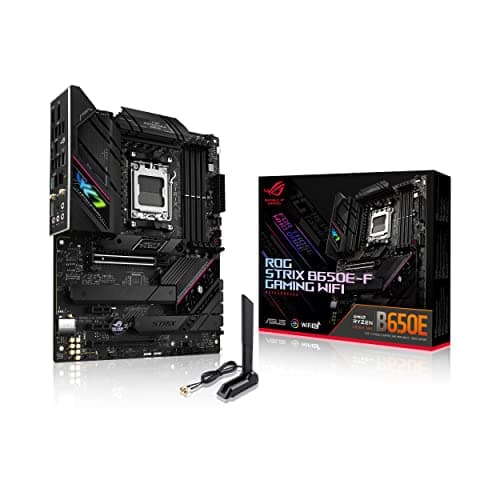
| ASUS ROG Strix B650E-F Gaming WiFi AMD Ryzen AM5 ATX motherboard, 12 + 2 power stages, DDR5, three M.2 slots, PCIe 5.0, WiFi 6E, 2.5G LAN, USB 3.2 Gen 2x2 Type-C port, and Aura Sync RGB | B650E | 12+2 | £201.46 · Details | ★★★★☆ (4.3) |
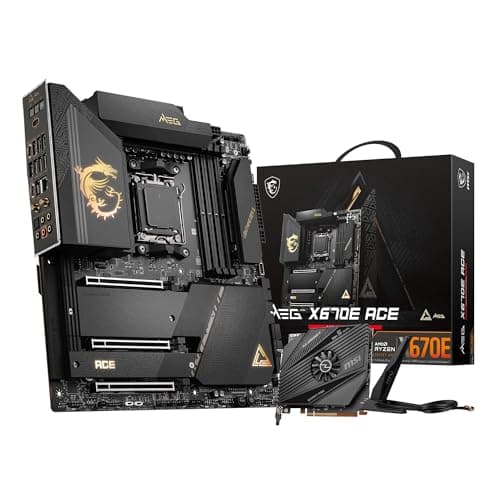
| MSI MEG X670E ACE Motherboard, E-ATX - Support AMD Ryzen 9000 Series Processors, AM5 - 22 Duet Rail 90A Power Stage, DDR5 Memory Boost 6666+MHz/OC, 3 x PCIe 5.0 x16, M.2 Gen5, 10G LAN, Wi-Fi 6E | X670E | 22 | Check price | ★★★★☆ (4.1) |
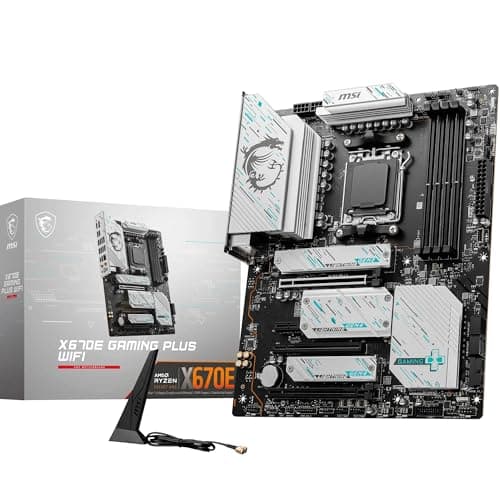
| MSI X670E GAMING PLUS WIFI Motherboard, ATX - Supports AMD Ryzen 9000/8000 / 7000 Series Processors, AM5-80A SPS VRM, DDR5 Memory Boost 7800+ MHz/OC, PCIe 5.0 x16, M.2 Gen5, Wi-Fi 6E | X670E | 80A SPS VRM | Check price | ★★★★☆ (4.4) |
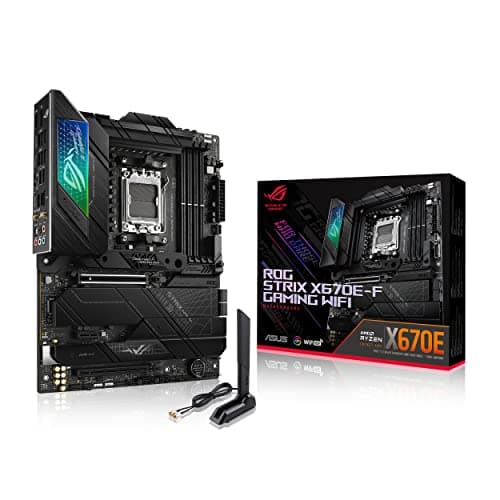
| ASUS ROG Strix X670E-F Gaming WiFi AMD Ryzen AM5 ATX motherboard, 16 + 2 power stages, DDR5 support, four M.2 slots with heatsinks, USB 3.2 Gen 2x2, PCIe 5.0, WiFi 6E, AI Cooling II, and Aura Sync | X670E | 16+2 | £564.40 · Details | ★★★★☆ (4.1) |
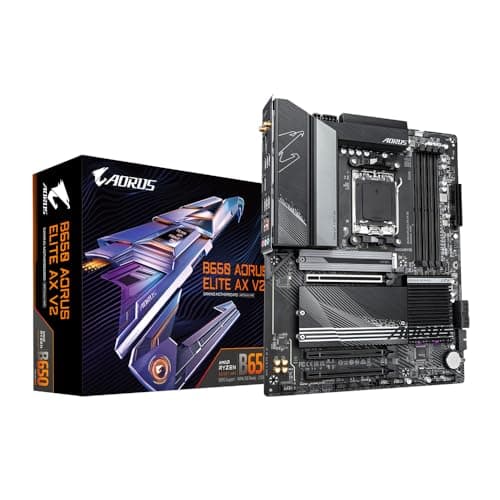
| Gigabyte B650 AORUS ELITE AX V2 Motherboard - Supports AMD AM5 CPUs, 12+2+2 Phases Digital VRM, up to 8000MHz DDR5 (OC), 1xPCIe 5.0 + 2xPCIe 4.0 M.2, Wi-Fi 6E, 2.5GbE LAN, USB 3.2 Gen 2 | B650 | 12+2+2 | Check price | ★★★★½ (4.5) |
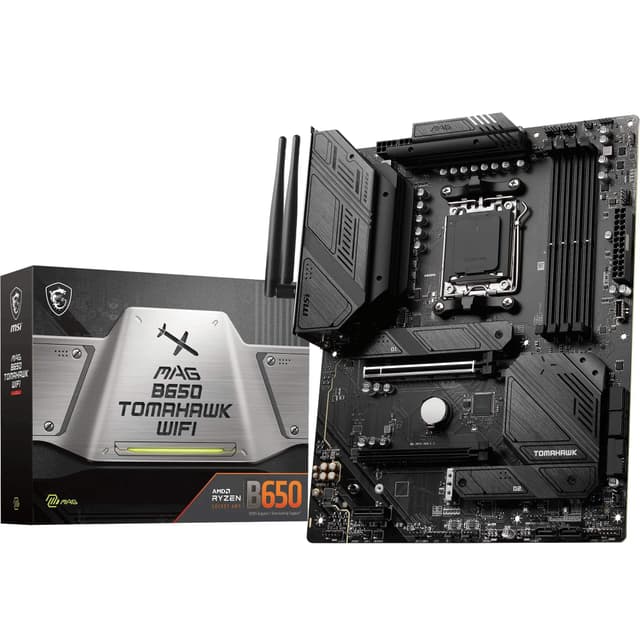
| MSI MAG B650 TOMAHAWK WIFI Motherboard, ATX - Supports AMD Ryzen 9000 Series Processors, AM5-14 Duet Rail 80A VRM, DDR5 Memory Boost 6400+MHz/OC, 2 x PCIe 4.0 x16, 3 x M.2 Gen4, Wi-Fi 6E | B650 | 14 | Not priced | ★★★★½ (4.6) |
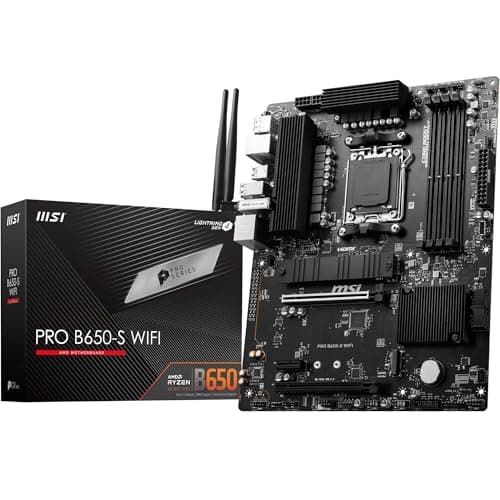
| MSI PRO B650-S WIFI Motherboard, ATX - Supports AMD Ryzen 9000/8000 / 7000 Series Processors, AM5 - DDR5 Memory Boost 6000+MHz/OC, 2 x PCIe 4.0 x16, 2 x M.2 Gen4, Wi-Fi 6E | B650 | N/A | £186.07 · Details | ★★★★☆ (4.4) |
| Asus PRIME B650-PLUS WIFI, AMD B650, AM5, ATX, 4 DDR5, HDMI, DP, Wi-Fi 6E, 2.5G LAN, 2x M.2 | B650 | N/A | Check price | ★★★★☆ (4.1) |
Check Today's Prices
Amazon UK prices update frequently. Click below to see live prices for our recommended products.
Check ASUS ROG Strix B650E-F Gaming WiFi AMD Ryzen AM5 ATX motherboard, 12 + 2 power stages, DDR5, three M.2 slots, PCIe 5.0, WiFi 6E, 2.5G LAN, USB 3.2 Gen 2x2 Type-C port, and Aura Sync RGB Price Check MSI MEG X670E ACE Motherboard, E-ATX - Support AMD Ryzen 9000 Series Processors, AM5 - 22 Duet Rail 90A Power Stage, DDR5 Memory Boost 6666+MHz/OC, 3 x PCIe 5.0 x16, M.2 Gen5, 10G LAN, Wi-Fi 6E Price Check availabilityCompatibility Guide: Best Motherboards for AMD Ryzen 9 7950X Processor
The Ryzen 9 7950X uses AMD's AM5 socket, which is only found on 600-series motherboards. That means B650, B650E, X670 and X670E chipsets. No AM4 boards will work here, so if you're upgrading from an older Ryzen system, you'll need a new board regardless.
Here's the chipset breakdown in plain terms:
| Chipset | PCIe 5.0 GPU | PCIe 5.0 M.2 | CPU Overclocking | Form Factor |
|---|---|---|---|---|
| X670E | Yes (guaranteed) | Yes (guaranteed) | Full | ATX / E-ATX |
| X670 | Yes (varies) | Yes (varies) | Full | ATX |
| B650E | Yes (guaranteed) | Yes (at least one) | Full | ATX / mATX |
| B650 | No | Varies | Full | ATX / mATX / ITX |
So why would you pick B650 for a flagship CPU? Honestly, because it's cheaper and most people don't need PCIe 5.0 on the GPU slot right now. If you're building compact, B650 is also the only chipset available on mini-ITX motherboards. The 7950X runs perfectly well on B650 as long as the VRM is up to scratch. And that's the key thing to check.
VRM quality is non-negotiable with this chip. The 7950X has a 170W TDP and can spike well above that under all-core loads. A board with weak power delivery will throttle the CPU to protect itself, and you'll never see the performance you paid for. Look for boards with 12 or more power stages and MOSFETs rated at 60A or above. The X670E boards in this guide all comfortably exceed that.
Memory is DDR5 only on AM5. There's no DDR4 option. Most boards in this guide support EXPO profiles (AMD's equivalent of XMP) to get your RAM running at rated speeds without manual tweaking. Aim for DDR5-6000 if you want the sweet spot between bandwidth and latency for Ryzen 7000 series chips.
For connectivity, check how many M.2 slots you need. If you're running multiple NVMe drives for video editing or large project files, you'll want at least three M.2 slots. USB 3.2 Gen 2x2 Type-C on the rear panel is a nice bonus for fast external storage. WiFi 6E is standard across most boards here, which is proper decent for a modern build.
One more thing: the 7950X doesn't include a cooler. Budget for a serious thermal solution. A 360mm AIO or a high-end tower cooler like a Noctua NH-D15 is the minimum you should consider.
Who Should Buy What
For Gamers
Priority: PCIe 5.0 support, solid VRM, WiFi 6E, good value
Recommended: ASUS ROG Strix B650E-F Gaming WiFi
For Creators
Priority: Maximum connectivity, 10G LAN, triple PCIe 5.0, premium VRM
Recommended: MSI MEG X670E ACE
Budget Builders
Priority: Capable VRM, essential features, lower spend
Recommended: MSI MAG B650 TOMAHAWK WIFI, see our guide to MSI motherboards for more budget-friendly options
ASUS ROG Strix B650E-F Gaming WiFi AMD Ryzen AM5 ATX motherboard, 12 + 2 power stages, DDR5, three M.2 slots, PCIe 5.0, WiFi 6E, 2.5G LAN, USB 3.2 Gen 2x2 Type-C port, and Aura Sync RGB - Best Overall

The ASUS ROG Strix B650E-F is the sweet spot for most Ryzen 9 7950X builds. It uses the B650E chipset, which guarantees PCIe 5.0 on the primary GPU slot and at least one M.2 slot, giving you future-proofing without the X670E price tag. The 12+2 power stage design handles the 7950X's 170W TDP without complaint, and the three M.2 slots cover most storage setups. WiFi 6E, 2.5G LAN and the USB 3.2 Gen 2x2 Type-C rear port round out a very complete package. Aura Sync RGB is there if you want it, easy to ignore if you don't.
Pros
- PCIe 5.0 on GPU slot and M.2 via B650E chipset
- Solid 12+2 power stages for the 7950X's 170W TDP
- Three M.2 slots with heatsinks included
Cons
- Fewer PCIe lanes than X670E boards
- No 10G LAN at this price point
MSI MEG X670E ACE Motherboard, E-ATX - Support AMD Ryzen 9000 Series Processors, AM5 - 22 Duet Rail 90A Power Stage, DDR5 Memory Boost 6666+MHz/OC, 3 x PCIe 5.0 x16, M.2 Gen5, 10G LAN, Wi-Fi 6E - Premium Pick

This is the no-compromise option. The MSI MEG X670E ACE is an E-ATX board with a 22-phase Duet Rail VRM running 90A MOSFETs. That's proper overkill for the 7950X, which is exactly what you want in a workstation build where sustained all-core loads are the norm. Three PCIe 5.0 x16 slots, M.2 Gen5 storage, 10G LAN and Wi-Fi 6E make this a connectivity powerhouse. DDR5 support up to 6666MHz and beyond via OC profiles. It's expensive. But if you're buying a flagship CPU, this board does it justice.
Pros
- 22-phase 90A VRM, absolutely no throttling concerns
- Triple PCIe 5.0 x16 slots for multi-GPU or add-in cards
- 10G LAN for high-speed network attached storage workflows
Cons
- Very high price, overkill for gaming-only builds
- E-ATX form factor needs a large case
MSI X670E GAMING PLUS WIFI Motherboard, ATX - Supports AMD Ryzen 9000/8000 / 7000 Series Processors, AM5-80A SPS VRM, DDR5 Memory Boost 7800+ MHz/OC, PCIe 5.0 x16, M.2 Gen5, Wi-Fi 6E - Best Value

The MSI X670E GAMING PLUS WIFI punches well above its price bracket. You get a proper X670E chipset with PCIe 5.0 on the primary GPU slot and M.2 Gen5 support, plus an 80A SPS VRM that's more than adequate for the 7950X. The DDR5 support tops out at 7800MHz via OC, which is impressive at this price. Wi-Fi 6E is included, and the overall build quality feels solid. It's not as flashy as the ROG boards but it's a genuinely sensible choice if you want X670E features without paying X670E flagship prices.
Pros
- Full X670E chipset at a more accessible price
- M.2 Gen5 slot for fastest NVMe drives
- DDR5 up to 7800MHz OC, excellent memory headroom
Cons
- Less premium aesthetic compared to ROG or MEG boards
- Fewer M.2 slots than some competitors at similar prices
ASUS ROG Strix X670E-F Gaming WiFi AMD Ryzen AM5 ATX motherboard, 16 + 2 power stages, DDR5 support, four M.2 slots with heatsinks, USB 3.2 Gen 2x2, PCIe 5.0, WiFi 6E, AI Cooling II, and Aura Sync - Runner Up

Step up from the B650E-F and you get four M.2 slots, a beefier 16+2 power stage setup and the full X670E chipset. The AI Cooling II feature adjusts fan curves based on real-time thermal data, which is genuinely useful for a chip that can run warm under sustained all-core workloads. PCIe 5.0 on the GPU slot and M.2, WiFi 6E and Aura Sync RGB are all present. It's a proper high-end board. The price is higher than the B650E-F but you're getting meaningfully more, particularly if four M.2 slots matter to your workflow.
Pros
- Four M.2 slots with heatsinks, ideal for multi-drive setups
- 16+2 power stages for excellent sustained power delivery
- AI Cooling II for intelligent thermal management
Cons
- Significantly more expensive than the B650E-F
- No 10G LAN at this price, only 2.5G
Gigabyte B650 AORUS ELITE AX V2 Motherboard - Supports AMD AM5 CPUs, 12+2+2 Phases Digital VRM, up to 8000MHz DDR5 (OC), 1xPCIe 5.0 + 2xPCIe 4.0 M.2, Wi-Fi 6E, 2.5GbE LAN, USB 3.2 Gen 2

The Gigabyte B650 AORUS ELITE AX V2 is a solid mid-range option for builders who want Gigabyte's ecosystem without spending on X670E. The 12+2+2 phase VRM is decent for the 7950X at stock settings, though heavy overclockers might want something beefier. DDR5 support up to 8000MHz via OC is genuinely impressive for a B650 board. One PCIe 5.0 M.2 slot covers the fastest drives, with two PCIe 4.0 M.2 slots for additional storage. Wi-Fi 6E and 2.5GbE LAN are included. Good board, sensible price, no major complaints.
Pros
- DDR5 up to 8000MHz OC, excellent for a B650 board
- One PCIe 5.0 M.2 slot plus two PCIe 4.0 M.2 slots
- Good Gigabyte build quality and BIOS maturity
Cons
- B650 chipset means no PCIe 5.0 on the GPU slot
- VRM may struggle under sustained heavy overclocking
MSI MAG B650 TOMAHAWK WIFI Motherboard, ATX - Supports AMD Ryzen 9000 Series Processors, AM5-14 Duet Rail 80A VRM, DDR5 Memory Boost 6400+MHz/OC, 2 x PCIe 4.0 x16, 3 x M.2 Gen4, Wi-Fi 6E - Best Budget

The TOMAHAWK name has earned a proper reputation in the PC building community and for good reason. The MAG B650 TOMAHAWK WIFI gives you a 14-phase Duet Rail VRM with 80A MOSFETs, which is genuinely capable of running the 7950X at stock without thermal throttling. Three M.2 Gen4 slots cover most storage needs, and Wi-Fi 6E is included as standard. DDR5 support up to 6400MHz via OC. It's not flashy, but it's well sorted. If you want to put your money into the CPU and GPU rather than the motherboard, this is the one to pick.
Pros
- 14-phase 80A VRM handles the 7950X at stock comfortably
- Three M.2 Gen4 slots for good storage flexibility
- Competitive pricing for the feature set offered
Cons
- No PCIe 5.0 on GPU slot or M.2 on the B650 chipset
- DDR5 OC ceiling lower than X670E boards
MSI PRO B650-S WIFI Motherboard, ATX - Supports AMD Ryzen 9000/8000 / 7000 Series Processors, AM5 - DDR5 Memory Boost 6000+MHz/OC, 2 x PCIe 4.0 x16, 2 x M.2 Gen4, Wi-Fi 6E

The MSI PRO B650-S WIFI is the more stripped-back option in this lineup, aimed at builders who want a clean, professional look without RGB frills. It supports the full Ryzen 7000 series on AM5 and will run the 7950X at stock settings. Wi-Fi 6E is included, two M.2 Gen4 slots cover basic NVMe needs, and the dual PCIe 4.0 x16 slots give some flexibility. DDR5 OC support tops out at 6000MHz, which is on the lower side. It's a no-nonsense board. Not the first choice for a 7950X enthusiast build, but it works if you're on a strict budget.
Pros
- Clean, professional aesthetic with no RGB
- Wi-Fi 6E included as standard
- Broad Ryzen compatibility including 7000 series
Cons
- Only two M.2 Gen4 slots, limiting for multi-drive builds
- DDR5 OC ceiling of 6000MHz is modest compared to rivals
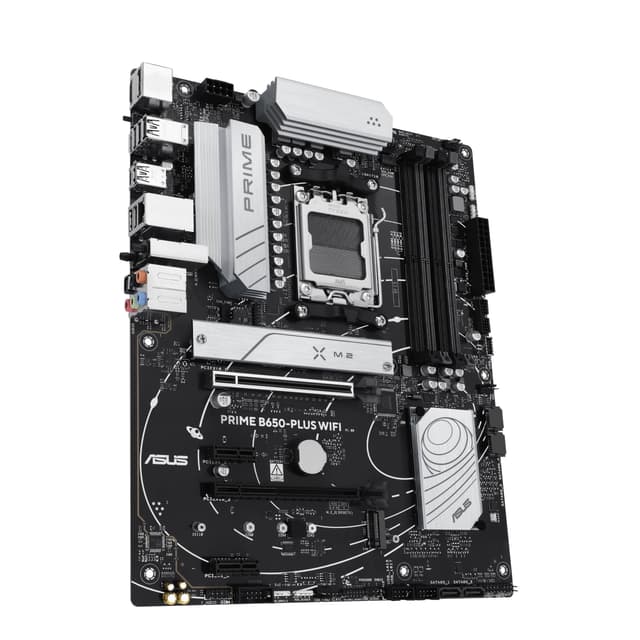
Asus PRIME B650-PLUS WIFI, AMD B650, AM5, ATX, 4 DDR5, HDMI, DP, Wi-Fi 6E, 2.5G LAN, 2x M.2

The ASUS PRIME B650-PLUS WIFI is the entry-level option in this guide. It's a straightforward B650 board with four DDR5 slots, HDMI and DisplayPort outputs (useful since the 7950X has integrated Radeon graphics), Wi-Fi 6E and 2.5G LAN. Two M.2 slots is the main limitation. For a 7950X, this board will work at stock settings but it's really designed for lower-TDP chips. That said, if you're building a budget workstation and plan to run the CPU within its stock power limits, it gets the job done. The PRIME series has always been reliable in ASUS's lineup.
Pros
- HDMI and DisplayPort outputs for iGPU use
- Wi-Fi 6E included at a low price point
- ASUS PRIME reliability and BIOS quality
Cons
- Only two M.2 slots, very limiting for storage-heavy builds
- VRM not ideal for sustained 170W loads from the 7950X
Understanding VRM and Why It Matters for the Ryzen 9 7950X
VRM stands for Voltage Regulator Module. It's the circuitry on your motherboard that converts the 12V power from your PSU into the precise lower voltages your CPU actually needs. Every motherboard has one. The quality of it varies enormously.
The Ryzen 9 7950X is a demanding chip. At stock, it draws 170W. Under all-core workloads like video rendering or 3D modelling, it can draw even more. A weak VRM will get hot under that kind of sustained load, and when VRM components overheat, the board throttles the CPU to protect itself. You lose performance. Sometimes a lot of it.
Here's what to look for. Phase count tells you how many individual power stages are delivering current to the CPU. More phases means each one handles less load, runs cooler and delivers cleaner power. For the 7950X, 12 phases is a reasonable minimum. The MSI MEG X670E ACE's 22-phase setup is proper overkill in the best possible way.
MOSFET amperage rating matters too. A stage rated at 90A can deliver more current before heating up than one rated at 60A. So a board with 12 phases at 90A is meaningfully better than one with 14 phases at 50A. Check both numbers if you can find them in the spec sheet.
For reference, AMD's official Ryzen 9 7950X product page lists the full power specifications. And Tom's Hardware is a solid resource for in-depth VRM testing methodology if you want to dig deeper into how boards handle sustained loads.
Bottom line: don't skimp on VRM quality when pairing a board with the 7950X. Every board in this guide is adequate at stock, but the X670E options give you genuine headroom for overclocking and sustained workloads.
Common Mistakes to Avoid
- Buying a B650 board with a weak VRM: Some cheaper B650 boards have power stages rated below 60A, which can cause throttling under the 7950X's sustained 170W draw.
Instead: Check the MOSFET amperage rating. Stick to boards with at least 60A per phase and 12 or more stages for the 7950X. - Ignoring cooler requirements: The 7950X has no bundled cooler and a 170W TDP. Many builders forget to budget for thermal solution.
Instead: Budget for a 280mm or 360mm AIO, or a high-end air cooler. Don't run this chip on a basic 120mm cooler. - Buying DDR4 RAM: The AM5 platform is DDR5 only. It's an easy mistake if you're upgrading from an AM4 system and already have DDR4 sticks.
Instead: Budget for DDR5 from the start. Aim for DDR5-6000 with EXPO support for the best Ryzen performance. - Overpaying for chipset features you won't use: PCIe 5.0 GPU slots are future-proofing for most people right now. Paying X670E prices for a gaming rig may not be worth it.
Instead: Match your chipset to your actual use case. B650E or X670E for enthusiasts, B650 for budget builds at stock settings. - Not checking form factor compatibility: E-ATX boards like the MSI MEG X670E ACE won't fit in standard mid-tower cases.
Instead: Check your case's supported form factors before buying. Most mid-towers support ATX. E-ATX needs a full tower or specific mid-tower.
Final Verdict: Best Motherboards for AMD Ryzen 9 7950X Processor
After comparing all 8 boards, the ASUS ROG Strix B650E-F Gaming WiFi is our top pick for the best motherboards for AMD Ryzen 9 7950X processor. It hits the right balance of VRM quality, PCIe 5.0 support, storage connectivity and price. For professional workstation builders who need maximum throughput, the MSI MEG X670E ACE is the clear step up. And for budget-conscious builds, the MSI MAG B650 TOMAHAWK WIFI delivers everything you actually need without unnecessary extras. Whatever your budget, all three will run the 7950X properly sorted.
Our #1 Pick: ASUS ROG Strix B650E-F Gaming WiFi AMD Ryzen AM5 ATX motherboard, 12 + 2 power stages, DDR5, three M.2 slots, PCIe 5.0, WiFi 6E, 2.5G LAN, USB 3.2 Gen 2x2 Type-C port, and Aura Sync RGB
- Top Rated: Best-reviewed pairing in this guide
- Amazon 30-Day Returns: Not happy? Return it hassle-free
- Prime Delivery: Get it delivered fast
Affiliate Disclosure: Vivid Repairs participates in the Amazon Associates Programme. We earn from qualifying purchases at no extra cost to you. This doesn't influence our recommendations.






