ASUS makes more motherboard SKUs than any other manufacturer, which is both a blessing and a curse for buyers trying to cut through the noise. If you're exploring options beyond ASUS, our guide to best motherboards across all manufacturers can help you compare alternatives. Whether you are building a budget AMD Ryzen system on a tight spend, a mid-range gaming rig around a Ryzen 7000 or 9000 series chip, or a future-proofed AM5 platform that will last the decade, there is an ASUS board designed for the job. Since last year, the AM5 ecosystem has matured considerably: DDR5 prices have dropped, PCIe 5.0 storage has become more accessible, and ASUS has refreshed its B850 lineup with beefier power delivery to handle the latest Ryzen 9000-series processors without thermal throttling. AM4 boards remain relevant for anyone upgrading an existing Ryzen 3000 or 5000 build on a budget. This guide covers six of the strongest ASUS options currently available in the UK, spanning PRIME, TUF Gaming and ROG STRIX families, to help you match the right board to your processor, case, and wallet.
Quick Verdict
Best Overall: ASUS TUF GAMING X870-PLUS WIFI. The X870 chipset, robust 16+2+1 power stages, and full AM5 feature set make this the most rounded board in the lineup for Ryzen 7000 and 9000 builds.
Best Value: ASUS TUF Gaming B550-PLUS (Wi-Fi). At its current price it delivers PCIe 4.0, onboard Wi-Fi, and solid VRM performance for AM4 Ryzen builds that still have years of life left in them.
The TUF GAMING X870-PLUS WIFI sits at the top of this roundup because it pairs AMD's flagship B-adjacent X870 chipset with a power delivery system and connectivity suite that genuinely justifies the premium over B850 boards. It is aimed squarely at enthusiast builders who want the very best AM5 platform short of stepping up to ROG CROSSHAIR or ProArt territory, and it delivers on that promise without the eye-watering price tags those boards command.
The 16+2+1 power stage configuration uses 80A DrMOS components, giving each phase more headroom than the 14-stage B850 design. In practice this means the board can comfortably handle a Ryzen 9 9950X under sustained all-core workloads without thermal throttling the VRM, something that cheaper AM5 boards occasionally struggle with when cooling is less than ideal. The heatsink coverage over those stages is generous, and ASUS has added a metal backplate to stiffen the PCB, which matters when you are fitting a heavy 360mm AIO cooler.
Connectivity is where X870 truly earns its keep. You get Wi-Fi 7 (802.11be) as standard, a 2.5GbE LAN port, two USB4 40Gbps Type-C ports on the rear, and PCIe 5.0 support for both the primary M.2 slot and the primary graphics lane. There are four DDR5 DIMM slots supporting up to 192GB, with EXPO and XMP profiles for straightforward memory overclocking. The BIOS is ASUS's familiar UEFI interface, which is one of the most polished in the industry, with an AI Overclocking feature that profiles your CPU and memory automatically on first boot.
For content creators and streamers running a Ryzen 9 9900X or 9950X, the additional USB4 bandwidth is a genuine quality-of-life improvement when connecting Thunderbolt docks or high-speed external SSDs. Gamers on a Ryzen 7 9700X will also benefit from the headroom, even if they do not push every feature to its limit. The board supports PCIe 5.0 M.2 drives, so you will not need to upgrade the motherboard when you eventually move to a Gen 5 SSD.
The price is higher than B850 alternatives, but given that X870 adds USB4, Wi-Fi 7, and guaranteed PCIe 5.0 routing without the chipset lottery that occasionally affects B850 implementations, the premium is defensible for a build you plan to keep for five or more years. It is our top pick for anyone serious about AM5.
Pros
- 16+2+1 80A DrMOS power stages handle even Ryzen 9 9950X without VRM throttling
- Wi-Fi 7 and dual USB4 40Gbps ports future-proof the rear I/O for years
- PCIe 5.0 on both the primary GPU and primary M.2 slots
Cons
- Priced above most B850 boards, harder to justify for mid-range Ryzen 5 builds
- No integrated 10GbE; only 2.5GbE LAN despite the premium positioning
The TUF GAMING B850-PLUS WIFI is the board most AM5 builders should be seriously considering in 2025. It uses AMD's B850 chipset, which is the mainstream successor to B650, and brings PCIe 5.0 support, USB4, and DDR5 memory to a price point that sits meaningfully below X870 options. It is designed for Ryzen 7000 and 9000 series processors in ATX cases, and it covers the needs of the vast majority of gaming and productivity builds without compromise.
The 14+2+1 power stage design uses the same 80A DrMOS components found on the X870 board above, which is a notable upgrade over the first-generation B650 boards that shipped with lower-rated phases. This means the TUF B850-PLUS can handle a Ryzen 9 9900X in sustained workloads without the VRM becoming a bottleneck, though for a 9950X under extreme loads the X870's extra phases do provide additional margin. For most users pairing this board with a Ryzen 5 9600X or Ryzen 7 9700X, the power delivery is more than sufficient.
Connectivity is strong. Wi-Fi 7 (802.11be) is included, offering significantly higher throughput and lower latency than the Wi-Fi 6 found on older B650 boards. There is a USB4 40Gbps Type-C port on the rear panel, two M.2 slots with PCIe 5.0 support, and a PCIe 5.0 x16 primary graphics slot. DDR5 memory is supported up to 192GB across four DIMM slots, with EXPO profiles for easy overclocking of AMD-optimised kits.
The TUF family has always been positioned as the durability-focused tier of ASUS's lineup, and the B850-PLUS reflects that: military-grade capacitors, reinforced PCIe slots, and a comprehensive heatsink arrangement over the chipset and M.2 areas. The BIOS is identical in quality to the X870 board, with AI Overclocking, Fan Xpert 4, and Armoury Crate integration for RGB control if you have compatible components.
For a new AM5 build in 2025, the TUF GAMING B850-PLUS WIFI represents the sweet spot between features and cost. It delivers everything a gaming or content-creation system needs, leaves room in the budget for a better CPU or GPU, and will support future Ryzen processors as AMD has committed to the AM5 socket through at least 2027.
Pros
- 14+2+1 80A DrMOS stages handle Ryzen 9000-series chips with thermal headroom to spare
- Wi-Fi 7 and USB4 40Gbps included at a price below X870 alternatives
- PCIe 5.0 on primary GPU and M.2 slots, ready for next-gen storage
Cons
- Slightly higher price than the PRIME B850-PLUS WIFI for features most casual gamers will not use
- Only two M.2 slots; power users needing three or more will need a different board
The PRIME B850-PLUS WIFI is ASUS's entry point into the AM5 B850 ecosystem, and it is the right choice for builders who want a clean, no-frills AM5 platform without paying for TUF or ROG branding premiums. It suits first-time builders, upgraders moving from AM4, and anyone pairing a Ryzen 5 9600X with a mid-range GPU for 1080p or 1440p gaming on a controlled budget.
The PRIME range has historically offered fewer power stages and less robust VRM cooling than TUF or ROG boards, and the B850-PLUS is no exception. The 12+2 power stage configuration is adequate for Ryzen 5 and Ryzen 7 processors but may show signs of thermal stress under sustained all-core loads on a Ryzen 9 chip, particularly if the board is in a case with poor airflow. For the majority of users who are not running heavy rendering or AI workloads continuously, this will never be a real-world concern.
Where the PRIME B850-PLUS WIFI impresses is in its connectivity package relative to its price. Wi-Fi 6E is included, which is a step below Wi-Fi 7 but still significantly faster than the Wi-Fi 5 found on many older boards. There is a USB 3.2 Gen 2 Type-C port on the rear, two M.2 slots, and a PCIe 5.0 primary graphics slot. DDR5 support extends to 192GB across four slots, with EXPO profiles supported for memory overclocking.
The board's BIOS is the same ASUS UEFI interface found across all tiers, which is a genuine advantage: you get the same AI Overclocking tools, the same Fan Xpert 4 fan control, and the same intuitive layout regardless of whether you spent £150 or £260. The rear I/O shield is pre-installed, a small but appreciated detail on budget boards. RGB is minimal, limited to a subtle accent on the chipset heatsink, which suits builders who prefer a clean aesthetic.
For a first AM5 build or a budget-conscious upgrade from an older platform, the PRIME B850-PLUS WIFI is a sensible, well-supported choice. It is not the board for extreme overclocking or multi-GPU workstation use, but for everyday gaming and productivity it ticks every box at a price that leaves more budget for the components that directly affect frame rates and render times.
Pros
- Most affordable ATX AM5 B850 board in this roundup, leaving budget for CPU or GPU
- Wi-Fi 6E and PCIe 5.0 primary slot included despite the entry-level positioning
- Same polished ASUS UEFI BIOS as more expensive TUF and ROG boards
Cons
- 12+2 power stages are adequate but not ideal for Ryzen 9 chips under sustained load
- Wi-Fi 6E rather than Wi-Fi 7, which matters for future-proofing in dense wireless environments
The TUF GAMING B650-PLUS WIFI was one of the most popular AM5 boards when it launched, and it remains a relevant option in 2025 for builders who can find it at a reduced price or who are specifically targeting the B650 chipset for compatibility reasons. It suits Ryzen 7000-series builds where the buyer is not yet ready to commit to a full B850 platform refresh, and it is a solid choice for anyone upgrading from an AM4 system who wants to move to DDR5 without spending X870 money.
The 14 power stage design was considered robust at launch and remains adequate for Ryzen 7 7700X and Ryzen 9 7900X builds. However, compared to the 80A DrMOS stages on the newer B850-PLUS, the B650-PLUS's phases are rated slightly lower, which means the VRM runs warmer under sustained all-core workloads. The heatsink coverage is still reasonable, and in a well-ventilated case this is unlikely to cause problems for the majority of users.
The chipset-level differences between B650 and B850 are worth understanding. B650 supports PCIe 5.0 on the primary GPU slot but routes M.2 storage through PCIe 4.0 lanes. This means you will not be able to take full advantage of a PCIe 5.0 NVMe drive without an adapter card, though PCIe 4.0 M.2 drives remain excellent for gaming and productivity in 2025. Wi-Fi 6 is included rather than the Wi-Fi 6E or Wi-Fi 7 found on newer boards, which is functional but less future-proofed.
DDR5 memory is supported up to 128GB across four slots, with EXPO profiles for AMD-optimised kits. The rear I/O includes USB 3.2 Gen 2 Type-A and Type-C ports, 2.5GbE LAN, and a DisplayPort output for integrated graphics use. There are two M.2 slots with heatsinks, and the primary PCIe slot is reinforced with SafeSlot technology to prevent GPU sag damage.
At its current price, the TUF GAMING B650-PLUS WIFI is a reasonable buy for a Ryzen 7000 build, but if you are starting fresh in 2025 and have the budget, stepping up to the PRIME B850-PLUS WIFI or TUF B850-PLUS WIFI is advisable for better long-term support and improved connectivity. For those already committed to B650 or finding this board at a significant discount, it remains a dependable platform.
Pros
- 14 power stages comfortably handle Ryzen 7 7700X and Ryzen 9 7900X in typical gaming use
- Wi-Fi 6 and 2.5GbE LAN included for wireless and wired connectivity out of the box
- Reinforced SafeSlot PCIe x16 protects against GPU sag on heavy graphics cards
Cons
- B650 chipset limits M.2 slots to PCIe 4.0 speeds, missing out on Gen 5 NVMe performance
- Wi-Fi 6 rather than Wi-Fi 6E or Wi-Fi 7, which newer B850 boards include at similar prices
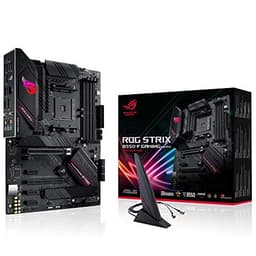
The ROG STRIX B550-F GAMING Wi-Fi is the premium AM4 option in this roundup, and it remains one of the most capable B550 boards available for builders who are sticking with Ryzen 3000 or 5000 series processors. It is aimed at enthusiast AM4 users who want ROG-level aesthetics, a strong VRM, and Wi-Fi 6 without stepping up to a Z570 board, and it delivers on all three counts.
The 12+2 power stage configuration on the B550-F is well-cooled by a substantial heatsink arrangement, and it has proven capable of handling Ryzen 9 5950X builds in the hands of overclockers and content creators. The board uses high-quality Infineon MOSFETs, and the thermal performance under load is noticeably better than cheaper B550 alternatives. For a Ryzen 5 5600X or Ryzen 7 5800X3D gaming build, the VRM is essentially never a limiting factor.
Wi-Fi 6 (802.11ax) is included via an Intel AX200 module, providing reliable 2.4GHz and 5GHz connectivity. The rear I/O is generous: a USB 3.2 Gen 2 Type-C port, multiple USB 3.2 Gen 1 Type-A ports, 2.5GbE LAN, and HDMI plus DisplayPort for integrated graphics output. There are two M.2 slots, both with PCIe 4.0 support, and a PCIe 4.0 x16 primary graphics slot. DDR4 memory is supported up to 128GB across four slots.
The ROG STRIX aesthetic is distinctive: a black and grey PCB with subtle RGB lighting on the chipset heatsink and I/O cover, with Aura Sync support for coordinated lighting across compatible components. The board feels premium in hand, with a full metal I/O shield and reinforced slots throughout. BIOS quality is excellent, with the same AI Overclocking and Fan Xpert 4 tools found on ASUS's AM5 lineup.
The caveat is price. At its current UK retail price, the ROG STRIX B550-F GAMING Wi-Fi is significantly more expensive than the TUF B550-PLUS below, and the practical performance difference for gaming is minimal. It makes sense for builders who specifically want ROG branding, plan to push a Ryzen 9 5900X or 5950X hard, or value the superior rear I/O layout. For everyone else, the TUF B550-PLUS offers better value on the AM4 platform.
Pros
- 12+2 Infineon MOSFET power stages handle Ryzen 9 5950X overclocking without thermal stress
- USB 3.2 Gen 2 Type-C and 2.5GbE LAN on the rear I/O, rare at this price on AM4
- ROG Aura Sync RGB and premium build quality with reinforced slots throughout
Cons
- Priced significantly above the TUF B550-PLUS for marginal real-world gaming performance gains
- AM4 platform is reaching end of life; no upgrade path to Ryzen 9000 series
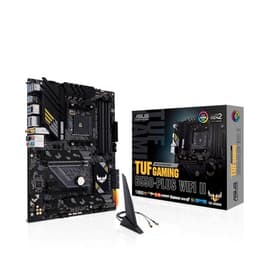
The TUF Gaming B550-PLUS (Wi-Fi) is the best-value pick in this entire roundup. At its current price, it delivers PCIe 4.0, onboard Wi-Fi, a solid 10+2 power stage design, and ASUS's excellent BIOS in an ATX package that suits the vast majority of AM4 Ryzen builds. It is the right choice for anyone building or upgrading on a tight budget who still wants a reliable, feature-complete platform rather than a bare-bones entry-level board.
The 10+2 power stages are rated adequately for Ryzen 5 5600X and Ryzen 7 5800X builds, and most Ryzen 9 5900X users will also find the board performs without issue in typical gaming and productivity workloads. Only sustained all-core loads on a 5950X in a poorly ventilated case are likely to push the VRM into uncomfortable territory. The heatsink coverage is reasonable for a board at this price, and ASUS's thermal management through Fan Xpert 4 helps keep temperatures in check.
Wi-Fi 5 (802.11ac) is included, which is functional for most home networks but is the weakest wireless standard in this roundup. If you are on a Wi-Fi 6 or Wi-Fi 6E router and want to take full advantage of it, the ROG STRIX B550-F above is the better AM4 choice. For most users connecting to a standard home broadband router, Wi-Fi 5 is perfectly adequate for gaming and streaming.
The board includes two M.2 slots with PCIe 4.0 support, a PCIe 4.0 x16 primary graphics slot, four DDR4 DIMM slots supporting up to 128GB, and a rear I/O with USB 3.2 Gen 1 ports, 2.5GbE LAN, and HDMI plus DisplayPort outputs. The TUF Gaming aesthetic is clean and understated, with minimal RGB limited to a small accent on the chipset heatsink. The board is compatible with all Ryzen 3000 and 5000 series processors and supports BIOS Flashback for updating without a CPU installed.
For a budget AM4 build in 2025, the TUF Gaming B550-PLUS (Wi-Fi) is the sensible, no-regrets choice. It will not win any awards for cutting-edge features, but it delivers everything a Ryzen 5 or Ryzen 7 gaming build needs at a price that leaves meaningful budget for a better GPU, more RAM, or a faster SSD. Our best-value pick without hesitation.
Pros
- Lowest price in the roundup for a Wi-Fi-equipped ATX B550 board with PCIe 4.0
- BIOS Flashback allows firmware updates without a CPU, useful for future Ryzen compatibility
- 2.5GbE LAN included, providing faster wired speeds than the standard 1GbE found on cheaper boards
Cons
- Wi-Fi 5 rather than Wi-Fi 6 or 6E, limiting wireless throughput on modern routers
- 10+2 power stages are adequate but leave less headroom for Ryzen 9 5950X overclocking
Buying Guide
Socket and Chipset: AM5 vs AM4
The single most important decision when buying an ASUS motherboard in 2025 is whether to build on AM4 or AM5. AM4 (Ryzen 3000/5000 series, DDR4) is a mature, cost-effective platform with a huge library of compatible processors available at reduced prices. AM5 (Ryzen 7000/9000 series, DDR5) is AMD's current platform, supported through at least 2027, and offers meaningfully better performance per core, PCIe 5.0 storage, and USB4 connectivity. If you are building new and can afford it, AM5 is the right long-term choice. If you are upgrading an existing AM4 system or working to a strict budget, AM4 remains excellent value.
Chipset Tier: B550, B650, B850, or X870
Within AM4, B550 is the mainstream sweet spot offering PCIe 4.0. Within AM5, B650 provides PCIe 5.0 on the primary GPU slot but PCIe 4.0 M.2 slots. B850 adds PCIe 5.0 M.2 support and typically includes Wi-Fi 7 and USB4. X870 goes further with guaranteed PCIe 5.0 routing, Wi-Fi 7, and dual USB4 ports as standard. For most gaming builds, B850 hits the right balance. Only buy X870 if you specifically need the additional USB4 ports or want the highest-tier VRM for extreme overclocking.
Power Delivery and VRM
The VRM (Voltage Regulator Module) determines how cleanly and consistently power is delivered to your CPU. More phases with higher amperage ratings mean cooler, more stable operation under load. For Ryzen 5 and Ryzen 7 chips, most ASUS boards in this roundup are more than adequate. For Ryzen 9 processors under sustained all-core workloads, prioritise boards with 14 or more 80A-rated phases, such as the TUF GAMING B850-PLUS or X870-PLUS.
Form Factor
All six boards in this roundup are ATX, which fits standard mid-tower and full-tower cases. If you are building in a smaller case, ASUS also offers Micro-ATX variants (such as the TUF B650M-PLUS, available separately) that trade some expansion slots for a smaller footprint. ATX boards generally offer more M.2 slots, more PCIe slots, and better VRM cooling, so choose ATX unless case size is a genuine constraint.
Memory and Storage
AM5 boards require DDR5 memory, which has fallen significantly in price over the past year. Look for EXPO-certified kits for AMD platforms to ensure straightforward overclocking. For M.2 storage, check whether your chosen board supports PCIe 5.0 or PCIe 4.0 on the M.2 slots: for gaming, PCIe 4.0 drives are still excellent, but PCIe 5.0 offers substantially higher sequential read speeds for content creation workloads.
Addressing Common Concerns About ASUS
Some UK buyers search for information about ASUS's reputation before purchasing. In 2023 and 2024, ASUS faced criticism in some communities over perceived warranty handling practices and pricing policies on certain GPU products, which led to a social media backlash sometimes described as a boycott. ASUS subsequently updated its warranty and RMA policies in response. Motherboards are a separate product category with a generally strong reliability record, and ASUS's motherboard division consistently ranks among the top two manufacturers globally for market share and user satisfaction. ASUS is not shutting down: it is one of the largest technology companies in Taiwan with billions in annual revenue. The primary weaknesses cited by critics are premium pricing on flagship products and occasionally inconsistent customer service response times, both of which are worth factoring into your purchase decision alongside the product quality itself.
The ASUS TUF GAMING X870-PLUS WIFI is the overall winner in this roundup. Its 16+2+1 80A DrMOS power stages, Wi-Fi 7, dual USB4 40Gbps ports, and full PCIe 5.0 support make it the most complete AM5 motherboard in the selection, capable of handling any current Ryzen processor and remaining relevant for the next generation of AM5 chips. For builders who want the best without stepping into ROG CROSSHAIR pricing, it is the clear choice.
For those who need to balance performance with budget, the ASUS TUF Gaming B550-PLUS (Wi-Fi) remains the best-value pick: it delivers everything a Ryzen 5 or Ryzen 7 AM4 build needs at a price that would be difficult to beat. And for new AM5 builders who want a middle path between the two, the ASUS TUF GAMING B850-PLUS WIFI is the board we would recommend most often, combining 80A power stages, Wi-Fi 7, and USB4 at a price that makes sense for a build intended to last five or more years.