Pick the wrong motherboard and you'll feel it every single day you use that PC. Wrong VRM and your CPU throttles under load. Wrong chipset and you're locked out of the features you actually wanted. Wrong board altogether and you're rebuilding six months later wondering where it all went wrong. So when someone asks whether the Gigabyte A520M DS3H AC Motherboard is worth their money, that's not a trivial question. It matters.
The short answer? For a budget AM4 build centred on a Ryzen 5000 series processor, this board does a genuinely decent job. It's not flashy, it won't overclock your CPU to the moon (the A520 chipset won't let it), and the VRM is modest. But it's honest about what it is, it includes built-in WiFi which is rare at this price point, and a small number of owner reviews with a positive overall rating suggests people aren't regretting the purchase. That's a decent signal. Not perfect, but decent.
There are caveats, and we'll get into all of them. But if you're building a no-nonsense Ryzen 5000 system on a tight budget and you want WiFi without buying a separate card, this board deserves a proper look.
Core Specifications
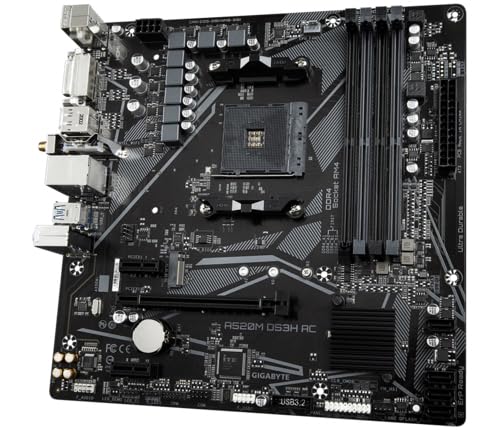
The Gigabyte A520M DS3H AC Motherboard sits on AMD's AM4 socket, using the A520 chipset in a Micro-ATX form factor. You get four DIMM slots supporting dual-channel DDR4 in both ECC and non-ECC unbuffered configurations. There's one PCIe x16 slot for your graphics card, and one M.2 slot running PCIe 3.0 x4 for NVMe storage. Display outputs for integrated graphics come via HDMI and DVI-D ports on the rear. Networking is handled by Gigabyte's 8118 Gaming LAN chip for wired connectivity, and the AC suffix in the name tells you WiFi is built in.
Audio uses the Realtek ALC1200 codec, which is a solid mid-tier chip that punches above what you'd normally expect on a budget board. Gigabyte calls it AMP-UP Audio and pairs it with high-end audio capacitors, which is a nice touch. Fan control comes through the Smart Fan 5 system with multiple temperature sensors and hybrid fan headers that support FAN STOP (so fans can go completely silent at low temps). Q-Flash Plus lets you update the BIOS without a CPU, memory, or GPU installed, which is genuinely useful if you're building fresh or need a BIOS update to support a newer Ryzen chip.
The VRM is rated at 5+3 phases using Pure Digital architecture with low RDS(on) MOSFETs. That's not a powerhouse configuration, but it's adequate for the 65W CPUs this board is really designed around. RGB Fusion 2.0 is present if you want to add addressable LED strips or standard RGB strips. USB connectivity includes USB 3.2 Gen 1 on the rear. Here's the full picture in one place:
| Specification | Detail |
|---|---|
| Socket | AMD AM4 |
| Chipset | AMD A520 |
| Form Factor | Micro-ATX |
| Memory Slots | 4x DDR4 DIMM (Dual Channel, ECC/Non-ECC Unbuffered) |
| VRM | 5+3 Phase Pure Digital with Low RDS(on) MOSFETs |
| M.2 Slots | 1x PCIe 3.0 x4 NVMe |
| PCIe x16 | 1x (PCIe 3.0) |
| Audio | Realtek ALC1200 with high-end audio capacitors |
| LAN | Gigabyte 8118 Gaming LAN (Gigabit Ethernet) |
| WiFi | WiFi 5 (802.11ac) built-in |
| Display Outputs | HDMI, DVI-D |
| USB | USB 3.2 Gen 1 |
| Fan Control | Smart Fan 5, Hybrid Headers with FAN STOP |
| RGB | RGB Fusion 2.0 (Addressable + Standard RGB) |
| BIOS Features | Q-Flash Plus |
| CPU Support | Ryzen 5000, 5000 G, 4000 G, 3000, 3000 G Series |
| Price | £92.85 · Details |

Socket and CPU Compatibility
The AM4 socket is one of the longest-running CPU sockets in recent PC history, and that's genuinely a good thing for anyone buying into this platform now. AMD supported AM4 from 2016 right through to the Ryzen 5000 series, which means there's a massive range of compatible processors. The Gigabyte A520M DS3H AC Motherboard officially supports Ryzen 5000 Series, Ryzen 5000 G-Series, Ryzen 4000 G-Series, Ryzen 3000, and Ryzen 3000 G-Series processors. That's a broad list and covers pretty much every sensible budget-to-mid-range AM4 chip you'd actually want to buy right now.
The sweet spot for this board is clearly the 65W Ryzen 5000 chips. Something like a Ryzen 5 5600 or a Ryzen 5 5600G (if you want integrated graphics) is exactly what this board was designed to run. Push it toward a Ryzen 9 5950X with its 105W TDP and you're asking the VRM to work harder than is probably sensible for long-term reliability. That's not a knock on Gigabyte specifically, it's just the reality of A520-class hardware. Know your limits and you'll be fine.
One thing: if you're buying a brand new Ryzen 5000 chip and the board has been sitting in a warehouse for a while, you may need a BIOS update before the CPU is recognised. This is where Q-Flash Plus earns its keep. You can flash a new BIOS using just a USB drive and the board's dedicated flash button, without needing a CPU, RAM, or GPU installed. It's a feature that sounds like a minor convenience until you actually need it, at which point it's an absolute lifesaver. Several AM4 builds have been saved by exactly this feature, and the fact that Gigabyte includes it here at the budget end is worth appreciating.
Chipset Features
The AMD A520 chipset is the entry-level option in AMD's AM4 chipset lineup, sitting below B550 and well below X570. That positioning matters because the chipset determines what you can and can't do with the board. A520 does not support CPU overclocking. Full stop. If you're buying a Ryzen 5 5600X with dreams of pushing it beyond its stock boost clocks via the CPU multiplier, this isn't your board. Memory can be pushed via EXPO/XMP profiles (the board lists DDR4 support up to 4733MHz with overclocking), but the CPU itself runs at AMD's rated speeds only.
What A520 does give you is PCIe 3.0 connectivity throughout. The primary x16 slot runs at PCIe 3.0 speeds, and the M.2 slot is PCIe 3.0 x4. For most people running a mid-range GPU and an NVMe SSD, PCIe 3.0 is genuinely fine. The bandwidth ceiling of PCIe 3.0 x4 for M.2 storage is around 3.5 GB/s, which is more than enough for any mainstream NVMe drive. You'd only feel the pinch if you were running one of the very fastest PCIe 4.0 SSDs, which would be a slightly odd pairing with an A520 board anyway.
SATA is handled at the chipset level, giving you ports for traditional hard drives or SATA SSDs. The chipset also handles the USB connectivity cascading from the rear I/O and internal headers. One thing A520 doesn't offer compared to B550 is the same level of PCIe lane flexibility. There's no second M.2 slot, no PCIe 4.0 anywhere, and no option to split GPU lanes. For a single-GPU, single-NVMe build, none of that matters. But it's what you're getting into before you commit.
VRM and Power Delivery
This is where budget boards live or die, and it's the section I always look at first. The Gigabyte A520M DS3H AC uses a 5+3 phase Pure Digital VRM solution with low RDS(on) MOSFETs. Let's unpack that. Five phases for the CPU core, three for other components. Low RDS(on) MOSFETs means the switching components have low resistance when conducting, which translates to less heat generated per ampere delivered. That's a good thing, and it's why Gigabyte specifically calls this out in the feature list.
Is 5+3 phases a lot? No, honestly. On a premium B550 or X570 board you'd see 10, 12, or even 16 phases. But here's the thing: phase count alone doesn't tell the whole story. The quality of the components in each phase matters just as much as the number of phases. Gigabyte's claim of low RDS(on) MOSFETs suggests they've at least thought about efficiency rather than just bolting on the cheapest components available. For a Ryzen 5 5600 running at 65W, this VRM is genuinely adequate. You're not going to see thermal throttling or instability under gaming loads with a sensibly specced CPU.
Where you'd start to worry is if someone decided to pair this board with a Ryzen 9 5900X or 5950X. Those chips can pull significantly more power under sustained all-core workloads, and a 5+3 phase VRM without substantial heatsinking is going to get warm. The board doesn't appear to have an elaborate VRM heatsink arrangement based on its budget positioning. Owner reviews don't flag widespread thermal issues, which suggests Gigabyte has calibrated this correctly for the expected use case. Just don't expect it to be a workstation powerhouse. It's not trying to be.
Memory Support
Four DIMM slots for DDR4 is a genuine plus at this price point. Some budget Micro-ATX boards cut corners and give you just two slots, which limits your upgrade path. Four slots means you can start with two sticks and add more later, or run a full four-stick configuration if your use case demands it. The board supports both ECC and non-ECC unbuffered DDR4, which is a slightly unusual feature for a consumer board. ECC memory corrects single-bit errors on the fly, making it popular in workstation and server environments. Most gaming and general-use builds will stick with standard non-ECC, but if you're building a home server or a workstation on a budget, ECC support is a genuinely useful bonus.
Memory speeds are listed up to 4733MHz with overclocking. That's the headline number, but in practice you'll want to check the board's QVL (Qualified Vendor List) to see which specific kits are validated. Running DDR4 at 3600MHz is generally considered the sweet spot for Ryzen 5000 performance, hitting a 1:1 ratio with the CPU's Infinity Fabric clock. The board should handle that without drama if you're using a decent kit. The dual-channel configuration means you want your sticks in matched pairs for best performance, typically in slots 2 and 4 (counting from the CPU socket) for a two-stick setup.
XMP profile support means you can set your memory to its rated speed in the BIOS without manually tweaking timings, which is a relief for anyone who doesn't want to spend an afternoon fiddling with memory subtimings. The ECC support is a nice differentiator that most competing budget boards don't offer, and it's the sort of thing that makes this board interesting for light professional or home-lab use beyond pure gaming builds.
Storage Options
One M.2 slot running PCIe 3.0 x4 NVMe is what you get here. Single slot. That's the reality of the A520 platform at this price. If you're coming from a higher-end board with two or three M.2 slots, that might sting a little. But for the vast majority of builds this board targets, one M.2 NVMe slot is perfectly fine. You put your OS and games on the NVMe drive, and if you need more storage you fall back on SATA ports for additional drives.
The PCIe 3.0 x4 bandwidth ceiling for that M.2 slot is around 3.5 GB/s sequential read, which covers drives like the Samsung 970 Evo Plus, the WD Black SN770, or any other mainstream NVMe SSD without bottlenecking them. You'd only saturate PCIe 3.0 x4 with the very fastest PCIe 4.0 drives, and again, pairing one of those with an A520 board is a bit like buying a sports exhaust for a family hatchback. Technically it fits, but it's not the smartest use of money.
SATA ports are present for traditional drives. The exact count isn't specified in the feature highlights, but A520 boards typically offer four to six SATA ports, which is enough for most home builds. If you're running a NAS-style build with lots of spinning drives, you'd want to verify the SATA port count before purchasing. For a typical gaming or home PC build with one NVMe boot drive and maybe a secondary SATA SSD for bulk storage, this board handles it without issue. Owner reviews don't flag any storage-related problems, which is reassuring.
Expansion Slots and PCIe
The main PCIe x16 slot runs at PCIe 3.0 speeds, which is where your GPU goes. PCIe 3.0 x16 has a bandwidth of around 16 GB/s, and the honest truth is that even modern high-end GPUs don't saturate that in most gaming scenarios. The bandwidth argument for PCIe 4.0 x16 is real but marginal for gaming at 1080p and 1440p. At 4K with the most demanding titles, you might see a small difference, but we're talking a few percent at most. For the mid-range GPUs that naturally pair with an A520 build, PCIe 3.0 x16 is not a meaningful limitation.
Beyond the primary x16 slot, the board will have additional PCIe slots for expansion cards. The A520 chipset's lane allocation means these won't be running at high bandwidths, but for a WiFi card (which you don't need since it's built in), a sound card, or a capture card, they work fine. The primary slot is the one that matters for GPU performance, and it delivers what you need.
One thing is that the Micro-ATX form factor means fewer physical slots compared to a full ATX board. If you're planning a multi-GPU setup (which, in 2026, almost nobody is), this isn't your board. But single-GPU builds, which is what essentially everyone building at this budget is doing, are perfectly well served. The GPU slot itself should have reinforcement given Gigabyte's standard manufacturing on boards in this range, though specific reinforcement details aren't called out in the feature list.
Connectivity and Rear I/O
The rear I/O includes HDMI and DVI-D display outputs for use with AMD's G-Series APUs that have integrated graphics. So if you're building with a Ryzen 5 5600G or a Ryzen 7 5700G, you can plug your monitor straight into the board without needing a discrete GPU. That's a genuinely useful option for budget builds or anyone doing a staged build where the GPU comes later. HDMI handles modern monitors easily; DVI-D is there for older displays, which is a nice bit of backward compatibility.
USB connectivity on the rear includes USB 3.2 Gen 1 ports, which run at 5 Gbps. That's fast enough for external SSDs, fast USB drives, and peripherals without issue. The exact count of USB ports on the rear I/O isn't broken out in the feature highlights, but Gigabyte's A520M DS3H AC typically provides a mix of USB 3.2 Gen 1 and USB 2.0 ports on the rear, with additional internal headers for front-panel USB connections. Audio on the rear comes from the ALC1200 codec, so you get proper audio jacks for headphones, speakers, and microphones.
Q-Flash Plus gets its own dedicated button or port on the rear I/O, which is the mechanism for BIOS updates without a CPU installed. This is a feature that's easy to overlook until you need it, and then it's genuinely invaluable. The Clear-CMOS functionality is also accessible, useful for recovering from a bad overclock or a BIOS setting that's caused instability. For a budget board, the rear I/O is reasonably well equipped and covers the bases that matter for a home build.
WiFi and Networking
This is where the A520M DS3H AC earns its AC suffix and, honestly, where it earns a fair chunk of its appeal over the standard DS3H. Built-in WiFi 5 (802.11ac) means you don't need to buy a separate PCIe WiFi card or a USB dongle. At the budget end of the market, that's actually a meaningful saving and a meaningful convenience. WiFi 5 supports dual-band operation on 2.4GHz and 5GHz, with theoretical speeds up to around 867 Mbps on the 5GHz band. For most home internet connections and everyday use, that's more than enough.
Is WiFi 5 the newest standard? No. WiFi 6 and WiFi 6E are faster and more efficient, particularly in congested environments with lots of devices. But for a budget build where the alternative is no built-in WiFi at all, WiFi 5 is a perfectly practical solution. If you're running a 1 Gbps home broadband connection, WiFi 5 on 5GHz won't be your bottleneck. The wired Ethernet side uses Gigabyte's 8118 Gaming LAN chip, which is a Gigabit controller with bandwidth management features aimed at prioritising gaming traffic. It's a decent chip and a step above the most basic Realtek controllers you'd find on the cheapest boards.
Bluetooth version isn't specified in the feature highlights, but WiFi 5 modules typically bundle Bluetooth 4.2 or Bluetooth 5.0. If Bluetooth connectivity matters to your build (for wireless headsets, controllers, etc.), it's the full spec sheet before purchasing. The combination of 8118 Gaming LAN and built-in WiFi 5 gives this board a networking setup that's genuinely competitive for its price bracket, and it's one of the clearest differentiators versus cheaper A520 alternatives that ship without WiFi.

BIOS and Overclocking
Gigabyte's BIOS has improved a lot over the years. It's not the most beautiful interface in the world (that crown probably goes to ASUS with their UEFI, which at least looks like someone cared about design), but it's functional and it gets the job done. The Easy Mode gives you a basic overview and quick settings, while Advanced Mode lets you dig into memory timings, fan curves, and the limited overclocking options the A520 chipset allows. Owner reviews don't flag widespread BIOS issues on this board, which is a good sign. A stable, boring BIOS is infinitely preferable to an exciting, broken one.
Overclocking on A520 is limited to memory. The CPU multiplier is locked, so you can't push your Ryzen 5000 chip beyond its rated boost clocks through manual overclocking. AMD's Precision Boost Overdrive (PBO) is a different matter and may be accessible depending on the BIOS version, allowing the CPU to boost more aggressively within its power limits. But traditional manual CPU overclocking? Not on this chipset. If that's important to you, you need a B550 board at minimum. Memory overclocking up to 4733MHz is listed, and getting your DDR4 kit to its rated XMP speed is straightforward via the BIOS.
Smart Fan 5 is Gigabyte's fan control system, and it's one of the better implementations at this price point. Multiple temperature sensors mean the board can make intelligent decisions about fan speeds based on actual temperatures rather than just CPU package temp. Hybrid fan headers with FAN STOP allow fans to completely stop spinning when temperatures are low enough, which is great for quiet builds. Q-Flash Plus for BIOS updates without a CPU is genuinely useful, as mentioned earlier. There are no debug LEDs or Q-Code displays on this board, which is standard for budget Micro-ATX hardware. Troubleshooting relies on POST beeps and the standard LED indicators rather than a numeric display.
Build Quality and Aesthetics
The DS3H line from Gigabyte has always been the sensible, no-nonsense option. You're not getting the full armour plating and elaborate heatsink fins of a gaming-oriented board. What you get is a clean Micro-ATX PCB with functional heatsinks on the chipset and VRM area, solid capacitor choices (Gigabyte calls out high-end audio capacitors specifically for the ALC1200 section), and a layout that makes building straightforward. Nothing flashy, but nothing obviously cheap either.
RGB Fusion 2.0 is present, which lets you connect addressable LED strips (ARGB) and standard RGB strips and control them through Gigabyte's software. The board itself doesn't appear to have onboard RGB lighting based on its positioning, but the headers give you the option to add it if you want. Honestly, for a budget build, the RGB headers are a nice option to have without forcing you to look at a light show every time you boot up. Some people want the lights. Some people don't. Having the headers means you choose.
Owner reviews with a positive overall rating across a small number of reviews suggests the build quality is holding up in real-world use. People aren't reporting dead boards, bent sockets, or components failing prematurely. That's the most meaningful quality signal available short of actually stress-testing units in a lab, and a 4.5 average with a reasonable review count is a solid endorsement. The Micro-ATX format keeps things compact, which suits smaller cases and tighter budgets without sacrificing the functionality you actually need.
How It Compares
The two most relevant comparisons for the Gigabyte A520M DS3H AC are the standard Gigabyte A520M DS3H (without WiFi) and the Gigabyte B550M DS3H. The first comparison tells you whether the WiFi is worth paying for. The second tells you whether you should spend a bit more for a better chipset. These are the questions people actually ask when shopping in this bracket.
The A520M DS3H without WiFi is typically cheaper, sometimes meaningfully so. If you're running a wired connection and have no intention of going wireless, the standard DS3H saves you money for no performance cost. But if you need WiFi and you're comparing the AC version to the non-AC version plus a separate WiFi card, the AC version often works out similar or cheaper, and it's cleaner with one fewer card in your system. The B550M DS3H is the more interesting comparison. B550 brings PCIe 4.0 support for the primary x16 slot and the M.2 slot, plus more overclocking headroom and generally better VRM specs. If you're buying a Ryzen 5 5600X and you want to run a fast PCIe 4.0 NVMe SSD, the B550M DS3H is worth the extra spend. If you're on the tightest possible budget and a Ryzen 5 5600 or a 5600G is your CPU, the A520M DS3H AC makes more sense.
Here's a quick comparison to put the key differences in context:
| Feature | Gigabyte A520M DS3H AC | Gigabyte B550M DS3H | Gigabyte A520M DS3H (no WiFi) |
|---|---|---|---|
| Chipset | A520 | B550 | A520 |
| CPU Overclocking | No | Yes | No |
| PCIe Generation (x16) | PCIe 3.0 | PCIe 4.0 | PCIe 3.0 |
| M.2 PCIe Generation | PCIe 3.0 x4 | PCIe 4.0 x4 | PCIe 3.0 x4 |
| Built-in WiFi | WiFi 5 (802.11ac) | Not specified | No |
| Memory Slots | 4x DDR4 | 4x DDR4 | 4x DDR4 |
| ECC Support | Yes | Varies | Yes |
| VRM Phases | 5+3 | Better spec | 5+3 |
| Price Tier | Budget | Budget to mid | Budget (lower) |
So which is better, A520M or B550M? If budget is genuinely tight and you're not overclocking, the A520M DS3H AC is fine. If you can stretch to B550, the upgrade path and PCIe 4.0 support are worth having. And is A520 or B450 better? A520 is newer, supports Ryzen 5000 out of the box (B450 often needs a BIOS update first and some boards have issues), and has slightly better power delivery spec in Gigabyte's implementation. A520 wins that one for most buyers building fresh today. Is B550 outdated in 2026? Honestly, not for AM4 builds. B550 is still a perfectly capable platform for Ryzen 5000, and it's not going to hold you back for everyday computing and gaming.
Final Verdict
The Gigabyte A520M DS3H AC Motherboard is exactly what it looks like: a sensible, no-drama budget AM4 board that does its job without trying to be something it's not. The 5+3 phase VRM is modest but appropriate for 65W Ryzen 5000 chips. The ALC1200 audio is better than you'd expect at this price. The built-in WiFi 5 is a genuine differentiator that saves you money and a PCIe slot. Q-Flash Plus is a feature that punches well above budget-board expectations. And a small number of owner reviews with a positive overall rating tells you people are actually happy with what they bought.
Is the A520M good for gaming? Yes, for mid-range gaming builds with a Ryzen 5 5600 or similar. You're not going to overclock the CPU, and you're running PCIe 3.0 throughout, but neither of those things will make your games run worse in any meaningful way at 1080p or 1440p. Is an A520 motherboard good in general? For its intended purpose, yes. It's not a board for power users, overclockers, or anyone who needs two M.2 slots. But for a clean, stable, budget Ryzen 5000 build, it's a proper solid choice.
The honest don't-overspend line: if you genuinely need to shave every pound and you're running wired Ethernet, the standard A520M DS3H without WiFi will cost you less and perform identically. Save the difference toward a better CPU or more RAM. On the other hand, if WiFi matters to you and you're comparing the total cost of a non-WiFi board plus a separate card, the AC version often works out the smarter purchase. At £92.85 · Details, this sits at the lower end of the budget bracket and represents fair value for what it delivers. We'd score it 7 out of 10. Solid, honest, and well-suited to its audience. Just don't ask it to be something it was never designed to be.
Is the Gigabyte A520M DS3H AC good for gaming?
For mid-range gaming builds using a Ryzen 5 5600 or similar 65W Ryzen 5000 processor, yes. The A520 chipset doesn't support CPU overclocking, and PCIe 3.0 is the maximum across all slots, but neither limitation meaningfully impacts gaming performance at 1080p or 1440p with a mid-range GPU. Pair it sensibly and it'll run games without complaint.
Is an A520 motherboard good?
For budget builds centred on Ryzen 5000 chips at stock speeds, A520 is a perfectly good platform. It lacks CPU overclocking support and PCIe 4.0, but for everyday gaming, home computing, and light workstation use, those omissions don't hurt. If you need overclocking or PCIe 4.0 storage, step up to B550.
Which is better, A520M or B550M?
B550M is the better chipset. It supports CPU overclocking, PCIe 4.0 on the primary x16 and M.2 slots, and typically has stronger VRM specs. If your budget allows, B550M is worth the extra spend, especially if you're buying a Ryzen 5 5600X or plan to use a fast PCIe 4.0 NVMe SSD. A520M makes sense when you're on the tightest budget and running a 65W chip at stock speeds.
Is a B550 motherboard outdated?
Not for AM4 builds in 2026. B550 still supports the full Ryzen 5000 lineup with PCIe 4.0 and CPU overclocking, which makes it a genuinely capable platform for gaming and everyday use. If you're building a new AM4 system, B550 remains a strong mid-range choice. Only consider it truly outpaced if you're moving to AM5 with Ryzen 7000 series, which requires a completely new platform.
Which is better, A520 or B450?
For new builds in 2026, A520 has the edge. It's a newer chipset with native Ryzen 5000 support (B450 boards needed BIOS updates and some had compatibility issues), and Gigabyte's A520 implementation has a solid power delivery spec. B450 can still work fine with the right board and a BIOS update, but starting fresh, A520 is the cleaner choice at the same price point.
What works. What doesn’t.
5 + 4What we liked5 reasons
- Built-in WiFi 5 saves money versus buying a separate card
- Q-Flash Plus for BIOS updates without a CPU installed
- ALC1200 audio codec is better than budget-board average
- ECC memory support is unusual and useful for home-lab or workstation builds
- Smart Fan 5 with FAN STOP for genuinely quiet operation
Where it falls4 reasons
- A520 chipset means no CPU overclocking whatsoever
- Only one M.2 slot at PCIe 3.0 speeds
- 5+3 phase VRM limits compatibility with high-TDP Ryzen chips
- WiFi 5 rather than the newer WiFi 6 standard
Full specifications
12 attributes| Socket | AM4 |
|---|---|
| Chipset | A520 |
| Form factor | Micro-ATX |
| Bios flashback | false |
| M2 slots | 1 |
| MAX RAM | 128GB |
| MAX RAM GB | 128 |
| Network | 1GbE + Wi-Fi 5 |
| Pcie 5 slots | 0 |
| Pcie slots | 1x PCIe 3.0 x16 |
| RAM slots | 4 |
| RAM type | DDR4 |
If this isn’t right for you
2 options
Frequently asked
5 questions01Is the Gigabyte A520M DS3H AC Motherboard overkill for just gaming?+
Not really. For a budget gaming build with a Ryzen 5 5600 or 5600G, this board is actually a well-matched choice rather than overkill. The A520 chipset doesn't allow CPU overclocking, which means you're running your chip at AMD's rated speeds. For 1080p and 1440p gaming with a mid-range GPU, that's absolutely fine. The built-in WiFi 5 is a practical bonus for gaming setups where running an Ethernet cable isn't practical.
02Will my existing CPU cooler work with the Gigabyte A520M DS3H AC Motherboard?+
The board uses AMD's AM4 socket, so any cooler with AM4 mounting compatibility will work. This includes a huge range of coolers from Noctua, be quiet!, Cooler Master, and others. If you're upgrading from an older AMD build on AM3 or AM3+, your old cooler won't physically fit without an AM4 mounting kit. Check your cooler's compatibility list before assuming it transfers across.
03What happens if the Gigabyte A520M DS3H AC Motherboard doesn't work with my components?+
Amazon UK's standard 30-day return window applies, along with the A-to-Z Guarantee which covers you if something goes wrong with the purchase. If the board doesn't POST or has compatibility issues, document the problem and contact Amazon for a return or replacement. For CPU compatibility specifically, check that your Ryzen chip is on the supported list (Ryzen 3000, 3000 G, 4000 G, 5000, and 5000 G Series are all supported). Newer Ryzen chips may need a BIOS update, which Q-Flash Plus can handle without a CPU installed.
04Is there a cheaper motherboard I should consider instead?+
Yes. The Gigabyte A520M DS3H (without the AC suffix) is the same board without built-in WiFi and typically costs less. If you're running a wired Ethernet connection and don't need wireless, the non-AC version saves you money for identical performance. Only pay for the AC version if WiFi genuinely matters to your setup.
05What warranty and returns apply to the Gigabyte A520M DS3H AC Motherboard?+
Specific warranty terms aren't listed in the verified product data for this board. Amazon UK's standard 30-day returns policy applies to purchases made through Amazon, along with the A-to-Z Guarantee for buyer protection. For manufacturer warranty details, check Gigabyte's official support pages or contact Gigabyte UK directly before purchasing if warranty length is a deciding factor for you.