




Picking the best motherboards for Intel Core i5 14400F desktop processor 10 cores isn't as straightforward as it sounds. You've got B760 vs Z790, DDR4 vs DDR5, ATX vs Mini-ITX, and price tags ranging from sensible to eye-watering. The i5-14400F is a brilliant mid-range chip with 6 Performance cores and 4 Efficiency cores pushing up to 4.7 GHz, but it needs the right board underneath it to shine. This guide cuts through the noise and gives you eight properly vetted options, from wallet-friendly workhorses to feature-packed flagships, so you can build with confidence.
Key Takeaways
- All eight boards use the LGA1700 socket and are fully compatible with the i5-14400F out of the box
- The i5-14400F cannot be CPU overclocked, so a Z790 board is only worth it if you need extra M.2 slots or PCIe 5.0 storage
- B760 is the sweet spot chipset for this CPU, offering excellent features at a fraction of the Z790 price
- DDR4 boards are cheaper to kit out right now, but DDR5 offers better long-term headroom if you're future-proofing
- The GIGABYTE Z790 AORUS Elite AX is our top overall pick for its quad M.2 slots, PCIe 5.0, and WiFi 6E at a competitive price
| Product | Chipset | Form Factor | Price | Rating |
|---|---|---|---|---|
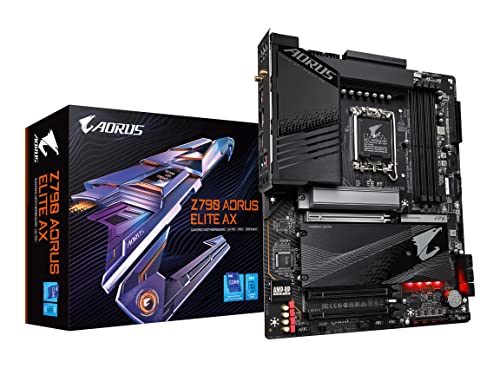
| GIGABYTE Z790 AORUS Elite AX | Z790 | ATX / DDR5 | £188.97 · Details | ★★★★☆ (4.4) |
| GIGABYTE B760I AORUS PRO | B760 | Mini-ITX / DDR5 | £205.89 · Details | ★★★★☆ (4.2) |
| ASUS ROG Maximus Z790 Hero | Z790 | ATX / DDR5 | Check price | ★★★★☆ (4.3) |
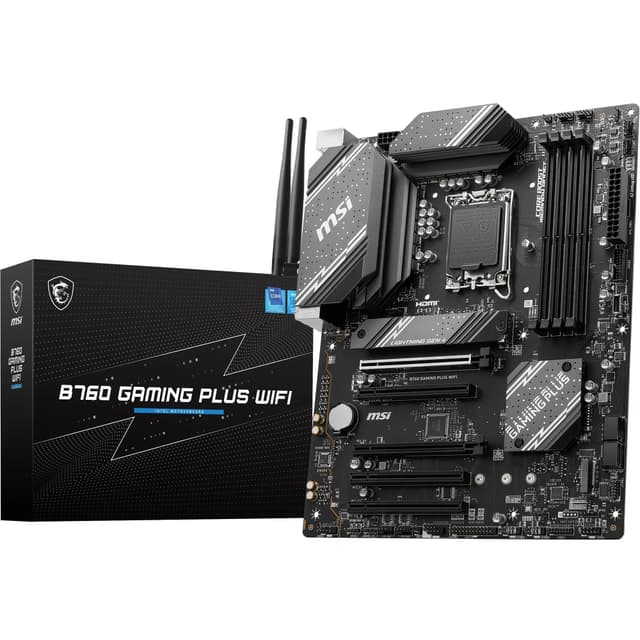
| MSI B760 GAMING PLUS WIFI (DDR5) | B760 | ATX / DDR5 | Check price | ★★★★½ (4.6) |
| MSI B760 GAMING PLUS WIFI DDR4 | B760 | ATX / DDR4 | £134.99 · Details | ★★★★½ (4.5) |
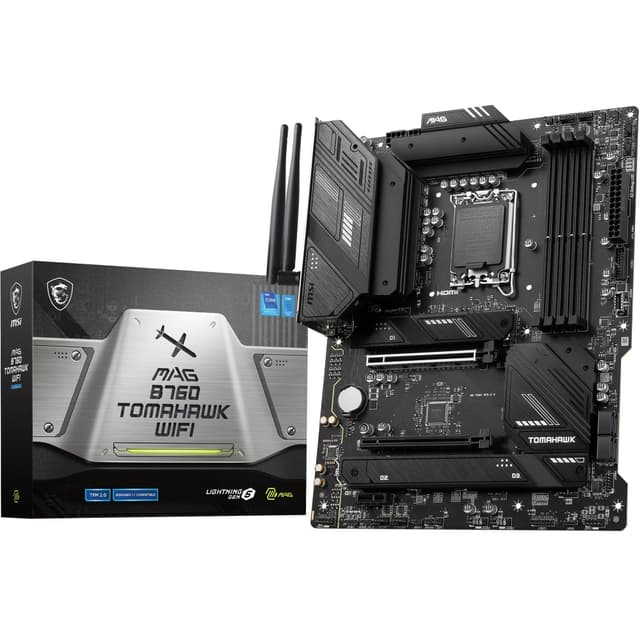
| MSI MAG B760 TOMAHAWK WIFI | B760 | ATX / DDR5 | Check price | ★★★★½ (4.6) |
| MSI PRO B760-P WIFI DDR4 | B760 | ATX / DDR4 | £134.99 · Details | ★★★★½ (4.5) |
| MSI PRO B760-P II | B760 | ATX / DDR5 | £93.54 · Details | ★★★★½ (4.5) |
Check Today's Prices
Amazon UK prices update frequently. Click below to see live prices for our recommended products.
Check GIGABYTE Z790 AORUS Elite AX Price Check GIGABYTE B760I AORUS PRO PriceCompatibility Guide: Best Motherboards for Intel Core i5 14400F Desktop Processor 10 Cores
The Intel Core i5-14400F uses the LGA1700 socket, which was introduced with Intel's 12th Gen Alder Lake platform. Every board in this guide is LGA1700, so physical compatibility is sorted. But socket alone isn't the whole story.
The chipset matters too. Here's the quick breakdown:
B760 is the chipset most people should be looking at for the i5-14400F. It supports both DDR4 and DDR5 (depending on the board variant), offers PCIe 4.0 on the primary x16 GPU slot, and typically includes two to four M.2 slots. It doesn't support CPU overclocking, which is fine because the i5-14400F is a locked chip anyway. You're not losing anything by going B760.
Z790 is Intel's enthusiast chipset. It adds PCIe 5.0 support, more M.2 slots, extra USB bandwidth, and memory overclocking headroom. Useful features, no question. But since the i5-14400F won't overclock its cores, you're paying for features you may never fully use. The GIGABYTE Z790 AORUS Elite AX and the ASUS ROG Maximus Z790 Hero both sit on Z790, and they're genuinely excellent boards. Just be honest with yourself about whether you need what they offer.
DDR4 vs DDR5: B760 boards come in both flavours. DDR4 kits are cheaper right now and performance differences in gaming are minimal. DDR5 offers higher peak bandwidth and is the standard going forward. If you're building fresh with no existing RAM, DDR5 is worth considering. If you've already got a DDR4 kit, save the money.
VRM quality: The i5-14400F has a 65W base TDP. It's genuinely not demanding. Even the more modest boards in this guide have more than enough power delivery. You don't need a 20-phase VRM for this chip. That said, better VRMs run cooler and quieter, which is a bonus in a small or quiet build.
One more thing worth checking: BIOS updates. Some older B760 boards shipped before 14th Gen support was confirmed. Always verify the board has a BIOS version that officially lists 14th Gen compatibility. All eight boards here do, but it's a good habit to check before buying anything second-hand.
For a broader look at what makes a great Intel board, Tom's Hardware's Intel motherboard roundup is a solid reference point, or for UK-specific options and pricing, our guide to the best motherboards UK covers the full market. And for the official chipset specs, Intel's official i5-14400F specification page is the definitive source.
Who Should Buy What
For Gamers
Priority: High FPS, low latency, PCIe 4.0 GPU slot
Recommended: MSI B760 Gaming Plus WiFi (DDR5)
For Creators
Priority: Multiple M.2 slots, USB bandwidth, stability
Recommended: GIGABYTE Z790 AORUS Elite AX
Budget Builders
Priority: Value, essentials only, DDR4 compatibility
Recommended: MSI PRO B760-P WIFI DDR4
GIGABYTE Z790 AORUS Elite AX - Best Overall

The GIGABYTE Z790 AORUS Elite AX is the board we'd recommend to most people who want a proper long-term platform for their i5-14400F. Four M.2 slots means you've got serious storage expandability. PCIe 5.0 on the primary slot future-proofs your GPU upgrade path. WiFi 6E and 2.5GbE LAN cover networking. The Q-Flash Plus feature lets you update the BIOS without a CPU installed, which is genuinely useful. It's not cheap, but it's not silly money either. See our full GIGABYTE Z790 AORUS Elite AX review for the complete breakdown.
Pros
- Quad M.2 slots for serious storage builds
- PCIe 5.0 primary slot for next-gen GPUs
- WiFi 6E and 2.5GbE LAN included
Cons
- Z790 features largely wasted on a locked CPU
- Pricier than B760 alternatives with similar day-to-day performance
GIGABYTE B760I AORUS PRO - Runner Up

Mini-ITX builds are a specific kind of love. The GIGABYTE B760I AORUS PRO is the board to get if you're going small form factor with your i5-14400F. Despite the compact footprint, it packs in dual M.2 slots, DDR5 support, WiFi 6E, and a USB 3.2 Gen 2x2 Type-C port. The 2.5GbE LAN is a nice touch at this size. PCIe 4.0 on the primary slot is perfectly adequate for any current GPU. It costs more than a standard ATX B760 board, but that's the Mini-ITX premium you pay. Worth every penny if a small build is the goal. We covered this in our GIGABYTE B760I AORUS PRO review.
Pros
- Excellent feature density for Mini-ITX
- WiFi 6E and 2.5GbE in a tiny package
- DDR5 support with dual M.2 slots
Cons
- Mini-ITX premium pushes the price up noticeably
- Limited expansion compared to ATX boards
ASUS ROG Maximus Z790 Hero - Premium Pick

Look, the ASUS ROG Maximus Z790 Hero is absolutely overkill for the i5-14400F. A 20+1 power stage VRM, five M.2 slots, dual Thunderbolt 4 ports, USB4, PCIe 5.0, and WiFi 6E. It's an extraordinary board. The price reflects that. If you're pairing it with the i5-14400F specifically, you're either planning a serious CPU upgrade later, need the Thunderbolt connectivity for professional peripherals, or simply want the best regardless of cost. No judgement. It's a genuinely brilliant piece of kit. Check our ASUS ROG Maximus Z790 Hero review for the full picture.
Pros
- Dual Thunderbolt 4 and USB4 for professional connectivity
- Five M.2 slots and exceptional VRM quality
- Best-in-class build quality and BIOS experience
Cons
- Extremely expensive for a locked CPU pairing
- Most features go unused with the i5-14400F
MSI B760 GAMING PLUS WIFI Motherboard - Best Value

The MSI B760 Gaming Plus WiFi DDR5 version hits a proper sweet spot. DDR5 memory support with boost speeds up to 6800MHz, two PCIe 4.0 x16 slots, two M.2 Gen 4 slots, 2.5G LAN, and WiFi 6E. All in an ATX package at a price that won't make your eyes water. The 75A DrMOS VRM is more than adequate for the i5-14400F's 65W TDP. It's a clean, no-nonsense board that covers everything most gamers and everyday users actually need. Read our full MSI B760 Gaming Plus WiFi review for more detail.
Pros
- DDR5 support at a competitive price point
- WiFi 6E and 2.5G LAN included
- Two PCIe 4.0 x16 slots for multi-GPU or capture card setups
Cons
- Only two M.2 slots, which may feel limiting for storage-heavy builds
- Gaming aesthetics won't suit every build style
MSI B760 GAMING PLUS WIFI DDR4 Motherboard

The DDR4 variant of the B760 Gaming Plus WiFi is worth a look if you've already got a DDR4 kit sitting around. Same great WiFi 6E and 2.5G LAN combination, same ATX footprint, same solid build quality. Memory support goes up to 5333MHz via XMP, which is decent headroom. The PCIe 4.0 x16 primary slot handles modern GPUs without issue, and the two M.2 Gen 4 slots cover most storage needs. It's slightly cheaper than the DDR5 version in most cases, making it a sensible choice for budget-conscious builders with existing DDR4 RAM. See our MSI B760 Gaming Plus WiFi DDR4 review for the full verdict.
Pros
- Great option for existing DDR4 RAM owners
- WiFi 6E and 2.5G LAN at an accessible price
- Solid build quality typical of MSI Gaming Plus series
Cons
- DDR4 is a dead-end platform long-term
- Only one PCIe 4.0 x16 slot on this variant
MSI MAG B760 TOMAHAWK WIFI Motherboard

The MAG B760 Tomahawk WiFi has been a community favourite for a while, and it's easy to see why. The 75A DrMOS VRM is genuinely solid, DDR5 memory can push to 7000MHz with XMP, and the PCIe 5.0 x16 slot is a rarity on B760 boards. That last point is interesting. You get PCIe 5.0 GPU compatibility without paying Z790 prices. WiFi 6E and M.2 Gen 4 storage round out a very complete package. It's a bit more expensive than the Gaming Plus, but the Tomahawk name carries a reputation for reliability that's well-earned. Our MSI MAG B760 Tomahawk WiFi review goes deeper on the VRM testing.
Pros
- PCIe 5.0 x16 slot on a B760 board is genuinely rare
- DDR5 support up to 7000MHz with XMP
- Strong community reputation for reliability and BIOS quality
Cons
- Slightly pricier than comparable B760 options
- Aesthetics are understated, which won't suit RGB-heavy builds
MSI PRO B760-P WIFI DDR4 Motherboard - Best Budget

Here's the thing: not everyone needs RGB, gaming aesthetics, or a fancy name on the box. The MSI PRO B760-P WIFI DDR4 is a clean, professional-looking ATX board that does everything the i5-14400F needs without any fluff. WiFi 6E is included, which is genuinely surprising at this price. PCIe 4.0 x16 handles any current GPU. M.2 Gen 4 slots cover fast NVMe storage. DDR4 support up to 5333MHz via XMP means your existing RAM works fine. It's the board for builders who want a sorted, reliable platform without spending more than necessary. See the full MSI PRO B760-P WIFI DDR4 review for more.
Pros
- WiFi 6E included at a budget-friendly price
- Clean professional aesthetic suits office and workstation builds
- Solid DDR4 compatibility for existing RAM owners
Cons
- DDR4 limits future memory upgrade options
- Fewer premium features compared to Gaming or Tomahawk lines
MSI PRO B760-P II Motherboard

The MSI PRO B760-P II is the DDR5 evolution of the PRO B760-P line. Same clean aesthetic, same professional focus, but now with DDR5 memory support pushing up to 7000MHz via XMP. PCIe 4.0 x16 primary slot, M.2 Gen 4 storage, and 2.5G LAN are all present. It doesn't include WiFi, which is worth noting if wireless connectivity matters to your setup. But if you're running a wired connection and want a no-nonsense DDR5 board at a sensible price, this is a solid choice. The lower review count compared to other MSI boards just reflects it being a newer release. Check our MSI PRO B760-P II review for hands-on impressions.
Pros
- DDR5 support up to 7000MHz at a professional price point
- Clean, understated design suits workstation and office builds
- 2.5G LAN for fast wired networking
Cons
- No WiFi included, unlike most competitors at this price
- Fewer reviews than established models, so long-term reliability data is thinner
Understanding VRM, Chipsets, and What Actually Matters for the i5-14400F
VRM stands for Voltage Regulator Module. It's the circuitry on the motherboard responsible for converting the power from your PSU into the precise, stable voltage your CPU needs. More phases generally means smoother power delivery, lower temperatures on the VRM components, and better stability under sustained load.
For the i5-14400F specifically, this is less critical than it sounds. The chip has a 65W TDP and doesn't support core overclocking. A 6-phase VRM handles it fine. You'd need a power-hungry chip like an i9-14900K before VRM quality becomes a genuine bottleneck. That said, a better VRM runs quieter and cooler, which matters in a small or near-silent build.
Here's a quick chipset comparison to help you decide:
| Feature | B760 | Z790 |
|---|---|---|
| CPU Overclocking | No | No (locked CPU) |
| Memory Overclocking (XMP) | Yes | Yes |
| PCIe 5.0 GPU Slot | Some boards | Yes |
| M.2 Slots (typical) | 2 to 3 | 4 to 5 |
| USB 3.2 Gen 2x2 | Some boards | Most boards |
| Price Premium | Standard | Significant |
XMP (Extreme Memory Profile) is the memory standard that lets DDR4 and DDR5 kits run at their advertised speeds. All B760 and Z790 boards support it. Just enable it in the BIOS after first boot and you're done. It's not overclocking in any risky sense. It's just running the RAM at the speed it was designed for.
Common Mistakes to Avoid
- Buying a Z790 board purely for overclocking: The i5-14400F is a locked CPU. Core overclocking is not possible on any chipset.
Instead: Choose Z790 only if you genuinely need the extra M.2 slots, PCIe 5.0 storage, or Thunderbolt connectivity. - Mixing DDR4 RAM with a DDR5 motherboard: DDR4 and DDR5 are physically incompatible. The notch positions are different and they will not fit in the wrong slot.
Instead: Check your board's memory type before buying RAM, or buy a RAM and motherboard bundle. - Skipping the BIOS update check: Some B760 boards shipped before 14th Gen CPUs were released and may need a BIOS update to recognise the i5-14400F.
Instead: Check the manufacturer's CPU support list for your specific board revision before purchasing second-hand. - Overspending on VRM quality for this CPU: The i5-14400F is a 65W chip. A basic 6-phase VRM is more than sufficient.
Instead: Put that budget towards better RAM, storage, or a GPU where it will actually make a difference.
Final Verdict: Best Motherboards for Intel Core i5 14400F Desktop Processor 10 Cores
When it comes to the best motherboards for Intel Core i5 14400F desktop processor 10 cores, the answer for most people is a B760 board. The CPU is locked, so Z790's overclocking headroom is irrelevant. Our top pick, the GIGABYTE Z790 AORUS Elite AX, earns its place at the top through sheer feature completeness: quad M.2, PCIe 5.0, WiFi 6E, and a proper build quality that justifies the price. For pure value, the MSI B760 Gaming Plus WiFi DDR5 and the MSI PRO B760-P WIFI DDR4 are both excellent. Mini-ITX builders should go straight to the GIGABYTE B760I AORUS PRO. And if money genuinely is no object, the ASUS ROG Maximus Z790 Hero is extraordinary, even if it's excessive for this particular CPU.
Our #1 Pick: GIGABYTE Z790 AORUS Elite AX (LGA 1700/ Intel Z790/ ATX/ DDR5/ Quad M.2/ PCIe 5.0/ USB 3.2 Gen2X2 Type-C/Intel WiFi 6E/ 2.5GbE LAN/Q-Flash Plus/PCIe EZ-Latch/Gaming Motherboard)
- Top Rated: Best-reviewed pairing in this guide
- Amazon 30-Day Returns: Not happy? Return it hassle-free
- Prime Delivery: Get it delivered fast
Affiliate Disclosure: Vivid Repairs participates in the Amazon Associates Programme. We earn from qualifying purchases at no extra cost to you. This doesn't influence our recommendations.





