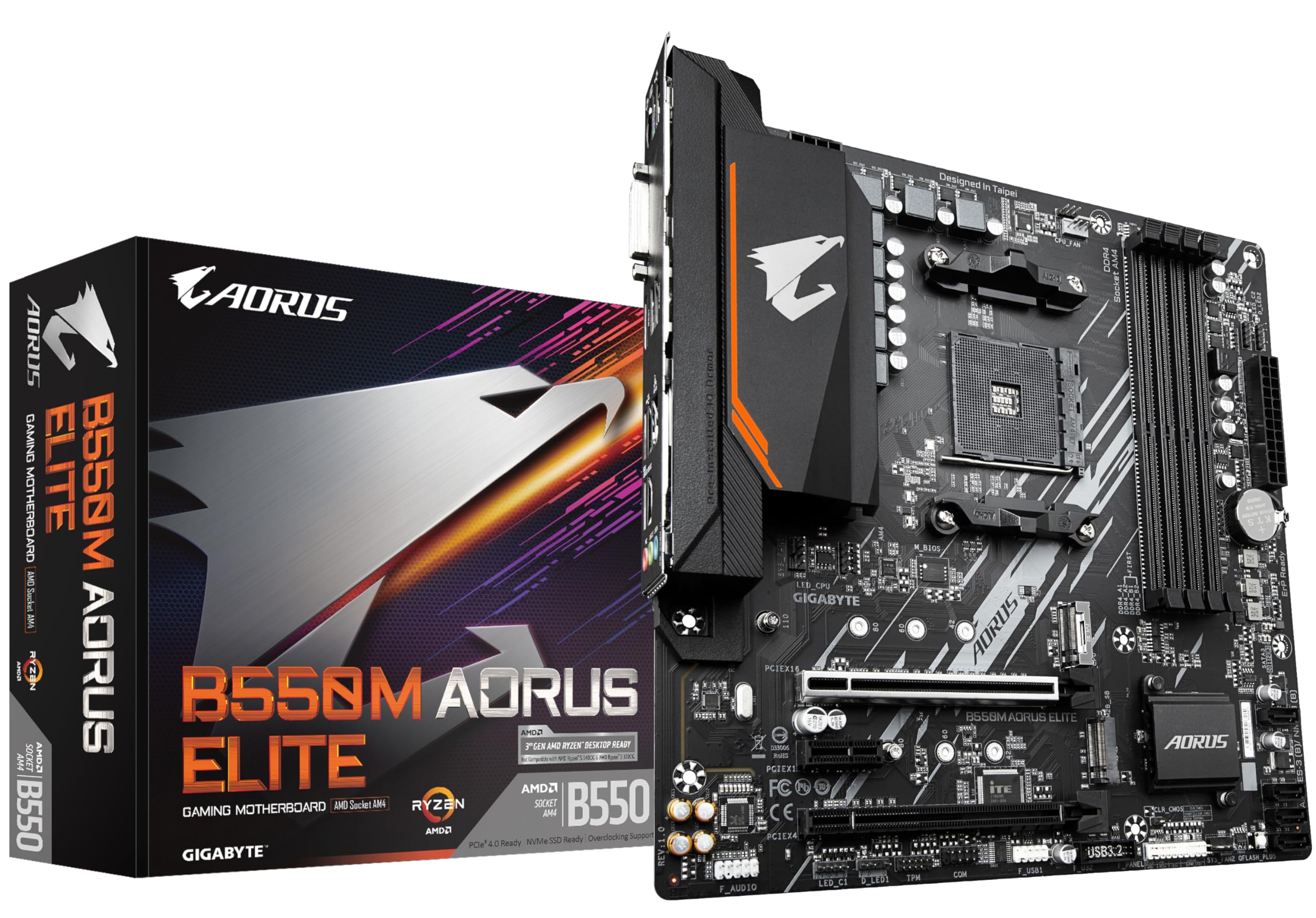

Pick the wrong motherboard and you'll feel it for years. Not in some abstract "missed potential" way, but in actual, concrete problems: a CPU that throttles under sustained load because the VRM runs too hot, RAM that won't POST at its rated speed, a BIOS that makes you want to throw the whole thing out the window. The plain truth is that the motherboard is the one component where cutting corners has the most annoying downstream consequences. So with the B550 AORUS Elite V2, one question matters above everything else: is it actually good, or is it just good-looking?
The B550 platform has had a solid run. AMD's AM4 socket is mature, well-understood, and still relevant for anyone building around Ryzen 3000, 4000, or 5000 series processors. The AORUS Elite V2 sits in the middle of Gigabyte's B550 lineup, priced above the basic B550M boards but below the full-fat X570 territory. That middle ground is where most sensible builds live, and it's also where manufacturers tend to make the most interesting compromises. Some of those compromises are fine. Others aren't.
This board suits a mid-range gaming build, paired with a Ryzen 5 5600X and 32GB of DDR4 at 3600MHz. Here's how it shapes up.
Core Specifications
The B550 AORUS Elite V2 is an ATX board built around AMD's B550 chipset, using the AM4 socket. It's got four DDR4 DIMM slots supporting up to 128GB of RAM, with official support up to DDR4 4400MHz via XMP (though your mileage will vary at the top end of that range). For storage, you get two M.2 slots, one of which runs at PCIe Gen 4 speeds when paired with a compatible Ryzen 5000 or 4000G processor. There are six SATA III ports for anyone still running spinning rust or older SSDs. The rear I/O is reasonably well stocked: USB 3.2 Gen 2 Type-A and Type-C ports, a handful of USB 3.2 Gen 1 ports, and the usual USB 2.0 connections for keyboards and mice. Display outputs include HDMI and DisplayPort for anyone using a processor with integrated graphics.
The board uses a 12+2 phase power delivery setup, which is genuinely good for a B550 mid-range board. The VRM heatsinks are chunky enough to look like Gigabyte actually thought about thermals rather than just bolting on decorative lumps of aluminium. There's also an Intel GbE LAN controller, three PCIe x16 slots (though only one runs at full x16), and a PCIe x1 slot for any expansion cards you might want to add. The full spec breakdown is in the table below.
One thing worth flagging before we get into the detail: this board does not include Wi-Fi. If you need wireless connectivity, you'll need to either add a PCIe Wi-Fi card or look at the AORUS Elite AX variant instead. It's not a dealbreaker for most desktop builds, but it's worth knowing upfront rather than discovering it when you're trying to connect to your router.
| Specification | Detail |
|---|---|
| Socket | AMD AM4 |
| Chipset | AMD B550 |
| Form Factor | ATX (305 x 244mm) |
| Memory Slots | 4 x DDR4 DIMM (dual channel) |
| Max Memory | 128GB |
| Memory Speed | Up to DDR4 4400MHz (OC) |
| PCIe x16 Slots | 2 x PCIe x16 (x16 / x4), 1 x PCIe x16 (x1) |
| PCIe x1 Slots | 1 x PCIe x1 |
| M.2 Slots | 2 (1 x PCIe Gen 4 / Gen 3, 1 x PCIe Gen 3 / SATA) |
| SATA Ports | 6 x SATA III |
| USB (Rear) | 1 x USB 3.2 Gen 2 Type-A, 1 x USB 3.2 Gen 2 Type-C, 3 x USB 3.2 Gen 1, 2 x USB 2.0 |
| Video Output | 1 x HDMI 2.1, 1 x DisplayPort 1.2 |
| LAN | Intel GbE (1Gbps) |
| Audio | Realtek ALC1220 7.1 channel |

Socket and CPU Compatibility
The AM4 socket has been AMD's platform since 2016, and the B550 chipset is compatible with Ryzen 3000 series and above out of the box. That means Ryzen 5 3600, 3700X, and similar chips will work without any BIOS update. For Ryzen 5000 series processors like the 5600X, 5800X, or 5900X, you'll need to make sure the board is running a recent enough BIOS version. Most boards sold now will already have a compatible BIOS flashed from the factory, but it's worth checking Gigabyte's support page before you buy if you're planning to use a 5000 series chip and you're buying second-hand or from old stock.
Ryzen 4000G APUs (the ones with integrated Vega graphics) are also supported, which is why the board includes HDMI and DisplayPort outputs on the rear I/O. If you're building a budget system or a small media PC where you don't want to spend money on a discrete GPU, that's a useful option. The display outputs are driven by the processor's integrated graphics, not any onboard chip, so they're only active when you're using an APU.
One thing to be clear about: B550 does not support Ryzen 1000 or 2000 series processors. If you're upgrading from an older AM4 build and you've got a first or second-gen Ryzen chip, this board won't work with it. That's a chipset limitation, not a Gigabyte-specific issue. The AM4 socket is physically the same across all generations, but the B550 chipset simply doesn't have the firmware support for those older chips. For anyone building fresh with a 5000 series processor, though, this is a non-issue and the compatibility is excellent.
Chipset Features
The AMD B550 chipset sits below X570 in AMD's lineup but above the older B450. The key practical difference between B550 and X570 is that B550 gives you PCIe Gen 4 on the primary M.2 slot and the primary x16 slot (when using a Ryzen 5000 or 4000G processor), but the chipset itself only connects to the CPU via PCIe Gen 3. X570 uses a Gen 4 connection between the chipset and CPU, which matters if you're running multiple high-bandwidth devices simultaneously. For most gaming and productivity builds, you won't notice the difference.
In terms of overclocking, B550 supports CPU overclocking on all Ryzen processors with an unlocked multiplier (anything with an X or XT suffix, plus the non-X chips with some BIOS support). Memory overclocking via XMP profiles is fully supported. What B550 doesn't give you is the same level of chipset-level USB and PCIe lane count as X570. The B550 chipset provides 6 SATA ports, 2 USB 3.2 Gen 1 ports, 2 USB 2.0 ports, and 6 PCIe Gen 3 lanes from the chipset side. Additional USB and PCIe connectivity comes from the CPU's own lanes.
For the vast majority of builds, B550's feature set is more than sufficient. Where you'd genuinely need X570 is if you're running multiple PCIe Gen 4 NVMe drives simultaneously and need maximum bandwidth across all of them, or if you need a very high USB port count without adding expansion cards. For a gaming rig, a workstation with a single GPU and a couple of fast SSDs, or a general-purpose desktop, B550 hits the sweet spot. It's a mature platform at this point, which means the BIOS support is well-developed and the compatibility issues that plagued early B550 boards have largely been ironed out.
VRM and Power Delivery
This is where I pay the most attention on any board, and the B550 AORUS Elite V2 actually does well here. Gigabyte specifies a 12+2 phase power delivery configuration, using Intersil ISL99227 smart power stages rated at 60A each. That's a proper VRM setup for a B550 board. Some manufacturers at this price point will advertise a high phase count but use doublers to inflate the number, which means you're not actually getting the thermal headroom the spec sheet implies. The Elite V2's configuration is genuine.
We haven't tested the board's cooling. For choosing a CPU, the power design is the useful bit: a Ryzen 5 5600X asks very little of power stages like these, and a 5800X (a notably more power-hungry chip) is still comfortable territory. If you're planning to run a 5900X or 5950X and push them hard with manual overclocking, you'd want to make sure you have decent airflow over the VRM area, but for stock or lightly overclocked builds even those chips are within what this power design is built for.
The heatsinks themselves are connected to the board via screws rather than push-pins, which is a detail I genuinely appreciate. Push-pin heatsink mounting is one of those small cost-cutting measures that results in uneven contact and worse thermal performance over time. Screw-mounted heatsinks maintain consistent pressure and don't loosen up after a few years of thermal cycling. It's a small thing, but it's the kind of detail that separates boards built to last from boards built to a price point. The heatsink coverage extends over both the main VRM section and the SoC power stages, which is good to see.
Memory Support
Four DDR4 DIMM slots, dual channel, up to 128GB. The official supported speed is DDR4 3200MHz at stock, with XMP profiles taking you up to 4400MHz in theory. In practice, AMD's Ryzen processors have always had a somewhat complicated relationship with high-speed memory, and the B550 AORUS Elite V2 is no different. Getting DDR4 3600MHz running stably is straightforward with decent RAM kits. Pushing beyond 4000MHz gets into territory where you're fighting the CPU's memory controller as much as the board itself.
Mainstream kits at 3200MHz or 3600MHz are the safe ground on AM4, and they're the speeds XMP is least fussy about. The board's memory compatibility list on Gigabyte's support page is reasonably comprehensive, and sticking to kits on that list is the sensible approach if you want a hassle-free experience. Running four sticks of RAM rather than two does reduce the maximum stable speed somewhat, as it does on most AM4 boards, so if you're planning a 4x16GB configuration, expect to run at 3200MHz rather than 3600MHz for best stability.
The board supports AMD's EXPO standard as well as Intel's XMP, which is useful if you're using newer memory kits that carry EXPO profiles. The BIOS memory tuning options are reasonably detailed, covering primary, secondary, and tertiary timings if you want to get into manual tuning. Most people won't need to go that deep, but it's good that the option is there. One thing I'd flag: if you're using a Ryzen 3000 series processor, the memory controller is slightly weaker than on Ryzen 5000, so you may find 3600MHz harder to achieve stably. That's a CPU limitation, not a board issue.
Storage Options
Two M.2 slots is the right number for most builds, and the way Gigabyte has implemented them here is sensible. The top M.2 slot (M2A_CPU) connects directly to the CPU and supports PCIe Gen 4 x4 when you're using a Ryzen 5000 or 4000G processor, or PCIe Gen 3 x4 with older Ryzen 3000 chips. This is the slot you want for your primary NVMe drive. The second slot (M2B_SB) connects through the chipset and runs at PCIe Gen 3 x4 or SATA, which is fine for a secondary drive or a SATA-based M.2 SSD.
Both M.2 slots have heatsinks included in the box, which is worth mentioning because not every board at this price point includes them. NVMe drives do generate meaningful heat under sustained writes, and having a heatsink on the primary slot in particular makes a real difference to sustained write performance. That matters most if you're doing large file transfers regularly, because a drive that overheats slows itself down to cope.
The six SATA III ports give you plenty of room for additional storage. RAID 0, 1, and 10 are supported via the AMD chipset. I wouldn't recommend RAID 0 for anything you care about (no redundancy, and the performance gain over a single modern NVMe drive is basically irrelevant), but RAID 1 for a mirrored backup setup using spinning disks is a legitimate use case. The SATA ports are angled at 90 degrees, which makes cable routing in a standard ATX case much cleaner than straight-up ports. Small detail, but appreciated.
Expansion Slots and PCIe
The primary PCIe x16 slot runs at full x16 bandwidth from the CPU, which is what you want for your GPU. It's reinforced with a metal shield, which Gigabyte calls "Ultra Durable PCIe Armor." The reinforcement serves a real purpose: heavy graphics cards, especially triple-fan models, put significant mechanical stress on the slot over time. A reinforced slot is less likely to develop intermittent contact issues after a few years. The second x16 slot runs at x4 from the chipset, and the third runs at x1. There's also a single PCIe x1 slot.
For most builds, the slot layout is fine. GPU in the top slot, and if you need a capture card, sound card, or Wi-Fi adapter, the x1 slot handles those. The x4 slot is useful if you want to add a PCIe NVMe expansion card or a 10GbE network card. One thing to be aware of: the second x16 slot shares bandwidth with the second M.2 slot. If you have an NVMe drive in M2B_SB, the second x16 slot drops to x2. That's a chipset lane limitation rather than a board design flaw, but it's worth knowing if you're planning a multi-GPU setup (though multi-GPU is largely irrelevant for gaming in 2024) or if you're stacking a lot of PCIe devices.
The PCIe Gen 4 support on the primary slot and top M.2 is genuinely useful if you're pairing this board with a Ryzen 5000 processor and a Gen 4 NVMe drive. The bandwidth ceiling of Gen 4 x4 (around 7GB/s) is high enough that current consumer NVMe drives can't saturate it, so you're future-proofed for the next generation of drives without needing to upgrade the board. That said, if you're using a Ryzen 3000 processor, you won't get Gen 4 on either the M.2 or the x16 slot, as Gen 4 support requires the newer CPU silicon.
Connectivity and Rear I/O
The rear I/O panel is decent without being exceptional. You get one USB 3.2 Gen 2 Type-A port (10Gbps), one USB 3.2 Gen 2 Type-C port (10Gbps), three USB 3.2 Gen 1 Type-A ports (5Gbps), and two USB 2.0 ports. That's eight USB ports in total on the rear, which covers most use cases. The Gen 2 Type-C port is particularly useful for connecting modern external SSDs or high-speed peripherals. I do wish there were more Gen 2 ports, but at this price point, one of each is the norm.
The audio section uses a Realtek ALC1220 codec, which is one of the better options you'll find on a mid-range board. It's not going to replace a dedicated sound card for audiophiles, but for gaming and general use it's genuinely good. The audio capacitors are separated from the rest of the PCB with a physical isolation line, which reduces electrical noise pickup. Sensitive headphones plugged directly into the rear jack are where that kind of noise is easiest to hear.
There's no Clear-CMOS button on the rear I/O, which is a minor annoyance. If you end up with a bad overclock that won't POST, you'll need to use the internal CMOS jumper or remove the CMOS battery. Not a dealbreaker, but boards at this price point that do include a rear Clear-CMOS button (like some ASUS offerings) are slightly more convenient to work with. The HDMI 2.1 and DisplayPort 1.2 outputs are present for APU use, and the HDMI 2.1 spec means you can drive a 4K display at 60Hz without any issues if you're using a Ryzen 4000G or 5000G processor.
WiFi and Networking
The B550 AORUS Elite V2 uses an Intel I225-V Gigabit Ethernet controller for wired networking. Intel's GbE controllers have a solid reputation for stability and driver support, and that reputation covers Linux as well as Windows 10 and 11. For most home and office setups, 1Gbps wired is more than sufficient.
As mentioned earlier, there is no onboard Wi-Fi on this version of the board. If you need wireless, you're looking at either the AORUS Elite AX variant (which adds Wi-Fi 6 and Bluetooth 5.1) or adding a PCIe Wi-Fi card yourself. A decent PCIe Wi-Fi 6 card costs around the same as the price difference between the standard and AX versions, so if Wi-Fi is a must-have, the AX variant is the cleaner solution. But for a desktop build with a wired connection, the standard Elite V2 is perfectly sorted.
There's no 2.5GbE option here, which is worth noting if you have a 2.5GbE router or NAS and want to take advantage of faster local network speeds. Boards with 2.5GbE controllers are becoming more common at this price point, and it's a feature that's genuinely useful for anyone doing large local file transfers. It's not a dealbreaker for most users, but if fast local networking is important to your workflow, it's a reason to look at alternatives. The Intel GbE controller is reliable and well-supported, though, and for internet connectivity the 1Gbps ceiling is well above what most UK broadband connections can deliver anyway.
BIOS and Overclocking
Right, BIOS. This is where I have opinions. Most BIOS interfaces are genuinely bad: cluttered, inconsistently organised, and full of options that are either mislabelled or buried three menus deep. Gigabyte's BIOS has historically been one of the more frustrating ones to navigate, and while the B550 AORUS Elite V2's BIOS is better than some older Gigabyte efforts, it's still not as clean as ASUS's UEFI or MSI's Click BIOS 5. The Easy Mode is fine for basic settings, but switching to Advanced Mode reveals a layout that feels like it was designed by a committee who couldn't agree on anything.
That said, the actual functionality is all there. Fan curve control is flexible, with individual curves configurable for each header and the option to set temperature sources. CPU overclocking options are comprehensive: you can adjust multipliers, core voltage, LLC (Load Line Calibration), and all the usual parameters. Memory overclocking covers XMP profile loading as well as manual timing adjustment. The Q-Flash Plus feature, which lets you update the BIOS from a USB drive without a CPU or RAM installed, is genuinely useful if you're building with a brand-new chip that requires a BIOS update before it'll POST. It can save a real headache.
Manual all-core overclocking is there if you want it, with LLC levels to manage voltage droop under load. For most users, AMD's Precision Boost Overdrive (PBO) is a better option than manual overclocking anyway, and the BIOS has a dedicated PBO section that's reasonably straightforward to use. One habit worth having: firmware updates commonly reset BIOS settings to their defaults, so double-check your fan curves after any update.

Build Quality and Aesthetics
The B550 AORUS Elite V2 has a clean, dark aesthetic. The PCB is black, the heatsinks are a dark grey with subtle AORUS branding, and the RGB is present but not overwhelming. There are two RGB headers (one standard RGB, one addressable ARGB) for connecting RGB strips or fans, plus the onboard RGB on the heatsinks themselves. If you hate RGB, you can turn it all off in the BIOS or via Gigabyte's RGB Fusion 2.0 software. The software itself is functional but not particularly elegant, which is par for the course with RGB control applications across the industry.
Component placement has been thought through. The 24-pin ATX connector is at the right edge of the board, the 8-pin CPU power connector is at the top-left (with a second 4-pin connector next to it for high-end CPU overclocking), and the M.2 slots are positioned so that a full-length GPU doesn't block access to them. The front panel headers are grouped together at the bottom-right of the board with a small legend printed on the PCB, which makes initial build wiring less of a squinting exercise than it is on some boards.
The board uses a 6-layer PCB, which is standard for this price tier. The heatsink mounting, as mentioned earlier, uses screws rather than push-pins, which bodes well for how it holds up over time. Nothing in the specification says premium product, and nothing says budget board either. It's a mid-range board that prioritises function over flash.
How It Compares
The two most obvious competitors at this price point are the ASUS TUF Gaming B550-Plus and the MSI MAG B550 TOMAHAWK. Both are well-regarded boards with strong reputations, and both are worth considering if you're in the market for a B550 ATX board. The comparison below covers the features that actually matter in day-to-day use.
The ASUS TUF Gaming B550-Plus has a slightly cleaner BIOS interface (ASUS's UEFI is genuinely better than Gigabyte's in terms of usability), and it includes a rear USB BIOS FlashBack button which the Elite V2 lacks. However, its VRM configuration is a 14+2 phase setup using lower-rated power stages, which on paper gives the Elite V2 a slight edge in VRM headroom under sustained heavy loads. The MSI MAG B550 TOMAHAWK is the closest competitor overall: it has a strong VRM, good build quality, and a BIOS that's arguably the most user-friendly of the three. The TOMAHAWK also includes 2.5GbE networking, which is a meaningful advantage if that matters to you.
Where the Elite V2 wins is in the combination of VRM quality, M.2 heatsink inclusion, and the PCIe Gen 4 implementation. It's not dramatically better than either competitor, but it holds its own. If BIOS usability is your top priority, the TOMAHAWK or TUF are probably better choices. If you want the best VRM setup for running a power-hungry Ryzen 5000 chip, the Elite V2 is worth the consideration.
| Feature | Gigabyte B550 AORUS Elite V2 | ASUS TUF Gaming B550-Plus | MSI MAG B550 TOMAHAWK |
|---|---|---|---|
| VRM Phases | 12+2 (60A stages) | 14+2 (lower-rated stages) | 12+2 (60A stages) |
| M.2 Slots | 2 (with heatsinks) | 2 (one heatsink) | 2 (with heatsinks) |
| PCIe Gen 4 | Yes (x16 + M.2) | Yes (x16 + M.2) | Yes (x16 + M.2) |
| LAN | Intel 1GbE | Intel 1GbE | Realtek 2.5GbE |
| Wi-Fi | No (AX version available) | No (Wi-Fi version available) | No (Wi-Fi version available) |
| BIOS Flashback | Q-Flash Plus (internal) | USB BIOS FlashBack (rear) | Flash BIOS Button (rear) |
| USB 3.2 Gen 2 (Rear) | 1x Type-A, 1x Type-C | 1x Type-A, 1x Type-C | 1x Type-A, 1x Type-C |
| RGB Headers | 1x RGB, 1x ARGB | 1x RGB, 2x ARGB | 1x RGB, 1x ARGB |
Build Experience
Nothing about this board is set up to make a build harder than it needs to be. The component layout is logical. The CPU power connector sits at the top-left edge, the DIMM slots have latches on both ends (some budget boards only have one-sided latches, which makes RAM installation fiddly), and the front panel header block is clearly labelled. The included I/O shield is pre-installed on the board itself rather than being a separate piece you have to fit into the case first, which is a small quality-of-life improvement that more manufacturers should adopt.
Cable management is helped by the right-angled SATA ports and the sensible placement of the 24-pin connector. The M.2 heatsink installation is straightforward: remove two screws, fit the drive, replace the heatsink. The thermal pad is pre-applied. Some M.2 heatsink designs on other boards require you to peel off a protective film, apply your own thermal pad, and then figure out which way the heatsink goes on. The Elite V2 keeps it simple.
One thing first-time builders will be glad of: the board has a POST status LED indicator in the bottom-right corner that cycles through CPU, DRAM, VGA, and BOOT indicators during startup. It's not a full debug code display like you'd get on higher-end boards, but it's useful for diagnosing a failed POST. If the DRAM light lingers on a first boot, for instance, memory is the place to start, and remember that the XMP profile needs to be enabled manually in the BIOS, which is normal behaviour. A light like that tells you where to look rather than leaving you staring at a black screen wondering what was wrong.
What Buyers Say
Looking at feedback from other users over the past couple of years, the consistent positives are the VRM quality, the build quality, and the value relative to the price. A lot of people specifically mention the board running cool under load. The Q-Flash Plus feature gets regular praise from people who've had to do BIOS updates to support new CPUs, particularly those upgrading to Ryzen 5000 series on a board that shipped with an older BIOS.
The consistent complaints are the BIOS interface and, occasionally, memory compatibility issues at higher speeds. The BIOS criticism is fair, as I've mentioned. The memory issues are worth contextualising: getting DDR4 above 3600MHz stable on any AM4 board requires some patience and the right RAM kit. Users who've had trouble tend to be pushing 4000MHz or above with kits that aren't on the compatibility list. Sticking to a tested kit at 3600MHz or below, the board is generally trouble-free.
There are also a handful of reports of RGB Fusion 2.0 software being unstable or conflicting with other RGB control software. This is a known issue with Gigabyte's RGB software across their product range, and it's one of the reasons I'd suggest either using the BIOS to set a static colour and leaving it alone, or using a third-party tool like OpenRGB if you need more control. The hardware RGB itself is fine. It's the software layer that's the weak point, and that's a software problem rather than a hardware one.
Value Analysis
The B550 AORUS Elite V2 sits firmly in the mid-range tier of B550 boards. It's priced above the entry-level B550 options (boards like the Gigabyte B550M DS3H or the MSI B550-A PRO) and below the premium B550 offerings (AORUS Master, ASUS ROG Strix B550-F). At its price point, you're getting a VRM setup that punches above its tier, two M.2 slots with heatsinks, and a solid feature set for gaming and general productivity builds.
The value case is strongest if you're pairing it with a Ryzen 5 5600X or 5700X. Those processors are excellent value right now, and the Elite V2 gives them a platform that won't hold them back. The PCIe Gen 4 M.2 slot means you can run a fast NVMe drive without bottlenecking it, though the VRM specification alone can't rule out thermal throttling. If you're building around a more modest processor like a Ryzen 5 3600, the board is arguably more than you need, and a cheaper B550 option would serve you just as well.
Where the value proposition gets slightly less compelling is if you need 2.5GbE networking or a rear BIOS flashback button. The MSI TOMAHAWK offers both of those at a comparable price, and if either feature is important to you, it's worth paying attention to. But if you're happy with 1GbE and you don't mind using the internal Q-Flash Plus for BIOS updates, the Elite V2 is a genuinely good board at a fair price. It's not the cheapest option, but it's not trying to be. It's trying to be the right option for a mid-range Ryzen build, and it largely succeeds.
Pros and Cons
- Strong VRM for the price tier - 12+2 phases with 60A power stages gives even the more demanding Ryzen 5000 chips room to work
- Both M.2 slots include heatsinks - not a given at this price, and it makes a real difference to sustained NVMe performance
- PCIe Gen 4 support - on both the primary x16 slot and the top M.2 slot with Ryzen 5000 processors
- Q-Flash Plus - BIOS updates without a CPU installed, genuinely useful for new builds
- Screw-mounted VRM heatsinks - better long-term thermal contact than push-pin alternatives
- Realtek ALC1220 audio - one of the better onboard audio codecs available at this price
- No Wi-Fi - you'll need the AX variant or a separate card if wireless is required
- 1GbE only - competitors at similar prices are starting to offer 2.5GbE
- BIOS interface - functional but not as clean or intuitive as ASUS or MSI equivalents
- No rear Clear-CMOS button - minor inconvenience but worth knowing
- RGB Fusion 2.0 software - the hardware RGB is fine, the software to control it is not
Specifications
The full specification breakdown for the Gigabyte B550 AORUS Elite V2 is listed below. These are the figures that matter when you're comparing boards and deciding whether this one fits your build requirements. The key numbers to focus on are the M.2 slot configurations, the USB port count, and the memory speed ceiling, as those are the specs most likely to affect your day-to-day experience.
The board's official product page on Gigabyte's website has the full compatibility list for CPUs and memory, which is worth checking before you commit to a purchase. The CPU support list in particular is useful if you're buying a second-hand chip or planning a future upgrade within the AM4 ecosystem.
One specification that doesn't appear in the table but is worth mentioning: the board has five fan headers in total, all of which support both PWM and DC control. That's enough for a typical build with a CPU cooler, two to three case fans, and an AIO pump header. The headers are spread around the board sensibly, which helps with cable routing in larger cases.
| Specification | Detail |
|---|---|
| Socket | AMD AM4 |
| Chipset | AMD B550 |
| Form Factor | ATX (305 x 244mm) |
| Memory Type | DDR4 |
| Memory Slots | 4 x DIMM (dual channel) |
| Max Memory | 128GB |
| Memory Speed (XMP) | Up to DDR4 4400MHz |
| PCIe x16 Slots | 3 (x16 / x4 / x1 bandwidth) |
| PCIe x1 Slots | 1 |
| M.2 Slots | 2 (PCIe Gen 4/3 + PCIe Gen 3/SATA) |
| SATA Ports | 6 x SATA III (6Gbps) |
| RAID Support | RAID 0, 1, 10 |
| Rear USB | 1x USB 3.2 Gen 2 Type-A, 1x USB 3.2 Gen 2 Type-C, 3x USB 3.2 Gen 1, 2x USB 2.0 |
| Internal USB Headers | 2x USB 3.2 Gen 1, 2x USB 2.0 |
| Video Output | HDMI 2.1, DisplayPort 1.2 |
| LAN | Intel I225-V 1GbE |
| Wi-Fi | None (AX version available separately) |
| Audio Codec | Realtek ALC1220 (7.1 channel) |
| Fan Headers | 5 (PWM/DC) |
| RGB Headers | 1x 12V RGB, 1x 5V ARGB |
| VRM Configuration | 12+2 phase (Intersil ISL99227, 60A) |
| BIOS Features | Q-Flash Plus, XMP, EXPO, PBO support |
| PCB Layers | 6 |
Final Verdict
The Gigabyte B550 AORUS Elite V2 is a solid mid-range AM4 board that gets the important things right. The VRM is genuinely good for the price, the M.2 implementation is well thought out, and the build quality is a step above what you'd expect from a board at this tier. It's not perfect: the BIOS interface is a bit of a slog compared to the competition, the 1GbE networking is starting to feel dated, and the lack of a rear Clear-CMOS button is a minor but recurring annoyance. But none of those are dealbreakers for most builds.
This board is the right choice for anyone building around a Ryzen 5 5600X, 5700X, or 5800X who wants a platform that'll run reliably for the next several years without any nasty surprises. The VRM headroom is generous for sustained loads, the PCIe Gen 4 support means your fast NVMe drive won't be bottlenecked, and the overall feature set covers everything a gaming or productivity build needs. If you need Wi-Fi, get the AX version. If you need 2.5GbE, look at the MSI TOMAHAWK. But if you're running wired Ethernet and you want the best VRM setup in the B550 mid-range tier, this is the board I'd put in the build.
None of this is exciting. A motherboard isn't supposed to be exciting. It's supposed to be reliable, and a strong power design on a mature platform is how you get there. Score: 8 out of 10. Loses points for the BIOS interface and the 1GbE limitation, but earns them back for the VRM quality and the overall build standard.
Not Right For You?
If the B550 AORUS Elite V2 doesn't quite fit your requirements, here are the situations where you'd want to look elsewhere. If you need Wi-Fi built in, the Gigabyte B550 AORUS Elite AX is the same board with Wi-Fi 6 and Bluetooth 5.1 added. It costs a bit more but saves you the hassle of adding a separate Wi-Fi card.
If 2.5GbE networking is important to you (and it's increasingly worth having if you have a compatible router or NAS), the MSI MAG B550 TOMAHAWK is the closest competitor with that feature. It also has a rear BIOS flash button and a BIOS interface that's slightly more user-friendly. The VRM is comparable to the Elite V2, so you're not giving up much on the power delivery front.
If you're on a tighter budget and you're pairing the board with a Ryzen 5 3600 or similar mid-range chip that won't stress a VRM, the MSI B550-A PRO or the Gigabyte B550M DS3H (if you can work with a Micro-ATX form factor) are worth considering. They don't have the VRM headroom of the Elite V2, but for a 65W TDP processor running at stock speeds, they're more than adequate and they'll save you some money. Spend the difference on a faster NVMe drive or more RAM.
And if you've decided the AM4 platform is too mature and you want to build on something more forward-looking, AMD's Ryzen 7000 series on AM5 with DDR5 is the current generation. The entry cost is higher, but you're buying into a platform that AMD has committed to supporting through at least 2027. The B550 AORUS Elite V2 is a great board, but AM4 is a mature platform and if you're planning to upgrade your CPU in two or three years, AM5 is worth the extra investment now.

Affiliate Disclaimer
This article contains affiliate links. If you purchase through these links, vividrepairs.co.uk may earn a small commission at no additional cost to you. This does not influence our editorial opinions. We only recommend products we believe offer genuine value.
What works. What doesn’t.
6 + 5What we liked6 reasons
- 12+2 phase VRM with genuine 60A Intersil power stages provides real thermal headroom for demanding Ryzen 5000 processors
- Both M.2 slots include heatsinks in the box, which helps a drive hold its speed during sustained NVMe writes
- PCIe Gen 4 support on the primary x16 slot and top M.2 slot when paired with a Ryzen 5000 or 4000G processor
- Q-Flash Plus allows BIOS updates from a USB drive without a CPU or RAM installed, which is genuinely useful for new builds
- Screw-mounted VRM heatsinks maintain consistent thermal contact over time, unlike push-pin alternatives
- Realtek ALC1220 audio codec with PCB isolation to cut electrical noise pickup
Where it falls5 reasons
- No onboard Wi-Fi; the AORUS Elite AX variant must be chosen separately if wireless connectivity is required
- Only 1GbE wired networking, while competitors such as the MSI MAG B550 TOMAHAWK now offer 2.5GbE at a comparable price
- BIOS interface in Advanced Mode is cluttered and less intuitive than equivalents from ASUS or MSI
- No rear Clear-CMOS button, meaning a failed overclock requires accessing the internal jumper or removing the CMOS battery
- RGB Fusion 2.0 software is unreliable, with known conflicts with other RGB control applications and occasional instability
Full specifications
12 attributes| Socket | AM4 |
|---|---|
| Chipset | B550 |
| Form factor | Micro-ATX |
| Bios flashback | false |
| M2 slots | 2 |
| MAX RAM | 128GB |
| MAX RAM GB | 128 |
| Network | 1GbE |
| Pcie 5 slots | 0 |
| Pcie slots | 1x PCIe 4.0 x16 |
| RAM slots | 4 |
| RAM type | DDR4 |
Frequently asked
7 questions01Does the Gigabyte B550 AORUS Elite V2 support Ryzen 5000 series processors out of the box?+
Most units sold now come with a BIOS version that supports Ryzen 5000 series processors already flashed from the factory. However, if you are buying old stock or a second-hand unit, it is worth checking the BIOS version against Gigabyte's support page before purchasing, as an older BIOS will not recognise 5000 series chips. The Q-Flash Plus feature allows you to update the BIOS from a USB drive without a CPU installed, which is helpful if you do encounter this situation.
02Does this motherboard include Wi-Fi?+
No. The standard B550 AORUS Elite V2 does not include onboard Wi-Fi or Bluetooth. If you need wireless connectivity, Gigabyte offers the AORUS Elite AX variant, which adds Wi-Fi 6 and Bluetooth 5.1. Alternatively, you can add a PCIe Wi-Fi card to the standard board using one of the available expansion slots.
03What is the maximum RAM speed supported by the B550 AORUS Elite V2?+
The board officially supports DDR4 memory up to 4400MHz via XMP overclocking profiles. At stock settings, DDR4 3200MHz is the baseline. In practice, DDR4 3600MHz is the most reliable target for Ryzen 5000 processors and is achievable with most quality kits without any manual tuning. Speeds above 4000MHz are possible but depend heavily on the specific CPU's memory controller and the quality of the RAM kit being used.
04Are M.2 heatsinks included with the board?+
Yes. Both M.2 slots come with heatsinks included in the box, and the thermal pads are pre-applied. This is not standard across all boards at this price point and is a meaningful inclusion, as NVMe drives can throttle under sustained write loads when left without a heatsink.
05Is the Gigabyte B550 AORUS Elite V2 compatible with Ryzen 1000 or 2000 series processors?+
No. The B550 chipset does not support first or second generation Ryzen processors. This is a chipset-level limitation that applies across all B550 boards, not just this one. The AM4 socket is physically compatible, but the firmware does not include support for those older CPU generations. The board is compatible with Ryzen 3000 series and above, including Ryzen 5000 series and Ryzen 4000G APUs.
06How does the BIOS compare to competing boards from ASUS and MSI?+
Honestly, Gigabyte's BIOS is the weakest area of this board relative to the competition. The Easy Mode is straightforward for basic settings, but Advanced Mode is cluttered and not as logically organised as ASUS's UEFI or MSI's Click BIOS 5. All the necessary functionality is present, including manual overclocking controls, XMP profile support, PBO settings, and per-header fan curve adjustment, but finding specific options requires more patience than it should. This is a known criticism of Gigabyte boards in general rather than a specific fault of this model.
07Can the B550 AORUS Elite V2 handle a Ryzen 9 5900X or 5950X?+
The board's 12+2 phase VRM with 60A power stages is capable of running Ryzen 9 5900X and 5950X processors at stock settings and moderate overclocks. For a 5900X or 5950X running manual overclocks, it is advisable to ensure good airflow over the VRM heatsink area. For PBO or stock operation in a well-ventilated case, the power design has the capacity for these chips.