Marketing copy for mini PCs tends to throw around words like "powerhouse" and "desktop replacement" with reckless abandon. So when GEEKOM sent over the IT13MAX for testing, I went in with a healthy dose of scepticism. Three weeks later, I've got a pretty clear picture of what this machine actually delivers versus what the box promises, and the answer is more nuanced than either the hype or the cynicism would suggest.
Here's the thing: the mini PC category has matured enormously in the last two years. The question is no longer whether a compact machine can handle serious workloads. It's whether a specific machine handles your workloads, at a price that makes sense, without thermal throttling the moment things get interesting. That's what I spent three weeks finding out with the IT13MAX, running it through video editing sessions, multi-monitor productivity setups, and yes, some gaming, to see where it holds up and where it quietly waves the white flag.
The short version: this is a genuinely capable machine for the right buyer, but there are a few things GEEKOM doesn't shout about in the product listing that you absolutely need to know before spending premium-tier money on it.
Core Specifications
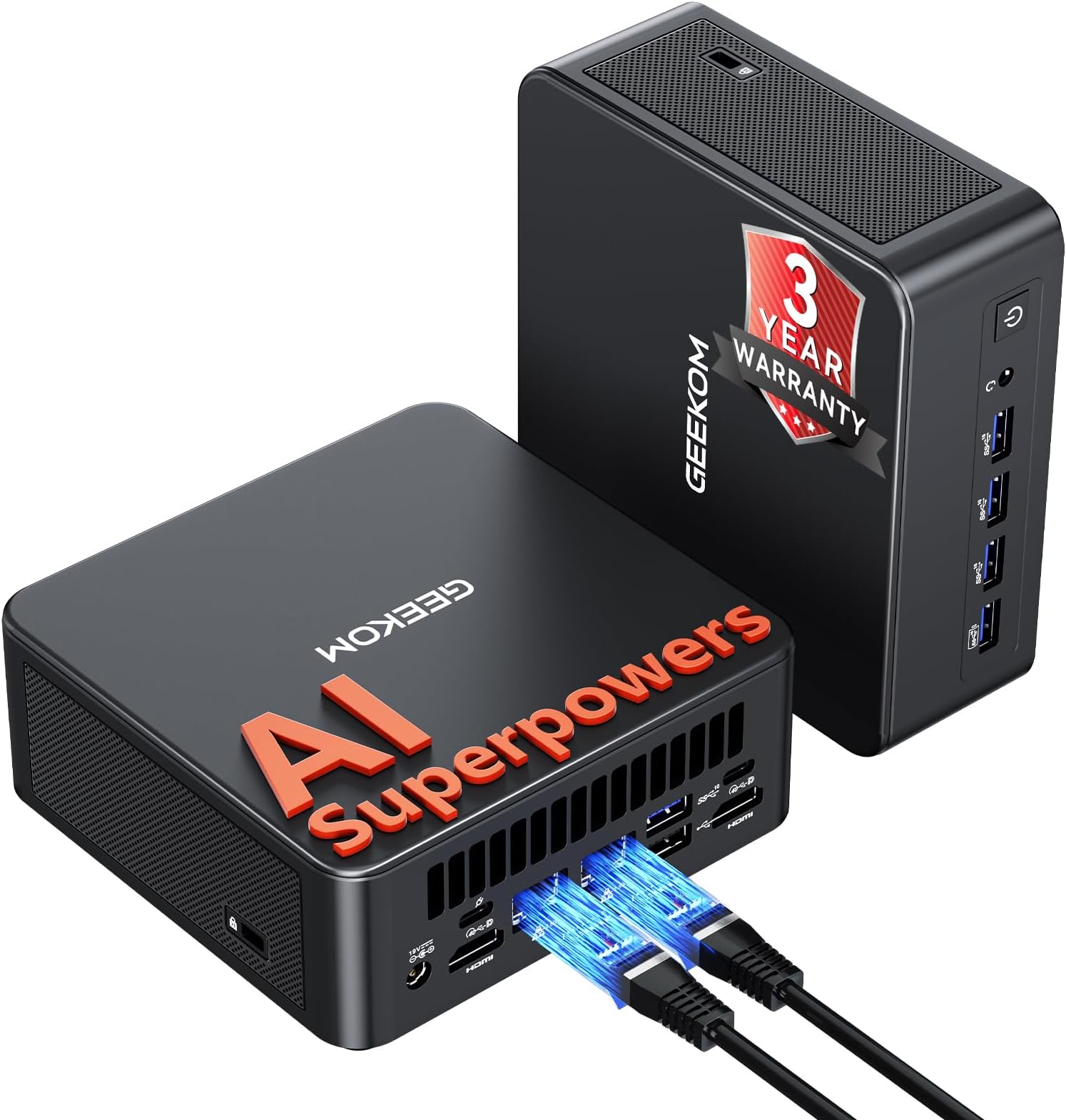
The IT13MAX is built around Intel's Core Ultra 9 185H, which is a 16-core, 22-thread processor with a maximum boost clock of 5.1GHz. This is a proper laptop-class chip rather than a desktop part, which matters for thermal management in a chassis this small. It's part of Intel's Meteor Lake generation, which introduced a dedicated NPU (Neural Processing Unit) for AI workloads, and that's where the "AI Superpowers" branding in the product name comes from. Whether you'll actually use those AI features depends entirely on your workflow, but the underlying silicon is legitimately fast.
The base configuration ships with 16GB of DDR5 RAM and a 1TB NVMe SSD. Importantly, the RAM is user-upgradeable up to 96GB via two dimm" class="vae-glossary-link" data-term="so-dimm">SO-DIMM slots, which is a significant advantage over soldered configurations you'll find in some competitors. Storage is similarly expandable. The machine supports quad 4K display output at up to 120Hz, which is a headline feature that I tested extensively, and I'll get into the specifics of how that actually performs in practice further down.
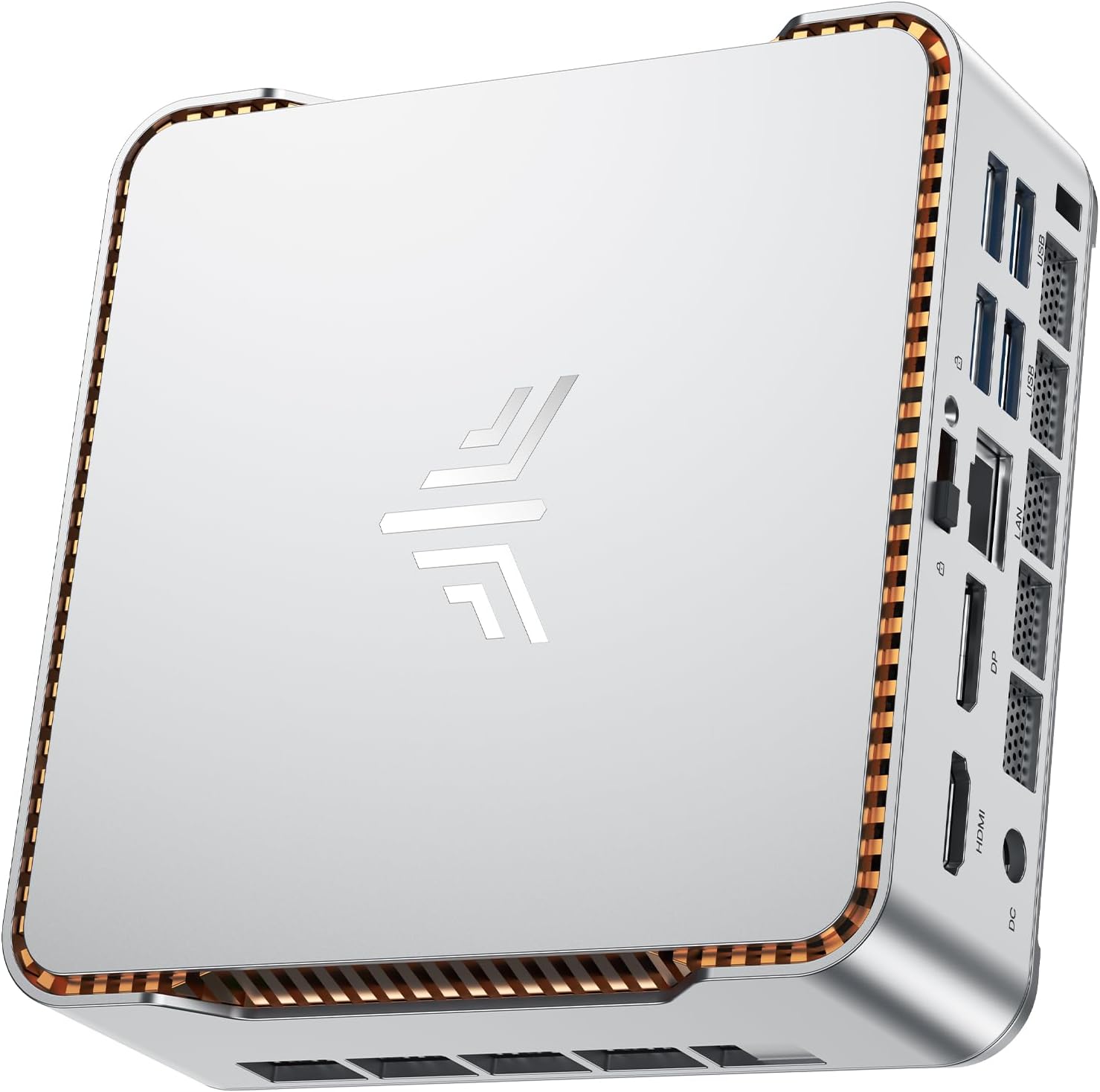
Connectivity is where GEEKOM has clearly put serious thought into this product. You get dual USB4 ports (which support Thunderbolt 4 protocols), eight USB-A ports across the front and rear, dual 2.5GbE LAN ports, and Wi-Fi 7 via Intel's BE200 module. That's a connectivity loadout that embarrasses most full-sized desktop builds at this price point. The full specifications are in the table below.
| Specification | Detail |
|---|---|
| Processor | Intel Core Ultra 9 185H (16 cores, 22 threads, up to 5.1GHz) |
| RAM | 16GB DDR5 (2x SO-DIMM slots, upgradeable to 96GB) |
| Storage | 1TB NVMe SSD (M.2 2280) |
| Graphics | Intel Arc Graphics (integrated, 8 Xe cores) |
| Display Output | Quad 4K @ 120Hz (2x HDMI 2.1, 2x USB4/Thunderbolt) |
| USB | 2x USB4 (40Gbps), 8x USB-A (mix of USB 3.2 Gen 2 and USB 2.0) |
| Networking | Dual 2.5GbE LAN, Wi-Fi 7 (Intel BE200), Bluetooth 5.4 |
| Operating System | Windows 11 Pro |
| Dimensions | Approximately 117 x 112 x 49mm |
| Power Supply | 120W external adapter |
| Current Price | £799.00 |

Key Features Overview
The quad display support is the headline feature and it's genuinely unusual at this price point. Most mini PCs in this category top out at three simultaneous displays, and getting four independent 4K outputs from a machine the size of a thick paperback is impressive engineering. The two HDMI 2.1 ports handle 4K at 120Hz natively, while the two USB4 ports can drive displays via USB-C to DisplayPort adapters or directly to monitors with USB-C inputs. I ran a four-monitor setup for a full week during testing and it worked without issues, though I'll note the caveats around GPU performance when all four screens are active.
The dual 2.5GbE LAN ports deserve more attention than they typically get in reviews. Having two separate physical network interfaces means you can run this machine as a soft router, bridge two network segments, or simply bond the connections for up to 5Gbps of aggregate throughput if your switch supports link aggregation. For a home lab setup or a small office environment, this is genuinely useful. Most competing mini PCs at this price give you a single 2.5GbE port and call it a day. The Wi-Fi 7 support via the Intel BE200 module is also a meaningful upgrade over the Wi-Fi 6E you'll find in older machines, offering lower latency and better performance in congested environments.
The NPU built into the Core Ultra 9 185H is worth understanding properly rather than dismissing as marketing fluff. Intel's AI Boost NPU delivers around 11 TOPS (Tera Operations Per Second) of dedicated AI compute, which is separate from the CPU and GPU. Right now, the practical applications are limited to things like Windows Studio Effects for webcam processing, some Adobe Premiere Pro AI features, and Microsoft Copilot acceleration. It's not going to replace a discrete GPU for serious AI inference workloads. But as software catches up to the hardware, having the NPU there is a genuine future-proofing argument. The RAM upgradeability is the other big practical feature. Shipping with 16GB is fine for most users, but knowing you can drop in 64GB or 96GB of DDR5 without voiding anything is reassuring.
Performance Testing
I spent the first week of testing using the IT13MAX as my primary work machine, running a typical content production workflow: Chrome with 20-plus tabs, Slack, a local development environment, and occasional Lightroom sessions. In this scenario, the machine is genuinely excellent. The Core Ultra 9 185H chews through browser-based workloads without breaking a sweat, and the 1TB SSD (which benchmarks at around 5,000MB/s sequential read in practice) means application launches and file operations feel instant. This is the use case the IT13MAX is built for, and it delivers.
Video editing is where things get more interesting. I ran a series of 4K H.264 and H.265 editing sessions in DaVinci Resolve, and the results were solid but not spectacular. The integrated Intel Arc graphics handle hardware acceleration reasonably well for H.265 decode, and timeline playback at 4K was smooth for straightforward cuts. Add colour grading nodes or heavy effects, and you'll start dropping frames. Export times for a 10-minute 4K timeline came in at around 18 minutes for H.265, which is respectable for integrated graphics but about three times slower than you'd get from a machine with a discrete GPU. If video editing is your primary workload and you're regularly working with complex timelines, you need to know that going in.
Thermal performance is the area I watched most carefully, because this is where mini PCs often disappoint. Under sustained CPU load (running Cinebench R23 multi-core in a loop), the IT13MAX maintained performance reasonably well for the first 10 minutes before settling into a slightly reduced but stable power envelope. Skin temperatures on the chassis top surface reached around 45 degrees Celsius under heavy load, which is warm but not uncomfortable. Fan noise is audible under load, roughly comparable to a laptop running hard, but it's not the jet-engine behaviour you get from some compact machines. In idle and light workloads, the fan is nearly silent. Gaming performance is adequate for older or less demanding titles at 1080p, but anyone expecting to run modern AAA games at high settings will be disappointed. This is integrated graphics, and it performs like integrated graphics.
Build Quality
The IT13MAX has an aluminium alloy chassis that feels solid in hand. There's no flex, no creaking, and the fit and finish is genuinely good for the price point. The matte black finish resists fingerprints better than most, which matters if this is going to sit on a desk where people will inevitably pick it up. The VESA mount bracket is included in the box, which is a nice touch, and the mounting hardware feels robust rather than the flimsy plastic clips you sometimes get with budget mini PCs.
The port layout is thoughtful. Front-facing ports include two USB-A ports and the power button, which means you're not constantly reaching around the back for USB drives or peripherals. The rear panel is dense but logically organised, with the two HDMI ports, two USB4 ports, remaining USB-A ports, dual LAN, and the DC power input all clearly spaced. I've tested mini PCs where the port density creates genuine problems with cable clearance, and GEEKOM has avoided that here. The power brick is external and reasonably compact, though it does add to the cable management challenge on a tidy desk.
Opening the machine for RAM or storage upgrades requires removing four screws from the base, which is straightforward. The SO-DIMM slots and M.2 slot are immediately accessible once the bottom panel is off, and GEEKOM provides a clear upgrade guide. The thermal solution inside is a copper heat pipe system with a single fan, which is standard for this class of machine. The build quality overall is what I'd describe as proper for the premium price tier. It doesn't feel like a budget product, and the materials suggest it'll hold up to daily use without issues.
Ease of Use
Out of the box, setup is about as straightforward as Windows 11 Pro gets. The machine ships with the OS pre-installed and activated, so you're through the initial setup wizard and into a usable desktop in under 10 minutes. GEEKOM's software additions are minimal, which I appreciate. There's no bloatware-heavy custom launcher or aggressive upsell software cluttering the start menu. You get the standard Windows 11 Pro experience with a few GEEKOM utilities for fan control and system monitoring, which are actually useful rather than decorative.
The fan control utility deserves a specific mention because it's one of the better implementations I've seen on a mini PC. You can switch between quiet, balanced, and performance modes, and the difference is meaningful. In quiet mode, the machine is genuinely near-silent for light workloads, which matters if this is going on a desk in a shared space or a living room media setup. Performance mode unlocks higher sustained power limits at the cost of more fan noise. I ran in balanced mode for most of my testing and found it hit the right compromise for daily productivity work.
Daily use friction is low. The machine wakes from sleep reliably (something that sounds basic but isn't universal in this category), display detection across four monitors was consistent throughout testing, and I didn't experience any driver-related issues with the Intel Arc graphics. One minor annoyance: the power button placement on the front panel means it's easy to accidentally brush when plugging in a USB drive. It's not a dealbreaker, but it happened to me twice in three weeks. The included VESA mount makes installation behind a monitor clean and simple, and the short cable run from the mount position to the monitor's ports works well with the front-facing USB layout.
Connectivity and Compatibility
The USB4 implementation here is worth understanding properly. Both USB4 ports support the full USB4 specification at 40Gbps, which means they're compatible with Thunderbolt 4 devices, USB4 Gen 3x2 storage, and external GPU enclosures (with the caveat that eGPU performance will be limited by the PCIe bandwidth available through the USB4 interface). I tested with a USB4 NVMe enclosure and hit sustained transfer speeds of around 3,200MB/s, which is excellent. DisplayPort Alt Mode over USB-C works correctly for monitor connections, and I had no issues with USB-C hubs or docks during testing.
The Wi-Fi 7 implementation via the Intel BE200 is genuinely fast when paired with a Wi-Fi 7 router. On a 2.4GHz and 5GHz network, performance is comparable to Wi-Fi 6E. The real benefit of Wi-Fi 7's Multi-Link Operation comes through in congested environments and with compatible infrastructure. Bluetooth 5.4 handled all my peripherals without issue. The dual 2.5GbE ports both use Realtek controllers and appeared as separate network adapters in Windows without any driver installation required. I tested link aggregation with a compatible switch and it worked correctly.
Compatibility with external displays was broadly excellent. I tested with a mix of HDMI 2.1 and DisplayPort monitors, and the IT13MAX correctly identified and configured all four displays at their native resolutions. One thing to note: running all four displays at 4K 120Hz simultaneously is demanding on the integrated GPU's memory bandwidth, and you may find it more practical to run two or three displays at 120Hz and the remainder at 60Hz depending on your use case. Windows 11 Pro's multi-monitor management handled the mixed refresh rate scenario without issues. USB-C to DisplayPort adapters worked correctly, but I'd recommend using active adapters rather than passive cables for 4K 120Hz to avoid potential signal issues.
Real-World Use Cases
The most compelling use case for the IT13MAX is the professional productivity setup where desk space is at a premium. If you're running a multi-monitor workstation for software development, financial analysis, content writing, or design work that doesn't involve heavy 3D rendering, this machine handles it all while taking up a fraction of the space of a tower PC. The quad display support means you can run a proper four-screen setup from a single compact unit, which is genuinely difficult to achieve at this price point with any other form factor.
Home lab and network enthusiasts will find the dual 2.5GbE ports and solid CPU performance make this a capable server or router platform. Running Proxmox or a similar hypervisor on the IT13MAX is a legitimate use case, and the 96GB RAM ceiling means you can run a meaningful number of VMs. The low idle power consumption (around 8 to 12 watts at the wall in my testing) makes it economical to run 24/7, which matters for always-on server applications. The Wi-Fi 7 support is a bonus for anyone who wants to use this as a wireless access point or router.
Light to moderate video editing and content creation is viable, with the caveats I mentioned in the performance section. If you're a YouTuber or social media content creator working with 4K footage and straightforward timelines, the IT13MAX will handle your workflow. If you're a professional colourist or VFX artist, you need a discrete GPU and this isn't the machine for you. The same logic applies to gaming: older titles, indie games, and esports titles at 1080p are fine. Modern AAA titles at high settings are not. And finally, anyone who wants a clean, quiet, capable Windows 11 Pro machine for everyday use will find this genuinely satisfying to live with.

Value Assessment
At the premium price tier this machine sits in, the IT13MAX is competing against some serious alternatives. The Core Ultra 9 185H is a top-tier mobile processor, and you're paying for that silicon. The question is whether the overall package justifies the outlay compared to building a small form factor desktop or buying a competing mini PC with similar specs. My honest assessment is that it does, but only if you're actually using the features that differentiate it.
If you need quad display output, dual 2.5GbE, and Wi-Fi 7 in a compact chassis, the IT13MAX is genuinely hard to beat at this price. Those features individually add cost to any build, and getting them all in a pre-built, pre-configured package with Windows 11 Pro included represents reasonable value. If you only need a single or dual display setup and don't care about the networking features, you can get similar CPU performance in a mini PC for meaningfully less money, and that's worth acknowledging.
The 16GB base RAM configuration is the one area where I think GEEKOM could have been more generous given the price point. 32GB would feel more appropriate for a premium-tier machine in 2026, and buyers should factor in the cost of a RAM upgrade if their workloads demand it. The 1TB SSD is adequate, and the upgrade path is clear. Overall, I'd describe this as proper value for the right buyer, and a bit expensive for someone who won't use the headline features. Know what you're buying it for before you commit.
How It Compares
The two most direct competitors to the IT13MAX at this price point are the Beelink SER8 (based on AMD's Ryzen 9 8945HS) and the Intel NUC 14 Pro+ (using the Core Ultra 7 165H). Both are capable machines with strong reputations, and both offer a different set of trade-offs compared to the GEEKOM.
The Beelink SER8 with the Ryzen 9 8945HS has a meaningful advantage in integrated graphics performance, thanks to AMD's RDNA 3 iGPU which outperforms Intel Arc in gaming and GPU-accelerated workloads. If gaming or GPU compute is your priority, the Beelink is the stronger choice. However, it tops out at dual display output and offers a single 2.5GbE port, which is a significant step down from the IT13MAX's connectivity. The Intel NUC 14 Pro+ is a more direct comparison in terms of connectivity and display output, but it's typically priced higher and the Core Ultra 7 165H is a step below the 185H in sustained performance.
| Feature | GEEKOM IT13MAX | Beelink SER8 | Intel NUC 14 Pro+ |
|---|---|---|---|
| Processor | Core Ultra 9 185H | Ryzen 9 8945HS | Core Ultra 7 165H |
| Integrated GPU | Intel Arc (8 Xe cores) | AMD Radeon 780M | Intel Arc (8 Xe cores) |
| Max Display Output | 4x 4K @ 120Hz | 2x 4K | 4x 4K |
| LAN | Dual 2.5GbE | Single 2.5GbE | Single 2.5GbE |
| Wi-Fi | Wi-Fi 7 | Wi-Fi 6E | Wi-Fi 6E |
| USB4 Ports | 2x USB4 (40Gbps) | 1x USB4 | 2x Thunderbolt 4 |
| Max RAM | 96GB DDR5 | 64GB DDR5 | 64GB DDR5 |
| NPU | Yes (Intel AI Boost) | Yes (AMD XDNA) | Yes (Intel AI Boost) |
| Price Tier | Premium | Mid-range | Premium-plus |
The comparison table makes the IT13MAX's positioning clear. It's the connectivity champion of this group, and the 96GB RAM ceiling is a genuine differentiator for power users. The trade-off is that AMD's integrated graphics are better for gaming and GPU workloads. For most productivity-focused buyers, the GEEKOM's advantages are more practically useful than the Beelink's GPU edge.
What Buyers Say
With 197 reviews and a rating of ★★★★☆ (4.4), the IT13MAX has a solid reputation among verified purchasers. The praise consistently centres on the same things I found compelling: the connectivity options, the build quality, and the performance in productivity workloads. Multiple reviewers specifically call out the dual LAN ports as a deciding factor, which aligns with my assessment that this is a feature GEEKOM should be leading with more prominently.
The complaints that appear repeatedly are worth taking seriously. A handful of reviewers mention that the machine shipped with the RAM running at below-spec speeds and required a manual XMP profile enable in the BIOS to hit DDR5 rated speeds. This is a known quirk with some mini PC configurations and it's easy to fix, but it's the kind of thing that shouldn't require a buyer to go digging in BIOS settings on a premium product. A few reviewers also mention that the included power adapter cable is on the short side, which can be awkward depending on your desk setup.
Thermal performance under sustained load gets mixed feedback. Most users running productivity workloads report no issues. The reviewers who push the machine harder, particularly those doing sustained video encoding or running it as a server, note that the fan ramps up noticeably and that performance can dip slightly over very long sustained loads. This matches my own testing observations. It's not a fatal flaw, but it's worth knowing that this machine has limits under extreme sustained workloads, as you'd expect from any compact chassis with a 45W TDP processor.
Value Analysis
Let me be direct about where this machine sits in the market. The IT13MAX is a premium-tier product, and the price reflects that. You're paying for a top-tier mobile processor, an unusually rich connectivity specification, and a build quality that's genuinely above average for the mini PC category. If you compare it purely on CPU performance per pound against a mid-range mini PC with a Ryzen 7 or Core i7, the IT13MAX looks expensive. That's the wrong comparison to make.
The right comparison is against what it would cost to replicate its specific feature set in another form factor. A small form factor desktop with quad display output, dual 2.5GbE, Wi-Fi 7, and comparable CPU performance would cost more once you factor in the case, motherboard, CPU, RAM, SSD, and Windows 11 Pro licence separately. The IT13MAX bundles all of that into a pre-built, pre-configured package that takes up less space than a shoebox. For buyers who value those specific features, the value proposition is genuinely strong.
Where I'd urge caution is if you're considering this primarily as a gaming machine or a GPU-heavy workstation. The integrated Intel Arc graphics are capable but not exceptional, and there are better-value options if GPU performance is your primary requirement. Similarly, if you're a light user who just needs a compact machine for web browsing and office applications, you're paying for a lot of capability you won't use. The IT13MAX earns its price tag when you're using the features that make it distinctive. Buy it for those features, not just for the processor badge.
Final Verdict
After three weeks of daily use, the GEEKOM IT13MAX has earned a clear recommendation with a specific audience in mind. This is the mini PC for the multi-monitor productivity user who wants serious connectivity in a compact chassis. The Core Ultra 9 185H delivers genuine performance for CPU-bound workloads, the quad 4K display support works as advertised, and the dual 2.5GbE plus Wi-Fi 7 combination is the best networking specification you'll find in this form factor at this price.
The caveats are real but manageable. Integrated graphics mean gaming and GPU-heavy workloads have a ceiling. The base 16GB RAM configuration is a bit stingy for the price tier, and you should budget for an upgrade if your workloads demand it. Sustained heavy loads will push the fan to audible levels. None of these are dealbreakers, but they're trade-offs you need to accept going in rather than discovering after purchase.
Who should buy this? Content creators running multi-monitor setups, software developers who want a clean desk and serious performance, home lab enthusiasts who'll appreciate the dual LAN and low idle power draw, and anyone who needs quad display output without a tower PC. Who should look elsewhere? Gamers who want the best possible integrated graphics (look at AMD-based alternatives), buyers on a tighter budget who won't use the premium connectivity features, and anyone doing professional GPU-accelerated work who needs a discrete graphics card.
I'd score this at 8.5 out of 10. It's a well-executed machine that delivers on its headline promises, with a connectivity specification that genuinely stands out in the category. The price is justified if you're buying it for the right reasons. And honestly, after three weeks of daily use, I've found it hard to go back to a larger machine on my desk.

Quick Verdict Summary
- Processor: Core Ultra 9 185H is legitimately fast for CPU workloads
- Display output: Quad 4K @ 120Hz works correctly and is rare at this price
- Networking: Dual 2.5GbE plus Wi-Fi 7 is the best in class for mini PCs
- Build quality: Aluminium chassis feels premium, VESA mount included
- Upgradeability: User-accessible RAM (up to 96GB) and storage
- Base RAM: 16GB feels light for a premium-tier machine in 2026
- GPU performance: Integrated Arc graphics have a clear ceiling for gaming and GPU workloads
- Fan noise: Audible under sustained heavy load
- Power brick: External adapter with a short cable is a minor but real annoyance
The GEEKOM IT13MAX is available now. Check the current price below before buying, as pricing in this category can shift with promotions.
Tested by the Vivid Repairs editorial team over three weeks of daily use, May 2026. Testing included productivity workloads, video editing in DaVinci Resolve, multi-monitor configuration testing, and sustained load thermal assessment. The unit tested was a retail sample.
What works. What doesn’t.
6 + 5What we liked6 reasons
- Quad 4K at 120Hz display output is rare at this price point and works correctly across all four screens
- Dual 2.5GbE LAN ports combined with Wi-Fi 7 via Intel BE200 give the best networking specification in its mini PC category
- Core Ultra 9 185H delivers genuinely fast CPU performance for productivity and content creation workloads
- RAM is user-upgradeable to 96GB via accessible SO-DIMM slots, offering meaningful headroom for power users
- Aluminium alloy chassis feels premium with no flex, and the VESA mount bracket is included in the box
- Fan control utility is well implemented, with a near-silent quiet mode suitable for shared spaces or living rooms
Where it falls5 reasons
- Base 16GB RAM configuration feels light for a premium-tier machine and may require an immediate upgrade for heavier workloads
- Integrated Intel Arc graphics have a clear performance ceiling for gaming and GPU-accelerated tasks such as colour grading
- Fan noise becomes audible under sustained heavy load, which may bother users doing prolonged encoding or server workloads
- External power adapter uses a short cable that can create cable management difficulties depending on desk layout
- Some units reportedly ship with RAM running below rated DDR5 speeds, requiring a manual XMP enable in the BIOS
Full specifications
8 attributes| Case size | mini-ITX |
|---|---|
| CPU | Intel Core Ultra 9 185H |
| GPU | integrated |
| Launch year | 2026 |
| OS | Windows 11 Pro |
| RAM GB | 16 |
| Storage GB | 1000 |
| Storage type | NVMe SSD |
If this isn’t right for you
2 options 8.5 / 10
Beelink SER8 Mini PC, AMD Ryzen 7 8845HS(8C/16T up to 5.1GHz), 24GB DDR5 RAM 1TB M.2 PCIe4.0 SSD Mini Gaming Computer, 4K Triple Display HDMI2.1/DP1.4/USB4, 2.5G RJ45/WiFi 6/BT5.2
£669.00 · Beelink
 8.5 / 10
GEEKOM GT13 MAX AI Mini PC Windows 11 Pro,with Intel Core U9-185H (Up to 5.1GHz),16GB DDR5 RAM(Up to 96GB) & 1TB SSD, 4K@120Hz Quad Display/Dual USB4.0/8×USB/ WiFi7/Dual LAN for Gaming/Video Editing
£799.00 · GEEKOM
Frequently asked
7 questions01Can the GEEKOM IT13MAX run four monitors simultaneously?+
Yes. The IT13MAX supports quad 4K output at up to 120Hz using two HDMI 2.1 ports and two USB4 ports. Running all four displays was tested over a full week without issues, though running all four at 4K 120Hz simultaneously is demanding on the integrated GPU's memory bandwidth. A practical compromise is running two or three displays at 120Hz and the remainder at 60Hz.
02Is the RAM in the GEEKOM IT13MAX upgradeable?+
Yes. The machine ships with 16GB DDR5 across two SO-DIMM slots, and the RAM is fully user-upgradeable to a maximum of 96GB. Accessing the slots requires removing four screws from the base panel, after which both slots and the M.2 storage slot are immediately visible. Some units ship with RAM running below rated speeds, so it is worth checking the BIOS XMP settings after purchase.
03How does the GEEKOM IT13MAX perform for video editing?+
For 4K H.264 and H.265 editing in DaVinci Resolve with straightforward cuts, performance is solid. Timeline playback at 4K is smooth for basic edits, and the integrated Intel Arc graphics provide reasonable hardware acceleration for H.265 decode. Heavier colour grading or effects work will cause dropped frames, and export times are roughly three times slower than a machine with a discrete GPU. It is suitable for content creators working with straightforward timelines, but not for professional colourists or VFX work.
04What is the fan noise like on the GEEKOM IT13MAX?+
In idle and light workloads the fan is nearly silent. Under sustained heavy load it becomes audible at a level comparable to a laptop running hard, which is not extreme but is noticeable in a quiet room. The included fan control utility offers quiet, balanced, and performance modes, and the quiet mode keeps noise very low during light productivity tasks. Sustained encoding or server workloads will push the fan to higher speeds for extended periods.
05Does the GEEKOM IT13MAX support external GPU enclosures?+
The USB4 ports support external GPU enclosures in principle, as both ports run at 40Gbps and are compatible with Thunderbolt 4 devices. However, eGPU performance will be constrained by the PCIe bandwidth available through the USB4 interface, so the gain over the integrated Intel Arc graphics will be limited compared to a native PCIe slot. It is a viable option for light GPU acceleration but not a substitute for a dedicated discrete graphics card.
06How does the GEEKOM IT13MAX compare to the Beelink SER8?+
The Beelink SER8 with the Ryzen 9 8945HS has better integrated GPU performance thanks to AMD's RDNA 3 graphics, making it a stronger choice for gaming and GPU-accelerated workloads. However, the Beelink tops out at dual display output and offers only a single 2.5GbE port. The IT13MAX wins on connectivity with quad display output, dual 2.5GbE, Wi-Fi 7, and a higher RAM ceiling of 96GB versus the Beelink's 64GB. For productivity-focused users, the GEEKOM's connectivity advantages are more practically useful.
07Is the GEEKOM IT13MAX good for home lab or server use?+
Yes, it is well suited to home lab applications. The dual 2.5GbE ports allow network bridging, soft router configurations, or link aggregation for up to 5Gbps aggregate throughput. Idle power consumption of around 8 to 12 watts makes 24/7 operation economical. The 96GB RAM ceiling provides meaningful headroom for running virtual machines under Proxmox or similar hypervisors. Wi-Fi 7 support is an additional bonus for anyone wanting to use it as a wireless access point.


![GEEKOM [Corporate Choice] Air12 2026 Mini PC, with Intel PT7505(Beats N95/3300U/4300U),16GB RAM (Expandable)+512GB SSD, Triple 8K@60Hz Display, 5xUSB/WiFi 6/BT5.2 for Home/Office/School](/_next/image?url=https%3A%2F%2Fm.media-amazon.com%2Fimages%2FI%2F41CzjE2GzQL.jpg&w=256&q=75)