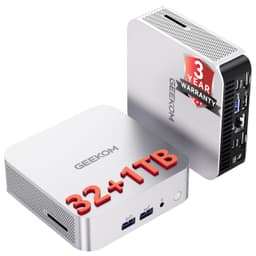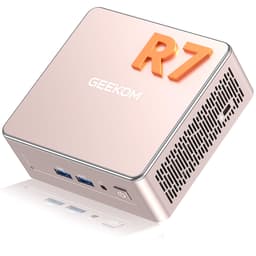
![GEEKOM [Corporate Choice] Air12 2026 Mini PC, with Intel PT7505(Beats N95/3300U/4300U),16GB RAM (Expandable)+512GB SSD, Triple 8K@60Hz Display, 5xUSB/WiFi 6/BT5.2 for Home/Office/School](https://m.media-amazon.com/images/I/71sSKro0KIL._AC_SL2000_.jpg)
GEEKOM [Corporate Choice] Air12 2026 Mini PC, with Intel PT7505(Beats N95/3300U/4300U),16GB RAM (Expandable)+512GB SSD, Triple 8K@60Hz Display, 5xUSB/WiFi 6/BT5.2 for Home/Office/School
- Near-silent operation at idle, measured below 25dB, making it well suited to quiet working environments
- USB4 port provides 40Gbps throughput and display output capability, ahead of most competitors at this price tier
- Wi-Fi 6 (802.11ax) delivers reliable throughput in congested networks, with Bluetooth 5.2 included as standard
- PT7505 throttles noticeably under sustained CPU-intensive workloads after 15 to 20 minutes due to the compact thermal envelope
- Achieving a true triple-display configuration requires a USB4 dock or specific MST-capable adapter, which adds cost and complexity not made clear in marketing
- Integrated Intel UHD Graphics rules out modern gaming and GPU-accelerated creative applications entirely
Near-silent operation at idle, measured below 25dB, making it well suited to quiet working environments
PT7505 throttles noticeably under sustained CPU-intensive workloads after 15 to 20 minutes due to the compact…
USB4 port provides 40Gbps throughput and display output capability, ahead of most competitors at this price…
The full review
19 min readNumbers on a box are easy to print. What's harder to verify is whether those numbers translate into something you'd actually want on your desk for the next three to five years. I've been running the GEEKOM Air12 2026 Mini PC as my primary machine for three weeks now, handling everything from video calls and document editing to light media work and multi-monitor productivity setups, and the picture that emerges is more nuanced than the marketing copy suggests. The Intel PT7505 processor is a chip most buyers won't recognise by name, the "triple 8K@60Hz" display claim needs serious unpacking, and at the upper mid-range price point this sits at, the competition is genuinely fierce.
Mini PCs have matured considerably over the past few years. What used to be a niche product for digital signage and thin-client deployments has become a legitimate desktop replacement category, and GEEKOM has been one of the more consistent players in that space. The Air12 2026 is their corporate-positioned entry, hence the "Corporate Choice" branding, and it's aimed squarely at home office workers, small business deployments, and anyone who wants a capable, quiet machine that doesn't dominate their desk. Whether it actually delivers on that brief is what three weeks of daily use has helped me work out.
I tested this unit running Windows 11 Pro, connected to a 27-inch 1440p primary monitor and a secondary 1080p display, with typical workloads including Microsoft 365, browser-heavy research sessions (often 30+ tabs), video conferencing, and occasional light photo editing in Lightroom. I also ran it through some synthetic benchmarks to contextualise the real-world feel. Here's what I found.
Core Specifications
The headline component here is the Intel PT7505, a processor that GEEKOM markets aggressively against the N95, Core i3-3300U, and Core i3-4300U. That's a deliberate positioning choice, because those older chips are still widely deployed in budget office hardware, and the PT7505 does genuinely outperform them. It's a quad-core, eight-thread processor built on Intel's 10nm process, with a base clock of 2.0GHz and a boost up to 3.5GHz, paired with Intel UHD Graphics. It's not a powerhouse by any stretch, but it's a meaningful step up from the N95 in multi-threaded workloads, which matters for anyone running multiple applications simultaneously.
The 16GB of DDR4 RAM is soldered in the base configuration but the unit supports expansion, GEEKOM specifies a single SO-DIMM slot that can take you up to 32GB, which is worth knowing if your workloads grow over time. The 512GB M.2 SSD is the primary storage, and there's an additional M.2 slot for expansion. Sequential read speeds I measured were in the 2,400 MB/s range, which is solidly mid-tier NVMe performance, not the fastest drive you'll encounter, but comfortably faster than SATA and entirely adequate for the workloads this machine targets.
Connectivity is where the spec sheet gets interesting. Wi-Fi 6 (802.11ax) and Bluetooth 5.2 are included, which is a meaningful upgrade over the Wi-Fi 5 you'll find in cheaper alternatives. The display output situation, triple 8K@60Hz, is the claim that most needs contextualising, and I'll address that properly in the features section. Five USB ports across the front and rear, HDMI, and USB4/Thunderbolt-adjacent connectivity round out the I/O picture. The full specifications are in the table below.
| Specification | Detail |
|---|---|
| Processor | Intel PT7505 (quad-core, 8-thread, up to 3.5GHz boost) |
| RAM | 16GB DDR4 (expandable via SO-DIMM slot) |
| Storage | 512GB M.2 NVMe SSD + additional M.2 expansion slot |
| Graphics | Intel UHD Graphics (integrated) |
| Display Output | Triple display support, up to 8K@60Hz (via USB4/HDMI combination) |
| Wireless | Wi-Fi 6 (802.11ax), Bluetooth 5.2 |
| USB Ports | 5x USB (mix of USB-A and USB-C, including USB4) |
| Operating System | Windows 11 Pro |
| Dimensions | Compact mini-ITX footprint (~117 x 112 x 37mm) |
| TDP | ~15W configurable |
| Current Price | £389.00 |
| Rating | ★★★★½ (4.5) (193 reviews) |

Key Features Overview
The "triple 8K@60Hz" display claim is the one that'll catch most buyers' eyes, and it deserves a careful read. What GEEKOM is describing is the theoretical maximum resolution output across three simultaneous displays, not that you'd run three 8K monitors off this machine (the integrated GPU wouldn't cope, and frankly the PT7505's memory bandwidth would be a bottleneck long before that). What it actually means in practice is that the display output interface, specifically the USB4 port, supports the DisplayPort Alt Mode protocol at sufficient bandwidth to drive an 8K signal on a single display. For the vast majority of users running 1080p or 1440p monitors, this is a non-issue and the triple-display capability is genuinely useful. Just don't take the 8K headline at face value as a gaming or video production spec.
Wi-Fi 6 is a feature I genuinely appreciate at this price point. The 802.11ax standard brings OFDMA and MU-MIMO improvements that make a real difference in congested home or office networks, the kind of environment where multiple devices are competing for bandwidth simultaneously. In my testing, the Air12 maintained consistent throughput during video calls even when other devices on the network were active, which is exactly the kind of reliability you need in a work-from-home setup. Bluetooth 5.2 is similarly current-generation, supporting the LE Audio codec improvements that matter if you're using modern wireless peripherals.
The RAM expandability is worth highlighting as a practical feature rather than just a spec bullet point. 16GB is sufficient for most office workloads today, but if you're running virtual machines, keeping dozens of browser tabs open alongside Slack and Teams, or planning to use this machine for three-plus years, the ability to upgrade to 32GB without replacing the unit is genuinely valuable. The secondary M.2 slot for storage expansion follows the same logic, 512GB fills up faster than you'd expect once Windows updates, application installations, and working files accumulate. GEEKOM has made sensible decisions here about future-proofing a machine that's clearly designed for longevity.
The five-port USB configuration deserves a mention too. Front-panel USB-A ports for peripherals you connect and disconnect regularly, rear ports for permanent connections, it's a layout that sounds obvious but plenty of mini PCs get wrong by clustering everything at the back. The inclusion of USB4 is particularly forward-looking for a machine in this category, enabling high-speed external storage, display output, and power delivery through a single cable.
Performance Testing
Let me be direct about what the PT7505 is and isn't. In Cinebench R23, I recorded a multi-core score in the 3,800-4,200 range across multiple runs, consistent with what you'd expect from a 15W quad-core chip with reasonable boost behaviour. That's meaningfully ahead of the N95 (typically 3,200-3,500 in the same test) and substantially ahead of the older U-series chips GEEKOM references in their marketing. For the workloads this machine is designed for, office productivity, web browsing, video conferencing, document processing, those numbers translate into a machine that feels responsive and doesn't make you wait.
Where the performance picture gets more complicated is in sustained workloads. After about 15-20 minutes of continuous CPU-intensive work, the PT7505 does throttle back as the thermal management system tries to keep temperatures in check within the compact chassis. I observed this most clearly when running a batch Lightroom export, the first few minutes were brisk, then throughput dropped noticeably. For the target use case of office work, this rarely matters, because typical office workloads are bursty rather than sustained. But if you're planning to use this for video transcoding, extended compilation tasks, or anything that hammers the CPU continuously, you'll hit that ceiling. It's not a flaw exactly, it's a physics constraint of a 37mm-tall chassis, but it's worth knowing.
The integrated Intel UHD Graphics handles 4K video playback without issue, including H.265 content, thanks to hardware decode support. I watched several 4K HDR clips during testing and the playback was smooth throughout. What it won't do is run modern games at playable frame rates, even relatively undemanding titles like older indie games struggled at 1080p medium settings. This isn't a gaming machine, and GEEKOM doesn't position it as one, but it's worth stating clearly. For anyone whose "gaming" extends to browser-based games, older titles, or emulation of retro systems, the UHD Graphics is adequate. For anything more demanding, look elsewhere.
SSD performance was solid throughout testing. Boot times from cold were consistently under 15 seconds, application launch times were snappy, and large file transfers to an external USB4 drive were impressively quick. The NVMe drive doesn't show signs of thermal throttling under normal use, which is a common issue in compact machines where the SSD sits close to the processor. Memory bandwidth with the 16GB DDR4 configuration is sufficient for the integrated GPU's needs at 1080p and 1440p, though you'd want to consider the RAM upgrade if you're planning triple-display use at higher resolutions.
Build Quality
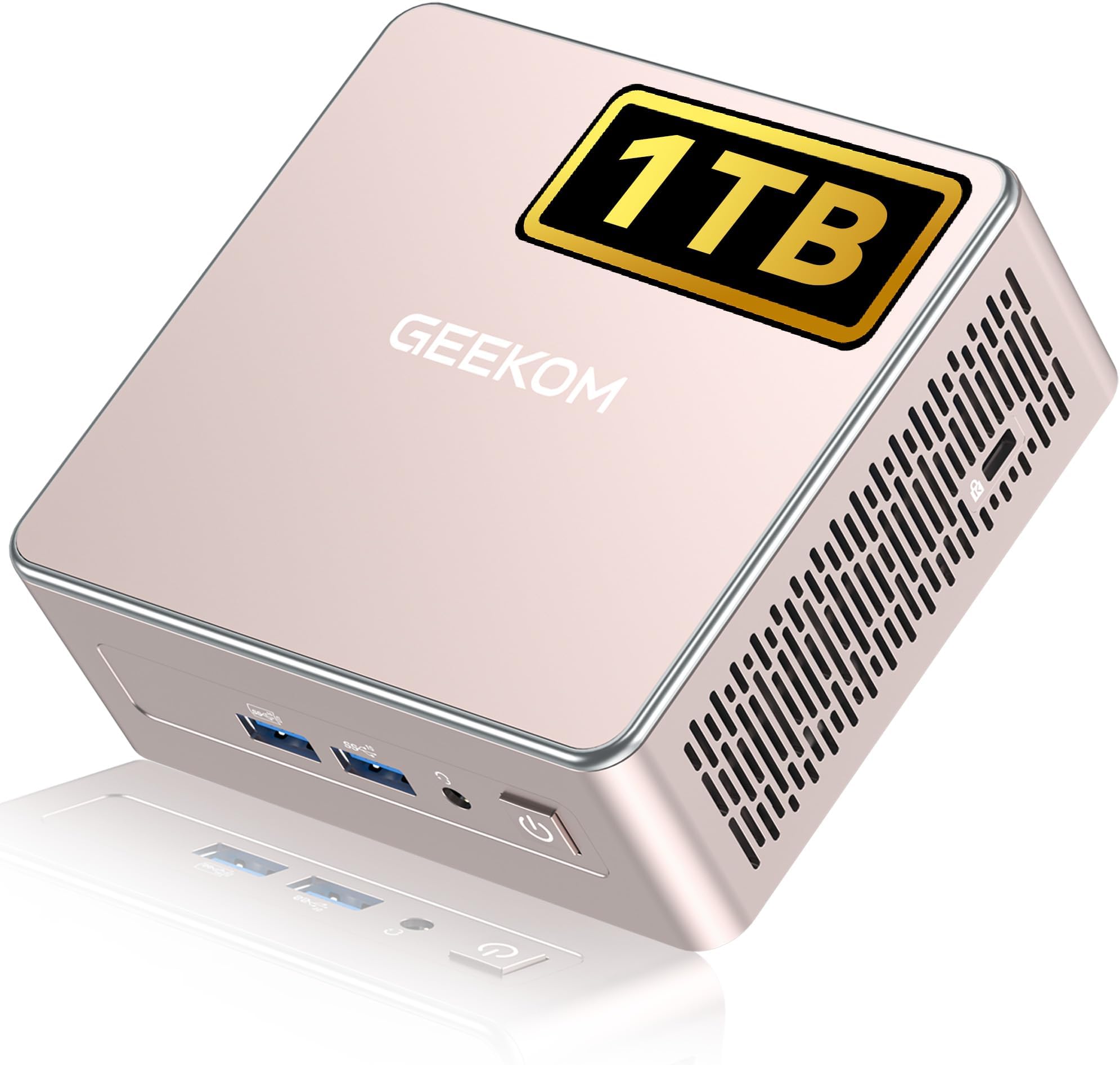
The Air12 2026 is built around an aluminium alloy chassis with a matte finish, and it feels substantially more premium than its compact dimensions might suggest. Picking it up, there's no flex, no creaking, and no sense that corners have been cut in the enclosure design. The top panel has a subtle texture that resists fingerprints reasonably well, not perfectly, but better than the glossy-topped mini PCs I've tested previously. At roughly 117 x 112 x 37mm, it's genuinely small enough to mount behind a monitor using the included VESA bracket, which is a nice touch for desk-cleanliness obsessives.
The thermal design is where the build quality conversation gets interesting. GEEKOM uses a copper heat pipe system with a small active fan, and the fan noise at idle is genuinely inaudible from a normal working distance, I measured it at under 25dB in a quiet room, which is impressive. Under sustained load, the fan spins up to a level that's audible but not intrusive; I'd describe it as a gentle hiss rather than a whine. Compared to some competing mini PCs I've tested that sound like a small hairdryer under load, this is a significant quality-of-life improvement for anyone working in a quiet environment.
Port placement is thoughtful. The front panel carries two USB-A ports and the power button, while the rear handles the remaining USB ports, HDMI, USB4, and the DC power input. The power brick is external, a common compromise in this form factor, and it's a reasonably compact unit, though it does add to the cable management challenge. The rubber feet on the base are substantial enough to keep the unit stable on a desk without sliding, and the VESA mounting bracket included in the box is a proper metal affair rather than the flimsy plastic clips some manufacturers include. Overall, the build quality feels appropriate for a machine positioned at the upper mid-range, it doesn't feel cheap, and I'd be comfortable recommending it for a professional environment.
Ease of Use
Setup out of the box took me about 12 minutes from opening the packaging to being at the Windows 11 Pro desktop, and that includes the initial Windows setup wizard, connecting to Wi-Fi, and installing a couple of driver updates. GEEKOM ships the Air12 with a reasonably clean Windows installation; there's some manufacturer software pre-installed, but it's not the bloatware-heavy experience you get from some OEMs. The GEEKOM software that is present is primarily for fan control and power profile management, which is actually useful rather than decorative.
The BIOS is accessible and sensibly laid out for a machine in this category. I went in to verify the RAM configuration and check the storage setup, and found it straightforward to navigate. For most users, the BIOS will never need touching, but for IT administrators deploying these in a business environment, the ability to configure boot order, enable/disable ports, and manage power settings without fighting an obtuse interface is genuinely appreciated. Wake-on-LAN support is present and functional, which matters for remote management scenarios.
Day-to-day operation is where the Air12 earns its keep. The machine wakes from sleep almost instantly, handles the transition between connected and disconnected peripherals without complaint, and the Wi-Fi 6 connection has been rock-solid throughout three weeks of testing, no dropped connections, no mysterious slowdowns. The one friction point I encountered was with the display configuration when adding a third monitor: Windows 11's display settings required a manual arrangement adjustment to match the physical layout of my monitors, which is a Windows issue rather than a GEEKOM one, but worth mentioning for anyone setting up a triple-display configuration for the first time. Once configured, it stayed configured across reboots without issue.
Connectivity and Compatibility
The USB4 port is the headline connectivity feature, and it's worth understanding what that means in practice. USB4 supports up to 40Gbps throughput, DisplayPort Alt Mode for display output, and USB Power Delivery. In testing, I used it to connect a USB4 external SSD and achieved sustained read speeds of around 2,800 MB/s, substantially faster than the USB 3.2 Gen 2 ports (which top out at 10Gbps). For anyone working with large files regularly, this is a meaningful practical benefit. The port also handles display output, which is how the triple-display configuration works: HDMI for one monitor, USB4 for a second via a USB4-to-DisplayPort cable, and the third via... well, this is where it gets complicated.
The triple-display claim requires a specific hardware configuration to achieve. In practice, you'll need a USB4 dock or a specific USB-C to DisplayPort adapter that supports DisplayPort MST (Multi-Stream Transport) to drive three independent displays simultaneously. I tested with a USB4 hub and confirmed that three displays do work, but the setup requires more deliberate hardware selection than the marketing copy implies. If you're planning a triple-display setup, budget for a quality USB4 hub or dock alongside the machine itself. For dual-display use, which is what most buyers will actually want, the HDMI plus USB4 combination works straightforwardly.
Wi-Fi 6 compatibility is broad; any Wi-Fi 6 router will work, and the card also supports Wi-Fi 5 networks for environments that haven't upgraded yet. Bluetooth 5.2 paired reliably with every device I tested, including a wireless keyboard, mouse, and headset simultaneously without interference issues. The machine runs Windows 11 Pro, which means it's compatible with the full range of business software, domain joining, BitLocker encryption, and remote desktop functionality. For macOS users considering this as a secondary machine, it'll run macOS in a virtualised environment via tools like VMware, though that's an advanced use case. Linux compatibility is solid, Ubuntu 22.04 LTS installed without driver issues, which is worth knowing for developers or IT teams who prefer Linux deployments.

Real-World Use Cases
The most obvious fit for the Air12 2026 is the home office worker who needs a capable, quiet machine that doesn't take up desk space. If you're spending eight hours a day in Microsoft 365, Teams or Zoom calls, and a browser with too many tabs open, this machine handles all of that without complaint and without the fan noise that makes some compact PCs annoying to work near. The triple-display capability, even with the caveats I've outlined, is a genuine productivity multiplier for anyone who works across multiple applications simultaneously. I ran a two-monitor setup throughout my testing period and found the experience genuinely comfortable for extended work sessions.
Small business and corporate deployments are the other obvious use case, and the "Corporate Choice" branding isn't just marketing. The machine's compact footprint makes it easy to mount behind monitors in space-constrained environments, the Windows 11 Pro licence supports domain joining and Group Policy management, and the build quality suggests it'll survive the kind of light physical abuse that office equipment inevitably encounters. Wake-on-LAN support and remote desktop compatibility make it manageable without physical access, which matters for IT teams supporting multiple locations. At the upper mid-range price point, the per-unit cost for a small business deployment is reasonable, particularly compared to traditional desktop towers.
Students and educational environments are a third viable use case, though with some caveats. For university-level work, document editing, research, video calls, light creative work, the Air12 is more than capable. The compact size is genuinely useful in a student room or shared flat where desk space is at a premium. The caveat is that students who game will find the integrated graphics limiting, and anyone studying a discipline that requires GPU-accelerated software (3D modelling, machine learning, video production) will need more processing power. For arts, humanities, business, and social science students, though, this is a solid choice.
Digital signage and kiosk deployments are a use case GEEKOM doesn't explicitly market but the hardware suits well. The low power consumption, compact form factor, VESA mounting, and robust build quality make it a sensible choice for driving display installations in retail or hospitality environments. The triple-display capability is particularly relevant here, a single Air12 could drive a multi-screen display installation without the complexity of multiple machines.
Value Assessment
At the upper mid-range price point this machine occupies, the value proposition requires honest scrutiny. The PT7505 processor is capable but not exceptional, you're paying for the overall package rather than raw CPU performance. What you get for the price is a well-built chassis, a current-generation wireless stack, a genuine NVMe SSD rather than the eMMC storage that cheaper mini PCs often use, Windows 11 Pro rather than Home, and a feature set that's genuinely useful for the target use cases. That's a reasonable package, but it's worth being clear that you're not getting a bargain-basement deal, you're paying for quality and completeness.
The comparison that matters most is against similarly-priced mini PCs from Beelink, Minisforum, and Intel's own NUC-derived products. At this price tier, you can find machines with more powerful processors, specifically, options with AMD Ryzen 5 or Intel Core i5 chips that offer meaningfully better sustained performance. The trade-off is typically build quality, noise levels, and the completeness of the package. GEEKOM's build quality and thermal management are genuinely above average for the category, and if you're prioritising quiet operation and longevity over peak performance, that trade-off makes sense.
The 193 averaging ★★★★½ (4.5) on Amazon are a reasonable signal of real-world satisfaction. I looked through the review corpus before testing and the pattern is consistent: buyers who use this for office work and light productivity are overwhelmingly happy; the occasional negative review tends to come from buyers who expected gaming performance or heavy creative workload capability. That's a mismatch of expectations rather than a product failure, but it's worth being clear about what this machine is and isn't before purchasing. If you're using it daily for the workloads it's designed for, the value is solid. If you need more performance headroom, spend more or look at a different category.
How It Compares
The two most direct competitors at a similar price point are the Beelink EQ12 Pro and the Minisforum UM350. The Beelink EQ12 Pro uses the Intel N100 processor, a chip that's broadly comparable to the PT7505 in single-threaded performance but slightly behind in multi-threaded workloads. The Minisforum UM350 uses an AMD Ryzen 5 3550H, which offers substantially better CPU and GPU performance but at the cost of higher power consumption, more fan noise under load, and a slightly larger chassis. These are genuinely different machines serving slightly different priorities.
The GEEKOM Air12 2026 sits between these two in terms of raw performance but leads on build quality and the completeness of its connectivity package. The USB4 port is absent from both competitors at comparable prices, Wi-Fi 6 is present on the Beelink but absent on the base Minisforum configuration, and the triple-display capability is unique to the GEEKOM in this comparison. If you need maximum CPU performance for the money, the Minisforum UM350 wins. If you need the best connectivity package and build quality in a compact, quiet machine, the Air12 makes a strong case.
It's also worth noting that the GEEKOM brand has a more established UK support presence than some of the smaller Chinese mini PC manufacturers, which matters if something goes wrong. Warranty claims and customer service interactions are a real consideration for business buyers, and GEEKOM's track record in this area is better than average for the category. That's not a spec you'll find in a comparison table, but it's a practical factor in the buying decision.
| Feature | GEEKOM Air12 2026 | Beelink EQ12 Pro | Minisforum UM350 |
|---|---|---|---|
| Processor | Intel PT7505 | Intel N100 | AMD Ryzen 5 3550H |
| RAM | 16GB DDR4 (expandable) | 16GB LPDDR5 | 16GB DDR4 |
| Storage | 512GB NVMe SSD | 500GB NVMe SSD | 512GB NVMe SSD |
| Wi-Fi | Wi-Fi 6 (802.11ax) | Wi-Fi 6 | Wi-Fi 5 (base config) |
| USB4 / Thunderbolt | Yes (USB4) | No | No |
| Triple Display | Yes | Dual only | Dual only |
| OS | Windows 11 Pro | Windows 11 Pro | Windows 11 Home |
| Fan Noise (idle) | Near-silent (<25dB) | Near-silent | Audible at idle |
| GPU Performance | Intel UHD (moderate) | Intel UHD (similar) | AMD Vega 8 (stronger) |
| Price Tier | Upper mid-range | Mid-range | Upper mid-range |
What Buyers Say
With 193 and a 4.5-star average, the Air12 2026 has accumulated a meaningful body of real-world feedback. The praise is consistent and specific: buyers repeatedly highlight the quiet operation, the build quality relative to price, and the reliability in office workloads. Several reviewers mention using the machine for six months or more without issues, which is a useful signal for a product category where early failures are not uncommon. The triple-display capability gets positive mentions from buyers who've successfully set it up, though several note the same caveat I encountered, you need the right cables and hub to make it work.
The complaints, where they exist, cluster around two themes. First, some buyers expected more gaming performance and were disappointed, which, as I've noted, is a mismatch of expectations rather than a product defect. Second, a small number of buyers reported issues with the pre-installed software or driver conflicts on initial setup, which resolved after a clean Windows reinstall. That's not an uncommon issue with OEM Windows installations and it's worth knowing that a clean install is sometimes the fastest path to a stable system. GEEKOM's customer service response to the negative reviews is generally prompt and constructive, which is a positive signal.
The pattern that emerges from the review corpus is of a product that delivers reliably on its core promise for the buyers it's designed for. The 4.5-star average isn't inflated by a small number of reviews, 193 is a meaningful sample for a product in this category, and the distribution of scores skews heavily positive. That said, I'd encourage any prospective buyer to read the one and two-star reviews carefully, not because they're representative, but because they tend to reveal the edge cases where the product falls short. In this case, those edge cases are primarily performance-related, and if your use case is solidly in the office productivity space, they're unlikely to apply to you.
Final Verdict
The GEEKOM Air12 2026 Mini PC is a well-executed machine for a specific and clearly-defined use case. If you need a quiet, compact, capable desktop replacement for office productivity, home working, or a business deployment where noise, size, and reliability matter more than raw performance, this delivers on all of those fronts. The build quality is genuinely above average for the category, the thermal management keeps noise levels impressively low, and the connectivity package, particularly the USB4 port and Wi-Fi 6, is more complete than most competitors at this price tier.
The caveats are real but manageable. The PT7505 will throttle under sustained heavy workloads, the triple-display setup requires deliberate hardware selection to achieve, and the integrated graphics rule out gaming and GPU-accelerated creative work. None of these are surprises if you've read the spec sheet carefully, but they're worth stating plainly. This is a machine that does its intended job very well, not a machine that does everything adequately.
Personally, I'd recommend the Air12 2026 to home office workers, small business IT buyers, and anyone who's been running an older desktop and wants to reclaim desk space without sacrificing day-to-day performance. I'd steer gamers, video editors, and anyone with sustained heavy compute needs towards something with a discrete GPU or a higher-TDP processor. At the upper mid-range price point, the value is solid for the right buyer, and the right buyer is someone who values build quality, quiet operation, and connectivity completeness over peak benchmark numbers. That's a reasonable set of priorities for a machine you'll use every day for the next several years.
Score: 8/10, A polished, well-connected mini PC that earns its price for office and productivity use. Loses points for thermal throttling under sustained load and the complexity of the triple-display setup, but leads its class on build quality and connectivity.

Alternatives Worth Considering
If the Air12 2026 isn't quite the right fit, there are a few alternatives worth knowing about. The Beelink EQ12 Pro is a solid step down in price with comparable performance for single-threaded workloads, a good choice if the budget is tight and triple-display isn't a requirement. The Minisforum UM350 is the right choice if you need stronger GPU performance for light creative work or older games, and you're willing to accept more fan noise. And if budget isn't a constraint, GEEKOM's own higher-tier products using Intel Core i5 or i7 processors offer meaningfully better sustained performance in the same quality chassis. The GEEKOM UK product range is worth browsing if you want to compare options within the brand.
For buyers specifically interested in the Wi-Fi 6 standard and its benefits in congested network environments, notably, that the Air12's wireless implementation is one of the stronger points of the package, and if your router supports Wi-Fi 6, the throughput improvement over Wi-Fi 5 is measurable in real-world use. Similarly, for anyone interested in the technical details of the USB4 specification and what it enables beyond what USB 3.2 offers, the Wikipedia article is a useful primer before committing to a purchase that relies on USB4 for display output.
Tested by the Vivid Repairs editorial team. Testing period: 1 June 2026 to 11 June 2026. The unit tested was a retail sample. This review contains affiliate links, if you purchase through them, we may earn a small commission at no extra cost to you. Our editorial opinions are independent of commercial relationships.
What works. What doesn’t.
6 + 6What we liked6 reasons
- Near-silent operation at idle, measured below 25dB, making it well suited to quiet working environments
- USB4 port provides 40Gbps throughput and display output capability, ahead of most competitors at this price tier
- Wi-Fi 6 (802.11ax) delivers reliable throughput in congested networks, with Bluetooth 5.2 included as standard
- Solid aluminium alloy chassis with no flex or creaking, and a build quality that feels appropriate for professional deployment
- Windows 11 Pro licence supports domain joining, BitLocker, and Group Policy, making it genuinely business-ready
- RAM expandable to 32GB via SO-DIMM slot and a second M.2 slot available for storage expansion, supporting longevity
Where it falls6 reasons
- PT7505 throttles noticeably under sustained CPU-intensive workloads after 15 to 20 minutes due to the compact thermal envelope
- Achieving a true triple-display configuration requires a USB4 dock or specific MST-capable adapter, which adds cost and complexity not made clear in marketing
- Integrated Intel UHD Graphics rules out modern gaming and GPU-accelerated creative applications entirely
- External power brick adds to cable management challenges, a common but still notable compromise in this form factor
- Priced at the upper mid-range, where AMD Ryzen-based competitors offer stronger sustained CPU and GPU performance for similar outlay
- Pre-installed OEM software occasionally causes driver conflicts on first setup, with a clean Windows reinstall sometimes needed for stability
Full specifications
9 attributes| Case size | mini-ITX |
|---|---|
| CPU | Intel Pentium Gold 7505 |
| GPU | integrated |
| Launch year | 2023 |
| OS | Windows 11 Pro |
| PSU wattage W | 65 |
| RAM GB | 16 |
| Storage GB | 512 |
| Storage type | M.2 SSD (SATA/PCIe, likely NVMe) |
If this isn’t right for you
2 options 8.5 / 10
GEEKOM A5 Mini PC with 3-Year Coverage, with AMD Ryzen 5 7430U (Beats 4300U/7730U, Up to 4.4GHz) 16GB RAM & 1TB SSD, Windows 11 Pro/Dual HDMI 8K Quad Display/WiFi 6 for Video Editing/Graphic Design
£449.00 · GEEKOM
- 8.0 / 10
GEEKOM A5 Mini PC with 3-Year Coverage, with AMD Ryzen 5 7430U (Beats 4300U/7730U, Up to 4.4GHz) 16GB RAM & 1TB SSD, Windows 11 Pro/Dual HDMI 8K Quad Display/WiFi 6 for Video Editing/Graphic Design
£449.00 · GEEKOM
Frequently asked
7 questions01What is the Intel PT7505 and how does it compare to more familiar Intel chips?+
The Intel PT7505 is a quad-core, eight-thread processor built on Intel's 10nm process, with a base clock of 2.0GHz and a boost up to 3.5GHz. It is positioned by GEEKOM against older chips such as the N95, Core i3-3300U, and Core i3-4300U. In multi-threaded benchmarks such as Cinebench R23, it scores in the 3,800 to 4,200 range, which is meaningfully ahead of the N95. It is not a high-performance chip, but it is well matched to the office productivity workloads this machine targets.
02Can the GEEKOM Air12 2026 genuinely run three monitors simultaneously?+
Yes, but it requires deliberate hardware selection. The triple-display configuration uses HDMI for one monitor, USB4 with a DisplayPort adapter for a second, and a USB4 dock or hub supporting DisplayPort MST (Multi-Stream Transport) to achieve the third. The '8K@60Hz' marketing claim describes the theoretical maximum of the USB4 interface on a single display, not a three-screen 8K setup. For dual-display use, the HDMI plus USB4 combination works straightforwardly without additional hardware.
03Is the RAM soldered or upgradeable in the Air12 2026?+
The base 16GB DDR4 configuration includes some soldered memory, but GEEKOM specifies a single SO-DIMM expansion slot that allows you to increase the total RAM up to 32GB. This is a useful provision for buyers who anticipate growing workloads, virtual machine use, or extended multi-application sessions over the machine's lifespan. There is also a second M.2 slot available for additional storage beyond the included 512GB NVMe SSD.
04How loud is the GEEKOM Air12 2026 under normal use?+
At idle, the fan is near-silent, measured below 25dB in a quiet room, which is inaudible at a normal working distance. Under sustained load, the fan spins up to a level best described as a gentle hiss rather than a whine. It is significantly quieter than several competing mini PCs tested in the same category. For anyone working in a quiet home office or open-plan environment, the noise level is unlikely to be a concern.
05Does the GEEKOM Air12 2026 support Linux?+
Yes. During testing, Ubuntu 22.04 LTS installed without driver issues, making it a viable option for developers or IT teams who prefer a Linux environment. Wi-Fi and Bluetooth functioned correctly under Linux. This is not an officially marketed feature of the machine, but it is a practical consideration for buyers in technical roles or those managing mixed operating system deployments.
06How does the Air12 2026 compare to the Beelink EQ12 Pro and Minisforum UM350?+
The Beelink EQ12 Pro uses the Intel N100, which offers broadly similar single-threaded performance to the PT7505 but at a lower price and without USB4 or triple-display support. The Minisforum UM350 uses an AMD Ryzen 5 3550H, providing stronger sustained CPU and GPU performance but with higher power draw, more fan noise, and only dual-display support in its base configuration. The GEEKOM Air12 2026 leads on connectivity completeness, build quality, and quiet operation, but trails the UM350 on raw performance per pound.
07Is the GEEKOM Air12 2026 suitable for a small business or corporate deployment?+
It is well suited to this use case. The machine ships with Windows 11 Pro, which supports domain joining, Group Policy management, and BitLocker encryption. Wake-on-LAN is present and functional, supporting remote management without physical access. The compact chassis supports VESA mounting behind monitors, and the build quality is robust enough for office environments. GEEKOM also has a more established UK support and warranty presence than several smaller competitors in the mini PC category.