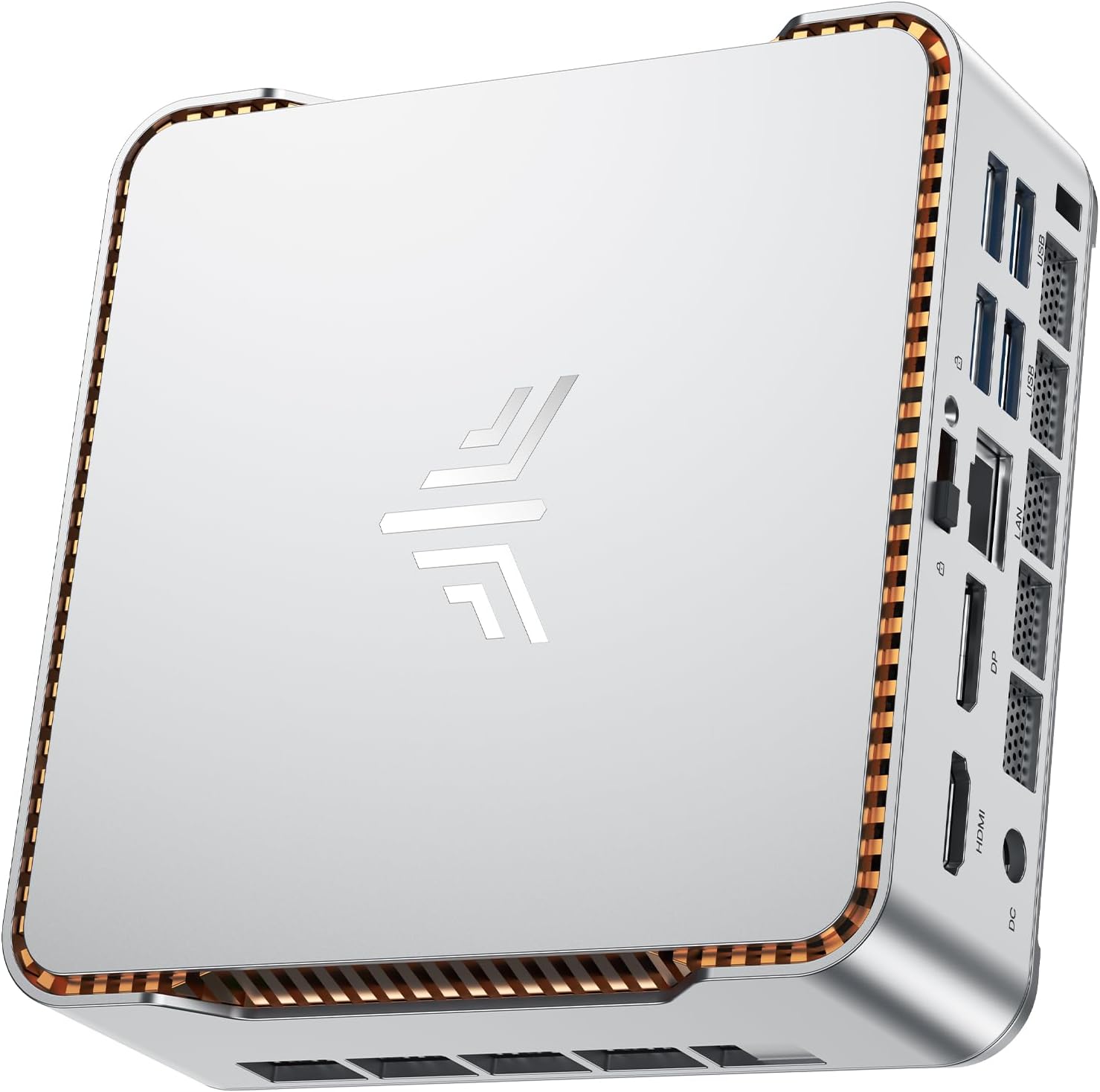
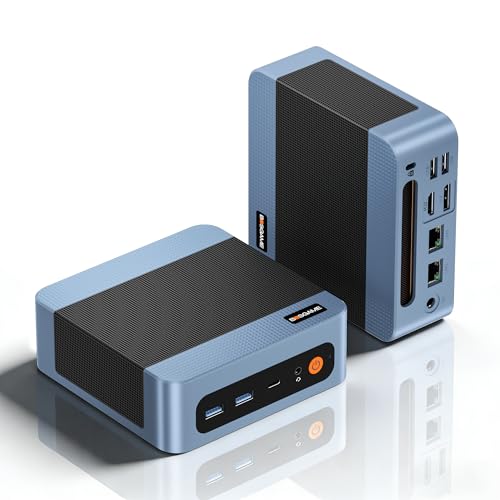
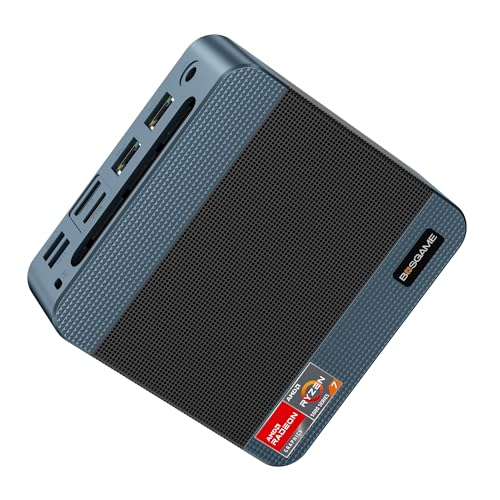
The BOSGAME P3 Lite is a mini PC built around AMD's Ryzen 7 6800H, a laptop processor from 2022, with 32GB of DDR5, a 1TB PCIe 4.0 SSD and two 2.5 Gigabit Ethernet ports. It's small enough to hang on the back of a monitor, and the spec covers plenty: office work across three screens, a home server, some light gaming.
The catch is the age of the chip. The 6800H was a high-end laptop part when it launched and it's still quick for everyday work, but AMD has released two newer generations since. It's fast enough for most jobs, so the decision is whether the networking and ports are worth having on an older processor. For most people that comes down to whether they'll ever plug anything into the second Ethernet port.
This review draws on BOSGAME's product page and images, the Amazon UK listing, and what's well established about the Ryzen 7 6800H and Radeon 680M. We haven't run a P3 Lite ourselves, so there are no noise or temperature measurements here, and anything BOSGAME claims is reported as BOSGAME's claim.
BOSGAME P3 Lite specifications
These are the details for the 32GB / 1TB P3 Lite sold on Amazon UK. Amazon sells it as one option on a listing it shares with other BOSGAME P3 models, so check the option you've picked reads "R7 6800H 32GB/1TB". Check the memory figure too: BOSGAME's own website still describes the P3 Lite as having 24GB in its product text while selling only a 32GB version, so check the memory figure on whichever listing you buy from.
| Specification | BOSGAME P3 Lite |
|---|---|
| Processor | AMD Ryzen 7 6800H, 8 cores, 16 threads, 3.2GHz base, up to 4.7GHz |
| Architecture | Zen 3+, 6nm, 16MB L3 cache |
| Graphics | AMD Radeon 680M integrated (RDNA 2) |
| Memory | 32GB DDR5-4800, dual channel, two SO-DIMM slots, up to 64GB |
| Storage | 1TB M.2 2280 NVMe SSD, PCIe 4.0 x4 |
| Front ports | 2 x USB 3.2 Gen 2 (10Gbps), 1 x USB4, 3.5mm audio jack |
| Rear ports | 2 x 2.5G Ethernet, HDMI 2.0, DisplayPort 1.4, 1 x USB 3.2 Gen 2 (10Gbps), 1 x USB 2.0, DC power in |
| Displays | Up to three at 4K 60Hz (HDMI, DisplayPort and USB4) |
| Wireless | Wi-Fi 6E, Bluetooth 5.2 |
| Operating system | Windows 11 Pro (according to the Amazon listing) |
| Size | Roughly 13cm across and under 5cm tall (BOSGAME's figures vary slightly) |
| In the box | Mini PC, power adapter, HDMI cable, VESA mount and screws, user manual |
| Warranty | 1-year limited (BOSGAME) |
| Current price | £519.00 · Details |

Processor and graphics
The Ryzen 7 6800H has eight Zen 3+ cores and sixteen threads on a 6nm process. BOSGAME's images quote the chip's 45W default power rating, AMD's published default for the 6800H. BOSGAME doesn't say whether the P3 Lite is set higher or lower, and it publishes nothing on sustained performance or fan behaviour.
For office work, browsing, video calls, spreadsheets and coding, eight cores is more than enough. Compiling code, exporting video and running a few virtual machines at once are the jobs where the extra cores pay off. BOSGAME's own product images quote a Cinebench R23 multi-core score of 14,607. BOSGAME doesn't publish the test conditions, so treat it as the maker's figure. Small cases also tend to give up some boost clock once they've been working hard for a while, so a long render may not match it.
The graphics are AMD's Radeon 680M, built into the processor. It was the strongest integrated GPU AMD had made when it appeared, and it's still capable, but the RDNA 3-based Radeon 780M that followed in the Ryzen 7000 series is newer and quicker in games. Integrated graphics borrow system memory and depend on its speed, so the dual-channel DDR5 here helps the 680M directly.
Is the P3 Lite any good for gaming?
BOSGAME calls the P3 Lite a gaming PC, and that needs a little translating. The 680M copes with esports and older titles at 1080p on sensible settings, so games like CS2, Rocket League, Fortnite and League of Legends are the realistic territory. Recent big-budget games are another matter. Expect low settings, a lower resolution or upscaling, and some won't be enjoyable at all.
If gaming is the main reason you're buying, a PC with a dedicated graphics card is the better spend. If it's the odd evening of something light on a machine that's mostly for work, the 680M will manage.
Ports and connectivity
The ports are the main reason to buy a P3 Lite. Two 2.5 Gigabit Ethernet ports allow things a single port can't: one cable to the router and one straight to a NAS, a separate port for a home lab network, or, under Linux or Proxmox, both ports bonded through a switch that supports it. 2.5G is two and a half times the speed of ordinary gigabit, which you'll notice most when copying big files to network storage fast enough to keep up.
The USB4 port on the front is the other useful extra. It carries video as well as data, and BOSGAME says it can drive a display at up to 8K 60Hz. BOSGAME's own material disagrees on its data speed, quoting 40Gbps on its website and 10Gbps on one product image, so don't count on full USB4 bandwidth for fast external drives until that's settled. Next to it are two 10Gbps USB-A ports, with a third on the back alongside a single USB 2.0 port, which is the obvious home for a keyboard or mouse receiver.
For screens there's HDMI 2.0 and DisplayPort 1.4 at the back plus the USB4 port at the front, and BOSGAME rates the P3 Lite for three 4K monitors at 60Hz. On a trading desk or a coding setup, or for anyone who works across several documents at once, that means three screens without a dock or a USB display adapter.
Wireless is Wi-Fi 6E and Bluetooth 5.2. Wi-Fi 6E adds the 6GHz band to the usual 2.4GHz and 5GHz, and in a crowded block of flats or a busy office that band is usually far less congested. You need a 6E router to use it, though. On an older router the P3 Lite connects at whatever standard the router offers.
Memory, storage and upgrades
32GB of DDR5 is a generous starting point. A stack of browser tabs, Teams, Office and a photo editor can all stay open without the machine running short, and there's room for a couple of small virtual machines. The memory sits in two standard SO-DIMM slots, and BOSGAME's listing says they'll take up to 64GB, so there's a way to add more later.
Storage is a 1TB M.2 2280 NVMe drive on PCIe 4.0, today's mainstream standard and noticeably quicker than older PCIe 3.0 drives when loading large files. It's a standard size, so swapping it for something bigger is straightforward if you're comfortable opening the case. The listing mentions expansion up to 2TB but doesn't say whether there's a second M.2 slot, so plan on replacing the drive rather than adding one unless BOSGAME confirms otherwise.
Design, size and cooling
The P3 Lite is a squat box roughly 13cm across and under 5cm tall. Amazon lists it at 12.6 x 11.2 x 4.1cm, while BOSGAME's own drawing works out at about 13 x 12.9 x 4.6cm. Either way it takes up very little desk, and BOSGAME includes a VESA bracket and screws so you can hang it on the back of a compatible monitor.
Inside, BOSGAME shows a single blower fan with copper heat pipes, and it claims a noise level of 36dB without saying what load or method that was measured under, so the figure can't tell you how loud it gets during a long render. Small PCs with a 45W chip are usually close to silent while browsing and clearly audible when pushed for long stretches. That comes with the form factor rather than being a fault of this particular box.
Power comes from an external adapter with a barrel plug. The listing doesn't give its wattage.

Setup and software
The Amazon listing says Windows 11 Pro comes installed. Pro rather than Home matters if you want BitLocker drive encryption, to connect into the PC with Remote Desktop, or to join it to a work domain. Setup is the usual Windows routine: connect a screen, keyboard and mouse, get online over Ethernet or Wi-Fi and work through Microsoft's setup screens. As with any new PC, run Windows Update and check AMD's site for current graphics drivers before you settle in.
BOSGAME also says the P3 Lite will take other operating systems. A Ryzen 7 with two 2.5G ports is a common choice for Linux, Proxmox or dedicated router software, though that's a project for someone happy to install an operating system from scratch.
Who the BOSGAME P3 Lite suits
Home office and small business desks. Three 4K screens, 32GB of memory and a fast SSD make a comfortable workstation for documents, spreadsheets, video calls and browser-heavy work, and the whole thing can hide behind a monitor.
Home lab and networking. The two 2.5G ports are the main draw. Typical jobs include a Proxmox host for a few virtual machines, a home firewall, or a small media and file server, and eight cores give plenty of headroom for that kind of work. BOSGAME doesn't name the network chip, so check driver support before planning a pfSense or OPNsense build.
Students and light creative work. Photo editing benefits from the memory, and 1080p video editing is workable. 4K timelines will be slow going on integrated graphics.
Occasional gaming. Fine for esports and older games at 1080p. It isn't a substitute for a gaming PC with its own graphics card.
Is BOSGAME a good brand?
BOSGAME is a mini PC maker. The brand panel on its Amazon listing says it was founded in March 2019, and it sells on Amazon UK through its own store as well as from its website. Like most mini PC brands, it builds around standard parts: an AMD laptop processor, SO-DIMM memory and an M.2 SSD. The memory and the SSD, the parts you're most likely to upgrade or replace, are ones you can buy anywhere.
The warranty is a one-year limited warranty, according to BOSGAME, with support through its website. It's worth weighing if you plan to keep the machine for years. When you buy from a UK retailer, your rights under the Consumer Rights Act apply on top. Long-term reliability is the part we can't judge, because that takes years of ownership data we don't have.
Is the P3 Lite good value?
Most of what you pay for here is connectivity. The processor dates from 2022, but two 2.5G ports, USB4, Wi-Fi 6E, three 4K outputs, 32GB and 1TB all come as standard. If you'll use the networking and the third screen, that's a lot in a very small box. If all you need is a quiet office PC for one or two monitors, a newer processor with fewer extras may suit you better, and if games matter, look for the newer Radeon 780M or 890M graphics instead.
Prices for mini PCs move around a lot, so compare the current price in the table above with the other machines on your shortlist before deciding.

Final verdict
The BOSGAME P3 Lite gives up some processor and graphics speed in return for its networking, its ports and a generous amount of memory. For a home office, a small business desk or a home lab, that trade makes sense, especially if you'll put both 2.5G ports to work. As a gaming PC first and foremost, it's the wrong choice, because the 680M is behind AMD's newer Radeon 780M and 890M integrated graphics.
Editorial score: 7 out of 10, earned by the connectivity and the 32GB of memory. A newer chip, a longer warranty and specifications BOSGAME agreed with itself on would have pushed it higher.
What works. What doesn’t.
5 + 4What we liked5 reasons
- Two 2.5G Ethernet ports, handy for a NAS or home lab
- 32GB of dual-channel DDR5 as standard, upgradeable to 64GB
- Three 4K 60Hz displays from HDMI, DisplayPort and USB4
- 1TB PCIe 4.0 NVMe SSD in a standard M.2 2280 slot
- Wi-Fi 6E and Bluetooth 5.2, plus a VESA mount in the box
Where it falls4 reasons
- Ryzen 7 6800H and Radeon 680M are two generations behind AMD's current chips
- Integrated graphics only, so recent big-budget games need low settings
- BOSGAME states only a one-year limited warranty
- BOSGAME's own figures disagree on USB4 speed and size
Full specifications
12 attributes| Bluetooth | 5.2 |
|---|---|
| CPU | AMD Ryzen 7 6800H |
| CPU base clock | 3.2GHz |
| CPU clock | up to 4.7GHz |
| CPU cores | 8C/16T |
| Display outputs | HDMI 2.0, DisplayPort 1.4, USB4 (three 4K@60Hz screens) |
| Ethernet | 2x 2.5GbE |
| GPU | AMD Radeon 680M (integrated) |
| GPU architecture | RDNA 2 |
| RAM | 32GB DDR5-4800 SO-DIMM, dual channel |
| RAM GB | 32 |
| RAM MAX | 64GB |
If this isn’t right for you
2 options 8.5 / 10
GEEKOM A6 Mini PC, AMD Ryzen 7 6800H, 16GB DDR5, 1TB SSD, USB4, Dual HDMI, Wi-Fi 6E, Windows 11 Pro
£509.00 · GEEKOM · Details

Frequently asked
6 questions01Is the BOSGAME P3 Lite worth buying?+
It is if you'll use what makes it different: two 2.5G Ethernet ports, USB4, triple 4K output and 32GB of DDR5 as standard. That suits home offices, small business desks and home labs. If you mainly want to play games, the older Radeon 680M graphics make a PC with a dedicated graphics card, or a newer Radeon 780M or 890M machine, the better choice.
02Is the BOSGAME P3 Lite good for gaming?+
For light gaming, yes. The Radeon 680M handles esports and older games such as CS2, Rocket League and Fortnite at 1080p on sensible settings. Recent big-budget games need low settings or upscaling, and some won't run well. BOSGAME markets it as a gaming PC, but it's really a productivity machine that can game a little.
03Can you upgrade the RAM and SSD in the BOSGAME P3 Lite?+
Yes. The memory is in two standard DDR5 SO-DIMM slots, and BOSGAME's listing says they take up to 64GB. The SSD is a standard M.2 2280 NVMe drive on PCIe 4.0, so it can be swapped for a larger one. The listing doesn't say whether there's a second M.2 slot, so plan on replacing the drive rather than adding another.
04Does the BOSGAME P3 Lite come with Windows 11?+
Yes. The Amazon UK listing says it comes with Windows 11 Pro installed, and BOSGAME says it will take other operating systems too. Linux is the usual alternative.
05Is BOSGAME a good brand?+
BOSGAME is a mini PC maker that says it was founded in 2019. It builds around standard AMD processors, SO-DIMM memory and M.2 SSDs, which keeps upgrades and repairs simple. Its warranty is a one-year limited one, worth weighing if you plan to keep the machine for years, and your UK statutory rights apply on top when you buy from a UK retailer. Long-term reliability is hard to judge without years of ownership data.
06What warranty comes with the BOSGAME P3 Lite?+
BOSGAME states a one-year limited warranty for its mini PCs, with support through its website. Your rights under the Consumer Rights Act apply separately when you buy from a UK retailer.