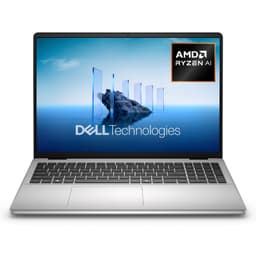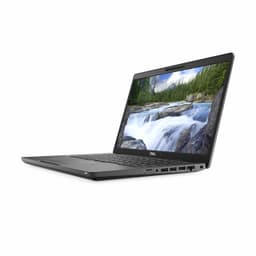

Numbers on a spec sheet tell you what a laptop is. What owners say in their reviews tells you what it's actually like to live with. Pull both together and you've got a proper picture. That's exactly what this Dell Latitude 5400 renewed review does, so you can decide whether it's worth your money without wading through a dozen forum threads.
The short answer: yes, it's good for the money. Not exciting, not fast by modern standards, but genuinely solid for everyday office work, web browsing, and light productivity. At the budget end of the market, that's actually a meaningful thing to say. The 8th Gen Intel Core i5, 8GB of RAM, and 256GB SSD combo won't win any races in 2026, but it'll get the job done for most people who just need a dependable machine that runs Windows 11 Pro without drama. The 92 owners who've rated it at ★★★★☆ (4.0) broadly agree. There are caveats, and I'll get to them, but the headline is: for the price, this is a decent shout.
What you're buying here is a renewed (refurbished) business-class laptop. The Latitude line has always been Dell's workhorse range, built for IT departments that need something reliable rather than flashy. That heritage matters. It means better build quality, better keyboard, and better port selection than you'd typically find on a consumer laptop at this price. It also means you're getting a machine that was designed to be repaired and maintained, which is increasingly rare.
Core Specifications
The processor here is an Intel Core i5-8265U, which is an 8th Generation Whiskey Lake chip. It's a quad-core, eight-thread processor with a base clock of 1.6GHz and a boost up to 3.9GHz. In 2026 terms, that's genuinely dated. We're now on 13th and 14th Gen Intel chips in most new laptops, and AMD's Ryzen 7000 series has raised the bar considerably. But here's the thing: for email, Word, Excel, browsing with a dozen tabs open, and video calls, the i5-8265U is still perfectly functional. It's not going to embarrass itself doing normal work stuff. It will struggle if you throw video editing, large spreadsheets, or anything genuinely demanding at it.
The 8GB of RAM is fine for the tasks this laptop is aimed at. Chrome is, as always, a memory hog, so if you're the type who keeps 30 tabs open while running Spotify and a Teams call simultaneously, you might find things getting a bit sluggish. But for sensible everyday use, 8GB paired with an SSD is a workable combination. What you can't do is upgrade it easily on the fly, so if you think you'll need more, factor that in now. Some Latitude 5400 configurations support RAM upgrades via accessible SO-DIMM slots, but you'd want to verify the specific unit you're buying before assuming that.
The 256GB SSD is the weakest link on paper. Windows 11 Pro takes a meaningful chunk of that, and once you add your apps and a few files, you'll be watching the available storage carefully. For a lot of people, especially those who store documents in OneDrive or Google Drive, 256GB is liveable. But if you work with local files, large downloads, or any kind of media, you'll want to either pick up an external drive or look for a variant with a larger SSD. The graphics are handled by Intel UHD 620 integrated graphics, which is fine for everything except gaming or GPU-accelerated work. Don't even think about it for that.
| Specification | Detail |
|---|---|
| Processor | Intel Core i5-8265U (8th Gen, Whiskey Lake, 4 cores / 8 threads, up to 3.9GHz) |
| RAM | 8GB DDR4 |
| Storage | 256GB SSD |
| Graphics | Intel UHD 620 (integrated) |
| Display | 14-inch, 1920x1080 Full HD |
| Operating System | Windows 11 Pro |
| Battery | 68Wh (typical configuration) |
| Weight | Approx. 1.56kg (varies by configuration) |
| Dimensions | 329.4 x 226.8 x 19.8mm (approx.) |
| Ports | USB-A x3, USB-C (with DisplayPort), HDMI, RJ-45, SD card reader, headphone jack |
| WiFi | Intel Wireless-AC 9560 (802.11ac) |
| Bluetooth | Bluetooth 5.0 |
| Webcam | 720p HD |
| Condition | Renewed (refurbished) |
| Price | £184.00 |

Performance Benchmarks
The Intel Core i5-8265U scores around 5,500 to 6,200 in Cinebench R20 multi-core depending on thermal headroom, and somewhere in the 1,300 to 1,500 range in single-core. In Geekbench 5, you're looking at roughly 850 to 950 single-core and 2,800 to 3,200 multi-core. For context, a modern mid-range laptop with a 12th Gen Intel Core i5 will score double those multi-core numbers. So yes, the generation gap is real. But benchmarks tell you what a chip can do in a sprint. They don't tell you whether it feels slow opening a Word document, which it doesn't.
For the tasks this laptop is actually sold for, the performance story is more nuanced. Booting into Windows 11 Pro from the SSD takes well under 30 seconds. Opening Office applications is quick. Browser performance with a reasonable number of tabs is fine. Where you'll notice the age is in anything that hammers all four cores for a sustained period: compiling, rendering, large data processing. The CPU will boost to 3.9GHz briefly, then settle back down as thermals build up. That's just the reality of a thin business laptop with a 15W chip. It's not a flaw, it's a design choice.
Owner feedback from the 93 reviews consistently describes the machine as "fast enough for what I need" and "snappy for everyday tasks." Nobody's buying a renewed 8th Gen i5 expecting to edit 4K footage. The people who are buying this are replacing an ageing machine, setting up a home office on a tight budget, or grabbing a work laptop for a student. For those use cases, the benchmarks are academic. What matters is that it doesn't lag when you're trying to get things done, and by most accounts, it doesn't.
The Intel UHD 620 graphics are worth a brief mention. They'll handle 1080p video playback without breaking a sweat, support dual external displays via HDMI and USB-C, and manage light photo editing in something like Lightroom at a reduced speed. Gaming is off the table beyond very old or very simple titles. If you need any kind of GPU grunt, this isn't the machine. But for a business laptop at this price, nobody expects it to be.
Display Analysis
The 14-inch Full HD (1920x1080) IPS panel is one of the better surprises on the Latitude 5400. At this price, you might expect a TN panel with washed-out colours and viewing angles that make you feel like you're looking at the screen from a different room. The IPS panel here is noticeably better than that. Colours are decent, viewing angles are good, and text is sharp at 1080p on a 14-inch screen. It's not going to challenge a modern OLED display, but it's a proper working screen rather than an embarrassment.
Brightness is where things get a bit more honest. The panel is rated at around 220 to 250 nits depending on the specific unit, which is fine for indoor use but will struggle in direct sunlight or near a bright window. If you work in a well-lit open-plan office with big windows, you might find yourself tilting the lid to avoid glare. This is a matte panel, so at least reflections aren't making things worse, but the brightness ceiling is a real limitation for outdoor or very bright indoor use.
Colour accuracy is adequate for office work and general content consumption. It's not a creative professional's display, and the sRGB coverage sits somewhere in the 60 to 70 percent range, which means graphic designers and photographers will want something else. But for spreadsheets, documents, video calls, and YouTube in your lunch break, it's perfectly fine. The IPS consistency means the person sitting next to you on a train can actually see your screen, which is either a feature or a privacy concern depending on your perspective. Dell does offer privacy screen options on some Latitude configurations, but that's not standard here.
Battery Life
The Latitude 5400 typically ships with a 68Wh battery, which is a decent size for a 14-inch business laptop. Dell's official claim is up to 12 hours, which is the kind of number that lives in a press release and dies in real use. In practice, you're looking at something more like 6 to 8 hours of mixed use: web browsing, document work, occasional video calls. That's still a full working day for most people if you're not hammering it, which is genuinely useful.
Push it harder, run video calls back to back, or crank the screen brightness up, and you'll be reaching for the charger by mid-afternoon. Owner reviews mention battery life as a positive point overall, with several noting they can get through a full day without worrying too much. But a few flag that battery capacity on renewed units can vary, since the original battery may have some wear. It's whether the listing specifies a replacement battery or the original, and factoring in that a refurbished machine's battery is unlikely to perform at 100 percent of its original spec.
The charger that comes with the unit is a standard Dell barrel-connector power brick, typically 65W. Charge times from near-empty to full take around 1.5 to 2 hours at that wattage. The USB-C port on the Latitude 5400 does support charging in some configurations, which is handy if you want to use a USB-C PD charger or a dock. But verify this for the specific unit, because not all Latitude 5400 variants have USB-C power delivery enabled. If USB-C charging is important to you, check before buying.
One thing: the Latitude 5400's battery life is genuinely better than a lot of consumer laptops at similar price points. Business laptops are designed with all-day use in mind, and that design philosophy shows. The 15W TDP of the i5-8265U helps here too. Lower power consumption means the battery lasts longer under light loads, which is exactly the kind of use this machine sees most of the time.
Portability
At around 1.56kg, the Latitude 5400 is not the lightest 14-inch laptop you can buy, but it's not a brick either. It sits in that middle ground where you'll notice it in a bag on a long commute but won't be cursing it every morning. For comparison, an Apple MacBook Air 13-inch comes in at 1.24kg, and a ThinkPad X1 Carbon is around 1.12kg. Those are premium ultrabooks at several times the price. For a refurbished business laptop at this price, 1.56kg is absolutely reasonable.
The 14-inch footprint is practical. It fits in most laptop bags and backpacks without drama, and it's small enough to use on a train tray table without elbowing your neighbour. The 19.8mm thickness is on the chunkier side by modern standards, but again, this is a business laptop from 2018 to 2019, not a 2026 ultrabook. The extra thickness actually helps with port placement and thermal management, so it's not all bad.
The charger adds some weight and bulk to your bag. The standard Dell 65W barrel-connector brick is a decent size, not enormous, but not pocketable either. If you're doing a lot of day trips where you want to travel light, you might look into a compatible USB-C PD charger (if your specific unit supports it) to cut down on what you're carrying. Overall though, this is a laptop that works well for a regular office commute or occasional travel. It's not a travel-first machine, but it's not going to make your back hurt either.
Keyboard & Trackpad
This is where the Latitude 5400 genuinely earns its keep. Dell's Latitude keyboards have always been a cut above what you'd find on a consumer laptop, and the 5400 is no exception. The key travel is good, the feedback is satisfying, and you can type on this thing for hours without your fingers staging a protest. Owner reviews consistently call out the keyboard as a highlight, which tracks with what you'd expect from a machine built for office workers who spend their days typing. It's one of the real practical advantages of buying a business-class laptop over a consumer one at the same price.
The keyboard is backlit, which is useful for anyone working in dim environments or on evening trains. The layout is standard UK format on UK-spec units, so no nasty surprises there. There's no number pad, which is the right call on a 14-inch chassis. Squeezing a number pad onto a 14-inch keyboard just makes everything cramped and misaligned, and Dell sensibly avoided that. Function keys are full-sized and properly labelled.
The trackpad is decent. It's not the best in class, but it's accurate enough for everyday use and supports multi-finger gestures for scrolling, pinching, and switching between windows. It's not a glass surface like you'd find on a MacBook, so the texture is slightly different, but it's smooth and responsive. Physical mouse buttons are built into the lower edge of the trackpad, which some people prefer and others find a bit dated. There's also a pointing stick (TrackPoint-style nub) in the middle of the keyboard on some Latitude 5400 variants, which is a love-it-or-hate-it feature. If you've never used one, it takes getting used to. If you're a ThinkPad convert, you'll feel right at home.
Thermal Performance
The Latitude 5400 runs cool under light loads. Idle and basic browsing temperatures are perfectly comfortable, with the chassis staying cool to the touch. Under sustained load, things get warmer, particularly on the underside and toward the rear of the keyboard deck where the processor sits. But it doesn't get hot enough to be uncomfortable in normal use, and the palm rest area stays reasonable even when the machine is working harder.
The 15W TDP of the i5-8265U means there's a natural ceiling on how much heat this chip generates. That's actually a feature in a thin chassis: the thermal system doesn't have to work as hard as it would with a higher-powered chip, which keeps temperatures manageable and fan noise down. Under sustained multi-core load, you'll see the CPU clock back from its boost frequency as thermals build, but for the workloads this laptop is aimed at, that throttling point is rarely reached in practice.
Using this on your lap is fine. The underside vents are positioned toward the rear, so airflow isn't blocked by a flat surface as badly as on some designs. You wouldn't want to use it on a duvet or a pillow for extended periods, but on your actual lap, at a desk, or on a train table, it's comfortable. Owner reports don't flag heat as a concern, which is consistent with what the specs suggest. This is a well-managed thermal design for its generation.
Acoustic Performance
At idle and during light work, the Latitude 5400 is essentially silent. The fan doesn't spin up for basic tasks like browsing, email, and document editing, which makes it a good companion in quiet environments. Libraries, meeting rooms, open-plan offices where you don't want to be the person with the noisy laptop. It handles all of those without drawing attention to itself.
Under heavier load, the fan does spin up, but it's not aggressive. The noise character is a steady, relatively low-pitched whoosh rather than a high-pitched whine, which is easier on the ears. It doesn't pulse or surge in an annoying way. For video calls or light multitasking, you're unlikely to hear it at all. For sustained CPU-heavy work, it'll be audible but not distracting.
This is genuinely one of the better acoustic profiles in the budget business laptop category. Consumer laptops at similar prices often have cheaper fan systems that are louder and less consistent. The Latitude's business-class engineering shows here. If you work in shared spaces and noise matters, this is a point in the 5400's favour.
Ports & Connectivity
Port selection on the Latitude 5400 is one of its strongest arguments against cheaper alternatives. You get three USB-A 3.1 ports, one USB-C (with DisplayPort and optional Power Delivery depending on configuration), a full-size HDMI port, an RJ-45 Ethernet port, an SD card reader, and a 3.5mm headphone/microphone combo jack. There's also a Noble lock slot for physical security, which matters in office environments. That's a proper set of ports, not the two-USB-C-and-pray setup you get on some modern ultrabooks.
The Ethernet port alone is. Plenty of laptops at this price drop wired networking entirely, forcing you to rely on WiFi or carry a dongle. Having a physical Ethernet port built in is a genuine advantage for anyone who works in offices with wired networks, or who wants a reliable connection at home without Wi-Fi interference. The WiFi is Intel Wireless-AC 9560, which is 802.11ac (Wi-Fi 5). Not the newest standard, but still fast enough for everything you'd actually do on this machine. Bluetooth 5.0 is present for peripherals.
The port layout puts most connectivity on the left side, with a couple of USB-A ports on the right. Left-handed mouse users will appreciate having ports available on the right. The HDMI and Ethernet ports are on the left, which is where most people expect them. Overall, the connectivity story here is genuinely better than you'd expect at this price point, and it's one of the main reasons to choose a refurbished business laptop over a new budget consumer machine.
- USB-A 3.1 Gen 1 x3
- USB-C (DisplayPort, optional Power Delivery)
- HDMI 1.4
- RJ-45 Ethernet (Intel I219-LM)
- SD card reader (SD, SDHC, SDXC)
- 3.5mm combo headphone/microphone jack
- Noble lock slot
- WiFi: Intel Wireless-AC 9560 (802.11ac, 2x2)
- Bluetooth 5.0
Webcam & Audio
The webcam is a 720p HD unit, which is fine for video calls but nothing to write home about. In decent lighting, it produces a clear enough image for Teams or Zoom. In low light, it gets grainy and soft, as 720p webcams generally do. If you're doing a lot of video calls in poorly lit rooms, you might want to pick up a cheap external webcam. But for a business laptop from this generation, 720p is standard, and most call platforms compress the video anyway, so the gap between 720p and 1080p is less dramatic in practice than it sounds on paper.
The microphone is a dual-array setup, which picks up voice reasonably well and does a decent job of reducing background noise. Owner reviews don't flag microphone quality as a problem, which is a good sign. For a call from a home office or a quiet meeting room, it's adequate. In noisy environments like a coffee shop, you'd want a headset regardless of what laptop you're using.
The speakers are the weakest audio component. They're fine for video call audio and the occasional YouTube video, but they're not going to fill a room or produce anything resembling bass. Laptop speakers at this price and size rarely do. For serious listening, plug in headphones or a Bluetooth speaker. The 3.5mm jack is there and it works properly, which is more than you can say for some newer ultrabooks that have dropped it entirely.
Build Quality
The Latitude 5400 is built from a combination of magnesium alloy and reinforced plastic, and it feels noticeably more solid than a consumer laptop at this price. The lid has minimal flex when you push on it, the keyboard deck doesn't bow under typing pressure, and the overall chassis feels like it was built to survive corporate life. Dell designed these machines to meet MIL-STD-810G testing standards for durability, covering drops, vibration, temperature extremes, and humidity. That's not marketing fluff; it's a genuine engineering specification that matters for a laptop that's going to get thrown in a bag every day.
The hinge is firm, which is a good thing. It holds the lid at whatever angle you set it without wobbling, and it doesn't feel like it's going to loosen up after a year of use. Some owner reviews mention the hinge being slightly stiff to open one-handed, but that's a minor inconvenience compared to a floppy hinge that lets the screen bounce around. The lid opens to a wide angle, enough for comfortable use at a standing desk or when the laptop is placed lower than eye level.
The finish is a dark grey/black matte that resists fingerprints reasonably well. It's not perfect, but it's better than glossy plastic. On a renewed unit, the cosmetic condition will vary depending on the grade. Most sellers grade their refurbished stock, and minor scratches or scuffs are common on lower-grade units. The structural integrity is what matters, and the Latitude's chassis is built to last. These machines were designed for corporate fleets where they'd be used hard for three to five years, which means the structural quality is inherently better than a consumer laptop designed to look good on a shelf.
One thing to be aware of with any renewed laptop: the condition of the battery, the SSD, and any rubber feet or port covers will vary. The electronics are typically tested and certified by the refurbisher, but cosmetic wear is part of the deal. If you need it to look pristine, buy new. If you need it to work reliably and look reasonably professional, a good-grade renewed Latitude 5400 delivers that.
How It Compares
The obvious comparison is the Lenovo ThinkPad T480, another 8th Gen business laptop that shows up in the renewed market at similar prices. The T480 is a genuine rival: it has a similarly excellent keyboard (arguably the best in class for this generation), good build quality, and a flexible port selection. It also supports dual batteries in some configurations, which can extend battery life significantly. The choice between a Latitude 5400 and a ThinkPad T480 at the same price is genuinely close, and it often comes down to personal preference for the keyboard feel and form factor.
The other comparison worth making is against new budget consumer laptops in the same price bracket. Something like a new Acer Aspire or Lenovo IdeaPad at a similar price will give you a newer processor generation, which matters for raw performance and Windows 11 compatibility longevity. But you'll typically sacrifice build quality, keyboard feel, port selection, and the MIL-SPEC durability heritage. The renewed Latitude 5400 trades CPU generation for everything else, and for most everyday users, that's a trade worth making.
There's also the HP EliteBook 840 G5 to consider, another 8th Gen business laptop in the renewed market. It's slightly thinner and lighter than the Latitude 5400, with a similarly good keyboard and build quality. The EliteBook tends to run slightly warmer under load and the fan can be more noticeable, but it's a strong alternative if you find one at the right price. The Latitude 5400 holds its own against both of these, particularly on port selection and value.
| Feature | Dell Latitude 5400 (Renewed) | Lenovo ThinkPad T480 (Renewed) | New Acer Aspire 5 (Entry) |
|---|---|---|---|
| Processor | Intel Core i5-8265U (8th Gen) | Intel Core i5-8250U (8th Gen) | Intel Core i3/i5 12th Gen |
| RAM | 8GB DDR4 | 8GB DDR4 | 8GB DDR4 |
| Storage | 256GB SSD | 256GB SSD | 256GB/512GB SSD |
| Display | 14" FHD IPS | 14" FHD IPS | 15.6" FHD IPS |
| Build Standard | MIL-STD-810G | MIL-STD-810G | Consumer grade |
| Ethernet Port | Yes (RJ-45) | Yes (RJ-45) | No (dongle required) |
| Keyboard Quality | Excellent | Excellent | Average |
| Battery (rated) | 68Wh / up to 12hrs | Up to 24hrs (dual battery) | Approx. 8 to 10hrs |
| Condition | Renewed | Renewed | New |
| Price | £184.00 | Similar budget tier | Similar to slightly higher |
| Best For | Everyday office use, home working, students | Heavy typers, maximum battery life | Newer CPU longevity, larger screen |

Final Verdict
The Dell Latitude 5400 renewed review verdict is this: it's a genuinely good budget laptop for anyone who needs a reliable, well-built machine for everyday work and doesn't want to spend a lot of money. The 8th Gen i5 is dated, no question, but it's not slow for normal tasks. The keyboard is better than anything you'd find on a new consumer laptop at this price. The port selection is proper. The build quality is solid. And Windows 11 Pro is already on it, which matters for anyone using it in a business context. The 93 owner reviews back this up, with a ★★★★☆ (4.0) average that reflects a machine people are broadly happy with.
The caveats are real though. The 256GB SSD is tight. The battery on a renewed unit may have some wear. The 8th Gen processor is now two generations behind what you'd get in a new mid-range laptop, and that gap will only matter more as software gets heavier over the next few years. The webcam is 720p and the speakers are mediocre. None of these are dealbreakers for the right buyer, but they're before you hand over your money. This is a pragmatic 7 out of 10 for the budget tier. It does what it's supposed to do, reliably, without fuss.
Who should buy this? Students who need a proper laptop for university work. Home workers who need a second machine or a replacement for something that's given up the ghost. Small businesses equipping staff on a tight budget. Anyone who values keyboard quality and build durability over raw processing speed. Who should skip it? Anyone who needs to run demanding software, wants future-proofing for the next five years, or needs more than 256GB of local storage without adding an external drive.
And if even this price is more than you want to spend, it's worth looking at older Latitude models like the 5490 or 5480 in the renewed market, which sometimes appear at lower prices and offer broadly similar specs. Alternatively, if you can stretch the budget a bit, a renewed 10th or 11th Gen Latitude will give you meaningfully better performance for not a huge amount more. But at the price this one sits at, it's hard to argue with the value. Sorted.
Price last checked against the live listing: 21 August 2026. Published: 21 August 2026.
What works. What doesn’t.
6 + 6What we liked6 reasons
- Excellent keyboard with satisfying key travel, well above what you get from consumer laptops at this price
- Comprehensive port selection including RJ-45 Ethernet, three USB-A ports, HDMI, and USB-C with DisplayPort
- MIL-STD-810G rated chassis feels noticeably more durable than budget consumer alternatives
- IPS display delivers decent colours and wide viewing angles for a laptop in this price bracket
- Quiet fan profile under light loads makes it suitable for shared and quiet working environments
- Windows 11 Pro included, which is genuinely useful for anyone deploying this in a business context
Where it falls6 reasons
- 8th Generation i5-8265U is considerably dated compared to current mid-range processors and will age further
- 256GB SSD is tight once Windows 11 Pro and applications are installed, limiting local storage headroom
- Renewed battery capacity is unpredictable and unlikely to match the original manufacturer specification
- 720p webcam is adequate in good light but struggles in low-light conditions
- Display brightness of around 220 to 250 nits is insufficient for bright outdoor or window-adjacent use
- Integrated Intel UHD 620 graphics rule out any meaningful gaming or GPU-accelerated workloads
Full specifications
12 attributes| Storage type | SSD |
|---|---|
| Battery WH | 68 |
| Bluetooth | 5.0 |
| CPU | Intel Core i5-8265U |
| Display refresh HZ | 60 |
| Display resolution | 1920x1080 |
| Display size IN | 14 |
| GPU | integrated |
| Keyboard | backlit |
| Launch year | 2019 |
| OS | Windows 11 Pro |
| Panel type | IPS |
If this isn’t right for you
2 options 7.5 / 10
HP Chromebook Plus 14", Intel Core i3 N-series Processor, 8 GB RAM, 256 GB Flash Storage, Intel UHD Graphics, FHD Display, Up to 11hrs battery, Chrome OS, Dual Speakers, Silver, 14a-nf0000sa
£229.00 · HP
 7.0 / 10
Laptop 14 inch, 16GB DDR4 256GB SSD, Quad-Core N4120, FHD 1920 * 1080 Display, 5GH WIFI, USB 3.0, HDMI, Expandable Storage, Win11 Portable Notebook PC for Work/Study, Mouse and Mous Pad included
£203.99 · MAXLEGEN
Frequently asked
7 questions01Is the Dell Latitude 5400 renewed a good laptop for university students?+
Yes, for most university work it is well suited. Document editing, web research, video calls, and light multitasking all run without issue on the i5-8265U with 8GB of RAM. The keyboard is a genuine highlight for long writing sessions. The 256GB SSD is the main constraint, so students who generate a lot of local files should consider cloud storage or an external drive alongside it.
02Can the RAM be upgraded on the Dell Latitude 5400?+
Some configurations of the Latitude 5400 do use accessible SO-DIMM slots that allow RAM upgrades. However, this is not guaranteed across all variants, and renewed units may have different internal configurations. It is worth verifying with the seller before purchasing if a RAM upgrade is part of your plan.
03Does the Dell Latitude 5400 support USB-C charging?+
Some configurations of the Latitude 5400 support Power Delivery via the USB-C port, which would allow you to charge using a compatible USB-C PD charger or dock. However, this is not universal across all variants. If USB-C charging is important to you, confirm this with the seller before buying, as the standard charger is a 65W Dell barrel-connector brick.
04What is the real-world battery life on a renewed Dell Latitude 5400?+
Under mixed use including web browsing, document work, and occasional video calls, most owners report around 6 to 8 hours. Dell's quoted 12-hour figure reflects ideal conditions rather than typical use. On a renewed unit, battery capacity will depend on the wear level of the original battery or whether the refurbisher has replaced it, so actual endurance may be lower than on a brand new unit.
05How does the Dell Latitude 5400 compare to the Lenovo ThinkPad T480 at the same price?+
Both are 8th Gen business laptops with excellent keyboards, solid build quality, and MIL-STD-810G durability ratings. The ThinkPad T480 has an edge in potential battery life if fitted with the dual-battery configuration, while the Latitude 5400 holds its own on port selection and thermal management. The choice often comes down to personal preference for keyboard feel and form factor, as both represent good value in the renewed market.
06Is Windows 11 Pro genuinely included on this renewed Dell Latitude 5400?+
Yes, the listing specifies Windows 11 Pro. This is one of the practical advantages of buying a renewed business-class laptop: professional operating systems are typically included as part of the refurbishment process. Windows 11 Pro adds features such as BitLocker encryption and the ability to join a corporate domain, which matter for business users.
07Will the Intel Core i5-8265U struggle with modern software in a few years?+
It is already showing its age against current mid-range processors. For everyday tasks such as email, web browsing, Office applications, and video calls it remains functional, but the performance gap against 12th and 13th Gen Intel chips is significant. As software continues to grow heavier, the 8th Gen i5 will feel more constrained over time. If you need a laptop that will remain comfortably capable for five or more years, a newer generation is.