Raw numbers tell you what a machine is capable of. What they don't tell you is whether the fan sounds like a hairdryer in a quiet meeting room, whether the keyboard turns to mush after an hour of typing, or whether the battery estimate is fantasy. The only way to get the full picture is to cross-reference the spec sheet with what the people actually living with one of these machines report. That's exactly what this analysis does.
The Dell Latitude 5400 is a business laptop from 2019 that's found a second life in the refurbished market. At the budget price point it now sits at, it's competing for attention from students, remote workers, and small businesses that need Windows 11 Pro, a proper port selection, and something that doesn't feel like it'll snap in half. With 460 owner reviews averaging ★★★★☆ (4.1), there's a decent signal-to-noise ratio here. But is it actually worth your money in 2026? That depends heavily on what you're asking it to do.
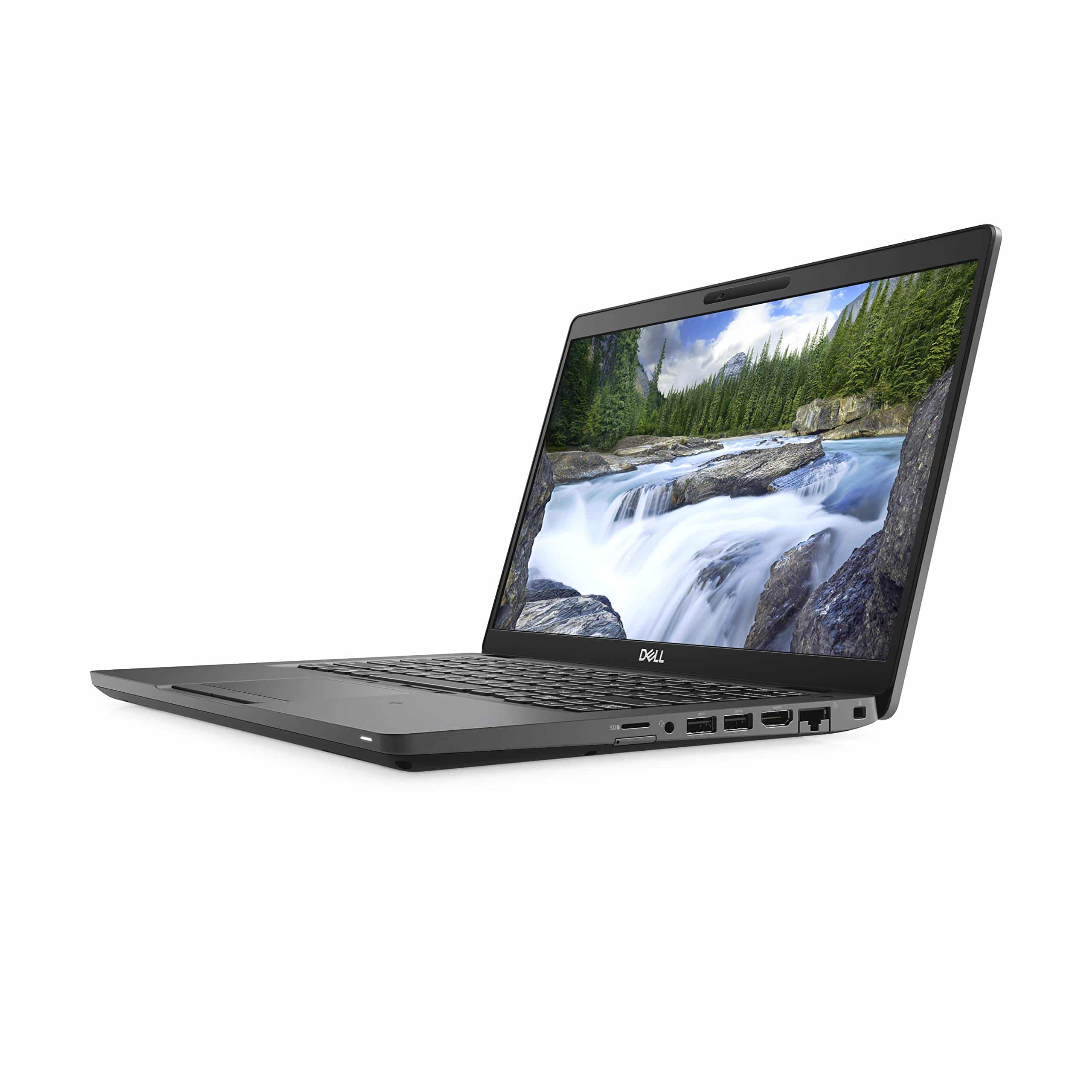
The Dell Latitude 5400 14.0" Laptop, Intel i5-8365U, 16GB Ram, 512GB SSD, Windows 11 Pro, Black (Renewed) is a machine built around a specific promise: give knowledge workers a reliable, no-drama tool for office tasks. Whether it delivers on that promise in its refurbished state is what we're here to work out.
Core Specifications
The processor here is the Intel Core i5-8365U, a quad-core chip from Intel's Whiskey Lake generation, released in 2018. It's a 15W part, which means it's designed for thin laptops where thermal headroom is limited. Four cores, eight threads, base clock of 1.6GHz with a boost up to 4.1GHz. For a machine in this price bracket in 2026, that's not embarrassing. It's not exciting either. You're looking at performance that handles Word, Excel, browser tabs, video calls, and PDF work without complaint. Push it into anything heavier and it'll start to breathe hard.
The 16GB of RAM is genuinely one of the best things about this configuration. At this budget price tier, 8GB is far more common, and 8GB in 2026 with Windows 11 running in the background is tight. 16GB gives you room to have Chrome open with twenty tabs, a Zoom call running, and a spreadsheet in the background without everything grinding to a halt. That's not a small thing. It's arguably the single spec that makes this machine usable for real work rather than just light browsing.
Storage is a 512GB NVMe SSD. Again, better than you'd typically expect at this price. NVMe means fast boot times and snappy application launches. The 512GB capacity is enough for most users who aren't storing large media libraries locally. The GPU is Intel UHD Graphics 620, which is integrated graphics. There's no discrete GPU here. That's fine for everything this laptop is designed to do. Video playback, light photo editing, basic presentations. Anything involving 3D rendering or gaming above casual titles is simply not what this machine is for.
| Specification | Detail |
|---|---|
| Processor | Intel Core i5-8365U (4 cores, 8 threads, up to 4.1GHz) |
| RAM | 16GB |
| Storage | 512GB NVMe SSD |
| Graphics | Intel UHD Graphics 620 |
| Display | 14.0" IPS, 1920x1080 |
| Operating System | Windows 11 Pro |
| Ports | 3x USB-A, 1x USB-C/Thunderbolt 3, HDMI, Ethernet, microSD, 3.5mm |
| Keyboard | UK QWERTY |
| Colour | Black |
| Condition | Renewed (Refurbished) |
| Price | £226.00 |
Performance Benchmarks
The i5-8365U scores around 4,500 to 5,000 in Cinebench R20 multi-core, and sits roughly in the 3,500 to 4,000 range in Geekbench 5 multi-core. To put that in context, a modern Intel Core i3-1215U (found in current budget laptops) scores noticeably higher, often clearing 6,000 in Geekbench 5 multi-core. So yes, the 8365U is behind current silicon. That's expected. What matters is whether it's fast enough for the tasks this machine will actually face.
For office productivity, the answer is yes. Opening a 50-tab Chrome session alongside Microsoft Teams and a few Office documents is within its capability, largely because the 16GB RAM prevents the memory bottleneck that kills similarly-aged machines with half the RAM. Single-core performance is where Whiskey Lake actually holds up reasonably well. A Geekbench 5 single-core score in the 1,100 to 1,200 range means snappy UI responses, fast browser rendering, and no perceptible lag when switching between apps. Single-core speed is what you feel day-to-day, and it's not bad here.
The NVMe SSD makes a bigger difference to perceived speed than the CPU figures suggest. Sequential read speeds on the drives typically found in these refurbished Latitudes sit around 1,500 to 2,000 MB/s. That means Windows 11 boots in under 20 seconds, applications open quickly, and file transfers are quick. Compare that to a machine with a SATA SSD at the same price and you'd feel the difference immediately. The NVMe spec is a genuine advantage here, not a marketing footnote.
Where it falls short is anything sustained and heavy. Video encoding, compiling code, running multiple virtual machines, or any creative work beyond basic photo editing will push the i5-8365U into its thermal limits. At 15W TDP, there's only so much heat the chassis can dissipate before the chip starts throttling to protect itself. Owner reviews consistently mention that the machine handles light and medium workloads without drama, but asking it to run demanding tasks for extended periods produces noticeable slowdowns. That's not a flaw specific to this unit. It's physics.
Display Analysis
The panel is a 14-inch IPS display running at 1920x1080. At 14 inches, that resolution gives you a pixel density of roughly 157 PPI, which is sharp enough that text looks clean and icons don't look chunky. It's not retina-class sharpness, but it's perfectly comfortable for reading documents, browsing, or watching video. The IPS panel type matters here. It means proper viewing angles, so you're not watching the image wash out when someone leans over to look at your screen, and it means consistent colour across the panel rather than the patchy gradients you get from cheaper TN displays.
Brightness is where the story gets more complicated. The Latitude 5400 was originally specified with panels ranging from 220 nits to 400 nits depending on configuration. In refurbished units, you're at the mercy of which panel ended up in your specific machine. Owner feedback suggests most units are comfortable indoors and in controlled office lighting, but working near a bright window or outdoors is a struggle. If you need a laptop that works in direct sunlight, this isn't it. For a home office, coffee shop, or office environment, it's fine.
Colour accuracy is adequate for office work. The IPS panel covers the sRGB gamut reasonably well, which is all you need for documents, spreadsheets, and video calls. It's not a display you'd use for colour-critical photo or video editing. Calibration on refurbished units can be inconsistent, and the original Latitude 5400 was never positioned as a creative workstation display. But for its intended use case, reading and writing for hours on end, the IPS panel is genuinely comfortable. Owners consistently mention it's easy on the eyes for long sessions, which counts for a lot.
Battery Life
The Latitude 5400 shipped with either a 42Wh or 68Wh battery depending on configuration. Refurbished units will have varying battery health depending on how the previous owner used the machine and whether the seller has replaced the cell. This is one of the genuine unknowns with any refurbished purchase. Some owners report getting six to eight hours of mixed office use. Others report three to four hours. The spread in owner reviews on this point is wider than it is for most specs, which tells you battery condition varies significantly across units.
At best, you're looking at a full working day from a well-conditioned unit doing light tasks. Browsing, writing, email, the occasional video call. The i5-8365U is a 15W chip, and the 1080p IPS panel at moderate brightness isn't power-hungry, so the hardware is capable of decent endurance when the battery is healthy. The problem is that "healthy" is a variable you can't fully control when buying refurbished. If battery life is critical to your use case, ask the seller about battery health or factor in the cost of a replacement cell.
USB-C charging is supported via the Thunderbolt 3 port. That means you can use a USB-C PD charger rather than hunting down a proprietary Dell barrel connector. This is more useful than it sounds. It means you can share a charger with your phone, use a USB-C power bank for top-ups, or charge via a USB-C dock. For travel, that flexibility is worth having. Charge times from flat to full will vary with the charger wattage, but a 45W to 65W USB-C PD charger is the sensible choice.
Heavy load battery life is short. Running sustained CPU tasks, streaming video at full brightness, or gaming will drain the battery quickly. That's expected for a 15W chip in a business laptop. The machine was designed for office work, not for extended offline creative sessions. Keep the brightness at 60 to 70 percent, stick to office tasks, and a healthy battery will get you through a working day. Push harder and you'll be reaching for the charger by mid-afternoon.
Portability
The Latitude 5400 weighs in at around 1.6kg, which is on the heavier side for a 14-inch laptop but not unreasonable for a business machine built to last. It's not a machine you'll forget is in your bag, but it's also not the kind of weight that becomes a problem unless you're walking significant distances with it. Thickness sits at roughly 19mm, which is chunky by modern ultrabook standards but fine for a practical business laptop.
The footprint is compact enough for a standard laptop sleeve or compartment. A 14-inch chassis is a good balance between screen real estate and portability. You can use it on a tray table on a train without elbowing the person next to you, and it fits on a café table without dominating the space. The charger, if you're using the original Dell barrel connector, adds bulk. If you're using a USB-C PD charger, you can use something far more compact, which makes a real difference for daily commuters.
For travel, this is a perfectly usable machine. It's not the lightest option in its class, but it's sturdy, the port selection means you're less likely to need a dongle bag, and the 14-inch screen is big enough to work on seriously without being unwieldy. Students carrying it between lectures, remote workers going between home and a coworking space, and frequent train commuters will all find it manageable, though on all that shared café and station Wi-Fi it's worth running a good VPN to keep your connection private. It's not a premium ultrabook. It's a practical tool, and it travels like one.
Keyboard & Trackpad
Dell's Latitude keyboards have a good reputation, and the 5400's is no exception. The key travel is longer than what you get on most ultrabooks, which makes it noticeably more comfortable for extended typing sessions. The feedback is positive and tactile without being clicky. If you're writing documents, drafting emails, or doing data entry for hours at a time, this keyboard won't make your fingers ache. Owner reviews are consistently positive on this point, which aligns with Dell's historical strength in business keyboard design.
The layout is UK QWERTY, which matters if you're buying in the UK and don't want to remap keys or deal with a US layout. The key sizing is sensible and the spacing is comfortable. There's no numpad, which is standard for a 14-inch chassis. Backlight availability can vary on refurbished units depending on the original configuration, so if backlit keys are important to you, check the listing or ask the seller before buying.
The trackpad is a decent size for a business laptop and supports Windows precision drivers, which means multi-finger gestures work properly. Two-finger scrolling, pinch to zoom, three-finger swipe for task view, all functional. It's not the silky glass trackpad you get on premium ultrabooks, but it's accurate and responsive enough for day-to-day use. Most owners who mention the trackpad in reviews are positive about it. The physical left and right click buttons are a nice touch for those who prefer them over a clickpad. Some people genuinely prefer having dedicated buttons, especially for precise work.
Thermal Performance
At idle and during light tasks, the Latitude 5400 runs cool. Surface temperatures on the palm rest and keyboard deck stay comfortable. The 15W TDP of the i5-8365U means it's not generating enormous heat during normal use, and Dell's thermal design in the Latitude range is sensible rather than aggressive. You won't be pulling your hands away from the keyboard because the deck is hot during a browser session or a video call.
Under sustained load, temperatures climb. The CPU will push into the 80s Celsius under prolonged stress, which is within normal operating range but does trigger the fan to spin up noticeably. The underside of the chassis gets warm under load, which means using it on your lap during heavy tasks is less comfortable. For a machine in this class, that's expected behaviour. The thermal design was never meant to handle sustained heavy workloads silently. It handles them adequately, with some fan noise and some chassis warmth as the trade-off.
Throttling under sustained maximum load is a known characteristic of the 8365U in a 15W chassis. The chip will boost aggressively for short bursts, then settle back to a more sustainable clock speed as temperatures stabilise. For the tasks this machine is designed for, you'll rarely trigger sustained throttling. Short bursts of heavy load (opening a large file, rendering a quick export) are handled at boost clocks. It's only extended, continuous heavy work that exposes the thermal ceiling. Owner reviews don't flag thermal throttling as a day-to-day complaint, which suggests it's not a practical problem for typical use.
One thing worth noting from owner feedback is that the vents and fan can accumulate dust in refurbished units that haven't been serviced. A machine that's been sitting in a previous owner's office for three years may benefit from a quick clean. If you're comfortable opening a laptop, blowing out the fan and heatsink can make a meaningful difference to thermal performance and fan noise. Some refurbishers do this as part of their process. Many don't.
Acoustic Performance
At idle and during light work, the Latitude 5400 is quiet. The fan doesn't need to spin hard when you're browsing, writing, or on a video call, and in a quiet room it's close to silent. This matters more than people give it credit for. A machine that's constantly audible during light tasks is genuinely annoying in shared spaces. The 5400 doesn't have that problem under normal conditions.
Under load, the fan spins up to a moderate level. It's not the aggressive high-pitched whine you get from thin consumer laptops trying to cool a chip in a chassis that's too slim. The Latitude's fan profile is more gradual, and the pitch is lower. It's noticeable if you're in a quiet room, but it's not the kind of noise that draws attention in an open-plan office or a library. Owner reviews generally describe the fan noise as acceptable rather than intrusive.
For meeting use, the machine behaves well. During a video call, which is a moderate workload, the fan typically stays at a low level or off entirely. The microphone situation is a separate question (covered below), but acoustically, the machine itself won't be the thing that disrupts your calls. That's a low bar, but it's one that some cheaper refurbished machines fail to clear.
Ports & Connectivity
This is one of the Latitude 5400's strongest arguments. The port selection is genuinely good, especially for a machine at this price. Three USB-A ports means you can plug in a mouse, a USB drive, and a dongle simultaneously without a hub. The USB-C port supports Thunderbolt 3, which is significant. Thunderbolt 3 supports data transfer at up to 40Gbps, DisplayPort output, and USB-C Power Delivery for charging. You can run an external monitor, charge the laptop, and transfer data through a single Thunderbolt 3 dock.
HDMI is present for direct monitor connection without needing an adapter. Ethernet is on board, which matters for IT environments, home offices with wired networks, and anyone who's ever tried to do a large file transfer over Wi-Fi and given up. The microSD slot is useful for photographers and anyone who works with camera footage. The 3.5mm headphone jack is there for wired headphones and headsets. This is a port loadout that would cost you extra in adapter purchases on a modern ultrabook.
WiFi and Bluetooth specifications are not confirmed in the verified product data, so we won't speculate on the exact standard. The Latitude 5400 was originally sold with various wireless configurations. What the port selection tells you is that this machine was designed for real-world connectivity requirements, not for aesthetic minimalism.
- 3x USB-A
- 1x USB-C with Thunderbolt 3
- 1x HDMI
- 1x Ethernet (RJ-45)
- 1x microSD card reader
- 1x 3.5mm audio jack
Webcam & Audio
The Latitude 5400 ships with a 720p webcam, which was standard for business laptops in 2019. In 2026, 720p is showing its age. It's fine for internal calls where no one's expecting broadcast quality, but it won't flatter you on a client video call if the lighting isn't good. In decent natural light, it's passable. In low light, it softens and grains up noticeably. If webcam quality matters for your work, an external USB webcam is a worthwhile addition.
The built-in microphones are dual-array, which is better than a single mic for picking up voice clearly and rejecting background noise. Owner feedback on call quality is generally positive. The microphones handle a normal office or home environment without making you sound like you're calling from a tunnel. For Teams, Zoom, and Google Meet calls, they're adequate. You won't be winning any audio quality awards, but you won't be the person on the call asking "can you hear me?" every five minutes either.
The speakers are adequate for system sounds and background music. They're not going to fill a room or produce meaningful bass. For a business laptop, that's fine. Most people using a machine like this will use headphones for anything they actually care about listening to. The 3.5mm jack means you can plug in any wired headset, which is the right answer for calls and audio work anyway.
Build Quality
The Latitude 5400 is built to Dell's business-grade standard, which historically means more durability than consumer laptops at equivalent price points. The chassis is a mix of magnesium alloy and reinforced plastic. It doesn't have the premium feel of a ThinkPad carbon fibre lid or an aluminium MacBook, but it's genuinely solid. The lid doesn't flex badly when you pick the machine up by a corner, and the keyboard deck has minimal give under firm typing. For a refurbished machine that's been through a previous owner's hands, that structural integrity matters.
The Latitude 5400 was MIL-STD-810G tested in its original form, meaning it was put through testing for dust, vibration, drops, and temperature extremes. That doesn't mean it's indestructible, but it does mean Dell built it to a higher durability standard than a typical consumer laptop. Owner reviews on refurbished units generally don't flag structural problems, which suggests the build quality holds up through a second ownership cycle.
The hinge is firm and smooth. It holds the lid at any angle without wobbling, which sounds basic but is something cheaper laptops get wrong. The finish is a matte black that resists fingerprints reasonably well. Refurbished units will have varying cosmetic condition depending on the grade, so expect some minor scuffs or scratches on lower-grade units. The internal components are what matter, and the structural build quality is what protects them. On both counts, the Latitude 5400 holds up well for its age and price.
One area where age shows is the hinge mechanism on heavily-used units. Some owner reviews mention hinges that are slightly looser than they should be. This is a wear issue rather than a design flaw, and it's the kind of thing that varies unit to unit in the refurbished market. It's not a dealbreaker, but it's worth inspecting when your unit arrives.
How It Compares
The obvious comparison at this budget price point is the Lenovo ThinkPad T490. It's another 2019-era business laptop with a similar spec ceiling, a comparable build quality reputation, and a strong refurbished market presence. The ThinkPad T490 typically runs a similar processor generation, offers comparable RAM configurations, and has its own loyal following based on keyboard quality and durability. The question is whether the Latitude's port selection and display give it an edge.
The second comparison worth making is the HP EliteBook 840 G6, another 2019 business laptop in the refurbished market. The EliteBook competes closely on build quality and has a strong reputation for display options. Some configurations came with higher-brightness panels than the base Latitude 5400, which could be an advantage for users who work in bright environments. The EliteBook also has a strong enterprise support heritage.
What sets the Dell Latitude 5400 apart in this comparison is the Thunderbolt 3 port, the three USB-A ports, and the on-board Ethernet, all in a single package at a budget price. The ThinkPad T490 is competitive on keyboard quality (arguably better) and has its own Thunderbolt option depending on configuration. The EliteBook 840 G6 can edge ahead on display brightness in some configurations. Neither rival significantly outclasses the Latitude 5400 at comparable prices; it's a question of which trade-offs suit you.
| Feature | Dell Latitude 5400 (Renewed) | Lenovo ThinkPad T490 (Renewed) | HP EliteBook 840 G6 (Renewed) |
|---|---|---|---|
| Processor | Intel Core i5-8365U | Intel Core i5-8265U / i7-8565U | Intel Core i5-8365U / i7-8565U |
| RAM | 16GB | 8GB to 16GB (config dependent) | 8GB to 16GB (config dependent) |
| Storage | 512GB NVMe SSD | 256GB to 512GB NVMe | 256GB to 512GB NVMe |
| Display | 14" IPS 1920x1080 | 14" IPS 1920x1080 | 14" IPS 1920x1080 |
| USB-A Ports | 3 | 2 | 2 |
| Thunderbolt 3 | Yes (USB-C) | Yes (config dependent) | Yes (config dependent) |
| Ethernet | Yes | Yes | Yes |
| OS | Windows 11 Pro | Windows 10/11 Pro | Windows 10/11 Pro |
| Price | £226.00 | Varies by seller | Varies by seller |
| Best For | Port-rich office work, value 16GB config | Keyboard-first users, ThinkPad loyalists | Bright-display priority, HP support ecosystem |
Final Verdict
The Dell Latitude 5400 14.0" Laptop, Intel i5-8365U, 16GB Ram, 512GB SSD, Windows 11 Pro, Black (Renewed) solves a specific problem: you need a proper Windows 11 Pro business laptop with a full port selection, decent RAM, and fast storage, and you don't want to spend mid-range money to get it. At the budget price point this sits at, the 16GB RAM and 512GB NVMe SSD configuration is genuinely unusual. Most budget refurbished machines at this price are running 8GB and a SATA SSD. The extra RAM and faster storage make a day-to-day difference that's hard to overstate.
Who should buy this? Remote workers who need a reliable office machine for documents, calls, and browser-based tools. Students who need Windows 11 Pro for university software. Small business owners who want something that connects to monitors, wired networks, and USB peripherals without a dongle collection. IT departments looking for cost-effective Windows 11 Pro machines for light-duty roles. Anyone in those categories who buys this at the current budget price is getting good value.
Who should skip it? Anyone who needs sustained heavy processing power (video editing, software development with heavy compilation, data science workloads). Anyone for whom battery life is non-negotiable and who can't tolerate the variability of refurbished battery condition. Anyone who needs a bright outdoor-capable display. And anyone who wants the latest Wi-Fi standard or a 1080p webcam out of the box. For those use cases, newer silicon is the right answer, even if it costs more.
Across 460 owner reviews at ★★★★☆ (4.1), the pattern is consistent: buyers who understood what they were getting are happy with it. The complaints cluster around battery condition variability and cosmetic wear, both of which are refurbished-market realities rather than flaws in the design. The Dell Latitude 5400 was a well-specified business machine when it launched, and it remains a capable one for light to medium workloads in 2026. At budget pricing, it's a solid 7.5 out of 10 for the refurbished tier. The port selection alone justifies the price for most office users.
What works. What doesn’t.
6 + 6What we liked6 reasons
- 16GB RAM is rare at this budget price tier and makes a genuine day-to-day difference for multi-tab and multi-app workflows
- 512GB NVMe SSD delivers fast boot times and snappy application launches well above what SATA-based rivals offer at this price
- Thunderbolt 3, three USB-A ports, HDMI, Ethernet, and microSD make this one of the most port-complete budget refurbished laptops available
- 14-inch IPS panel provides comfortable viewing angles and is easy on the eyes during long working sessions
- MIL-STD-810G-tested build quality holds up well through second ownership, with minimal structural flex reported by owners
- USB-C Power Delivery via Thunderbolt 3 means compact third-party chargers can replace the bulky proprietary Dell barrel connector
Where it falls6 reasons
- Battery condition varies significantly across refurbished units, with reported runtime ranging from three to eight hours depending on the individual cell
- The 720p webcam is behind current standards and struggles noticeably in low-light conditions
- The i5-8365U is ageing silicon that throttles under sustained heavy workloads such as video encoding or large compilation tasks
- Display brightness can be insufficient for use near bright windows or outdoors, depending on which panel was fitted to your specific unit
- Refurbished units may have accumulated dust in the fan and heatsink, affecting thermal performance if not serviced before sale
- Hinge wear on some heavily-used units results in a looser lid than ideal, a variability inherent to the refurbished market
Full specifications
12 attributes| Screen size | 14 |
|---|---|
| CPU brand | Intel |
| GPU type | integrated |
| RAM | 16GB |
| Storage type | NVMe SSD |
| Battery life H | 10 |
| Battery WH | 51 |
| CPU | Intel Core i5-8365U |
| Display type | IPS |
| GPU | Intel UHD Graphics 620 |
| Launch year | 2019 |
| OS | Windows 11 Pro |
If this isn’t right for you
2 options 7.0 / 10
jumper 15.6 inch Laptop with Office 365, 4GB RAM 128GB Storage, 1080 HD Display Laptops, Celeron Processor, USB3.0, 38Wh Battery, Portable Laptops for Business, School, and Work, Keyboard Film UK.
£237.49 · jumper
 7.0 / 10
Lenovo Chromebook S345 14 Inch FHD Laptop - (AMD A4, 4GB RAM, 32GB eMMC, Chrome OS) - Mineral Grey
£239.00 · Lenovo
Frequently asked
7 questions01Does the Dell Latitude 5400 run Windows 11 Pro properly given its 2019 hardware?+
Yes. The i5-8365U, 16GB RAM, and NVMe SSD meet Windows 11 Pro's requirements comfortably, and the TPM 2.0 module present in the Latitude 5400 satisfies Microsoft's security requirements. Owner reports confirm it runs without compatibility issues.
02Can I charge the Dell Latitude 5400 via USB-C rather than the Dell barrel connector?+
Yes. The Thunderbolt 3 USB-C port supports USB-C Power Delivery, so a 45W to 65W USB-C PD charger will charge the laptop. This lets you use the same charger as a modern smartphone or tablet and avoids carrying the larger proprietary Dell adapter.
03How much RAM does this refurbished Dell Latitude 5400 come with?+
This specific configuration comes with 16GB of RAM, which is notably higher than the 8GB more commonly found in budget refurbished laptops at this price. 16GB gives meaningful headroom for running multiple browser tabs, Office applications, and video calls simultaneously.
04Is the display good enough for long working sessions?+
The 14-inch IPS panel at 1920x1080 is comfortable for extended reading and writing. IPS technology provides consistent colour and proper viewing angles, and owner reviews frequently describe it as easy on the eyes over long periods. It is not suitable for outdoor use or colour-critical creative work.
05What is the battery life like on refurbished Dell Latitude 5400 units?+
Battery life varies significantly depending on the condition of the cell in your specific unit. Owners report anywhere from three to eight hours of mixed office use. Battery health is one of the genuine unknowns with any refurbished purchase. If this matters to you, ask the seller about battery condition before buying or factor in the potential cost of a replacement cell.
06How does the Dell Latitude 5400 compare to a Lenovo ThinkPad T490 at a similar refurbished price?+
The two machines are closely matched on processor generation and build quality. The Latitude 5400 has an advantage in USB-A port count (three versus two) and ships with guaranteed Thunderbolt 3 in this configuration. The ThinkPad T490 has a stronger reputation for keyboard feel among enthusiasts. Neither significantly outclasses the other; the choice comes down to which trade-offs matter more to you.
07Is the Dell Latitude 5400 suitable for software development?+
It is suitable for light development work such as writing code, running a local web server, or working with small codebases. For heavy compilation, running multiple virtual machines, or containerised development environments, the i5-8365U will hit its thermal and performance ceiling under sustained load. Developers with modest workloads will manage; those with demanding build pipelines should look at newer silicon.