Compact desktop PCs have never offered better value for money than they do right now. Whether you need a reliable home office workhorse, a light gaming machine, or a second PC for the kids, a small form factor (SFF) desktop punches well above its size, and pairing it with one of the budget gaming chairs completes the setup. The refurbished market in particular has matured enormously over the past twelve months: Windows 11 Pro compatibility has become standard even on older-generation hardware, NVMe storage is appearing on machines that originally shipped with spinning hard drives, and RAM upgrades to 16 GB or 32 GB are now common at sub-£300 price points. This roundup targets buyers who want a proper, upgradeable desktop experience without the bulk of a full tower and without stretching to a brand-new system. All five picks here sit under £300, ship ready to use, and cover a range of processing generations so you can match your budget to your actual workload.
Quick Verdict
Best Overall: Dell FAST OptiPlex i7-6700 SFF (B0FG862S6N). With a 6th-generation Core i7, 32 GB of RAM, and a 1 TB SSD, it delivers the most capable all-round package under £300 and handles multitasking, light video editing, and remote working without compromise.
Best Value: Dell OptiPlex 7020 SFF i7-4770 (B09XHQ7Y6F). At this price you get a quad-core i7, 16 GB RAM, and a 512 GB SSD, making it the sharpest price-to-performance ratio in this roundup for everyday computing tasks.
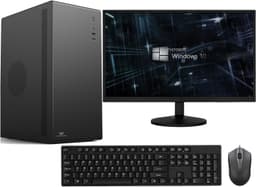
The entry point of this roundup, this refurbished Dell OptiPlex SFF is aimed squarely at buyers who need a functional, Windows 11 Pro machine for the lowest possible outlay. It suits students, families setting up a shared home PC, small businesses equipping a reception desk, or anyone who simply needs a reliable second computer without spending more than a modest lunch budget. The i5-4570 is a 4th-generation Intel quad-core processor that, while not cutting-edge, handles word processing, web browsing, video calls, spreadsheets, and light media consumption without complaint. Paired with 8 GB of DDR3 RAM and a 250 GB SATA SSD, the system boots quickly and feels responsive for its class.
The SFF chassis is compact enough to tuck behind a monitor or sit on a shelf, and the small form factor means it produces less noise and heat than a full tower. Because this is a Dell OptiPlex platform, spare parts, RAM upgrades, and additional storage are widely available and inexpensive. Upgrading to 16 GB of RAM costs very little and would noticeably improve multitasking headroom. The integrated Intel HD 4600 graphics handle 1080p video playback and basic display tasks, but this is not a machine for gaming beyond very light titles or older games.
The 250 GB SSD is on the smaller side. Users who store large media libraries or install many applications will want to add an external drive or swap the internal drive for something larger. Windows 11 Pro is pre-installed and activated, which is a genuine saving over the Home edition for anyone who needs BitLocker encryption or Remote Desktop. For the price, this is a hard machine to fault as a basic productivity tool.
Verdict: The most affordable entry point in this roundup. Ideal for light workloads where budget is the primary constraint.
Pros
- Exceptionally low price for a Windows 11 Pro machine with SSD storage
- Compact SFF chassis fits easily on or under a desk
- Dell OptiPlex platform means cheap, plentiful upgrade parts
Cons
- 250 GB SSD is tight for anyone storing photos, videos, or many applications
- 8 GB RAM limits multitasking with multiple browser tabs or office applications open simultaneously
Step up to the OptiPlex 7020 SFF and you gain a meaningful performance jump for a price that still sits comfortably under £200. The Intel Core i7-4770 is a 4th-generation quad-core processor with Hyper-Threading, giving you eight logical threads, which makes a noticeable difference when running multiple applications, compiling documents, or handling video calls alongside other tasks. With 16 GB of DDR3 RAM already installed, this machine handles genuine multitasking without slowdown, and the 512 GB SSD provides enough space for a full software suite plus a reasonable media collection.
The OptiPlex 7020 was a business-grade machine when it launched, which means it was built to higher standards than consumer equivalents. The chassis is robust, the power supply is reliable, and the internal layout makes upgrades straightforward. The 7020 platform supports up to 32 GB of RAM across four DIMM slots, so there is headroom if your workload grows. It also supports additional storage via SATA, so adding a secondary drive for backups or media is simple.
Weighing in at 6.29 kg, this is not a machine you will be moving around frequently, but for a fixed desk setup that weight reflects the solid build quality. Connectivity includes USB 3.0 ports, DisplayPort, and VGA outputs, covering most monitor setups. Windows 11 Pro is pre-installed. The integrated Intel HD 4600 graphics are adequate for dual-monitor productivity work at 1080p. Light gaming on older titles is possible, but do not expect to run modern AAA games.
This machine represents the sharpest price-to-performance ratio in the roundup. For home office workers, students, and small business users who want a capable, upgradeable desktop without spending more than £150, it is the standout choice.
Verdict: Best value pick. A quad-core i7 with 16 GB RAM and a 512 GB SSD at this price is genuinely hard to beat.
Pros
- Intel Core i7-4770 with Hyper-Threading handles multitasking well for the price
- 16 GB RAM already installed, no immediate upgrade needed
- Business-grade OptiPlex build quality with straightforward internal access
Cons
- 4th-generation Intel architecture limits performance headroom compared to newer-generation chips
- At 6.29 kg it is heavier than a true mini PC, though still compact for a desktop
This is the standout performer in the roundup. The Intel Core i7-6700 is a 6th-generation Skylake processor, a meaningful architectural step forward from the 4th-generation chips found in the other Dell listings. Skylake brought improved instructions-per-clock performance, better power efficiency, and DDR4 memory support, all of which translate into a noticeably snappier everyday experience. Paired with 32 GB of DDR4 RAM and a 1 TB SSD, this machine arrives configured for serious multitasking, content creation, software development, and demanding office workloads.
The 32 GB of RAM is the headline specification here. At this price point, 32 GB is exceptional and future-proofs the machine for several years of software inflation. Running a virtual machine, editing large spreadsheets, processing RAW photos in Lightroom, or keeping dozens of browser tabs open alongside a video call, this machine handles it all without breaking a sweat. The 1 TB SSD provides ample space for a full application suite, a large document library, and a media collection without requiring an immediate external drive.
Windows 11 Pro is pre-installed and activated, and the FAST refurbishment process ensures the unit has been professionally tested. The SFF chassis is compact and quiet, and the integrated Intel HD 530 graphics on the i7-6700 are a step up from the HD 4600 found in 4th-generation models, handling 4K output and smoother video playback. For anyone considering light photo or video work, this improvement is tangible.
At this price, this is the most expensive pick in the roundup, but it is still well under £300 and the specification gap over cheaper options is substantial. For home office professionals, freelancers, and power users who want the most capable machine available at this budget, this is the clear choice.
Verdict: Best overall. The 6th-gen i7, 32 GB DDR4, and 1 TB SSD combination is the most capable package in this roundup by a clear margin.
Pros
- Intel Core i7-6700 Skylake architecture delivers noticeably better performance than 4th-gen alternatives
- 32 GB DDR4 RAM is exceptional at this price and future-proofs the machine for years
- 1 TB SSD provides generous storage without needing an immediate external drive
The Veno Scorp listing takes a different approach to the others in this roundup. Rather than prioritising CPU generation, it focuses on storage speed: the Intel Core i5-2400 is a 2nd-generation Sandy Bridge processor, making it the oldest chip here, but the machine ships with a 1 TB NVMe SSD, which is faster than the SATA SSDs found in most of the Dell listings. For workloads that are storage-bound rather than CPU-bound, such as loading large files, booting applications quickly, or running a local database, the NVMe drive makes a real-world difference.
The i5-2400 is a quad-core processor without Hyper-Threading, running at a base clock of 3.1 GHz. It remains capable for basic productivity tasks, web browsing, document editing, and media playback, but it will show its age more quickly than the i7 options in this roundup when faced with demanding multitasking or modern software. The 16 GB of DDR3 RAM helps mitigate this, providing enough headroom for everyday office use without constant page-file swapping.
The inclusion of Wi-Fi is a practical advantage that none of the other listings explicitly confirm. For users who cannot run an Ethernet cable to their desk, built-in wireless connectivity removes the need to purchase a USB Wi-Fi adapter, which is a genuine convenience. Windows 11 is pre-installed, though note this listing ships with Windows 11 Home rather than Pro, which may matter to users who need BitLocker encryption or Remote Desktop functionality.
At this price, the Veno Scorp is priced relatively high for a 2nd-generation i5. The NVMe SSD, 16 GB RAM, and Wi-Fi inclusion justify some of the premium, but buyers who can stretch to the i7-6700 listing for an additional £11.52 will get a substantially more capable machine. This pick suits users who specifically value fast storage and wireless connectivity over raw CPU performance.
Verdict: A niche pick for buyers who prioritise NVMe storage speed and built-in Wi-Fi over CPU performance. Good value if those features matter to you specifically.
Pros
- 1 TB NVMe SSD delivers faster application loading and file transfer speeds than SATA alternatives
- Built-in Wi-Fi removes the need for a separate wireless adapter
- 16 GB DDR3 RAM provides adequate headroom for everyday multitasking
Cons
- Intel Core i5-2400 Sandy Bridge is the oldest CPU generation in this roundup and will show its age sooner
- Ships with Windows 11 Home rather than Pro, lacking BitLocker and Remote Desktop features
- At this price, the price is high relative to the CPU generation compared with the i7-6700 option nearby
Buying Guide
CPU Generation: Why It Matters More Than Clock Speed
When comparing refurbished mini desktops, the generation of the processor is often more important than the headline clock speed. A 6th-generation Intel Core i7 running at 4.0 GHz will outperform a 2nd-generation Core i7 at the same clock speed in most real-world tasks, because newer architectures handle more instructions per clock cycle and benefit from improved memory controllers and cache designs. In practical terms, this means faster application loading, smoother multitasking, and better compatibility with modern software. For most buyers, we recommend prioritising 4th-generation (Haswell) or newer processors as a minimum, with 6th-generation (Skylake) being the sweet spot for longevity at this price point.
RAM: How Much Do You Actually Need?
For basic web browsing, email, and document editing, 8 GB of RAM is functional but tight with modern browsers. Chrome and Edge both consume significant memory, and with a few tabs open alongside an office application, an 8 GB machine will begin paging to the SSD, which slows things down noticeably. 16 GB is the comfortable baseline for everyday productivity in 2025, handling multiple applications and browser sessions without strain. 32 GB is genuinely useful for users who run virtual machines, work with large spreadsheets, edit photos, or keep many applications open simultaneously. The good news is that DDR3 RAM is extremely cheap to buy second-hand, so upgrading an 8 GB machine to 16 GB costs very little.
SSD Type: NVMe vs SATA
Both NVMe and SATA SSDs are dramatically faster than traditional spinning hard drives, so either is a significant improvement over older systems. NVMe drives offer sequential read speeds of 2,000 to 3,500 MB/s compared to roughly 500 to 550 MB/s for SATA SSDs. In day-to-day use, the difference is most noticeable when loading large files, booting the operating system, or launching heavy applications. For general office use, a SATA SSD is more than adequate. For users who regularly work with large media files or databases, NVMe is worth seeking out.
Can a Mini Desktop Replace a Full Tower?
For the vast majority of home and office users, yes. Mini and small form factor desktops handle web browsing, office applications, video calls, media playback, and light creative work without compromise. The trade-offs are graphics performance (no room for a discrete GPU in most SFF cases) and limited internal expansion compared to a full tower. If you need to run a dedicated graphics card for gaming or GPU-accelerated creative work, a full tower or a purpose-built machine like the Stormforce Gaming Lunar Pro is still the better choice. For everything else, a compact SFF desktop saves desk space, uses less power, and produces less noise.
Lifespan: What to Expect
A well-maintained refurbished desktop from a reputable seller can realistically serve as a primary machine for three to five years from the date of purchase, depending on your workload. Machines with 4th or 6th-generation Intel processors are still receiving Windows 11 updates and are supported by current software. By the late 2020s, some older-generation chips may fall outside Microsoft's support window, but for the price paid, the cost-per-year of ownership remains excellent. Upgrading RAM and storage as needed extends the useful life further.
The Dell FAST OptiPlex i7-6700 SFF (B0FG862S6N) is the overall winner of this roundup. Its 6th-generation Skylake architecture, 32 GB of DDR4 RAM, and 1 TB SSD combine to produce the most capable and future-proof machine available under £300 in this selection. It handles demanding multitasking, content creation, and professional workloads that would slow down the 4th-generation alternatives, and the DDR4 memory platform gives it a longer useful life. For buyers on a tighter budget, the Dell OptiPlex 7020 SFF i7-4770 (B09XHQ7Y6F) is the best value pick, delivering a quad-core i7 and 16 GB RAM at a price that is difficult to argue with. Between these two machines, the majority of buyers will find exactly what they need.