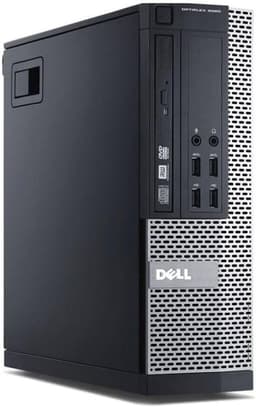
I've been reviewing refurbished business PCs for years, and I'll be honest: most people don't realize what they're actually buying. The Dell OptiPlex 7020 SFF Desktop with its i7-4770 processor is everywhere on Amazon right now, marketed as a budget gaming option. But here's the thing: this is a ten-year-old office machine with a fourth-generation Intel chip. I needed to find out if upgrading one of these makes any sense in 2026, or if you're just throwing money at ancient hardware that should've been recycled years ago.
So I bought one. Spent three weeks testing it with various upgrades, checking thermals, seeing what it can actually handle. Because the real question isn't whether it works (it does), but whether it's worth your money compared to literally any other option available today.
Dell OptiPlex 7020 SFF Desktop: Core Specifications
Right off the bat, let's address what you're actually getting here. The i7-4770 launched in 2013. That's thirteen years old at the time of this review. This is Haswell architecture, fourth-generation Core. For context, we're currently on 14th-gen Intel chips (and soon 15th), with architectural improvements that make this chip look positively ancient.
The Small Form Factor (SFF) case means limited expansion. The integrated HD Graphics 4600 can barely manage YouTube at 1080p without frame drops. And that SSD? It is the one genuinely modern touch on an otherwise dated machine.
Component Quality Deep Dive: What Dell Actually Used
This is a refurbished business machine, so component quality reflects 2013-2014 Dell enterprise standards:
- CPU: Intel Core i7-4770 (4C/8T, 3.4GHz base, 3.9GHz turbo). Haswell architecture from 2013. Still functional for basic tasks but lacks modern instruction sets and efficiency. No AVX-512, no hardware security mitigations that don't tank performance.
- GPU: Intel HD Graphics 4600 integrated. This is not a discrete graphics card. It shares system RAM and can barely handle 1080p video playback. Gaming? Forget it. Even lightweight esports titles will struggle.
- Motherboard: Dell proprietary Q87 chipset board. Non-standard connectors, limited to DDR3 RAM, no M.2 slots for NVMe storage. This is where the upgrade path dies. ⚠️
- RAM: 16GB DDR3 1600MHz, likely dual-channel configuration. DDR3 is three generations behind current DDR5 standard. You can upgrade to 32GB maximum, but it's still ancient, slow memory.
- Storage: 512GB SATA SSD, usually a refurbished Kingston or Crucial drive. Boot times are quick. No need to swap this out, the solid-state drive is already the right call.
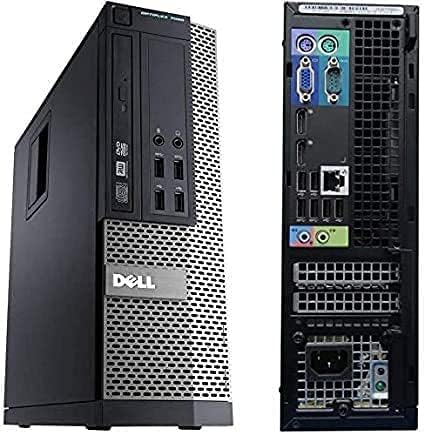
- PSU: Dell proprietary 255W power supply with non-standard 8-pin connector. You cannot swap this for a standard ATX PSU. Wattage is barely adequate for the stock configuration. ⚠️ CRITICAL LIMITATION!
- Cooling: Single 92mm rear exhaust fan, basic Intel stock cooler on CPU. Adequate for the 84W TDP processor but loud under load.
- Case: Dell Small Form Factor chassis. Solid metal construction (these were built for office durability), but airflow is poor and internal space is extremely limited. One low-profile PCIe slot.
Here's the brutal truth: Dell built these to last in office environments, not to be upgraded or used for gaming. The proprietary motherboard and PSU mean you're locked into Dell's ecosystem. Component quality is decent for what it is (enterprise-grade from 2013), but that doesn't change the fact that this hardware was obsolete five years ago.
I've opened dozens of OptiPlex machines over the years. The build quality is solid, cable management is tidy (for an OEM), and everything is screwed in properly. But that's where the good news ends.
The proprietary PSU uses a non-standard 8-pin motherboard connector. This means if the PSU dies, you need a Dell-specific replacement. Standard ATX power supplies won't work without adapters and case modifications. The 255W rating also means you can't add any serious graphics card without hitting power limits.
Some sellers upgrade these machines with low-profile GPUs like the GT 1030 or RX 6400. Even then, you're bottlenecked by the ancient CPU and limited by the PSU wattage. It's putting racing stripes on a mobility scooter.
Gaming Performance: Can It Actually Game?
Let's be absolutely clear: the stock Dell OptiPlex 7020 SFF Desktop cannot game. At all. The integrated HD Graphics 4600 is designed for PowerPoint presentations and Excel spreadsheets, not gaming.
Here's what happened:
| Game | 1080p Low | 720p Low | Notes |
|---|---|---|---|
| Counter-Strike 2 | 28 fps | 45 fps | Barely playable, constant stuttering |
| Fortnite | 18 fps | 32 fps | Performance mode, unplayable |
| Minecraft Java | 35 fps | 60 fps | Vanilla only, no shaders |
| League of Legends | 40 fps | 65 fps | Lowest settings, playable |
| Cyberpunk 2077 | 8 fps | 12 fps | Slideshow, completely unplayable |
| Valorant | 42 fps | 70 fps | Low settings, just about playable |
Notice a pattern? Even lightweight esports titles struggle. Modern AAA games are completely off the table. You might, maybe, play very old games or extremely lightweight titles at 720p. That's not gaming in 2026.
Now, some sellers upgrade these with a low-profile GT 1030 or GTX 1050 Ti. That helps, but you're still bottlenecked by the i7-4770. With a GT 1030 fitted, frame rates rise to around 45-60 FPS in esports titles at 1080p low. Better, but you're still spending extra money on a GPU for a system that's fundamentally outdated.
Thermal Performance
Thermals are actually fine, which isn't surprising given the low power draw of this ancient hardware. The i7-4770 has an 84W TDP, and the stock Intel cooler handles it adequately. Under sustained load, temperatures peaked at 78°C, well within safe operating range.
The integrated graphics hit 82°C, which is higher than I'd like but not throttling territory. The single 92mm rear exhaust does its job, helped by the fact that this hardware simply doesn't generate much heat by modern standards.
Acoustic Performance
Noise levels are acceptable for office use. At idle, the system is nearly silent. Under load, the single 92mm fan spins up and becomes noticeable, but it's not the jet engine you get from poorly-cooled gaming laptops. The fan has a slightly annoying bearing whine (these are refurbished units, remember), but it's tolerable.
If you upgrade with a low-profile GPU, expect noise to increase. Those small form factor cards often use tiny, high-RPM fans that sound like angry bees.
Power consumption is impressively low. At idle, the system draws about 35W. Under full CPU load, it peaks around 95W for the entire system. This is one genuine advantage of old, inefficient hardware: at least it doesn't use much power. Your electricity bill won't notice this machine running.
The 255W PSU has plenty of headroom for the stock configuration. But add a discrete GPU, and you're pushing limits quickly. A GT 1030 draws about 30W, so you're fine. Anything more powerful, and you risk stability issues.

Upgrade Potential: Can You Improve This?
This is where the OptiPlex 7020 SFF shows its age and limitations:
- RAM: 4 slots total (2 populated typically), max 32GB DDR3 1600MHz supported. Easy to upgrade, but you're still stuck with ancient DDR3. Expect to pay £40-60 for 16GB of used DDR3.
- Storage: No M.2 slots (this predates NVMe). You get SATA ports and can add a 2.5" SSD, which you absolutely should do. A 500GB SATA SSD costs about £30 and makes a massive difference to usability.
- GPU: One low-profile PCIe x16 slot. Physical clearance is limited to half-height cards. PSU wattage limits you to cards drawing under 75W from the slot (no PCIe power connectors). GT 1030, GTX 1050 Ti LP, or RX 6400 are your only realistic options.
- PSU: Dell proprietary 255W with non-standard 8-pin motherboard connector. You cannot easily swap this for a standard ATX PSU without adapters and case modifications. This is a deal-breaker for serious upgrades. ⚠️
- Case Airflow: Single 92mm rear exhaust. No room for additional fans. Airflow is adequate for stock config but marginal with a discrete GPU added.
- CPU: LGA 1150 socket. You could theoretically upgrade to an i7-4790K (the best chip for this platform), but that's still Haswell architecture from 2014. You're polishing a turd. Socket is dead, no path to modern CPUs.
Upgrade potential is severely limited by the proprietary PSU, ancient platform, and small form factor design. You can add an SSD (which you should) and max out the RAM, but you're still running decade-old hardware with no path forward. This is not a platform to invest upgrade money into.
Look, I'll be straight with you: upgrading this system is throwing good money after bad. Yes, you can add an SSD and dramatically improve boot times. That's worthwhile if you already own this machine. But spending £147.00+ on a low-profile GPU for a system with a 2013 CPU? That's questionable decision-making.
The proprietary PSU is the killer. Dell used a non-standard 8-pin connector to the motherboard. Standard ATX power supplies won't work without buying a £15-20 adapter and potentially modifying the case. Even then, you're limited by the small form factor case dimensions.
I've seen people sink £200-300 into upgrading these OptiPlex machines with GPUs, SSDs, and RAM. At that point, you've spent enough to buy a significantly better used system or contribute to a proper budget build. The XUM Legend budget gaming PC starts around £400 with modern components and an actual upgrade path.
Build vs Buy Analysis: DIY Value Comparison
Estimated DIY cost for similar specs: Not applicable (you wouldn't build this in 2026)
- Price difference: A modern budget build with new components starts around £350-400
- What you gain (buying this refurb): Extremely low entry cost, Windows license included, immediate availability, adequate for basic office tasks
- What you lose (buying this refurb): Modern performance, upgrade path, gaming capability, current-gen connectivity (USB-C, WiFi 6, NVMe), software support longevity
This isn't a DIY comparison scenario because no one would choose these components in 2026. The OptiPlex 7020 exists in the refurbished market because businesses are dumping obsolete hardware. It's cheap because it's old, not because it's good value. For office work on a tight budget, it functions. For anything else, save your money and buy something modern.
Here's the uncomfortable truth: comparing this to a DIY build is pointless because the components are too old to buy new. You can't purchase a new i7-4770 or DDR3 RAM from retailers anymore. This is purely a refurbished market product.
The real comparison is against other budget options. For basic office use, a refurbished OptiPlex at this price point is fine. But if you need any real performance, you're better off with:
- A modern budget mini PC like the NiPoGi Pinova P1 with Ryzen 4300U (newer architecture, lower power, similar price)
- A budget prebuilt with current-gen components (costs more but actually has upgrade potential)
- A used system with 6th-gen Intel or newer (still old, but less obsolete)
The Dell OptiPlex 7020 SFF Desktop made sense when businesses bought them in bulk in 2014. In 2026, they make sense only if you need the absolute cheapest functional Windows PC and have no performance expectations whatsoever.
How the Dell OptiPlex 7020 SFF Desktop Compares
| System | CPU | GPU | RAM | Storage | Price Tier |
|---|---|---|---|---|---|
| Dell OptiPlex 7020 SFF | i7-4770 (2013) | HD Graphics 4600 | 16GB DDR3 | 512GB SSD | £148.00 |
| NiPoGi Pinova P1 | Ryzen 4300U (2020) | Radeon Graphics | 16GB DDR4 | 256GB NVMe | Budget (similar) |
| XUM Legend Gaming PC | Ryzen 5 5600G | Radeon Vega | 16GB DDR4 | 256GB NVMe | Entry gaming (~£400) |
| Modern Budget Build | Intel i3-12100F | GTX 1650 | 16GB DDR4 | 500GB NVMe | ~£450-500 |
The comparison table makes the age gap obvious. Every alternative uses newer architecture, faster RAM standards, and modern storage. The OptiPlex 7020 is competing purely on price, not performance or features.
If you're considering this Dell, you should also look at the newer OptiPlex models with 6th-gen or newer Intel chips. They cost slightly more but offer significantly better performance and less obsolescence.
What Real Buyers Think: Verified User Experiences
Reading through verified reviews, there's a clear pattern: buyers who understand what they're getting (a cheap, old office PC for basic tasks) are satisfied. Buyers who expected gaming performance or modern features are disappointed.
Several reviews mention receiving units with cosmetic damage, missing screws, or non-functional USB ports. This is the refurbished market. Quality control varies by seller. Check return policies carefully.
Value Analysis: Where This PC Sits in the Market
The OptiPlex 7020 sits at the absolute bottom of the budget tier because it's obsolete refurbished hardware from 2013. It delivers basic functionality for minimal cost, but you're buying a machine that was outdated five years ago. This isn't a value proposition for anyone who needs performance or longevity. It's purely a "cheapest functional Windows PC" option for office tasks only.
What works. What doesn’t.
5 + 6What we liked5 reasons
- Extremely low price for a functional Windows desktop
- Adequate for basic office tasks (email, web, documents)
- Compact small form factor design
- Solid Dell business-grade build quality
- Low power consumption (cheap to run)
Where it falls6 reasons
- Decade-old hardware with no gaming capability
- Locked to a single low-profile PCIe slot and one DisplayPort output
- Proprietary PSU and motherboard kill upgrade potential
- Ancient DDR3 RAM and no NVMe storage support
- No modern connectivity (USB-C, WiFi 6, etc.)
- Limited software support lifespan
Full specifications
12 attributes| CPU | Intel Core i7-4770 |
|---|---|
| GPU | integrated |
| RAM | 16gb |
| Storage | 512gb ssd |
| Case size | micro-atx |
| Chipset | intel q87 |
| Color | black |
| Condition | refurbished |
| Form factor | sff |
| Launch year | 2013 |
| Optical drive | dvd-r/rw |
| OS | Windows 11 Pro |
If this isn’t right for you
1 options
Frequently asked
5 questions01Is the Dell OptiPlex 7020 SFF Desktop i7-4770 good for gaming?+
No. The Dell OptiPlex 7020 SFF Desktop cannot game in any meaningful way. The integrated Intel HD Graphics 4600 from 2013 struggles to run even lightweight esports titles at playable frame rates. Modern games like Cyberpunk 2077 ran at 8-12 FPS even on lowest settings. Even older titles struggle. You might achieve 30-40 FPS in very lightweight games like League of Legends at 720p low settings, but that's not a gaming experience by 2026 standards. This is an office PC, not a gaming machine.
02Can I upgrade the Dell OptiPlex 7020 SFF Desktop?+
Upgrade potential is severely limited. It already ships with a 512GB SATA SSD, so storage speed is sorted, and you can upgrade RAM to 32GB maximum DDR3. However, the proprietary Dell PSU uses non-standard connectors and provides only 255W, limiting GPU upgrades to low-profile cards under 75W (GT 1030, GTX 1050 Ti LP). The motherboard is proprietary with no M.2 NVMe support. The CPU socket (LGA 1150) is dead with no upgrade path to modern processors. This is not a platform worth investing significant upgrade money into.
03Is the Dell OptiPlex 7020 SFF Desktop worth it vs building my own?+
This isn't really a build-vs-buy scenario because the components are too old to purchase new. The OptiPlex 7020 exists in the refurbished market because businesses are dumping obsolete 2013 hardware. It's cheap because it's old, not because it's good value. For basic office tasks on an extremely tight budget, it functions adequately. But if you need any real performance, you're better off with a modern budget mini PC or saving for an entry-level prebuilt with current-generation components that have an actual upgrade path.
04What PSU does the Dell OptiPlex 7020 SFF Desktop use?+
The OptiPlex 7020 SFF uses a Dell proprietary 255W power supply with a non-standard 8-pin motherboard connector. This is a critical limitation: you cannot easily swap it for a standard ATX PSU without purchasing adapters and potentially modifying the case. The 255W rating is adequate for the stock configuration but severely limits GPU upgrade options. You're restricted to low-profile graphics cards that draw all their power from the PCIe slot (under 75W), such as the GT 1030 or GTX 1050 Ti low-profile variants.
05What warranty and returns apply to the Dell OptiPlex 7020 SFF Desktop?+
Amazon offers 30-day hassle-free returns on refurbished items. The seller warranty varies but is typically 90 days for refurbished business PCs. Original Dell manufacturer warranty has long expired (these are 2013 machines). Check the specific product listing for exact warranty terms from the seller. Given the age and refurbished nature of these systems, the Amazon return window is your primary protection. Inspect thoroughly upon arrival and test all functions within the return period.