Anyone shortlisting the best budget mechanical keyboards runs into this question, and until now nobody has answered it directly. Here are the honest verdicts, weighed against Amazon UK customer ratings as at 5 August 2026 and what our own published reviews recorded.
RedThunder averages 4.25 stars from 12,305 Amazon UK customer ratings as at 5 August 2026. That's among the lowest averages of the brands we track with a substantial sample, second only to Snpurdiri. RedThunder keyboards work, and they're among the cheapest genuine mechanical options available. But our review record shows stabiliser rattle and ABS keycap shine are consistent cons, and the switch feel is variable between units. Fine for a first board on a very tight budget. Not the pick if you want something that still feels good in two years.
MageGee averages 4.30 stars from only 681 Amazon UK customer ratings as at 5 August 2026. The sample is too thin to be fully confident in the number, but it's consistent with what our review of the MageGee MK-Box recorded: a functional 60 percent board at a very low price whose metal top plate and doubleshot keycaps our review named as genuine pros, held back by clicky blue switches with no quieter option, no hot-swap sockets and a rattling spacebar stabiliser. Worth buying if the price is the deciding factor. Not worth buying if you can stretch to the next bracket.
NEWMEN averages 4.34 stars from 7,491 Amazon UK customer ratings as at 5 August 2026. NEWMEN keyboards are worth buying at the bottom of the market, because they put working hot-swap sockets on boards under £30, though our reviews of the GM326 and GM610 both recorded stabiliser rattle and inconsistent switch feel out of the box. The GM326 is 3-pin only (per our specification record), which limits your switch options. The GM610 accepts both 3-pin and 5-pin switches. If hot-swap matters to you at this price, the GM610 is the better choice. Our Newmen GM326 review and NEWMEN GM610 review cover both in detail.
Rii averages 4.40 stars from 12,054 Amazon UK customer ratings as at 5 August 2026. Rii produces a wide range of peripherals at very low prices, and the customer ratings are respectable for the money. Read the switch specification carefully, though: our own review of a Rii board sold with "Mechanical Feeling" in its listing title found membrane switches inside, with no tactile feedback and no distinct actuation point. Rii is the brand that makes the trap in the next section concrete. Fine for a cheap office board. Not a mechanical keyboard unless the listing names an actual switch.
Dierya averages 4.42 stars from 12,565 Amazon UK customer ratings as at 5 August 2026. Dierya is one of the more consistent performers in the cheap-brand tier. The DK61se 60 percent board is the most commonly reviewed Dierya keyboard in our record, and our Dierya DK61se review found it a competent compact board with the expected stabiliser rattle. Better than RedThunder on average; similar compromises.
Attack Shark averages 4.47 stars from 7,619 Amazon UK customer ratings as at 5 August 2026. Attack Shark is one of the more pleasant surprises in the cheap-brand tier. The rating is competitive with AULA at the same figure, and the brand has been producing boards with more interesting specifications (including Hall Effect options) at aggressive prices. Worth considering, particularly if the specific model has a strong recent rating sample.
Sumvision averages 4.70 stars from 2,114 Amazon UK customer ratings as at 5 August 2026. That's the second-highest average in our catalogue. But there's a catch: the Sumvision Seeker Destroyer, the board in our catalogue, is a membrane keyboard. Our specification record lists its switch type as 'membrane (mechanical feel)'. The high rating reflects that it does what it claims, not that it's a mechanical keyboard. Don't buy it expecting mechanical switches.
Snpurdiri averages 4.18 stars from 13,021 Amazon UK customer ratings as at 5 August 2026. That's the lowest average in our catalogue with a large sample, and it's a meaningful signal. Snpurdiri boards are cheap and functional, but the rating suggests more buyers are disappointed than with comparable brands. We'd steer most buyers towards Dierya or NEWMEN at similar prices.
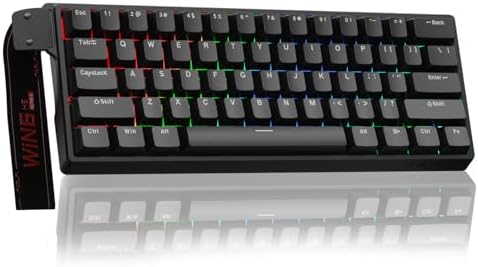
AULA averages 4.47 stars from 1,274 Amazon UK customer ratings as at 5 August 2026. AULA is producing some of the more technically interesting budget boards right now, including Hall Effect options at sub-£50 prices. The sample size is still relatively small, but the rating is strong. The AULA WIN60 HE, reviewed separately, is the standout.
Redragon averages 4.50 stars from 509 Amazon UK customer ratings as at 5 August 2026. That is the strongest rating of any cheap brand here, but it rests on a single board in our catalogue and a sample two orders of magnitude smaller than RedThunder or Snpurdiri, so read it as encouraging rather than settled. Redragon is a well-established budget gaming peripheral brand with a broad range, and it produces a lot of boards at a lot of price points. Individual models vary more than the brand average suggests, so check the specific product rating rather than relying on the brand name.
The defensible reading of these ratings, stated plainly: the cheap-brand tier clusters within about three tenths of a star of Corsair (4.59) and Logitech (4.54) on Amazon UK customer ratings as at 5 August 2026. The budget boards mostly do what they claim. The gap shows up in materials and longevity, not in whether the thing works on day one.