YouTube content creation in 2025 demands more from a desktop than ever before. Whether you are cutting 4K vlogs, colour grading short-form clips or live-streaming while encoding a timeline in the background, your machine needs to handle sustained multi-threaded workloads without breaking a sweat. The big shift since last year is the arrival of RTX 50-series GPUs, which bring hardware-accelerated AV1 encoding, dramatically faster export times in DaVinci Resolve and Premiere Pro, and improved NVENC quality at lower bitrates. At the same time, Apple's M4 iMac has raised the bar for integrated-GPU editing on macOS, making it a genuine rival to discrete-GPU Windows machines at a similar price. This guide is aimed at creators who upload regularly, run their own channel and want a desktop that can handle editing, thumbnail work, audio mixing and occasional streaming without constant compromise. We cover machines from compact budget options through to high-end workhorses.
Quick Verdict
Best Overall: Apple iMac with M4 chip, for its exceptional single-core performance, stunning display and polished Final Cut Pro workflow.
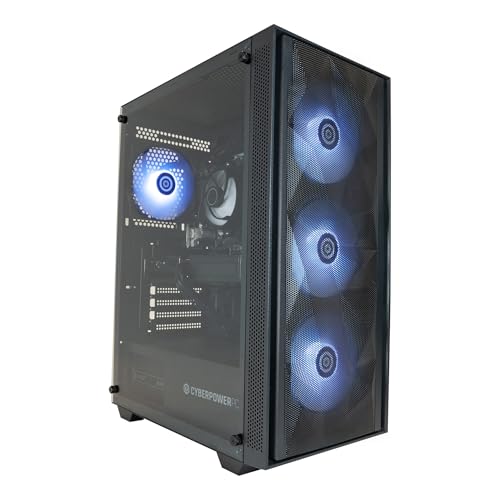
Best Value: CyberPowerPC Wyvern Gaming PC (RTX 5060, Ryzen 5 8400F), which delivers RTX 50-series AV1 encoding and solid 1080p/4K editing performance at a competitive price.
The Apple iMac with M4 chip is the standout choice for YouTube creators who live inside Final Cut Pro or DaVinci Resolve on macOS. Apple's M4 silicon combines a 10-core CPU (four performance cores, six efficiency cores) with a 10-core integrated GPU and a unified memory architecture that means the CPU, GPU and Neural Engine all share the same fast memory pool. For content creators, this translates into remarkably smooth 4K timeline scrubbing, near-instant proxy generation and export speeds that rival machines with discrete mid-range GPUs.
The 16 GB of unified RAM in the base configuration is sufficient for most single-stream 4K workflows, though creators working with multiple camera angles, heavy effects stacks or 6K/8K footage will want to look at the 24 GB or 32 GB upgrade options at purchase time, as RAM is not user-upgradeable. The 512 GB SSD is fast but fills up quickly with raw footage; pairing the iMac with an external Thunderbolt drive from day one is strongly recommended.
The 24-inch Retina display is one of the best built-in monitors available at this price point, covering a wide colour gamut and offering True Tone and ProMotion support depending on configuration. For thumbnail design in Photoshop or Affinity Photo, colour accuracy is excellent out of the box with minimal calibration needed. The built-in 12-megapixel Centre Stage webcam is genuinely good for video calls and quick talking-head recordings, and the studio-quality microphone array means creators can record decent scratch audio without additional hardware.
Battery life is not relevant here, but power consumption is impressively low for the performance on offer, making it a sensible choice for a home studio where electricity costs matter. The all-in-one form factor keeps the desk tidy, which matters when you are also managing a camera, audio interface and lighting rig. The main limitation is the locked-down ecosystem: if your workflow involves Windows-only tools, or you need to add a discrete GPU later, the iMac is not the right choice.
For creators already invested in Apple software, or those moving from a MacBook and wanting a larger screen, the M4 iMac is the most refined editing experience in this price bracket. It handles 4K H.264, H.265 and ProRes editing with ease, and the Neural Engine accelerates AI-powered tools in Final Cut and Adobe's Sensei suite.
Verdict: The best all-round desktop for macOS-based YouTube creators who prioritise display quality, workflow polish and energy efficiency over raw GPU power.
Pros
- M4 unified memory architecture delivers fast 4K editing without a discrete GPU
- Stunning 24-inch Retina display with wide colour gamut, ideal for thumbnail and colour work
- Compact all-in-one design keeps desk clutter minimal in a home studio setup
Cons
- 512 GB base storage fills quickly with raw video footage, and internal storage is not upgradeable
- Locked to macOS, so Windows-only plugins and tools are not available
Buying Guide
CPU: How Many Cores Do You Actually Need?
For YouTube editing, the CPU handles timeline rendering, proxy transcoding, audio processing and AI-powered tools such as noise reduction and object tracking. A six-core processor like the Ryzen 5 8400F is sufficient for solo creators editing one camera angle in 1080p or 4K H.264. Move to eight cores if you regularly work with multi-cam setups, run After Effects alongside your video editor, or use CPU-intensive plugins like Neat Video. Sixteen or more cores become relevant only for very high-volume production or 6K/8K RAW workflows. Clock speed matters too: higher single-core boost speeds improve timeline responsiveness and scrubbing performance.
GPU: Integrated vs Discrete, and Why NVENC Matters
A discrete GPU is not strictly necessary for YouTube editing, but it makes a significant difference to export times and real-time playback of graded footage. More importantly, Nvidia's NVENC encoder (and AMD's equivalent AMF) offloads video encoding from the CPU to dedicated hardware, dramatically reducing export times in Premiere Pro, Resolve and Handbrake. Nvidia's RTX 50-series cards introduce eighth-generation NVENC with hardware AV1 support, which is increasingly relevant as YouTube and other platforms adopt AV1 for efficient delivery. For creators who also live-stream, NVENC allows high-quality stream encoding without stealing CPU resources from the game or application being captured. Integrated GPUs like the Apple M4's GPU and AMD's Radeon 780M are capable for 1080p editing and light 4K work but will show their limits with complex colour grading or heavy effects.
RAM: 16 GB vs 32 GB
16 GB of RAM is the practical minimum for 4K editing in 2025. It is workable for single-stream 4K H.264 or H.265 in Premiere Pro or Final Cut, but you will notice the system slowing down if you have multiple applications open simultaneously. 32 GB removes RAM as a bottleneck for almost all YouTube workflows and is the recommended target if your budget allows. Unified memory architectures like Apple's M4 are more efficient per gigabyte than traditional discrete RAM, so 16 GB on an M4 iMac performs closer to 24 GB on a conventional Windows machine for creative tasks.
Storage: Speed and Capacity
An NVMe SSD is essential for smooth editing performance. SATA SSDs are acceptable for project archives but too slow for active editing drives. 1 TB is a reasonable starting point, but 4K footage at high bitrates fills storage quickly: a single hour of 4K H.264 at 100 Mbps uses roughly 45 GB. Plan for external storage from day one, either via USB 3.2 or Thunderbolt depending on your machine. PCIe 4.0 NVMe drives offer faster sequential speeds than PCIe 3.0, which benefits large file transfers and cache performance in Resolve.
Form Factor: Tower vs Mini PC vs All-in-One
Towers offer the best expandability and cooling for sustained workloads. Mini PCs save desk space but limit future upgrades and may throttle under sustained rendering. All-in-ones like the iMac integrate the display and keep the desk tidy but cannot be upgraded internally. Choose based on your studio setup, future upgrade plans and whether you need to move the machine between locations.
Operating System Considerations
Windows 11 gives access to the widest range of creative software and is the default for most gaming-oriented desktops. macOS is the better choice if you use Final Cut Pro, Logic Pro or the broader Apple creative ecosystem. Ensure any machine running Windows 10 has a clear upgrade path to Windows 11, as Microsoft's support for Windows 10 ends in October 2025.
For most YouTube creators in 2025, the Apple iMac with M4 chip is the overall winner. Its combination of a high-performance 10-core CPU, efficient integrated GPU, stunning Retina display and polished macOS creative workflow makes it the most complete out-of-the-box editing experience at its price point. The unified memory architecture means it punches above its weight in 4K editing, and the all-in-one design suits the typical home studio setup perfectly.
For Windows-based creators who want RTX 50-series GPU acceleration without spending over £1,500, the CyberPowerPC Wyvern with RTX 5060 and Ryzen 5 8400F is the best value pick. It delivers hardware AV1 encoding, solid 4K editing performance and an expandable tower chassis at a price that leaves budget for external storage and peripherals. Creators who need more CPU headroom should spend the extra £50 on the Ryzen 7 8700F variant. The GMKtec K8 Plus rounds out the selection for creators who prioritise a compact footprint and light editing over raw GPU power.