Professional architects demand more from a desktop than almost any other creative discipline. Running Autodesk Revit, AutoCAD, ArchiCAD, or Rhino alongside heavy rendering workloads in V-Ray, Enscape, or Lumion requires a machine that can handle sustained multi-core processing, a capable GPU with substantial VRAM, and enough RAM to keep large project files open without grinding to a halt. Since last year, the arrival of Nvidia's RTX 50-series cards has meaningfully shifted the value equation at the mid-to-high end, with real-time ray tracing now accessible at lower price points. The integrated GPU options on this list remain relevant only for architects doing lighter 2D drafting or working in hybrid office environments where a dedicated workstation sits elsewhere. Whether you are a sole practitioner watching the budget carefully or a studio principal who needs the fastest possible render times, the picks below cover the realistic range of what is available in the UK market today, with verified specs and honest assessments of where each machine excels and where it falls short.
Quick Verdict
Best Overall: Vibox VIII-75 Gaming PC (Intel Core i9 12900KF, RTX 5090 32GB) delivers the raw horsepower that serious architectural visualisation demands, with a 32 GB GPU that handles the largest Enscape and Lumion scenes without compromise.
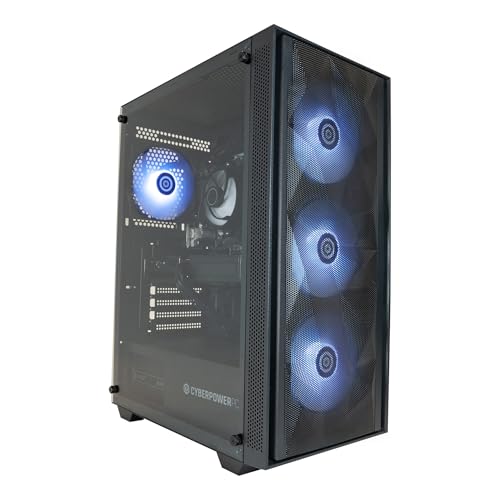
Best Value: CyberPowerPC Wyvern (AMD Ryzen 7 8700F, RTX 5060 8GB) punches well above its price for architects doing BIM work and moderate rendering, offering a current-generation GPU and a capable CPU at a price that leaves budget for a quality monitor and peripherals.
The Vibox VIII-75 is the machine for architects who cannot afford to wait. Whether you are running a full Enscape walkthrough of a large mixed-use development, baking lighting in Lumion, or rendering a photorealistic exterior in V-Ray, the RTX 5090 with its 32 GB of VRAM is simply in a different league from anything else on this list. Large point cloud files, complex BIM models with hundreds of families loaded, and multi-view rendering queues that would bring a mid-range machine to its knees are all handled with composure here.
The Intel Core i9 12900KF is a 16-core hybrid chip with a 5.2 GHz boost clock. It is not the very latest generation, but it remains a formidable multi-threaded processor that handles Revit's notoriously single-thread-heavy operations well and then switches to all-core performance for CPU rendering passes in Corona or Chaos Cloud local previews. Paired with 32 GB of RAM and a 2 TB NVMe SSD, there is enough headroom to keep multiple large project files open simultaneously without paging to disk, and the storage capacity means you are unlikely to run out of space for project archives, asset libraries, and render outputs.
The RTX 5090 is the standout specification here. For GPU-accelerated rendering in V-Ray GPU, Enscape, and Lumion, VRAM is the primary constraint, and 32 GB means you can load extremely high-resolution texture sets, dense vegetation libraries, and complex lighting rigs without hitting memory limits. Architects working on large-scale masterplanning visualisations or high-end residential projects where photorealism is non-negotiable will find this card transformative. The Nvidia DLSS 4 support also means real-time viewport performance in Enscape is smoother than on previous generations.
The machine ships with Windows 11, which is the current standard for professional software compatibility. Autodesk's 2025 and 2026 product lines are all tested and certified on Windows 11, so there are no compatibility concerns. The 2 TB SSD is particularly welcome given how large Revit project files and render output folders can become over the course of a project.
The price is significant, but for a busy practice or a visualisation specialist whose time is billed by the hour, the reduction in render times alone can justify the investment within a few months. This is the best overall pick on the list for serious architectural work.
Pros
- RTX 5090 with 32 GB VRAM handles the largest V-Ray GPU and Enscape scenes without memory limits
- 2 TB NVMe SSD provides ample space for project files, asset libraries, and render outputs
- 32 GB system RAM keeps multiple large Revit and Rhino files open simultaneously
Cons
- i9 12900KF is a previous-generation CPU and lacks the IPC improvements of Intel's more recent Core Ultra lineup
- Price is very high and may be difficult to justify for sole practitioners or smaller practices
The MSI Aegis R is the oldest machine on this list in terms of its core architecture, and at its current price it is difficult to recommend over the newer options available. However, it does have a discrete GPU in the RTX 3060, which gives it a meaningful advantage over integrated graphics solutions for architectural visualisation work, and MSI's build quality and component selection are generally reliable. For an architect who finds this machine at a significantly reduced price, or who is equipping a secondary workstation for a junior team member, it merits consideration.
The Intel Core i7-10700F is a 10th-generation eight-core processor. It remains capable for AutoCAD, SketchUp, and lighter Revit work, but it shows its age compared to current-generation chips when handling large BIM models or CPU rendering tasks. Single-threaded performance, which matters for Revit's model regeneration, is noticeably behind what the Ryzen 7 8700F or Core Ultra 7 265F deliver. For architects whose primary tools are AutoCAD 2D drafting and SketchUp modelling, the performance gap is less critical.
The RTX 3060 with its VRAM allocation provides GPU-accelerated rendering capability in Enscape and V-Ray GPU for small to medium projects. It is not a current-generation card, and it lacks the performance improvements of the RTX 50 series, but it is a real discrete GPU that handles real-time visualisation at medium quality settings without difficulty. For architects who are not doing heavy GPU rendering but want hardware-accelerated viewport performance in Rhino or 3ds Max, it is adequate.
The 16 GB of RAM and 1 TB NVMe SSD are reasonable specifications, and the Windows 10 Home operating system can be upgraded to Windows 11 on compatible hardware. The machine has a distinctive aesthetic that may or may not suit a professional office environment, but its internals are what matter for architectural work.
At its current price, the MSI Aegis R sits in an awkward position: it costs more than some newer machines with better specifications. It is included here as the fifth option for architects who specifically need a machine with a discrete GPU and find it available at a competitive price, but the CyberPowerPC Wyvern is a better purchase for most buyers in this price range.
Pros
- RTX 3060 discrete GPU provides hardware-accelerated viewport and real-time visualisation capability in Enscape and V-Ray
- Eight-core i7-10700F handles AutoCAD, SketchUp, and lighter Revit workloads without difficulty
Cons
- 10th-generation CPU shows meaningful performance gaps versus current-generation chips in Revit and CPU rendering benchmarks
- RTX 3060 lacks the VRAM and architectural improvements of the RTX 50-series cards available at similar or lower prices
- Windows 10 Home requires an upgrade for full compatibility with the latest Autodesk 2026 product line recommendations
Buying Guide
CPU: Single-Core Speed Matters More Than Core Count for Revit
Autodesk Revit, the dominant BIM platform in UK architectural practice, is notoriously dependent on single-threaded CPU performance for its most common operations: opening views, regenerating models, and running schedules. A processor with a high boost clock and strong IPC (instructions per clock) will feel faster in day-to-day Revit use than a processor with more cores but lower single-threaded performance. Current-generation Intel Core Ultra and AMD Ryzen 7000/8000 series chips both deliver strong single-core performance. Older chips, such as the 10th-generation Intel parts, are noticeably slower for these tasks. For CPU rendering in Corona or Blender Cycles, core count becomes more important, so if CPU rendering is a significant part of your workflow, prioritise a chip with at least eight cores.
GPU and VRAM: The Key Specification for Visualisation
For architects doing real-time visualisation in Enscape or GPU rendering in V-Ray, the GPU is the most important single component. VRAM capacity is the primary constraint: when a scene exceeds available VRAM, the renderer falls back to system RAM, which is dramatically slower. For small to medium projects, 8 GB of VRAM is workable. For large commercial or masterplanning projects with dense texture libraries and vegetation, 16 GB or more is strongly advisable. The RTX 50 series cards on this list benefit from Nvidia's DLSS 4 technology, which improves real-time viewport performance in Enscape significantly. Integrated graphics, whether Intel, AMD, or Apple Silicon, are only suitable for 2D drafting and lightweight 3D work.
RAM: 32 GB Is the Professional Standard in 2025
Autodesk recommends 32 GB of RAM for Revit on large projects, and this has become the practical standard for professional use. 16 GB is the minimum and will work for smaller projects and solo practitioners, but running Revit, Enscape, a browser, and communication tools simultaneously on 16 GB will result in noticeable slowdowns. If you are purchasing a machine with 16 GB, check whether the RAM is upgradeable and what the upgrade cost would be. Some compact form factor machines have soldered RAM that cannot be expanded.
Storage: Speed and Capacity Both Matter
NVMe SSDs are now standard across the machines on this list, and the difference in project load times and application launch speeds compared to SATA SSDs or HDDs is significant. For capacity, 1 TB is a reasonable starting point for a primary drive, but architects accumulate large render output folders, point cloud files, and asset libraries quickly. External storage or a secondary internal drive for project archives is a practical necessity for most practices. A 2 TB primary SSD, as found on the Vibox VIII-75, is a meaningful quality-of-life improvement.
Software Compatibility and Operating System
All current Autodesk products are supported on Windows 11, and Autodesk has indicated that Windows 11 will be the primary supported platform going forward. Machines shipping with Windows 10 should be checked for Windows 11 upgrade compatibility. macOS users should verify that their specific software tools have native Apple Silicon versions or acceptable Rosetta 2 performance before committing to an Apple platform. Revit users in particular should be aware that there is no native macOS Revit version.
For professional architects who need the best possible performance for demanding visualisation and BIM work, the Vibox VIII-75 with its RTX 5090 32 GB GPU and Core i9 12900KF is the clear overall winner. The combination of a 32 GB VRAM GPU, 32 GB of system RAM, and a 2 TB NVMe SSD covers every professional architectural workflow without compromise. For sole practitioners and smaller studios working to a tighter budget, the CyberPowerPC Wyvern with the RTX 5060 delivers genuine current-generation GPU performance at a price that leaves room for the quality monitor that architectural work also demands.