Music production places unique demands on a desktop computer. Unlike gaming, where the GPU does the heavy lifting, audio work leans hard on CPU single-core speed, RAM headroom for large sample libraries, fast NVMe storage for streaming multi-gigabyte orchestral patches, and a low-noise chassis that won't bleed into your microphone. In 2024 and into 2025, the shift towards AI-assisted mixing tools and increasingly complex plugin stacks has pushed the minimum viable spec upward. A machine that felt adequate for a 64-track session two years ago can now struggle with a single instance of a neural amp simulator. Whether you are a bedroom producer running Ableton Live with a handful of soft synths, a professional composer juggling Kontakt libraries and a 200-track orchestral template, or a podcaster who needs reliable performance without a steep learning curve, there is a desktop here that fits your workflow and your budget.
Quick Verdict
Best Overall: Apple iMac M4 (B0DL7M1FJ3). Apple Silicon's efficiency architecture delivers class-leading audio performance per watt, near-silent operation, and a polished macOS ecosystem that the majority of professional studios still rely on. For Windows users who need more headroom, the CyberPowerPC Luxe (B0FL7J799C) with its Intel Core Ultra 7 and 32 GB of RAM is the top pick.
Best Value: ADMI Gaming PC Ryzen 5 5500 (B0F3JVWCBY). It delivers a capable six-core CPU, 16 GB of DDR4, and a 1 TB NVMe SSD at a price that leaves plenty of budget for audio interfaces, monitors, and plugins.
Spec Comparison
The Apple iMac M4 is the machine that most professional music producers in the UK are quietly switching to, and for good reason. Apple Silicon has fundamentally changed what a desktop computer can do for audio work. The M4 chip pairs four high-performance cores with six efficiency cores, and the entire design prioritises sustained, consistent throughput rather than short burst performance. In a DAW context, this matters enormously: Logic Pro, Pro Tools, Ableton Live, and Cubase all benefit from a CPU that can maintain low-latency buffer sizes for hours without thermal throttling.
The 16 GB of unified memory is shared between the CPU and the integrated 10-core GPU, meaning the system does not waste bandwidth shuttling data between discrete chips. In practice, producers running 64-track sessions with heavy plugin loads report lower CPU meter readings on the iMac M4 than on Windows machines with nominally faster clock speeds. The 512 GB SSD is the one area where you may want to budget for external storage if you use large Kontakt or Spitfire libraries, but the SSD itself is extremely fast and silent.
macOS is still the preferred operating system in professional recording studios. Core Audio, Apple's audio subsystem, is more stable at low buffer sizes than Windows Audio Session API for many users, and the driver ecosystem for audio interfaces is generally better maintained. Logic Pro, which is exclusive to Mac, is one of the best-value DAWs available and comes with an enormous stock library of loops, instruments, and effects.
The all-in-one form factor means the iMac is near-silent in operation, which is a genuine practical advantage in a home studio where fan noise can bleed into sensitive microphones. The 24-inch Retina display is also genuinely excellent for reading dense plugin UIs and mixing session arrangements. This is the pick for producers who want a polished, integrated experience with minimal setup friction.
Pros
- Near-silent operation thanks to efficient M4 chip and optimised thermal design
- macOS Core Audio delivers excellent low-latency stability for demanding plugin sessions
- Unified memory architecture reduces bottlenecks in large sample-library workflows
Cons
- 512 GB SSD fills quickly with large orchestral or drum sample libraries
- RAM is not upgradeable after purchase, so choose your configuration carefully
For producers who are committed to Windows and want the most capable machine in this list for demanding audio work, the CyberPowerPC Luxe is the standout option. The Intel Core Ultra 7 265KF is a modern hybrid architecture processor with a strong single-core performance profile, which is exactly what most DAWs prioritise when distributing plugin load. With 32 GB of RAM and a 2 TB NVMe SSD, this machine handles the largest orchestral templates, dense mixing sessions, and simultaneous audio recording without complaint.
The Nvidia RTX 5070 Ti GPU is overkill for pure audio work, but it opens the door to GPU-accelerated tasks that are becoming increasingly relevant in modern production: AI-powered noise removal tools, video scoring workflows where you are rendering high-resolution footage alongside your audio session, and real-time neural processing in plugins such as iZotope RX or Slate Digital's ML-based tools. If you produce music for sync licensing or create content alongside your music, having a powerful GPU is a genuine advantage rather than wasted expenditure.
The 2 TB NVMe SSD is a significant practical benefit. Most producers accumulate sample libraries rapidly, and having 2 TB of fast internal storage means you can keep your most-used libraries on the primary drive without constantly managing space or relying on slower external drives. Windows 11 is pre-installed, and the system ships ready to use with minimal setup.
At this price point, the CyberPowerPC Luxe represents a serious investment, but it is genuinely future-proofed for several years of increasingly demanding production software. The 32 GB of RAM is particularly important as AI-assisted mixing and mastering tools begin to require more headroom. This is the pick for professional composers, film scorers, and producers who run complex multi-instrument templates.
Pros
- 32 GB RAM and 2 TB NVMe SSD handle the largest orchestral templates without compromise
- Intel Core Ultra 7 265KF delivers strong single-core DAW performance on Windows
- RTX 5070 Ti enables GPU-accelerated AI plugin processing and video scoring workflows
Cons
- Premium price puts it out of reach for hobbyist or entry-level producers
- RTX 5070 Ti is unnecessary for audio-only workflows, so you are partly paying for unused capability
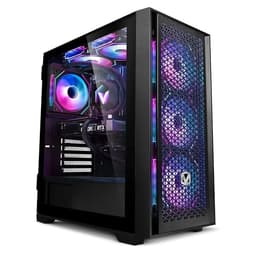
The ADMI Ryzen 5 5500 is the best-value option in this list for producers who are starting out or working on a tight budget. The Ryzen 5 5500 is a six-core, twelve-thread processor based on AMD's Zen 3 architecture, which offers solid single-core performance for DAW use. It is not the fastest chip available, but it handles typical home studio workloads, including 32 to 48 track sessions with moderate plugin use, without breaking a sweat.
The 16 GB of DDR4 at 3200 MHz is the current minimum recommended specification for music production, and it is adequate for most genres and session sizes. Producers working with very large orchestral libraries or running 100-plus track templates will want more, but for electronic music, hip-hop, singer-songwriter, and podcast production, 16 GB is entirely workable. The 1 TB NVMe SSD provides fast storage for your DAW, projects, and a moderate sample library collection.
The NVIDIA RTX 3050 6 GB GPU is included primarily because this is a gaming PC chassis, but it does offer a useful bonus for music producers: it can accelerate certain AI-powered audio tools, and it gives you the option to add a second monitor or run a high-resolution display without any strain. The discrete GPU also means the CPU does not share its resources with display rendering, which can marginally improve DAW performance compared to integrated graphics solutions.
Windows 11 is pre-installed, and the system is ready to use out of the box. For producers who want to spend their remaining budget on an audio interface, studio monitors, or plugin licences rather than on computer hardware, the ADMI is a sensible and honest choice. It is not glamorous, but it gets the job done reliably.
Pros
- Ryzen 5 5500 handles typical home studio sessions competently at a budget-friendly price
- Discrete RTX 3050 frees the CPU from display rendering duties, marginally improving DAW performance
- 1 TB NVMe SSD offers fast project and sample library storage
Cons
- 16 GB RAM limits headroom for large orchestral templates or very dense plugin sessions
- RTX 3050 6 GB is a modest GPU that will age quickly if GPU-accelerated audio tools become mainstream
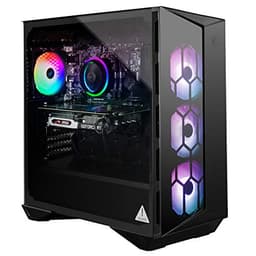
The MSI Aegis R is the oldest machine in this list, built around Intel's 10th-generation Core i7-10700F processor. At first glance, a 10th-gen Intel chip might seem like a reason to look elsewhere, but the i7-10700F is an eight-core, sixteen-thread processor with a boost clock that remains competitive for DAW use. Many professional producers still run sessions on older hardware without issue, and the i7-10700F handles 64-track sessions with moderate plugin loads reliably.
The NVIDIA RTX 3060 is a capable mid-range GPU that supports hardware ray tracing and DLSS, and its 12 GB of VRAM is actually more than the RTX 3050 and competitive with newer mid-range cards. For music producers who also work with video, the RTX 3060 handles 4K timeline playback in DaVinci Resolve or Premiere Pro without strain. The 1 TB NVMe SSD provides fast storage for projects and a moderate sample library.
The 16 GB of RAM is the main limitation for complex production work, though the Aegis R's standard DDR4 slots mean upgrading to 32 GB is straightforward and relatively inexpensive. The MSI Aegis R ships with Windows 10 Home rather than Windows 11, which is worth noting: Windows 11 is the current standard and offers improved audio stack performance in some scenarios, though an upgrade path is available.
The Aegis R's price is its most challenging aspect. At over £3,000, it is priced above several newer and more capable machines in this list. The MSI brand and build quality are well regarded, and the machine is solidly constructed, but value-conscious buyers will find better specifications per pound elsewhere. It suits producers who specifically want a known, established brand with a proven track record and do not mind paying a premium for that reassurance.
Pros
- Core i7-10700F eight-core processor handles typical DAW sessions reliably and consistently
- RTX 3060 with 12 GB VRAM is well suited to video scoring and GPU-accelerated audio tools
Cons
- Significantly overpriced relative to newer machines with better specifications at lower cost
- Ships with Windows 10 Home rather than Windows 11, requiring an upgrade for optimal audio stack performance
- 10th-gen Intel platform limits future upgrade options compared to current-generation motherboards
Buying Guide
CPU: The Most Important Specification for Music Production
The central processing unit is the single most important component in a music production desktop. DAWs distribute audio processing across CPU cores, and the speed of each individual core determines how many plugin instances you can run before the audio engine clips or stutters. Modern DAWs including Ableton Live, Logic Pro, Cubase, and Pro Tools all benefit from high single-core clock speeds as well as a healthy core count. For most home studio producers, a six-core CPU with a boost clock above 4.0 GHz is the minimum comfortable specification. Professional composers running large orchestral templates should target eight or more cores with boost clocks above 4.5 GHz.
RAM: How Much Do You Actually Need?
RAM requirements in music production are driven primarily by sample libraries. A modest setup with software synthesisers and a few drum kits can work comfortably with 16 GB. However, producers using Kontakt-based orchestral libraries, Spitfire Audio instruments, or large drum replacement tools will find that 32 GB is a much more comfortable working specification. If you plan to run full orchestral templates with 100 or more tracks of streamed samples, 64 GB is not excessive. When buying a desktop, check whether the RAM slots are accessible and whether the motherboard supports upgrades, as this is one of the most cost-effective ways to extend a machine's useful life.
Storage: Speed and Capacity Both Matter
Music production is one of the most storage-intensive computing tasks outside of video editing. A single orchestral library can occupy 50 to 200 GB, and producers accumulate dozens of libraries over time. NVMe SSD storage is strongly preferred over SATA SSD for sample streaming, as the higher sequential read speeds reduce the risk of audio dropouts when streaming many simultaneous instruments. A 1 TB primary drive is the practical minimum; 2 TB is more comfortable. Most producers also add external drives for library storage, so checking the available USB ports and their speeds is worthwhile.
Operating System: macOS vs Windows for Audio
Both macOS and Windows are viable platforms for music production in 2025. macOS has historically offered more stable low-latency audio performance through Core Audio, and the majority of professional recording studios still run Mac. Logic Pro, exclusive to macOS, is one of the best-value DAWs available. Windows has improved significantly with Windows 11's WASAPI and ASIO driver support, and the wider hardware choice at every price point is a genuine advantage. The choice often comes down to which DAW and plugins you already own licences for.
GPU: When Does It Matter?
For pure audio production, the GPU is largely irrelevant beyond driving your display. However, AI-powered audio tools are increasingly GPU-accelerated, and producers who score to picture or create video content alongside their music will benefit from a capable discrete GPU. If your workflow is exclusively audio, do not pay a premium for a high-end GPU: invest that money in RAM or storage instead.
Chassis Noise
Fan noise is a practical concern in home studios. A loud computer can bleed into sensitive condenser microphones, particularly in untreated rooms. All-in-one designs like the Apple iMac and compact mini PCs like the GMKtec K8 Plus tend to run quieter than full tower gaming PCs under load. If you record acoustic instruments or vocals in the same room as your computer, prioritise machines with efficient cooling designs.
The Apple iMac M4 is the overall winner for music production. Its near-silent operation, macOS Core Audio stability, unified memory architecture, and integration with Logic Pro make it the most practical and polished choice for the majority of producers, from bedroom beatmakers to professional studio engineers. The M4 chip's efficiency means you can run demanding sessions without fan noise intruding on recordings, and the all-in-one form factor keeps the desk tidy and cable-free.
For Windows users who need maximum headroom, the CyberPowerPC Luxe with its Intel Core Ultra 7 265KF and 32 GB of RAM is the top pick: it handles the most demanding orchestral templates and AI-accelerated audio tools without compromise. On a tighter budget, the ADMI Ryzen 5 5500 delivers honest, capable performance for typical home studio work and leaves money in the budget for the audio interface, monitors, and plugins that will have a far greater impact on your sound than incremental CPU upgrades.