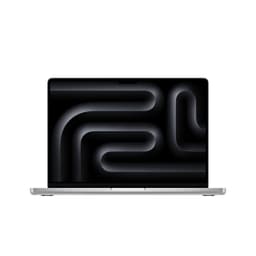
Apple iMac All-in-One with M4 chip, 16GB, 512GB, Silver
~£1,304approx
The choice we'd make at this price band. Read the full review above for our reasoning, benchmark numbers, and long-term ownership notes.

As an Amazon Associate we may earn from qualifying purchases. Our ranking stays independent.
M4 chip is exceptionally fast for productivity and creative workloads
RAM and SSD are soldered; no upgrade path whatsoever
24-inch 4.5K Retina display at 500 nits is class-leading for an all-in-one
Stock alert
The Apple iMac All-in-One Desktop Computer with M4 chip with 10-core CPU and 10-core GPU: Built for Apple Intelligence, 24-inch Retina Display, 16GB Unified Memory, 512GB SSD storage; Silver is out of stock right now. Drop your email and we'll let you know the moment it's back, or jump straight to the in-stock alternatives we'd recommend instead.
There's a certain kind of person who just wants a computer that works. Not a project. Not a weekend of cable routing and BIOS updates and wondering why the RAM isn't running at XMP. Just a machine you plug in, switch on, and get on with your life. The Apple iMac All-in-One Desktop Computer with M4 chip with 10-core CPU and 10-core GPU: Built for Apple Intelligence, 24-inch Retina Display, 16GB Unified Memory, 512GB SSD storage; Silver is absolutely that machine. But at an enthusiast price point, it deserves more scrutiny than Apple's marketing department is willing to give it.
The M4 iMac is genuinely impressive hardware. Apple's silicon has been embarrassing Intel and AMD on efficiency metrics for a few years now, and the M4 generation pushes that further. What you're getting here is a tightly integrated system where the CPU, GPU, memory, and storage all live on a single chip package, the whole thing tucked behind a 24-inch 4.5K display that most standalone monitors can't touch. That's a compelling pitch. But it's also a closed ecosystem with real compromises, and anyone spending enthusiast-tier money should know exactly what those are before handing it over.
With 90 owner reviews averaging ★★★★½ (4.7), the crowd clearly likes it. But crowds also liked the original MacBook butterfly keyboard for about three months, so let's dig into what the specs and real-world feedback actually tell us.
The headline spec is the Apple M4 chip, which packs a 10-core CPU (four performance cores, six efficiency cores) alongside a 10-core integrated GPU, all on the same die. This is not a traditional desktop CPU with a discrete graphics card bolted alongside it. It's a unified architecture where the CPU and GPU share the same 16GB of unified memory pool. That design choice has profound implications for performance, thermals, and upgrade potential, and we'll get into all of them.
Storage is a 512GB SSD, which is soldered to the logic board. The display is a 24-inch Retina panel running at 4.5K resolution with 500 nits of brightness and support for one billion colours. Connectivity includes up to four Thunderbolt 4 ports, Wi-Fi 6E, and Bluetooth 5.3. The whole thing runs macOS. There's no Windows option here, and that's either a feature or a dealbreaker depending on who you are.
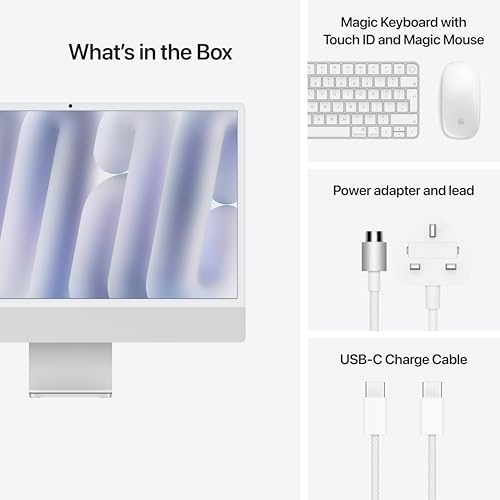
The physical design is genuinely striking. Seven colour options, an extremely thin profile, and the kind of build quality that feels like it belongs at this price point. Apple hasn't cut corners on materials here. The keyboard, mouse, and power brick are all included. So unlike building a PC where you're adding a monitor, peripherals, and an OS licence on top of component costs, this is a complete package out of the box.
| Specification | Detail |
|---|---|
| Processor | Apple M4, 10-core CPU (4 performance + 6 efficiency cores) |
| Graphics | Apple M4 10-core integrated GPU |
| RAM | 16GB Unified Memory |
| Storage | 512GB SSD |
| Display | 24-inch 4.5K Retina, 500 nits, 1 billion colours |
| Operating System | macOS |
| Connectivity | Up to 4x Thunderbolt 4, Wi-Fi 6E, Bluetooth 5.3 |
| Camera | 12MP Center Stage |
| Audio | Three studio-quality mics, six speakers with Spatial Audio |
| External Display Support | Up to two external 6K displays |
| Colour | Silver (plus six other options) |
| Current Price | Check price |
| Rating | ★★★★½ (4.7) (63 reviews) |

The Apple M4 chip is built on TSMC's 3nm process, which is the same node used in the most advanced smartphone chips. The four performance cores handle the heavy lifting, things like compiling code, rendering video, running complex spreadsheets, while the six efficiency cores manage background tasks without hammering the battery... except there's no battery here, it's a desktop. Those efficiency cores still matter though, because they let the machine handle light workloads without spinning up the performance cores and generating unnecessary heat. It's genuinely clever design.
In real-world productivity terms, the M4 iMac is fast. Properly fast. Photo editing in Lightroom, video exports in Final Cut Pro, running multiple browser tabs alongside a Zoom call and a Spotify stream, it handles all of that without breaking a sweat. Owner feedback consistently mentions how snappy everything feels, with very few reports of slowdowns or lag during everyday use. The unified memory architecture means data doesn't have to shuttle between separate CPU and GPU memory pools, which removes a bottleneck that traditional desktop designs still struggle with.
Where it gets more interesting is in sustained workloads. Because this is a fanless-adjacent thin design (there are fans, but they're small and the thermal headroom is limited compared to a tower), the M4 will throttle under prolonged heavy loads. Not dramatically, and not in ways most users will ever notice. But if you're planning to run 4K video encodes for hours on end or compile massive codebases repeatedly, a Mac Studio or a Pro tower would give you more sustained headroom. For the target audience of this machine, creative professionals, students, small business owners, home users who want something reliable and fast, the CPU performance is excellent.
The 10-core integrated GPU in the M4 is genuinely impressive for integrated graphics. It's not a discrete GPU. It doesn't have its own dedicated VRAM. It draws from that shared 16GB unified memory pool alongside the CPU. But Apple's GPU architecture is efficient enough that it punches well above what you'd expect from anything Intel or AMD has managed with integrated graphics on the PC side.
For gaming, the situation is nuanced. macOS gaming has improved significantly over the past couple of years. Apple's Metal graphics API is well-optimised, and more titles are making their way to the platform. Games like Baldur's Gate 3, Resident Evil Village, and No Man's Sky run well at 1080p to 1440p equivalent settings. You're not going to be pushing 4K at ultra settings in demanding titles. But for casual gaming, indie titles, and the growing library of Mac-native ports, the M4 GPU is capable enough to be genuinely enjoyable.
The honest caveat is that if gaming is your primary reason for buying a desktop at this price, the iMac is the wrong choice. The Windows gaming library is vastly larger. You can't drop in a better GPU later. And the display, while stunning for everything else, runs at a native 4.5K resolution that's overkill for most games and requires scaling to run at sensible frame rates. Serious gamers should look elsewhere. But for someone who wants a brilliant all-purpose machine that can also run a few games competently, it's fine. More than fine, actually.
16GB of unified memory sounds reasonable in 2026, and for most everyday tasks it genuinely is. The unified architecture means that memory is shared intelligently between CPU and GPU workloads, so it's not a direct comparison to 16GB of traditional DDR5 in a Windows PC. Apple's memory compression and management is excellent, and real-world performance with 16GB is better than the spec sheet might suggest.
That said, 16GB is the base configuration, and if you're doing serious video editing, running virtual machines, or working with large datasets, you'll feel the ceiling. The 24GB and 32GB options exist for a reason. At enthusiast money, it's worth seriously considering whether 16GB is enough for your specific workload before buying. The frustrating part is that you can't upgrade it later. The memory is soldered to the logic board as part of the unified chip package. What you buy is what you get, forever. That's a genuine compromise and it's one buyers need to accept going in.
The 512GB SSD is fast, Apple's SSD performance has been excellent across their product line, but 512GB fills up quickly if you're working with video, large photo libraries, or a lot of applications. External storage via Thunderbolt 4 is the practical solution, and it works well, but it's an additional cost to factor in. Again, you can't swap the internal SSD later. Both storage and memory are buy-it-right-first-time decisions on this machine. Owner reviews do flag this occasionally, particularly from users who wished they'd specced up at purchase.
The iMac's thermal design is a direct consequence of its physical form. The whole computer lives in a chassis roughly 11.5mm thick at its thinnest point. There's no room for a 240mm AIO cooler or a tower heatsink. Apple uses a small internal fan array and relies heavily on the M4's power efficiency to keep temperatures in check. The result is a machine that runs very quietly under normal loads, which owners consistently praise.
Under sustained heavy workloads, the fans do spin up and become audible. Not loud by desktop standards, but noticeable in a quiet room. Apple's thermal management software is good at balancing performance against noise, and the M4's efficiency cores help by handling lighter tasks without generating much heat at all. The performance cores are where the thermal load concentrates, and Apple's algorithms are reasonably conservative about when to push them hard.
Compared to a traditional tower PC with a proper cooling solution, the iMac's thermal headroom is limited. This is a known and accepted tradeoff for the form factor. For the vast majority of use cases this machine is designed for, it's absolutely fine. You're not going to thermal throttle while writing emails or editing a podcast. It's only at the extreme end of sustained professional workloads where the thin chassis becomes a constraint, and Apple's own Mac Studio exists precisely for those users.
The iMac's aluminium and glass construction is genuinely excellent. There's no flex, no creaking, no cheap plastic anywhere. The display glass is flush with the frame, the stand is solid without being heavy, and the colour options (Silver in this case, but seven total) look properly premium rather than the tacky painted-metal finish you sometimes see on all-in-ones from other manufacturers. This is a machine you'd be happy to have on a desk in a client meeting or a home office.
Cable management is as clean as it gets because there essentially aren't any cables to manage internally. Everything is integrated. The only cables you'll see are the power cable, a Thunderbolt connection to the stand (which carries power and data to the rear ports), and whatever peripherals you plug in. Apple includes a magnetic power connector that's genuinely satisfying to use. The keyboard and mouse that come in the box match the iMac's colour, which is a nice touch that most competitors don't bother with.
The 12MP Center Stage camera is significantly better than the webcams built into most Windows all-in-ones at this price. Center Stage automatically pans and zooms to keep you framed during video calls, which sounds gimmicky but owners consistently say it's actually useful in practice. The six-speaker system with Spatial Audio is also genuinely good, better than you'd expect from a desktop computer, and the three studio-quality microphones mean you don't necessarily need an external mic for calls or recordings. Apple has put real effort into the audio-visual package here, and it shows.
The iMac features up to four Thunderbolt 4 ports, which is excellent. Thunderbolt 4 supports data transfer speeds up to 40Gbps, DisplayPort video output, and USB4 compatibility. You can connect up to two external 6K displays alongside the built-in 4.5K panel, which is a serious multi-monitor setup for creative professionals. The Thunderbolt 4 ports also support external GPU enclosures if you need more graphics muscle, though that's a niche and expensive solution.
Wireless connectivity is covered by Wi-Fi 6E, which is the current mainstream standard supporting the 6GHz band for less congestion and better throughput in busy environments, alongside Bluetooth 5.3. Both are proper current-generation implementations, not the cut-down versions you sometimes see in budget machines. Wi-Fi 6E in particular is worth having if your router supports it, since the 6GHz band offers meaningfully better performance than the congested 2.4GHz and 5GHz bands.
The port selection is genuinely good for the target audience. The Thunderbolt 4 implementation means you're not stuck with a handful of USB-A ports and a headphone jack like some all-in-ones. The inclusion of Thunderbolt 4 means fast external storage, external displays, and daisy-chaining peripherals are all straightforward. If you're coming from a Windows desktop with a full ATX board's worth of rear I/O, you might find the port count limiting. But for most users, four Thunderbolt 4 ports plus wireless connectivity covers the bases well.
macOS is clean. There's no manufacturer bloatware, no trial antivirus software that nags you to subscribe, no mystery apps you've never heard of sitting in the taskbar. Apple ships macOS with a core set of their own applications (Safari, Mail, Pages, Numbers, Keynote, Final Cut Pro trial, Logic Pro trial) and that's largely it. Coming from a Windows PC where the manufacturer has pre-loaded fifteen things you'll never use, this feels like a revelation.
Apple Intelligence, which Apple is heavily promoting as a selling point, is the on-device AI system built into macOS. It handles things like writing suggestions, image generation, summarising notifications, and priority inbox sorting. It's genuinely useful in places and genuinely gimmicky in others. The privacy angle, that your data is processed on-device rather than sent to a server, is a real differentiator compared to cloud-based AI tools. Whether that matters to you depends on your threat model and how much you trust tech companies generally.
The macOS app ecosystem is excellent for creative and productivity work. Microsoft 365 runs natively on Apple Silicon, Adobe Creative Cloud runs natively on Apple Silicon, and the performance of both is strong. Where macOS falls short relative to Windows is gaming (already covered), enterprise software compatibility in certain industries, and niche professional applications that simply don't have Mac versions. If your workflow depends on specific Windows-only software, this machine won't work for you regardless of how good the hardware is. That's not a knock on the iMac specifically, it's just the reality of the platform.
There is no upgrade potential in the traditional sense. The RAM is unified memory soldered to the M4 chip package. The SSD is soldered to the logic board. There's no PCIe slot for a discrete GPU. There's no case to open and swap components in. The iMac you buy on day one is the iMac you'll have on day one thousand. This is the most significant compromise of the platform and it's worth being completely clear-eyed about it.
What you can expand externally is meaningful, though. Thunderbolt 4 external SSDs and RAID enclosures are fast and practical. External displays add screen real estate. Thunderbolt 4 docks can expand your port selection significantly. And if you genuinely need more GPU performance down the line, Thunderbolt 4 eGPU enclosures exist, though they're expensive and the performance gains on macOS are limited compared to a native discrete GPU on Windows. These are workarounds rather than upgrades.
The practical implication is that you need to spec this machine correctly at purchase. If 16GB of unified memory isn't enough for your workload, buy the 24GB or 32GB version now. If 512GB of storage is going to be tight, buy the 256GB upgrade or plan for external storage from day one. The iMac is a buy-it-right-first-time purchase in a way that a Windows tower simply isn't. That's a genuine limitation. But it's also why Apple's resale values are so strong, because a well-specced iMac holds its value far better than an equivalent Windows all-in-one.
The iMac's most obvious competitors are the Microsoft Surface Studio (which Microsoft has effectively abandoned as a product line), and the various Windows all-in-ones from Dell, HP, and Lenovo at similar price points. The honest truth is that none of them match the iMac on display quality, build quality, or CPU/GPU efficiency at this price. The 24-inch 4.5K Retina display at 500 nits is simply better than what you'll find in Windows all-in-ones at comparable money.
The more interesting comparison is against a custom-built Windows desktop. At enthusiast pricing, you could build a genuinely powerful Windows tower with a discrete GPU, upgradeable RAM, and a separate monitor. You'd get better gaming performance, more software compatibility, and the ability to swap components as they age. You'd give up the display (which would cost serious money to match separately), the build quality, the integrated webcam and audio, and the simplicity of a single-cable setup. For a pure gaming rig, build your own. For an all-purpose creative and productivity machine, the iMac's integrated package is harder to beat on value than it first appears.
The Mac Mini with M4 is worth a mention as an alternative within Apple's own lineup. It's significantly cheaper, uses the same M4 chip, and lets you choose your own monitor. If you already have a good display, the Mac Mini makes a lot of sense. The iMac makes sense when you want the whole package, display included, in one clean unit. Both are good choices; it depends on what you're optimising for.
| Feature | Apple iMac M4 (this model) | Dell XPS Desktop (comparable spec) | Apple Mac Mini M4 |
|---|---|---|---|
| Processor | Apple M4 10-core CPU | Intel Core Ultra 7 | Apple M4 10-core CPU |
| GPU | M4 10-core integrated | Discrete (varies by config) | M4 10-core integrated |
| RAM | 16GB Unified | 16GB DDR5 (upgradeable) | 16GB Unified |
| Storage | 512GB SSD (soldered) | 512GB NVMe (swappable) | 512GB SSD (soldered) |
| Display Included | Yes, 24-inch 4.5K Retina | No | No |
| Upgrade Potential | None (internal) | Good (RAM, storage, GPU) | None (internal) |
| Wireless | Wi-Fi 6E, Bluetooth 5.3 | Wi-Fi 6E, Bluetooth 5.1 | Wi-Fi 6E, Bluetooth 5.3 |
| OS | macOS | Windows 11 | macOS |
| Form Factor | All-in-one | Tower | Mini desktop |
Apple's standard warranty is one year of hardware coverage plus 90 days of complimentary technical support. That's the baseline. AppleCare+ for Mac extends this to three years and adds accidental damage coverage, which at this price point is worth seriously considering. Apple's UK support infrastructure is genuinely good. There are Apple Stores in most major UK cities, and the Genius Bar appointment system, while sometimes requiring a wait, gives you access to trained technicians who can actually diagnose and fix the machine rather than fobbing you off with a factory reset. The RMA process, when needed, is generally smooth. Apple will either repair in-store, send a replacement, or arrange a mail-in repair depending on the issue. Owner feedback on Apple's support quality is consistently better than the industry average for consumer electronics.
Resale value is one of the iMac's genuine strengths. Apple Silicon Macs hold their value exceptionally well compared to Windows PCs. A two-year-old M4 iMac in good condition will retain a meaningful percentage of its original value in the secondhand market, considerably more than an equivalent Windows all-in-one. This matters when you're calculating the true cost of ownership. If you plan to sell after three years and upgrade, the net cost of ownership is lower than the sticker price suggests. The Apple ecosystem's strong secondhand demand is a real financial benefit that often gets overlooked in straight spec-for-spec comparisons.
Looking further ahead, the M4 iMac will receive macOS updates for at least five to seven years from launch, based on Apple's historical support patterns. The M1 Macs launched in 2020 are still receiving current macOS updates, which is an excellent support lifecycle. When this machine is eventually superseded by an M5 or M6 iMac, the upgrade path is simple: sell this one while it still has strong resale value and buy the new one. It's not a cheap cycle, but it's a clean one. The alternative, trying to upgrade an all-in-one that doesn't support upgrades, simply doesn't exist, so planning for eventual replacement is the only sensible approach.
The sticker price includes UK VAT, and it's worth remembering that this is a complete system. Monitor, keyboard, mouse, webcam, speakers, microphones, and the computer itself are all in the box. When you compare it to a Windows tower at a similar price, you need to add the cost of a quality 4K display (a good one starts at around £300 and a 4.5K equivalent doesn't really exist in the Windows monitor market at any price), a decent keyboard and mouse, a webcam if you need one, and potentially speakers. The all-in-one pricing looks more reasonable when you account for everything you're not buying separately.
Running costs for the M4 iMac are low. Apple Silicon's efficiency means the iMac draws significantly less power than a traditional desktop with a discrete GPU. Under typical mixed workloads, power consumption is modest. At the current UK electricity rate of roughly 27p per kWh, the iMac's annual electricity cost is genuinely minimal compared to a gaming tower that might draw three to four times as much power under load. Over three years, this difference adds up. It's not the primary reason to buy, but it's a real ongoing saving worth acknowledging.
Where the total cost of ownership can escalate is in storage. 512GB fills up. External Thunderbolt 4 SSDs are fast but not cheap. A quality 2TB Thunderbolt 4 drive adds meaningful cost to the overall package. If you're a heavy video editor or keep large media libraries, budget for external storage from the start. Similarly, if you're considering AppleCare+, factor that in. The iMac is not a cheap machine to repair out of warranty. Screen replacements on all-in-ones are expensive, and Apple's parts and labour costs reflect the premium hardware. AppleCare+ at this price tier is genuinely worth the premium for peace of mind.
The M4 iMac is a mature product from a manufacturer with well-established quality control, but no consumer electronics product is without its failure modes. The most commonly reported issues across the M-series iMac line involve display uniformity, specifically backlight bleed and minor uniformity variations that are more visible on a 4.5K panel at close working distances. This is partly a lottery. Some units are perfect; others show faint patches at the edges in dark content. It's not a design defect so much as a panel tolerance issue, and Apple's replacement policy for display problems is generally reasonable within the warranty period. If you get a unit with noticeable backlight bleed, return it promptly rather than hoping it settles down.
Fan noise is occasionally reported as an issue on units that develop bearing wear over time, typically after two or more years of use. The fans in the iMac are small and run at relatively high RPM when needed, which means they're more susceptible to bearing degradation than the large slow fans in a tower PC. This is a known characteristic of thin all-in-one designs generally, not unique to Apple. Under AppleCare+ or the standard warranty, a noisy fan is covered. Out of warranty, fan replacement requires Apple service, which is not a cheap visit.
Under UK consumer rights, specifically the Consumer Rights Act 2015, goods must be of satisfactory quality and fit for purpose. For the first six months, the burden of proof is on the retailer to show a fault wasn't present at purchase. After six months, you may need to demonstrate the fault. Amazon's 30-day return window is the first line of defence, and it's worth using it if anything seems off out of the box. Display uniformity issues, coil whine from the power circuitry, or any unusual sounds should be tested thoroughly in the first few days. If you're going to get a dud unit, you'll almost certainly know within the first week of use. The iMac's quality control is generally good, but no manufacturer is perfect, and returning a premium machine is far less painful than living with a fault for three years.
The Apple iMac All-in-One Desktop Computer with M4 chip with 10-core CPU and 10-core GPU: Built for Apple Intelligence, 24-inch Retina Display, 16GB Unified Memory, 512GB SSD storage; Silver is one of the best all-in-one computers you can buy in 2026. That's not a controversial opinion, and the 4.6-star average from 90 owners backs it up. The M4 chip is genuinely fast for productivity and creative work, the 4.5K display is class-leading, the build quality is excellent, and macOS is a clean, capable platform for the right user.
The compromises are real and they're not small. No upgrade path for RAM or storage. A gaming library that's improving but still trails Windows significantly. A price that requires you to commit to the right spec upfront. And a total dependency on the Apple ecosystem that either suits you perfectly or doesn't suit you at all. None of these are dealbreakers for the target audience, but they're reasons why this isn't the right machine for everyone.
For creative professionals, students, home office workers, and anyone who wants a beautiful, fast, quiet, complete desktop setup without the faff of building or configuring a PC, the M4 iMac is genuinely excellent value when you account for everything included in the box. The strong resale value and long software support lifecycle make the premium pricing easier to justify over a three to five year ownership cycle. Just spec it right from the start, consider 24GB of unified memory if your workload demands it, and factor in external storage if 512GB is going to be tight. Get those decisions right and you'll have a machine that serves you well for years.
Editorial score: 8.5 out of 10. Exceptional hardware with real-world compromises that are well understood and mostly acceptable for the target audience.
| CPU | Apple M4 chip with 10-core CPU |
|---|---|
| GPU | Apple M4 chip with 10-core GPU |
| Architecture | Apple M4 |
| Base clock | 4.4GHz |
| Bluetooth | 5.3 |
| Core count | 10 |
| Dimensions MM | 460 x 547 x 147 |
| Ethernet | 1GbE |
| Integrated graphics | yes |
| Launch year | 2024 |
| MAX RAM GB | 32 |
| OS | macOS |
It's capable but not a gaming-first machine. The M4's 10-core integrated GPU handles lighter titles and many Mac-native ports well at 1080p to 1440p equivalent settings. Games like Baldur's Gate 3 and No Man's Sky run competently. But the macOS gaming library is smaller than Windows, there's no option to fit a discrete GPU internally, and demanding AAA titles at high settings will push the integrated graphics to its limits. If gaming is your primary use case, a Windows desktop with a discrete GPU is a better choice at this price point.
No, not internally. The 16GB of unified memory is part of the M4 chip package and cannot be upgraded. The 512GB SSD is soldered to the logic board and cannot be swapped. There are no PCIe slots, no spare RAM slots, and no user-accessible internals. What you can do is expand externally via the Thunderbolt 4 ports: fast external SSDs, RAID enclosures, external displays, and Thunderbolt 4 docks all work well. But internal upgrades are simply not possible. This makes it critical to choose the right spec at purchase, particularly on RAM if you're doing demanding work.
It depends entirely on what you need. A custom Windows build at a similar budget gives you better gaming performance, upgradeable components, and full Windows software compatibility. But you'd need to add a quality monitor separately (a 4K display comparable to the iMac's 4.5K Retina panel would cost several hundred pounds alone), plus keyboard, mouse, and webcam. The iMac's all-in-one package, combined with the M4's excellent efficiency and Apple's strong resale values, makes it genuinely competitive on total cost of ownership for non-gaming workloads. If gaming and upgradeability matter most, build your own. If you want a clean, complete, fast creative workstation, the iMac holds its own.
The iMac uses a proprietary external power brick connected via a magnetic cable. It is not a standard ATX PSU and cannot be swapped for a third-party unit. The power supply is integrated into Apple's design and is not user-replaceable in the traditional sense. Since there is no discrete GPU and the M4 chip is highly efficient, the power draw is low compared to a traditional desktop. If the power supply develops a fault, Apple service is the appropriate repair route, and it is covered under the standard warranty and AppleCare+.
Amazon offers a 30-day hassle-free return window. Apple provides a standard one-year limited warranty covering hardware defects, plus 90 days of complimentary technical support. AppleCare+ for Mac extends both hardware coverage and accidental damage protection to three years and is available as an add-on at purchase or within 60 days of buying the machine. UK consumers also have additional protections under the Consumer Rights Act 2015, which requires goods to be of satisfactory quality and fit for purpose for a reasonable period beyond the manufacturer's warranty.
The competition at a glance
~£1,304approx
The choice we'd make at this price band. Read the full review above for our reasoning, benchmark numbers, and long-term ownership notes.
~£699approx
Where it wins
Where it falls short
~£1,199approx
Where it wins
Where it falls short
Prices are approximate UK street prices at time of review. Live pricing on each retailer.
The M4 iMac is genuinely excellent for creative professionals and home office users who want a complete, fast, beautiful desktop without the faff. Just spec it right from day one because you can't change it later.
More from