The 4K UHD monitor market has shifted dramatically over the past twelve months. QD-OLED panels have tumbled in price, there are IPS options for everyday desk use, and smart monitor features once reserved for premium sets have filtered down to mid-range models. Whether you are a designer demanding colour accuracy, a gamer chasing sub-millisecond response times, or a home-office worker who wants a clean desk with USB-C power delivery, there is now a 4K panel to suit you at almost every price point. This guide is aimed at UK buyers who want a definitive shortlist without wading through dozens of mediocre options. The picks below cover 27-inch and 32-inch screen sizes, IPS, VA, OLED, and QD-OLED panel technologies, and a range of budgets, so you can find the right display for your specific workload, gaming habit, or creative workflow.
Quick Verdict
Best Overall: ASUS ROG Swift PG27UCDM. A 240Hz QD-OLED with HDMI 2.1, DisplayPort 2.1a, and near-perfect motion clarity makes it the most capable all-round 4K monitor on this list for those who can stretch the budget.
27-inch 4K option: AOC U27B3A. This IPS model includes HDR10 and built-in speakers. Check its live price in the table against your budget.
Best for Creatives: BenQ PD2705U. The AQCOLOR calibration, 99% sRGB, 99% Rec. 709, and a full USB-C hub make it the go-to for designers and video editors.
Best 32-inch Gaming: ASUS ROG Strix XG32UCWG. A 165Hz OLED at 31.5 inches with USB-C and HDMI 2.1 is a serious proposition for console and PC gamers alike.
The AOC U27B3A pairs a 27-inch 3840×2160 IPS panel with HDR10, built-in speakers and a three-side frameless design. Its current price is £178.97. For documents, browsing or a second display, the useful starting point is its resolution and connectivity. Check the live price against your budget before buying.
IPS panels offer wide viewing angles, useful when you move around your desk or share the screen. The 60Hz refresh rate is adequate for office work, web browsing, streaming, and casual gaming. Do not expect the panel to keep up with fast-paced competitive titles, but for slower-paced games, strategy, or RPGs, 60Hz at 4K is a pleasant experience.
Connectivity is straightforward: two HDMI 2.0 ports and one DisplayPort 1.4. You will not find USB-C here, and there is no USB hub. The three-side frameless design keeps the aesthetic clean, and the built-in speakers mean you can get audio without a separate purchase, though dedicated speakers or headphones will sound considerably better.
HDR10 support is present, though as with most budget HDR implementations, the panel lacks local dimming and the peak brightness to make HDR truly transformative. It is more of a checkbox feature here than a headline selling point. Judge it on the display features you need rather than the HDR badge alone.
The stand offers basic tilt adjustment. If you want height adjustment or pivot, you will need a VESA mount, but the 100×100mm VESA compatibility is confirmed, so upgrading the stand is straightforward. For anyone stepping up from a 1080p or 1440p monitor on a tight budget, compare the AOC U27B3A's live price with the other 4K options here.
Verdict: A 27-inch 4K IPS option for everyday desk use. Check its live price and ports against your needs; the 60Hz refresh rate is the main gaming limitation.
Pros
- 27-inch 3840×2160 IPS panel
- Three-side frameless design looks clean in multi-monitor setups
- HDR10 support and built-in speakers
Cons
- No USB-C or USB hub connectivity
- 60Hz only, not suitable for competitive gaming
- Stand limited to tilt adjustment only
Dell's S2721QSA is one of the most consistently recommended 27-inch 4K monitors in the UK, and for good reason. It combines a well-calibrated IPS panel, a clean industrial design, AMD FreeSync support, and the reassurance of Dell's build quality and customer service into a package that sits at a mid-range price point. It is the monitor that professionals, home-office workers, and general users reach for when they want something reliable and well-regarded without the premium of a specialist display.
The 3840×2160 IPS panel delivers accurate colours and wide viewing angles. Dell has historically shipped the S2721QSA with solid factory calibration, and the panel covers a good percentage of sRGB, making it suitable for light creative work, photo editing, and video consumption alongside its primary role as a productivity display. The 60Hz refresh rate is the standard for this class of monitor, and the 4ms response time keeps motion reasonably controlled for everyday use.
Connectivity covers two HDMI ports and one DisplayPort, which is functional for most setups. The absence of USB-C is a limitation compared to the BenQ PD2705U, but the S2721QSA is notably cheaper, so the trade-off is understandable. AMD FreeSync support means that AMD GPU users get tear-free gaming within the supported refresh rate range, adding a degree of gaming capability that makes this more versatile than a pure office display.
The stand is one of the better ones in this price range, offering height adjustment, tilt, and swivel, which is a meaningful advantage over budget competitors that offer tilt only. The slim bezels on three sides keep the aesthetic contemporary, and the overall build quality feels solid and durable.
Dell's after-sales support is a genuine differentiator. The brand's Advanced Exchange programme means that if you receive a faulty unit, the replacement process is typically smoother than with lesser-known brands. For buyers who value peace of mind alongside performance, this matters.
At its current UK price, the Dell S2721QSA competes directly with the BenQ PD2705U and the Samsung 32-inch options. It is the right choice for someone who prioritises a known brand, a good stand, and reliable colour performance in a 27-inch form factor.
Verdict: A dependable, well-built 27-inch 4K IPS monitor from a trusted brand. Not the cheapest, but the stand quality and Dell's support make it worth the premium over budget alternatives.
Pros
- Height-adjustable, swivel-capable stand included as standard
- Reliable factory calibration and consistent IPS colour accuracy
- AMD FreeSync adds tear-free gaming capability
Cons
- No USB-C connectivity, limiting one-cable laptop setups
- 60Hz only, not suitable for high-refresh gaming
The BenQ PD2705U is built for a specific audience: designers, photographers, video editors, and creative professionals who need colour accuracy they can trust. It is not trying to be a gaming monitor or a budget pick. Instead, it focuses on delivering a calibrated, colour-accurate 4K IPS panel with a practical hub of connectivity that suits a modern creative workstation.
The AQCOLOR technology is BenQ's proprietary colour management system, and on the PD2705U it delivers 99% sRGB and 99% Rec. 709 coverage with factory calibration. Each unit ships with a calibration report, which is a reassuring touch for professionals who need to know their display is accurate out of the box. The 3840×2160 IPS panel at 27 inches gives a pixel density of around 163 PPI, which is sharp enough for detailed retouching, vector work, and video grading.
The connectivity suite is the PD2705U's other major selling point. It includes a USB-C port with 65W Power Delivery and DisplayPort Alt Mode, meaning you can connect a modern laptop with a single cable and charge it simultaneously. Two HDMI 2.0 ports, one DisplayPort 1.4, three USB-A 3.2 downstream ports, and two USB-B upstream ports round out the hub. This is a genuinely useful setup for a desk that hosts a laptop, a desktop, and several peripherals.
The 60Hz refresh rate and 5ms response time confirm that this is a productivity and creative tool rather than a gaming display. BenQ has not tried to make the PD2705U do everything; it does its specific job very well. The Hotkey Puck accessory, which allows quick switching between colour modes, is a thoughtful addition for professionals who move between different colour spaces throughout the day.
The stand is height-adjustable, tiltable, and supports pivot rotation, which is useful for portrait-mode work on documents or code. Build quality is solid throughout, with a clean matte finish that avoids the gamer-aesthetic that some professional users find off-putting.
At its price point, the PD2705U competes with monitors from NEC, Eizo, and other professional-grade brands, and it holds its own. For UK buyers who need a reliable, colour-accurate 4K display with a practical hub, it is the strongest option on this list.
Verdict: The definitive choice for designers and creative professionals. The AQCOLOR calibration, 99% sRGB coverage, and USB-C hub make it a complete workstation display.
Pros
- Factory-calibrated with 99% sRGB and 99% Rec. 709 coverage
- USB-C 65W Power Delivery enables single-cable laptop connectivity
- Comprehensive USB hub with three USB-A 3.2 downstream ports
- Height-adjustable stand with pivot rotation included
Cons
- 60Hz refresh rate makes it unsuitable for gaming use
- Premium price compared to non-professional 4K IPS alternatives
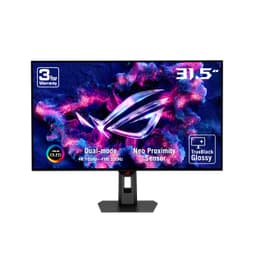
The ASUS ROG Strix XG32UCWG represents a significant step up in both panel technology and price. At 31.5 inches with a 4K OLED panel running at 165Hz and a 0.03ms response time, it is aimed at serious PC and console gamers who want the best possible image quality and motion clarity in a large-format display. OLED technology brings true blacks, effectively infinite contrast, and per-pixel illumination that no IPS or VA panel can replicate.
The 3840×2160 resolution at 31.5 inches gives a pixel density of around 140 PPI, which is slightly lower than 27-inch 4K panels but still sharp enough for detailed gaming environments and productivity use. The OLED panel's colour volume is exceptional, delivering vivid, saturated colours in HDR content that genuinely looks different from LCD alternatives. If you have only ever used IPS or VA panels, the first time you see deep space or a dark forest scene on an OLED at this size is a notable experience.
The 165Hz refresh rate is well-matched to current high-end GPUs. An RTX 4080 or RX 7900 XTX can push 4K at 165Hz in many titles, and the OLED's response time means there is no ghosting or trailing even in fast-paced shooters and racing games. The combination of resolution, refresh rate, and panel technology makes this one of the most capable gaming monitors available at its price point.
Connectivity is strong: two HDMI 2.1 ports for console gaming at 4K 120Hz, one DisplayPort 1.4, one USB-C, a USB hub, and audio output. The HDMI 2.1 ports are particularly valuable for PlayStation 5 and Xbox Series X users who want 4K gaming on a monitor rather than a television. The USB-C port adds versatility for laptop users.
OLED burn-in is a consideration for any OLED display. ASUS includes pixel refresh and pixel shift features to mitigate this, and the risk for gaming use is generally low, but static elements such as taskbars, HUD elements, and desktop icons should be managed carefully over long periods. The ROG Strix branding and RGB lighting on the rear will suit gaming setups but may feel excessive in a professional or home-office environment.
At its current UK price, the XG32UCWG is a premium investment. It is the right choice for buyers who want the best 32-inch 4K gaming experience available and are prepared to pay for OLED quality.
Verdict: The best 32-inch 4K gaming monitor on this list. OLED quality, 165Hz, HDMI 2.1, and USB-C make it a near-complete package for serious gamers.
Pros
- OLED panel delivers true blacks and effectively infinite contrast ratio
- 0.03ms response time eliminates ghosting in fast-paced gaming
- HDMI 2.1 supports 4K 120Hz from PlayStation 5 and Xbox Series X
- 165Hz refresh rate suits high-end PC gaming setups
Cons
- OLED burn-in risk requires careful management of static screen elements
- Premium price puts it out of reach for most budget buyers
- ROG aesthetic and RGB lighting may not suit all environments
The ASUS ROG Swift PG27UCDM is the most capable monitor on this list and carries the highest price tag to match. It combines a 27-inch QD-OLED panel with a 240Hz refresh rate, 0.03ms response time, HDMI 2.1, DisplayPort 2.1a, and USB-C in a package that represents the current state of the art in 4K gaming display technology. It is aimed at enthusiast PC gamers who will accept no compromise on performance and are prepared to pay for it.
QD-OLED technology combines the per-pixel illumination and true blacks of OLED with the enhanced colour volume of quantum dot technology. The result is a panel that delivers brighter highlights than standard OLED while retaining the deep blacks and wide colour gamut. At 27 inches and 3840×2160, the pixel density is approximately 163 PPI, giving text and fine detail exceptional sharpness.
240Hz at 4K is a specification that very few GPUs can fully exploit at the time of writing. An RTX 4090 or a future high-end card is required to push 240 frames per second at native 4K in demanding titles. In less demanding or older games, however, 240Hz is achievable, and even at lower frame rates the QD-OLED's response time and refresh rate combination produces visibly smoother motion than any IPS alternative.
DisplayPort 2.1a is a forward-looking addition that provides the bandwidth needed for 4K at 240Hz without compression. Two HDMI 2.1 ports cover console gaming at 4K 120Hz, and the USB-C port and USB hub add practical connectivity for multi-device setups. The headphone jack is a small but appreciated addition for gaming audio.
As with all OLED panels, burn-in management is important. ASUS includes pixel refresh cycles and on-screen element shifting, and the risk for varied gaming content is generally low. The ROG branding is prominent, and the monitor's aesthetics are firmly in the gaming camp. For a professional creative environment, the BenQ PD2705U is a more appropriate choice.
The PG27UCDM's price is significant, but it reflects what you are getting: the fastest, sharpest, most colour-accurate 27-inch 4K display available in the UK market. For the buyer who wants the absolute best and has the GPU to match, this is the definitive choice.
Verdict: The best 4K monitor on this list, full stop. 240Hz QD-OLED with DisplayPort 2.1a and HDMI 2.1 is as good as it gets in 2025. The price is high, but the performance justifies it for serious enthusiasts.
Pros
- 240Hz QD-OLED delivers the best motion clarity and colour volume available at 27 inches
- DisplayPort 2.1a provides full bandwidth for 4K 240Hz without compression
- HDMI 2.1 and USB-C make it compatible with consoles, PCs, and laptops
- 0.03ms response time eliminates all visible ghosting and trailing
Cons
- Check the live price against your budget
- Requires an RTX 4090-class GPU to exploit 240Hz at native 4K
- OLED burn-in risk requires ongoing management of static UI elements
Buying Guide
Panel Technology: IPS, VA, OLED, or QD-OLED?
The panel type is the single most important decision when buying a 4K monitor. IPS panels offer wide viewing angles, good colour accuracy, and consistent brightness across the screen. They are the most versatile choice for mixed use, covering productivity, creative work, and casual gaming. VA panels offer deeper blacks and higher native contrast ratios than IPS, making them better for dark-room viewing and HDR content, but they can suffer from slower response times and narrower viewing angles. OLED panels deliver true blacks, per-pixel illumination, and effectively infinite contrast, which transforms HDR gaming and film viewing. The trade-off is burn-in risk from static elements and a higher price. QD-OLED combines OLED's black levels with quantum dot colour volume for even brighter highlights and more saturated colours, making it the premium choice for gaming and media consumption.
Screen Size: 27-Inch or 32-Inch?
At 4K resolution, both 27-inch and 32-inch panels offer sharp images, but the experience differs. A 27-inch 4K panel gives approximately 163 PPI, which means UI elements are small at native scaling and Windows scaling of 150% is commonly recommended. A 32-inch 4K panel gives around 140 PPI, which is slightly more comfortable at 125% scaling and feels more like a traditional monitor experience. For desk use at a typical 60-70cm viewing distance, 27 inches is often the preferred choice for pixel density. For a monitor that doubles as a media display or sits further away, 32 inches is more immersive.
Refresh Rate: Does It Matter at 4K?
For productivity and creative work, 60Hz is entirely sufficient. For gaming, the answer depends on your GPU and the types of games you play. Competitive shooters and racing games benefit most from high refresh rates, but pushing 4K at 144Hz or above requires a top-end graphics card. If you have an RTX 4070 Ti or better, a 144Hz or 160Hz 4K panel is a worthwhile upgrade. If you have a mid-range GPU, 60Hz at 4K will be more consistently achievable. For the absolute best experience, 240Hz QD-OLED panels like the ASUS ROG Swift PG27UCDM exist, but they require both a large budget and a very powerful GPU.
Connectivity: What to Look For
USB-C with Power Delivery is increasingly important for laptop users, as it allows a single cable to carry video, data, and charging simultaneously. Look for at least 65W PD if you want to charge a modern laptop. HDMI 2.1 is essential for console gaming at 4K 120Hz on PlayStation 5 or Xbox Series X. DisplayPort 1.4 is sufficient for 4K at 60Hz and most 144Hz panels, while DisplayPort 2.1 or 2.1a is needed for 4K at 240Hz without compression. A built-in USB hub saves desk clutter and adds practical value.
HDR: Real or Marketing?
HDR implementation varies enormously. Budget monitors with HDR10 certification but no local dimming and low peak brightness deliver a minimal HDR benefit. True HDR requires high peak brightness (600 nits or above), local dimming or OLED per-pixel control, and wide colour gamut coverage. OLED and QD-OLED panels deliver genuine HDR; most budget IPS panels do not, regardless of the HDR badge on the box.
Budget Allocation
Start with the features you need, then compare the live prices above. For everyday work, consider a 60Hz IPS display. For gaming, weigh refresh rate against the performance of your graphics card. For creative work, look at calibration and connectivity rather than choosing by price alone.
The ASUS ROG Swift PG27UCDM is the overall winner on this list. Its 240Hz QD-OLED panel, DisplayPort 2.1a, HDMI 2.1, and 0.03ms response time represent the current peak of 4K monitor technology. For buyers who can afford it and have the GPU to match, it is unmatched. For everyone else, the AOC U27B3A offers a 27-inch 4K IPS panel with HDMI and DisplayPort; compare its live price with the features you need. Designers and creative professionals should go straight to the BenQ PD2705U for its calibrated colour accuracy and USB-C hub. Gamers who want OLED quality at 32 inches without paying the PG27UCDM's price should consider the ASUS ROG Strix XG32UCWG. The Dell S2721QSA remains a solid, reliable choice for home-office users who value brand assurance and a good stand over cutting-edge specifications.