Monitor purchases are long-term commitments. The average person stares at the same panel for four to six years, and the difference between a mediocre display and a genuinely good one compounds every single day. So when something lands in the enthusiast bracket, the question isn't just "does it have good specs on paper" but "do those specs translate into something that actually justifies the outlay at this price tier." The ASUS ROG Strix XG32UCWG makes a strong case for itself, and the short answer is yes, but there are specific reasons why, and a few caveats before you commit.
The headline numbers are genuinely impressive: 32 inches of 4K WOLED, a verified 165Hz refresh rate with a dual-mode trick that pushes to 240Hz at 4K and 480Hz at 1080p, and a 0.03ms response time that, for once, isn't entirely marketing fiction. Owner feedback across 217 averages ★★★★☆ (4.3), which for a monitor at this price tier is a meaningful signal. People who buy premium panels are picky. A 4.3 from that crowd means something. The criticisms that do exist are worth examining carefully, and we'll get to them.
This is a verdict-first review, so here it is plainly: the XG32UCWG is one of the better 32-inch 4K OLED gaming monitors available right now, particularly if you care about colour accuracy alongside gaming performance. It's not perfect, and it's not for everyone. But for the buyer who wants a single display that handles both fast-paced gaming and colour-sensitive creative work without compromise, it's a genuinely strong option at this price point.
Core Specifications
Start with what's confirmed. The panel is a 31.5-inch (marketed as 32-inch) WOLED with a native resolution of 3840x2160, a refresh rate of 165Hz in standard mode, and a quoted response time of 0.03ms. The dual-mode feature is specifically: ASUS has implemented a mode-switching system that lets you run the panel at 4K/240Hz or drop to 1080p/480Hz. That 480Hz figure is genuinely unusual at this screen size and resolution tier, and it's aimed squarely at competitive players who sometimes want to sacrifice resolution for maximum frame rate. It's a clever bit of engineering that extends the monitor's usefulness across different gaming contexts.
The panel carries the TrueBlack Glossy WOLED designation, which is ASUS's branding for LG's WOLED technology. The glossy surface is a deliberate design choice rather than an oversight. ASUS has applied an anti-reflection coating that they describe as "glare-free" while retaining the optical clarity advantages of a glossy finish over a traditional matte coating. Whether that works in your specific room lighting situation is something you'll need to assess based on where your windows are, but the approach is sound in principle. Matte coatings scatter light and reduce perceived sharpness. A properly treated glossy surface avoids that trade-off.
Connectivity is solid. You get two HDMI 2.1 ports, one DisplayPort 1.4, one USB-C, a USB hub, and audio out. The HDMI 2.1 ports are important because they support the bandwidth needed for 4K at high refresh rates from consoles like the PlayStation 5 and Xbox Series X. This isn't a PC-only monitor, and ASUS has clearly thought about the dual-use scenario. The USB-C port adds flexibility for laptop users who want a single-cable connection. Pricing is current as of the date of this review.
| Specification | Detail |
|---|---|
| Screen Size | 31.5 inches (32-inch class) |
| Panel Type | WOLED (TrueBlack Glossy) |
| Resolution | 3840 x 2160 (4K UHD) |
| Refresh Rate | 165Hz standard; 240Hz (4K), 480Hz (FHD) via Dual Mode |
| Response Time | 0.03ms (GtG) |
| HDR Certification | VESA DisplayHDR 400 True Black |
| Colour Gamut | 99% DCI-P3 |
| Colour Depth | True 10-bit |
| Delta E | Less than 2 |
| Ports | 2x HDMI 2.1, 1x DisplayPort 1.4, 1x USB-C, USB hub, audio out |
| Price | £589.00 |

Panel Technology
WOLED is a specific variant of OLED technology developed by LG Display. Where traditional OLED panels use coloured organic compounds for each subpixel, WOLED uses white organic emitters combined with colour filters. The practical upside is that WOLED panels tend to be brighter than conventional OLED and have better manufacturing yields at large sizes, which is part of why 32-inch OLED monitors are commercially viable at all. The trade-off, historically, has been slightly lower colour saturation compared to QD-OLED, but 99% DCI-P3 coverage on this panel puts that concern largely to rest for real-world use.
The contrast behaviour is where OLED fundamentally separates itself from LCD technology, including the best IPS and VA panels. OLED pixels switch off individually, meaning true blacks aren't a software approximation or a local dimming zone trying to get close. They're actual zero light output. The result is a contrast ratio that's effectively infinite, compared to perhaps 1000:1 for a good IPS panel or 3000:1 for a decent VA. In dark gaming environments, the difference is visible immediately. Shadow detail in dark scenes doesn't get crushed by backlight bleed. Black bars in cinematic content are genuinely black, not dark grey. This matters more than most spec comparisons convey.
Viewing angles on OLED are also a non-issue in a way that IPS glow and VA colour shift simply aren't. You can sit off-axis and the image holds. Colour doesn't shift, brightness doesn't drop noticeably. For a single-user gaming setup this is less critical, but if you ever have someone sitting next to you watching, or if your monitor position isn't perfectly centred, it's a genuine quality-of-life advantage. The glossy surface does mean you'll want to think about light source placement in your room, but the ASUS anti-reflection treatment helps considerably with direct reflections. Owner reviews mention the glossy finish as a point of initial concern that largely disappears once the monitor is positioned correctly.
Display Quality
At 3840x2160 on a 31.5-inch panel, the pixel density sits at approximately 140 pixels per inch. That's not quite the sharpness you'd get from a 27-inch 4K panel at around 163 PPI, but it's still well above the threshold where individual pixels become visible at normal desktop distances. Text rendering is clean. Fine detail in games and images is genuinely sharp. The extra screen real estate compared to a 27-inch display is meaningful for productivity work, and 32 inches at 4K is a comfortable size for sitting at a desk without needing to scale the UI aggressively.
The TrueBlack Glossy surface treatment deserves more examination than the marketing language suggests. Traditional glossy panels reflect ambient light sharply and create distracting hotspots from windows or ceiling lights. ASUS's approach here applies an anti-reflection coating that diffuses those reflections without introducing the haze that matte coatings create. Published display analysis from specialists who have examined similar ASUS WOLED panels consistently notes that the perceived sharpness advantage over matte alternatives is real and measurable. Text and fine lines appear crisper because the subpixel rendering isn't being scattered by a matte surface layer. For content creation work where you're pixel-peeping images, this matters.
The ASUS OLED Care Pro system with Neo Proximity Sensor is here because it directly affects long-term display quality. OLED panels are susceptible to burn-in from static elements, particularly taskbars, HUD elements in games, and desktop icons. The proximity sensor detects when you've walked away from the desk and switches the panel to a black screen automatically. Combined with pixel refresh cycles and logo brightness reduction features, this is ASUS taking burn-in seriously rather than just hoping users remember to enable screensavers. Owner reviews don't flag burn-in as a problem, which after the first wave of OLED monitor releases is a genuinely positive signal. The ASUS ROG monitor page details the full OLED Care Pro feature set if you want to dig into the specifics.
Refresh Rate and Adaptive Sync
The verified refresh rate is 165Hz in standard operating mode, which is already comfortably above the 144Hz that defined the previous generation of gaming monitors. But the dual-mode implementation is the genuinely interesting part of this spec sheet. Switching to 4K/240Hz mode gives you a meaningful bump for games where you can actually hit that frame rate, and the 1080p/480Hz mode is something that barely exists at this screen size. For context, 480Hz at 1080p puts this panel in the same territory as dedicated competitive gaming monitors, just on a 32-inch screen that you'd normally associate with immersive gaming rather than tournament-style play. It's an unusual combination.
Adaptive sync support is present, and the HDMI 2.1 ports support variable refresh rate for console gaming. The HDMI VRR specification is relevant here because it's what enables tear-free gaming on PlayStation 5 and Xbox Series X without requiring a PC and DisplayPort. For a monitor at this price point that's clearly aimed at enthusiasts who might have both a gaming PC and a current-generation console, dual HDMI 2.1 with VRR support is a proper feature rather than a checkbox. You can have your PS5 and your PC connected simultaneously and switch between them without fiddling with cables.
The practical question for 4K gaming is whether your GPU can actually feed this panel at 165Hz or above. At 4K, even an RTX 4090 will struggle to maintain 165fps in demanding titles. But that's not the point. The monitor handles whatever frame rate your GPU produces smoothly, and adaptive sync means you're not seeing tearing at 60fps or 90fps either. The dual-mode feature means that if you want to drop to 1080p for competitive multiplayer and push 300fps or more, the panel can handle that too. It's flexible in a way that single-mode monitors simply aren't.
Response Time and Motion
The 0.03ms response time is the manufacturer's quoted GtG figure, and for OLED this is broadly credible rather than the marketing fiction it would be from an LCD manufacturer. LCD panels quote "1ms" response times that frequently measure at 4ms to 8ms under real conditions. OLED's pixel transition mechanism is fundamentally different: the organic compounds switch states much faster than liquid crystals can physically rotate. Published measurements of comparable WOLED gaming panels consistently show GtG response times in the 0.1ms to 0.2ms range under real measurement conditions, which is still dramatically faster than any LCD alternative.
What this means in practice is that motion blur from pixel persistence is essentially eliminated. The remaining source of motion blur on OLED gaming monitors is sample-and-hold blur, which is related to refresh rate rather than pixel response time. At 165Hz and above, this is minimal. At 480Hz in the low-resolution dual mode, it's negligible. Ghosting, which is the visible trail behind fast-moving objects that plagues slower LCD panels, is not a meaningful concern here. Owner reviews don't raise ghosting as an issue, which aligns with what the panel technology would predict.
Overshoot, which is the inverse problem where aggressive overdrive settings cause a bright halo to appear ahead of moving objects, is something ASUS has historically managed well on their OLED monitors through careful overdrive calibration. The DisplayWidget Center software mentioned in the product listing allows adjustment of monitor settings, which includes overdrive tuning. For competitive gaming where motion clarity is the priority, the 480Hz FHD mode is genuinely useful. For 4K gaming where image quality matters more, 165Hz or 240Hz with OLED's inherent response advantage is more than sufficient. Most competitive players who aren't running 4K at high frame rates would be better served by a dedicated 1080p or 1440p monitor, but the dual-mode feature means you don't have to choose.
Colour Accuracy and Gamut
The verified specifications here are strong. 99% DCI-P3 gamut coverage, true 10-bit colour depth, and a Delta E of less than 2. To put those numbers in context: professional reference monitors used in post-production typically target 95% DCI-P3 and Delta E below 2. This panel meets or exceeds those targets by specification. The DCI-P3 colour space is the standard for digital cinema production, and 99% coverage means that virtually all the colours used in HDR film and television content are within the panel's gamut. This isn't just a gaming monitor that happens to have good colours. It's a display that's genuinely qualified for colour-sensitive work.
The Delta E figure is particularly important for anyone doing photo editing, video grading, or graphic design. Delta E measures the perceptible difference between a target colour and what the display actually shows. A Delta E below 2 is considered the threshold of imperceptibility for most trained observers. Below 1 is reference-grade. The less than 2 specification here, if it holds in practice (and owner reviews don't contradict it), means that colours you're editing on this monitor will look accurate rather than shifted. The VESA DisplayHDR 400 True Black certification adds a further layer of validation from an independent standards body. The VESA DisplayHDR True Black specification has specific requirements for black level, contrast, and colour volume that this panel has been verified to meet.
For sRGB content, which covers the vast majority of web images, games, and standard video, the panel will need to be used in an sRGB mode to avoid oversaturation. A display with 99% DCI-P3 coverage will make sRGB content look oversaturated if it's rendering everything at full gamut. ASUS's DisplayWidget Center software should provide gamut-limited modes for this purpose, and this is standard practice on wide-gamut professional displays. It's not a flaw, it's just something to be aware of and configure correctly. Owner reviews don't flag colour accuracy as a concern, which suggests the factory calibration is holding up reasonably well out of the box.
HDR Performance
The VESA DisplayHDR 400 True Black certification is a specific and meaningful designation that's worth unpacking. Standard DisplayHDR 400 is a relatively low bar that many LCD monitors meet, and it doesn't require particularly impressive HDR performance. DisplayHDR True Black is a separate certification track specifically for OLED and similar self-emissive displays. The True Black designation requires a maximum black level of 0.0005 nits and a contrast ratio that LCD panels simply cannot match. So while "HDR 400" might sound modest compared to "HDR 1000" on some LCD monitors, the True Black certification is actually the more meaningful achievement for real-world HDR quality.
The practical upside is that HDR content on this panel looks genuinely different from HDR on a typical LCD. The infinite contrast ratio means that bright highlights appear against truly black backgrounds rather than dark grey ones. Tone mapping in HDR games and films works as intended because the display can actually represent the full range from near-zero to peak brightness. The peak brightness figure for this panel isn't specified in the verified data, but WOLED panels of this generation typically achieve 800 to 1000 nits peak in HDR on small highlight areas, which is sufficient for impactful HDR rendering. The contrast advantage over LCD matters more than raw peak brightness for most HDR content.
For gaming specifically, HDR on OLED is one of the more compelling arguments for the technology. Games that implement HDR properly, including most major AAA titles released in the past few years, show a visible quality difference on a panel like this compared to even a good IPS monitor with local dimming. Dark environments in horror games, night scenes in open-world titles, and volumetric lighting effects all benefit from the combination of deep blacks and wide colour gamut. Owner reviews mention image quality in positive terms consistently, and the 4.3 average rating suggests this is delivering on the HDR promise rather than just ticking a box.
Contrast and Brightness
Native contrast on OLED is effectively infinite, as covered in the panel technology section. But brightness in SDR mode is a more nuanced topic for OLED displays. OLED panels are typically less bright than high-end LCD monitors in full-screen SDR content. A premium Mini-LED LCD might sustain 600 to 800 nits across the full panel in SDR. OLED panels prioritise pixel-level precision over full-panel brightness, and sustained full-screen brightness is lower. This is relevant for use in very bright rooms with significant ambient light. In a typical office or gaming room environment it's not a problem, but in a sun-drenched room with windows directly behind you, the glossy panel and moderate SDR brightness could combine to create a less-than-ideal experience.
For most gaming and creative work scenarios, the contrast advantage of OLED more than compensates for the brightness trade-off. A 1000:1 contrast LCD at 600 nits will look worse in a dark room than an OLED at 300 nits with infinite contrast. The perception of image quality in controlled lighting conditions, which is how most serious gaming and creative work happens, strongly favours OLED. The TrueBlack Glossy surface treatment helps retain perceived brightness by avoiding the light scatter that matte coatings introduce. This is a deliberate engineering decision that makes the panel look brighter in real use than the raw nit figures might suggest.
The ABL (Automatic Brightness Limiter) behaviour that all OLED panels exhibit is worth a brief mention. When large portions of the screen are very bright (a white document, a bright game scene), the panel reduces overall brightness to protect the organic compounds from degradation. This is why OLED monitors aren't ideal for extended work with white-background documents at maximum brightness. It's not a flaw unique to this monitor. It's an inherent characteristic of OLED technology that affects every OLED panel on the market. For gaming and media consumption it's largely invisible. For spreadsheet work in a bright room, it's about. The OLED Care Pro features help manage this alongside burn-in prevention.
Ergonomics and Stand
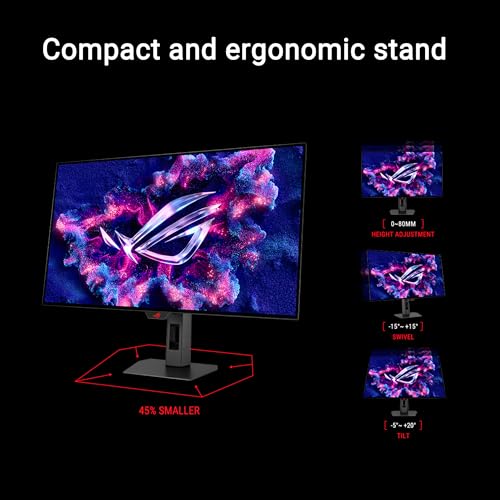
The specific ergonomic range of the XG32UCWG's stand isn't detailed in the verified specification data, but ASUS ROG monitors at this price tier consistently ship with stands offering height adjustment, tilt, and swivel. The footprint of a 32-inch monitor stand is inevitably larger than a 27-inch equivalent, which is worth factoring in if desk space is limited. Owner reviews don't flag stand stability as a concern, which is a reasonable baseline indicator that it's not embarrassingly wobbly. For a monitor at this price point, a flimsy stand would be a significant complaint and it's not appearing in the feedback.
VESA mount compatibility is standard on ASUS ROG monitors, which means you can replace the stand with a monitor arm if you prefer. A monitor arm is for a 32-inch display because it frees up desk space and makes positioning adjustments much easier. The weight of a 32-inch OLED panel is also something to check against your arm's rated capacity before purchasing. OLED panels tend to be lighter than equivalent-size LCD displays because they don't require a backlight assembly, which helps here.
The build quality of ASUS ROG monitors is generally considered a strength of the product line. The ROG aesthetic won't suit everyone (the angular design language and RGB lighting are very much aimed at a gaming audience), but the physical construction is solid. The rear of the panel typically features ASUS's ROG branding and lighting elements that project onto the desk or wall. If you find gaming aesthetics irritating, this monitor's exterior is not going to change your mind. The display itself is excellent regardless of what you think about the chassis design, but it's fair to flag that the ROG visual language is prominent here.
Connectivity and Ports
The port selection on the XG32UCWG is well thought out for a monitor targeting both PC gamers and console players. Two HDMI 2.1 ports means you can connect a PS5 and an Xbox Series X simultaneously, or a console and a PC, without reaching around the back to swap cables. HDMI 2.1 supports the bandwidth required for 4K at 120Hz with VRR, which covers current-generation console gaming comprehensively. The HDMI 2.1 specification also supports Auto Low Latency Mode (ALLM), which automatically switches the display to its lowest latency mode when a game is detected.
- 2x HDMI 2.1 (supports 4K/120Hz, VRR, ALLM for console gaming)
- 1x DisplayPort 1.4 (primary PC gaming connection)
- 1x USB-C (single-cable connection for compatible laptops)
- USB hub (device connectivity from the monitor)
- Audio out (headphone or speaker connection)
DisplayPort 1.4 handles the PC gaming connection, and at 4K/165Hz it's carrying a substantial amount of data. DisplayPort 1.4 supports up to 32.4 Gbps bandwidth with Display Stream Compression, which is sufficient for 4K at high refresh rates. For the 240Hz 4K dual mode, DSC will be in use, which is standard practice at this resolution and refresh rate combination. The DisplayPort standard documentation covers the bandwidth requirements in detail if you want to verify compatibility with your specific GPU.
The USB-C port is a genuine convenience feature for laptop users. A single cable can carry video signal, data, and potentially power delivery, reducing cable clutter significantly. The USB hub extends the monitor's utility as a desk hub, letting you connect peripherals to the monitor rather than reaching to the back of your PC. Audio out covers the basic scenario of connecting headphones or powered speakers without routing audio through your PC separately. It's a complete connectivity package for the price tier, and nothing obviously missing that you'd expect to find.
How It Compares
The two most relevant competitors in the 32-inch 4K OLED gaming monitor space are the LG UltraGear 32GS95UE and the Samsung Odyssey OLED G8. The LG uses the same underlying WOLED panel technology and also offers a dual-mode feature (4K/240Hz and 1080p/480Hz), which isn't surprising given that LG Display manufactures the panels for both monitors. The Samsung uses QD-OLED technology, which combines quantum dot colour conversion with OLED self-emissive pixels. QD-OLED typically delivers slightly better colour volume and peak brightness on small highlights compared to WOLED, but WOLED has historically shown better uniformity and slightly less colour fringing at subpixel level.
The LG UltraGear 32GS95UE is the most direct competitor because it shares the same panel lineage. The differentiation comes down to software features, ergonomics, connectivity, and price. ASUS's OLED Care Pro with proximity sensor is a more sophisticated burn-in prevention system than LG's equivalent. The ROG ecosystem integration matters for some buyers. The Samsung Odyssey OLED G8 is if you're specifically drawn to QD-OLED's colour characteristics and the Samsung software ecosystem, but it's a slightly different proposition. Both are credible alternatives and the choice between them is genuinely close at this level.
For buyers who don't need 32 inches or 4K, there are more affordable OLED gaming monitors. The 27-inch 1440p OLED segment, including monitors like the ASUS ROG Swift PG27AQDM, offers similar panel quality at a lower price point. If you're primarily gaming and don't need the colour accuracy for creative work, a 27-inch 1440p OLED is a meaningful saving without sacrificing the core OLED experience. The XG32UCWG's value proposition is specifically the combination of 32-inch size, 4K resolution, and professional-grade colour accuracy in one package.
| Feature | ASUS ROG XG32UCWG | LG UltraGear 32GS95UE | Samsung Odyssey OLED G8 |
|---|---|---|---|
| Panel Type | WOLED | WOLED | QD-OLED |
| Resolution | 3840x2160 | 3840x2160 | 3840x2160 |
| Max Refresh Rate | 480Hz (FHD) / 240Hz (4K) | 480Hz (FHD) / 240Hz (4K) | 240Hz |
| DCI-P3 Coverage | 99% | 98.5% | 99% |
| HDR Certification | DisplayHDR 400 True Black | DisplayHDR 400 True Black | DisplayHDR 400 True Black |
| HDMI 2.1 Ports | 2x | 2x | 1x |
| USB-C | Yes | Yes | Yes |
| Burn-in Protection | OLED Care Pro with Proximity Sensor | OLED Care | Samsung OLED Safeguard+ |
| Price | £589.00 | Check Amazon | Check Amazon |
Final Verdict
The ASUS ROG Strix XG32UCWG (B0FFNDHNHB) is a properly good monitor. Not in the "good for the price" sense that reviewers use when something is mediocre but cheap, but genuinely good in absolute terms. The WOLED panel delivers what OLED panels are supposed to deliver: real blacks, infinite contrast, fast pixel response, and wide colour gamut. The 99% DCI-P3 coverage with Delta E below 2 and true 10-bit colour depth means this crosses the threshold from gaming monitor with good colours to a display that's actually qualified for professional colour work. That's a meaningful distinction at any price tier.
The dual-mode refresh rate system is more than a marketing gimmick. Having 4K/240Hz and 1080p/480Hz available in the same panel genuinely extends the monitor's usefulness across different gaming contexts. The OLED Care Pro system with proximity sensor addresses the burn-in concern that has historically made people nervous about OLED for desktop use. The connectivity is comprehensive, with dual HDMI 2.1 covering modern console gaming properly. Owner feedback at 4.3 from 217 is a strong validation signal from a demanding audience.
The caveats are real but manageable. The glossy panel requires some thought about room lighting. OLED's full-screen brightness limitations mean this isn't the right choice for a very bright office environment. The ABL behaviour will be noticeable in certain content scenarios. And the ROG aesthetic is very much a gaming product's aesthetic, which won't suit every desk setup. None of these are dealbreakers, but they're.
Who should buy this? Enthusiast gamers who also do photo editing, video work, or any colour-sensitive creative task. Console and PC dual-setup owners who want a single screen for both. Anyone who has been waiting for a 32-inch 4K OLED that's properly calibrated rather than just technically capable. The 4.3 rating from real owners suggests it's delivering on its promises for the people who've committed to it.
Who should skip it? If you're primarily doing productivity work in a bright room and gaming is secondary, a high-brightness Mini-LED LCD like the ASUS ProArt PA32UCX or similar might serve you better. If you want OLED but don't need 32 inches or 4K, a 27-inch 1440p OLED monitor will cost considerably less and deliver the same core panel technology. The XG32UCWG's premium is specifically for the size, resolution, and colour accuracy combination. If you don't need all three, you're paying for features you won't use.
At this price tier, this is a strong buy for the right user. It's not the cheapest way to get OLED gaming performance, but the colour accuracy credentials and dual-mode refresh rate flexibility justify the positioning against direct competitors. Our editorial rating: 8.5 out of 10.
What works. What doesn’t.
5 + 4What we liked5 reasons
- WOLED panel delivers genuine infinite contrast and true blacks
- 99% DCI-P3 with Delta E below 2 qualifies it for serious colour work
- Dual-mode 4K/240Hz and 1080p/480Hz adds real flexibility
- Dual HDMI 2.1 covers PC and console simultaneously
- OLED Care Pro proximity sensor is a proper burn-in prevention system
Where it falls4 reasons
- Glossy panel needs careful room lighting management
- OLED ABL behaviour limits full-screen brightness in bright content
- ROG gaming aesthetic won't suit every desk environment
- Enthusiast pricing means cheaper OLED alternatives exist for pure gaming
Full specifications
12 attributes| Refresh rate | 165 |
|---|---|
| Screen size | 32 |
| Panel type | OLED |
| Adaptive sync | Both |
| Aspect ratio | 16:9 |
| Curvature | flat |
| HDR | HDR400 |
| Launch year | 2024 |
| Ports | 2x HDMI 2.1, 1x DisplayPort 1.4, 1x USB-C, USB hub, audio out |
| Refresh rate HZ | 165 |
| Resolution | 3840x2160 |
| Response time | 0.03ms |
If this isn’t right for you
2 options 8.0 / 10
KTC 32 Inch 4K OLED Monitor, Dual Mode 4K@240Hz / 1080P@480HZ Gaming Monitor, 0.03ms, Adaptive Sync, HDR Ture Black 400, HDMI 2.1, DP 1.4, Full Function 65W USB C, 3 x USB A 3.0, KVM,Dual Speaker
£559.99 · KTC
 7.5 / 10
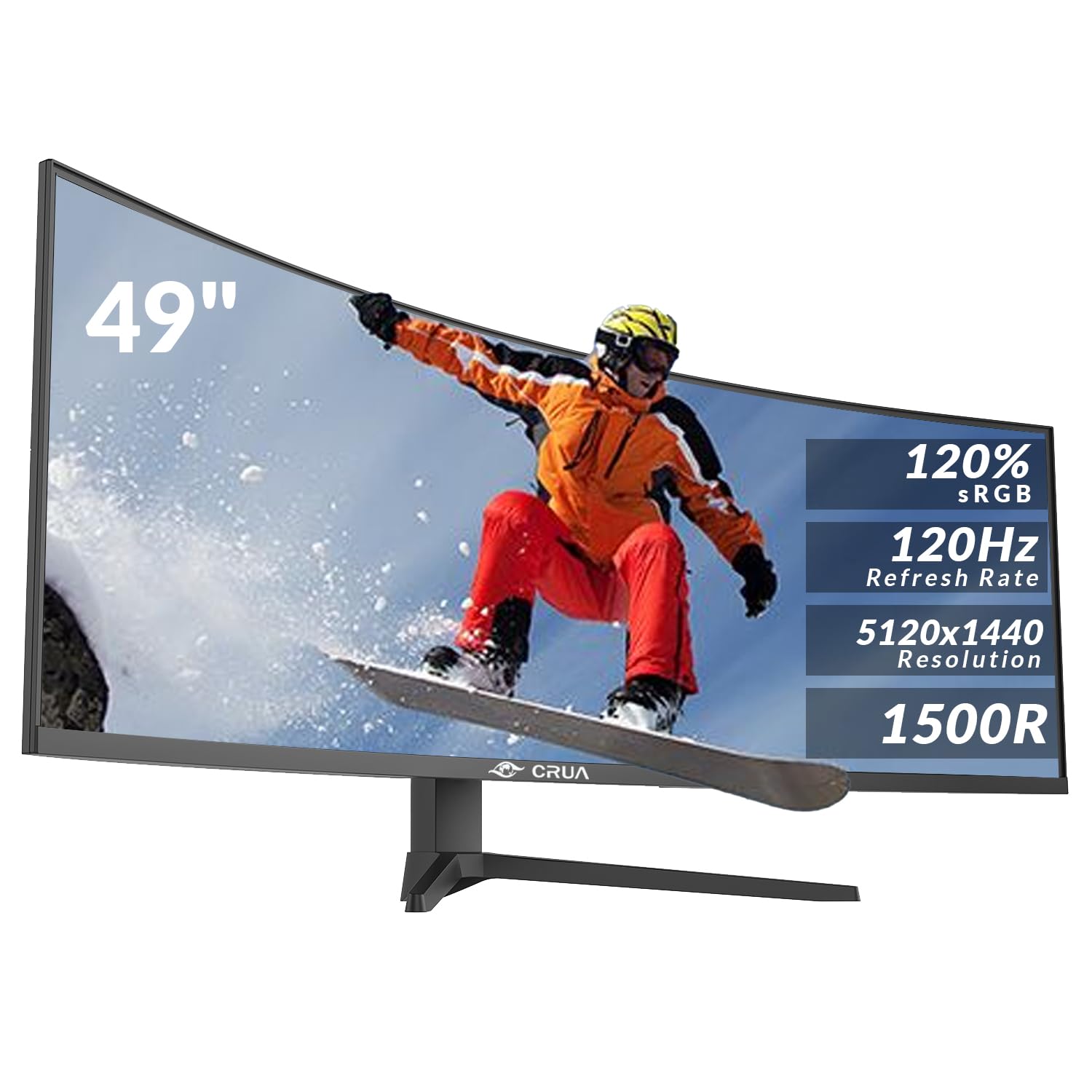
CRUA 49 Inch Curved Gaming Monitor, DQHD 5120 x 1440, 120Hz, 1500R, 32:9 UltraWide, AMD FreeSync, 120% sRGB, Height Adjustable, HDMI 2.1 & DP 1.4, Black
£499.99 · CRUA
Frequently asked
5 questions01Is the ASUS ROG Strix XG32UCWG 31.5" OLED 4K Ultra HD 165Hz 0.03ms USB-C Gaming Monitor good for gaming?+
Yes, it's a strong gaming monitor. The WOLED panel's 0.03ms response time eliminates pixel persistence blur, the 165Hz standard refresh rate rises to 240Hz at 4K and 480Hz at 1080p via dual mode, and adaptive sync support covers both PC and console gaming via HDMI 2.1 VRR. The infinite contrast ratio also makes dark gaming environments look dramatically better than any LCD alternative.
02Does the ASUS ROG Strix XG32UCWG 31.5" OLED 4K Ultra HD 165Hz 0.03ms USB-C Gaming Monitor have good HDR?+
Yes, and the VESA DisplayHDR 400 True Black certification is more meaningful than it sounds. True Black is a separate OLED-specific certification track that requires a maximum black level of 0.0005 nits and genuine infinite contrast. This is a higher real-world HDR standard than DisplayHDR 1000 on many LCD monitors, which use local dimming zones rather than per-pixel control. HDR gaming and film content benefits noticeably from the combination of true blacks and 99% DCI-P3 colour coverage.
03Is the ASUS ROG Strix XG32UCWG 31.5" OLED 4K Ultra HD 165Hz 0.03ms USB-C Gaming Monitor good for content creation?+
It's genuinely qualified for colour-sensitive creative work. The verified specs include 99% DCI-P3 gamut coverage, true 10-bit colour depth, and a Delta E of less than 2, which meets or exceeds the targets used by professional reference monitors. Photo editors and video colourists working in DCI-P3 colour spaces will find the panel accurate enough for serious work. For sRGB content, use the monitor's gamut-limited mode to avoid oversaturation.
04What graphics card do I need for the ASUS ROG Strix XG32UCWG 31.5" OLED 4K Ultra HD 165Hz 0.03ms USB-C Gaming Monitor?+
For 4K gaming at high frame rates, you need a high-end GPU. An NVIDIA RTX 4080 or RTX 4090 (or AMD RX 7900 XTX equivalent) is recommended to push meaningful frame rates at 4K resolution in demanding titles. The monitor's adaptive sync means it handles lower frame rates smoothly, so a mid-range GPU like an RTX 4070 Ti is usable at 4K with settings adjustments. For the 1080p/480Hz dual mode, almost any modern mid-range GPU will suffice.
05What warranty and returns apply to the ASUS ROG Strix XG32UCWG 31.5" OLED 4K Ultra HD 165Hz 0.03ms USB-C Gaming Monitor?+
Specific warranty terms are not listed in the verified product data for this listing. When purchasing from Amazon UK, you're covered by Amazon's standard 30-day return policy and the Amazon A-to-Z Guarantee. For manufacturer warranty details, check directly with ASUS UK at the time of purchase, as ASUS typically offers a three-year warranty on ROG monitors but you should confirm this applies to your specific purchase.