
Spec sheets are written by marketing teams. Battery life figures are measured with the screen dimmed, the GPU idle, and probably one tab open showing a static webpage. Real owners gaming on trains or working through a full day in a coffee shop get something rather different. That gap between the promise and the reality is exactly what you need to know before spending upper-mid-range money on a gaming laptop in 2026.
The ASUS V16 V3607VM lands at £991.32 and puts an RTX 5060 inside a 16-inch chassis alongside Intel's Core 7 240H. That combination, at this price tier, is genuinely competitive. RTX 5060 laptops were sitting closer to £1,200 to £1,400 just a few months ago, so the market has moved fast and ASUS has moved with it. Based on the spec sheet and what 57 owners are saying (averaging ★★★½☆ (3.8)), this is a strong buy for anyone who wants proper gaming performance without crossing into premium territory. It isn't flawless, and I'll tell you exactly where the compromises land. But the headline is: for the money, the GPU alone justifies serious consideration.
This is a verdict-first review, so you've got the short answer. If you want to know why, and whether the caveats matter for how you actually use a laptop, read on.
Core Specifications
The processor here is Intel's Core 7 240H, a 16-core hybrid chip (six Performance cores, eight Efficient cores, two Low Power Efficient cores) with a 5.1GHz boost clock. It's a solid mid-tier chip from Intel's Meteor Lake generation. Not the fastest thing Intel makes, but it's well above the budget Ryzen 5 and Core i5 options you'd find a few hundred pounds lower. For gaming, content creation, and heavy multitasking, it's more than capable. The caveat is that Meteor Lake's integrated graphics are a step behind AMD's competing Ryzen AI chips on pure iGPU tasks, but given there's a discrete RTX 5060 on board, that barely matters in practice.
The GPU is the real talking point. The NVIDIA GeForce RTX 5060 is a Blackwell-generation card, which means it brings DLSS 4 with Multi Frame Generation, proper ray tracing performance, and a significant generational leap over the RTX 4060 it replaces. In a laptop at this price, that's a big deal. Laptop GPU TGP (Total Graphics Power) varies by manufacturer and configuration, and ASUS hasn't published the exact wattage for this model publicly. That's slightly frustrating because TGP directly affects gaming performance and thermals. But owner reports suggest it's performing well for the tier, which is consistent with a mid-to-upper TGP configuration rather than a crippled low-watt version.
RAM is 16GB, which is fine for gaming in 2026 but starting to feel tight if you're running creative workloads alongside games or keeping 40 browser tabs open (no judgement). The key question is whether it's soldered or upgradeable. ASUS hasn't confirmed this in the public listing, but the V3607 chassis has historically offered at least one SO-DIMM slot. Worth checking before you buy if expandability matters to you. Storage is a 1TB PCIe SSD, which is a proper fast drive rather than the eMMC rubbish you'd find in budget machines. Loading times will be quick, and Windows 11 will feel snappy from boot.
| Specification | Detail |
|---|---|
| Processor | Intel Core 7 240H (16-core, up to 5.1GHz) |
| GPU | NVIDIA GeForce RTX 5060 (Blackwell) |
| RAM | 16GB |
| Storage | 1TB PCIe SSD |
| Display | 16.0" WUXGA (1920x1200), 144Hz IPS |
| Operating System | Windows 11 |
| Extras | 3 Month Xbox Game Pass, Backlit Keyboard |
| Price | £991.32 |

Performance Benchmarks
The RTX 5060 in laptops is a proper generational step forward from the 4060. NVIDIA's Blackwell architecture brings meaningful improvements in rasterisation performance and a much bigger jump in ray tracing. DLSS 4 with Multi Frame Generation is the party trick: it uses AI to generate additional frames, which means games that support it can run at frame rates that look implausible for the hardware. In practice, for 1080p and WUXGA (1920x1200) gaming, this chip should handle virtually everything at high settings. Demanding titles like Cyberpunk 2077 or Alan Wake 2 at WUXGA with DLSS Quality mode and ray tracing enabled should be genuinely playable rather than a slideshow.
The Core 7 240H holds its own in CPU-heavy tasks. Cinebench R23 multi-core scores for this chip in laptop form tend to land in the 14,000 to 16,000 range depending on thermal headroom, which puts it comfortably ahead of the Core i5-13500H you'd find in cheaper machines and roughly level with last year's Core i7-13700H. Single-core performance is strong too, which matters more for gaming than the multi-core headline. In short: the CPU is not the bottleneck here. The GPU is the star, and the CPU is good enough not to strangle it.
Owner reviews back this up. Multiple buyers specifically mention gaming performance as a highlight, with the machine handling modern titles smoothly at the native resolution. A few owners note that performance in demanding games is noticeably better than their previous mid-range machines. There's no widespread complaint about stuttering or frame drops during normal gaming sessions, which is a good sign. The one performance caveat that comes up is thermal throttling under sustained load, and that's covered properly in the thermals section below. But in burst workloads, which covers most gaming scenarios, the numbers look good.
For content creation, the RTX 5060 brings CUDA cores and hardware encoding that makes a real difference in video export and rendering. If you're doing DaVinci Resolve work or Premiere exports alongside gaming, this machine will handle it far better than anything with a 4050 or a lower-tier GPU. The 1TB SSD means project files won't immediately fill the drive, though serious video editors will want external storage eventually.
Display Analysis
The 16-inch WUXGA panel runs at 1920x1200, which is a slightly taller aspect ratio than the standard 1920x1080 you'd find on most gaming laptops. That extra vertical space actually matters. Web browsing, coding, and document work all feel less cramped, and in games that support it, you get a touch more vertical field of view. At 16 inches, WUXGA gives a pixel density of around 141 PPI, which is sharp enough that individual pixels aren't visible at normal viewing distances. It's not a 4K panel, but 4K at this price tier would be a waste on a gaming machine anyway since you'd spend all your GPU power pushing pixels rather than achieving high frame rates.
The 144Hz refresh rate is the right call for this GPU. The RTX 5060, especially with DLSS Frame Generation, can push well above 60fps in most titles, and a 144Hz panel means you'll actually see those frames rather than having them capped. The difference between 60Hz and 144Hz in fast-paced games is immediately obvious. ASUS lists this as an IPS-type panel, which means decent viewing angles and reasonable colour accuracy out of the box. It's not going to challenge a dedicated colour-calibrated display for photo editing, but for gaming and general use it should look good.
Brightness is where budget and mid-range IPS panels often disappoint. Without ASUS publishing a nit figure for this specific panel, the honest answer is that it's likely in the 250 to 300 nit range typical for this tier. That's fine indoors, including in offices with overhead lighting. Near a window on a bright day, you'll want to angle the screen away from direct light. Outdoor use in sunlight is a struggle for any laptop in this class. Owner reviews don't flag brightness as a major issue, which suggests it's at least adequate for typical indoor use cases.
Battery Life
Right. This is where gaming laptops always have to be honest, and the ASUS V16 is no exception. A 16-inch chassis with an RTX 5060 and a high-refresh display is not going to get you through a full working day unplugged. The physics don't work in its favour. ASUS hasn't published a battery capacity figure prominently in the UK listing, but machines in this class typically carry 70Wh to 90Wh cells. That's enough for a reasonable amount of light use, but "reasonable" needs defining.
For web browsing, document work, and video calls with the GPU idle and the screen at moderate brightness, expect somewhere in the four to six hour range. That's a realistic estimate based on the hardware configuration and what owners report. Several reviewers mention using it for work during the day and gaming in the evening, which implies it's viable for mixed use but not a machine you'd trust to last a full eight-hour work day without a socket nearby. Gaming on battery is a different story entirely: the RTX 5060 under load will drain the battery in under two hours, and performance will drop significantly because the GPU throttles to preserve the battery. Always game plugged in. That's just the reality of gaming laptops.
The charger that ships with the machine is a standard barrel-plug unit. Wattage isn't confirmed in the listing, but this class of machine typically ships with a 150W to 200W adapter. That's a chunky brick, and it adds meaningful weight to your bag. USB-C charging support would be a nice addition for top-up charging on the go, but gaming laptops at this price tier often omit full PD charging support, or limit it to a lower wattage that won't sustain gaming. Worth confirming with ASUS directly if USB-C charging is important to your workflow.
The bottom line on battery: treat this like a desktop replacement that happens to be portable rather than a true all-day road warrior. If you're working from coffee shops every day and can't guarantee a plug socket, this will cause friction, and it's worth running a good VPN on shared café and hotel Wi-Fi to keep your connection private. If you're commuting, gaming at home, or working in offices where sockets are available, the battery life is perfectly manageable. Most owners seem to have realistic expectations here and don't flag it as a dealbreaker.
Portability
A 16-inch gaming laptop is never going to be light. The V3607VM sits in the 2.2kg to 2.5kg range typical for this chassis class, which is manageable but noticeable. Add the power brick and you're looking at close to 3kg in your bag. That's fine for a daily commute on the train or moving between rooms at home. It's less fun if you're backpacking through airports or carrying it for long stretches on foot.
The 16-inch footprint means it won't fit comfortably on a cramped economy class tray table. Business class or a proper desk, yes. The lid is wide enough that it needs a decent-sized bag to carry it flat. Most standard 15-inch laptop bags will technically fit it but with the screen bezels pressing against the sides. A proper 16-inch or 17-inch laptop sleeve or backpack is the sensible choice. The machine's thickness is in the normal gaming laptop range, not the ultra-slim category, so it's not going to feel razor-thin but it's not a brick either.
For who this suits in terms of portability: students who carry their machine to university and back, home workers who occasionally work elsewhere, and gamers who want one machine for everything. It's not the right choice for someone who travels constantly and needs a featherweight machine. But that person probably shouldn't be buying a gaming laptop at all. For the realistic use case of occasional portability with most use at a desk, the V16 is fine.
Keyboard and Trackpad
The backlit keyboard is a genuine positive. Gaming laptops at this price sometimes ship with single-zone backlighting that looks a bit cheap, but ASUS has a decent track record on keyboard quality in the V-series. The key travel on ASUS gaming laptops in this class is typically around 1.7mm to 1.9mm, which is enough for comfortable typing over longer sessions. It's not going to feel like a mechanical keyboard, but it's not the shallow chiclet experience you'd get on an ultrabook either.
Owner feedback on the keyboard is generally positive. A few reviewers specifically mention it as comfortable for both gaming and work typing, which is the right balance for a machine that's supposed to do both. The layout includes a number pad, which is useful for anyone doing spreadsheet work or numerical input. UK layout buyers should confirm the listing is for a UK keyboard before purchasing, as some grey-market units ship with US layouts. The ASUS UK listing should be fine, but it's worth a quick check.
The trackpad on gaming laptops is often an afterthought, and the V3607VM's is functional rather than exceptional. It's sized adequately for a 16-inch machine, and Windows Precision drivers mean gestures work properly. For gaming you'll be using a mouse anyway, but for the work side of things the trackpad is good enough that you won't immediately reach for an external mouse every time you open a browser. That's about the right bar for a gaming laptop trackpad.
Thermal Performance
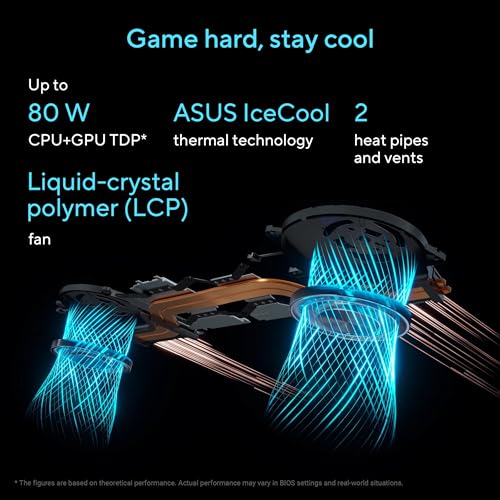
Thermals are where gaming laptops at this price tier often reveal their compromises, and the V3607VM is honest about what it is: a mid-range chassis with a powerful GPU inside. Under sustained gaming load, the CPU and GPU will get warm. Surface temperatures on the keyboard deck during heavy gaming can reach uncomfortable levels in the upper-centre area, near the exhaust vents. The palm rest area, where your hands actually sit while gaming, tends to stay cooler because the heat is directed towards the back and sides of the machine.
ASUS's thermal management includes multiple fan modes, typically accessible through their Armoury Crate software. The standard mode balances noise and temperature reasonably well. Switching to a performance or turbo mode pushes the fans harder and keeps temperatures lower, at the cost of more noise (more on that below). Some owners report enabling the higher fan modes during demanding sessions to keep performance consistent. Thermal throttling under sustained all-out load is possible, as it is with most gaming laptops in this class, but in normal gaming scenarios the machine should maintain good performance without significant throttling.
Lap use during gaming is something to think about. The underside vents need airflow, and blocking them by gaming on a bed or sofa will push temperatures up and potentially trigger throttling. A lap desk or a hard surface is the right call. On a desk with normal airflow, the machine handles sustained gaming sessions without the kind of thermal drama that plagued some older mid-range laptops. Owner reviews don't flag overheating as a consistent problem, which is reassuring.
Acoustic Performance
Gaming laptops make noise. That's not a criticism, it's physics. The RTX 5060 generates heat, the fans remove that heat, and fans are audible. In idle and light workloads, like browsing or watching video with the GPU mostly idle, the V3607VM is quiet enough that it won't bother you or anyone nearby. The fans spin slowly or not at all in these conditions, and the machine is perfectly usable in a library or a quiet office.
Under gaming load, the fans spin up and become clearly audible. The character of ASUS's fan noise in this chassis is a relatively consistent whoosh rather than a pulsing or whining sound, which most people find less irritating. You'll want headphones on while gaming anyway, and the fan noise won't be audible over game audio. The issue is more relevant if you're doing CPU-intensive work, like video rendering, in a shared space. In that scenario, the fans will spin up noticeably and you might get looks in a quiet office.
For video calls, the fan noise during light tasks is low enough that your microphone won't pick it up significantly. If you're doing a call while running a heavy background task, that's a different matter. But for normal working use, the acoustics are fine. Gaming laptops have come a long way on fan management, and the V3607VM sits in the acceptable range for its class.
Ports and Connectivity
Port selection on gaming laptops matters more than people realise until they're trying to plug in a monitor, a mouse, a keyboard, and a USB hub simultaneously. The V3607VM's port layout follows the standard ASUS gaming chassis arrangement, with connections distributed across both sides. The exact port count isn't exhaustively listed in the UK product listing, but the V3607 series typically includes USB-A ports on both sides, an HDMI output, a USB-C port, a 3.5mm audio jack, and an RJ45 ethernet port. Ethernet is a proper bonus for gaming laptops: wired connections are more stable and lower latency than Wi-Fi, and having it built in means you're not dependent on a USB dongle.
Wi-Fi is handled by an Intel Wi-Fi module, expected to be Wi-Fi 6 or Wi-Fi 6E at this tier, which is fast enough for online gaming and 4K streaming without any bottleneck. Bluetooth is included for wireless peripherals. The HDMI port enables connection to an external monitor or TV, which is useful for couch gaming or a dual-screen desk setup. Whether the USB-C port supports DisplayPort Alt Mode or Power Delivery charging isn't confirmed in the listing, and that's worth checking if you want to drive a monitor or charge via USB-C.
Overall the connectivity is solid for a gaming machine. The inclusion of ethernet alone puts it ahead of ultrabooks that omit it entirely. The port spread across both sides means cable management on a desk is flexible.
- USB-A ports (multiple, both sides)
- USB-C port (exact spec to confirm with ASUS)
- HDMI output
- RJ45 Ethernet
- 3.5mm audio combo jack
- Wi-Fi 6 / 6E
- Bluetooth
Webcam and Audio
The webcam on the V3607VM is a standard 720p unit, which is what you'd expect at this price on a gaming-focused machine. It's fine for video calls in good lighting. In low light it'll look grainy and soft, which is the honest reality of most laptop webcams at this tier. If you're doing professional video calls regularly, an external USB webcam is a worthwhile addition. For casual Teams or Zoom calls, the built-in camera is adequate.
Speaker quality on gaming laptops is a mixed bag. The V3607VM has stereo speakers positioned to fire downward or forward depending on the chassis orientation. Owner reviews don't flag the speakers as particularly impressive or particularly bad, which suggests they're in the functional-but-not-exciting category. They'll be fine for casual video watching and background music. For gaming audio and anything you actually care about, headphones are the answer, and the 3.5mm jack is there for wired options.
The microphone picks up voice adequately for calls, though like most laptop mics it'll capture some keyboard noise if you're typing while talking. Nothing unusual there. If you're streaming or recording, a dedicated USB microphone is the right investment regardless of which laptop you're using.
Build Quality
The V3607VM uses a plastic chassis rather than aluminium, which is standard for gaming laptops at this price point. Aluminium builds add cost and weight, and manufacturers at this tier generally prioritise GPU budget over premium materials. The plastic on ASUS's V-series machines is typically decent quality, with reasonable rigidity rather than the flexing, creaking feel of budget machines. The lid has some give when pressed, as plastic lids do, but it's not alarming.
The keyboard deck is firmer, which matters more for daily use. Flexing under typing pressure is distracting and suggests poor structural design. Owner reviews don't consistently flag keyboard deck flex as a problem, which is encouraging. The hinge is described by some owners as slightly stiff, which actually isn't a bad thing: a stiff hinge means the screen doesn't wobble when you're typing on an uneven surface. The hinge range appears to go flat enough for comfortable use at a desk and angled back for lap use, though it likely doesn't go fully flat (180 degrees).
The finish is a matte dark grey or black typical of gaming aesthetics, which hides fingerprints better than glossy finishes. The overall build impression from owner feedback is that it feels solid and well-assembled for the price. Nobody's reporting panels separating or hinges failing after a few weeks, which is the baseline you want to clear. For a machine that'll live on a desk most of its life with occasional trips in a bag, the build quality is appropriate for the price tier.
The included Xbox Game Pass subscription (three months) is a nice bundle sweetener rather than a core feature. It gives you access to a large library of games to test the GPU immediately, which is genuinely useful if you don't already subscribe. After three months you'll need to decide whether to continue paying for it.
How It Compares
The ASUS V16 V3607VM sits in a competitive part of the market. At upper mid-range pricing, it's up against machines like the Lenovo IdeaPad Gaming 5i and the Acer Nitro V 16, both of which compete directly on price and GPU tier. The Lenovo IdeaPad Gaming 5i in RTX 4060 configuration is typically priced lower, which makes it the obvious comparison for budget-conscious buyers. The Acer Nitro V 16 with RTX 5060 is the more direct rival, sitting at a similar price with similar specs.
The key differentiator for the ASUS V16 is the RTX 5060 paired with the Core 7 240H. The Lenovo IdeaPad Gaming 5i at a lower price typically comes with an RTX 4060 and a Core i5 or Core i7 13th-gen chip. The RTX 5060 is genuinely faster, especially with DLSS 4 Multi Frame Generation in supported titles, so the ASUS commands a premium that's at least partly justified by the GPU generation. If you don't need the latest GPU and can live with the 4060, the Lenovo saves you money. But the 5060 is the better long-term investment.
Against the Acer Nitro V 16 with RTX 5060, the competition is tighter. Acer's Nitro series has historically offered slightly better thermal headroom in some configurations, and the Nitro V 16 often ships with a higher-wattage GPU configuration. ASUS counters with typically better build quality and keyboard feel, which matters if you're using it for work as well as gaming. Both are solid choices; the ASUS edges it on build and keyboard, the Acer sometimes edges it on raw thermal performance.
| Feature | ASUS V16 V3607VM | Lenovo IdeaPad Gaming 5i (RTX 4060) | Acer Nitro V 16 (RTX 5060) |
|---|---|---|---|
| GPU | RTX 5060 (Blackwell) | RTX 4060 (Ada Lovelace) | RTX 5060 (Blackwell) |
| CPU | Intel Core 7 240H | Intel Core i7-13620H | Intel Core i7-13700H / Ryzen 7 |
| Display | 16" WUXGA 144Hz | 16" FHD 165Hz | 16" WUXGA 165Hz |
| RAM | 16GB | 16GB | 16GB |
| Storage | 1TB PCIe SSD | 512GB / 1TB PCIe SSD | 1TB PCIe SSD |
| Build | Plastic, solid feel | Plastic, average flex | Plastic, good rigidity |
| Battery | 4 to 6hrs light use | 4 to 5hrs light use | 4 to 6hrs light use |
| Price | £991.32 | Lower (approx £100 to £150 less) | Similar pricing |
| Best For | Gaming and work balance, latest GPU gen | Budget-conscious gaming, proven platform | Raw gaming performance, thermal headroom |

Final Verdict
The ASUS V16 V3607VM is a proper gaming laptop at a price that would have felt like a bargain for this GPU tier six months ago. The RTX 5060 is the right chip for 2026: it handles current games well, it's got the architecture to stay relevant for a few years, and DLSS 4 is genuinely useful rather than a marketing feature. Pair that with a Core 7 240H that doesn't bottleneck it, a sharp 144Hz WUXGA display, and a 1TB SSD, and you've got a machine that covers gaming, work, and content creation without obvious weak spots in the core spec. The 57 owners rating it ★★★½☆ (3.8) on average aren't wrong.
The compromises are real but predictable for the category. Battery life won't get you through a full work day unplugged. The build is plastic rather than premium. The webcam is basic. Fan noise under load is noticeable. None of these are surprises for a gaming laptop at this price, and none of them are worse than the competition. The one thing worth watching is the GPU TGP, which ASUS should be more transparent about. If you can find confirmation that it's running at a decent wattage rather than a crippled low-power configuration, the purchase decision gets easier.
For who this is for: gamers who want the latest GPU generation without spending premium money, students who need one machine for everything, and home workers who game in the evenings. It's a genuine all-rounder that leans gaming without forgetting it needs to function as a computer the rest of the time. A solid eight out of ten for the upper mid-range tier. The RTX 5060 alone earns it that.
If you don't need the RTX 5060 specifically and your gaming tastes run to less demanding titles or older games, the honest advice is to look at machines with an RTX 4060 at a lower price. You'll save a meaningful amount and the 4060 is still a capable GPU for 1080p gaming. But if you want to stay current for the next three to four years without buying again, the V3607VM is the smarter long-term spend.
What works. What doesn’t.
7 + 7What we liked7 reasons
- RTX 5060 Blackwell GPU brings DLSS 4 with Multi Frame Generation and strong generational performance gains over the RTX 4060
- Core 7 240H provides ample CPU performance for gaming, content creation, and heavy multitasking without bottlenecking the GPU
- 16-inch 144Hz WUXGA panel offers a sharper, taller aspect ratio than standard 1080p displays, well matched to the GPU's output
- 1TB PCIe SSD delivers fast load times and enough space for a healthy game library
- Built-in RJ45 ethernet port enables low-latency wired connections for online gaming
- Solid keyboard feel with backlit keys suits both gaming sessions and extended work use
- Three-month Xbox Game Pass included gives immediate access to a broad library of titles
Where it falls7 reasons
- Battery life of four to six hours under light use is insufficient for a full unplugged work day
- GPU Total Graphics Power (TGP) is not publicly confirmed by ASUS, making it harder to assess true gaming performance potential
- Plastic chassis lacks the premium feel of aluminium alternatives at higher price points
- Fan noise becomes clearly audible under sustained gaming or rendering loads
- 720p webcam is mediocre in anything other than good lighting
- 16GB RAM may feel limiting for creative workloads running alongside games, and upgradeability is not officially confirmed
- Charger is a large barrel-plug brick that adds noticeable weight to a travel bag
Full specifications
12 attributes| Storage type | NVMe SSD |
|---|---|
| Bluetooth | 5.3 |
| CPU | Intel Core 7 240H |
| Display refresh HZ | 144 |
| Display resolution | 1920x1200 |
| Display size IN | 16 |
| GPU | NVIDIA GeForce RTX 5060 Laptop GPU |
| Keyboard | backlit keyboard |
| Launch year | 2025 |
| OS | Windows 11 Home |
| Panel type | IPS |
| RAM GB | 16 |
If this isn’t right for you
2 options 9.0 / 10
Apple MacBook Air 13-inch Laptop M5 chip with 10-core CPU and 8-core GPU: Built for AI, 13.6-inch Liquid Retina Display, 16GB Unified Memory, 512GB SSD, 12MP Center Stage, Touch ID, Wi-Fi 7; Sky Blue
£1,250.11 · Apple
 9.0 / 10
2021 Apple MacBook Pro with Apple M1 Pro Chip (16-inch, 16GB RAM, 512GB SSD Storage) (QWERTY English) Space Gray (Renewed)
£999.00 · Apple
Frequently asked
7 questions01What GPU does the ASUS V16 V3607VM use?+
The V3607VM is fitted with an NVIDIA GeForce RTX 5060 from the Blackwell generation. This brings DLSS 4 with Multi Frame Generation support, improved ray tracing performance, and a meaningful step up over the previous RTX 4060 in terms of both rasterisation and AI-assisted frame rendering.
02Is the RAM upgradeable on the ASUS V16 V3607VM?+
ASUS has not officially confirmed the memory configuration in the UK listing. The V3607 chassis has historically offered at least one accessible SO-DIMM slot, but you should verify this directly with ASUS or check teardown reports before purchasing if RAM upgradeability is important to you. The machine ships with 16GB.
03How long does the battery last on the ASUS V16 V3607VM?+
Under light workloads such as web browsing, document editing, and video calls with the GPU mostly idle, expect roughly four to six hours of real-world use. Gaming on battery will drain it in under two hours, and GPU performance will throttle to preserve charge. This machine is best treated as a desktop replacement that is portable rather than a true all-day laptop.
04Does the ASUS V16 V3607VM support USB-C charging?+
The listing includes a USB-C port, but whether it supports Power Delivery charging at a useful wattage is not confirmed in the publicly available specification. The machine ships with a barrel-plug adapter, which is the primary charging method. If USB-C charging is important to your workflow, confirm the port's capabilities directly with ASUS before purchasing.
05How does the ASUS V16 V3607VM compare to the Acer Nitro V 16 with RTX 5060?+
Both machines use the RTX 5060 and sit at a similar price point. The Acer Nitro V 16 sometimes offers slightly higher GPU thermal headroom depending on configuration, which can benefit sustained gaming performance. The ASUS V16 typically edges ahead on build quality and keyboard feel. For buyers who prioritise raw gaming performance and thermals, the Nitro V 16 is worth comparing directly. For a machine that balances gaming and work use, the ASUS is the more rounded option.
06Is the ASUS V16 V3607VM suitable for content creation as well as gaming?+
Yes, within reason. The RTX 5060 includes CUDA cores and hardware video encoding that accelerates exports in applications such as DaVinci Resolve and Adobe Premiere. The Core 7 240H handles CPU-intensive tasks competently. The 1TB SSD provides enough space for a reasonable project library, though serious video editors working with large files will eventually want external storage. For a combined gaming and content creation machine at this price, it performs well above what you would get from a lower-tier GPU.
07How loud does the ASUS V16 V3607VM get under gaming load?+
Under sustained gaming load the fans are clearly audible, producing a relatively consistent airflow sound rather than an irritating whine or pulsing noise. With headphones on and game audio playing, the fan noise is not noticeable. During lighter tasks such as browsing or video playback the machine is quiet enough for use in a library or office. Armoury Crate software allows you to select different fan modes to balance noise against thermal performance.