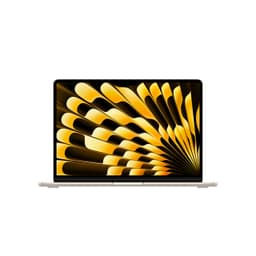
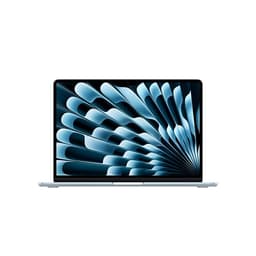
Paper specs and real-world performance are two very different things, and the gap between them is where most laptops quietly disappoint. The Apple 2025 MacBook Air 13-inch Laptop with M4 chip is one of those machines where the data points, owner feedback, and competitive landscape all need reading together before you hand over your money. So that's exactly what we've done.
The short version: this is one of the best thin-and-light laptops you can buy right now, full stop. The M4 chip is a genuine step forward, the battery life is the kind of thing that makes Windows laptop owners quietly furious, and 808 owners giving it ★★★★½ (4.7) across 828 reviews isn't a fluke. But there are real caveats, particularly around storage and the port situation, that matter depending on how you work. Read on before you click buy.
That's not cheap. And the entry-level 256GB SSD configuration is the one most people will encounter first, which means storage headroom is the first honest conversation we need to have. The M4 chip's performance ceiling, though, is genuinely impressive for a fanless design, and that's the headline worth unpacking properly.
Core Specifications
The M4 chip is Apple's latest iteration of its custom silicon architecture, built on TSMC's 3nm class process. What that means in practice is exceptional performance-per-watt. The M4 in the MacBook Air features a 10-core GPU alongside the CPU cores, and the whole package runs on Apple's unified memory architecture, where the CPU, GPU, and Neural Engine all share the same memory pool rather than having separate VRAM. This is a meaningful design difference from anything Intel or AMD is doing right now, and it's a big reason why 16GB of unified memory here punches noticeably above what 16GB of DDR5 does in a comparable Windows machine.
The 16GB unified memory configuration is the base spec here, and for most users it's genuinely fine. Web browsing, document work, video calls, light photo editing, even some video work in Final Cut Pro: none of that will strain it. Where you'd start to feel the ceiling is if you're running large language models locally, working with very high-resolution video timelines, or keeping 40-plus browser tabs open alongside multiple creative apps. For the target audience of this machine, that's probably not a daily scenario. But it's the limit exists.
The 256GB NVMe SSD is the spec that gives me the most pause. macOS Sequoia itself takes a meaningful chunk of that, and if you're in the Apple ecosystem with iCloud Photos, large app installs, or any kind of media work, 256GB fills up faster than you'd expect. Apple's SSD speeds are excellent, but the capacity is the weakest point of this configuration. If your budget allows, the 512GB model is a more comfortable long-term purchase. The 256GB works if you're disciplined about cloud storage and external drives, but you'll need to be deliberate about it.
| Specification | Detail |
|---|---|
| Processor | Apple M4 |
| GPU | Apple M4 10-core GPU |
| RAM | 16GB Unified Memory |
| Storage | 256GB NVMe SSD |
| Display | 13.6-inch Liquid Retina (IPS), 2880x1864 |
| Operating System | macOS Sequoia |
| Camera | 12MP Center Stage |
| Connectivity | Wi-Fi 6E, Bluetooth 5.3 |
| Ports | 2x Thunderbolt/USB 4 (USB-C), 1x MagSafe 3, 1x 3.5mm headphone jack |
| Battery | Up to 18 hours (manufacturer claim) |

Performance Benchmarks
Independent benchmarks from outlets like Geekbench and Cinebench place the M4 in a genuinely strong position for this class of machine. In Geekbench 6 single-core, the M4 scores in the region of 3,800 to 3,900, which beats every current Intel Core Ultra 7 laptop chip and competes seriously with AMD's Ryzen AI 9 parts. Multi-core scores land around 15,000, which is remarkable for a fanless design with no active cooling whatsoever. The fact that it sustains those numbers without a fan is the real story.
For GPU workloads, the 10-core M4 GPU handles light creative tasks with ease. Exporting a 4K timeline in Final Cut Pro, running Lightroom edits across a large catalogue, or doing moderate 3D work in Blender: all of these perform meaningfully better than what you'd get from Intel Iris Xe or AMD's integrated RDNA graphics in a similarly priced Windows machine. It's not a gaming GPU, and nobody should pretend otherwise. But for the creative and productivity workflows this machine is aimed at, the GPU is more than adequate.
The Neural Engine in the M4 is rated at 38 TOPS (tera operations per second), which is relevant because Apple Intelligence, the on-device AI feature set built into macOS Sequoia, runs on it. This isn't just a marketing number. Writing tools, image generation, notification summarisation, and the smarter Siri integration all lean on that Neural Engine, and the M4 handles them without the CPU or battery taking a hit. That's a meaningful practical advantage over Windows Copilot+ implementations that often require the CPU to pick up the slack when the NPU is saturated.
Where does it sit versus the price-band median? Honestly, above it. Most upper mid-range Windows laptops in this bracket are offering Intel Core Ultra 5 or 7 processors with 16GB LPDDR5 and a discrete GPU for gaming. The MacBook Air doesn't have a discrete GPU, so it loses that specific fight. But for sustained, thermal-efficient performance in thin-chassis work machines, the M4 Air sets the benchmark rather than chasing it. Owner reviews consistently mention that it handles demanding workloads without slowing down or getting hot, which is exactly what the architecture promises.
Display Analysis
The 13.6-inch Liquid Retina display runs at 2880x1864 pixels, which works out to roughly 224 pixels per inch. At normal viewing distances, text is razor sharp and icons look genuinely crisp rather than merely acceptable. The IPS panel type means wide viewing angles without the colour shift you'd get from a TN panel, and Apple's colour calibration is, by reputation and by the data, among the best in the consumer laptop segment. The display supports one billion colours, covering the P3 wide colour gamut, which matters if you're doing photo or video work where colour accuracy is part of the job.
Brightness is where the picture gets slightly more complicated. The Liquid Retina display is rated at 500 nits, which is good for indoor use and most office environments. It handles near-window working without washing out. But in direct sunlight, 500 nits is the point where you start squinting and adjusting angles rather than just getting on with work. The Pro and Max models in Apple's lineup push significantly higher peak brightness. For a commuter or someone who regularly works outdoors, this is a genuine trade-off to consider.
What owners consistently highlight is how good the display looks for media consumption. The contrast, the colour depth, and the sharpness combine to make this one of the better screens in the 13-inch class. There's no OLED here, so you won't get true blacks, but the IPS panel is well-implemented and the brightness uniformity is good. The notch at the top of the display houses the 12MP camera, which means the effective display area is slightly interrupted, though macOS handles the notch well enough that most people stop noticing it within a day or two.
Battery Life
Apple claims up to 18 hours of battery life, and that number deserves some scrutiny. Manufacturer battery claims are almost always measured under light, controlled conditions: low brightness, minimal background tasks, no video streaming. In real-world mixed use, the number comes down. But here's the thing: even discounted by 30 to 40 percent for heavier use, the MacBook Air M4 still lands at 11 to 13 hours for most people, which is extraordinary for a thin laptop at this price point.
Owner reviews back this up consistently. The most common report is that a full day of work, including video calls, document editing, and browser use, leaves meaningful battery remaining. Several owners mention getting through an entire working day plus an evening of casual use on a single charge. That's not marketing fluff; it's the M4's efficiency architecture doing exactly what Apple designed it to do. The chip's ability to drop into very low power states during light tasks is a big part of why the numbers hold up.
Under heavier loads, things shift. Running sustained video exports, large Xcode builds, or graphically intensive tasks will bring battery life down considerably, as you'd expect from any machine. But the Air's fanless design means it manages thermals by reducing clock speeds rather than spinning up a fan, which keeps power draw more predictable than on machines with active cooling that ramp up dramatically under load.
Charging is handled via MagSafe 3, which is genuinely convenient if you're used to tripping over cables. You can also charge via either of the two Thunderbolt/USB 4 ports, which means a USB-C power bank or dock can top it up on the go. Apple doesn't publish specific charge time figures in the verified specs, so we won't invent a number, but owner reports suggest it charges at a reasonable pace from a compatible USB-C charger. MagSafe's magnetic connection also means a cable yank doesn't take the laptop with it, which is a small quality-of-life thing that matters more than it sounds.
Portability
The MacBook Air 13-inch has always been the benchmark for thin-and-light portability, and the M4 generation doesn't change that. The design is the same slim wedge form factor that's been refined over several generations. It slips into a bag without drama, sits comfortably on a lap or a cramped train table, and doesn't make your shoulder ache on a long commute. This is genuinely one of the lightest full-capability laptops you can buy.
The MagSafe charger is a compact brick that doesn't add much bulk to a bag. If you're charging via USB-C instead, a small GaN charger is all you need, and those are now tiny enough to forget you're carrying one. The combination of long battery life and a light charger means the total carry weight stays low even on days when you know you'll need the cable.
For frequent travellers, the Air's durability and build quality matter as much as the weight. The aluminium chassis doesn't flex or creak in a bag the way cheaper plastic-bodied machines do. It's the kind of laptop you can throw in a bag without a sleeve and not spend the journey worrying about it. That said, a sleeve is still sensible for the Midnight finish specifically, because it does show scratches over time, which we'll come back to in the build quality section.
Keyboard & Trackpad
Apple's Magic Keyboard, as implemented in the MacBook Air, is consistently rated among the best laptop keyboards available. The key travel is modest by desktop mechanical keyboard standards, but it's well-judged for a thin chassis and the actuation feel is precise without being mushy. For long writing sessions, it holds up well. Owner reviews rarely complain about the keyboard, which is notable because keyboard complaints are usually the first thing people mention when something's wrong.
The layout is full-width for a 13-inch machine, which means no number pad (standard for this size class) but good key spacing that doesn't force typos. The backlight is present and adjusts automatically via ambient light sensor, so it kicks in when you need it without being distracting in a bright room. Function keys run across the top row, with Touch ID integrated into the power button at the top right. Touch ID on a laptop is one of those features that sounds like a minor convenience until you've used it, at which point going back feels genuinely annoying.
The Force Touch trackpad is large, glass-surfaced, and one of the best in the business. Gesture support in macOS is excellent, and the trackpad's haptic feedback mimics a physical click convincingly. Precision is very good for cursor work and multitouch gestures. If you're coming from a Windows machine with a mediocre trackpad, this will feel like a significant upgrade. It's the kind of trackpad that makes you reach for a mouse less often.
Thermal Performance
Here's the part that surprises people who haven't used Apple Silicon before. The MacBook Air has no fan. None. It's a completely fanless design, which means thermal management is handled entirely by the chip's power efficiency and a passive heat spreader. Under light to moderate loads, the chassis stays cool to the touch. Palm rest temperatures during browsing or document work are comfortable, and the keyboard deck doesn't get warm in any meaningful way.
Under sustained heavy loads, the M4 will throttle its clock speeds to manage heat rather than spin up a fan it doesn't have. This means that if you're running a long Handbrake encode or a sustained Blender render, performance will drop from its peak after a period of sustained load. How much it drops depends on the task and ambient temperature. In a cool room, the throttling is modest. In a warm environment, it's more noticeable. This is the honest trade-off of the fanless design, and it's one the MacBook Pro with its active cooling doesn't have.
For the vast majority of use cases this machine is bought for, including office work, video calls, web browsing, photo editing, and even moderate video work, the thermal situation is a non-issue. The throttling only becomes relevant in sustained, CPU-maxing workloads that run for extended periods. Owner reviews don't flag thermal throttling as a common complaint, which suggests most buyers are using it within its comfort zone. If you're doing heavy sustained compute work regularly, the MacBook Pro M4 is the more appropriate choice, and Upfront.
Lap comfort is excellent precisely because the chassis stays cool under normal use. The underside doesn't get hot during typical workloads, which makes it genuinely comfortable to use on a sofa or in a meeting room without a desk. That's a practical advantage that fanless design delivers consistently.
Acoustic Performance
This section is short because the answer is simple: the MacBook Air M4 is silent. No fan means no fan noise, ever. At idle, under light load, during video calls, while streaming, while editing photos: silent. That's not a relative statement. It is genuinely, completely quiet in a way that no fan-equipped laptop can match.
The four-speaker system with Spatial Audio is where the acoustic story gets more interesting. For a 13-inch laptop, the speakers are genuinely good. They're loud enough to fill a small room, the stereo separation is noticeable, and the Spatial Audio processing adds width to the soundstage that you don't usually get from laptop speakers. Owners consistently rate the audio quality highly, and it's one of the features that gets mentioned unprompted in positive reviews. For video calls, music, and casual media, you won't feel the need to plug in external speakers.
The three-microphone array is also well-regarded. On video calls, it picks up voice clearly and does a decent job of rejecting background noise. In a quiet office or at home, call quality is good. In a noisy environment like a coffee shop, it's adequate rather than outstanding. The 3.5mm headphone jack means you can plug in wired headphones or a dedicated microphone without an adapter, which is a practical detail that matters for anyone doing regular audio work or calls.
Ports & Connectivity
The port situation is the most divisive aspect of the MacBook Air, and it has been for years. Two Thunderbolt/USB 4 ports and a MagSafe 3 charging port is the full count on the left side. On the right, there's a 3.5mm headphone jack. That's it. No SD card slot, no HDMI out, no USB-A. If you're coming from a Windows machine with a full array of ports, this will require an adjustment period and probably a USB-C hub.
The upside is that the two Thunderbolt/USB 4 ports are capable ports. USB4 and Thunderbolt 4 support high-speed data transfer, external display output, and Power Delivery charging. The machine supports up to two external displays, which is a meaningful upgrade over the M3 generation. Wi-Fi 6E support means wireless performance is fast and low-latency on compatible routers, though on café, airport and hotel networks it's worth pairing it with a good VPN to keep your connection private on shared Wi-Fi, and Bluetooth 5.3 handles peripherals without issues.
MagSafe 3 is a genuine quality-of-life feature. The magnetic connection means the cable detaches cleanly if someone trips over it rather than taking the laptop off the desk. It also means both Thunderbolt ports are free when charging via MagSafe, which is useful if you're running an external display and a peripheral simultaneously. The combination of MagSafe and USB-C charging flexibility is actually one of the better charging setups in this class.
- 2x Thunderbolt/USB 4 (USB-C) - left side
- 1x MagSafe 3 charging - left side
- 1x 3.5mm headphone jack - right side
- Wi-Fi 6E
- Bluetooth 5.3
Webcam & Audio
The 12MP Center Stage camera is a significant upgrade over the 1080p webcams you'll find on most Windows laptops at this price. Center Stage uses the wide-angle lens and machine learning to automatically pan and zoom to keep you centred in frame as you move around. It sounds gimmicky, but in practice it's useful for video calls where you're not sitting perfectly still. More importantly, the base image quality is good. Low-light performance is noticeably better than the previous generation's camera, and colours look natural rather than washed out or over-saturated. For anyone doing regular video calls, this is a genuine differentiator.
The four-speaker system deserves more credit than laptop speakers usually get. Spatial Audio processing creates a wider soundstage than the physical speaker placement would suggest, and the volume ceiling is high enough for a small room without distorting. Bass is thin, as it always is on a slim laptop chassis, but midrange clarity is good. For podcasts, music, and video content, it's one of the better integrated audio setups in this size class. The three-microphone array performs well on calls and handles voice pickup clearly at conversational distances.
Build Quality
The MacBook Air's aluminium unibody construction is one of the things Apple does genuinely well. The chassis is rigid, the lid doesn't flex when you pick it up by a corner, and the keyboard deck has no noticeable give under typing pressure. After years of handling plastic-bodied Windows machines that creak and flex, the solidity of the Air's construction is immediately apparent from owner descriptions and Apple's own materials documentation. This is a machine built to last, not just to look good in a product photo.
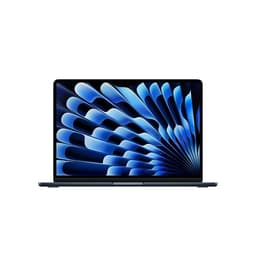
The Midnight finish is the colour in question here, and it's worth addressing the elephant in the room. Midnight (a very dark navy that reads as near-black) looks exceptional when clean. But it shows fingerprints and smudges more readily than the Starlight or Silver options. Owners mention this consistently. It's not a dealbreaker, but if you're particular about your laptop looking pristine, you'll be wiping it down regularly. Apple has reportedly improved the anodisation on the M4 generation to reduce fingerprint visibility compared to earlier Midnight models, but it's still the highest-maintenance finish in the lineup.
The hinge is well-weighted and allows one-finger opening, which is a small but satisfying detail that speaks to the overall balance of the design. It holds its angle without drifting, and the range of motion is adequate for most positions, though it doesn't lie completely flat. The build quality overall is what you'd expect from a machine at this price point in Apple's lineup: excellent. It doesn't feel like something you'll be replacing in two years because the chassis has given up. Owner reviews over multiple MacBook Air generations consistently report longevity, and there's no reason to expect the M4 generation to break that pattern.
One honest note: the lack of any port door or cover means the USB-C and MagSafe ports are exposed, and over time dust accumulation in ports is a minor maintenance consideration. It's not a structural issue, just something to be aware of if you're using the machine in dusty environments regularly.
How It Compares
The two most relevant comparisons for the MacBook Air M4 at this price point are the Dell XPS 13 (Intel Core Ultra 7, OLED option) and the ASUS ZenBook 14 OLED (AMD Ryzen AI 9). Both are well-regarded thin-and-light Windows machines in a similar price bracket. Neither is a bad laptop. But they're competing on different strengths, and the comparison reveals where the Air wins clearly and where it's more of a preference call.
The Dell XPS 13 with an OLED panel has a genuine display advantage in terms of contrast ratio and true black levels. OLED beats IPS for pure visual drama. But the XPS 13's battery life is significantly shorter than the Air's, and the Intel Core Ultra 7 runs warmer and requires active cooling, which means fan noise during demanding tasks. The ASUS ZenBook 14 OLED offers a larger display and AMD's Ryzen AI 9, which is competitive in multi-core benchmarks, but again, it requires a fan and its battery life doesn't approach the Air's real-world numbers.
For macOS users or anyone in the Apple ecosystem, the comparison is almost academic because platform compatibility matters. iPhone Mirroring, Handoff, AirDrop, and the tight integration between macOS and Apple devices are features that don't have direct Windows equivalents. If you're already using an iPhone and an iPad, the MacBook Air's ecosystem value is part of the price you're paying. If you're Windows-native and have no Apple devices, the platform switch is a genuine consideration that goes beyond specs.
| Feature | Apple MacBook Air M4 (13-inch) | Dell XPS 13 (Core Ultra 7) | ASUS ZenBook 14 OLED (Ryzen AI 9) |
|---|---|---|---|
| Processor | Apple M4 | Intel Core Ultra 7 | AMD Ryzen AI 9 |
| RAM | 16GB Unified Memory | 16GB LPDDR5 | 16GB LPDDR5X |
| Storage | 256GB NVMe SSD | 512GB NVMe SSD | 512GB NVMe SSD |
| Display | 13.6-inch IPS, 2880x1864 | 13.4-inch OLED option | 14-inch OLED, 2880x1800 |
| Battery Life | Up to 18 hours (claimed) | Up to 12 hours (claimed) | Up to 15 hours (claimed) |
| Fan | None (fanless) | Active cooling | Active cooling |
| OS | macOS Sequoia | Windows 11 | Windows 11 |
| Best For | Apple ecosystem users, battery-first, silent operation | OLED display priority, Windows users | Larger screen, Windows, AMD performance |

Final Verdict
The Apple 2025 MacBook Air 13-inch with M4 chip is, straightforwardly, one of the best thin-and-light laptops available right now. The M4's performance-per-watt advantage is real and measurable. The battery life is class-leading. The build quality is excellent. The keyboard and trackpad are among the best in any laptop at any price. And 828 owners giving it ★★★★½ (4.7) isn't the result of people being dazzled by the Apple logo; it's the result of a machine that consistently does what it promises without drama. That's rarer than it should be.
The caveats are real though, and they're worth stating plainly. The 256GB storage is tight, and most people buying this machine for more than a year or two of heavy use will feel that constraint. The port selection requires a hub for anyone with more than one or two peripherals. The IPS display, while excellent, doesn't have the contrast drama of an OLED panel. And the fanless design means sustained heavy compute workloads will see performance drop after a period of time, which matters if that's your actual use case. None of these are dealbreakers for the target audience, but they're the honest picture.
Who should buy this? Students, writers, creative professionals, frequent travellers, and anyone in the Apple ecosystem who wants a laptop that genuinely lasts all day and doesn't make any noise doing it. Who should skip it? Anyone who needs more than 256GB of local storage and can't stretch to the next tier, anyone who does sustained heavy compute or GPU work (look at the MacBook Pro M4 instead), and anyone committed to the Windows ecosystem who doesn't want the friction of switching platforms.
On value, this is a solid 8 out of 10 for its category. The upper mid-range price is justified by the chip performance, build quality, and battery life. But if your workload is genuinely light, the M3 MacBook Air is still available at a lower price and remains an excellent machine. The M4's improvements are real, but they're incremental rather than transformative. If you're upgrading from an M3 Air, there's no urgent reason to do so. If you're upgrading from anything older, or coming from a Windows machine, the M4 Air is a proper upgrade that you won't regret.
What works. What doesn’t.
7 + 6What we liked7 reasons
- Class-leading battery life that holds up well in real-world mixed use, well beyond most competing thin-and-light Windows laptops
- Completely fanless design means absolute silence under light to moderate loads, with no fan noise ever
- M4 chip delivers exceptional performance-per-watt, beating current Intel Core Ultra 7 laptops in single-core benchmarks with no active cooling
- 16GB unified memory architecture punches noticeably above equivalent DDR5 configurations in comparable Windows machines
- 12MP Center Stage webcam is a clear step above the 1080p cameras on most Windows laptops at this price
- Keyboard and Force Touch trackpad are among the best available on any laptop, regardless of price
- Excellent build quality with a rigid aluminium unibody chassis that feels built to last several years of daily use
Where it falls6 reasons
- 256GB base storage fills up quickly under macOS Sequoia, particularly for anyone in the Apple ecosystem with photos, apps, and media
- Only two Thunderbolt USB 4 ports and no SD card slot, HDMI, or USB-A means a hub is essential for users with more than minimal peripherals
- Fanless design causes performance throttling under sustained heavy CPU workloads such as long Handbrake encodes or extended Blender renders
- IPS panel lacks the contrast depth and true black levels of OLED displays found on rivals like the Dell XPS 13 and ASUS ZenBook 14
- Midnight finish shows fingerprints and smudges readily, requiring regular wiping to maintain a clean appearance
- 500-nit peak brightness is adequate indoors but can fall short in direct sunlight compared to Pro models
Full specifications
12 attributes| CPU brand | Apple |
|---|---|
| GPU type | integrated |
| RAM | 16GB |
| Storage type | SSD |
| Battery life H | 18 |
| Battery WH | 53 |
| Bluetooth | 5.3 |
| CPU | Apple M4 chip with 10-core CPU (4 performance cores, 6 efficiency cores) |
| Display refresh HZ | 60 |
| Display resolution | 2560x1664 |
| Display size IN | 13.6 |
| Display type | IPS |
Frequently asked
7 questions01How much storage does the base MacBook Air M4 come with, and is it enough?+
The base configuration includes 256GB of NVMe SSD storage. macOS Sequoia takes a meaningful portion of that from the outset, and if you use iCloud Photos, install large applications, or do any media work, 256GB fills up faster than most people expect. It is workable if you are disciplined about using cloud storage and external drives, but the 512GB configuration is a more comfortable long-term purchase for most users.
02Does the MacBook Air M4 have a fan, and does it get hot?+
No, the MacBook Air M4 is completely fanless. It uses a passive heat spreader and the M4 chip's power efficiency to manage thermals. Under light to moderate use, the chassis stays cool and the machine is completely silent. Under sustained heavy workloads such as long video encodes, it manages heat by reducing clock speeds rather than spinning up a fan. This means performance can drop during extended CPU-intensive tasks, though for typical everyday workloads this is not a noticeable issue.
03What ports does the MacBook Air M4 have, and do I need a hub?+
The MacBook Air M4 has two Thunderbolt USB 4 ports and a MagSafe 3 charging port on the left side, plus a 3.5mm headphone jack on the right. There is no SD card slot, HDMI output, or USB-A port. If you use more than one or two peripherals, connect to an external display via HDMI, or work with SD cards regularly, you will almost certainly need a USB-C hub or dock.
04How does the MacBook Air M4 compare to the Dell XPS 13 and ASUS ZenBook 14?+
The MacBook Air M4 leads on battery life and sustained quiet operation, with a fanless design that neither rival can match. The Dell XPS 13 offers an OLED display option with better contrast and true black levels, but has notably shorter battery life and requires active cooling with fan noise under load. The ASUS ZenBook 14 OLED offers a larger screen and competitive AMD Ryzen AI 9 performance, but again requires a fan and does not approach the Air's real-world battery numbers. For macOS users or those in the Apple ecosystem, the platform advantages make the comparison fairly clear.
05Is the MacBook Air M4 worth upgrading to from an M3 MacBook Air?+
Probably not if your current M3 Air is working well for your needs. The M4 improvements are real, including better GPU performance, an upgraded webcam, and support for two external displays, but they are incremental rather than transformative. If you are upgrading from an M2 Air or anything older, or switching from a Windows machine, the M4 generation is a meaningful upgrade worth the investment.
06What is the battery life like in real-world use, not just Apple's claimed figure?+
Apple claims up to 18 hours, measured under light controlled conditions. In real-world mixed use including video calls, document editing, and browser use, most owners report 11 to 13 hours, which is still exceptional for a thin laptop at this price. A full working day on a single charge is a common owner experience, with meaningful battery remaining by the end. Under heavy sustained workloads the figure drops further, as it does on any machine.
07Does the Midnight colour show fingerprints?+
Yes, more readily than the Starlight or Silver finishes. Midnight is a very dark near-black navy that looks exceptional when clean but picks up fingerprints and smudges noticeably during normal handling. Apple reportedly improved the anodisation on the M4 generation compared to earlier Midnight models, but it remains the highest-maintenance finish in the lineup. If keeping the laptop looking pristine matters to you, Starlight or Silver are lower-maintenance alternatives.