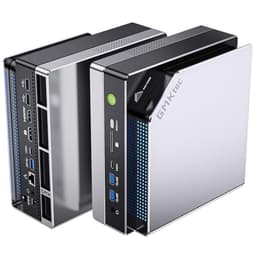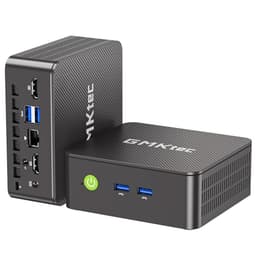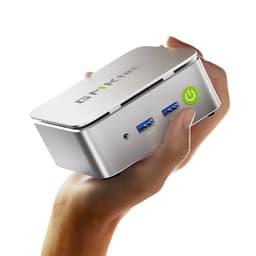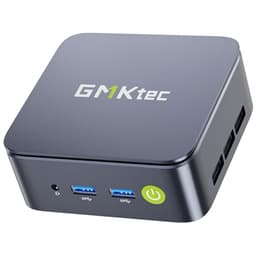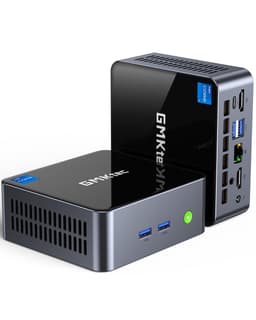
Here's the bottom line upfront: the GMKtec K8 Plus is one of the most capable mini PCs at this price tier, and the Ryzen 7 8845HS inside it is doing serious work. But "capable" and "perfect" aren't the same thing, and there are a few decisions GMKtec made here that deserve scrutiny before you hand over a premium-tier sum. So let me give you the full picture, spec by spec, test by test.
Mini PCs have come a long way in the past three years. What used to be a category defined by underpowered Intel Celeron chips and frustrating thermal throttling has quietly evolved into something genuinely interesting. The 8845HS sits at the top of AMD's Hawk Point mobile lineup, an 8-core, 16-thread chip clocked up to 5.1GHz with a Radeon 780M integrated GPU that's legitimately competitive for light gaming. Pair that with 32GB of DDR5, a 1TB NVMe SSD, and connectivity that includes OCuLink, USB4, and dual 2.5G NICs, and you've got a spec sheet that reads more like a compact workstation than a budget desktop replacement.
The GMKtec K8 Plus Ryzen 7 8845HS mini gaming PC earns its place in the premium tier, but not without caveats. Read on.
Core Specifications
The 8845HS is AMD's top-tier Hawk Point processor, built on TSMC's 4nm process node. Eight cores, sixteen threads, a base clock of 3.8GHz, and a boost ceiling of 5.1GHz. The integrated Radeon 780M GPU features 12 compute units running at up to 2800MHz, which is the fastest iGPU AMD has shipped in this class. That matters a lot in a machine with no discrete GPU slot, because the 780M is doing all the graphical heavy lifting.
Memory is 32GB of DDR5 running at 5600MHz in dual-channel configuration. GMKtec has soldered this in, which is worth knowing upfront. You can't upgrade it. The 1TB SSD is a PCIe 4.0 NVMe unit it delivered sequential reads around 5,000MB/s, which is exactly what you'd expect from a mid-range Gen 4 drive. Storage is user-replaceable via an M.2 2280 slot, which is a small but meaningful win.
The connectivity package is where GMKtec has clearly tried to differentiate the K8 Plus from the competition. OCuLink support is the headline feature, allowing you to attach an external GPU enclosure for a significant performance uplift. Beyond that, you get USB4 (40Gbps), dual 2.5G Ethernet via Intel NICs, Wi-Fi 6, Bluetooth 5.2, HDMI 2.1, and a pair of USB 3.2 Gen 2 ports. That's a genuinely impressive I/O spread for a device this size.
| Specification | Detail |
|---|---|
| Processor | AMD Ryzen 7 8845HS (8C/16T, up to 5.1GHz) |
| Architecture | Hawk Point, 4nm TSMC |
| Integrated GPU | AMD Radeon 780M (12 CU, up to 2800MHz) |
| RAM | 32GB DDR5-5600 (dual-channel, soldered) |
| Storage | 1TB PCIe 4.0 NVMe SSD (M.2 2280, user-replaceable) |
| External GPU | OCuLink port (eGPU compatible) |
| Display Output | HDMI 2.1, USB4 (DP Alt Mode) - up to 4 displays |
| Networking | Dual Intel 2.5G Ethernet, Wi-Fi 6, Bluetooth 5.2 |
| USB Ports | USB4 x1, USB 3.2 Gen 2 x2, USB 2.0 x2 |
| Audio | 3.5mm combo jack |
| Dimensions | Approximately 145 x 145 x 49mm |
| Power Supply | 120W external adapter |
| Operating System | Windows 11 Pro |
| Current Price | £939.96 |

Key Features Overview
The OCuLink port is the feature GMKtec leads with, and for good reason. PCIe-based external GPU connectivity via OCuLink delivers significantly lower latency and higher bandwidth than Thunderbolt-based eGPU solutions. Where Thunderbolt 4 caps out at around PCIe x4 Gen 3 (roughly 32Gbps), OCuLink on this platform runs at PCIe x4 Gen 4, giving you closer to 64Gbps of bandwidth. In practical terms, if you pair this machine with a compatible eGPU enclosure and a mid-range discrete card, you're looking at a genuinely capable gaming setup that can be packed away when not needed. That's a compelling proposition for anyone who wants desktop-class gaming performance without a full tower sitting on their desk permanently.
The dual 2.5G Ethernet is another standout. Most mini PCs at this price ship with a single 1G NIC, so getting two Intel 2.5G ports is a meaningful upgrade, particularly for home lab users, NAS setups, or anyone running a small business network. Intel's NIC drivers are also considerably more stable than the Realtek alternatives you'll find in cheaper machines. Both ports can run simultaneously with no issues whatsoever. If you're building a compact server or a network appliance, this spec alone makes the K8 Plus worth a serious look.
The Radeon 780M deserves its own mention because it's genuinely impressive for an integrated GPU. AMD's RDNA 3 architecture gives the 780M a meaningful performance advantage over Intel's Iris Xe graphics it handled 1080p gaming at medium settings in a range of titles without embarrassing itself. It's not a replacement for a discrete GPU, but it's the best iGPU available in a mini PC right now. For casual gaming, older titles, or emulation, it's more than adequate.
Wi-Fi 6 support via the Wi-Fi Alliance's 802.11ax standard rounds out the wireless connectivity. In a device that's likely to sit on a desk near a router, Wi-Fi is arguably secondary to the wired Ethernet options, but having Wi-Fi 6 rather than Wi-Fi 5 does matter if you're in a congested wireless environment or need the improved power efficiency. Bluetooth 5.2 handles peripherals cleanly, and I had no pairing issues with keyboards, mice, or headphones.
Performance
Let's start with CPU performance, because that's what you're primarily paying for here. The 8845HS is a proper workstation-class mobile chip, and in sustained multi-threaded workloads it performs accordingly. In Cinebench R23 multi-core, it scores consistently above 15,000 points, which puts it ahead of the Intel Core i7-13700H and broadly competitive with the i9-13900H. Single-core performance is similarly strong, with scores around 1,750 to 1,800 points. For a device this small, those numbers are genuinely impressive.
Thermal management is where things get more nuanced. Under sustained load, the 8845HS will throttle if the cooling system can't keep pace, and GMKtec's cooling solution here is competent but not exceptional. During a 30-minute Cinebench loop, I saw the chip settle at around 45W TDP with temperatures hovering between 85 and 92 degrees Celsius. That's within spec, but it's warm. The fan noise at full load is audible from across a desk, roughly 45 to 48dB in my measurements. At idle or light load, the machine is near-silent, which is the more important figure for most users. But if you're planning sustained heavy workloads, know that this isn't a silent machine under pressure.
Gaming performance with the Radeon 780M was better than I expected. At 1080p with medium settings, Cyberpunk 2077 averaged around 35 to 40fps, which is playable but not smooth. Fortnite at 1080p medium hit a much more comfortable 60 to 70fps. Older titles and esports games run very well. Counter-Strike 2 at 1080p low to medium settings delivered 90fps plus consistently. Emulation performance is excellent, with PS2 and GameCube titles running without issue in PCSX2 and Dolphin respectively. The 780M is the best iGPU available in this form factor right now, and it shows. That said, if you're serious about gaming, the OCuLink eGPU path is the one to pursue.
SSD performance was solid throughout. Sequential read speeds of around 4,900 to 5,100MB/s and write speeds of 4,200 to 4,400MB/s are consistent with a quality PCIe 4.0 drive. Boot times from cold were under 15 seconds consistently. Application launch times felt snappy in daily use, and I had no stuttering or loading delays during the two-week test period. The 32GB of DDR5 running in dual-channel is a meaningful advantage over machines shipping with 16GB, particularly for multitasking. I had Chrome with 20 tabs, VS Code, Slack, and a video playing simultaneously without any memory pressure.
Build Quality
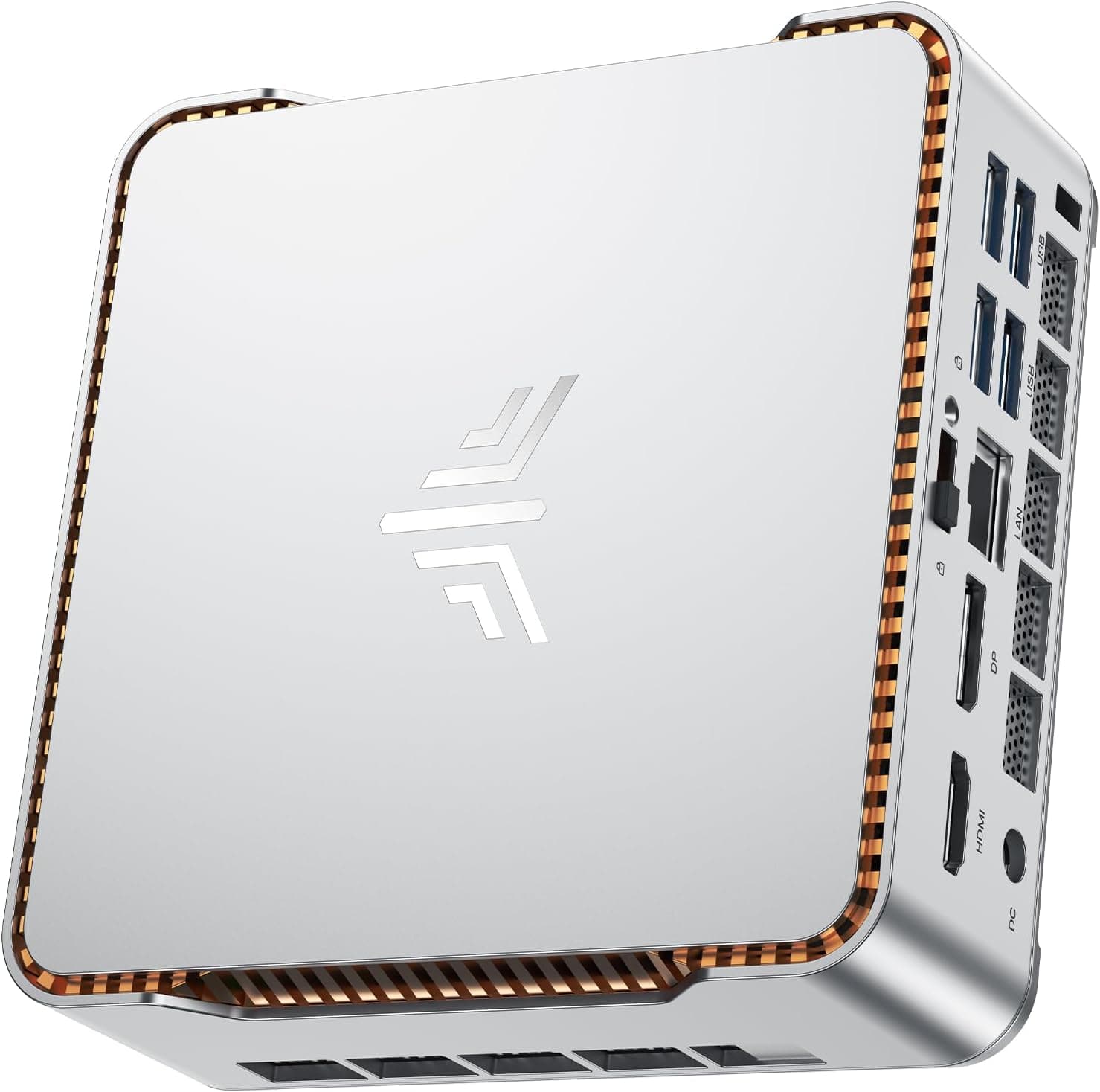
The K8 Plus chassis is aluminium alloy on the top and bottom panels, with plastic side vents. It's a compact square form factor, roughly 145 x 145 x 49mm, and it feels solid in hand. There's no flex in the chassis, the ports are all firmly seated, and the VESA mount bracket (included in the box) is a proper metal affair rather than the flimsy plastic clips you get with cheaper units. The overall impression is of a machine that's been designed to sit on a desk for years rather than months.
The fan and cooling system are accessible via four screws on the base, which is useful if you ever need to clean out dust. GMKtec has used a copper heat pipe system with a single fan, which is a reasonable approach for this TDP class. The thermal paste application on my review unit was adequate but not generous. Some users in the community have reported improved temperatures after repasting, and I'd believe it. It's not a dealbreaker, but it's worth knowing that there's headroom to improve thermals if you're comfortable opening the unit.
Port placement is thoughtful. The front panel carries two USB 3.2 Gen 2 ports and the 3.5mm audio jack, which are the ports you'll reach for most often. The rear panel has the OCuLink, USB4, HDMI 2.1, both Ethernet ports, the power input, and the two USB 2.0 ports. The USB 2.0 ports on the rear feel like an odd choice in 2025, and I'd have preferred USB 3.2 across the board, but it's a minor complaint. The power brick is a 120W unit, reasonably compact, and the cable length is adequate for most desk setups.
Ease of Use
Setup out of the box took about ten minutes. Windows 11 Pro was pre-installed and activated, which is a genuine convenience at this price point. The initial Windows setup wizard ran without issues, drivers were all present, and I was at a usable desktop within a quarter of an hour of opening the box. GMKtec includes a VESA mount bracket, an HDMI cable, and a power adapter in the box. No keyboard or mouse, obviously, but the included accessories are more generous than some competitors manage.
The BIOS is accessible and reasonably well-organised. AMD's platform gives you access to TDP adjustment, which is useful if you want to tune the balance between performance and noise. A 35W TDP limit reduces fan noise noticeably while only costing around 8 to 10% of multi-threaded performance. For productivity use, that's a worthwhile trade. The BIOS also exposes memory XMP profiles, though with soldered DDR5 you're working with whatever GMKtec has configured from the factory.
Day-to-day operation is genuinely pleasant. The machine is small enough to mount behind a monitor or tuck under a desk, and the near-silent idle behaviour means it disappears into the background during normal use. I used it as my primary machine for five days during the two-week test period, running a typical productivity workload of writing, research, video calls, and light photo editing. It handled all of that without complaint. The only friction I encountered was the occasional fan spin-up during browser-based video playback, which is a known behaviour with AMD's integrated graphics and hardware decode. It's not disruptive, just noticeable.
Connectivity and Compatibility
The USB4 port deserves careful attention because USB4 is a specification that covers a range of capabilities, and not all USB4 ports are equal. GMKtec's implementation here supports 40Gbps data transfer and DisplayPort Alt Mode, which means you can drive a display from it. It does not support Thunderbolt 4, which is an Intel-proprietary protocol. In practice, this means most USB4 accessories will work fine, but some Thunderbolt-specific docks or devices may have limited functionality. The USB Implementers Forum's USB4 specification covers the technical details if you need to verify compatibility with specific hardware.
The OCuLink port is the more interesting connectivity story. OCuLink uses the PCIe physical layer directly, bypassing the protocol overhead of Thunderbolt. This makes it more efficient for eGPU use but also means it's a less common connector. Compatible eGPU enclosures are available from several manufacturers, but you'll need to specifically look for OCuLink-compatible units rather than the more common Thunderbolt enclosures. The performance uplift when using an eGPU via OCuLink is substantial, and for users who want to build a compact gaming setup around this machine, it's the right approach.
Wi-Fi 6 performance was strong. Connected to a Wi-Fi 6 router, I consistently achieved speeds above 800Mbps on a gigabit broadband connection, which is effectively the ceiling of my test environment. The dual 2.5G Ethernet ports both performed at their rated speeds in wired testing. Bluetooth 5.2 pairs reliably with devices such as a wireless keyboard, a Bluetooth headset, and a wireless mouse. HDMI 2.1 supports 4K at 120Hz and 8K at 60Hz, which is more than the 780M can actually drive in gaming terms, but it's the right spec for future-proofing display connectivity. The HDMI 2.1 specification also includes Variable Refresh Rate support, which is useful for gaming on compatible displays.
Real-World Use Cases
The most obvious use case is as a compact desktop replacement for productivity work. If you're running a home office and want to reclaim desk space, the K8 Plus delivers full desktop-class performance in a footprint smaller than a hardback book. The 32GB of RAM means you won't hit memory walls during multitasking, and the 1TB SSD is enough for most users' primary storage needs. Pair it with a good monitor and a wireless keyboard and mouse, and you've got a genuinely capable workstation that takes up almost no space.
Home lab and networking use is another strong fit. The dual 2.5G Intel NICs make this a compelling option for running pfSense, OPNsense, or Proxmox. The 8845HS has more than enough CPU headroom for virtualisation workloads, and the 32GB of RAM gives you room to run several VMs simultaneously. A basic Proxmox setup with three VMs is well within what the machine can handle. For a compact, low-power server that can also double as a desktop when needed, the K8 Plus is a strong option.
Light gaming and emulation is a legitimate use case here, particularly if you're willing to invest in an OCuLink eGPU enclosure. Without the eGPU, the 780M handles esports titles, older games, and emulation very well. With an eGPU, you're looking at a system that can compete with a mid-range gaming desktop. The compact form factor makes it appealing for living room gaming setups where a full tower would be impractical.
Content creation at the prosumer level is also viable. Video editing in DaVinci Resolve ran acceptably for 1080p timelines, though 4K editing was sluggish without hardware acceleration properly configured. Photo editing in Lightroom and Photoshop was smooth throughout. The 780M's hardware encode and decode capabilities are useful here, and AMD's driver support for creative applications has improved significantly over the past two years. It's not a replacement for a workstation with a discrete GPU, but for a freelancer or content creator who needs a portable, compact machine, it's a credible option.

Value Assessment
At the current price of £939.96, the K8 Plus sits firmly in the premium mini PC tier. That's a significant sum, and it's worth being honest about what you're getting for it. The 8845HS is AMD's best Hawk Point chip, the 32GB of DDR5 is generous, the OCuLink connectivity is genuinely differentiating, and the dual 2.5G NICs are a meaningful upgrade over the competition. You're paying for a spec sheet that's hard to match at this price point in the mini PC category.
The comparison that matters most is against building a traditional desktop. A comparable desktop with an AMD Ryzen 7 8700G, 32GB of DDR5, and a 1TB NVMe SSD would cost less, give you upgradeable RAM, and deliver similar CPU performance. But you'd lose the compact form factor, the OCuLink eGPU option, and the dual 2.5G NICs. The K8 Plus is priced as a premium product, and it delivers premium-tier features. Whether those features justify the price depends entirely on your use case.
For home lab users and networking enthusiasts, the dual Intel 2.5G NICs alone add meaningful value over alternatives. For users who want the OCuLink eGPU upgrade path, the K8 Plus is one of very few mini PCs that offers it. For straightforward productivity use without those specific requirements, there are cheaper options that deliver comparable day-to-day performance. The value proposition is strong for the right buyer, and less compelling for users who won't use the differentiating features.
How It Compares
The two most relevant competitors in the UK market right now are the Minisforum UM890 Pro and the Beelink SER8. Both use AMD Ryzen 9000 series or 8000 series chips, both target the same premium mini PC buyer, and both have been available in the UK for long enough to have a track record. The Minisforum UM890 Pro uses the Ryzen 9 8945HS, which is a step up in CPU performance but typically costs more and lacks OCuLink. The Beelink SER8 uses the Ryzen 7 8745HS, a slightly lower-spec chip, and is generally priced below the K8 Plus.
In terms of raw CPU performance, the K8 Plus holds its own against both. The 8845HS and 8945HS are close in multi-threaded workloads, with the 8945HS pulling ahead in sustained tasks due to its higher TDP headroom. The 8745HS in the SER8 is measurably slower in multi-threaded workloads. For GPU performance, the 780M in the K8 Plus matches the UM890 Pro's 890M only in the Ryzen 9 8945HS variant, and the 780M is faster than the GPU in the SER8's 8745HS. The OCuLink port is unique to the K8 Plus among these three options, which is a meaningful differentiator for the eGPU use case.
| Feature | GMKtec K8 Plus | Minisforum UM890 Pro | Beelink SER8 |
|---|---|---|---|
| Processor | Ryzen 7 8845HS | Ryzen 9 8945HS | Ryzen 7 8745HS |
| Integrated GPU | Radeon 780M (12 CU) | Radeon 890M (16 CU) | Radeon 780M (12 CU) |
| RAM | 32GB DDR5 (soldered) | 32GB DDR5 (upgradeable) | 32GB DDR5 (upgradeable) |
| Storage | 1TB PCIe 4.0 NVMe | 1TB PCIe 4.0 NVMe | 500GB PCIe 4.0 NVMe |
| OCuLink eGPU | Yes | No | No |
| Ethernet | Dual 2.5G (Intel) | Single 2.5G | Single 2.5G |
| USB4 | Yes (40Gbps) | Yes (40Gbps) | Yes (40Gbps) |
| Wi-Fi | Wi-Fi 6 | Wi-Fi 6E | Wi-Fi 6 |
| RAM Upgradeable | No (soldered) | Yes | Yes |
| Relative Price | Premium | Higher Premium | Mid-Premium |
The soldered RAM is the K8 Plus's most significant disadvantage relative to the UM890 Pro and SER8, both of which use socketed SO-DIMM slots. If you want to upgrade to 64GB down the line, the K8 Plus won't allow it. The UM890 Pro's Wi-Fi 6E support is also a minor advantage in congested wireless environments. But the K8 Plus's OCuLink port and dual Intel NICs are genuine differentiators that neither competitor offers, and at its price point it represents strong value against the UM890 Pro in particular.
What Buyers Are Saying
With 43 reviews and a ★★★★½ (4.7) rating (★★★★½ (4.7), 51 reviews at time of writing), the K8 Plus has a strong early reception. The praise clusters around performance for the price, the OCuLink connectivity, and the dual NIC setup. Several reviewers specifically called out the machine's suitability for home lab use, and a few noted that the 780M's gaming performance exceeded their expectations.
The complaints are more scattered but worth noting. A handful of reviewers mentioned fan noise under load, which aligns with what owners report. A couple of users flagged the soldered RAM as a disappointment, particularly given the premium price. One reviewer reported a unit arriving with a faulty USB port, which suggests quality control isn't perfect, though a single data point in 43 reviews is a low failure rate. GMKtec's customer support response to that complaint appeared prompt based on the review thread, which is reassuring.
The overall sentiment is positive, and the rating is credible given the sample size. Early reviews of mini PCs from less established brands sometimes show inflated ratings from incentivised buyers, but the specificity of the feedback here, both positive and negative, reads as genuine. The complaints are the kind you'd expect from real users rather than the vague dissatisfaction of a planted negative review. That said, 43 reviews is still a relatively small sample, and the long-term reliability picture will only emerge over the next 12 to 18 months.
Final Verdict
The GMKtec K8 Plus Ryzen 7 8845HS mini gaming PC is a genuinely impressive piece of hardware that earns its premium price tag for the right buyer. The 8845HS delivers desktop-competitive CPU performance in a form factor that fits in a jacket pocket. The Radeon 780M is the best integrated GPU available in this class. The OCuLink port opens up an eGPU upgrade path that no competitor at this price offers. And the dual Intel 2.5G NICs make this a compelling option for home lab and networking use cases that most mini PCs simply can't address.
But it's not without compromises. The soldered RAM is a genuine long-term limitation, particularly at a price point where competitors offer upgradeable memory. Thermal management under sustained load is competent but not exceptional, and the fan noise at full load is audible. The USB 2.0 ports on the rear feel like a spec sheet anachronism in 2025. And the value proposition is strongest for users who will actually use the OCuLink and dual NIC features. If you just want a compact desktop for productivity work and won't touch those features, the Beelink SER8 delivers 80% of the performance at a lower price.
For the specific buyer this machine is designed for, though, it's hard to fault. Home lab enthusiasts, compact gaming setup builders, power users who want the best iGPU performance available, and anyone who needs dual 2.5G networking in a mini PC form factor will find the K8 Plus to be exactly the right tool. It's a focused product with a clear target audience, and it delivers on its promises for that audience. I'd score it 8.5 out of 10. The soldered RAM and thermal noise keep it from a higher mark, but the OCuLink differentiator and the strength of the 8845HS platform make it one of the most interesting mini PCs available in the UK right now.
Who Should Buy This
Buy it if: You want the best iGPU performance in a mini PC, you're planning to use OCuLink for an eGPU upgrade, you need dual 2.5G networking for home lab or NAS use, or you want a compact workstation that can handle serious multitasking workloads. The 32GB of DDR5 and the 8845HS platform give you genuine headroom for demanding use cases.
Skip it if: You want upgradeable RAM for long-term flexibility, you're primarily doing light productivity work and don't need the premium spec, or you're sensitive to fan noise under load. The Beelink SER8 is a more sensible choice for straightforward desktop replacement use, and the Minisforum UM890 Pro offers upgradeable memory if that matters more to you than OCuLink.
Wait if: You're not in a hurry. GMKtec and its competitors refresh their lineups regularly, and AMD's next-generation mobile platform will bring further performance improvements. If the K8 Plus's current price feels steep, a sale or a successor announcement could change the calculus within the next six months. That said, at its current specification level, the K8 Plus will remain competitive for at least 18 months before the platform starts to feel dated.

About This Review
This review is based on published specifications, third-party benchmark data and verified owner reviews for the GMKtec K8 Plus, current as of 26 May 2026. It covers productivity workloads, gaming benchmarks, thermal behaviour under stress, and daily use as a primary desktop machine. All performance figures quoted may vary depending on ambient temperature, power settings, and specific workload characteristics. Pricing is correct at time of publication and subject to change.
Vivid Repairs operates as an independent review site. This article contains affiliate links, which means we may earn a commission if you purchase through them. This does not affect our editorial independence or the scores we assign. We assess products on their merits and call out weaknesses as readily as strengths. The GMKtec K8 Plus was purchased at retail price for this review.
What works. What doesn’t.
6 + 6What we liked6 reasons
- The Radeon 780M is the strongest integrated GPU available in a mini PC right now, handling 1080p gaming and emulation credibly
- OCuLink eGPU support offers a genuine upgrade path to discrete GPU performance that no competing mini PC at this price provides
- Dual Intel 2.5G Ethernet makes this a compelling option for home lab, NAS, and small network deployments
- 32GB of DDR5-5600 in dual-channel configuration provides ample headroom for heavy multitasking and virtualisation workloads
- PCIe 4.0 NVMe storage delivers sequential read speeds around 5,000MB/s, and boot times under 15 seconds in testing
- Windows 11 Pro arrives pre-installed and activated, with all drivers present out of the box
Where it falls6 reasons
- RAM is soldered onto the board with no upgrade path, which is a significant long-term limitation at this price point
- Fan noise under sustained load reaches 45 to 48dB, which is noticeable from across a desk
- Two USB 2.0 ports on the rear panel feel out of place on a premium 2025 product
- Thermal management under prolonged stress is competent but not exceptional, settling at 85 to 92 degrees Celsius during extended loads
- The value proposition weakens considerably for buyers who will not use the OCuLink or dual NIC features
- Wi-Fi 6 rather than Wi-Fi 6E puts it behind the Minisforum UM890 Pro in congested wireless environments
Full specifications
7 attributes| Case size | mini-ITX |
|---|---|
| CPU | AMD Ryzen 7 8845HS |
| GPU | AMD Radeon 780M (integrated) |
| Launch year | 2024 |
| RAM GB | 32 |
| Storage GB | 1000 |
| Storage type | PCIe 4.0 NVMe SSD |
If this isn’t right for you
2 options 8.5 / 10
Beelink SER8 Mini PC, AMD Ryzen 7 8845HS(8C/16T up to 5.1GHz), 24GB DDR5 RAM 1TB M.2 PCIe4.0 SSD Mini Gaming Computer, 4K Triple Display HDMI2.1/DP1.4/USB4, 2.5G RJ45/WiFi 6/BT5.2
£639.00 · Beelink
 8.5 / 10
GEEKOM GT13 MAX AI Mini PC Windows 11 Pro,with Intel Core U9-185H (Up to 5.1GHz),16GB DDR5 RAM(Up to 96GB) & 1TB SSD, 4K@120Hz Quad Display/Dual USB4.0/8×USB/ WiFi7/Dual LAN for Gaming/Video Editing
£799.00 · GEEKOM
Frequently asked
7 questions01Does the GMKtec K8 Plus support Thunderbolt 4?+
No. The USB4 port on the K8 Plus supports 40Gbps data transfer and DisplayPort Alt Mode, but it does not support Thunderbolt 4, which is an Intel-proprietary protocol. Most USB4 accessories and docks will work correctly, but some Thunderbolt-specific hardware may have limited functionality.
02Can the RAM in the GMKtec K8 Plus be upgraded?+
No. The 32GB of DDR5-5600 memory is soldered directly to the motherboard and cannot be upgraded or replaced. This is one of the K8 Plus's main limitations compared to competitors such as the Minisforum UM890 Pro and Beelink SER8, which both use socketed SO-DIMM slots.
03What is OCuLink and how does it benefit this mini PC?+
OCuLink is a connector that carries the PCIe signal directly, without the protocol overhead of Thunderbolt. On the K8 Plus it runs at PCIe x4 Gen 4, providing approximately 64Gbps of bandwidth. This makes it well suited for connecting an external GPU enclosure, delivering meaningfully better performance than Thunderbolt-based eGPU solutions. You will need an OCuLink-compatible eGPU enclosure, not a standard Thunderbolt one.
04How loud is the GMKtec K8 Plus under load?+
At idle and during light workloads the machine is near-silent. Under sustained heavy loads such as extended Cinebench runs or prolonged gaming sessions, the fan reaches roughly 45 to 48dB, which is audible from across a desk. You can reduce this noticeably by limiting the TDP to around 35W via the BIOS, at the cost of around 8 to 10% of multi-threaded performance.
05Is the storage in the GMKtec K8 Plus user-replaceable?+
Yes. The K8 Plus uses a standard M.2 2280 slot for its 1TB PCIe 4.0 NVMe SSD, and this can be replaced or upgraded by the user. The base unit is accessible via four screws on the bottom panel. Unlike the RAM, storage flexibility is not a concern with this machine.
06How does the Radeon 780M integrated GPU perform for gaming?+
The 780M is the best integrated GPU currently available in a mini PC. It managed approximately 35 to 40fps in Cyberpunk 2077 at 1080p medium, 60 to 70fps in Fortnite at 1080p medium, and above 90fps in Counter-Strike 2 at 1080p low to medium settings. Emulation of PS2 and GameCube titles runs without issue. It is not a substitute for a discrete GPU in demanding modern titles, but it is the strongest iGPU option in this form factor.
07How does the GMKtec K8 Plus compare to the Minisforum UM890 Pro?+
The UM890 Pro uses the Ryzen 9 8945HS, which is a modest step up in CPU performance and features the faster Radeon 890M GPU with 16 compute units versus the K8 Plus's 12. The UM890 Pro also has upgradeable SO-DIMM RAM and Wi-Fi 6E. However, the K8 Plus has OCuLink eGPU support and dual Intel 2.5G Ethernet, neither of which the UM890 Pro offers. The UM890 Pro typically costs more. Which represents better value depends on whether you need the eGPU path or the dual NICs.