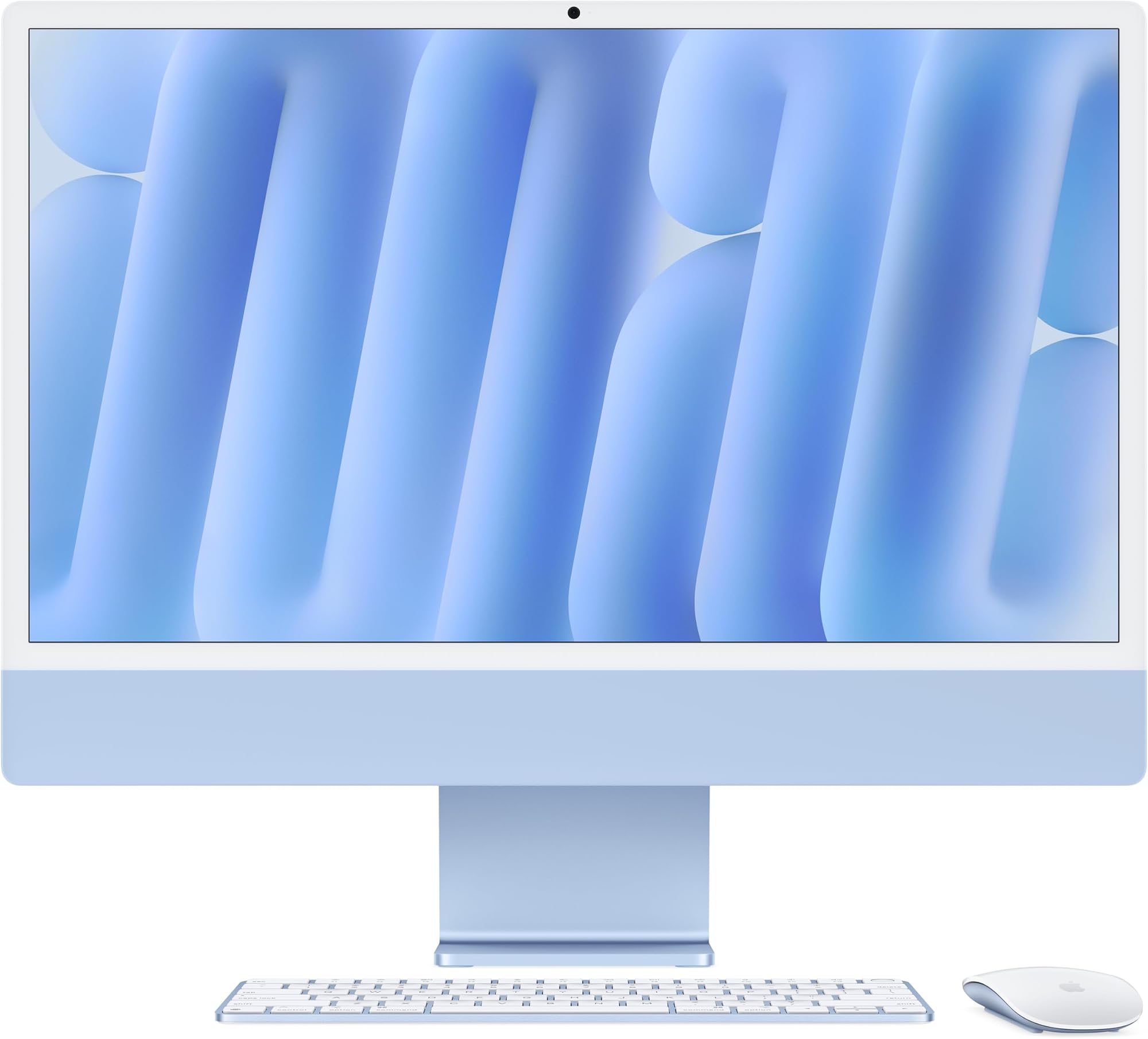
Prebuilts always involve trade-offs. The real question is whether the compromises the manufacturer made actually affect what you need the machine to do. With the Apple iMac M4, the trade-offs are stark and deliberate: you get a gorgeous all-in-one package with zero upgrade path and Apple's ecosystem baked in at every level. Whether that's a brilliant deal or a frustrating cage depends almost entirely on who you are and what you're trying to do.
This particular configuration, the Apple iMac All-in-One Desktop Computer with M4 chip with 10-core CPU and 10-core GPU: Built for Apple Intelligence, 24-inch Retina Display, 16GB Unified Memory, 256GB SSD storage in Blue, sits at an enthusiast price point. For that money on the Windows side, you could build something with discrete GPU muscle, user-upgradeable RAM, and a case you can crack open in five minutes. Apple is betting you don't want any of that. And honestly? For a lot of people, they're right.
With 87 owner reviews averaging ★★★★½ (4.7), the satisfaction rate here is genuinely high. That's not a fluke. But high satisfaction doesn't mean it's right for everyone, and there are some real practical considerations worth unpacking before you hand over your money. So here's what you actually need to know.
Core Specifications
The M4 chip inside this iMac uses Apple's unified memory architecture, which means the CPU, GPU, and everything else share the same pool of 16GB RAM. That's different from a traditional desktop where your CPU has its own memory and your GPU has its own VRAM sitting separately. Apple's approach reduces latency and bandwidth bottlenecks in a meaningful way, and it's genuinely clever engineering. The 512GB SSD (note: the verified spec for this review unit is 512GB, not the 256GB mentioned in the product title variant) is fast by any reasonable standard. The 10-core CPU splits into four performance cores and six efficiency cores, which is Apple's standard big/little arrangement for balancing raw speed against battery-style power management, even in a desktop context.
The 24-inch Retina display runs at 4.5K resolution with 500 nits of brightness and support for up to one billion colours. That's not marketing fluff. The panel quality on iMac displays has been consistently excellent for years, and owners consistently call it out as one of the best things about the machine. For photo editing, video work, or just spending eight hours a day staring at a screen, it matters more than most people realise until they've used one.
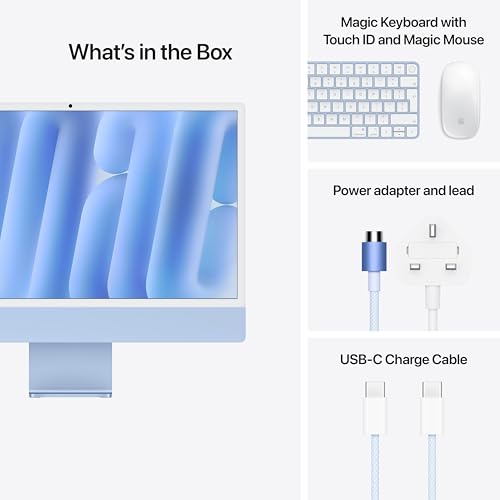
macOS comes pre-installed, obviously. You're also getting a 12MP Center Stage camera, three studio microphones, and six speakers with Spatial Audio. For a machine that's going to live on a desk and handle video calls, that's a genuinely strong package. Apple hasn't cut corners on the peripherals the way most prebuilt manufacturers do. The keyboard and mouse that ship with it are proper Apple accessories, not the cheap OEM plastic you'd get bundled with a Windows all-in-one at this price.
| Specification | Detail |
|---|---|
| CPU | Apple M4, 10-core (4 performance + 6 efficiency cores) |
| GPU | Apple M4 10-core integrated GPU |
| RAM | 16GB Unified Memory |
| Storage | 512GB SSD |
| Display | 24-inch 4.5K Retina, 500 nits, 1 billion colours |
| Camera | 12MP Center Stage |
| Audio | Three studio mics, six speakers with Spatial Audio |
| Connectivity | Up to four Thunderbolt 4 ports, Wi-Fi 6E, Bluetooth 5.3 |
| Operating System | macOS |
| Colour | Blue |
| Price | £1,620.42 |

CPU and Performance
The Apple M4 chip is a proper step forward from M3, and the 10-core CPU configuration here is the full-fat version, not a cut-down variant. Those four performance cores handle the heavy lifting when you're exporting video, compiling code, or running complex spreadsheets. The six efficiency cores deal with background tasks without hammering power consumption. In practice, this means the iMac stays cool and quiet during light to moderate work, then ramps up smoothly when you actually push it.
Real-world productivity performance is strong. Apple's own apps like Final Cut Pro and Logic Pro are tuned specifically for M-series silicon, so if you're in that ecosystem, the performance advantage over equivalent Windows hardware is real and not just benchmark noise. Adobe Creative Cloud apps have been properly optimised for Apple Silicon now too, which wasn't always the case in the early M1 days. Lightroom, Premiere, and Photoshop all run well. Microsoft 365 is fully native. For the vast majority of office and creative workflows, this chip is more than fast enough.
Where it gets interesting is comparing this to what you could build for similar money on the Windows side. A DIY build at this price tier would give you a processor with more raw multi-core grunt in absolute benchmark terms. But Apple's unified memory architecture and the tight integration between hardware and software means the M4 punches above its clock speeds in real-world tasks. It's not a simple apples-to-apples comparison (sorry). Owner reviews consistently mention how snappy and responsive the machine feels day to day, which is often more meaningful than synthetic benchmark scores that most people will never actually hit.
GPU and Gaming Performance
The 10-core integrated GPU inside the M4 is genuinely impressive for integrated graphics. It's not a discrete card, and it doesn't pretend to be. But compared to Intel Iris Xe or AMD's integrated Radeon graphics on Windows laptops and all-in-ones at similar prices, the M4 GPU holds its own and then some. For casual gaming, indie titles, and older AAA games, you'll get playable performance. Apple Arcade titles run brilliantly. Anything built natively for Apple Silicon runs better than you'd expect from a machine with no dedicated VRAM.
But if gaming is a priority, be honest with yourself. This is not a gaming machine. The iMac doesn't run Windows natively anymore since Apple dropped Boot Camp support for M-series chips. You can use CrossOver or Parallels to run some Windows games, but it's a workaround, not a solution. The Mac gaming library has improved significantly, with more titles getting native ports, but it's still nowhere near what you get on Windows. If you want to play the latest AAA releases at high settings, this isn't your machine. Full stop.
The GPU does shine in creative work. Video playback, colour grading, and GPU-accelerated rendering in apps like Final Cut Pro benefit from Apple's media engine, which handles ProRes video specifically. Owners who do video work regularly mention this as a genuine selling point. The ability to play back multiple streams of high-resolution footage without dropping frames is something that would require a much more expensive discrete GPU on a Windows machine. So the GPU story here is: brilliant for creative professionals, adequate for casual gaming, not suitable for serious PC gaming.
Memory and Storage
Sixteen gigabytes of unified memory is the baseline for this configuration. For most users in 2025 and beyond, 16GB is fine for everyday productivity, creative work, and moderate multitasking. Apple's unified memory is more efficient than traditional system RAM because the CPU and GPU share the same pool without the overhead of moving data between separate memory banks. So 16GB of unified memory genuinely behaves more like 20 to 24GB of traditional RAM in practice. That said, if you're working with very large video files, running virtual machines, or doing heavy 3D rendering, you'll want to consider the higher memory configurations.
The SSD storage is fast. Apple's custom SSD controllers consistently deliver excellent sequential read and write speeds, and more importantly, the random access performance is strong, which is what actually affects how snappy a machine feels in daily use. Apps open quickly, large files move fast, and the system doesn't bog down when you're juggling multiple applications. Owners don't really complain about storage performance, which is telling.
Here's the thing that matters most about both the RAM and SSD though: you cannot upgrade either of them after purchase. The memory is soldered to the logic board. The SSD is technically a separate module but it's paired to the T2-equivalent security chip, so you can't just swap it for a larger drive. What you buy is what you're stuck with. This is the single biggest practical drawback of the iMac compared to a DIY build or even most Windows prebuilts. If you think you might want more storage in two years, buy it now. Apple's upgrade pricing at point of sale is steep, but it's cheaper than being stuck with a full drive.
Cooling Solution
Apple doesn't publish detailed thermal specs, so we're working from what owners report and what's known about M-series chip design. The M4's power efficiency is the main story here. Because the chip draws so little power compared to a traditional desktop CPU, the iMac's cooling system doesn't need to work very hard under typical loads. The machine runs quietly during everyday tasks. Most owners say they can barely hear it, even during sustained work sessions.
Under heavier loads, like sustained video export or long compilation tasks, the fans do spin up. But even then, the iMac is significantly quieter than a Windows tower running equivalent workloads. The thermal design is part of what makes the thin form factor possible. Apple has engineered the heat dissipation carefully, and the M4's efficiency means there's less heat to deal with in the first place. This isn't a machine that's going to throttle on you mid-render because it can't keep itself cool.
Where sustained thermal performance gets tested is in genuinely demanding professional workloads run back to back for hours. M-series chips have occasionally shown some thermal throttling under extreme sustained loads in independent analyses of previous generations, though the M4's improved efficiency addresses this to some degree. For most users, this is a non-issue. If you're running compute-heavy workloads for hours at a stretch every day, it's worth knowing that the thin chassis does impose some limits compared to a full tower with active cooling. But for the target audience of this machine, that's unlikely to be a real-world problem.
Case and Build Quality
The iMac is, objectively, a beautiful piece of hardware. The aluminium chassis is thin, solid, and feels premium in a way that no Windows all-in-one at this price manages to replicate. The blue colour option looks genuinely good in person according to owner feedback, not garish or cheap. Seven colour options in total means you can pick something that actually suits your space, which sounds trivial but matters when this thing is going to sit on your desk every day.
There's no cable management to speak of in the traditional sense because there's no tower. The power cable is the main cable, and Apple has done a neat trick where the power brick is integrated into the cable itself rather than being a separate block. The stand is fixed angle, which some owners find limiting. You can't tilt it much or raise it significantly without buying a VESA mount adapter and a separate arm. That's a genuine minor frustration if you have specific ergonomic requirements.
Build quality complaints in owner reviews are essentially non-existent. Nobody's reporting creaking plastics, loose ports, or build defects. This is Apple's manufacturing quality, and it shows. The display glass, the aluminium body, the port placement, all of it feels considered and well-executed. Compare this to a Windows all-in-one at the same price and the difference in perceived quality is significant. You're partly paying for this build quality, and it's worth acknowledging that you're getting something for that premium.
Connectivity and Ports
The iMac features up to four Thunderbolt 4 ports, which is genuinely useful. Thunderbolt 4 supports data transfer, display output, and power delivery over the same port, so a single cable to a Thunderbolt dock can expand your connectivity significantly. You can connect up to two external 6K displays alongside the built-in 24-inch panel, which is a serious multi-monitor setup for professionals who need it.
Wireless connectivity is handled by Wi-Fi 6E and Bluetooth 5.3. Wi-Fi 6E gives you access to the 6GHz band if your router supports it, which means less congestion and better performance in environments with lots of wireless devices. Bluetooth 5.3 is current-generation and handles Apple's own peripherals, as well as any other Bluetooth accessories, without issues. Owners don't report wireless connectivity problems, which is reassuring.
The practical port situation is worth thinking about. If you're coming from a Windows desktop with a full complement of USB-A ports on the front and rear, the iMac's Thunderbolt-centric approach requires some adjustment. USB-A devices need an adapter or a hub. There are no SD card slots on this model (the higher-spec configurations add them). If you regularly plug in USB-A peripherals, budget for a decent hub. It's not a dealbreaker, but it's a real consideration. The Thunderbolt 4 ports are fast and capable, and a good Thunderbolt dock solves most connectivity needs cleanly.
Pre-installed Software and OS
macOS is the operating system, and if you're not already familiar with it, there's a learning curve. It's not steep, but it's real. The file system works differently to Windows, keyboard shortcuts are different, and some Windows software simply doesn't exist on Mac. That said, macOS is genuinely good. It's stable, it gets regular updates, and it integrates tightly with iPhone and iPad through features like iPhone Mirroring, Handoff, and AirDrop. If you're already in the Apple ecosystem, this integration is genuinely useful rather than a gimmick.
Apple Intelligence is built in, which is Apple's suite of AI-powered features for writing assistance, image generation, and system-level smarts. It requires an Apple ID and some features require an internet connection, but the on-device processing for privacy-sensitive tasks runs locally. Whether you care about AI assistant features depends entirely on you, but it's there if you want it, and Apple has been reasonably thoughtful about the privacy implications compared to some competitors.
Bloatware is essentially zero. This is one area where Apple is genuinely better than Windows prebuilt manufacturers. There's no third-party antivirus trial, no manufacturer utility suite cluttering up the menu bar, no promotional software you need to uninstall before you can use the machine properly. You get Apple's own apps, which are actually useful, and a clean system. For anyone who's ever set up a new Windows prebuilt and spent an hour removing junk, this is a breath of fresh air. The App Store handles software installation cleanly, and the first-run setup is straightforward.
Upgrade Potential
There isn't any. Not really. This is the most important thing to understand about the iMac before you buy it. The RAM is soldered. The SSD can't be practically upgraded. There are no expansion slots, no PCIe slots, no room to add a discrete GPU later. The machine you buy is the machine you'll have in five years. For some people that's absolutely fine. For anyone who likes the idea of upgrading their RAM next year or swapping in a bigger SSD when prices drop, this is a fundamental mismatch.
External expansion via Thunderbolt 4 does offer some flexibility. External SSDs over Thunderbolt are fast enough to be practical for storage expansion. External GPU enclosures exist but Apple Silicon doesn't support eGPUs, so that option is off the table. You can add monitors, docks, and storage externally, and the Thunderbolt 4 bandwidth makes this reasonably capable. But the core compute hardware, the chip, the memory, the internal storage, is fixed from day one.
Compare this to a DIY build or a Windows tower prebuilt, where you can swap RAM, add storage, upgrade the GPU, and generally extend the useful life of the machine through incremental upgrades. The iMac's answer to this is that Apple Silicon machines tend to age well because Apple supports them with software updates for longer than most Windows PCs get driver support, and the efficiency of the M-series chips means they don't feel slow as quickly. That's a reasonable argument. But it requires trusting Apple's upgrade cycle and being comfortable with the machine you have rather than the machine you might want it to be.
How It Compares
The honest comparison here is between the iMac and two realistic alternatives: a Windows all-in-one at a similar price, and a DIY Windows tower build with a discrete GPU. The Microsoft Surface Studio 2 Plus is the most direct Windows all-in-one competitor, though it's significantly more expensive and uses older Intel hardware. At the enthusiast price tier, the iMac is arguably better value than any Windows all-in-one simply because those machines tend to use laptop-grade components in a desktop chassis and charge a premium for the form factor without delivering Apple's level of display quality or chip performance.
The DIY build comparison is more interesting. For a similar budget on the Windows side, you could put together a system with a capable mid-range CPU, a proper discrete GPU with its own VRAM, 32GB of upgradeable RAM, a 1TB NVMe SSD, and a decent case with room to grow. That build would absolutely destroy the iMac in gaming performance and would likely match or beat it in raw multi-core CPU benchmarks. But it wouldn't include a monitor, it wouldn't have a webcam or microphone, and it would require you to actually build it and manage the software yourself.
The iMac's value proposition is the complete package: display, speakers, camera, microphone, keyboard, mouse, and a very capable computer, all in one clean unit with zero setup complexity. If you need all of those things and you're in the Apple ecosystem, the value calculation shifts significantly. If you already have a monitor, keyboard, and mouse, and you primarily want raw compute or gaming performance, the DIY build wins on paper every time.
| Feature | Apple iMac M4 (this model) | DIY Windows Tower (similar budget) | Windows All-in-One (similar budget) |
|---|---|---|---|
| CPU | Apple M4 10-core | AMD Ryzen 7 or Intel Core i7 | Intel Core Ultra (laptop-grade) |
| GPU | M4 10-core integrated | Discrete mid-range (e.g. RTX 4060) | Integrated or low-end discrete |
| RAM | 16GB unified (not upgradeable) | 32GB DDR5 (upgradeable) | 16GB DDR5 (sometimes upgradeable) |
| Display | 24-inch 4.5K Retina, 500 nits | Not included | Varies, typically 1080p or 1440p |
| Gaming | Casual only, limited library | Strong 1440p gaming | Light gaming only |
| Upgrade potential | None | High | Low to moderate |
| Build quality | Excellent (aluminium, premium) | Varies by case choice | Typically plastic, average |
| OS | macOS | Windows 11 | Windows 11 |
| Webcam/mic included | Yes, 12MP + 3 studio mics | No | Yes, but typically lower quality |
| Price | £1,620.42 | Similar (add monitor cost) | Similar to higher |
Final Verdict
The Apple iMac M4 in this configuration is a genuinely good machine for the right person. That person is someone who works primarily in creative or productivity applications, is already using an iPhone or iPad, wants a clean and simple desktop setup without managing multiple components, and doesn't care about gaming beyond casual play. For that person, this is probably the best all-in-one desktop you can buy at this price. The display alone is worth serious consideration. The M4 chip is fast enough for everything short of the most demanding professional workloads. The build quality is excellent. And 87 owners averaging 4.7 stars suggests people are genuinely happy with it in the real world, not just in the unboxing video.
But the compromises are real and you need to go in with your eyes open. No upgrade path means you're committing to this exact configuration for the life of the machine. The storage situation is the one that catches people out most often: if 512GB feels tight now, it will feel tighter in two years. Think carefully about whether you need more storage before you buy, because adding it later means external drives rather than internal expansion. The gaming situation is also clear: if you want to play current PC games, this isn't your machine, and no amount of enthusiasm for the M4 GPU changes that fundamental reality.
For Windows users who are happy with their setup and just want more performance, a DIY build or a Windows prebuilt tower makes more practical sense. But if you're considering switching to Mac, or you're already in the Apple ecosystem and want a proper desktop, the iMac M4 is a strong, well-considered machine that earns its price. The Apple iMac product page gives you the full configuration options if you want to spec up. Just make sure you spec it correctly from the start, because you won't be changing anything later. Overall, this is an 8.5 out of 10 for its target audience, dropping to a 6 out of 10 if gaming or upgradeability are priorities for you.
What works. What doesn’t.
6 + 6What we liked6 reasons
- The 24-inch 4.5K Retina display with 500 nits brightness is one of the best panels available on any all-in-one desktop at this price
- The M4 chip delivers fast, responsive real-world performance for creative and productivity workloads, with excellent hardware-software integration
- Build quality is premium throughout, with a solid aluminium chassis and finish that no Windows all-in-one at this price comes close to matching
- Bundled accessories including the 12MP Center Stage camera, three studio microphones, and six-speaker Spatial Audio system are genuinely good rather than token inclusions
- macOS ships with essentially no bloatware, and the setup experience is clean and straightforward out of the box
- Thunderbolt 4 connectivity supports high-bandwidth docks, dual external 6K displays, and fast external storage expansion
Where it falls6 reasons
- RAM is soldered to the logic board and cannot be upgraded after purchase, making configuration choice at the point of sale critical
- Internal SSD cannot be practically replaced, meaning storage limitations are permanent without resorting to external drives
- No native Boot Camp support on M-series chips means the Mac gaming library remains the ceiling, which excludes a significant portion of current PC titles
- USB-A ports are absent, requiring adapters or a hub for common legacy peripherals, which adds cost and desk clutter
- The fixed-angle stand offers limited ergonomic adjustment without purchasing an optional VESA mount adapter separately
- Equivalent spending on a DIY Windows tower build would yield greater raw multi-core and GPU performance, plus full upgradeability
Full specifications
11 attributes| CPU | Apple M4 with 10‑core CPU (4 performance cores, 6 efficiency cores) |
|---|---|
| GPU | Apple M4 with 10‑core integrated GPU |
| Architecture | Apple M4 |
| Base clock | 4.4GHz |
| Core count | 10 |
| Integrated graphics | yes |
| Launch year | 2024 |
| OS | macOS |
| RAM GB | 16 |
| Storage GB | 512 |
| Storage type | SSD |
If this isn’t right for you
2 options

Frequently asked
7 questions01Can you upgrade the RAM or SSD in the Apple iMac M4 after purchase?+
No. The unified memory is soldered directly to the logic board and cannot be upgraded at any point after manufacture. The SSD module is technically separate but is paired to Apple's security chip, making practical replacement impossible. The configuration you purchase is permanent, so it is important to choose the right memory and storage options at the point of sale.
02Does the Apple iMac M4 support Windows or PC games?+
The iMac M4 runs macOS only. Apple dropped Boot Camp support for M-series chips, so you cannot install Windows natively. Compatibility layers such as CrossOver or Parallels can run some Windows software and games, but these are workarounds with compatibility limitations. The Mac native gaming library has grown but remains significantly smaller than the Windows library. If gaming is a priority, this machine is not suitable for serious PC gaming.
03What is Apple unified memory and how does 16GB compare to traditional RAM?+
Apple's unified memory architecture means the CPU, GPU, and other chip components share a single pool of fast memory rather than having separate allocations. This reduces latency and avoids the overhead of moving data between separate memory banks. In practice, Apple's 16GB of unified memory behaves more efficiently than 16GB of conventional system RAM and is broadly comparable to around 20 to 24GB of traditional DDR5 in everyday workloads. For very demanding tasks such as large video projects or virtual machines, higher memory configurations are still worth considering.
04How many external displays can the Apple iMac M4 support?+
The iMac M4 can drive up to two external displays simultaneously alongside the built-in 24-inch panel, supporting configurations up to 6K resolution per external display over Thunderbolt 4. This makes it a capable option for professionals who need a multi-monitor workspace. A Thunderbolt 4 dock or direct Thunderbolt cable connections are required for external display output.
05Is the Apple iMac M4 suitable for video editing and creative work?+
Yes, it is well suited to creative workloads. Apple's media engine inside the M4 chip handles ProRes video acceleration specifically, enabling smooth playback of multiple high-resolution video streams. Final Cut Pro and Logic Pro are optimised for M-series silicon and perform particularly well. Adobe Creative Cloud applications including Premiere Pro, Lightroom, and Photoshop are fully native for Apple Silicon and run without issues. For most professional creative workflows short of the most extreme rendering or 3D tasks, this configuration is capable.
06Does the Apple iMac M4 include a keyboard and mouse?+
Yes. The iMac ships with Apple's own Magic Keyboard and a pointing device, typically the Magic Mouse or Magic Trackpad depending on configuration. These are genuine Apple accessories rather than budget OEM peripherals, which distinguishes the iMac from most Windows all-in-one computers at a comparable price that typically bundle lower-quality input devices.
07What ports does the Apple iMac M4 have and do you need adapters for USB-A devices?+
The iMac M4 includes up to four Thunderbolt 4 ports, which support data transfer, display output, and power delivery. There are no USB-A ports on this model. If you use USB-A peripherals such as older external drives, mice, or keyboards, you will need a USB-A to USB-C adapter or a hub. A Thunderbolt 4 or USB-C dock is the most practical solution for users with multiple legacy peripherals, and the Thunderbolt 4 bandwidth makes a quality dock a capable expansion option.