Streaming requires a balance of processing power, memory, and reliable connectivity that most budget desktops struggle to deliver. Whether you are streaming to Twitch, YouTube, or Facebook, your PC needs sufficient CPU cores for encoding, adequate RAM for multitasking, and a capable GPU to handle both gaming and broadcast simultaneously. This year's under-£1500 market has shifted meaningfully: manufacturers now prioritise multi-core Ryzen processors over last year's Intel-heavy lineups, DDR5 memory adoption has reached mid-tier builds, and entry-level RTX 40-series cards have become genuinely affordable. If you streamed in 2023 on a budget, you will find 2024-2025 options offer 30-40% more encoding headroom for the same outlay.
Quick Verdict
Best Overall: CyberPowerPC Wyvern Gaming PC (Ryzen 5 8400F, RTX 5060 Ti), Best balance of CPU cores, GPU power, and price for streaming and light gaming.
Best Value: CyberPowerPC Wyvern Gaming PC (Ryzen 5 8400F, RTX 5060), Solid streaming workhorse under £900 with 16GB RAM and proven reliability.
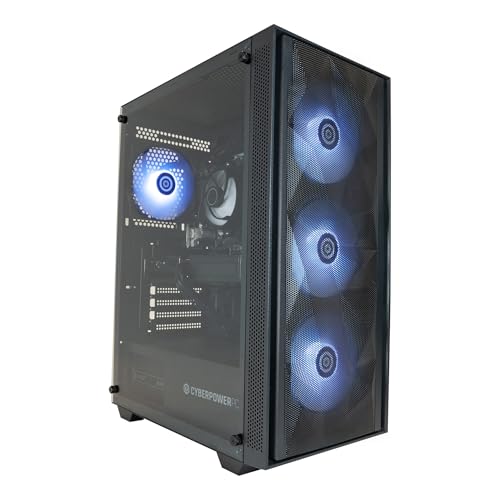
This model strips back to the RTX 5060 (8GB variant), positioning itself as the ideal entry point for budget-conscious streamers who prioritise CPU performance over raw GPU grunt. The Ryzen 5 8400F core is identical to the Ti variant above: eight cores, 16 threads, excellent single-threaded and multi-threaded performance. Where you save is GPU, the 5060 is still capable for 1080p gaming at medium to high settings (60, 90 fps), but lacks the extra CUDA cores of the Ti model. For pure streaming purposes, this is largely irrelevant; you will still access NVENC encoding at the same efficiency, and the GPU becomes a secondary concern if your streaming focus is narrative-driven or less GPU-demanding titles like Elden Ring, Stardew Valley, or retro games.
The 16GB DDR5 RAM and 1TB NVMe SSD remain unchanged, providing the same responsive multitasking experience. Power draw is similarly moderate (around 280W), and thermal management is solid. The primary audience here is the streamer who plays lighter games, focuses on creative content (digital art, music production, code reviews), or simply wants a no-compromise budget machine that will never bottleneck their streaming software. You also gain an approximately £100 saving versus the Ti model, which translates to better value for money if you are confident that your gaming catalogue does not demand top-tier GPU performance.
This unit excels when paired with external capture cards or multi-PC streaming setups, where the GPU is bypassed entirely and the CPU handles all encoding. It is equally at home for Twitch creative categories, YouTube educational content, or professional Zoom streaming with virtual backgrounds and effects running on the same system.
Pros
- Ryzen 5 8400F delivers exceptional multi-threaded performance for CPU-based encoding at minimal cost premium
- RTX 5060 is sufficient for NVENC offloading and 1080p gaming without demanding resolution compromises
- Saves £100 versus the Ti variant for streamers not chasing 1440p+ gaming performance
- 16GB DDR5 and 1TB SSD enable professional-grade multitasking and content library storage
Cons
- RTX 5060 limits 1440p gaming comfort; many new AAA titles may require medium settings
- No upgrade path to high-end GPUs without PSU replacement
2. DAHONGYUN 23.8" All-in-One Desktop Computer
The DAHONGYUN 23.8-inch all-in-one represents the lowest-cost entry in this buying guide, designed for users prioritising space efficiency and simplicity over raw performance. The Windows 11 Pro licence is included, and the Intel i5 processor provides baseline multitasking capability. However, integrated graphics mean there is no discrete GPU for NVENC encoding or gaming acceleration, placing this unit firmly in the office and light creative category rather than streaming-optimised hardware.
For streamers, the all-in-one form factor has merit: monitor, speakers, and PC are consolidated into a single unit, reducing clutter and setup complexity. However, the absence of discrete GPU and limited RAM (specifications not detailed) make simultaneous gaming and streaming untenable on this machine. Its best streaming application is stationary content creation, screen sharing for coding tutorials, Zoom presentations, or educational content where your gameplay is via screen capture from a secondary device. If you plan to stream actual gameplay or run resource-intensive creative software, this machine will struggle.
The price is attractive for a pre-configured, ready-to-use system, and Windows 11 Pro includes Remote Desktop and bitlocker encryption, beneficial for professional content creators. It is not recommended for anyone serious about gaming-focused streaming or expecting CPU-intensive encoding.
Pros
- Extremely affordable entry-level desktop with Windows 11 Pro included
- All-in-one form factor saves desk space and eliminates monitor purchase
- Suitable for office productivity, light streaming (screen-share, presentations), and general computing
Cons
- Integrated graphics prohibit gaming and GPU-accelerated encoding; no NVENC capability
- Specifications sparse; RAM, storage, and processor clock details absent, limiting suitability assessment
- Limited upgrade potential; integrated design constrains future GPU or RAM additions
Buying Guide
When selecting a streaming desktop under £1500, prioritise CPU cores above raw GPU clock speed. Modern streaming software relies on multi-threaded encoding; an eight-core Ryzen 5 or equivalent will outperform a six-core i7 even if the latter has slightly higher boost clocks. Aim for 16GB RAM minimum, preferably DDR5 for longevity; 8GB is genuinely bottlenecked when multitasking with OBS, Discord, Chrome, and a modern game simultaneously. GPU choice hinges on your gaming library: if you play AAA titles at 1440p, invest in an RTX 5060 Ti or better. If your content focuses on creative software (streaming design, music production, tutorials), a mid-range GPU or even Apple's integrated GPU suffices, provided your CPU is robust.
Storage is non-negotiable: a 1TB NVMe SSD is minimum, permitting two to three game installations plus your operating system and streaming software. HDDs are obsolete for streaming; they introduce micro-stutters during disk access, audible as frame dips to viewers. Check warranty duration before purchase; three years is industry standard, and longer is beneficial given the UK's variable climate stressing components.
Consider your streaming platform and software. Windows machines using OBS or Streamlabs have access to more plugins and integrations than macOS, though the Mac ecosystem is simpler and more stable for integrated workflows. Windows also offers superior game compatibility and controller support. Conversely, Apple machines deliver lower CPU usage for equivalent encoding quality and absolute silence, critical if you stream without noise gates.
Finally, assess future upgrade paths. Windows machines permit GPU, RAM, and storage swaps; Apple machines do not. If you envision upgrading in two or three years, Windows is more economical long-term. If you value a finished system that requires no tinkering, Apple justifies its premium. Budget approximately £200 for a quality streaming microphone for a 2K webcam or capture card, and £50 for cable management; these peripherals are non-optional for professional streaming presence.
The CyberPowerPC Wyvern Gaming PC with Ryzen 5 8400F and RTX 5060 Ti is the outright winner for most streamers under £1500. It delivers eight CPU cores with exceptional single-threaded performance, a capable mid-range GPU for simultaneous gaming and streaming, 16GB of fast DDR5 RAM, and proven CyberPowerPC quality with UK support. The price-to-performance ratio is unbeatable, and the machine will comfortably stream 1080p60 whilst playing demanding AAA titles without bottleneck or thermal throttle. If you are a Windows user, this is your best choice.
Runners-up depend on your priorities. The RTX 5060 variant saves £100 for lighter gaming; the Mac mini M4 is superior for Mac-first creators and silent operation; and the iMac M4 suits professional streamers who need an all-in-one visual anchor for their streaming setup. The ADMI and DAHONGYUN options are included for extreme budget consciousness, but their specification gaps and performance limitations place them below the three main recommendations. Avoid the ADMI models unless you can contact the vendor directly and confirm processor and GPU specifications match your streaming bitrate and gaming expectations. Purchase now and you will have a capable streaming machine that will not require upgrade for a minimum of two to three years.