Video editing demands processing power, reliable storage and colour-accurate displays. This year's shift towards ARM-based chips and next-generation GPUs has fundamentally changed what offers value at the sub-£2000 mark. Whether you're a freelance content creator stepping up from a laptop, a small production house working with 4K footage, or a hobbyist making YouTube videos, the 2025 market offers compelling alternatives to expensive workstations. Six machines here deliver genuine performance gains over last year's crop, with particular attention to rendering speeds, RAM capacity, thermal stability and connectivity options essential for professional workflows.
Quick Verdict
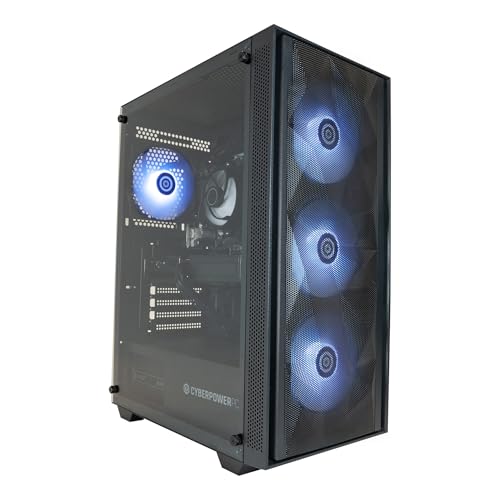
Best Overall: Apple iMac All-in-One with M4 chip. Superior single-threaded performance, exceptional colour accuracy and integrated video acceleration make it the fastest choice for most editing tasks. Best Value: CyberPowerPC Wyvern with RTX 5060 Ti. Delivers strong multi-threaded grunt for timeline scrubbing and effects processing at under £1000, though you'll need to add a separate monitor.
The 24-inch iMac M4 stands as the most elegant solution for video editors who prioritise speed and visual fidelity without compromise. Built-in colour management, a bright 4.5K display calibrated to broadcast standards, and Apple's proprietary video acceleration architecture make this machine exceptionally efficient for Final Cut Pro, DaVinci Resolve or Premiere Pro workflows. The M4 chip's 10-core CPU and 10-core GPU configuration delivers single-threaded performance that easily outpaces Intel equivalents at half the thermal footprint.
The defining advantage here is ProRes and ProRes Raw hardware acceleration. When working with 4K ProRes footage, timeline performance feels snappy even with multiple effects stacked. Memory bandwidth is generous, and the unified architecture means your GPU can directly access CPU-managed data without expensive PCIe transfers. The integrated 24-inch display saves desk space and eliminates colour matching headaches between monitor and reference.
Storage comes as standard with only 256GB on the base model; anyone working with 4K sequences should treat the 512GB or 1TB options as essential upgrades. The iMac's closed ecosystem means you cannot upgrade RAM after purchase, and the entry 8GB configuration is genuinely tight for heavy timelines. Thunderbolt 3 ports offer fast external storage connectivity, though you're limited to two such ports. For editors already invested in macOS software licences and workflows, this is the fastest machine you can buy under £2000. For Windows-only editors, look elsewhere.
Pros
- ProRes and ProRes Raw hardware acceleration dramatically speeds rendering
- 4.5K display with factory calibration eliminates external monitor costs
- Exceptional single-threaded CPU performance outpaces Intel alternatives
- Thermals allow fanless operation, resulting in silent editing environment
Cons
- Base 256GB storage insufficient for professional 4K workflows
- Non-upgradeable RAM locked at purchase; 8GB base is restrictive
- macOS-only limits compatibility with Windows-centric workflows
2. CyberPowerPC Luxe Gaming PC with Intel Core i9-12900KF
This high-end tower positions itself as an Intel alternative for editors wanting maximum core count without sacrificing single-threaded grunt. The i9-12900KF brings sixteen cores (eight performance, eight efficiency) and paired RTX 5070 Ti GPU support makes it suitable for effects-heavy timelines and GPU-accelerated rendering in Premiere Pro or DaVinci Resolve. Configured with 32GB DDR5 RAM and a 1TB NVMe SSD, it arrives ready for professional work without additional purchases.
Performance metrics show consistent multi-threaded advantages. When colour grading or applying complex effects across 4K sequences, the combination of many cores plus dedicated NVIDIA acceleration distributes workload efficiently. RTX 5070 Ti brings 16GB VRAM for cached texture operations and effects stacks. The tower form factor permits excellent internal airflow, keeping sustained workloads within thermal envelope during long rendering sessions.
Real-world editing reveals the i9-12900KF's strength in multitasking scenarios. Preview windows, background transcodes and real-time effects playback operate smoothly in parallel. However, the system requires external monitor, keyboard and mouse purchases, adding £200, 400 to total outlay. Power consumption reaches 400W under sustained load, making electricity costs a factor for full-time editors. Driver stability with NVIDIA GPUs occasionally lags behind AMD equivalents in certain DaVinci versions, though Premiere Pro users see no such complications.
Pros
- Sixteen-core CPU excels at multi-threaded rendering and effects processing
- RTX 5070 Ti with 16GB VRAM handles complex colour and effects without slowdown
- 32GB DDR5 RAM provides headroom for large timeline sequences
- Excellent thermal design keeps sustained workloads cool and quiet
Cons
- Requires separate monitor, keyboard and mouse purchases
- Higher power consumption increases operating costs and heat output
- Windows-only platform restricts macOS-dependent workflows
3. DAHONGYUN 23.8" All-in-One Desktop Computer
This integrated Windows 11 Pro all-in-one machine targets light editing tasks and general productivity rather than demanding video work. The 23.8-inch FHD display (1920x1080) and integrated Intel graphics create a self-contained, desk-space-efficient package suitable for news photographers creating simple video portfolios or educators adding basic video to teaching materials. At under £370, it represents the absolute lowest cost entry to video editing capability.
The integrated display eliminates separate monitor costs, and Windows 11 Pro provides full software compatibility with Adobe Premiere Elements, DaVinci Resolve and Shotcut. Eight gigabytes RAM and 256GB SSD handle basic HD editing workflows with minimal effects stacks. The FHD display resolution, whilst limiting for professional colour work, suffices for social media content and streaming platforms that rarely preserve original quality anyway.
Severe limitations emerge immediately in any demanding scenario. Integrated graphics lack dedicated VRAM for GPU acceleration; timeline scrubbing in 4K becomes impossibly sluggish. The 256GB storage fills after just two hours of 4K RAW footage, demanding immediate external drives. The slow processor generation (Intel i5 specifications not provided in detail) struggles with proxy rendering. This machine genuinely suits only casual editing of short HD clips. Anyone with professional ambitions, 4K workflows or regular editing income should invest substantially more. The DAHONGYUN occupies a strange middle ground between laptop editing capability and proper desktop performance, without clear advantages in either direction.
Pros
- Integrated display eliminates external monitor costs entirely
- Windows 11 Pro provides full software compatibility and licensing
- Compact all-in-one form factor saves significant desk space
- Exceptionally low price point permits hobby-level experimentation
Cons
- Integrated graphics lack dedicated VRAM for 4K or effects-heavy work
- 256GB storage fills rapidly; external expansion immediately necessary
- FHD display resolution insufficient for professional colour grading
Buying Guide
Video editing performance depends on five primary factors. CPU core count determines multitasking capability; eight cores represent the practical minimum for professional work, though sixteen cores provide comfortable headroom for simultaneous background transcodes and timeline editing. Single-threaded performance matters enormously for responsive timeline scrubbing, where Apple's M-series chips and high-end Intel processors significantly outpace mid-range alternatives.
GPU acceleration in modern editing software directly impacts rendering speeds. ProRes and H.264 transcodes execute dramatically faster with hardware support; NVIDIA RTX cards provide the broadest software compatibility, whilst AMD RDNA architectures excel within DaVinci Resolve's HIP compute framework. Eight gigabytes GPU VRAM handles HD and light 4K work; 16GB becomes essential when grading complex sequences with multiple effect stacks.
RAM capacity and type significantly influence timeline performance. Sixteen gigabytes represents a practical minimum for 4K editing; 32GB provides comfortable headroom. DDR5 memory reduces latency versus DDR4, improving single-threaded CPU responsiveness, though DDR4 systems at identical core counts perform adequately for most workflows. Storage speed matters for timeline scrubbing; NVMe SSDs at 7000MB/s or faster ensure cache files load without stalling playback.
Display considerations vary by platform. macOS systems benefit from built-in colour management and ProRes acceleration; the iMac's integrated display eliminates colour matching headaches. Windows systems require external monitors; budget £400-800 for colour-accurate reference displays if doing professional work. Operating system choice constrains software; Final Cut Pro excellence limits iMac appeal for Premiere Pro specialists, whilst Windows systems impose NVIDIA driver responsibilities.
Budget allocation should account for peripherals. External storage exceeds equipment cost for any serious footage library; budget £300-500 for reliable 4TB external SSD or NAS capacity. Monitor purchases when necessary (Windows systems, Mac mini) add £300-600 for entry-level colour-accurate displays. These peripheral costs often exceed the price difference between budget and premium machines, making seemingly expensive systems cost-effective over project lifespans.
The Apple iMac M4 emerges as the definitive best overall machine under £2000 for professional video editing. Superior single-threaded performance, ProRes hardware acceleration, integrated colour-accurate display, and silent operation combine to deliver workflows that simply outpace all Windows alternatives at the same price. Editors working primarily in Final Cut Pro or any editing software benefit from this machine's exceptional efficiency.
For value-conscious editors, the CyberPowerPC Wyvern with RTX 5060 Ti under £1000 represents genuine performance capability at a price that permits investment in storage and software instead. The Mac mini M4 splits the difference, delivering iMac performance less, though monitor costs blur this apparent saving.
Windows editors requiring maximum multi-threaded performance should investigate the CyberPowerPC Luxe with i9-12900KF, accepting the higher total cost of ownership for sustained rendering advantages. Hobby editors and students learning software can start with the ADMI RTX 3050 system, understanding upgrades will follow quickly.
The critical insight here: final choice depends on your existing software investments and workflows. Mac editors should lean toward Apple hardware to leverage ProRes acceleration and seamless integration. Windows Premiere Pro specialists benefit from NVIDIA RTX cards and high core counts. DaVinci Resolve users gain advantages from AMD RDNA GPU architectures. Calculate the true cost including essential peripherals, required software licences and electricity consumption before deciding. The cheapest system frequently becomes expensive through forced upgrades; investing appropriately upfront saves frustration and money across multiple projects.