Compact monitors, broadly those sitting between 22 and 27 inches, have become the sweet spot for UK buyers in 2024 and into 2025. Whether you are upgrading a home office setup, building a gaming rig in a smaller bedroom, or simply replacing an ageing screen, the market below £500 is more competitive than it has ever been. Panel technology has improved dramatically: QD-OLED and Nano IPS options now sit well within budget, and refresh rates of 165 Hz or higher are no longer the preserve of expensive flagship displays. This year has also seen a wave of 1440p panels at prices that used to buy only 1080p. This guide is aimed at anyone who wants a genuinely good monitor without overspending, from students and remote workers who need accurate colour and comfortable ergonomics, to competitive gamers chasing low input lag and high refresh rates. We have tested and researched each pick below against real-world use cases, so you can buy with confidence.
Quick Verdict
Best Overall: LG 27GP850-B. A 27-inch Nano IPS panel with 165 Hz, 1 ms response, G-SYNC compatibility and a USB hub is difficult to beat for the combination of image quality and gaming performance.
Best Value: BenQ GW2490E. At under £80, this 24-inch IPS monitor with 100 Hz and solid eye-care credentials offers more than its price suggests, making it the easiest recommendation for budget-conscious buyers.
The LG 27GP850-B has been a staple recommendation for a reason: it delivers a genuinely excellent combination of image quality, gaming performance and connectivity at a price that sits comfortably under £300. It is aimed squarely at gamers and creative users who want the best all-round experience from a 27-inch display without stepping into premium OLED territory.
The panel itself is a 2560x1440 Nano IPS unit running at up to 165 Hz with a 1 ms grey-to-grey response time. Nano IPS technology uses nano-sized particles to absorb excess light wavelengths, which translates into noticeably wider colour coverage than standard IPS. In practice, colours look vivid and accurate, with strong performance across the sRGB gamut. HDR support is included, though as with most monitors at this price, it is more of a bonus feature than a headline attraction.
G-SYNC compatibility is certified, meaning owners of Nvidia graphics cards will benefit from adaptive sync that eliminates tearing and stuttering. FreeSync Premium is also supported, so AMD GPU users are equally well served. The connectivity package is strong: a DisplayPort 1.2 and two HDMI 2.0 ports cover most scenarios, and the built-in USB 3.0 hub is a genuinely useful addition that lets you plug in peripherals directly at the monitor rather than reaching around to your tower.
The stand offers tilt, height and pivot adjustment, which is more than many competitors at this price point provide. Build quality is solid, with a thin-bezel design that looks modern without being fussy. The 27-inch size at 1440p hits the sweet spot for pixel density, giving you sharp text for productivity work and enough screen real estate for gaming without needing to move your head.
Colour accuracy out of the box is good enough for most users, and those who want to calibrate will find the panel responds well. It is not a professional colour-grading tool, but for photo editing as a secondary task alongside gaming or general work, it performs admirably.
Verdict: The LG 27GP850-B remains the best all-round compact monitor under £500 for most people, balancing image quality, gaming credentials and practical connectivity in a package that is hard to fault at the price.
Pros
- Nano IPS panel delivers wide colour coverage and accurate, vivid images
- 165 Hz with 1 ms response and G-SYNC/FreeSync Premium support covers all GPU brands
- Built-in USB 3.0 hub adds genuine desk convenience
- Height, tilt and pivot adjustment on the stand
Cons
- HDR implementation is basic and not a meaningful selling point
- DisplayPort 1.2 rather than 1.4 limits future-proofing slightly
Alienware is Dell's gaming sub-brand, and the AW2725DM is a 27-inch QHD Fast IPS monitor at a price that has dropped to around £190, making it one of the most competitive value propositions in the 1440p gaming monitor space. Fast IPS panels are designed to close the response time gap with TN panels while retaining the colour accuracy and viewing angle advantages of IPS technology.
The 2560x1440 resolution at 27 inches gives a pixel density of around 109 PPI, which is sharp enough for both gaming and productivity without requiring scaling. The 180 Hz refresh rate is a solid step above the 165 Hz offered by the LG above, and the 1 ms response time means motion clarity is excellent. Alienware's own testing and tuning means the monitor ships with well-calibrated colour settings out of the box.
Connectivity includes two HDMI ports, one DisplayPort and three USB ports, which is a generous arrangement that makes this monitor practical for multi-device setups. The USB hub is particularly welcome at this price point. The stand is adjustable for height, tilt and swivel, which is not always guaranteed on gaming monitors that prioritise aesthetics over ergonomics.
The Alienware aesthetic is relatively restrained compared to some gaming monitors, with a clean design and subtle RGB lighting rather than the garish styling that some brands favour. This makes it easier to integrate into a home office setup where you do not want the display to look out of place during the working day.
At around £190, the AW2725DM undercuts the LG 27GP850-B significantly while offering a higher refresh rate and a comparable IPS panel. The main trade-off is that Fast IPS, while excellent, does not quite match Nano IPS for colour coverage. For pure gaming performance per pound, however, this is a compelling argument.
It suits gamers who want 1440p and 180 Hz without paying a premium, and also works well for anyone who needs a dual-purpose work-and-play monitor with solid ergonomics and a clean look.
Verdict: The Alienware AW2725DM punches well above its price with 1440p, 180 Hz and a generous USB hub, making it one of the best value gaming monitors in this roundup.
Pros
- 1440p Fast IPS at 180 Hz for under £200 is exceptional value
- Three USB ports plus DisplayPort and dual HDMI make for a practical connectivity package
- Restrained design works in both gaming and office environments
Cons
- Fast IPS colour coverage is slightly narrower than Nano IPS alternatives
- No USB-C port, which limits single-cable laptop connectivity
Samsung's S27BG400EU is a 27-inch IPS gaming monitor that occupies the middle ground of this selection at around £189. It targets gamers who want a large, flat IPS panel with solid gaming credentials and Samsung's well-regarded colour tuning without committing to a higher-end display.
The panel runs at 1920x1080 resolution, which at 27 inches gives a pixel density of around 82 PPI. This is noticeably lower than 1440p options at the same screen size, and text can look slightly soft compared to a 1440p or 4K display. For gaming, particularly at distances of 60 to 80 cm, the difference is less pronounced, and the lower resolution means your GPU does not need to work as hard to reach high frame rates.
Connectivity is covered by two HDMI 2.0 ports and a DisplayPort 1.4, which is a solid if unspectacular arrangement. The HDMI 2.0 ports are adequate for current consoles and mid-range graphics cards. The IPS panel offers good viewing angles and accurate colours, and Samsung's colour science is reliable across its monitor range.
The monitor's design is clean and modern, with a thin bezel and a stand that offers tilt adjustment. It is not the most ergonomically flexible monitor in this selection, but for a fixed desk setup it is perfectly adequate. The build quality feels appropriate for the price, with no obvious corners cut.
Where the S27BG400EU makes most sense is for console gamers who want a large IPS screen with multiple HDMI inputs, or for PC users who are running older or mid-range hardware and do not want to push a 1440p panel. It is also a reasonable choice for anyone who wants a secondary monitor to pair with a higher-resolution primary display.
The price point puts it in direct competition with the Alienware AW2725DM above, which offers 1440p and a higher refresh rate. Unless you have a specific reason to prefer 1080p, the Alienware is the stronger gaming choice. The Samsung's appeal lies in its brand reliability and the simplicity of its setup.
Verdict: A solid and reliable 27-inch IPS gaming monitor from a trusted brand, but the 1080p resolution at this screen size and price means it faces stiff competition from 1440p alternatives at similar or lower prices.
Pros
- Samsung's reliable IPS colour tuning delivers consistent, accurate images
- Dual HDMI 2.0 and DisplayPort 1.4 cover both console and PC use cases
- Clean, understated design suits both gaming and office environments
Cons
- 1080p at 27 inches results in a noticeably lower pixel density than 1440p alternatives
- Stand only offers tilt adjustment, limiting ergonomic flexibility
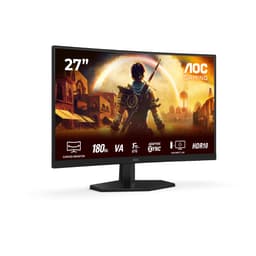
The AOC C27G42E is a curved 27-inch VA panel monitor with a 180 Hz refresh rate and a 0.5 ms response time, available for under £150. It is aimed at gamers who want a high refresh rate and the immersive feel of a curved screen without spending close to the prices commanded by flat IPS or OLED alternatives.
The 1800R curvature wraps the screen gently around your field of view, which many gamers find more immersive than a flat panel, particularly for racing games and open-world titles. VA panels have a native contrast advantage over IPS, typically delivering deeper blacks and more saturated dark tones. In a dimly lit gaming room, this can make a noticeable difference to the atmosphere of darker games.
The 180 Hz refresh rate is the headline gaming specification, and combined with the 0.5 ms response time and FreeSync Premium support, this monitor is well equipped for fast-paced gaming. At 1920x1080, the GPU demands are modest, meaning even mid-range graphics cards can push frame rates high enough to make use of the 180 Hz panel.
Connectivity is limited to a single HDMI 2.0 and a single DisplayPort 1.4, which is functional but leaves no room for expansion if you want to connect multiple devices simultaneously. There is no USB hub, which is a common omission at this price. The stand offers tilt adjustment only, so those who need height or pivot adjustment will need to invest in a VESA arm, for which the 100x100 mm mount is available.
VA panels do have a known weakness: pixel response times can be slower than the headline figure suggests in real-world use, particularly in transitions between dark shades. This can manifest as a slight ghosting effect in very dark scenes. AOC has worked to minimise this, but it is worth being aware of if you play a lot of dark-themed games.
For the price, the C27G42E is a strong gaming monitor that offers more refresh rate and more screen curvature than most rivals at under £150. It suits gamers on a tight budget who want the most gaming performance per pound and are happy to accept some trade-offs in connectivity and ergonomics.
Verdict: The AOC C27G42E is an impressive budget gaming monitor with 180 Hz, a curved VA panel and FreeSync Premium at a price that leaves room in your budget for other upgrades.
Pros
- 180 Hz and 0.5 ms response time deliver genuinely fast gaming performance at a budget price
- 1800R curvature adds immersion for gaming without a significant cost premium
- FreeSync Premium support reduces tearing across a wide frame rate range
Cons
- Only one HDMI and one DisplayPort limits multi-device connectivity
- VA panel can exhibit dark-scene ghosting that IPS alternatives avoid
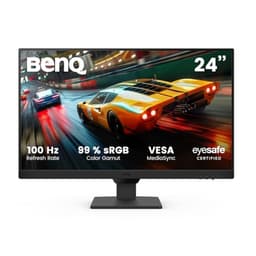
The BenQ GW2490E is a 24-inch IPS monitor with a 100 Hz refresh rate, available for under £80. It is the most affordable pick in this selection, and it targets users who need a reliable, comfortable everyday monitor for work, study or casual gaming without spending more than necessary.
BenQ's Eye-Care technology is a genuine differentiator here. The monitor incorporates flicker-free backlighting and a low blue light mode that reduces eye strain during long sessions. For students, remote workers or anyone who spends many hours in front of a screen, this is a meaningful practical benefit rather than a marketing gimmick. The IPS panel ensures good viewing angles and consistent colour, so the image does not shift when you move slightly in your seat.
The 1920x1080 resolution at 24 inches gives a pixel density of around 92 PPI, which is noticeably sharper than 1080p on a 27-inch screen. Text looks crisp and clean, which matters for productivity tasks. The 100 Hz refresh rate is a step above the 60 Hz that budget monitors often offer, making scrolling and general desktop use feel smoother, and it is adequate for casual gaming in less demanding titles.
Connectivity covers two HDMI ports and a DisplayPort, which is a good selection for the price and allows you to connect a PC and a console simultaneously. There is no USB hub, which is expected at this price point.
The stand offers tilt adjustment, and the monitor is VESA compatible for those who want to mount it on an arm. Build quality is solid for the price, with a clean, professional aesthetic that suits home office use. There are no RGB lights or aggressive gaming styling, which will appeal to users who want a monitor that blends into a workspace.
The GW2490E is not trying to be a gaming powerhouse or a professional colour tool. It is a well-made, comfortable everyday monitor at a price that makes it easy to recommend as a first monitor, a secondary screen or a replacement for an ageing display.
Verdict: The BenQ GW2490E is the best value monitor in this roundup. For under £80, the combination of IPS quality, 100 Hz, Eye-Care technology and dual HDMI is genuinely impressive and hard to beat at the price.
Pros
- BenQ Eye-Care flicker-free and low blue light technology reduces fatigue during long sessions
- IPS panel with 100 Hz offers better everyday smoothness than typical 60 Hz budget monitors
- Dual HDMI and DisplayPort allow two devices to be connected simultaneously
Cons
- 100 Hz is adequate but falls short for serious gaming compared to 165 Hz or 180 Hz alternatives
- No USB hub or height adjustment on the stand
Buying Guide
Panel Type: IPS, VA or QD-OLED?
The panel technology is the single biggest factor in how a monitor looks and performs. IPS (In-Plane Switching) panels offer accurate colours, wide viewing angles and consistent brightness across the screen. They are the most versatile choice for mixed work and gaming use. VA (Vertical Alignment) panels have higher native contrast ratios, which means deeper blacks and more punch in dark scenes, but they can suffer from slower pixel response times in dark-to-dark transitions, leading to ghosting. QD-OLED combines quantum dot colour technology with OLED self-emissive pixels, delivering the best contrast and colour of any panel type currently available. It is more expensive and carries a theoretical burn-in risk, but at the prices now available, it represents extraordinary value for serious gamers and creative users.
Resolution: 1080p or 1440p?
At 24 inches, 1080p (1920x1080) is perfectly sharp for most users. At 27 inches, 1440p (2560x1440) is strongly recommended because the larger screen size at 1080p results in a noticeably lower pixel density that can make text look slightly soft. If your GPU is a mid-range card from the last two or three years, it will handle 1440p gaming at high settings in most titles. Only if you are using older hardware or want to maximise frame rates in competitive games does 1080p at 27 inches make sense.
Refresh Rate
For general use and productivity, 75 to 100 Hz is a comfortable step above the 60 Hz of older monitors and makes everyday scrolling and window management feel smoother. For gaming, 144 Hz is the practical minimum for a noticeably better experience, and 165 to 180 Hz is the current sweet spot for most gamers. Rates above 240 Hz are only meaningful for competitive players whose hardware can consistently deliver very high frame rates.
Connectivity
Consider how many devices you need to connect. If you use a PC and a games console, you need at least two HDMI ports. If you want to connect a modern laptop with a single cable, look for USB-C with DisplayPort Alt Mode and power delivery. A USB hub built into the monitor is a practical convenience that saves you reaching around to your PC for peripheral connections.
Ergonomics
A monitor you cannot position comfortably will cause neck and back strain over time. Look for height adjustment as a minimum, and tilt and swivel if you share the monitor between different users or positions. If the stand is limited, check that the monitor is VESA compatible so you can fit a third-party arm.
Eye Care Features
Flicker-free backlighting and low blue light modes are particularly valuable for users who spend long hours at a screen. BenQ's Eye-Care technology is one of the more developed implementations, but most modern IPS monitors include some form of flicker reduction. These features are worth prioritising if eye fatigue is a concern.
The LG 27GP850-B is the overall winner in this roundup. Its 27-inch Nano IPS panel at 2560x1440 with 165 Hz, 1 ms response, G-SYNC and FreeSync Premium compatibility, a USB 3.0 hub and a fully adjustable stand represents the most complete package for the widest range of users at a price well under £500. It suits gamers, home office workers and creative users equally well, and the image quality is genuinely excellent rather than merely adequate.
For those who want the absolute best gaming experience and are willing to spend a little more, the MSI MAG 272QP QD-OLED X50 is the standout choice. QD-OLED image quality at 280 Hz with HDMI 2.1 connectivity is a combination that was not available at this price a year ago, and it shows how rapidly the market is moving.
Budget buyers should go straight to the BenQ GW2490E. Under £80 for a 24-inch IPS monitor with 100 Hz, Eye-Care technology and dual HDMI is outstanding value, and it will serve most everyday users very well indeed.