Budget monitors have improved dramatically over the past twelve months. Where you once had to accept washed-out VA panels or sluggish response times below £150, today you can pick up a 180 Hz curved gaming screen or a well-calibrated IPS panel with proper ergonomics for under £100. This roundup is aimed at students, home-office workers, casual gamers and anyone upgrading from an ageing display without spending a fortune. We have focused on screens priced under £200, selecting models that deliver genuine value rather than simply the lowest price tag. Each pick has been assessed against real-world use cases: a student who needs accurate colours for coursework, a flat-share gamer who wants high refresh rates on a tight budget, and a remote worker who sits in front of a screen for eight hours a day. The Alienware AW2725DM at around £190 sits at the top of this price bracket and represents the ceiling of what we consider budget territory for 2025.
Quick Verdict
Best Overall: Alienware AW2725DM, a 27-inch QHD Fast IPS panel at 180 Hz that punches well above its price point and suits both gaming and everyday work. Best Value: BenQ GW2490E, a 24-inch 100 Hz IPS screen available for under £80 that covers the basics brilliantly and is hard to beat for sheer cost-per-quality.
The Alienware AW2725DM is a remarkable monitor to find sitting at the top of a budget roundup. At around £190, it is genuinely at the ceiling of what most people would call affordable, yet it delivers specifications that were commanding two or three times that price just two years ago. This is a 27-inch QHD (2560x1440) Fast IPS panel running at 180 Hz with a quoted 1 ms response time, and it is aimed squarely at the gamer who refuses to compromise on smoothness or clarity but cannot stretch to a premium display.
The QHD resolution at 27 inches hits a sweet spot. Pixel density is high enough that text looks crisp for productivity work, yet the GPU demand is not as punishing as 4K. If you are running a mid-range graphics card such as an RTX 3060 or RX 6700 XT, you will be able to push this display hard in most titles. The Fast IPS panel technology means colours are vivid and viewing angles are wide, so the screen works equally well for watching films, editing photos casually or browsing the web during the day.
Connectivity is solid for the price. You get two HDMI ports, one DisplayPort and three USB ports, which means you can keep a console and a PC connected simultaneously without swapping cables. The stand offers tilt adjustment, and while it is not the most feature-rich ergonomic solution on the market, it is adequate for most desk setups. The bezels are slim on three sides, giving the monitor a clean, modern look that fits the Alienware aesthetic without being garish.
One area where Alienware has clearly made savings is the stand's limited adjustability. Height adjustment is not available on this model, which is a genuine omission at this price. You may need a monitor arm or a riser to get the screen to the correct eye level. HDR support is present but, as with most monitors in this category, the peak brightness is not high enough for a truly transformative HDR experience. Treat it as a bonus feature rather than a selling point.
For anyone who games regularly and also uses their monitor for work, the AW2725DM is the standout choice in this price bracket. The combination of QHD resolution, 180 Hz refresh rate and Fast IPS colour accuracy is genuinely difficult to match below £200 in 2025. It is the Best Overall pick in this roundup without question.
Pros
- QHD resolution at 180 Hz for under £200 is exceptional value in 2025
- Fast IPS panel delivers accurate colours and wide viewing angles
- Dual HDMI ports allow simultaneous PC and console connection
Cons
- No height adjustment on the stand, which is a real omission at this price
- HDR implementation is too dim to be genuinely useful
The Samsung S27BG400EU is a 27-inch FHD IPS gaming monitor that sits in a well-established sweet spot for budget gamers. At around £189, it competes directly with the Alienware AW2725DM above, and the choice between the two will largely come down to whether you prioritise resolution or brand ecosystem features. The Samsung runs at 165 Hz and uses an IPS panel, delivering a smooth, responsive experience for fast-paced games without the colour compromises associated with budget VA alternatives.
The FHD (1920x1080) resolution is a step down from the Alienware's QHD, but this is not necessarily a disadvantage. At 27 inches, 1080p is less pixel-dense than ideal, and some users will notice slightly soft text in productivity applications. However, for gaming, the lower resolution means your GPU has an easier time hitting high frame rates, which makes the 165 Hz refresh rate more achievable on mid-range hardware. If you are running an older graphics card or a budget build, the S27BG400EU may actually deliver a smoother gaming experience than a QHD alternative.
Samsung's IPS panel here offers good colour accuracy out of the box, with coverage of the sRGB colour space that is more than adequate for everyday content consumption and casual creative work. The screen uses Samsung's own eye-care technology to reduce blue light emission, which is a welcome feature for anyone who spends long hours at a desk. The monitor also supports AMD FreeSync Premium, reducing screen tearing across a wide range of frame rates.
The port selection is practical: two HDMI 2.0 inputs and one DisplayPort 1.4. There are no USB hub ports, which is a minor inconvenience if you have multiple peripherals to manage. The stand provides tilt adjustment only, so again, a monitor arm is worth considering if you need precise positioning. Build quality feels solid for the price, with a clean design that avoids the aggressive gamer aesthetic of some rivals.
The S27BG400EU is best suited to console gamers who want a large, smooth screen on a budget, or PC gamers with modest hardware who want to maximise frame rates at 1080p. It is a dependable, well-rounded choice that delivers Samsung's panel quality at a price that feels genuinely accessible.
Pros
- 165 Hz IPS panel is smooth and colour-accurate for gaming and everyday use
- Lower 1080p resolution is easier to drive at high frame rates on budget GPUs
- Samsung's eye-care features make long sessions more comfortable
Cons
- 1080p at 27 inches results in noticeably lower pixel density than QHD alternatives
- No USB hub ports limits desk connectivity
The AOC C27G42E is a 27-inch curved Full HD gaming monitor that makes a strong case for itself at under £150. It uses a VA panel with a 1500R curve, 180 Hz refresh rate and a quoted 0.5 ms response time, making it one of the fastest and most immersive options in this price bracket. If you want a curved screen that wraps around your field of vision and delivers buttery-smooth gaming without spending a fortune, this AOC is a serious contender.
The VA panel technology is a deliberate choice here. Compared to IPS, VA panels typically offer higher contrast ratios, which means deeper blacks and a more cinematic look in dark games and films. The trade-off is that viewing angles are narrower and some VA panels exhibit a phenomenon known as smearing on fast-moving objects. AOC has worked to mitigate this with the 0.5 ms response time rating, and in practice the C27G42E performs well in fast-paced titles, though it is not quite as sharp in motion as the best IPS alternatives.
The 1500R curve is one of the tighter curvatures available at this screen size, and it genuinely adds to the sense of immersion when gaming. Sitting at a normal desk distance of around 60 to 80 cm, the curve fills your peripheral vision more effectively than a flat panel. This makes the C27G42E particularly well suited to racing games, first-person shooters and open-world titles where environmental immersion matters.
AMD FreeSync Premium support is included, which synchronises the monitor's refresh rate with your GPU's output to eliminate tearing across a wide frame-rate range. The port selection is minimal: one HDMI 2.0 and one DisplayPort 1.4, which is sufficient for most single-device setups but means you cannot easily keep two sources connected simultaneously. The stand offers tilt adjustment only.
The C27G42E is the pick for the budget gamer who wants maximum immersion and refresh rate performance without paying IPS panel prices. It is not the right choice for colour-critical work or anyone who needs wide viewing angles, but for gaming in a darkened room, it delivers an experience that feels significantly more premium than its price suggests.
Pros
- 180 Hz refresh rate and 0.5 ms response time deliver genuinely smooth gaming performance
- 1500R VA curve creates strong immersion at a competitive price
- Higher contrast ratio than IPS alternatives produces deeper blacks in dark content
Cons
- VA panel has narrower viewing angles than IPS, which matters for shared viewing
- Only one HDMI port limits multi-device connectivity
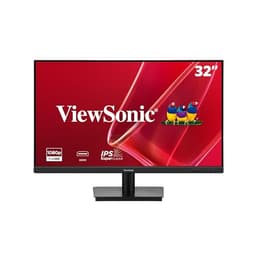
The ViewSonic VA3209M is a 32-inch Full HD IPS monitor priced at around £139, and it occupies a unique position in this roundup. It is the largest screen here by some margin, and at that size, 1080p resolution is a genuine compromise. Text and fine detail are noticeably softer than on a 24 or 27-inch 1080p display, and anyone doing detailed design work or reading small text for extended periods may find this frustrating. However, for the specific use case of a large, affordable screen for media consumption, casual gaming or general home use, the VA3209M makes a compelling argument.
The IPS panel delivers good colour accuracy and wide viewing angles, which is important on a 32-inch screen where you are more likely to be sitting slightly off-axis or sharing the display with someone else. The 75 Hz refresh rate is not going to excite competitive gamers, but it is a step above the 60 Hz panels that dominated this size category until recently, and it makes everyday desktop use feel noticeably smoother than a standard 60 Hz display.
The VA3209M's port selection is straightforward: one HDMI and one VGA. The inclusion of VGA is a nod to users connecting older hardware, such as a desktop PC with an ageing graphics card or a work laptop that lacks HDMI output. It is a practical touch that many rival monitors at this price have dropped. The monitor also features a frameless design on three sides, which gives it a cleaner look than older budget displays with thick plastic bezels.
At 32 inches, this monitor works particularly well as a second screen for a laptop user who wants a large display for watching content or working in split-screen mode. It is also a reasonable choice for a living-room desk setup where you are sitting further back than a typical office distance, as the larger size compensates for the lower pixel density at greater viewing distances.
The ViewSonic VA3209M is not for pixel-peepers or competitive gamers, but as an affordable large-format screen for general use, it delivers real value. If screen real estate matters more to you than pixel density or refresh rate, this is the pick.
Pros
- 32-inch screen size delivers generous desktop real estate at a very accessible price
- IPS panel provides accurate colours and wide viewing angles for shared use
- VGA port adds compatibility with older hardware that many rivals have dropped
Cons
- 1080p at 32 inches results in noticeably soft pixel density for text-heavy work
- 75 Hz refresh rate is adequate but unremarkable for gaming
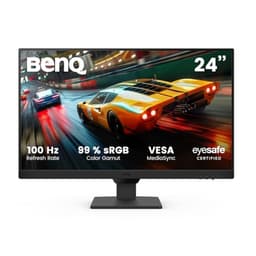
The BenQ GW2490E is the Best Value pick in this roundup and, at under £80, it is genuinely remarkable what BenQ has managed to deliver. This is a 24-inch Full HD IPS monitor running at 100 Hz, with BenQ's well-regarded Eye-Care technology built in. For students, home-office workers or anyone who needs a reliable, comfortable everyday monitor without spending much money, the GW2490E is difficult to argue against.
BenQ has a long-standing reputation for panel quality and eye-care features, and the GW2490E upholds that tradition. The IPS panel offers good colour accuracy across the sRGB colour space, making it suitable for casual photo editing, document work and content consumption. The Eye-Care suite includes a low blue-light mode and flicker-free backlight technology, both of which make a tangible difference during long working sessions. If you spend eight hours a day in front of a screen, these features are worth having.
The 100 Hz refresh rate is a step up from the 75 Hz panels that dominated this price bracket previously, and it makes desktop use feel meaningfully smoother. It is not a gaming monitor in the traditional sense, but casual gamers playing less demanding titles will find the 100 Hz rate perfectly adequate. The response time is not quoted as aggressively as the gaming-focused options in this roundup, so it is not the right choice for competitive multiplayer gaming, but for everything else it performs well.
Connectivity covers the basics: two HDMI ports and one DisplayPort. Having two HDMI inputs is genuinely useful at this price, as it allows you to keep a laptop and a desktop connected simultaneously without swapping cables. The stand provides tilt adjustment, and the monitor's compact 24-inch footprint makes it easy to fit into smaller desks or shared workspaces.
The GW2490E is the monitor to recommend to anyone who asks for a reliable, comfortable screen on a tight budget. It does not have the gaming credentials of the AOC or Samsung options above it, but for everyday work and study, it is the most sensible purchase in this roundup. At this price, it represents outstanding value for money and earns its Best Value designation clearly.
Pros
- Sub-£80 price makes it one of the most accessible IPS monitors available in the UK
- BenQ Eye-Care suite with flicker-free backlight and low blue-light mode is genuinely effective
- Dual HDMI inputs allow two devices to stay connected simultaneously
Cons
- Not suited to competitive gaming due to moderate response time performance
- Stand offers tilt only, with no height or swivel adjustment
Buying Guide
Panel Type: IPS, VA or Something Else?
The panel technology is the single most important decision when buying a budget monitor. IPS panels offer the best colour accuracy and widest viewing angles, making them the preferred choice for office work, study and content consumption. They are also the most common panel type in this price bracket in 2025, which means competition has driven quality up and prices down. VA panels offer higher contrast ratios and deeper blacks, which suits gaming in dark environments and film watching, but they have narrower viewing angles and can exhibit motion smearing in fast-paced content. At the budget end of the market, you are unlikely to encounter OLED or quantum dot technology, though these are beginning to appear in the sub-£400 bracket.
Resolution and Screen Size
Resolution and screen size must be considered together. A 1080p panel looks sharp on a 22 or 24-inch screen but noticeably soft on a 27 or 32-inch display. If you are buying a 27-inch monitor, QHD (2560x1440) is worth seeking out if your budget allows, as the pixel density improvement over 1080p is clearly visible in everyday use. At 24 inches, 1080p is perfectly adequate for most users. At 32 inches, 1080p is a compromise, and you should only accept it if screen real estate matters more to you than sharpness.
Refresh Rate
For everyday productivity use, 75 Hz is the minimum worth accepting in 2025. A 100 Hz panel makes desktop use feel noticeably smoother and is worth the small premium. For gaming, 144 Hz and above is the standard expectation, and several monitors in this roundup deliver 165 or 180 Hz at budget prices. Higher refresh rates require a capable graphics card to be useful, so check that your GPU can actually output enough frames to justify the investment.
Connectivity
Check the port selection carefully before buying. HDMI is essential for connecting most devices, and having two HDMI ports is genuinely useful if you want to keep a laptop and a desktop connected simultaneously. DisplayPort is preferred for PC gaming as it supports higher refresh rates and resolutions more reliably than HDMI on older hardware. VGA is a legacy connection but remains useful for connecting older equipment. USB hub ports are a convenience feature that most budget monitors omit, but they are worth having if your desk has limited USB ports.
Ergonomics and Eye Care
Budget monitors frequently cut costs on stand adjustability. Many offer tilt only, with no height or swivel adjustment. If you work at a desk for long hours, this matters for posture and comfort. A monitor arm is a worthwhile investment alongside a budget display, as it gives you full positional flexibility for around £20 to £40. Eye-care features such as flicker-free backlights and low blue-light modes are genuinely useful for reducing fatigue during long sessions and are increasingly common even on budget panels.
What to Ignore
Marketing terms such as HDR support on budget monitors should be treated with scepticism. Most budget displays that advertise HDR do not have the peak brightness or local dimming zones to deliver a meaningful HDR experience. Similarly, very aggressive response time claims such as 0.5 ms or 1 ms are often measured under optimal overdrive settings that introduce visual artefacts. Treat these figures as indicative rather than absolute.
The Alienware AW2725DM is the overall winner of this roundup. A 27-inch QHD Fast IPS panel at 180 Hz for around £190 is a combination that was simply not available at this price twelve months ago, and it represents a genuine step change in what budget buyers can expect. It suits gamers, remote workers and students equally well, and the dual HDMI ports add practical connectivity that rivals at this price often omit. The lack of height adjustment on the stand is the only meaningful criticism, and that is easily solved with a monitor arm.
For buyers who cannot stretch to £190, the BenQ GW2490E at under £80 is the Best Value pick and an easy recommendation. It delivers BenQ's reliable IPS quality, effective eye-care features and dual HDMI connectivity at a price that leaves money in your pocket for other components. It will not satisfy competitive gamers, but for the majority of everyday users it is more than enough monitor.
The AOC C27G42E earns its place as the curved gaming pick for those who want maximum immersion on a tight budget, while the ViewSonic VA3209M serves the niche of users who need a large screen above all else. The AOC 22B2H remains the sensible choice when budget is the absolute primary constraint and a reliable, no-frills display is all that is required.