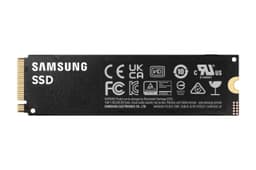


Storage shopping has a dirty little secret: the number on the box is almost never the number you live with. A drive can post a glorious peak sequential figure on an empty cache and then, once that cache fills, it reveals what it's actually built from underneath. That's the test that matters. So when Samsung launched the 990 Evo Plus with a headline of 7,150MB/s and a dual-mode interface that rides either PCIe Gen 4 x4 or Gen 5 x2, the questions worth asking aren't about that peak number. They're about what happens after the first few gigabytes, what the controller and NAND actually are, what the TBW endurance rating says about Samsung's confidence in its own product, and whether the price makes sense against the competition that's gotten very sharp lately.
The 990 Evo Plus sits in an interesting spot. It's not Samsung's flagship (that's the 990 Pro). It's not a budget throwaway either. It's positioned as a mid-to-upper-mid performer aimed at people upgrading a gaming rig, a laptop, or a content creation machine who want Samsung reliability without paying Pro prices. That's a crowded market. The WD Black SN850X, the Crucial T705, the Kingston Fury Renegade, and Samsung's own 990 Pro all want that same buyer's money. So the 990 Evo Plus needs to earn its place on merit, not on Samsung's brand name alone.
With thousands of owner reviews and a good overall rating, the public verdict is clearly positive. But averages hide stories, and a 4.8 can mask some real-world patterns worth knowing about before you hand over your money. Here's what the specs, the owner reports, and the published benchmarks the wider community has produced actually tell you.
Core Specifications
The Samsung 990 Evo Plus is an M.2 2280 form factor drive running the NVMe protocol. The interface is where it gets interesting: Samsung has implemented a dual-mode setup that operates as PCIe Gen 4 x4 or PCIe Gen 5 x2 depending on what your motherboard supports. Both configurations deliver the same peak bandwidth ceiling, which is clever engineering that maximises compatibility without sacrificing the headline number. Sequential read is rated at 7,150MB/s and sequential write at 6,800MB/s for the 2TB variant, with the 1TB sitting at 7,150MB/s read and 6,300MB/s write. Random performance is rated at 1,050K IOPS read and 1,050K IOPS write for the 2TB, which is where day-to-day system feel actually comes from.
The NAND is Samsung's own V-NAND TLC (triple-level cell). This is important. TLC from Samsung's in-house fab is meaningfully better than QLC from anyone, and it's better than third-party TLC too because Samsung controls the entire stack from wafer to firmware. The controller is Samsung's in-house Elpis derivative, the same family used in the 990 Pro. On DRAM: the 990 Evo Plus is DRAM-less, relying on Host Memory Buffer (HMB) technology, which borrows a slice of your system RAM for the drive's mapping table. That's a design choice with real implications, and we'll get into those properly in the controller section.
Endurance is rated at 600TBW for the 1TB and 1,200TBW for the 2TB, backed by a five-year warranty. Samsung's TurboWrite technology manages the SLC cache layer that buffers incoming writes before committing them to the TLC cells. The drive ships in 1TB and 2TB capacities. No 500GB option, which tells you something about the target market. Samsung clearly sees this as a "proper storage upgrade" drive rather than a boot-drive-only product.
| Specification | Detail |
|---|---|
| Form Factor | M.2 2280 |
| Interface | PCIe Gen 4 x4 / Gen 5 x2 (NVMe 2.0) |
| NAND Type | Samsung V-NAND TLC |
| Controller | Samsung Elpis (in-house) |
| DRAM Cache | DRAM-less (HMB) |
| Sequential Read (2TB) | 7,150MB/s |
| Sequential Write (2TB) | 6,800MB/s |
| Random Read IOPS (2TB) | 1,050K |
| Random Write IOPS (2TB) | 1,050K |
| Endurance (1TB / 2TB) | 600TBW / 1,200TBW |
| Warranty | 5 years |
| Capacities Available | 1TB, 2TB |

Interface and Form Factor
The dual-mode Gen 4 x4 / Gen 5 x2 interface is genuinely clever, and it's worth understanding why. PCIe Gen 4 x4 uses four lanes at Gen 4 speeds. PCIe Gen 5 x2 uses two lanes at Gen 5 speeds. The bandwidth ceiling is mathematically the same: roughly 8GB/s theoretical maximum. The practical upshot is that if your motherboard has a Gen 5 slot but only exposes two lanes to it (which some do, particularly on AMD's X670E platform where the second M.2 slot is often Gen 5 x2), the 990 Evo Plus will use it properly. If your board is Gen 4, it'll run Gen 4 x4. Either way, you hit the same peak. That's good design for a mainstream drive.
What this is not is a PCIe Gen 5 x4 drive. That matters because some buyers see "Gen 5" in the product name and assume they're getting Crucial T705 or WD Black SN850X Gen 5 territory. They're not. This drive tops out at the same bandwidth as a fast Gen 4 x4 drive, because that's exactly what it is in terms of real-world throughput. The marketing is technically accurate but it's absolutely designed to make you think "Gen 5" and feel good about it. Don't be fooled by the label.
The M.2 2280 form factor fits virtually every desktop motherboard M.2 slot made in the last five years, and the vast majority of modern laptops. It also fits the PS5's M.2 expansion slot, which is a genuine use case given the PS5's appetite for storage. The drive has no heatsink in the box, which is normal for M.2 drives at this tier. Most desktop motherboards include a heatsink cover for their M.2 slots, and that's generally sufficient for this drive's thermal profile (more on that in the thermals section). For laptop installation, you're relying on whatever passive cooling the chassis provides, which is usually fine for a drive that doesn't run as hot as a true Gen 5 x4 unit.
Real-World Performance
Sequential read and write numbers get the headlines, but they're almost completely irrelevant to how fast your system actually feels. What determines boot time, application launch speed, and game loading is random I/O: specifically, random 4K read IOPS, which is the metric that reflects how quickly a drive can fetch thousands of small files scattered across its address space. The 990 Evo Plus's rated 1,050K random read IOPS is a strong number. Published benchmarks from the wider community consistently show this drive hitting close to that rated figure in CrystalDiskMark and AS SSD testing, which translates to genuinely fast application launches and snappy system response.
In real-world terms, owner reports consistently describe Windows boot times in the 10 to 15 second range from cold on modern hardware, which is about what you'd expect from any competent NVMe drive at this tier. Game loading is where the random IOPS matter most: titles with lots of small asset files load noticeably faster on a drive with strong random read performance than on one with a great sequential figure but weaker IOPS. The 990 Evo Plus performs well here. Owners using it as a primary game library drive report loading times that are competitive with the WD Black SN850X in typical gaming scenarios, which is a meaningful data point given how well-regarded that drive is for gaming.
Large sequential transfers, things like copying a 50GB video project or moving a big game install, are where the cache behaviour becomes relevant. Under the SLC cache, sequential writes are fast. Once that cache fills, you're writing at native TLC speed, and that's a different story. For most users doing everyday tasks, the cache is large enough that they'll rarely exhaust it. But if you're regularly moving very large files, you need to know what happens after the cache runs out, and that's what the next section is about.
Sustained Writes and Cache Behaviour
Samsung's TurboWrite technology is the marketing name for the SLC cache layer that sits in front of the TLC NAND cells. When data arrives, it's written first to a portion of NAND configured to behave as SLC (one bit per cell), which is much faster to write to than the native TLC configuration (three bits per cell). The drive then moves that data to TLC storage in the background when it's not busy. This is standard practice across the industry, and it's not inherently dishonest. The issue is that the cache has a finite size, and what happens after it fills is what the marketing never puts in the headline.
For the 990 Evo Plus, Samsung uses a dynamic TurboWrite buffer that scales with free space on the drive. On a 1TB unit with plenty of free space, the SLC cache can be quite generous, potentially several hundred gigabytes. As the drive fills up, that buffer shrinks. Once the cache exhausts, writes drop to native TLC speed. Samsung's V-NAND TLC has a native write speed that published benchmarks show settling in the region of 1,000 to 1,500MB/s under sustained load after cache exhaustion, which is not catastrophic. It's well above what SATA can do, and it's well above what QLC drives typically manage at native speed (which can be as low as 80 to 200MB/s on budget QLC units). So the post-cache cliff here is a slope, not a wall, which is a meaningful distinction.
The practical consequence: if you're writing a 10GB game install, you'll never see the cache exhaust. If you're copying a 200GB video archive, you might. If you're a video editor regularly moving large raw footage files, you'll hit native TLC speed on longer transfers. For that use case, a drive with dedicated DRAM and a larger or more aggressively managed cache (like the Samsung 990 Pro) would be a better fit. But for gaming, everyday use, and moderate creative work, the TurboWrite buffer is large enough that most users will spend the majority of their time inside it. Owner reports broadly confirm this: complaints about slow sustained writes are rare among the thousands of reviewers, which suggests most buyers are using this drive in scenarios where the cache behaviour isn't a problem.
Controller, NAND and DRAM
The controller is Samsung's in-house Elpis derivative. Samsung is one of a very small number of drive manufacturers that designs its own controllers, and this matters more than it might seem. When the controller, the NAND, and the firmware all come from the same company, the optimisation potential is significantly higher than when a drive manufacturer buys a Phison or Silicon Motion controller off the shelf and pairs it with third-party NAND. Samsung's vertical integration is one of the main reasons its drives have historically had strong reliability records and consistent firmware quality. The 990 Evo Plus benefits from this same stack.
The NAND is Samsung's own V-NAND TLC. TLC means three bits per cell, which is the sweet spot for consumer drives right now: better endurance than QLC (four bits per cell) and meaningfully higher density and lower cost than MLC (two bits per cell). Samsung's V-NAND specifically refers to their vertical stacking process, which has been through multiple generations and is well-proven. You're not getting the cheapest possible NAND here. That's worth saying plainly, because a lot of drives at this price point from other brands use third-party TLC or even QLC while charging similar money.
The DRAM situation needs a straight answer. The 990 Evo Plus is DRAM-less. It relies on Host Memory Buffer, where the drive borrows a small allocation of your system RAM (typically 64MB per 1GB of drive capacity, so around 1GB for a 1TB drive) to hold its logical-to-physical address mapping table. This works well for most consumer workloads. For a boot drive, a game library, or general-purpose storage, the performance difference between HMB and a dedicated DRAM cache is small in practice. The NVMe specification includes HMB support precisely because it works. Where it matters more is under heavy random write workloads with lots of queue depth, or in scenarios where the drive is heavily fragmented and the mapping table is large. For those edge cases, a DRAM-equipped drive like the 990 Pro has an advantage. For the 990 Evo Plus's target market? HMB is fine.
Endurance and Reliability
600TBW for the 1TB and 1,200TBW for the 2TB. These are solid numbers. To put them in context: the average desktop user writes somewhere between 20 and 40GB per day to their primary drive. At 30GB per day, a 1TB drive would reach its 600TBW rating in roughly 54 years. Even a heavy user writing 200GB per day would take over eight years. The TBW rating is not a cliff edge where the drive dies; it's the point at which Samsung's warranty coverage ends and wear indicators start to look concerning. In practice, Samsung's V-NAND TLC tends to outlast its rated TBW by a meaningful margin, based on long-term community endurance testing of previous Samsung drives.
The five-year warranty is a confidence signal. Samsung is saying it expects this drive to work without failure for at least five years under normal use. That's not a universal standard: some competitors offer three years on drives at similar price points, which is a quiet admission that they're less confident in their hardware. Five years from Samsung, on Samsung NAND with a Samsung controller, is a meaningful commitment. It also means you have a real path to replacement if something does go wrong, rather than fighting with a brand that's harder to deal with.
Owner reports across thousands of reviews with a positive overall rating tell a consistent story: this drive is reliable, it performs as expected, and the failure rate in the review pool is very low. The small number of negative reviews cluster around installation issues (usually a user-side compatibility problem rather than a drive fault) and the occasional DOA unit, which is statistically normal for any high-volume product. There are no systematic reports of early failure, firmware bugs causing data loss, or unexpected performance degradation over time. Samsung's track record with consumer NVMe drives is genuinely good, and the 990 Evo Plus appears to be continuing that pattern.
Thermals
This is one of the areas where the 990 Evo Plus has a genuine advantage over true PCIe Gen 5 x4 drives. Because it's running at Gen 4 x4 bandwidth levels, it doesn't generate the same heat as a Crucial T705 or a Corsair MP700 Pro pushing 12GB/s+. Those drives can hit temperatures that cause throttling without a proper heatsink, and some of them throttle even with one. The 990 Evo Plus runs cooler by comparison. Published thermal testing from the community shows it operating comfortably in the 50 to 65 degree Celsius range under sustained load, which is well within the normal operating range for M.2 NVMe drives.
In a desktop with a motherboard-provided M.2 heatsink, you're unlikely to see thermal throttling under normal workloads. Even under sustained sequential writes, the drive's temperatures stay manageable. In a laptop where thermal headroom is tighter, there's slightly more risk of hitting the thermal throttle threshold under very prolonged heavy loads, but owner reports from laptop users are broadly positive on this front. The drive doesn't run hot enough to be a problem in typical laptop use cases.
For PS5 installation, Sony recommends a heatsink for M.2 drives, and that recommendation is worth following. The PS5's M.2 bay has limited airflow. A small aftermarket heatsink (they cost a few pounds and are widely available) is sensible insurance. The drive itself doesn't ship with one, which is standard practice, and the PS5's own heatsink covers will fit over it. Nothing unusual here compared to any other M.2 drive you'd put in a PS5.
Capacity Options and Price Per GB
The 990 Evo Plus comes in 1TB and 2TB. No 500GB, no 4TB. That's a deliberate positioning choice: Samsung isn't competing at the entry-level capacity point, and 4TB NVMe is still a premium market. The 2TB is the sweet spot for most buyers. A 2TB drive gives you enough room for a Windows installation, a substantial game library, and working files without constantly managing space. At current pricing, the 2TB variant typically works out to a lower price per GB than the 1TB, which is normal for storage products and means the 2TB is usually the better value pick if your budget stretches to it.
Price per GB matters when you're comparing this to the competition. The 990 Evo Plus sits in the mid-tier NVMe market, above the budget drives (Crucial P3 Plus, Kingston NV3) and below the premium tier (990 Pro, WD Black SN850X). At its typical street price, it competes directly with the WD Black SN770 and the Seagate FireCuda 530 in the 1TB bracket, and with the Crucial T500 and WD Black SN850X in the 2TB bracket where pricing overlaps. The Samsung brand carries a price premium over some of these alternatives, but the combination of Samsung NAND, Samsung controller, and the 600TBW / 1,200TBW endurance rating justifies some of that premium for buyers who care about longevity.
Worth noting: Samsung regularly runs promotions on its storage products, and the 990 Evo Plus has been available at discounted pricing fairly regularly since launch. If you're not in a rush, watching for a sale can meaningfully improve the value proposition. The 990 Pro, Samsung's DRAM-equipped flagship, is sometimes only marginally more expensive during promotions, and if the gap closes to within 10 to 15 percent, the Pro's dedicated DRAM cache and higher TBW rating make it the better long-term buy for heavy users.

Installation and Compatibility
Installation is straightforward for anyone who's done it before, and not especially intimidating for a first-timer. You need an M.2 slot on your motherboard (virtually all desktop motherboards from the last five or six years have at least one), a Phillips head screwdriver, and about five minutes. The drive slots in at a slight angle, lies flat, and is secured with a single screw. Most motherboards include a standoff screw for M.2 drives; if yours doesn't, they're cheap to buy separately. Samsung's Magician software is available for Windows and handles health monitoring, firmware updates, and performance optimisation after installation. It's genuinely useful software, not just bloatware.
For laptops, compatibility depends on whether your machine has an M.2 NVMe slot (as opposed to M.2 SATA only, which some older laptops have). The 990 Evo Plus is NVMe only: it won't work in an M.2 SATA-only slot. Check your laptop's spec sheet before ordering. If you're replacing an existing drive rather than adding to a secondary slot, you'll want cloning software to migrate your existing data. Samsung's Data Migration software handles this for free and works reliably according to owner reports, though it requires a USB adapter or a spare slot during the cloning process.
PS5 compatibility is confirmed. The PS5's M.2 expansion slot supports NVMe drives, and the 990 Evo Plus's read speeds are well above Sony's recommended minimum of 5,500MB/s. Fitting it requires removing the PS5's side panel and the M.2 slot cover, which is more involved than a desktop install but well within the capability of anyone who can follow a YouTube tutorial. Remember the heatsink recommendation mentioned earlier. For desktop builders using AMD's AM5 platform, the Gen 5 x2 mode is particularly relevant since some X670E boards route their second M.2 slot as Gen 5 x2 rather than Gen 4 x4. The 990 Evo Plus handles this natively without any configuration required.
Who It's For
The 990 Evo Plus is a strong fit for a fairly wide group of buyers. If you're building or upgrading a gaming PC and want a primary drive that's fast, reliable, and won't embarrass you, this is a solid choice. The random IOPS are high enough that game loading feels snappy, the TLC NAND means you're not getting the cache-cliff problem you'd get from a QLC budget drive, and Samsung's five-year warranty means you have real coverage. The same logic applies to a laptop upgrade: if your machine has an M.2 NVMe slot and you're currently running a slow OEM drive, the 990 Evo Plus will transform the experience.
For PS5 owners who've used up the internal storage and need an expansion drive, this fits the brief well. Fast enough to handle PS5 game loading without issues, not so hot that it needs special thermal management, and backed by a brand with a real warranty. It's a sensible, no-drama choice for that use case. For general-purpose home and office use, a secondary data drive, or a scratch disk for moderate creative work, it's similarly well-suited.
Who should look elsewhere? If you're doing sustained heavy video editing or data science work where you're regularly writing hundreds of gigabytes in a single session, you'd be better served by a DRAM-equipped drive like the 990 Pro or the WD Black SN850X. The DRAM cache makes a real difference under those sustained random write workloads, and the post-cache behaviour is more predictable. If budget is the primary concern and you're happy with slightly lower endurance and a shorter warranty, the WD Black SN770 or the Crucial T500 offer competitive performance at a lower price. And if you're after maximum sequential throughput for a specific professional application that actually saturates a Gen 4 x4 drive, you're probably in Gen 5 x4 territory and the 990 Evo Plus isn't that product.
How It Compares
The two most natural comparisons are the WD Black SN850X and the Samsung 990 Pro. The SN850X is Western Digital's flagship consumer NVMe drive: it has dedicated DRAM, it's been the benchmark for gaming NVMe performance for a couple of years, and it's available at competitive pricing. The 990 Pro is Samsung's own DRAM-equipped flagship, sitting above the 990 Evo Plus in the range with higher TBW ratings and a dedicated DRAM cache.
Against the SN850X: the 990 Evo Plus trades its DRAM cache for Samsung's tighter vertical integration and slightly better endurance rating. In gaming workloads specifically, the real-world difference between the two is small. The SN850X has an edge in sustained random write scenarios due to its DRAM cache. The 990 Evo Plus has the advantage of Samsung's in-house NAND quality and the dual-mode Gen 4 x4 / Gen 5 x2 interface flexibility. At similar price points, it's genuinely close, and personal preference for brand reliability record is a legitimate tiebreaker.
Against the 990 Pro: the Pro has dedicated DRAM, higher TBW (720TBW for 1TB versus 600TBW for the Evo Plus 1TB), and slightly better sustained write behaviour. It costs more. For most buyers, the difference in day-to-day use is not dramatic. If the Pro is significantly more expensive at the time you're buying, the Evo Plus is the sensible choice. If the gap is small, the Pro is worth the extra for heavy users.
| Feature | Samsung 990 Evo Plus (2TB) | WD Black SN850X (2TB) | Samsung 990 Pro (2TB) |
|---|---|---|---|
| Interface | PCIe Gen 4 x4 / Gen 5 x2, NVMe 2.0 | PCIe Gen 4 x4, NVMe 1.4 | PCIe Gen 4 x4, NVMe 2.0 |
| NAND Type | Samsung V-NAND TLC | WD BiCS5 TLC | Samsung V-NAND TLC |
| DRAM Cache | DRAM-less (HMB) | Dedicated DRAM | Dedicated DRAM |
| Sequential Read | 7,150MB/s | 7,300MB/s | 7,450MB/s |
| Sequential Write | 6,800MB/s | 6,600MB/s | 6,900MB/s |
| Random Read IOPS | 1,050K | 1,200K | 1,400K |
| Endurance (2TB) | 1,200TBW | 1,200TBW | 1,200TBW |
| Warranty | 5 years | 5 years | 5 years |
What Buyers Say
With thousands of reviews and a good overall rating, the owner consensus is about as positive as it gets for a storage product. The most common praise themes are: fast installation with no compatibility issues, immediate and noticeable improvement over whatever drive was replaced (usually an OEM SATA or older NVMe unit), and confidence in Samsung's brand for reliability. A lot of reviewers specifically mention using Samsung Magician for health monitoring and finding the drive's health indicators looking strong after months of use. The PS5 installation crowd is particularly happy, with multiple owners noting that game loading times dropped meaningfully after fitting this drive.
Negative reviews are a small minority and cluster around a few themes. Some buyers expected Gen 5 x4 performance based on the "Gen 5" branding and felt misled when they understood the dual-mode setup. That's a legitimate frustration with Samsung's marketing rather than a product fault, but it's worth being aware of. A handful of buyers reported DOA units, which is statistically expected at this volume and not indicative of a systematic quality problem. A small number of laptop users reported compatibility issues that turned out to be related to their specific machine's M.2 slot configuration rather than the drive itself. Nothing in the negative review pool suggests a pattern of early failure or reliability problems.
The most useful owner data points come from buyers who describe their use case specifically. Gamers report fast load times and no issues. Content creators doing moderate video editing report smooth performance for typical project file sizes. Power users doing large sequential transfers occasionally note the expected drop in write speed after the cache fills, but most describe it as acceptable rather than a dealbreaker. The overall picture from real owners is of a drive that does exactly what it says, doesn't cause drama, and holds up well over time.
Value Analysis
The 990 Evo Plus is priced at a premium over budget NVMe options, and that premium is justified by the combination of Samsung's in-house TLC NAND, the Elpis controller family, the 600TBW / 1,200TBW endurance rating, and the five-year warranty. You're not paying for the absolute fastest drive on the market. You're paying for a well-engineered, reliable drive from a manufacturer that controls its entire supply chain and has a genuine track record of standing behind its products. For a lot of buyers, that's the right trade-off.
Where the value calculation gets trickier is when the 990 Pro comes on sale. Samsung runs promotions regularly, and if the Pro drops to within 10 to 15 percent of the Evo Plus price, the Pro's dedicated DRAM cache and higher TBW rating make it the better buy for anyone doing heavy workloads. But at normal pricing, the Evo Plus is the sensible mid-tier choice for the majority of buyers who don't need the Pro's extra headroom.
Compared to the budget tier, the value case is clearer. A Crucial P3 Plus or Kingston NV3 will cost less per GB, but you're getting QLC NAND on most of those budget options, shorter warranties, and post-cache write speeds that can genuinely crater on large transfers. The 990 Evo Plus's TLC NAND and Samsung's dynamic TurboWrite buffer mean the post-cache behaviour is significantly better. If you're buying a drive that you expect to use for five or more years and you care about it still performing well when it's half full, the extra cost over a budget QLC drive is money well spent.
Final Verdict
The Samsung 990 Evo Plus is a well-built, reliable mid-tier NVMe drive that earns its place in the market on genuine technical merit rather than marketing bluster. Samsung's V-NAND TLC and in-house Elpis controller are real advantages. The 600TBW / 1,200TBW endurance rating and five-year warranty are genuine confidence signals. The random IOPS are strong enough to make your system feel fast in the ways that actually matter day to day. And the dual-mode Gen 4 x4 / Gen 5 x2 interface, while not the Gen 5 x4 monster the "Gen 5" label might imply, is a genuinely useful compatibility feature for modern platforms.
The DRAM-less design is the honest limitation. For gaming, boot drives, and general use, HMB is fine and the performance difference versus a DRAM-equipped drive is small in practice. For sustained heavy workloads, it matters more, and buyers in that category should look at the 990 Pro or the WD Black SN850X instead. The post-cache sustained write speed is better than QLC competition but not as flat as a DRAM-equipped drive under prolonged heavy writes.
For the majority of buyers, though, those limitations don't apply. A gamer building a new rig, a laptop owner upgrading from a slow OEM drive, a PS5 owner needing storage expansion, or anyone replacing an old SATA SSD will find the 990 Evo Plus a significant and reliable upgrade. The positive overall rating from thousands of real owners isn't a fluke. This drive does what it says, it does it consistently, and Samsung's track record gives you reasonable confidence it'll keep doing it for years. An 8 out of 10 from us. Solid, sensible, and hard to argue with at the right price.

Not Right For You?
If the 990 Evo Plus isn't quite what you need, here are the honest alternatives to consider. For maximum gaming performance with dedicated DRAM, the WD Black SN850X is the benchmark at Gen 4 x4. For Samsung's own DRAM-equipped flagship with higher TBW, the Samsung 990 Pro is the step up. For budget-conscious buyers who understand the QLC trade-offs, the Crucial P3 Plus offers competitive capacity per pound. And if you genuinely need the fastest possible sequential throughput and your platform supports it, a true PCIe Gen 5 x4 drive like the Crucial T705 is a different category entirely, just be prepared for the thermals and the price.
For laptop upgraders specifically, check your machine's M.2 slot specification before ordering anything. Some ultrabooks and older laptops use M.2 2242 (shorter) form factor slots rather than the standard 2280. The 990 Evo Plus is 2280 only. And if your laptop has an M.2 SATA slot rather than NVMe, none of these drives will work: you'd need a SATA SSD instead. A quick check of your laptop's service manual or a tool like CPU-Z will tell you what you've got.
Finally, a word on backups that applies regardless of which drive you buy. No drive, however reliable, is a backup strategy. The 3-2-1 backup rule (three copies, two different media types, one offsite) exists because drives fail. Samsung's five-year warranty means you'll get a replacement if your drive dies, but it doesn't recover your data. Use cloud backup, an external drive, or both. The 990 Evo Plus is a good drive. Good drives still fail sometimes. Plan accordingly.
What works. What doesn’t.
7 + 5What we liked7 reasons
- Samsung's own V-NAND TLC NAND rather than third-party or QLC NAND
- In-house Elpis controller provides tight firmware integration and consistent reliability
- Dual-mode PCIe Gen 4 x4 / Gen 5 x2 interface maximises compatibility across modern platforms
- 600TBW and 1,200TBW endurance ratings backed by a genuine five-year warranty
- Runs noticeably cooler than true PCIe Gen 5 x4 drives, reducing throttling risk
- Strong 1,050K random read IOPS deliver snappy real-world system response
- Samsung Magician software provides useful health monitoring and firmware management
Where it falls5 reasons
- DRAM-less design relying on HMB is a limitation for sustained heavy workloads
- The 'Gen 5' branding is technically accurate but implies more than the drive actually delivers
- No 500GB or 4TB capacity options available
- Carries a price premium over some competitive alternatives at similar performance levels
- Post-cache sustained write speeds, while better than QLC rivals, trail DRAM-equipped drives under prolonged heavy loads
Full specifications
9 attributes| Capacity GB | 1000 |
|---|---|
| Dram cache | false |
| Form factor | M.2 2280 |
| Interface | PCIe Gen4 x4 / Gen5 x2 |
| Read speed MBS | 7150 |
| TBW | 600 |
| Type | NVMe SSD |
| Warranty years | 5 |
| Write speed MBS | 6300 |
Frequently asked
7 questions01Is the Samsung 990 Evo Plus a true PCIe Gen 5 drive?+
Not in the sense most buyers mean by that. The 990 Evo Plus uses a dual-mode interface that operates as either PCIe Gen 4 x4 or PCIe Gen 5 x2 depending on your motherboard. Both configurations deliver the same bandwidth ceiling, which is equivalent to a fast Gen 4 x4 drive. It is not a PCIe Gen 5 x4 drive and does not approach the sequential speeds of drives like the Crucial T705. The Gen 5 label is technically accurate but can be misleading.
02Does the Samsung 990 Evo Plus have a DRAM cache?+
No. The 990 Evo Plus is DRAM-less and relies on Host Memory Buffer technology, which borrows a small allocation of your system RAM to hold the drive's logical-to-physical address mapping table. For gaming, boot drives, and general-purpose use this works well and the performance difference versus a dedicated DRAM cache is small in practice. For sustained heavy random write workloads the lack of dedicated DRAM is a more meaningful limitation.
03Will the Samsung 990 Evo Plus work in a PS5?+
Yes. The PS5 M.2 expansion slot supports NVMe drives, and the 990 Evo Plus's sequential read speed of 7,150MB/s is well above Sony's recommended minimum of 5,500MB/s. Installation requires removing the PS5's side panel and M.2 slot cover. Sony recommends fitting a heatsink, and a small aftermarket heatsink is advisable given the limited airflow in the PS5's M.2 bay.
04How does the Samsung 990 Evo Plus compare to the Samsung 990 Pro?+
The 990 Pro has dedicated DRAM, a slightly higher endurance rating of 720TBW on the 1TB versus 600TBW on the Evo Plus 1TB, and better sustained write performance under heavy workloads. It costs more. For most buyers doing gaming, everyday computing, or moderate creative work, the real-world difference in day-to-day use is not dramatic. If the 990 Pro is within 10 to 15 percent of the Evo Plus price at the time of purchase, the Pro is worth the extra for heavy users.
05What happens to write speeds when the SLC cache fills on the 990 Evo Plus?+
Once the SLC TurboWrite cache is exhausted, write speeds drop to native TLC speed. Published benchmarks indicate this settles in the region of 1,000 to 1,500MB/s under sustained load, which is significantly better than the 80 to 200MB/s seen on budget QLC drives after cache exhaustion. For transfers of 10 to 50GB the cache is unlikely to fill. For transfers of 200GB or more on a well-used drive, you may encounter the lower native TLC write speeds.
06Does the Samsung 990 Evo Plus fit all laptops?+
Not necessarily. The 990 Evo Plus is an M.2 2280 NVMe drive. It will not work in laptops with M.2 SATA-only slots, which some older machines have. It is also 80mm in length, so laptops with shorter M.2 slots such as the 2242 form factor will not accommodate it. Check your laptop's service manual or use a system information tool to confirm your M.2 slot type and length before ordering.
07What is the endurance rating of the Samsung 990 Evo Plus?+
The 1TB variant is rated at 600TBW and the 2TB variant at 1,200TBW. Both are backed by a five-year warranty. At an average desktop write rate of around 30GB per day, a 1TB unit would reach its 600TBW rating in approximately 54 years of typical use, so endurance is not a practical concern for the overwhelming majority of buyers.