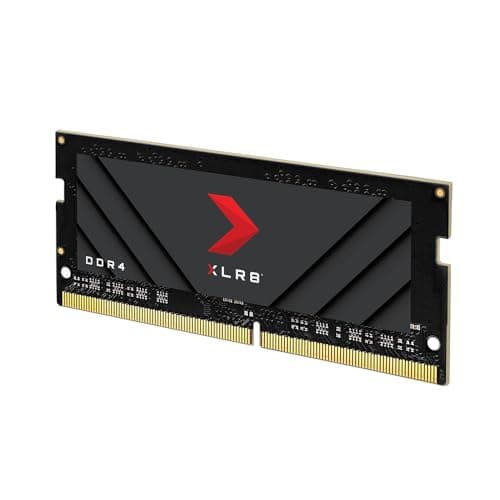
Memory marketing is a strange beast. You see "3600MHz" printed in massive letters on the box, slap it in your build, and then... your games run exactly the same as they did before. Sound familiar? The gap between what RAM manufacturers promise and what you actually feel in daily use is wide enough to drive a lorry through. The PNY XLR8 Gaming EPIC-X RGB DDR4 3600MHz 16GB (2x8GB) kit sits right in the middle of this: a DDR4 kit at a speed that was genuinely sweet-spot territory when Ryzen 3000 and 4000 were king, now competing in a market where DDR5 is eating DDR4's lunch on new platforms.
So who actually buys this in 2025? Mostly people finishing off a DDR4 build on a budget, upgrading a system that's still rocking an older Intel or AMD board, or anyone who refuses to pay the DDR5 premium for a gaming PC that'll mostly be running games anyway. All perfectly valid reasons. The question is whether PNY's kit is the right call, or whether you'd be better off with something else at the same price. The 371 owner reviews (averaging ★★★★½ (4.7)) suggest most buyers are happy, but let's look at what you're actually getting before you click buy.
The "EPIC-X RGB" branding is doing a lot of work on the tin. RGB lighting, a gaming-focused name, and a speed number that sounds impressive. But once you strip away the marketing, what matters is the CAS latency, the actual nanosecond latency, compatibility with your board, and whether 16GB is even enough for what you're doing. Let's get into all of that.
Core Specifications
The PNY XLR8 Gaming EPIC-X RGB DDR4 3600MHz kit ships as a 2x8GB dual-channel pair, giving you 16GB total. It's DDR4, so this is a 288-pin DIMM, and it runs at 1.35V at its rated XMP 2.0 speed. The primary timings are CL18-22-22-42, which is worth paying attention to because the headline "3600MHz" number tells you roughly half the story. PNY specifies XMP 2.0 support, meaning you'll need to enable that profile in your BIOS to actually hit the rated speed rather than defaulting to JEDEC 2133MHz out of the box.
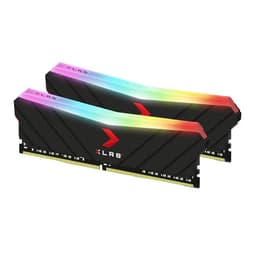
The heat spreader is a fairly chunky aluminium affair with a built-in RGB diffuser running along the top edge. PNY doesn't publish the specific IC (integrated circuit) used in this kit, which is frustratingly common across the industry, but at 3600MHz CL18 on DDR4 the ICs are likely Samsung B-die adjacent or Hynix, depending on the production batch. This matters if you're planning to overclock beyond the rated speed, because B-die scales much better than Hynix CJR or MJR. Don't buy this kit specifically hoping to push it to 4000MHz though. Buy it at face value.
The form factor is standard full-height, so if you're running a large tower cooler with overhanging heatsink fins, double-check clearance. PNY doesn't offer a low-profile variant of this specific EPIC-X RGB kit. Below are the full specs at a glance.
| Specification | Detail |
|---|---|
| Kit Configuration | 2x8GB (16GB total) |
| DDR Generation | DDR4 |
| Rated Speed | 3600MHz |
| CAS Latency | CL18 |
| Primary Timings | 18-22-22-42 |
| Voltage | 1.35V (XMP), 1.2V (JEDEC) |
| XMP Profile | XMP 2.0 |
| Form Factor | 288-pin DIMM (Desktop) |
| RGB | Yes, per-module |
| Warranty | Lifetime |

Speed, Timings and Real Latency
Right, this is the bit most reviews skip over, and it's the bit that actually matters. "3600MHz" sounds fast. But MHz alone doesn't tell you how quickly the RAM actually responds to a request. For that, you need to look at CAS latency alongside the speed. The formula is simple: true latency in nanoseconds equals (CAS latency divided by frequency in MHz) multiplied by 2000. For this kit at 3600MHz CL18, that works out to roughly 10 nanoseconds. That's the actual delay between your CPU requesting data and the RAM delivering it.
How does that compare? A 3200MHz CL16 kit (a very common budget option) also works out to 10ns. So you're not getting a faster-responding kit than a well-timed 3200 setup, despite the higher MHz. On the other hand, a 3600MHz CL16 kit would come in around 8.9ns, which is genuinely quicker. The CL18 timings here are fine, not exceptional. They're what you'd expect at this speed tier without paying a premium for tighter-binned ICs. The secondary timings of 22-22-42 are similarly middle-of-the-road rather than aggressively tuned.
For gaming, the honest answer is that the difference between 10ns and 8.9ns true latency is not something you'll feel. Frame rate gains from RAM speed in games are real but marginal, typically a few percent at most in CPU-limited scenarios. If you're running an AMD Ryzen system where the memory controller is more sensitive to RAM speed (Ryzen 3000 and 4000 in particular benefit from hitting the 1:1 FCLK ratio at 3600MHz or 3733MHz), then this kit's rated speed is genuinely useful. But don't buy this expecting a transformation. It's not that. What you're getting is a solid, sensible speed with acceptable timings, not a precision instrument.
XMP / EXPO Stability and Compatibility
This kit uses XMP 2.0, which is Intel's extended memory profile standard. That means on Intel platforms (Z690, Z790, older Z490, Z390 and so on) you simply enable XMP in the BIOS and you should be at 3600MHz. Owner reports back this up, with the vast majority of the 371 reviewers saying it posted at rated speed without fuss. That's good. No-post RAM is genuinely one of the most stressful PC building experiences, and a kit that just works is worth something.
On AMD, it's a slightly different story. AMD uses its own EXPO standard for DDR5, but for DDR4 systems (AM4, so Ryzen 3000, 4000, 5000 series) you're still using XMP profiles, which AM4 boards support. Most B550 and X570 boards handle 3600MHz XMP without drama, and Ryzen 5000 in particular loves DDR4-3600 because it's the sweet spot for the Infinity Fabric running at 1800MHz (1:1 ratio). So if you're on a Ryzen 5000 build, this kit is a genuinely sensible choice, not just a marketing decision. That said, AM4 compatibility with 3600MHz can vary by board. Budget B550 boards sometimes need a manual nudge or a BIOS update to hit 3600 reliably, and a handful of owner reviews do mention needing to drop to 3200 on cheaper boards.
Voltage is 1.35V at XMP, which is standard for DDR4 at this speed. Nothing alarming there. PNY doesn't publish an extensive QVL (qualified vendor list) for this kit in the way that Corsair or G.Skill do, which is a mild annoyance. If you're building on a mainstream B550, X570, Z490, or Z690 board from Asus, MSI, Gigabyte, or ASRock, you're almost certainly fine. More exotic or budget boards are where you might want to double-check. The good news is that 3600MHz is a mature, well-supported speed on DDR4 platforms, and genuine compatibility disasters are rare at this tier.
Capacity and Use Case
16GB in a 2x8GB configuration. That's the kit. And the first question you should ask yourself is whether 16GB is actually enough for what you're doing in 2025. For pure gaming, 16GB is still the floor. Most titles run fine on 16GB, and you're not going to be memory-starved playing the latest shooters or RPGs on a 16GB system. But "fine" is doing some work in that sentence. Some modern open-world games, particularly with texture mods or running alongside Discord, a browser, and a stream, will push 16GB fairly hard. You'll see the odd stutter as the system starts swapping. It won't be unplayable, but it's noticeable.
If you're doing anything beyond gaming, 16GB starts feeling tight faster than you'd expect. Video editing in DaVinci Resolve or Premiere, even at 1080p, benefits massively from 32GB. Running virtual machines, compiling code, working with large datasets, or keeping 40 browser tabs open (you know who you are) all push past 16GB regularly. The 2x8GB configuration does mean you're in dual-channel, which is good, but you have no headroom to add more sticks later unless your board has four slots and you buy another matched pair. And mixing kits is always a gamble.
So who is the 16GB 2x8GB kit actually for? Honestly, it's for someone building a dedicated gaming rig on a budget, upgrading an older system from 8GB, or someone who genuinely doesn't multitask heavily. If that's you, it's a sensible buy. If you're building a new system from scratch and you're even slightly unsure, spend a bit more and get a 32GB kit (2x16GB) instead. Future-proofing 16GB to 32GB on a four-slot board is possible but annoying, and matched quad-stick kits are finicky. Better to buy right once.
DDR5 vs DDR4 Value
This is a DDR4 kit. That's not a criticism, but it's context you need. If you're building on Intel 12th, 13th, or 14th gen (Alder, Raptor, Meteor Lake) or AMD Ryzen 7000 series (AM5), you're on a platform that either supports DDR5 natively or, in Intel's case, sometimes supports both. DDR5 has come down in price significantly since its launch, and the gap between DDR4 and DDR5 kit prices has narrowed. If you're buying a new motherboard and CPU today, DDR5 is increasingly the sensible default, especially on AM5 where there's no DDR4 option at all.
This PNY kit makes sense if you're on an AM4 or older Intel platform where DDR4 is what the board takes. You're not "stuck" with DDR4 in any meaningful sense because DDR4 at 3600MHz is genuinely fast enough for gaming and most everyday workloads. The performance gap between a well-tuned DDR4-3600 system and a DDR5-5600 system in gaming is, again, marginal. We're talking single-digit percentage differences in frame rate in CPU-limited scenarios. Not nothing, but not the upgrade that'll make your games feel different.
Where DDR5 genuinely pulls ahead is in memory bandwidth for workloads that actually use it: video encoding, large file operations, AI/ML tasks, heavily multithreaded productivity. For those workloads, DDR5's bandwidth advantage is real and measurable. For gaming on a DDR4 platform, this PNY kit is absolutely not holding you back. The honest verdict on DDR4 vs DDR5 for this specific purchase decision: if your platform takes DDR4, buy DDR4. If you're choosing a platform right now, lean DDR5. Simple as that.
Build Quality and Heat Spreaders
The EPIC-X RGB heatspreader is a full-length aluminium unit with a frosted RGB diffuser strip running along the top. It's not the most aggressive-looking design out there, which is actually fine. Some of the more elaborate heatspreader designs are purely aesthetic and don't contribute meaningfully to cooling. DDR4 at 1.35V doesn't generate huge amounts of heat anyway, so the spreader is more about looks and protecting the PCB than active thermal management. Build quality from owner reports is generally positive, with no widespread complaints about the heatspreaders feeling flimsy or the RGB strip cracking.
Height is the practical concern. PNY doesn't publish an exact height figure for this kit in their spec sheet, but based on the design it's a standard-height DIMM, not a low-profile one. If you're running a large air cooler like a Noctua NH-D15 or a be quiet! Dark Rock Pro, the cooler's heatsink fins can overhang the first DIMM slot on many boards. Check your cooler's clearance spec before buying. This isn't a PNY-specific problem, it affects most full-height RGB kits, but it's worth flagging. If clearance is tight, look at low-profile alternatives instead.
The PCB quality isn't something PNY shouts about, and without knowing the specific IC used in this batch, it's hard to say much beyond "it's DDR4 at a mainstream speed, so the PCB requirements aren't extreme." What we can say is that the owner review pool of 371 people doesn't show a pattern of early failures or obvious PCB defects, which is reassuring. A kit that's been on the market long enough to accumulate that many reviews and still sits at 4.7 stars is not a quality disaster.
RGB and Aesthetics
The EPIC-X RGB lighting is the headline visual feature. Each stick has a diffuser strip along the top edge that produces a fairly smooth, even glow across the length of the module. It's not the most intricate per-LED addressable setup you'll find, but it looks decent in a windowed case and doesn't have the harsh hotspot effect you get from cheaper implementations. Brightness is reasonable. It's visible in a lit room, which is more than can be said for some budget RGB kits that look great in the dark and disappear the moment you turn the lights on.
Software sync is where things get complicated, and this is true of basically every RGB RAM kit regardless of brand. PNY supports its own RGB control through their XLR8 software, but if you want to sync it with your motherboard's RGB ecosystem (Asus Aura Sync, MSI Mystic Light, Gigabyte RGB Fusion, ASRock Polychrome) you're going to have a mixed experience. Some boards pick it up, some don't. A handful of owner reviews mention that the RGB doesn't play nicely with their board's software and they just leave it on a static colour or a default rainbow cycle. This is frustrating but not unusual. RGB RAM sync has been a mess across the industry for years and it hasn't really been solved.
Are you paying an RGB tax here? Probably a small one. The EPIC-X RGB costs a bit more than PNY's non-RGB XLR8 sticks at equivalent speeds, which is the definition of an RGB premium. Whether that's worth it is entirely down to whether you have a windowed case and care about the aesthetic. If your PC lives under a desk or in a closed case, buy the non-RGB version and save yourself the money. If you're building a showcase rig, the lighting is decent enough to justify the modest premium. Just don't expect it to sync perfectly with everything else in your system without some fiddling.
Reliability and Warranty
PNY backs this kit with a lifetime warranty, which is the gold standard for RAM. The fact that they're willing to guarantee it for the life of the product says something about their confidence in it, and it gives you peace of mind that you're not buying a kit that'll be out of warranty in three years when a stick develops a fault. Lifetime warranties on RAM are increasingly common among reputable brands, but they're not universal, so notably,.
From the 371 owner reviews, the reliability picture is genuinely positive. The 4.7 average rating isn't just people being nice. The review patterns show consistent reports of kits working out of the box, running stable at rated speeds for extended periods, and no widespread pattern of dead sticks or early failures. There are a small number of negative reviews, as there always are with any product, mentioning DOA sticks or instability at XMP speeds, but these are a small minority and some of those reports are ambiguous (could be a board or BIOS issue rather than the RAM itself).
RMA experience with PNY is harder to assess from the review pool because most people who've had a smooth ownership experience don't go back to leave a follow-up review about their warranty claim. What's there is mostly positive, with a few reports of straightforward replacements. PNY isn't Corsair or G.Skill in terms of brand reputation for customer service, but they're not a no-name operation either. They've been making memory and storage products long enough that their warranty process is at least functional. The lifetime guarantee is the important bit. If something goes wrong in year four, you're covered.
Value and Price Per GB
At 16GB total, the price per GB is the key metric here. DDR4 has gotten genuinely cheap over the past couple of years as DDR5 has taken over the high-end market and DDR4 production has matured. That means a 16GB DDR4 kit at 3600MHz should be reasonably affordable, and this PNY kit sits at a price point that reflects that. Check the current price using the widget above, because RAM prices move around a fair bit and what's accurate today might not be next month.
In terms of tier context, this is a mid-range enthusiast DDR4 kit. It's not bargain-basement JEDEC-spec RAM, but it's also not a premium tightly-binned kit chasing sub-CL16 timings. You're paying for a known brand, a decent XMP profile, RGB lighting, and a lifetime warranty. The value proposition is solid if 16GB is genuinely what you need. Where it gets murkier is if you compare the price per GB against a 32GB DDR4 kit at similar speeds. Sometimes the 32GB kit works out to a similar or even lower price per GB, and you get twice the capacity. Always do that comparison before buying.
The RGB premium is real but modest. If you strip the EPIC-X RGB branding and compare it to non-RGB DDR4-3600 kits from Crucial, Kingston, or even PNY's own non-RGB range, you'll pay a small amount more for the lighting. For most buyers that's an acceptable trade-off if aesthetics matter. If they don't, save the money. The underlying RAM performance is the same either way, and the timings aren't magically tighter because there's an RGB strip on top.
Platform Compatibility
DDR4 compatibility is broadly simple: if your motherboard has DDR4 slots, this kit will work. The XMP 2.0 profile is Intel's standard, but AMD AM4 boards (B450, X470, B550, X570) all support XMP profiles from DDR4 memory. You won't find EXPO support here because EXPO is AMD's DDR5 standard. On AM4 with Ryzen 3000, 4000, or 5000 series, enabling XMP in the BIOS is exactly what you do, and 3600MHz is a particularly well-supported speed on those platforms.
Intel compatibility covers everything from older Z370 and Z390 boards through to Z490 and Z590. On Intel 12th gen (Alder Lake) boards that support both DDR4 and DDR5, you'd use the DDR4 slots if your board has them, and this kit works fine there. 12th gen supports DDR4 up to 3200MHz officially, but most Z690 DDR4 boards will happily run 3600MHz via XMP. 13th gen Raptor Lake is similarly accommodating. If you're on a budget B660 or H670 board, check your board's QVL or memory support list, as some budget Intel boards are pickier about high-speed DDR4 than their Z-series counterparts.
One thing to be clear about: this kit does not work in AM5 boards. AM5 (Ryzen 7000 series) is DDR5 only. Full stop. If you're building on AM5, this isn't the kit for you regardless of anything else. Similarly, this won't work in any laptop or mini-ITX system using SO-DIMM slots. It's a full-size desktop DIMM. These are obvious points but worth stating clearly because the wrong RAM in the wrong slot is a classic beginner mistake that costs time and money to sort out.
How It Compares
The DDR4 3600MHz 16GB space has a few obvious competitors. The two most commonly cross-shopped alternatives are the Corsair Vengeance LPX DDR4-3600 16GB (2x8GB) and the G.Skill Ripjaws V DDR4-3600 16GB (2x8GB). Both are well-established kits with strong track records, and both compete directly with the PNY EPIC-X RGB on price and specification.
The Corsair Vengeance LPX is a non-RGB low-profile kit, which makes it the go-to choice if cooler clearance is a concern. It typically runs at CL18 at 3600MHz as well, so the real-world latency is essentially identical to the PNY. G.Skill's Ripjaws V is available at both CL16 and CL18 at 3600MHz, and the CL16 version is worth paying attention to if you can find it at a reasonable price, because that tighter timing does make a small but measurable difference to true latency (down to around 8.9ns from 10ns). The PNY's advantage is the RGB aesthetics and the lifetime warranty, which G.Skill also offers but Corsair's warranty terms vary by product line.
| Feature | PNY XLR8 EPIC-X RGB DDR4-3600 | Corsair Vengeance LPX DDR4-3600 | G.Skill Ripjaws V DDR4-3600 |
|---|---|---|---|
| Capacity | 16GB (2x8GB) | 16GB (2x8GB) | 16GB (2x8GB) |
| Speed | 3600MHz | 3600MHz | 3600MHz |
| CAS Latency | CL18 | CL18 | CL16 or CL18 (varies) |
| Primary Timings | 18-22-22-42 | 18-22-22-42 | 16-19-19-39 (CL16 version) |
| Voltage | 1.35V | 1.35V | 1.35V |
| RGB | Yes | No | No |
| Profile Height | Standard | Low Profile | Standard |
| Warranty | Lifetime | Lifetime | Lifetime |
| Best For | RGB builds, DDR4 gaming | Tight cooler clearance | Tighter timings (CL16) |
The G.Skill CL16 version is worth the extra if you can find it at a small premium, because those timings are genuinely better. If cooler clearance is your issue, the Corsair LPX solves that problem the PNY can't. And if RGB is important to you and those alternatives don't appeal, the PNY is a perfectly solid choice. None of these kits are dramatically better or worse than each other at the same CAS latency. You're choosing on aesthetics, clearance, and price.
What Buyers Actually Say
With 357 averaging 4.7 stars, the owner feedback for this kit is overwhelmingly positive. The most common praise is exactly what you want to hear about RAM: it works. People report it posting at XMP 3600MHz first try, running stable without manual tweaking, and the RGB looking good in their builds. Several reviewers specifically mention using it on Ryzen 5000 builds where it hits the 1:1 FCLK sweet spot, and that's a genuinely useful data point. A few buyers mention upgrading from 8GB or 2666MHz kits and noticing smoother multitasking, which is capacity and speed working together.
The negative reviews, where they exist, split into a couple of categories. A small number report instability at XMP speeds on specific boards, usually budget B550 or older B450 boards. This is almost certainly a board compatibility issue rather than a RAM defect, but it's still a frustrating experience if it happens to you. One or two mention RGB sync issues with their motherboard software, which tracks with the general state of RGB ecosystem compatibility. And there are the usual handful of "one stick was DOA" reports, which happen with any RAM kit at scale and are handled by the lifetime warranty.
What's absent from the reviews is more telling than what's present. There are no widespread reports of the kit degrading over time, no pattern of crashes after a few months of use, and no chorus of people saying the XMP profile is unstable under load. That kind of sustained reliability across a large review pool is actually quite reassuring. A kit with a few hundred reviews and a 4.7 average has had enough real-world time to surface genuine problems if they existed.
Value and Price Per GB
The price per GB on a 16GB DDR4 kit in 2025 should be pretty reasonable given how mature the DDR4 market is. This kit sits at a price point that reflects its RGB premium and brand positioning without being egregiously expensive. The honest assessment is that you're paying a small amount extra over a no-frills DDR4-3600 kit for the lighting and the PNY branding. Whether that's worth it depends on your build.
The more important value question is whether 16GB at this price makes more sense than spending a bit more on a 32GB kit. DDR4 32GB kits have dropped in price significantly, and if you're on the fence about capacity, the jump to 32GB often costs less than you'd expect. For a gaming-only build where you're disciplined about background apps, 16GB is fine. For anything more demanding, the extra capacity is worth more than the RGB strip on a 16GB kit.
In the context of the enthusiast DDR4 market, this kit represents fair value. It's not the cheapest DDR4-3600 you can buy, but it's not overpriced either. The lifetime warranty adds genuine long-term value that pure price-per-GB comparisons don't capture. And for a DDR4 platform where you're not planning to upgrade the board and CPU anytime soon, spending sensibly on RAM that'll last is a reasonable approach.
Final Verdict
The PNY XLR8 Gaming EPIC-X RGB DDR4 3600MHz 16GB kit is a solid, no-drama choice for DDR4 platforms. It's not going to transform your gaming performance, because no RAM kit at this tier will. What it will do is run at a sensible speed, post at XMP without fuss on most mainstream boards, look decent in a windowed case, and stay stable for years with a lifetime warranty behind it. That's actually most of what you need RAM to do.
The CL18 timings are middle-of-the-road for 3600MHz DDR4. You're not getting the tightest possible latency, but you're also not paying a premium for it. If timings matter to you and you're happy to spend a bit more, the G.Skill Ripjaws V at CL16 is worth considering. If RGB doesn't matter and you have a large cooler, the Corsair Vengeance LPX solves the clearance problem better. But if you want a mainstream, RGB-equipped DDR4-3600 kit that works and looks good, the PNY delivers that without fuss.
The 16GB capacity is the only real caveat. It's enough for gaming in 2025, but it's not generous. If your budget stretches to 32GB, consider going that route instead, even if it means a different kit. More capacity beats slightly faster 16GB for most real-world use. But if 16GB is what you need and this is your price point, you won't regret it. Score: 8/10. Recommended for DDR4 gaming builds where RGB and reliability matter more than chasing the absolute tightest timings.

Not Right For You?
If you're building on AM5 (Ryzen 7000 series), stop here. AM5 is DDR5 only and this kit won't physically fit. You'll want to look at DDR5 kits from Kingston Fury Beast DDR5 or Corsair Vengeance DDR5 instead. If you're on an Intel 12th or 13th gen platform that supports DDR5, weigh up whether the DDR4 option on your board is actually cheaper enough to justify the older standard. DDR5 prices have come down and the performance headroom is real for non-gaming workloads.
If 16GB feels tight for your use case (and be honest with yourself here), look at 32GB DDR4 kits. The Corsair Vengeance RGB Pro 32GB DDR4-3600 or G.Skill Trident Z RGB 32GB DDR4-3600 are the obvious upgrades if you want to stay in the same speed tier with more headroom. Yes, they cost more. But you'll thank yourself six months later when you're not watching your RAM usage hover at 95% while playing a game with Discord open.
And if RGB genuinely doesn't matter to you, the Corsair Vengeance LPX 16GB DDR4-3600 or Crucial Ballistix 3600 are worth a look as non-RGB alternatives that often come in at a lower price per GB. The underlying performance at the same speed and timings is essentially identical. You're just not paying for the light show.
What works. What doesn’t.
5 + 5What we liked5 reasons
- Posts at XMP 3600MHz on most mainstream Intel and AMD AM4 boards without manual adjustment
- Lifetime warranty provides genuine long-term peace of mind that shorter-term guarantees do not
- RGB diffuser produces an even, smooth glow without harsh hotspots, suitable for windowed cases
- 3600MHz is the Ryzen 5000 Infinity Fabric sweet spot, making this a genuinely sensible speed choice for AM4 builds
- Overwhelmingly positive owner feedback across 371 reviews with no widespread pattern of early failures or instability
Where it falls5 reasons
- CL18 timings are middle-of-the-road for DDR4-3600, offering no latency advantage over a well-timed 3200MHz CL16 kit
- RGB synchronisation with motherboard software such as Asus Aura Sync or MSI Mystic Light is inconsistent and may require fiddling
- 16GB capacity is only just adequate for 2025 gaming and will feel tight for anyone multitasking heavily or doing content creation
- PNY does not publish a detailed qualified vendor list, making compatibility research harder than with Corsair or G.Skill
- Full-height heatspreader may cause clearance issues with large tower air coolers on some motherboard layouts
Full specifications
9 attributes| Capacity GB | 16 |
|---|---|
| CAS latency | 18 |
| ECC | false |
| Form factor | DIMM |
| Module count | 2 |
| RGB | true |
| Speed MHZ | 3600 |
| Type | DDR4 |
| Voltage V | 1.35 |
Frequently asked
7 questions01Does the PNY XLR8 EPIC-X RGB DDR4-3600 work with AMD Ryzen 5000 processors?+
Yes. AMD AM4 boards supporting Ryzen 5000 use DDR4 and accept XMP 2.0 profiles. DDR4-3600 is particularly well-suited to Ryzen 5000 because it allows the Infinity Fabric to run at 1800MHz in a 1:1 ratio, which is the recognised sweet spot for that platform. Most B550 and X570 boards handle this without needing manual configuration beyond enabling XMP in the BIOS.
02Do I need to enable XMP manually, or does it run at 3600MHz automatically?+
You need to enable XMP manually in your BIOS. Without doing so, the kit will default to JEDEC standard speeds, typically 2133MHz or 2400MHz, regardless of what is printed on the box. Once you enter the BIOS, locate the XMP or memory profile setting and select the XMP 2.0 profile to run at the rated 3600MHz. Most mainstream motherboards make this a straightforward one-step process.
03Will this kit fit alongside a large air cooler such as the Noctua NH-D15?+
Possibly not in the first DIMM slot without modification or repositioning. Large tower coolers often have heatsink fins that overhang the first memory slot. This kit uses a standard-height heatspreader rather than a low-profile design, which increases the likelihood of a clearance conflict. Check your cooler manufacturer's stated DIMM clearance figures before purchasing. If clearance is limited, a low-profile alternative such as the Corsair Vengeance LPX is a more practical choice.
04Can I add more RAM later if 16GB is not enough?+
You can add more RAM if your motherboard has additional DIMM slots, but there are caveats. Mixing kits from different batches, even if they appear identical, can cause instability, as the ICs may differ between production runs. The safest approach is to buy a matched 2x16GB or 4x8GB kit from the start if you suspect 16GB may be insufficient. If your board has four slots, purchasing a second identical PNY kit is possible but success is not guaranteed, and a single 32GB kit bought at the outset is generally the more reliable route.
05Is the RGB lighting compatible with Asus Aura Sync, MSI Mystic Light, and other motherboard software?+
Compatibility is inconsistent. PNY provides its own XLR8 software for controlling the lighting, but synchronisation with third-party motherboard RGB ecosystems such as Asus Aura Sync, MSI Mystic Light, Gigabyte RGB Fusion, and ASRock Polychrome Sync is not guaranteed. Some owners report successful sync while others find the kit does not appear in their board's software. This is a broader industry problem rather than a PNY-specific failing. If unified RGB control across all components is important to you, test the compatibility with your specific board before committing, or be prepared to run the RAM on a static colour independent of the rest of your system.
06How does CL18 at 3600MHz compare to CL16 at 3200MHz in real-world latency?+
They are broadly equivalent. The true latency in nanoseconds is calculated as CAS latency divided by frequency in MHz, multiplied by 2000. A 3600MHz CL18 kit produces approximately 10 nanoseconds of true latency. A 3200MHz CL16 kit also produces approximately 10 nanoseconds. So despite the higher frequency, this kit offers no latency improvement over a well-timed 3200MHz alternative. A 3600MHz CL16 kit would produce around 8.9 nanoseconds, which is genuinely quicker, though the practical difference in gaming frame rates is typically only a few percentage points in CPU-limited scenarios.
07Does the kit come with a warranty, and what does it cover?+
PNY provides a lifetime warranty on this kit. This covers manufacturing defects and module failures for the life of the product. In practice this means that if a stick develops a fault years after purchase, you are still entitled to a replacement. The warranty does not cover damage caused by incorrect installation, overvolting beyond specified limits, or physical damage. RMA reports from owners are generally positive, though PNY's customer service infrastructure is less extensively documented than that of Corsair or G.Skill.