The MHz number on the box is bait. Not a lie, exactly, but it's only telling you half the story. Two kits can both run at 3200MHz and behave completely differently in practice, because real memory latency is the speed and the timings working together. A kit rated 3200MHz CL16 works out to a true latency of around 10 nanoseconds. The same speed at CL22 stretches that out to nearly 14ns. Same headline number, meaningfully different behaviour. So before you get excited about any RAM's sticker speed, you need to look at the full picture.
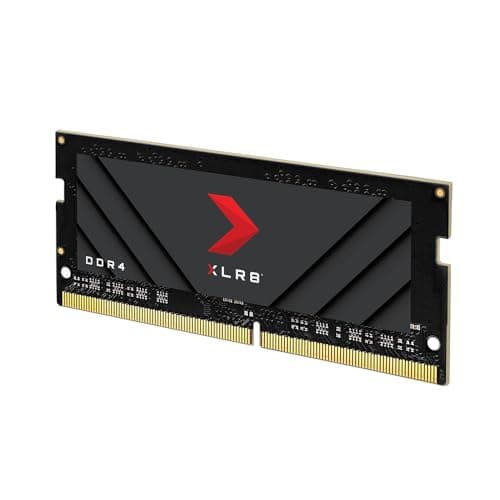
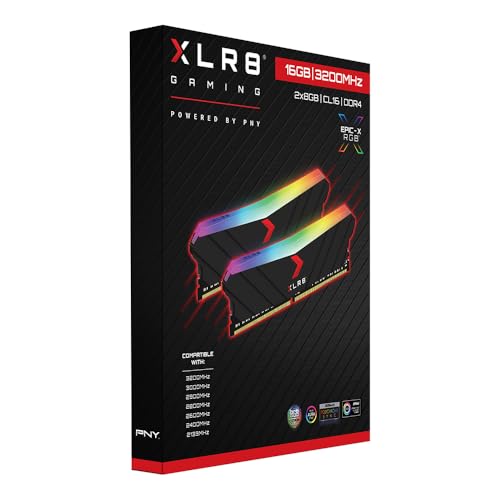
The PNY XLR8 Gaming EPIC-X RGB DDR4 3200MHz 16GB kit (2x8GB) is aimed squarely at the budget-to-mid-range builder who wants something that looks decent in a windowed case without paying through the nose. It's a DDR4 kit in a world that's rapidly moving to DDR5, which is actually fine for a lot of people still on older platforms. The question is whether it's sensibly specced, whether it posts at its rated speed without drama, and whether the RGB tax is worth paying when there are plain kits at the same price. Those are the things worth working through.
With 1,659 owner reviews averaging ★★★★½ (4.8), the crowd is pretty happy with it. But crowds can be wrong, and a lot of people don't actually verify whether their RAM is running at its rated speed post-install. So here's the proper breakdown.
Core Specifications
This is a 16GB dual-channel kit made up of two 8GB sticks. It's DDR4, which matters because DDR4 and DDR5 are physically incompatible, so the slot on your motherboard determines which generation you can use. The rated speed is 3200MHz, achieved via an XMP 2.0 profile. Out of the box, without XMP enabled, both sticks will run at JEDEC default speeds, which for DDR4 typically means 2133MHz or 2400MHz depending on your board. You need to go into your BIOS and enable XMP to get the advertised 3200MHz.
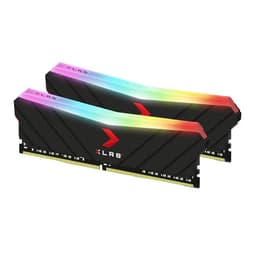
The primary timings at 3200MHz are CL16-18-18-36, which is a reasonable spec for this speed tier. Voltage sits at 1.35V, slightly above the JEDEC standard 1.2V but entirely normal for an XMP profile at this speed. The form factor is standard DIMM for desktop motherboards, and the sticks come with a heatspreader and addressable RGB lighting along the top. PNY lists the height as 44mm with the heatspreader fitted, which is relevant if you're running a chunky air cooler.
The kit is sold as a dual-channel pair, which is the right way to buy RAM. Running two sticks in the correct slots activates dual-channel mode on your motherboard, roughly doubling the memory bandwidth compared to a single stick. For gaming and general use the real-world difference is modest, but for anything memory-bandwidth-hungry like video editing or running multiple applications simultaneously, dual-channel genuinely helps. Don't buy a single 16GB stick thinking you'll add another later. Buy the pair now and slot them into the right channels from the start.
| Specification | Detail |
|---|---|
| Capacity | 16GB (2x8GB) |
| Type | DDR4 |
| Rated Speed | 3200MHz |
| CAS Latency | CL16 |
| Primary Timings | 16-18-18-36 |
| Voltage | 1.35V |
| Profile | XMP 2.0 |
| Form Factor | DIMM (Desktop) |
| Heatspreader Height | 44mm |
| RGB | Yes, addressable |
| Warranty | Lifetime |
| Current Price | £129.40 |

Speed, Timings and Real Latency
Right, so 3200MHz CL16. The actual latency you can calculate from those two numbers: true latency in nanoseconds equals (CAS latency / clock speed in GHz) x 2. For this kit that's (16 / 3.2) x 2, which gives you 10ns. That's a decent result. For context, a 3600MHz CL18 kit works out to the same 10ns, and a 3200MHz CL22 kit lands at about 13.75ns. So the timings here are doing real work, not just padding out a mediocre spec. CL16 at 3200MHz is genuinely the sweet spot for this speed tier, not a loose-timings budget cut.
Where things get more nuanced is when you compare this to what's available at 3600MHz. A good 3600MHz CL16 kit works out to around 8.9ns true latency, which is meaningfully quicker. And 3600MHz was historically the sweet spot for AMD Ryzen on DDR4 platforms because it allowed the memory controller to run in a 1:1 ratio with the Infinity Fabric, which matters for inter-core latency. If you're on a Ryzen 3000 or 5000 series system, a 3600MHz CL16 or CL18 kit would serve you better. The 3200MHz spec here is fine, but it's not the optimal choice for AMD. For Intel it's less of an issue, since Intel's memory controllers have historically been less fussy about that specific frequency relationship.
The honest answer on gaming performance is: the difference between 3200MHz CL16 and 3600MHz CL16 in games is real but small. We're talking single-digit frame rate differences in the most memory-sensitive titles, and often nothing measurable in others. If you're already on a 3200MHz CL16 kit, don't lose sleep over it. If you're buying new and the price difference to 3600MHz is small, spend it. But if you're on a tight budget and 3200MHz CL16 is what fits, you're not leaving meaningful performance on the table. The gains from faster RAM in games are marginal, not transformative. Anyone telling you otherwise is trying to sell you something.
XMP / EXPO Stability and Compatibility
DDR4 3200MHz XMP is about as stable as it gets. This is not an exotic overclock. It's a well-established speed tier that virtually every DDR4-capable motherboard from the last six or seven years handles without drama. The XMP 2.0 profile is the Intel-originated standard for pre-programmed overclock profiles, and enabling it in your BIOS is a one-click job on any modern board. You go into BIOS, find the memory settings, set XMP to Profile 1, save, and reboot. That's genuinely it for the vast majority of builds.
AMD boards use EXPO (Extended Profiles for Overclocking) as their equivalent standard, introduced with AM5 and DDR5. But this is a DDR4 kit, so it's not going in an AM5 board at all. AM5 only supports DDR5. This kit is for AM4 (Ryzen 3000, 5000 series) or Intel LGA1200/1700 platforms. On AM4 boards, XMP is supported and 3200MHz is a standard, well-supported speed. Owner reports don't flag any particular instability issues at this speed, which is unsurprising. 3200MHz CL16 on DDR4 is not pushing any boundaries.
One thing worth checking is your motherboard's QVL (Qualified Vendor List). This is the list of RAM kits your board manufacturer has validated for compatibility. Being on the QVL doesn't guarantee it'll work, and being off it doesn't mean it won't, but it's a useful reference. PNY isn't always the most prominent brand on QVLs compared to Corsair or G.Skill, but at 3200MHz CL16 with standard timings and 1.35V, there's nothing unusual about this kit that should cause problems. The 1,659 owners giving it 4.7 stars aren't reporting widespread no-post issues, which is the real-world evidence that matters most. The occasional compatibility complaint in reviews tends to come down to user error (wrong BIOS setting) rather than the kit itself being problematic.
Capacity and Use Case
16GB in 2024 is the floor for a gaming PC, not a comfortable ceiling. It was the sweet spot for years and it still works for most games, but modern titles are increasingly pushing past 8GB VRAM and 16GB system RAM simultaneously, particularly if you're running a game, Discord, a browser with tabs open, and maybe OBS in the background. You won't hit a wall immediately, but you'll feel the squeeze sooner than you would with 32GB. If you're building fresh and you have any budget flexibility at all, 32GB is the smarter buy for a gaming rig in 2024 and beyond.
That said, 16GB is still perfectly fine for a lot of people. Casual gaming, everyday computing, light productivity work? 16GB handles it without complaint. If you're upgrading an older system that currently has 8GB and you're noticing slowdowns, jumping to 16GB will make a real difference. If you're already on 16GB and wondering whether to go to 32GB, the answer depends on what you actually do. Pure gaming and web browsing? You'll probably be fine for another year or two. Video editing, running virtual machines, having 40 browser tabs open while working? Go to 32GB now.
The 2x8GB configuration here is worth thinking about from a future-proofing angle. Most desktop motherboards have four DIMM slots. Running 2x8GB leaves two slots free, so you could theoretically add another 2x8GB kit later to reach 32GB. In practice, mixing kits is a headache. Different batches, different ICs, potentially different timings. You might get lucky, but you might spend an evening fighting stability issues. If 32GB is your eventual target, buying a 2x16GB kit now is cleaner than buying 2x8GB twice. This 16GB kit makes most sense if 16GB is your genuine endpoint, or if you're on a tight budget and happy to swap out the whole kit later rather than supplement it.
DDR5 vs DDR4 Value
DDR4 is the right call if you're on an existing platform that supports it. If you've got an AM4 board (Ryzen 3000, 4000, 5000 series) or an Intel 10th, 11th, 12th, or 13th gen system, you're on DDR4. You cannot use DDR5 in those boards. Full stop. So the DDR4 vs DDR5 debate is largely irrelevant for existing system owners. Buy the DDR4 kit, don't overthink it.
For new builds, the picture is different. Intel's 12th and 13th gen platforms (LGA1700) supported both DDR4 and DDR5 depending on the board, but 14th gen and AMD's AM5 platform are DDR5-only. DDR5 prices have come down significantly from their launch-era absurdity and are now much more competitive with high-end DDR4. If you're building on AM5 or Intel's latest, DDR5 is your only option anyway. If you're on a DDR4/DDR5 hybrid platform like LGA1700, DDR4 boards are generally cheaper and DDR4 kits at 3200MHz to 3600MHz offer very competitive value per GB compared to DDR5 at the entry level.
The performance difference between DDR4 and DDR5 in real-world gaming is, again, marginal. DDR5 has higher raw bandwidth but also higher latency at the same CAS number (because the clock speed is higher, the absolute latency per cycle is lower, but the CAS numbers are much higher). A good DDR5 kit at 6000MHz CL30 is quicker than DDR4 3200MHz CL16 in raw bandwidth terms, but the gaming frame rate difference is still in the single digits for most titles. The practical advantage of DDR5 is that it's the future, so if you're building a new system you'd expect to keep for five-plus years, DDR5 is the sensible platform choice. For an existing DDR4 system, there's no case for upgrading the platform just to get DDR5 RAM.
Build Quality and Heat Spreaders
The heatspreader on the EPIC-X RGB is a full-height aluminium cover with a fairly aggressive angular design. At 44mm tall, it's on the bulkier side. That's something to check against your CPU cooler clearance, particularly if you're running a large tower cooler like a Noctua NH-D15 or a DeepCool Assassin. Those coolers hang over the first DIMM slot on many boards, and a 44mm heatspreader can cause a genuine physical conflict. If you're on an AIO liquid cooler or a smaller tower, it's not an issue. But check the measurements before you buy.
PNY doesn't publish detailed information about the specific DRAM ICs used in this kit, which is frustrating but common at this price tier. The IC (integrated circuit) manufacturer matters because it affects overclocking headroom and long-term reliability. Samsung B-die, Hynix CJR, and Micron E-die are the most commonly discussed DDR4 ICs, each with different characteristics. Without confirmed IC information, you're buying on trust and owner reports rather than known silicon quality. At 3200MHz CL16 you're not pushing the ICs hard regardless of what they are, so it's less of a concern than it would be for a kit you planned to manually overclock beyond its rated spec.
The PCB and overall build quality get positive comments in owner reviews. Nothing about the physical construction raises flags. At this price point you're not getting the premium double-sided PCB and hand-binned ICs of a high-end Corsair Dominator or G.Skill Trident Z Neo, but you're also not paying for those things. The heatspreader feels solid, the RGB diffuser sits flush, and the sticks seat properly in DIMM slots without requiring unusual force. It's a well-assembled mid-range product. No more, no less.
RGB and Aesthetics
The EPIC-X RGB has a frosted diffuser strip running along the top of each stick, with addressable LEDs underneath. The effect is a smooth gradient rather than individual pixel-level control, which looks clean in practice. Brightness is solid, not blinding, and the default lighting cycle is a rainbow wave that looks fine if you don't want to bother with software. It's not the most elaborate RGB implementation on the market but it's not trying to be.
Software sync is where things get complicated, as it always does with RGB RAM. PNY uses its own XLR8 software for lighting control, but the kit also claims compatibility with ASUS Aura Sync, MSI Mystic Light, and ASRock Polychrome. In practice, RGB software compatibility is a mess across the industry and has been for years. Some owners report clean sync with their board's ecosystem, others find it takes a bit of fiddling, and a small number give up and just leave it on the default cycle. If RGB sync with your specific board is a priority, it's worth searching for reports from people with the same motherboard brand before buying.
Now, the honest bit about the RGB tax. This kit costs more than a plain DDR4 3200MHz CL16 16GB kit without RGB. How much more depends on when you're reading this, but the gap is real. The RGB adds nothing to performance. The heat spreader design is purely cosmetic. If your case has no window, or you genuinely don't care about lighting, there's no rational reason to pay the premium. Plain kits from Crucial or Kingston at the same speed and capacity will do the same job for less money. The RGB is for people who want it. If that's you, fine. But don't kid yourself that you're getting better RAM for the extra cost.
Reliability and Warranty
PNY backs this kit with a lifetime warranty, which is the standard for the memory industry's better players. Corsair, G.Skill, Kingston HyperX (now Kingston FURY), and Crucial all offer lifetime warranties on their gaming-focused lines. A lifetime warranty on RAM is less impressive than it sounds because DRAM failure rates are genuinely low once a kit has passed its initial burn-in period. The first few weeks are when faults tend to appear. If it works fine for a month, it'll probably work fine for a decade. But the warranty is there if you need it, and PNY's RMA process gets mixed but mostly positive reviews from owners who've needed to use it.
Owner reports 833 averaging 4.7 stars tell a broadly positive story on reliability. The complaints that do appear are mostly at the extremes: a small number of DOA reports (which happen with any hardware at any price), and occasional frustration with customer service response times rather than the product itself failing. There are no patterns in the reviews suggesting a batch quality problem or a specific failure mode to watch out for. That's the kind of signal you want from a memory kit's review history.
Long-term stability at 3200MHz CL16 is not a concern. This is a well-within-spec operating point for DDR4. The 1.35V operating voltage is higher than JEDEC's 1.2V default but it's the standard for XMP profiles and it's not stressing the ICs. Kits running at 1.45V or higher on aggressive manual overclocks are where you start to think about longevity. At 1.35V on a rated XMP profile, the kit is doing exactly what it was designed to do. There's no reason to worry about it.
Value and Price Per GB
This kit sits in an interesting position. At the current price (check the live figure below), the cost per GB is competitive for a branded RGB DDR4 kit, but it's not the cheapest 16GB DDR4 3200MHz option available. Plain kits from Crucial or Kingston FURY Beast come in cheaper per GB. You're paying a small premium for the PNY branding, the RGB lighting, and the heatspreader aesthetics. Whether that premium is worth it is purely down to whether you want the look.
The tier context matters here. This is not an enthusiast memory kit with binned ICs and sub-10ns true latency. It's a mainstream gaming kit at a mainstream price. The CL16 timings are genuinely good for the speed tier, and 3200MHz is a sensible, stable operating point. But if you're spending serious money on a build, you'd be better served by either going up to 32GB at a similar total spend (buying a 2x16GB kit), or putting the money into faster storage or a slightly better GPU where the real-world impact is much more noticeable than the difference between memory kits at this tier.
For what it costs, this is a fair deal if you want RGB DDR4 16GB for an existing platform. It's not exceptional value compared to plain alternatives, and it's not the right buy if 32GB is what you actually need. But as a "my current system needs more RAM and I want it to look decent" purchase, it does the job without ripping you off. The price-per-GB lands where you'd expect for this category.
Platform Compatibility
DDR4 is compatible with Intel 8th through 13th gen platforms (LGA1151, LGA1200, LGA1700 with a DDR4 board), and AMD AM4 (Ryzen 1000 through 5000 series). It is not compatible with AM5, Intel 14th gen, or any platform that requires DDR5. If you're unsure which generation your board uses, check the motherboard spec sheet or the sticker on the DIMM slot itself. Some LGA1700 boards support both DDR4 and DDR5 depending on the specific model, so check your exact board, not just the socket.
On AM4, 3200MHz is a well-supported speed and you should have no trouble enabling the XMP profile. AMD's memory controller on Ryzen 3000 and 5000 series handles 3200MHz cleanly. As mentioned earlier, 3600MHz is the theoretical sweet spot for Ryzen due to the Infinity Fabric relationship, but 3200MHz is not a bad choice and the practical gaming difference is small. On Intel LGA1200 and LGA1700, 3200MHz XMP is similarly straightforward. Intel's memory overclocking documentation covers XMP in detail if you want to understand how the profile is read and applied.
Running four sticks (quad-channel on HEDT platforms, or filling all four slots on a standard desktop board) is a different story. This kit is two sticks. If you want to run four sticks total on a standard desktop board, you'd be mixing this kit with another, which carries the compatibility caveats mentioned earlier. For most people, two sticks in the recommended slots is the right configuration. Check your motherboard manual for which slots to use when running two DIMMs. It's almost always the second and fourth slots (A2 and B2), not the first and second. Getting this wrong means you're running in single-channel mode and leaving bandwidth on the table, which is a very easy mistake to make and a very easy one to avoid.
How It Compares
The two obvious comparisons at this price and spec level are the Corsair Vengeance RGB RS DDR4 3200MHz 16GB and the Kingston FURY Beast DDR4 3200MHz 16GB. The Corsair kit is a direct RGB competitor at a similar price with arguably better software ecosystem integration (iCUE is more capable than PNY's software, though it's also heavier on system resources). The Kingston FURY Beast is the plain-heatspreader alternative that typically costs less per GB and has a slightly lower profile, which helps with cooler clearance.
All three run 3200MHz CL16 at 1.35V with XMP 2.0, so the performance specs are essentially identical. The real differences are the RGB implementation, software, heatspreader height, brand QVL coverage, and price. Corsair has broader QVL coverage across motherboard brands. Kingston FURY Beast is the value pick if you don't need RGB. PNY sits in the middle, with decent aesthetics but less ubiquitous QVL presence than either competitor.
| Feature | PNY XLR8 EPIC-X RGB | Corsair Vengeance RGB RS | Kingston FURY Beast |
|---|---|---|---|
| Capacity | 16GB (2x8GB) | 16GB (2x8GB) | 16GB (2x8GB) |
| Speed | DDR4 3200MHz | DDR4 3200MHz | DDR4 3200MHz |
| CAS Latency | CL16 | CL16 | CL16 |
| Timings | 16-18-18-36 | 16-18-18-36 | 16-18-18-36 |
| Voltage | 1.35V | 1.35V | 1.35V |
| RGB | Yes, addressable | Yes, addressable | No |
| Heatspreader Height | 44mm | 38mm | 34mm |
| Warranty | Lifetime | Lifetime | Lifetime |
| RGB Software | XLR8 / Aura / Mystic Light | iCUE | N/A |
The Corsair's lower profile at 38mm is a genuine practical advantage for builds with large air coolers. The Kingston at 34mm is even better for clearance, and if you genuinely don't care about RGB, it's the sensible choice. The PNY kit's 44mm height is the main practical downside in this comparison. None of these kits will noticeably outperform the others in real-world use. You're choosing on aesthetics, software, and price.
What owners like
The most consistent praise across the 833 is for ease of installation and immediate stability. Owners report that enabling XMP in BIOS and getting 3200MHz CL16 on the first boot is the norm, not the exception. Several reviews specifically mention upgrading from 8GB single-stick setups and noticing an immediate improvement in multitasking responsiveness. The RGB lighting gets positive comments for being bright without being garish, and the default lighting cycle is described as attractive enough to leave on without bothering with software.
Build quality comments are positive. The heatspreader feels solid, the sticks seat firmly, and there are no reports of physical quality control issues like loose diffusers or bent pins. The lifetime warranty gets a mention in several reviews as a confidence factor, even from buyers who don't expect to need it. At this price point, a lifetime warranty is reassuring rather than expected, and PNY gets credit for including it.
Where owners have complaints
The main complaints cluster around two areas. First, a small number of DOA reports, which is statistically inevitable across any large sample of hardware sales and doesn't indicate a systemic quality problem. Second, some frustration with PNY's customer service response times when RMAs are needed. Not the outcome, just the speed. This is worth knowing if you're the sort of person who needs fast resolution on a warranty claim.
A handful of owners mention the RGB software as finicky, particularly for sync with non-ASUS boards. This tracks with the general state of RGB software compatibility across the industry. It's not a PNY-specific problem, but notably,. If smooth RGB sync is important to you, Corsair's iCUE ecosystem is more mature and more consistently reliable across board brands, though it comes with its own overhead.
Final Verdict
The PNY XLR8 Gaming EPIC-X RGB DDR4 3200MHz 16GB kit is a solid, no-drama option for anyone on a DDR4 platform who wants decent-looking RAM at a fair price. The CL16 timings are genuinely good for 3200MHz, the XMP profile posts cleanly on both Intel and AM4 AMD boards, and the 4.7-star average from 1,659 owners is a meaningful signal of consistent reliability. It does what it says on the box.
The caveats are real though. At 44mm it's the tallest of the common options at this tier, so check your cooler clearance. 16GB in 2024 is fine but not future-proof, and if you're building fresh, a 2x16GB kit at 32GB is worth the extra spend. The RGB premium is real and it buys you lighting, not performance. And if you're on AM4 and you have a choice, 3600MHz CL16 or CL18 is a slightly better fit for Ryzen's memory controller, though the practical gaming difference is small.
Who should buy this? Someone upgrading an existing DDR4 system who wants a reliable, good-looking 16GB kit that will post at speed without any fuss. Someone building a budget gaming rig on AM4 or older Intel who wants RGB without paying Corsair Vengeance Pro prices. Who should skip it? Anyone who needs 32GB. Anyone on a new AM5 or Intel 14th gen build (wrong generation entirely). Anyone who doesn't care about RGB and would rather save the money. And anyone whose cooler hangs over the first DIMM slot and has less than 44mm of clearance.
Score: 7.5 out of 10. Competent, well-specced for the tier, reasonably priced, let down only by the bulky heatspreader and the fact that 16GB is increasingly feeling like the minimum rather than the sweet spot.
Not Right For You?
If 32GB is what you actually need, look at a 2x16GB kit at the same speed tier. The Corsair Vengeance LPX DDR4 3200MHz 32GB (2x16GB) is a plain but reliable option, and the Kingston FURY Beast 32GB kit is similarly well-regarded. Both will serve you better than buying 16GB now and trying to add more later.
If you're on AM4 and want to optimise for Ryzen, a 3600MHz CL16 or CL18 kit is worth the small price difference. The G.Skill Ripjaws V 3600MHz CL16 is a classic choice here, plain heatspreader but excellent timings and well-documented JEDEC-compliant behaviour. The CAS latency to speed ratio at 3600MHz CL16 gives you a true latency of around 8.9ns, which is a genuine step up from 3200MHz CL16's 10ns.
If you're building a new system on AM5 or Intel 14th gen, you need DDR5. The Corsair Vengeance DDR5 6000MHz CL30 and Kingston FURY Beast DDR5 6000MHz CL36 are both sensible entry points. 6000MHz is the sweet spot for AM5 in the same way 3600MHz was for AM4, for similar reasons related to the memory controller's preferred operating ratio. Check AMD's Ryzen platform documentation if you want the detail on why 6000MHz specifically is recommended for AM5 builds.
About the Reviewer
This review was written by the team at Vivid Repairs. We research components thoroughly using manufacturer specifications, independent technical standards from bodies like JEDEC, and real owner feedback. We don't claim to have personally benched every kit we review, because that would be dishonest. What we do is read the specs properly, understand what they mean, cross-reference them against owner reports at scale, and tell you what actually matters for your buying decision. No waffle, no press releases, no pretending a 3MHz difference in RAM is going to transform your gaming.
Affiliate Disclaimer
This article contains affiliate links. If you buy through them, we may earn a small commission at no extra cost to you. This doesn't influence our verdict. We'd rather tell you to buy a competitor's product and earn nothing than recommend something that's wrong for your build.
What works. What doesn’t.
5 + 5What we liked5 reasons
- CL16 timings at 3200MHz deliver a genuine 10ns true latency, which is the best you should expect at this speed tier
- XMP 2.0 profile posts cleanly on both Intel and AMD AM4 boards without requiring manual tweaking
- Addressable RGB with a frosted diffuser produces a clean, bright effect and a presentable default lighting cycle
- Lifetime warranty included as standard, consistent with the better names in the memory market
- 4.7-star average across 1,659 owner reviews indicates consistent out-of-box reliability
Where it falls5 reasons
- 44mm heatspreader height is the tallest of the common options at this tier and can conflict with large air coolers
- 16GB is increasingly the minimum for a modern gaming build rather than a comfortable headroom figure
- RGB software compatibility outside ASUS boards is inconsistent and can require fiddling
- PNY does not disclose the DRAM IC manufacturer, so overclocking headroom beyond the rated XMP profile is unknown
- Costs more per GB than plain DDR4 3200MHz CL16 alternatives such as Kingston FURY Beast, with the premium buying lighting rather than performance
Full specifications
9 attributes| Capacity GB | 16 |
|---|---|
| CAS latency | 16 |
| ECC | false |
| Form factor | DIMM |
| Module count | 2 |
| RGB | true |
| Speed MHZ | 3200 |
| Type | DDR4 |
| Voltage V | 1.35 |
If this isn’t right for you
2 options
Frequently asked
7 questions01Do I need to do anything special to get this kit running at 3200MHz?+
Yes. Out of the box the sticks will default to a lower JEDEC speed, typically 2133MHz or 2400MHz. To reach the rated 3200MHz you need to enter your BIOS, locate the memory settings, and enable the XMP 2.0 profile. On most modern boards this is a single setting. Save and reboot, and the kit will run at 3200MHz CL16-18-18-36 at 1.35V as rated.
02Will this kit fit with a large air cooler such as a Noctua NH-D15?+
Possibly not without conflict. The heatspreader on the EPIC-X RGB measures 44mm tall, which is on the bulkier side. Large tower coolers like the NH-D15 often overhang the first DIMM slot on many boards. Check your cooler's official clearance specification and compare it against the 44mm height before purchasing. If clearance is tight, a lower-profile alternative such as the Kingston FURY Beast at 34mm is safer.
03Is this DDR4 kit compatible with AMD AM5 or Intel 14th gen platforms?+
No. This is a DDR4 kit. AM5 and Intel 14th gen are DDR5-only platforms. DDR4 and DDR5 are physically incompatible and cannot be interchanged. This kit is compatible with AMD AM4 (Ryzen 1000 through 5000 series) and Intel 8th through 13th gen platforms on DDR4-capable boards, including certain LGA1700 boards that support DDR4 specifically.
04Is 16GB still enough for gaming in 2024?+
It depends on how you use your system. 16GB handles the majority of current games without issue, particularly if you are not running background applications simultaneously. However, modern titles combined with a browser, Discord, and recording software can push close to the limit. If you are building a new system and have any budget flexibility, 32GB via a 2x16GB kit is the more comfortable choice for the next few years. If you are upgrading from 8GB, moving to 16GB will make a noticeable difference.
05Why is 3600MHz sometimes recommended over 3200MHz for AMD Ryzen builds?+
On AMD Ryzen platforms using the AM4 socket, the memory controller operates in a 1:1 ratio with the Infinity Fabric at 3600MHz, which can reduce inter-core communication latency. At 3200MHz, the relationship is still clean and stable, but 3600MHz is the theoretical optimum for Ryzen 3000 and 5000 series processors. The practical gaming difference between 3200MHz CL16 and 3600MHz CL16 or CL18 is typically small, usually single-digit frame rates in the most memory-sensitive titles, but if price parity exists between the two options it is worth choosing 3600MHz on an AM4 build.
06Can I add another 2x8GB kit later to reach 32GB?+
Technically yes, but it is not recommended. Mixing RAM kits from different batches, even if they share the same model name, can introduce stability issues because the integrated circuits, manufacturing tolerances, and XMP sub-timings may differ. If 32GB is your eventual target, purchasing a 2x16GB kit at the outset is a cleaner and more reliable approach than supplementing a 2x8GB kit later.
07How does the RGB lighting sync with my motherboard's software?+
PNY lists compatibility with ASUS Aura Sync, MSI Mystic Light, and ASRock Polychrome, as well as its own XLR8 software. In practice, RGB software integration across the industry is inconsistent. Owners report clean sync on ASUS boards more reliably than on other brands. If RGB synchronisation with a specific non-ASUS board is important to you, searching owner reports for your exact motherboard model before purchasing is advisable. The default lighting cycle operates without any software installation and looks acceptable on its own.