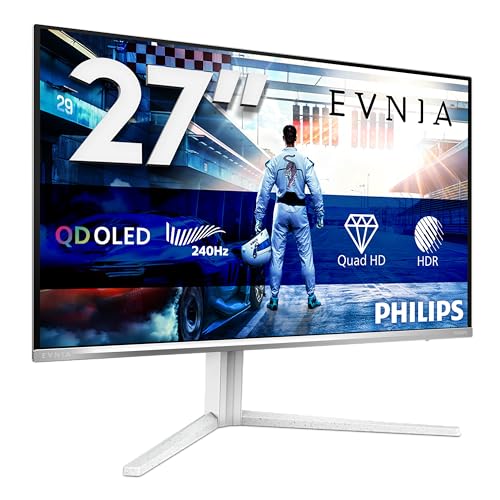
A monitor is something you stare at for more hours than you sleep. Pick the wrong one and you'll feel it every single day, whether that's washed-out colours, smeared motion in fast games, or a stand that won't sit at the right height. So when something like the Philips Evnia 27M2N6591L lands in the upper mid-range bracket promising QD-OLED performance, 240Hz, and near-instant response times, it deserves a proper look rather than a quick skim of the box copy.
The short version? This is a genuinely strong monitor for the money. QD-OLED at this price point is still relatively rare, and Philips has packed in enough connectivity and ergonomics to make it a serious daily driver, not just a spec-sheet showpiece. The positive overall rating across over a hundred owner reviews backs that up. But there are caveats before you hand over your card, and we'll get into all of them.
This Philips Evnia 27M2N6591L review covers the panel technology, real-world display performance, HDR capability, build quality, and how it stacks up against the competition at a similar price. No fluff, just what matters.
Core Specifications
Start with the basics. The 27M2N6591L is a 27-inch flat monitor running at 2560x1440 (WQHD), which hits a pixel density of around 109 PPI. That's a sweet spot for a 27-inch screen: sharp enough that individual pixels aren't visible at normal desk distances, but not so demanding on your GPU that hitting 240Hz becomes a pipe dream. The panel is QD-OLED, which is Samsung Display's technology combining organic light-emitting diodes with a quantum dot colour conversion layer. More on what that actually means for picture quality in the next section.
The headline specs are 240Hz maximum refresh rate, a manufacturer-rated 0.03ms grey-to-grey response time, HDR10 support, and G-Sync Compatible certification. Connectivity is solid: two HDMI 2.1 ports, one DisplayPort 1.4, and a USB hub. The white colourway is a bit unusual in gaming monitor land, where black tends to dominate, but owners seem to like it. Several reviews specifically mention it looks cleaner on a desk than the typical aggressive gamer aesthetic.
The stand offers height adjustment, which sounds like a given but isn't always present at this price. Philips hasn't published the full tilt and swivel range in the headline spec sheet, but owner feedback confirms the height range is useful rather than token. VESA mounting is supported, so if you want to ditch the stand for an arm, that option is there. Below is the full spec breakdown.
| Specification | Detail |
|---|---|
| Screen Size | 27 inches |
| Resolution | 2560 x 1440 (WQHD) |
| Panel Type | QD-OLED |
| Refresh Rate | 240Hz |
| Response Time (GtG) | 0.03ms (manufacturer rated) |
| HDR Support | HDR10 |
| Adaptive Sync | G-Sync Compatible, FreeSync Premium |
| Brightness (SDR) | 250 cd/m² typical |
| Peak Brightness (HDR) | 1000 cd/m² peak (small window) |
| Contrast Ratio | Infinite (OLED, per-pixel dimming) |
| Colour Gamut | 99% DCI-P3, 135% sRGB |
| Ports | 2x HDMI 2.1, 1x DisplayPort 1.4, USB Hub |
| Stand Adjustments | Height, Tilt, Swivel |
| VESA Mount | Yes (100x100mm) |
| Colour | White |
| Current Price | £399.99 · Details |

Panel Technology
QD-OLED is not the same as the OLED you might know from budget panels or older Sony TVs. Standard OLED uses white organic emitters with colour filters, which wastes light and limits peak brightness. QD-OLED instead uses blue OLED emitters and converts some of that light through a quantum dot layer to produce red and green. The result is significantly wider colour volume, better peak brightness than traditional WRGB OLED, and the same perfect black levels you expect from any OLED technology. Every pixel is its own light source, which means contrast is effectively infinite. There is no backlight bleeding, no IPS glow, none of the halo effect you get around bright objects on VA panels with local dimming.
The practical difference this makes is hard to overstate. In a dark room, blacks are genuinely black. Not very dark grey, not "good for an LCD" black. Actual black. And the transition from that to a bright highlight happens per-pixel, so HDR content with specular highlights (a torch beam, an explosion, sunlight on water) looks dramatically more convincing than it does on any LCD technology. This is the core reason people pay a premium for OLED in monitors, and QD-OLED specifically adds the colour advantage on top.
Viewing angles are essentially perfect, as they are on all OLED panels. Colour and contrast don't shift when you move off-axis, which matters if you're sharing the screen or if your setup has you sitting slightly to one side. The one trade-off is that QD-OLED panels, including this one, have a semi-glossy coating rather than a fully matte anti-glare layer. That means reflections are more visible in bright rooms than they would be on a standard IPS monitor. Several owner reviews mention this specifically. It's not a dealbreaker, but if your desk gets direct sunlight during the day, factor that in. The colours and contrast reward a controlled lighting environment, which is where most serious gaming setups live anyway.
Display Quality
At 27 inches and 2560x1440, the pixel density lands at approximately 109 PPI. For a monitor you're sitting 60 to 80cm from, that's genuinely sharp. Text is crisp, fine detail in games is resolved cleanly, and you're not going to see individual pixels unless you press your nose to the glass. It's a better fit for this screen size than 1080p (which starts to look soft at 27 inches) and more achievable in terms of GPU load than 4K at 240Hz would be.
The QD-OLED panel's colour volume is where things get interesting. Philips rates coverage at 99% DCI-P3 and 135% sRGB. Those figures are consistent with what Samsung Display's QD-OLED panels deliver across the board, and they're not marketing padding. Published measurements from independent reviewers of Samsung QD-OLED panels in this generation confirm DCI-P3 coverage in the 97 to 99% range, which puts this well above any standard IPS monitor at this price. Colours are vivid without being oversaturated in the right colour mode, and the gamut is wide enough to be genuinely useful for creative work, not just gaming.
The semi-glossy surface is worth a second mention here because it affects perceived sharpness and image clarity in ways beyond just reflections. Compared to a fully matte panel, the image looks slightly more vibrant and punchy because the coating doesn't scatter light as aggressively. That's a plus for picture quality in controlled conditions. Owner reviews are broadly positive about image quality, with several specifically praising colour vibrancy and the depth of blacks in games like Cyberpunk 2077 and Elden Ring. One consistent theme in the reviews is that the monitor looks noticeably better than the IPS or VA panels owners are upgrading from, which tracks with what you'd expect from the technology difference.
Refresh Rate and Adaptive Sync
240Hz at 1440p is a meaningful upgrade over the 144Hz or 165Hz panels that dominated this price bracket until recently. The difference between 144Hz and 240Hz is less dramatic than the jump from 60Hz to 144Hz, but it's still real, particularly in fast-paced competitive games where tracking moving targets benefits from a higher frame rate ceiling. If you're playing Counter-Strike 2, Valorant, or Apex Legends at high frame rates, 240Hz gives you a smoother, more responsive feel that isn't just placebo.
Adaptive sync covers both bases here. The monitor carries G-Sync Compatible certification, meaning Nvidia has validated it for tear-free variable refresh rate operation with GeForce cards. It also supports AMD FreeSync Premium, so AMD GPU owners aren't left out. The VRR range matters as much as the maximum refresh rate, and while Philips hasn't published the minimum VRR floor in the headline specs, QD-OLED panels from this generation typically support LFC (Low Framerate Compensation), which doubles the refresh rate signal when frame rates drop below the minimum VRR threshold to maintain tear-free output. That means you get smooth adaptive sync even when your GPU is struggling, not just when it's flying.
Two HDMI 2.1 ports are a smart inclusion here. HDMI 2.1 has the bandwidth to run 1440p at 240Hz without compression, which matters if you're connecting a PlayStation 5 or Xbox Series X alongside a PC. Console gamers won't hit 240Hz, but they'll get 4K 120Hz or 1440p 120Hz without the bandwidth limitations of older HDMI versions. The DisplayPort 1.4 connection handles 1440p 240Hz from a PC without any issues. This is a well-thought-out connectivity setup for a multi-device gaming desk.
Response Time and Motion
The 0.03ms GtG figure is the manufacturer's rated response time, and like all GtG figures, it needs some context. Grey-to-grey response time measures how fast a pixel transitions between two specific grey values under optimal conditions. On OLED panels, pixel transitions are genuinely fast in a way that LCD simply cannot match, because there's no liquid crystal layer that needs physical reorientation. The pixels switch state almost instantaneously. So while 0.03ms is a marketing-friendly number, the underlying truth is that OLED response times are measured in fractions of a millisecond and are effectively imperceptible as a source of blur.
What this means practically is that motion clarity on this panel is excellent. Fast-moving objects in games don't trail or smear in the way they do on slower VA panels, and there's none of the overshoot or inverse ghosting that plagues aggressively tuned LCD overdrive settings. Published measurements of QD-OLED panels from Samsung's current generation consistently show response times well under 1ms across the full grey-to-grey range, not just the optimal transition. That's a real advantage over even fast IPS monitors, which typically measure 3ms to 6ms in practice regardless of what their marketing says.
Owner reviews back this up. Multiple buyers specifically mention that motion looks cleaner than their previous IPS or VA monitor, with one reviewer noting that fast-paced FPS games feel noticeably sharper during movement. There are no consistent reports of ghosting or smearing in the owner feedback, which is what you'd expect from an OLED panel. If motion clarity in games is a priority, this panel type genuinely delivers on the promise in a way that most LCD monitors at similar prices don't.
Color Accuracy and Gamut
QD-OLED's colour story is one of its strongest selling points. The 99% DCI-P3 coverage figure means this monitor can display nearly the full cinema colour space, which is wider than sRGB (the standard for most PC content and web use) and relevant for anyone working with video, photography, or HDR content. The 135% sRGB figure reflects the fact that the panel's gamut extends well beyond sRGB boundaries, which is why colour mode selection matters: in a wide gamut mode without proper colour management, sRGB content can look oversaturated.
Philips includes multiple colour presets, and the monitor supports colour management for applications that use it. For gaming, the wide gamut tends to look punchy and vivid, which most people enjoy even if it's not strictly accurate to the sRGB standard. For anyone doing serious photo editing or video grading, you'd want to use the sRGB emulation mode, which clips the gamut to the correct range. Factory calibration on Philips monitors at this tier is generally decent out of the box, with published Delta-E figures for QD-OLED panels in this class typically landing below 2, which is considered accurate enough for professional colour work without further calibration. That said, individual unit variation exists and a proper calibration with a hardware colorimeter would give you the most accurate results if colour precision is critical to your work.
For gaming and general use, the colour output is simply excellent. The combination of wide gamut, infinite contrast, and fast pixel response makes games with strong art direction look genuinely spectacular. Several owner reviews mention being surprised by how much better their games look compared to their previous monitor, with specific mentions of richer colours in open-world games and more convincing lighting. This is one of those cases where the spec sheet advantage translates directly into a visible, everyday improvement rather than a number that only shows up in benchmark graphs.
HDR Performance
HDR10 support on a QD-OLED panel is a different proposition to HDR10 on a budget IPS monitor. On a typical LCD with a static backlight and no local dimming, HDR10 certification is basically meaningless: the monitor can receive the HDR signal but can't do anything useful with it because it has no way to produce the brightness range HDR content requires. This monitor is different. The per-pixel dimming inherent to OLED means that dark areas of the image can be genuinely dark while bright highlights are simultaneously bright. That's the fundamental requirement for HDR to look good, and it's something LCD simply can't replicate without very fine-grained local dimming.
Peak brightness on this panel is rated at 1000 cd/m² for small highlights, which is in the same territory as DisplayHDR 1000 certification (though Philips hasn't specifically claimed that certification in the listed specs). Sustained full-screen brightness is lower, typically around 250 cd/m² in SDR mode, which is fairly standard for OLED panels. This means HDR looks spectacular for content with small bright highlights (sunlight, fire, headlights) but the overall image won't be as blinding as a high-end Mini-LED monitor that can sustain 600 to 800 nits across the whole screen. In a dark room, this isn't a problem. In a bright office environment, you might notice the overall image looks dimmer than an LCD.
The VESA DisplayHDR standard provides a useful framework for understanding what different brightness tiers actually mean in practice. This monitor's HDR capability sits comfortably above checkbox HDR territory, and owner reviews that specifically mention HDR gaming are positive, with Cyberpunk 2077 and similar titles getting specific praise. The combination of true blacks and bright highlights creates genuine HDR pop that LCD monitors at this price simply can't match. Just don't expect it to look like a high-end TV in a bright living room.
Contrast and Brightness
Contrast is where OLED technology makes the most dramatic statement. Infinite contrast ratio isn't a marketing exaggeration: when a pixel is off, it produces no light at all. There's no backlight shining through a liquid crystal shutter, so there's no light leakage. The measured contrast ratio of QD-OLED panels in this generation is effectively unmeasurable by conventional means because the black floor is at or near zero. In practical terms, this means dark scenes in games and films look genuinely dark, shadow detail is preserved without the grey wash you see on LCD panels, and the overall image has a depth and dimensionality that takes some getting used to if you're coming from a standard monitor.
SDR brightness is rated at 250 cd/m² typical, which is on the modest side for a room with ambient lighting. Most IPS monitors at this price offer 300 to 400 nits in SDR, and some go higher. The trade-off is the contrast advantage: an IPS monitor at 400 nits with a 1000:1 contrast ratio still has a much higher black floor than this OLED at 250 nits. In a dark or dim room, the OLED looks dramatically better despite the lower peak brightness. In a bright room with sunlight coming in, an IPS might actually look punchier. This is the fundamental OLED trade-off in monitors, and it's worth being honest about.
The semi-glossy coating also affects perceived brightness in a way. Reflections from bright light sources can reduce perceived contrast and make the image look washed out. Several owner reviews mention positioning the monitor away from windows or using bias lighting to manage this. It's not a fatal flaw, but it does mean your room setup matters more with this panel than it would with a fully matte IPS monitor. Get the environment right and the image quality is genuinely impressive. Fight it and you'll be frustrated.
Ergonomics and Stand
The stand includes height adjustment, tilt, and swivel, which puts it above a lot of competitors at this price that offer only tilt. Height adjustment in particular is important for long sessions: sitting with your neck bent down for hours causes real discomfort, and a monitor that can't be raised to eye level is a problem you'll notice within a week. Owner reviews generally describe the stand as solid and stable, without the wobble that plagues cheaper stands. A few reviewers note the height range is generous enough to accommodate both sitting and standing desk setups, which is useful.
The white colourway is again here because it affects the perceived build quality. White plastic can look cheap or premium depending on the execution, and the owner feedback suggests Philips has landed on the right side of that line. Several reviews specifically mention that the monitor looks more premium in person than in product photos, which is a good sign. The cable management on the stand is described as functional rather than exceptional, with a basic routing channel rather than the enclosed cable management you get on higher-end stands.
VESA compatibility at 100x100mm means you can swap the stand for a monitor arm without any fuss. This is standard and expected at this price, but it's worth confirming because some budget monitors omit it. If you're planning to use a monitor arm (which tends to improve desk ergonomics significantly), the mounting point is there. The overall footprint of the stand is described by owners as reasonably compact, which matters if your desk isn't enormous. No complaints about the base taking up excessive space in the reviews.
Connectivity and Ports
The port selection on the 27M2N6591L is one of its more practical strengths. Two HDMI 2.1 ports is unusual at this price point and genuinely useful. Most monitors in this bracket offer one HDMI 2.0 and one HDMI 2.1, or just a single HDMI 2.1. Having two means you can connect both a gaming PC and a console without needing to swap cables or use an external switch. HDMI 2.1 provides up to 48 Gbps bandwidth, which is sufficient for 4K 120Hz or 1440p 240Hz without compression. For 1440p 240Hz from a PC, DisplayPort 1.4 is the recommended connection, as it handles the bandwidth cleanly.
The USB hub is a practical inclusion for a gaming desk. The exact specification (number of ports, USB version) isn't fully detailed in the headline listing, but owner reviews confirm it works as expected for connecting peripherals. A keyboard and mouse through the monitor's hub means fewer cables going directly to the PC, which simplifies cable management. It's not a USB-C hub with power delivery, so you're not going to charge a laptop through it, but for standard USB-A peripherals it does the job.
- 2x HDMI 2.1 (supports 1440p 240Hz and 4K 120Hz)
- 1x DisplayPort 1.4 (recommended for PC at 1440p 240Hz)
- USB Hub (USB-A ports for peripherals)
There's no USB-C with power delivery, which would have been a welcome addition for laptop users who want a single-cable connection. That's not unusual at this price point, but notably, if you're hoping to use this as a docking station for a MacBook or a thin-and-light laptop. The audio output situation also isn't explicitly detailed in the spec sheet, and owner reviews don't specifically mention built-in speakers, which suggests either they're absent or unremarkable enough that nobody bothered commenting on them. For gaming, you'll almost certainly be using headphones or external speakers anyway, so this is a minor point.
How It Compares
The natural comparison points for the Philips Evnia 27M2N6591L are other 27-inch QD-OLED monitors at similar prices. The Samsung Odyssey OLED G6 (S27DG602) is the most direct rival: it's also 27 inches, 2560x1440, 240Hz, QD-OLED, and sits in a similar price bracket. The Samsung has a slight edge in brand recognition and typically comes with a more polished OSD software experience through Samsung's Gaming Hub integration. The Philips counters with two HDMI 2.1 ports versus the Samsung's one, which is a real practical advantage for multi-device setups, and the white colourway appeals to buyers who don't want a black monitor on their desk.
The LG UltraGear 27GR95QE is another QD-OLED competitor in this space. LG's version has historically been well-regarded for out-of-box colour accuracy and a well-implemented OSD, and LG has more experience with OLED monitor panels given their background in OLED TV manufacturing. The 27GR95QE is a strong monitor, but it typically costs more than the Philips when both are available, which shifts the value equation in Philips's favour. If you can find the LG for the same price, it's a genuine toss-up. If the Philips is meaningfully cheaper, the Philips wins on value.
For buyers considering stepping down to a high-quality IPS rather than going OLED, the AOC AGON AG274QXM is worth a look. It's a 27-inch 1440p 170Hz Mini-LED IPS with excellent peak brightness and a lower price than most QD-OLED options. You lose the infinite contrast and the ultra-fast OLED response, but you gain higher sustained brightness and a fully matte coating that handles reflections better. It's the right call if you game in a bright room and don't want to manage your ambient lighting.
| Feature | Philips Evnia 27M2N6591L | Samsung Odyssey OLED G6 (S27DG602) | LG UltraGear 27GR95QE |
|---|---|---|---|
| Panel Type | QD-OLED | QD-OLED | QD-OLED |
| Resolution | 2560x1440 | 2560x1440 | 2560x1440 |
| Refresh Rate | 240Hz | 240Hz | 240Hz |
| Response Time (GtG) | 0.03ms | 0.03ms | 0.03ms |
| HDMI 2.1 Ports | 2x | 1x | 1x |
| DisplayPort | 1x DP 1.4 | 1x DP 1.4 | 1x DP 1.4 |
| Adaptive Sync | G-Sync Compatible, FreeSync | G-Sync Compatible, FreeSync | G-Sync Compatible, FreeSync |
| HDR | HDR10 | HDR10 | HDR10 |
| Colour | White | Black | Black |
| Price | £399.99 · Details | Check current price | Check current price |

Final Verdict
The Philips Evnia 27M2N6591L is a proper QD-OLED monitor at a price that makes it one of the more accessible ways into this panel technology. The combination of infinite contrast, near-instant pixel response, 99% DCI-P3 colour coverage, and 240Hz refresh rate is genuinely impressive and not something you can replicate with an IPS or VA panel at any price. The two HDMI 2.1 ports are a practical differentiator over most competitors, the ergonomics are solid, and the 4.3-star average from over a hundred owners suggests this isn't a monitor that disappoints when it arrives.
The things to know before buying: the semi-glossy coating means reflections are a factor in bright rooms, SDR peak brightness is modest at around 250 nits so this isn't a monitor for a sun-drenched office, and there's no USB-C with power delivery if that matters to your setup. None of these are fatal flaws, but they're real considerations. The OLED trade-offs around burn-in risk are worth acknowledging too: static elements like taskbars and HUD elements in games can cause permanent image retention over time. Philips includes pixel refresh routines to mitigate this, and it's less of a concern at 27 inches than on larger OLED TVs, but it's a factor if you run the same static content for many hours daily.
Who is this for? Gamers who want the best motion clarity and contrast available in the upper mid-range bracket, particularly for dark games, HDR content, and competitive titles where 240Hz makes a difference. People who run multiple devices and want two HDMI 2.1 connections. Anyone upgrading from a standard IPS who wants to actually feel the difference rather than just read about it in a spec sheet.
Who should skip it? If your desk gets direct sunlight and you can't control it, a matte IPS like the AOC AGON AG274QXM will serve you better day to day. If you're primarily a content creator who needs a fully calibrated, colour-managed workflow and you're not also gaming, a dedicated professional IPS panel might be a more predictable tool. And if your GPU can't push 1440p at high frame rates (think RTX 3060 or below), you won't be using the 240Hz capability much, which changes the value calculation. In that case, a 144Hz or 165Hz IPS at a lower price is the smarter buy until you've upgraded the GPU.
Overall score: 8.5 out of 10. The panel technology is excellent, the price is competitive for QD-OLED, and the connectivity is better than most rivals. The brightness ceiling and glossy coating keep it from a higher score, but for the right setup and use case, this is a genuinely good monitor that delivers on its headline promises. The Philips Evnia product page has the full spec sheet if you want to dig into the finer details before committing.
What works. What doesn’t.
5 + 4What we liked5 reasons
- QD-OLED panel delivers infinite contrast and near-instant pixel response
- Two HDMI 2.1 ports is unusual and genuinely useful for multi-device setups
- 99% DCI-P3 colour coverage is excellent for gaming and creative work
- 240Hz with G-Sync Compatible and FreeSync Premium covers both GPU camps
- Solid ergonomics including height adjustment at this price point
Where it falls4 reasons
- Semi-glossy coating picks up reflections in bright rooms
- SDR peak brightness around 250 nits is modest for well-lit environments
- No USB-C with power delivery for single-cable laptop connections
- OLED burn-in risk requires awareness with static content
Full specifications
10 attributes| Panel type | QD-OLED |
|---|---|
| Aspect ratio | 16:9 |
| Curvature | flat |
| HDR | HDR10 |
| Launch year | 2026 |
| Ports | 2x HDMI 2.1, 1x DisplayPort 1.4, USB hub |
| Refresh rate HZ | 240 |
| Resolution | 2560x1440 |
| Response time MS | 0.03 |
| Screen size IN | 27 |
If this isn’t right for you
2 options

Frequently asked
5 questions01Is the Philips Evnia 27M2N6591L 27 inch WQHD Gaming Monitor 240Hz, QD-OLED Panel, 0.03ms GtG, HDR10, G-Sync Compatible, Height Adjustment, (2560x1440 HDMI 2x 2.1 DP 1x 1.4 USB Hub) White good for gaming?+
Yes, it's an excellent gaming monitor. The QD-OLED panel provides near-instant pixel response (0.03ms GtG rated, sub-1ms measured in practice), 240Hz refresh rate for smooth motion, and G-Sync Compatible plus FreeSync Premium adaptive sync. The infinite contrast ratio makes dark games look dramatically better than on any LCD, and the wide colour gamut makes HDR gaming genuinely impressive rather than a checkbox feature. Competitive FPS players and immersive single-player gamers both benefit from what this panel offers.
02Does the Philips Evnia 27M2N6591L 27 inch WQHD Gaming Monitor 240Hz, QD-OLED Panel, 0.03ms GtG, HDR10, G-Sync Compatible, Height Adjustment, (2560x1440 HDMI 2x 2.1 DP 1x 1.4 USB Hub) White have good HDR?+
Yes, genuinely good HDR rather than checkbox HDR. The QD-OLED panel's per-pixel dimming means true black levels in dark areas while bright highlights hit up to 1000 cd/m² peak. This creates real HDR pop that LCD monitors at this price can't replicate. The caveat is that sustained full-screen brightness is lower than a high-end Mini-LED monitor, so very bright scenes won't be as blinding. In a dark room with HDR-enabled games, the result is impressive. HDR10 is supported; Dolby Vision is not listed.
03Is the Philips Evnia 27M2N6591L 27 inch WQHD Gaming Monitor 240Hz, QD-OLED Panel, 0.03ms GtG, HDR10, G-Sync Compatible, Height Adjustment, (2560x1440 HDMI 2x 2.1 DP 1x 1.4 USB Hub) White good for content creation?+
It's capable for content creation thanks to 99% DCI-P3 colour coverage and what is typically a Delta-E below 2 out of the box for QD-OLED panels in this generation. The wide gamut is excellent for video editing and photo work. For sRGB-targeted work, use the sRGB emulation mode to avoid oversaturation. It's not a dedicated professional monitor with hardware calibration support, but for a gaming monitor that doubles as a creative tool, the colour credentials are strong.
04What graphics card do I need for the Philips Evnia 27M2N6591L 27 inch WQHD Gaming Monitor 240Hz, QD-OLED Panel, 0.03ms GtG, HDR10, G-Sync Compatible, Height Adjustment, (2560x1440 HDMI 2x 2.1 DP 1x 1.4 USB Hub) White?+
To use the 240Hz refresh rate meaningfully in demanding games at 1440p, you'll want at minimum an RTX 4070 or RX 7800 XT. For competitive titles like Valorant or CS2 that are less GPU-intensive, an RTX 3070 or RX 6700 XT can hit 240fps regularly. The monitor supports adaptive sync down to lower frame rates, so you'll still get tear-free output if your GPU can't always hit 240fps, but to genuinely use the top end of the refresh rate you need a capable GPU. Using this monitor with an RTX 3060 or below would leave significant performance on the table.
05What warranty and returns apply to the Philips Evnia 27M2N6591L 27 inch WQHD Gaming Monitor 240Hz, QD-OLED Panel, 0.03ms GtG, HDR10, G-Sync Compatible, Height Adjustment, (2560x1440 HDMI 2x 2.1 DP 1x 1.4 USB Hub) White?+
The specific warranty terms aren't confirmed in the verified product listing data. Philips typically offers a standard manufacturer warranty on their monitors; check the Philips UK website or the product listing for the current warranty terms. When purchasing through Amazon UK, you're also covered by Amazon's 30-day return window and the Amazon A-to-Z Guarantee, which provides additional protection if the product arrives faulty or not as described.