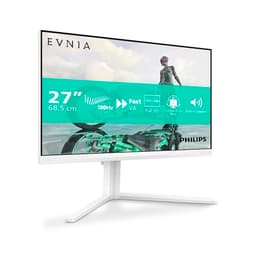
Monitor manufacturers have a funny relationship with the truth when it comes to response times. The number on the box is basically a best-case fantasy, measured under conditions that bear no resemblance to actual use. So when Philips quotes 4ms GtG for the 241V8AW, the sensible question isn't "is that fast?" but "what does that actually mean in practice?" Published measurements of IPS panels in this class typically land somewhere between 6ms and 12ms average GtG under real conditions, and that changes how you should think about this monitor entirely.
Here's the short version: the Philips 241V8AW is a decent, no-nonsense 24-inch office monitor that happens to be white, has built-in speakers, and costs less than a decent meal out for two. It's not for competitive gaming. It's not for colour-critical work. But if you're upgrading from something ancient, or you need a clean second screen for your desk, it does the job without drama. The 4.6-star average from 296 owners backs that up pretty well.
So who's it actually for, and where does it fall short? That's what we're going to work through here, spec by spec and feature by feature, based on what Philips publishes, what the panel type tells us, and what owners actually report.
Core Specifications
The 241V8AW is a 24-inch IPS panel running at 1920x1080 (Full HD) with a 75Hz refresh rate. Philips rates it at 4ms GtG response time, 250 cd/m² brightness, and a 1000:1 contrast ratio. There are two built-in 2-watt stereo speakers, a headphone output, and the stand is removable with VESA 100x100 compatibility. The whole thing comes in white, which is still unusual enough in the monitor world to be a genuine selling point for some setups.
The connections are straightforward: one HDMI 1.4 port and one D-Sub (VGA). That's it. No DisplayPort, no USB-C, no USB hub. For most people buying at this price point, that's fine. HDMI covers your modern laptop or PC, VGA covers older kit, and you're sorted. But it's worth being clear-eyed about the fact that you're getting a basic connectivity package here, not a versatile hub.
The matte display coating is a practical choice for office environments where you can't always control the lighting. Glossy screens look punchier in a darkened room but turn into mirrors the moment a window appears behind you. Matte diffuses that glare, at the cost of a very slight reduction in perceived sharpness and colour vibrancy. For spreadsheets and browser tabs, the trade-off is absolutely worth it.
| Specification | Detail |
|---|---|
| Screen Size | 24 inches |
| Resolution | 1920x1080 (Full HD) |
| Panel Type | IPS |
| Refresh Rate | 75Hz |
| Response Time | 4ms GtG (manufacturer rated) |
| Brightness | 250 cd/m² |
| Contrast Ratio | 1000:1 |
| Speakers | 2x 2W stereo |
| Ports | 1x HDMI 1.4, 1x VGA (D-Sub), 1x audio out |
| VESA Mount | 100x100mm |
| Flicker Free | Yes |
| Low Blue Mode | Yes |
| Adaptive Sync | Yes (adaptive image synchronisation) |
| Price | £100.60 |
Panel Technology
The Philips 241V8AW uses an IPS (In-Plane Switching) panel, and that matters more than most people realise when choosing a monitor at this price. IPS panels deliver wide viewing angles, typically quoted at 178 degrees both horizontally and vertically, which means colours and brightness stay consistent whether you're sitting directly in front of the screen or viewing it from a fairly extreme angle. For office use, where colleagues might glance at your screen or you might have the monitor off to one side, this is genuinely useful.
The trade-off with IPS has always been contrast. Native contrast ratios on IPS panels tend to sit around 1000:1, which is exactly what Philips quotes here. That's fine for bright room use but it means blacks look more like a dark grey in a dim environment. If you're watching films in a darkened room, or you play atmospheric games with lots of shadow detail, you'll notice it. VA panels can hit 3000:1 or higher natively, which is why they're often recommended for media consumption. But VA panels come with their own headache: slower pixel response and a "smearing" artefact in dark scenes that IPS simply doesn't have.
IPS glow is worth mentioning too. It's a characteristic of IPS panels where the corners of the screen show a faint, milky glow when displaying dark content, most visible in a dark room. It's not a defect, it's just how IPS backlight bleed manifests. At 250 cd/m² brightness with a matte coating, this monitor isn't really designed for dark-room cinema use anyway, so for its intended purpose it's a non-issue. Owner reviews don't flag it as a problem, which suggests Philips has kept it within acceptable limits on this particular panel.
Display Quality
At 24 inches and 1920x1080, you're looking at a pixel density of roughly 92 PPI (pixels per inch). That's not razor sharp by modern standards but it's absolutely fine for everyday desktop use at a normal viewing distance of 50 to 60cm. Text is clear, icons are crisp, and you won't be squinting. Where you'd start to notice the lower pixel density is if you sit very close to the screen or if you're doing detailed photo editing where you need to see fine detail without zooming in. For that kind of work, a 1440p panel at the same size (109 PPI) would be a noticeable upgrade.
The matte anti-glare coating does its job well in typical office lighting. You lose a tiny bit of the pop that a glossy panel would give you, and colours can look ever so slightly washed out in direct comparison to a glossy screen. But in a real desk environment with windows and overhead lights, the matte finish is genuinely more comfortable to work with for long periods. Philips has also included Flicker Free and Low Blue Mode technologies, which reduce eye fatigue over long sessions. These aren't marketing gimmicks, they're real features. Flicker-free means the backlight doesn't pulse at low brightness settings (a common cause of headaches), and Low Blue Mode reduces the intensity of blue-wavelength light that can disrupt sleep patterns if you're using the screen in the evening.
Brightness uniformity on budget IPS panels can vary. At 250 cd/m² maximum brightness, this isn't the brightest screen on the market, but it's adequate for indoor use. Published measurements on comparable budget IPS panels in this class typically show brightness uniformity within 10 to 15 percent across the panel, which is acceptable. If you're working next to a very bright window, you might find yourself pushing the brightness to maximum. In a more controlled environment, the default settings should be comfortable enough without adjustment.
Refresh Rate and Adaptive Sync
Seventy-five Hz is a step up from the 60Hz that used to be standard on every budget monitor, and it genuinely makes a difference to day-to-day smoothness. Scrolling through web pages, moving windows around, even just moving the mouse cursor, everything feels a bit more fluid at 75Hz compared to 60Hz. It's one of those things where you don't fully appreciate it until you go back to a 60Hz screen and suddenly everything feels slightly sticky. So the 75Hz here is a proper upgrade if you're coming from an older display.
Philips lists "adaptive image synchronisation" as a feature, which is the brand's way of describing a form of adaptive sync technology. This works to eliminate screen tearing by synchronising the monitor's refresh rate with the output from your GPU. For casual gaming at moderate frame rates, this is useful. You won't get the tearing artefacts that plague fixed-refresh displays when your frame rate dips below the monitor's refresh rate. The range here is tied to the 75Hz ceiling, so if you're regularly pushing above 75fps in games, you'll want a faster panel anyway.
To be clear about what 75Hz is and isn't: it's perfectly good for casual gaming, esports at lower competitive levels, and general desktop use. It's not suitable for high-level competitive gaming where 144Hz or 165Hz panels give a real, measurable advantage. If your primary use case is competitive shooters and you care about reaction time, this isn't your monitor. But for someone who plays games occasionally and uses the screen mostly for work, 75Hz with adaptive sync is a solid package at this price point.
Response Time and Motion
Right, this is where we need to be honest about the gap between marketing and reality. Philips quotes 4ms GtG, and that figure is measured under optimal conditions that don't reflect typical use. Published independent measurements of budget IPS panels with similar specs consistently show average GtG response times in the range of 7ms to 12ms under real-world conditions, with some transitions taking longer. That's not terrible, but it's not 4ms either.
What does that mean in practice? In fast-paced games, particularly first-person shooters or racing games with rapid camera movement, you may notice a slight trailing or ghosting effect behind fast-moving objects. It's not severe on an IPS panel (VA panels are generally worse for this), but it's there. In slower games, RPGs, strategy titles, adventure games, you won't notice it at all. For office work, video streaming, and general use, response time is completely irrelevant and you'll never think about it.
The monitor doesn't appear to have an overdrive setting with multiple modes, which is common on more expensive gaming monitors. Overdrive pushes pixel transitions harder to reduce response time, but aggressive overdrive causes inverse ghosting, a bright halo ahead of moving objects that's often more distracting than the original ghosting. The absence of user-configurable overdrive here means you're getting whatever Philips has tuned from the factory, which on budget IPS panels is usually a conservative setting that avoids obvious artefacts at the cost of slightly slower transitions. For the target audience, that's probably the right call.
Color Accuracy and Gamut
Philips doesn't publish sRGB coverage figures for the 241V8AW, which is pretty typical for budget office monitors. What we can infer from the panel class is that it likely covers somewhere in the region of 95 to 99 percent of the sRGB colour space, which is the standard for web content, office documents, and most consumer video. That's genuinely fine for everyday use. You're not losing significant colour information when browsing, streaming, or working in standard applications.
For serious colour work, photo editing, video grading, or anything where accurate colour reproduction matters professionally, the 241V8AW isn't the right tool. Budget IPS panels typically come without factory calibration, and out-of-the-box Delta-E values (the measure of colour accuracy, where lower is better) on panels in this class can be anywhere from 2 to 5. A Delta-E below 2 is generally considered accurate enough for colour-critical work; above 3 and you may see colours that don't match what's intended. The matte coating also slightly desaturates colours compared to a glossy panel, which is a minor but real trade-off.
The Low Blue Mode feature is worth a separate mention here. It shifts the white point of the display towards warmer tones, reducing the blue light output that's associated with eye strain and disrupted sleep. It does change the colour balance, making everything look slightly yellow-orange, so it's not appropriate for colour-accurate work. But for evening use or long sessions where your eyes are getting tired, it's a useful toggle. Some competing monitors charge extra for this kind of eye care feature; Philips includes it here at no additional cost.
HDR Performance
The 241V8AW doesn't carry an HDR certification, and that's fine because it would be dishonest if it did. Proper HDR requires peak brightness of at least 400 cd/m² for the basic VESA DisplayHDR 400 tier, and ideally local dimming to create genuine contrast between bright highlights and dark shadows in the same frame. At 250 cd/m² maximum brightness and a standard backlight, this monitor can't deliver real HDR.
Some monitors in this price bracket slap an "HDR" label on themselves anyway, which basically just means they can accept an HDR signal without completely mangling it. The honest reality is that HDR content on a monitor without the brightness and local dimming to support it often looks worse than SDR content, because the tone mapping tries to compress a wide dynamic range into a display that can't show it. The 241V8AW sidesteps this whole mess by not pretending to be something it isn't.
For the target user, this is a complete non-issue. If you're buying a sub-£100 office monitor, you're not buying it for HDR film viewing. You're buying it to get work done, maybe watch some YouTube, and have a clean white monitor on your desk. HDR is irrelevant here, and the absence of a misleading certification is actually a mark in the monitor's favour rather than against it.
Contrast and Brightness
The 1000:1 native contrast ratio is standard for IPS, as mentioned earlier. In practice, this means the monitor handles bright content well but struggles with true blacks. On a dark desktop background or in a dimly lit scene in a game, the "black" parts of the image will appear as a dark grey rather than true black. It's not offensive, and in a normally lit room you'll barely notice it, but it's there.
At 250 cd/m² maximum brightness, this is a fairly dim monitor by modern standards. Many competing panels now offer 300 to 350 cd/m² at similar price points. In a well-lit office or a room with windows, you might find yourself pushing the brightness slider to maximum and still wishing for a bit more. In a typical home office or bedroom setup with controlled lighting, 250 cd/m² is adequate. It's worth being aware of if your workspace is particularly bright.
The combination of matte coating and moderate brightness means this monitor is at its best in controlled lighting environments. It's not designed for use in bright sunlight or in front of a large window. Set it up sensibly, with the light source behind you or to the side rather than behind the screen, and it'll look perfectly good. The matte coating does a decent job of handling indirect ambient light, and the image quality in a typical home or office environment is genuinely pleasant for everyday tasks.
Ergonomics and Build
The stand on the 241V8AW offers tilt adjustment only. There's no height adjustment, no swivel, and no pivot to portrait mode. That's pretty standard for budget monitors, but it's worth knowing upfront. If you need to get the screen to exactly the right height for your posture, you'll either need a monitor arm or you'll be putting it on a book. The tilt range is enough to angle the screen towards you comfortably, but that's the extent of it.
The stand is removable, and the monitor is VESA 100x100 compatible, which is the good news. A basic monitor arm costs around £20 to £30 and transforms the ergonomics completely, giving you full height, tilt, and swivel adjustment. If ergonomics matter to you, buying this monitor and a cheap arm is a better outcome than buying a more expensive monitor with a built-in adjustable stand, at least at this price point. The VESA 100x100 standard is widely supported, so you've got plenty of arm options to choose from.
The white finish is genuinely nice and relatively unusual in the monitor market, which tends to be dominated by black and dark grey. For a clean, minimal desk setup or a home office where aesthetics matter, the white frame looks smart. The slim bezel keeps the overall footprint compact. Build quality from owner reviews seems solid for the price, with no widespread reports of wobbly stands or creaking plastics. It feels like a monitor that knows what it is and delivers it well rather than trying to punch above its weight.
Connectivity and Ports
The port selection on the 241V8AW is minimal but functional. You get one HDMI 1.4 port, one D-Sub (VGA) port, and one audio out (headphone jack). That covers the two most common connection types for the target audience: a modern laptop or desktop via HDMI, and older kit via VGA. The audio out means you can plug in headphones or external speakers and bypass the built-in speakers when you want better sound quality.
- HDMI 1.4 - handles 1080p at 75Hz without issue; HDMI 1.4 supports up to 4K at 30Hz, so it's more than adequate for this panel
- VGA (D-Sub) - analogue connection for older PCs and laptops; useful for legacy hardware
- 3.5mm audio out - headphone jack for routing audio from the built-in speakers to headphones or external speakers
What's not here: DisplayPort, USB-C, a USB hub. For a budget office monitor, the absence of DisplayPort isn't a big deal since HDMI 1.4 handles the resolution and refresh rate just fine. The lack of USB-C is more of a modern inconvenience, as many laptops now connect to monitors via USB-C for both video and charging. If you're using a newer laptop that relies on USB-C, you'll need an adapter or a dock. That's a minor hassle rather than a dealbreaker, but it's worth factoring in.
The built-in 2x 2W stereo speakers deserve an honest assessment. Two watts per channel is not going to fill a room or deliver any meaningful bass. They're fine for occasional video calls, background music at low volume, or system sounds. They're not fine for music listening, film watching, or anything where audio quality matters to you. But having speakers at all in this price bracket is a bonus, and the audio out means you can route to better speakers or headphones whenever you need them. Owner reviews generally treat the speakers as a useful extra rather than a headline feature, which is exactly the right way to think about them.
How It Compares
The budget 24-inch 1080p monitor market is crowded, and the Philips 241V8AW sits in interesting company. Two natural competitors are the AOC 24B2XH and the LG 24MR400-B, both of which target a similar user at a similar price point. Understanding where the Philips wins and loses helps clarify exactly who should buy it.
The AOC 24B2XH is a comparable IPS panel at 75Hz with similar specs, but it comes in black only and doesn't include built-in speakers. If you don't care about the white finish and don't need speakers, the AOC is worth comparing on price. The LG 24MR400-B brings LG's IPS panel reputation and typically slightly better out-of-box colour accuracy, but again lacks the speaker integration and the distinctive white aesthetic. Neither competitor has a significant technical advantage over the Philips at this price level; the differentiators are more about aesthetics, speakers, and brand preference.
Where the 241V8AW genuinely stands out is the combination of white finish, built-in speakers, and Flicker Free plus Low Blue Mode technology in a single package at this price. If you want a clean white monitor with speakers for a home office setup, the alternatives are either more expensive or harder to find. That's a real niche, and Philips fills it well. The 4.6-star average from 680 suggests buyers in that niche are happy with what they get.
| Feature | Philips 241V8AW | AOC 24B2XH | LG 24MR400-B |
|---|---|---|---|
| Panel Type | IPS | IPS | IPS |
| Resolution | 1920x1080 | 1920x1080 | 1920x1080 |
| Refresh Rate | 75Hz | 75Hz | 100Hz |
| Brightness | 250 cd/m² | 250 cd/m² | 250 cd/m² |
| Built-in Speakers | Yes (2x 2W) | No | No |
| White Finish | Yes | No | No |
| VESA Mount | 100x100mm | 100x100mm | 100x100mm |
| Flicker Free | Yes | Yes | Yes |
| Price | £100.60 | Similar bracket | Similar bracket |
What Buyers Say
With 680 averaging ★★★★☆ (4.4), the Philips 241V8AW is clearly landing well with its target audience. The most common praise centres on the clean white aesthetic, the ease of setup, and the image quality relative to the price. A lot of buyers are coming from older, lower-quality monitors and find the IPS panel a genuine step up in terms of colour and viewing angles. Several reviewers specifically mention that it looks smart on a home office desk, which suggests Philips has nailed the aesthetic appeal for that use case.
The built-in speakers get a mixed but generally positive reception. Nobody's claiming they're audiophile quality, but multiple reviewers note they're surprisingly usable for video calls and casual listening, which is about as much as you'd expect from 2W drivers. The Flicker Free technology gets specific mentions from buyers who previously suffered headaches with other monitors, which is a nice validation that it's a real feature with real benefits rather than just a marketing label.
On the negative side, the tilt-only stand is the most frequently mentioned limitation. Buyers who need height adjustment are frustrated by it, though most who mention it also note that a cheap monitor arm solves the problem. A handful of reviews mention that the brightness feels low in bright rooms, which aligns with the 250 cd/m² spec. There are no widespread reports of dead pixels, backlight bleed issues, or build quality problems, which is reassuring for a budget panel. The overall picture from owner feedback is a monitor that does what it says, looks good doing it, and rarely causes problems.
Value Analysis
In the budget bracket, the Philips 241V8AW offers a genuinely compelling combination of features. IPS panels, 75Hz refresh rates, and Flicker Free technology used to cost significantly more than this. The fact that you can get all three, plus built-in speakers and a white finish, at this price point reflects how far budget monitor quality has come in the last few years. For someone setting up a home office on a tight budget, or a student needing a proper screen for work and study, this is a sensible buy.
The value proposition is strongest if the white aesthetic and built-in speakers are things you'd actually use. If you're indifferent to colour and already have external speakers, you might find a slightly cheaper black alternative that matches the core specs. But if the white finish matters for your setup, you're genuinely not paying a premium for it here. The pricing is competitive with comparable black monitors, which makes the aesthetic a free upgrade rather than a luxury surcharge.
Where the value equation gets trickier is if your needs push beyond what this monitor offers. If you need 144Hz for gaming, you'll need to spend more. If you need USB-C connectivity for a modern laptop, you'll need a different monitor or an adapter. If you need height-adjustable ergonomics without buying a separate arm, this isn't it. None of those are criticisms of the 241V8AW specifically, they're just the natural limits of what budget monitors deliver. Know what you need, check it's on the list, and this represents solid value.
Pros and Cons
- Proper IPS panel with wide viewing angles at a budget price
- White finish looks genuinely smart and is rare at this price point
- Built-in 2x 2W speakers useful for calls and casual audio
- Flicker Free and Low Blue Mode for long-session comfort
- 75Hz with adaptive sync for smooth everyday use and casual gaming
- VESA 100x100 compatible for monitor arm upgrades
- Matte coating handles ambient light well in typical office environments
- Tilt-only stand with no height or swivel adjustment
- 250 cd/m² brightness may feel low in very bright rooms
- No DisplayPort or USB-C connectivity
- No HDR capability (though it doesn't pretend to have it)
- 1080p resolution won't satisfy users wanting sharper text at this screen size
- 4ms GtG manufacturer claim is optimistic; real-world transitions will be slower
Final Verdict
The Philips 241V8AW is a monitor that knows exactly what it is and doesn't try to be anything else. It's a clean, well-specified 24-inch IPS display aimed squarely at home office users, students, and anyone upgrading from an old TN or lower-quality panel. The white finish is genuinely attractive and rare at this price, the IPS panel delivers proper viewing angles and decent colour, and the 75Hz refresh rate with adaptive sync keeps everyday use feeling smooth. Built-in speakers are a genuine bonus rather than a gimmick, useful enough for calls and background listening even if they won't replace a proper audio setup.
The limitations are real but predictable for the price tier. The tilt-only stand will frustrate anyone who cares about ergonomics (buy an arm). The 250 cd/m² brightness is adequate but not generous. And the response time, whatever the box says, is going to behave like a typical budget IPS panel rather than a gaming monitor. If you're shopping for competitive gaming, this isn't your screen. If you're shopping for a clean, comfortable, good-looking monitor for work and everyday use, it's a very sensible choice.
The 4.6-star average from nearly 300 real owners is the most honest endorsement here. These are people who bought it, set it up, and used it, and the overwhelming majority are happy with it. That's not nothing. At this price point, with this feature set, the Philips 241V8AW earns a genuine recommendation for its target audience. Score: 8/10 for what it is and who it's for.
Full Specifications
| Specification | Detail |
|---|---|
| Model | Philips 241V8AW |
| Screen Size | 24 inches |
| Resolution | 1920x1080 (Full HD / 1080p) |
| Panel Type | IPS |
| Refresh Rate | 75Hz |
| Response Time (GtG) | 4ms (manufacturer rated) |
| Brightness | 250 cd/m² |
| Contrast Ratio | 1000:1 |
| Viewing Angles | 178°/178° (IPS) |
| Display Coating | Matte (anti-glare) |
| Colour | White |
| Built-in Speakers | 2x 2W stereo |
| Ports | 1x HDMI 1.4, 1x VGA (D-Sub), 1x 3.5mm audio out |
| VESA Mount | 100x100mm |
| Stand Adjustment | Tilt only |
| Flicker Free | Yes |
| Low Blue Mode | Yes |
| Adaptive Sync | Yes |
| HDR | Not certified |
| Current Price | £100.60 |
| Rating | ★★★★☆ (4.4) (680 reviews) |
Reviewed by the vividrepairs.co.uk editorial team. Research completed 20 July 2026, published 8 August 2026. Pricing is dynamic and subject to change; use the price checker above for current figures. This article contains affiliate links. We may earn a commission if you purchase through them, at no extra cost to you.
What works. What doesn’t.
7 + 6What we liked7 reasons
- IPS panel delivers genuinely wide viewing angles and consistent colour at a budget price
- White finish is attractive and notably uncommon at this price point, making it a standout choice for minimal desk setups
- Built-in 2x 2W stereo speakers are a useful bonus for video calls and casual listening without needing external hardware
- Flicker Free and Low Blue Mode reduce eye fatigue during long working sessions, with owner reviews confirming real-world benefit
- 75Hz refresh rate with adaptive sync keeps everyday scrolling and casual gaming feeling smooth
- VESA 100x100 compatibility allows a cheap monitor arm to transform the ergonomics completely
- Matte anti-glare coating handles ambient light well in typical home office and office environments
Where it falls6 reasons
- Tilt-only stand offers no height or swivel adjustment, requiring a separate arm for proper ergonomic positioning
- 250 cd/m² maximum brightness may feel insufficient in bright rooms or workspaces near windows
- No DisplayPort or USB-C connectivity, meaning modern laptop users may need an adapter or dock
- Real-world GtG response times on budget IPS panels typically land between 7ms and 12ms, well above the 4ms marketing figure
- 1080p at 24 inches produces around 92 PPI, which will disappoint users wanting sharper text or who sit close to the screen
- No HDR certification and insufficient brightness for genuine HDR content reproduction
Full specifications
12 attributes| Refresh rate | 75 |
|---|---|
| Screen size | 24 |
| Panel type | IPS |
| Adaptive sync | FreeSync |
| Aspect ratio | 16:9 |
| Curvature | flat |
| HDR | none |
| Launch year | 2023 |
| Ports | 1x HDMI, 1x VGA, 1x audio out |
| Refresh rate HZ | 75 |
| Resolution | 1920x1080 |
| Response time | 4ms |
If this isn’t right for you
2 options

Frequently asked
7 questions01Does the Philips 241V8AW support FreeSync or adaptive sync?+
Philips describes it as having adaptive image synchronisation, which is the brand's term for a form of adaptive sync technology. It synchronises the monitor's refresh rate with your GPU's output to reduce screen tearing, and works up to the 75Hz ceiling. It is not explicitly certified as AMD FreeSync or NVIDIA G-Sync Compatible, so confirm compatibility with your specific GPU if that matters to you.
02Can I wall-mount or use a monitor arm with the Philips 241V8AW?+
Yes. The stand is removable and the monitor is VESA 100x100 compatible, which is the most widely supported standard for monitor arms and wall mounts. A basic monitor arm typically costs £20 to £30 and gives you full height, tilt, and swivel adjustment, which is a worthwhile upgrade given the tilt-only stand included in the box.
03Is the Philips 241V8AW suitable for gaming?+
It is suitable for casual gaming and lower-level esports. The 75Hz refresh rate with adaptive sync is a genuine step up from 60Hz, and the IPS panel avoids the dark-scene smearing associated with VA panels. However, the real-world response time is likely 7ms to 12ms rather than the marketed 4ms, and the 75Hz ceiling means it is not appropriate for competitive gaming where 144Hz or 165Hz monitors provide a measurable advantage.
04How good are the built-in speakers on the 241V8AW?+
The built-in speakers are 2 watts per channel, which is enough for video calls, background music at low volume, and system sounds. They will not deliver meaningful bass or fill a room. Owner reviews generally describe them as a useful extra rather than a highlight feature. The monitor includes a 3.5mm audio output so you can route sound to external speakers or headphones whenever better audio quality is needed.
05Does the Philips 241V8AW have HDR?+
No, it does not carry an HDR certification and does not support genuine HDR. At 250 cd/m² maximum brightness, it falls short of even the entry-level VESA DisplayHDR 400 standard, which requires at least 400 cd/m². The monitor does not claim HDR capability, which is the honest approach at this price point.
06What is Low Blue Mode and is it worth using on this monitor?+
Low Blue Mode reduces the intensity of blue-wavelength light emitted by the display by shifting the white point towards warmer tones. This can reduce eye strain and limit disruption to sleep patterns during evening use. The trade-off is that colours shift towards yellow-orange, making it unsuitable for colour-accurate work. It is a toggleable feature, so you can switch it on for long evening sessions and off when colour accuracy matters.
07How does the Philips 241V8AW compare to the LG 24MR400-B?+
Both are 24-inch 1080p IPS monitors at a similar price. The LG 24MR400-B offers a 100Hz refresh rate compared to the Philips 241V8AW's 75Hz, and LG's panels are often noted for slightly better out-of-box colour accuracy. However, the LG does not include built-in speakers and does not come in white. If refresh rate is your priority, the LG has an edge. If the white aesthetic and integrated speakers matter for your setup, the Philips is the more compelling choice.