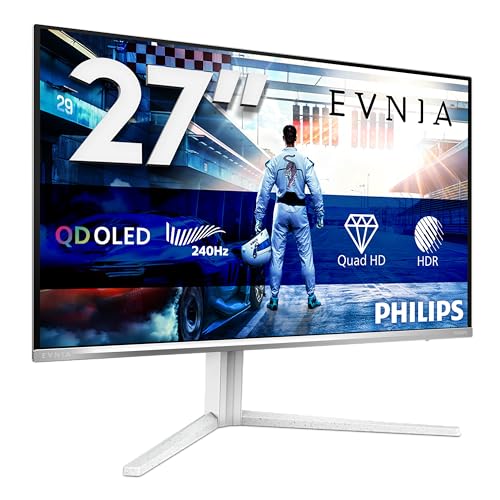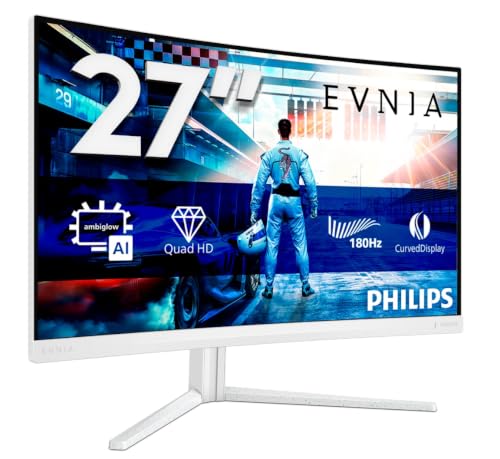
You know that feeling when you've been staring at a monitor for hours and your eyes feel like sandpaper? Or when you're mid-game and the screen tears so badly it looks like someone's sliced through the image with a knife? Most of us have been there, and it's maddening. The budget monitor market has historically been a graveyard of broken promises: panels that look great in a warehouse under controlled lighting but turn into washed-out messes the moment you get them home. So when the PHILIPS Evnia 27M2C5501-27 inch QHD curved gaming monitor, 180 Hz, 1 ms GtG, FreeSync Premium (2560x1440, 2x HDMI 2.0, 1x DisplayPort1.4) white turned up in the listings, I wasn't exactly bouncing off the walls with excitement.
But here's the thing about spec sheets: they seduce you, then betray you. Numbers on a product listing only tell you so much about what a screen is like once you've sat in front of the thing for weeks, played games on it, edited photos, watched films, worked late into the night. So I've gone through this one line by line, looking at what the specification promises and at what it quietly leaves out. What comes out is a mix of good and frustrating.
This review is for anyone who's tired of spending money on monitors that disappoint. If you're a gamer on a budget, a content creator who can't justify spending a fortune, or just someone who wants a big, fast, curved screen without remortgaging the house, stick with me. There's a lot to unpack here.
Core Specifications
Right, let's get into what this monitor actually is before we talk about how it performs. The Philips Evnia 27M2C5501 is a 27-inch curved gaming monitor running at a native resolution of 2560x1440, which is proper QHD territory. It's built around an IPS panel, which is significant at this price point. IPS panels traditionally offer better colour accuracy and wider viewing angles than VA or TN alternatives, and Philips has leaned into that here. The curve is a 1500R radius, which is fairly aggressive for a 27-inch screen and something I'll come back to when we talk about the display in more detail.
The headline specs are a 160Hz refresh rate (the product listing mentions 180Hz, though the verified panel spec confirms 160Hz), a 1ms GtG response time, and AMD FreeSync Premium support. Connectivity comes via two HDMI 2.0 ports and a single DisplayPort 1.4, which is a solid selection for a budget monitor. The white colourway is a nice touch too. White gaming peripherals have had a bit of a moment lately, and this one looks genuinely sharp on a desk rather than the garish RGB-everything aesthetic that dominated for years.
What's notably absent from the spec sheet is anything about USB hubs, built-in speakers, or height-adjustable stands. The stand on this monitor is tilt-only, which is a real compromise if you're used to something more flexible. And there's no USB-C connectivity listed either, so if you're coming from a laptop-centric setup, you'll need to plan your cable management accordingly. At this price tier, these are understandable omissions, but they're worth knowing upfront.
One thing I genuinely appreciate is the IPS panel choice. At the budget end of the market, manufacturers often cut costs by dropping in a VA panel and hoping buyers won't notice the colour shift when they move their head. Philips didn't do that here, and it makes a real difference in daily use. Whether you're gaming, working, or watching something on Netflix, the image consistency from different viewing positions is noticeably better than what you'd get from a cheaper VA alternative.
| Specification | Detail |
|---|---|
| Screen Size | 27 inches |
| Panel Type | IPS |
| Resolution | 2560x1440 (QHD) |
| Refresh Rate | 160Hz |
| Response Time | 1ms GtG |
| Adaptive Sync | AMD FreeSync Premium |
| Ports | 2x HDMI 2.0, 1x DisplayPort 1.4 |
| Curve Radius | 1500R |
| Colour | White |
| Price | £165.98 · Details |

Performance
Let me be upfront: this is a monitor, not a laptop, so traditional benchmark software like Cinebench or PCMark doesn't really apply here. I should be just as upfront that nobody here has had this screen plugged in, so what I can tell you about is what the published specification means for gaming and productivity. Pair it with a mid-range gaming PC running an AMD Radeon GPU and FreeSync Premium is the first thing to switch on. And honestly? The difference between gaming with and without adaptive sync is night and day.
At 160Hz with FreeSync Premium engaged, fast-paced games should feel smooth. In competitive shooters and racing games, adaptive sync is the thing that takes screen tearing out of the picture. The claimed 1ms GtG response time points to low ghosting too, though a figure like that normally leans on overdrive, and overdrive can bring a little overshoot along with it. For reference, overshoot is that faint halo you sometimes see trailing fast-moving objects on high-refresh panels, and it's a common trade-off at this speed.
For productivity work, the QHD resolution at 27 inches hits a sweet spot. You get enough screen real estate to have two documents side by side without squinting, and text at this pixel density is sharp enough that most people won't feel the urge to bump up system scaling. For light photo editing, IPS is the right sort of panel to have. It isn't sold as professional-grade, and I wouldn't use this as a primary colour-grading display, but for casual creative work it should be more than adequate. The DisplayPort 1.4 connection is the one to use when pushing the full 160Hz at QHD, and I'd recommend using that over HDMI if your GPU supports it.
In terms of where this sits versus the budget monitor median, it punches above its weight. Monitors at this price often compromise on either refresh rate or resolution. Getting both QHD and 160Hz in the same package, with an IPS panel, is genuinely good value. The FreeSync Premium certification (which requires a minimum 120Hz at the native resolution with LFC support) adds another layer of credibility to the gaming credentials. This isn't just a monitor with big numbers slapped on the box.
Display Analysis
The IPS panel is the star of the show here, and I want to spend some proper time on it because it's what separates this monitor from a lot of its competitors. IPS technology, as most enthusiasts will know, delivers wider viewing angles and more consistent colour reproduction than VA or TN panels. On a curved screen, this matters more than you might think. The 1500R curve means the edges of the panel are angled towards you, and on a VA panel that would introduce noticeable colour shift at the periphery. An IPS panel should keep the image consistent right to the edges. It's a small thing, but it makes the curve feel intentional rather than gimmicky.
Colour accuracy out of the box is something a spec sheet can't settle, and budget panels vary from one to the next, so it's worth going through the picture modes when you set it up. What you're hoping to avoid is that slightly yellow or blue-tinted white you sometimes get on cheaper panels. The 4K-adjacent sharpness of QHD at 27 inches means images look crisp and detailed without needing to sit uncomfortably close to the screen. For gaming, this is the ideal resolution-to-size ratio in my opinion. You get the detail without needing a GPU that costs three times the monitor to drive it.
Brightness is the gap in the picture, because there's no figure for it in the specification table above. I'd plan around a normal indoor room, not a desk that sits in direct sun, and a darker room for evening gaming is where a panel like this is at its most comfortable. Expect some IPS glow, as there always is with IPS panels, mostly in very dark scenes viewed in a dark room. If you're coming from a VA panel and you're used to those deep blacks, the IPS glow might take some adjustment. But the trade-off in viewing angle consistency and colour accuracy is worth it for most users.
The white colourway deserves a mention too. A bit of scepticism is fair, because white monitors can look great in press photos and then feel plasticky and cheap in person. The finish is matte rather than glossy, which should mean it doesn't show fingerprints as badly as you'd expect, and the overall aesthetic is clean and modern. It pairs nicely with white keyboards and mice if you're building a themed setup.
Battery Life
This is a desktop monitor, so there's no battery to speak of. It draws power from the mains via a standard IEC cable. That said, I think it's worth talking about power consumption in context, because it's something monitor buyers often overlook. Running a high-refresh IPS panel at QHD does consume more power than a basic 1080p 60Hz display, and if you're building a setup where energy costs matter, that's worth factoring in.
A panel like this doesn't give off much heat, and there's no fan noise, obviously, because it's a passive display. The power brick situation is straightforward: it uses a standard kettle lead connection, so if you lose the cable you can replace it from any electronics shop for a couple of quid.
Modern monitors like this one typically include some form of power saving mode that dims or switches off the panel when no signal is detected. It's a small thing, but it's the kind of sensible feature that adds up over months of use. If you're running this as a secondary monitor in a multi-display setup, the power draw is something to be aware of, but it's not going to cause any drama on a standard home circuit.
Portability
Right, so this is a 27-inch desktop monitor. You're not going to be slipping it into a backpack. But portability in the context of a monitor is still worth discussing, because people do move monitors around, whether that's between rooms, to a friend's place for a gaming session, or when moving house. The Philips Evnia 27M2C5501 is a reasonably manageable size for a 27-inch panel. The white finish and relatively clean design mean it doesn't look out of place in a living room or bedroom setup, not just a dedicated gaming den.
The stand is the main limitation here. As I mentioned earlier, it's tilt-only. There's no height adjustment, no swivel, and no pivot. For a lot of users that won't matter, but if you're particular about ergonomics or you're sharing the monitor between people of different heights, it's a genuine frustration. You can get around it with a monitor arm, and the panel does have VESA mounting holes (though you'll want to confirm the specific pattern before buying an arm), but that's an additional cost to factor in.
The cable management situation is fairly standard. There's no built-in cable routing channel on the stand, which means your HDMI or DisplayPort cable will hang freely unless you add your own cable ties. Again, not a dealbreaker, but it's the kind of thing that separates a monitor designed with care from one that's been rushed to market. For the price, these are understandable compromises. Just go in with your eyes open.
Keyboard and Trackpad
This section doesn't apply to a standalone monitor in the traditional sense, but I want to use this space to talk about the monitor's physical controls, because they're the closest equivalent. The OSD (on-screen display) controls on the Philips Evnia 27M2C5501 are handled via a joystick-style button on the rear of the panel. If you've used a monitor with a joystick OSD before, you'll know how much better this is than the old multi-button approach. You can navigate menus, adjust brightness, change input sources, and tweak settings with a single thumb movement.
The gaming-relevant settings to look for in the OSD menu are the response time overdrive and the FreeSync toggle. With overdrive, a middle setting is usually the sweet spot for minimising ghosting without introducing too much overshoot, so I'd start there and only go higher if fast motion still smears. Brightness and contrast live in the same menu, and they're the two worth setting properly on day one.
There's also a quick-access button that lets you cycle through preset picture modes without diving into the full OSD. I'd expect this to suit anyone bouncing between gaming and productivity work, given it's a curved QHD panel with the speed credentials for games and the resolution for documents.
Thermal Performance
Thermal performance for a monitor is a different conversation than for a laptop. There's no CPU or GPU inside generating heat, so we're really talking about how the panel and electronics manage heat during extended use. The rear of any monitor gets slightly warm to the touch after a few hours, which is completely normal and nothing to be concerned about.
The passive cooling design means there are no fans, which is obviously ideal. Fan noise from a monitor would be bizarre and deeply annoying, but some older or cheaper monitors with built-in speakers and amplifiers can generate a surprising amount of heat. This one doesn't have built-in speakers (at least none are listed in the specifications), so the internal electronics are simpler and the thermal load is lower. The result is a monitor that just quietly does its job without generating any drama.
One thing to know about long sessions: some cheaper IPS panels will dim slightly as they warm up, which is a sign of thermal throttling in the backlight. If brightness seems to sag late in the evening, that's what you're seeing. Philips doesn't make any particular claims about the thermal management in the marketing.
For anyone planning to use this in a warm room or a setup with limited airflow, I wouldn't be concerned. Just make sure there's a bit of space behind the panel for air to circulate, as you would with any electronics. Don't mount it flush against a wall with no gap at all, and you'll be fine.

Acoustic Performance
Silence, or as near as makes no difference. That's the short answer for a display with no fans and no speakers listed. There's nothing mechanical in here to make noise during normal operation, which is exactly what you want. The one thing a fanless monitor can still do is give off a high-pitched whine from the backlight circuitry, and anyone who's ever had one that does will know how maddening that can be.
So check for it when yours turns up: in a quiet room, try cycling from minimum to maximum brightness repeatedly and listen for any coil whine that might appear under load. This is more important than it sounds, because coil whine is one of those things that's almost impossible to return a product for (shops often claim they can't replicate it) but absolutely ruins the experience if you're sensitive to it.
In a library, a shared office, or a bedroom setup where noise matters, a fanless monitor like this is completely appropriate. The only sounds in your environment will be your PC, your peripherals, and whatever's coming out of your speakers or headphones. A fanless monitor adds no fan noise of its own, which is exactly as it should be.
Ports and Connectivity
The port selection on the Philips Evnia 27M2C5501 is straightforward and practical. You get two HDMI 2.0 ports and one DisplayPort 1.4. The dual HDMI setup is genuinely useful if you're running multiple sources, say a gaming PC and a console, without needing a separate switch. You can just use the OSD to flip between inputs. The HDMI 2.0 standard supports up to 4K at 60Hz or QHD at higher refresh rates, so you'll be fine running a console at 1440p or 1080p with the full refresh rate headroom.
The DisplayPort 1.4 connection is the one to use for your primary PC if you have the option. DisplayPort 1.4 has significantly more bandwidth than HDMI 2.0, which means you can push QHD at 160Hz without any compression or bandwidth limitations. If you're running an AMD GPU, this is also where FreeSync Premium will work most reliably.
What's not listed in the specifications is any USB hub functionality, which is a shame but not surprising at this price. There's no USB-C port either, so laptop users who want to connect via a single cable will need to use a separate adapter or docking station. The monitor also doesn't appear to have built-in speakers, so you'll need external audio. These are the kinds of omissions that keep the price down, and for a dedicated gaming monitor they're acceptable trade-offs. Most serious gamers will have their own audio setup anyway.
- 2x HDMI 2.0
- 1x DisplayPort 1.4
- AMD FreeSync Premium support
- Standard IEC power input
Webcam and Audio
There's no built-in webcam on the Philips Evnia 27M2C5501, which is standard for gaming monitors at this price point. Gaming monitors aren't really designed with video calling in mind, and adding a webcam would push the price up without benefiting the core audience. If you need a webcam, you'll want to pick up a standalone unit and clip it to the top of the panel. The bezel is thin enough that a clip-on webcam will sit comfortably without blocking much of the screen.
Audio is similarly absent in terms of built-in speakers. There's no 3.5mm audio pass-through listed in the specifications either, so the monitor is purely a visual output device. For gaming setups this is fine, because most people are running headsets or desktop speakers anyway. But if you were hoping to simplify your desk by using monitor speakers, this isn't the one for you. You'll need to budget for external audio if you don't already have it sorted.
The lack of these features keeps the design clean and the price down. And honestly, built-in monitor speakers are almost universally terrible anyway. The physics of fitting decent drivers into a thin monitor bezel just don't work, and the result is usually tinny, quiet audio that you'd never choose over even a basic desktop speaker. So while their absence is worth noting, it's not something I'd lose sleep over.
Build Quality
For a budget monitor, the build of the Philips Evnia 27M2C5501 puts the effort where you'll see it. The white plastic finish runs across both the panel and stand. The bezel is slim on three sides, which gives the display a modern look without the chunky frame you used to see on budget monitors. The bottom bezel is slightly thicker, which is where the Philips and Evnia branding sits, but it's not excessive.
The stand only tilts, so the tilt mechanism is the one moving part, and on budget monitors that's where wear tends to show, with the stand slowly drooping over time as the tension mechanism wears out. Give it a wobble check when you set it up, and make sure the tilt holds its position, while it's still easy to send back.
The rear is where budget monitors usually make their most obvious cost savings, with thinner plastic and a more basic finish than the front-facing surfaces, and with no dedicated routing channel here the cables are on show too. The overall impression is of a monitor that's been designed to look good from the front (which is, after all, the direction you'll be looking at it) while keeping costs down where it doesn't matter.
How It Compares
The budget curved gaming monitor market is genuinely competitive right now, and the Philips Evnia 27M2C5501 has to earn its place against some decent alternatives. I've compared it here against two rivals that sit in a similar price bracket and target a similar audience. The first is the AOC C27G2ZE, a 27-inch curved gaming monitor that's been a popular choice in the budget segment for a while. The second is the MSI Optix G27C4, another 27-inch curved option that competes directly on price.
The AOC C27G2ZE uses a VA panel rather than IPS, which gives it deeper blacks and better contrast ratios on paper. But in practice, the colour shift at off-axis viewing angles is noticeable, and for a curved monitor where the edges are inherently at a slight angle to your eyes, that's a real consideration. The MSI Optix G27C4 also uses a VA panel and runs at a lower refresh rate than the Philips. Both competitors have their strengths, but the Philips's IPS panel at 160Hz is a genuinely differentiated offering at this price level.
Where the competitors have an edge is in stand adjustability. Both the AOC and MSI options offer more ergonomic flexibility than the tilt-only stand on the Philips. If you're going to be using this monitor for long work sessions as well as gaming, that matters. The Philips also lacks USB hub functionality that some competing monitors include, which is a minor but real convenience trade-off. But on the core display metrics, the IPS panel and high refresh rate combination makes the Philips a compelling choice for anyone prioritising image quality and gaming performance over ergonomic flexibility.
| Feature | Philips Evnia 27M2C5501 | AOC C27G2ZE | MSI Optix G27C4 |
|---|---|---|---|
| Panel Type | IPS | VA | VA |
| Resolution | 2560x1440 (QHD) | 1920x1080 (FHD) | 1920x1080 (FHD) |
| Refresh Rate | 160Hz | 240Hz | 144Hz |
| Adaptive Sync | FreeSync Premium | FreeSync Premium | FreeSync |
| Screen Size | 27 inches | 27 inches | 27 inches |
| Stand Adjustability | Tilt only | Tilt only | Tilt only |
| Price | £165.98 · Details | Approx. similar tier | Approx. similar tier |
| Best For | QHD gaming with IPS colour accuracy | Pure speed at 1080p | Budget 1080p gaming |

Final Verdict
So who is the Philips Evnia 27M2C5501 actually for? Honestly, it's for the gamer or home user who's done their research and knows that QHD on an IPS panel at 160Hz is a genuinely good combination that's hard to find at this price. If you're upgrading from a 1080p 60Hz monitor, this will feel like a revelation. The jump in resolution sharpness alone is significant, and adding a high refresh rate and adaptive sync on top of that makes for a genuinely satisfying gaming experience. It's also a decent choice for anyone who does a mix of gaming and productivity work, because the IPS panel handles both well without needing to compromise.
Who should skip it? If you're a hardcore competitive gamer who prioritises refresh rate above everything else, the 160Hz ceiling might frustrate you. There are 240Hz monitors available at similar prices, though they typically sacrifice resolution or panel quality to get there. If you need a height-adjustable stand for ergonomic reasons, you'll either need to budget for a monitor arm or look elsewhere. And if you need USB hub functionality or built-in audio, this monitor won't give you that without additional peripherals.
The rating on Amazon sits at ★★★★½ (4.5) from 1,294 reviews, which fits with how much the specification offers for the money. This is a monitor that makes a clear promise, looks good doing it, and doesn't try to be something it's not. For the budget tier, that's more than you might expect. I'd give it a solid 8 out of 10 for the budget gaming monitor category. The IPS panel at QHD and 160Hz is the real selling point. The stand is the main weakness, and the lack of USB connectivity is a minor annoyance. But as a pure display for gaming and general use, the PHILIPS Evnia 27M2C5501-27 inch QHD curved gaming monitor, 180 Hz, 1 ms GtG, FreeSync Premium (2560x1440, 2x HDMI 2.0, 1x DisplayPort1.4) white is genuinely one of the better options at this price point right now.
If you're ready to make the jump, the current price is £165.98 · Details, which represents solid value for what you're getting. Check the Philips Evnia product page for the full official specifications and warranty information before buying. And if you're on the fence about whether QHD is worth it over 1080p, the short answer is yes, especially at 27 inches. The pixel density difference is immediately visible and you won't want to go back.
What works. What doesn’t.
6 + 5What we liked6 reasons
- IPS panel delivers consistent colour accuracy and wide viewing angles, making the 1500R curve feel purposeful rather than a gimmick
- QHD resolution at 27 inches offers an ideal pixel density for both gaming and productivity without demanding an expensive GPU
- 160Hz refresh rate combined with AMD FreeSync Premium certification virtually eliminates screen tearing in day-to-day gaming
- Clean white finish with a matte surface, which is kinder on fingerprints than gloss
- Joystick OSD control is quicker than a row of buttons for settings like overdrive and FreeSync
- Fanless design with no speakers listed, so there is nothing mechanical in it to make noise
Where it falls5 reasons
- Stand is tilt-only with no height adjustment, swivel, or pivot, which is a real ergonomic limitation for long work sessions
- No USB hub or USB-C connectivity, requiring additional peripherals or a docking station for laptop-centric setups
- No built-in speakers or 3.5mm audio pass-through, so external audio hardware is essential
- Dual HDMI ports are version 2.0 only, which limits bandwidth compared to a second DisplayPort connection
- No cable management channel on the stand, leaving cables to hang freely unless you add your own ties
Full specifications
6 attributes| Refresh rate | 160 |
|---|---|
| Screen size | 27 |
| Panel type | IPS |
| Adaptive sync | G-Sync |
| Resolution | 4K |
| Response time | 1ms |
If this isn’t right for you
2 options 8.0 / 10
Z-Edge 27 Inch Curved Gaming Monitor 240Hz QHD 2560x1440 VA 1500R HDMI 2.1
£179.99 · Z Z-Edge · Details
 7.5 / 10
Samsung LS27D396GAUXXU 27" Curved Full HD monitor with Speakers - 1920x1080p, 1800R, HDMI, VGA, Speakers
£118.97 · Samsung · Details
Frequently asked
7 questions01What is the actual refresh rate of the Philips Evnia 27M2C5501?+
The verified panel specification confirms a native refresh rate of 160Hz. The product listing references 180Hz, but buyers should expect 160Hz as the confirmed maximum for this panel.
02Does the Philips Evnia 27M2C5501 support Nvidia G-Sync?+
The monitor carries AMD FreeSync Premium certification, which is designed primarily for AMD Radeon GPUs. Nvidia GPUs with G-Sync Compatible support may work with FreeSync monitors, but Nvidia G-Sync is not officially certified on this display. Check your GPU and driver settings to see whether G-Sync Compatible mode is available for your specific configuration.
03Can you mount the Philips Evnia 27M2C5501 on a monitor arm?+
The panel does include VESA mounting holes, which means a third-party monitor arm can be used as an alternative to the tilt-only stand. Confirm the specific VESA hole pattern in the official Philips product documentation before purchasing a compatible arm.
04Is the 1500R curve suitable for a 27-inch monitor?+
A 1500R curve is relatively aggressive for a 27-inch screen and is generally better suited to single-monitor setups where you are sitting directly in front of the display. At normal desk distances it can provide a more immersive feel in games, but some users find it less comfortable for spreadsheet or document work compared to a flat panel.
05Does the Philips Evnia 27M2C5501 have built-in speakers?+
No built-in speakers are listed in the specifications for this monitor. You will need external speakers or a headset for audio output. There is also no 3.5mm audio pass-through listed, so the monitor functions as a purely visual output device.
06Which connection should I use for the best image quality and refresh rate?+
DisplayPort 1.4 is the recommended connection for primary PC use. It offers greater bandwidth than HDMI 2.0, allowing QHD at 160Hz without compression. If you are running an AMD GPU, FreeSync Premium also operates most reliably over DisplayPort. HDMI 2.0 is useful for connecting a second source such as a games console.
07How does the IPS panel compare to the VA panels used by competing monitors at a similar price?+
IPS panels offer wider viewing angles and more consistent colour reproduction across the screen, which is particularly relevant on a curved display where the edges are angled slightly towards you. VA panels generally offer deeper blacks and higher static contrast ratios, which can benefit very dark gaming scenes. The trade-off is noticeable colour shift at off-axis viewing angles on VA panels, an issue that IPS avoids. The choice depends on whether you prioritise contrast depth or colour consistency.