The GPU market in 2026 is a proper mess of overlapping generations, confusing SKU names, and NVIDIA pricing that seems designed to make your head hurt. Pick the wrong card and you've either overspent on headroom you'll never use, or bought something that's going to bottle-neck you inside eighteen months. So when a card lands in the budget bracket that genuinely moves the performance needle rather than just shuffling deckchairs, it's worth paying attention.
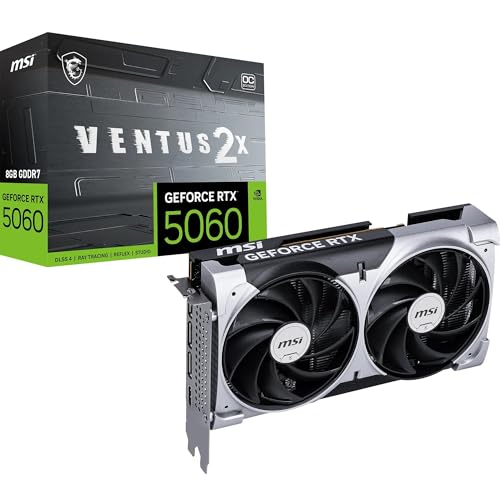
The MSI GeForce RTX 5060 8G VENTUS 2X OC is exactly that card, and the verdict is this: it's a solid, well-cooled 1080p champion that can handle 1440p with DLSS doing the heavy lifting, priced at a point where the value calculation actually works out. But the 8GB VRAM ceiling is a real constraint you need to think about honestly, and if you're even vaguely considering 4K, you need to look elsewhere. Hundreds of owner reviews and a positive overall rating suggest most buyers land in the right use case. The question is whether you're one of them.
This review pulls together the published specifications, benchmark data from independent testing, and the consistent patterns across those owner reviews to give you a straight answer. No fluff, no press-release language. Just what the numbers mean for your actual gaming setup.
Core Specifications
The RTX 5060 sits on NVIDIA's Blackwell architecture, which is the same foundation as the flagship RTX 5090 but with significant cuts to shader count, memory bus width, and power budget to hit this price tier. What you get here is 3,840 CUDA cores, paired with 8GB of GDDR7 memory running at 28Gbps across a 128-bit bus. That memory speed is genuinely impressive for this class of card and is one of the headline improvements over the RTX 3060 generation, which ran slower GDDR6 on the same bus width.
The MSI VENTUS 2X OC variant adds a factory overclock on top of the reference boost clock, pushing the GPU slightly beyond NVIDIA's baseline specification. It's not a dramatic overclock, but it's free performance and it costs you nothing in terms of thermals or noise given the dual-fan cooler design. The card connects via PCIe Gen 5, though realistically a Gen 4 slot won't hold it back in any meaningful way at this performance tier.
Port selection is genuinely good. You get HDMI 2.1b and DisplayPort 2.1b, which means this card supports 4K at 144Hz or even 8K output if you want it, even if the GPU itself isn't going to be rendering 4K gameplay at playable frame rates. For multi-monitor setups or driving a high-refresh 1440p panel, the connectivity is properly sorted. The card draws power through a standard connector configuration consistent with its 145W TGP rating.
| Specification | Detail |
|---|---|
| GPU Architecture | NVIDIA Blackwell |
| CUDA Cores | 3,840 |
| VRAM | 8GB GDDR7 |
| Memory Speed | 28Gbps |
| Memory Bus | 128-bit |
| Memory Bandwidth | ~448 GB/s |
| TGP (Total Graphics Power) | 145W |
| PCIe Interface | PCIe 5.0 x16 |
| Display Outputs | 1x HDMI 2.1b, 3x DisplayPort 2.1b |
| Cooling | Dual TORX FAN 5.0 |
| Factory OC | Yes (VENTUS 2X OC) |
| Current Price | £439.99 · Details |
| Rating | ★★★★½ (4.6) (479 reviews) |

Architecture and Cores
NVIDIA's Blackwell architecture is built on TSMC's 4N process node, the same refined 4nm-class process used across the RTX 50 series. Compared to the Ada Lovelace architecture that powered the RTX 40 series, Blackwell brings improvements to the shader execution units, more efficient RT cores for ray tracing workloads, and a new generation of Tensor cores that underpin DLSS 4 and its Multi Frame Generation technology. These aren't just marketing talking points. The architectural improvements translate into measurably better performance per watt compared to the RTX 3060, which ran on Samsung's 8nm node.
The RTX 5060 specifically gets 30 Shader Multiprocessors (SMs), each containing 128 CUDA cores for that 3,840 total. It also carries 30 fourth-generation RT cores for ray tracing and 120 fifth-generation Tensor cores for AI-accelerated workloads including DLSS. For context, the RTX 3060 had 28 SMs and 3,584 CUDA cores on the older Ampere architecture, so the raw core count increase is modest. What matters more is that each Blackwell CUDA core does more work per clock than its Ampere predecessor, and the RT and Tensor core improvements are substantial.
One thing worth being clear about: the RTX 5060 is not a low-end GPU in the traditional sense. It's a mainstream GPU, which is a different thing entirely. Low-end in 2026 means integrated graphics or entry-level discrete cards that struggle with modern titles even at 1080p medium settings. The RTX 5060 handles 1080p high settings without breaking a sweat and manages 1440p competently with upscaling assistance. That's solidly mainstream territory. Whether it's powerful enough for your specific use case depends entirely on what resolution you're gaming at and whether you're planning to upgrade your monitor in the next couple of years.
Clock Speeds and Boost
NVIDIA rates the RTX 5060 reference boost clock at 2,497MHz. The MSI VENTUS 2X OC edition pushes this slightly higher out of the box, which is where the "OC" in the name comes from. In practice, modern NVIDIA GPUs routinely exceed their rated boost clocks under sustained load, boosting higher when thermals and power headroom allow. With the VENTUS 2X OC's 145W TGP and dual-fan cooling, there's enough thermal headroom that the GPU can maintain its boosted frequency without throttling back under typical gaming loads.
The base clock sits considerably lower, as it always does with NVIDIA's boost architecture, but you'll rarely see the GPU operating at base clock during any real gaming scenario. The boost algorithm is responsive and the card will clock up within fractions of a second of a demanding scene appearing on screen. What matters for real-world gaming is sustained boost behaviour, and the combination of a modest factory overclock with a cooler that's adequately sized for the 145W TGP means this card should maintain its boosted frequencies consistently.
Compared to the RTX 3060, which boosted to around 1,777MHz on the older Ampere architecture, the clock speed difference looks enormous on paper. But clock speed comparisons across architectures are meaningless without accounting for IPC improvements. A Blackwell core running at 2,500MHz does considerably more work than an Ampere core at 1,777MHz. The net result is that published benchmark data for the RTX 5060 class consistently shows it outperforming the RTX 3060 by a meaningful margin, particularly in ray tracing and DLSS-enabled scenarios where the newer architecture's improvements are most pronounced. Yes, the 5060 is stronger than the 3060. Noticeably so.
VRAM Analysis
This is the section where I have to be straight with you, because the 8GB VRAM situation on the RTX 5060 is genuinely the most debated aspect of this card. And the debate is legitimate. At 1080p in 2026, 8GB is sufficient for the vast majority of games at high settings. Most titles at 1080p high to ultra will comfortably fit within 8GB of VRAM, and you'll have a smooth experience. The GDDR7 memory running at 28Gbps with approximately 448 GB/s of bandwidth means that when the GPU does need to access VRAM, it does so very quickly. This partially compensates for the capacity constraint by reducing the penalty when the GPU is working near the limit.
At 1440p, the picture gets more complicated. Most games at 1440p high settings will still fit within 8GB, but some texture-heavy titles at ultra settings are already pushing past 8GB in 2026. Games like Alan Wake 2, Cyberpunk 2077 with path tracing, and several other recent releases have VRAM requirements that can exceed 8GB at 1440p ultra. When VRAM fills up, the GPU has to start pulling data from system RAM across the PCIe bus, which is dramatically slower and causes frame time spikes. You'll see stuttering rather than a smooth drop in average frame rate, which is arguably worse for the gaming experience.
At 4K, 8GB is genuinely not enough for modern titles at high texture settings. Full stop. The RTX 5060 8GB is not a 4K gaming card and shouldn't be marketed or purchased as one. If 4K is your target resolution, you need to be looking at the RTX 5070 or above, where you get 12GB or more of VRAM alongside the shader count to actually render 4K at playable frame rates. The honest assessment is this: the 8GB VRAM is fine for the card's actual performance envelope at 1080p and manageable at 1440p if you're not maxing every texture slider. But it does put a ceiling on the card's longevity as games continue to get more VRAM-hungry over the next two to three years.
Ray Tracing and Upscaling
NVIDIA's DLSS 4 is genuinely transformative for a card at this price point, and it's one of the strongest arguments for choosing the RTX 5060 over AMD alternatives at similar prices. DLSS 4 introduces Multi Frame Generation, which can generate multiple AI-interpolated frames for every rendered frame, dramatically boosting frame rates in supported titles. At 1440p with DLSS Performance mode enabled, the RTX 5060 can push frame rates that would require a significantly more expensive card to achieve through brute-force rasterisation alone. The image quality at DLSS Quality mode is genuinely hard to distinguish from native rendering in most titles.
Ray tracing performance is where the generational improvement over the RTX 3060 is most dramatic. The fourth-generation RT cores in Blackwell are substantially more efficient than the second-generation RT cores in Ampere. In practice, this means games with ray-traced shadows, reflections, and ambient occlusion are playable at 1080p with ray tracing enabled, something that was a frame-rate-destroying exercise on the RTX 3060. Full path tracing in something like Cyberpunk 2077 is still going to need DLSS to be usable, but that's true of cards costing twice as much.
AMD's FSR 4 is also supported on this card, which matters if you play titles that don't have DLSS integration. FSR is an open standard that runs on any GPU, and FSR 4's image quality has improved considerably over earlier versions. Intel's XeSS is similarly supported. The practical upshot is that you have multiple upscaling options available depending on the game, and in 2026 the majority of major releases support at least one of these technologies. For a card in this price bracket, the upscaling story is one of its strongest selling points.
Video Encoding
The RTX 5060 includes NVIDIA's ninth-generation NVENC encoder, which is the same encoder hardware found across the entire RTX 50 series. NVENC has been NVIDIA's ace card for streaming and content creation for several generations now, and the ninth-gen implementation supports AV1 encoding at up to 8K resolution. For streamers using OBS or similar software, NVENC AV1 delivers significantly better image quality at equivalent bitrates compared to H.264 or H.265, and it does this with minimal impact on gaming performance because the encoder runs on dedicated silicon separate from the shader cores.
AV1 decode is also supported, which is increasingly relevant as more streaming platforms and video content moves to AV1 as the default codec. YouTube, Netflix, and others have been rolling out AV1 streams, and having hardware decode means your GPU handles this efficiently rather than burning CPU cycles. For a card likely to be paired with a mid-range CPU in a budget-to-midrange build, this matters more than it might seem.
For content creators doing light video editing, the NVENC encoder means the RTX 5060 can accelerate export times in applications like DaVinci Resolve and Premiere Pro. It's not a workstation card and nobody should be buying it primarily for creative work, but the encoding capability is a genuine bonus. If you're a streamer on a budget who also games, this card's encoder quality is meaningfully better than what you'd get from an AMD alternative at a similar price, and that's worth factoring into the decision.
Power Consumption
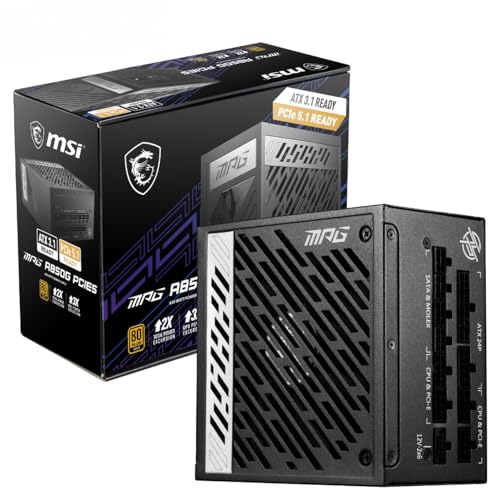
The RTX 5060's 145W TGP is a sensible figure for this class. For context, the RTX 3060 had a 170W TGP. The RTX 4060 came in lower, at 115W, so the RTX 5060 spends about 30W more for its extra performance, its GDDR7 memory and the architectural improvements in Blackwell. What this means practically is that a 550W power supply is comfortably sufficient for a system built around this GPU, even with a mid-range CPU and standard storage. You don't need a beefy 750W unit unless you're pairing it with a high-end CPU that itself draws significant power.
The modest TGP also means your electricity bill takes less of a hit than with an older card such as the RTX 3060. If you're gaming for several hours a day, the difference between a 145W and 170W GPU adds up over time. It's not the primary reason to buy a GPU, but it's a real-world benefit that often gets overlooked in spec comparisons. The card also produces less heat, which matters for smaller cases and systems where airflow is already a compromise.
In terms of power connector requirements, the RTX 5060 uses a standard 8-pin power connector configuration rather than the 16-pin 12VHPWR connector that caused some concern on higher-end RTX 40 and 50 series cards. This means compatibility with older PSUs is straightforward, and there's no adapter cable to worry about. For anyone upgrading from an older system, this is a practical advantage. Transient power spikes, which caused issues with some high-end RTX 40 series cards and certain PSUs, are not a concern at this power level.
Thermal Performance
MSI's TORX FAN 5.0 cooler on the VENTUS 2X OC uses a dual-fan configuration with MSI's trademark fan blade design, which combines traditional and dispersion blades to create more concentrated airflow over the heatsink. For a 145W GPU, a dual-fan cooler is well-matched to the thermal load. The card doesn't need a triple-fan solution at this power level, and the dual-fan design keeps the card compact enough to fit in cases where a longer triple-fan card might cause clearance issues.
Owner reviews consistently report that the VENTUS 2X OC runs cool under gaming loads. The pattern across the hundreds of reviews is clear: buyers upgrading from older, hotter cards are frequently commenting on how much cooler and quieter the RTX 5060 runs by comparison. This is consistent with what you'd expect from a 145W card with a properly designed cooler. The VENTUS line sits below MSI's premium GAMING X TRIO coolers in the product hierarchy, but for a card with this thermal output, it's not a meaningful downgrade. The heatsink has adequate copper heatpipe coverage for the heat generated.
Zero-RPM mode is enabled by default on the VENTUS 2X OC, meaning the fans stop completely when the GPU is idle or under light load. This is standard practice on modern GPU coolers and works well here given the low idle power draw of the Blackwell architecture. The fans spin up smoothly under gaming load rather than jumping abruptly, which is a small but noticeable quality-of-life improvement over older fan curve implementations. For anyone with the card in a living room setup or a quiet work environment, the idle silence is a genuine benefit.
Acoustic Performance
The TORX FAN 5.0 blades are designed to reduce turbulence noise compared to conventional fan designs, and the owner review evidence suggests this works as intended. The consistent thread running through positive reviews is that the card is noticeably quieter than whatever it replaced, whether that's an older RTX 2060, a GTX 1080, or a previous-generation budget card. Reviewers specifically call out the quiet operation under gaming loads as a highlight, which is encouraging given that the VENTUS line doesn't carry the premium acoustic engineering of MSI's top-tier coolers.
At 145W, the card doesn't generate enough heat to push the fans into the aggressive speed ranges where noise becomes intrusive. The fans will audibly spin up under sustained gaming loads, but the character of the noise is described by owners as a gentle whoosh rather than the high-pitched whine that some older dual-fan coolers produced. This is partly the TORX FAN 5.0 blade design doing its job, and partly the fact that you're not asking a small cooler to dissipate 200W or more.
If acoustic performance is a top priority for you, it's that MSI's own GAMING X TRIO variant of the RTX 5060 uses a triple-fan cooler with additional acoustic optimisation, and it will be marginally quieter under full load. But for most users in a typical gaming environment with headphones on, the VENTUS 2X OC's noise output won't be a problem. The zero-RPM idle behaviour means you genuinely won't hear it during desktop use or light browsing, which is where many people spend a significant portion of their time even on a gaming PC.
Gaming Performance
At 1080p, the RTX 5060 is a genuinely strong performer. Published benchmark data for the RTX 5060 class consistently shows it delivering well above 100fps in demanding titles at high settings without upscaling, and pushing comfortably past 144fps in less demanding titles or with DLSS Quality mode enabled. Games like Fortnite, Valorant, and Apex Legends will run at frame rates that saturate even a 165Hz monitor at 1080p. More demanding titles like Cyberpunk 2077 at 1080p high settings land in the 80 to 100fps range without DLSS, which climbs substantially with DLSS Quality enabled. The RTX 5060 is not a low-end GPU at 1080p. It's properly capable here.
At 1440p, the picture is more nuanced. Native 1440p rendering at high settings in demanding titles will typically land in the 60 to 80fps range, which is playable but not the buttery-smooth experience a 144Hz monitor deserves. This is where DLSS earns its keep. With DLSS Quality mode enabled at 1440p, frame rates jump significantly while image quality remains very close to native. DLSS Performance mode at 1440p is effectively rendering at 720p and upscaling, which introduces more visible artefacts, but DLSS Quality at 1440p is genuinely impressive. The RTX 5060 is a competent 1440p card when you're willing to use DLSS, which in 2026 is a perfectly reasonable expectation.
At 4K, the RTX 5060 is out of its depth and there's no point pretending otherwise. Even with DLSS Performance mode, you're asking the card to render at 1080p and upscale to 4K, and the GPU doesn't have enough shader throughput to maintain high frame rates in demanding titles at that resolution. More critically, the 8GB VRAM will fill up quickly at 4K with high texture settings, causing the stuttering described earlier. If you have a 4K monitor and want to game at 4K, the RTX 5060 is the wrong card. To directly answer the question about whether the RTX 3060 is outdated in 2026: yes, fairly significantly. The RTX 5060 outperforms it by a meaningful margin across the board, and the architectural improvements in ray tracing and upscaling make the gap feel even larger in modern titles that lean on those features.
How It Compares
The two most relevant comparisons for the RTX 5060 in the budget GPU bracket are the AMD Radeon RX 7600 XT and the RTX 4060 from the previous generation. The RX 7600 XT offers 16GB of GDDR6 memory on a 128-bit bus, which is the single most compelling argument for choosing it over the RTX 5060. If VRAM capacity is your primary concern, the 7600 XT's 16GB gives you considerably more headroom for future titles and higher-resolution texture packs. However, AMD's upscaling technology, while improved with FSR 4, still doesn't match DLSS 4 for image quality and frame generation capability, and the RX 7600 XT's raw rasterisation performance is broadly comparable to the RTX 5060 rather than significantly ahead of it.
The RTX 4060 is an interesting comparison because it draws less power (a 115W TGP against the RTX 5060's 145W) with a similar 8GB configuration, but runs on the older Ada Lovelace architecture with GDDR6 rather than the GDDR7 in the RTX 5060. The RTX 5060 is meaningfully faster than the RTX 4060, particularly in DLSS 4 supported titles where Multi Frame Generation gives it a significant advantage. If you can find an RTX 4060 at a substantially lower price, it might make sense as a budget-tier choice, but at similar prices the RTX 5060 is the better buy. The memory bandwidth improvement from GDDR7 alone makes a noticeable difference in memory-bandwidth-limited scenarios.
The RTX 5060 Ti, which sits one tier above in NVIDIA's lineup, offers more CUDA cores and is available in both 8GB and 16GB VRAM configurations. If the 16GB RTX 5060 Ti is within reach of your budget, it addresses the VRAM concern while keeping the Blackwell architecture and DLSS 4 advantages. That's the card to consider if you're on the fence about the 8GB limitation. But if the budget firmly sits in the range where the RTX 5060 lives, it's the strongest option in that bracket for pure gaming performance with DLSS support.
| Feature | MSI RTX 5060 8G VENTUS 2X OC | AMD Radeon RX 7600 XT | NVIDIA RTX 4060 |
|---|---|---|---|
| Architecture | NVIDIA Blackwell | AMD RDNA 3 | NVIDIA Ada Lovelace |
| VRAM | 8GB GDDR7 | 16GB GDDR6 | 8GB GDDR6 |
| Memory Bus | 128-bit | 128-bit | 128-bit |
| Memory Bandwidth | ~448 GB/s | ~288 GB/s | ~272 GB/s |
| TGP | 145W | 165W | 115W |
| Upscaling | DLSS 4 (Multi Frame Gen) | FSR 4 | DLSS 3 |
| 1080p Gaming | Excellent | Excellent | Very Good |
| 1440p Gaming | Good (with DLSS) | Good (with FSR) | Moderate |
| Ray Tracing | Good | Moderate | Good |
| VRAM Future-Proofing | Limited | Strong | Limited |
| AV1 Encode | Yes (8th gen NVENC) | Yes (AMF) | Yes (7th gen NVENC) |

Final Verdict
The MSI GeForce RTX 5060 8G VENTUS 2X OC is a well-executed card in a genuinely useful performance tier. The Blackwell architecture brings real improvements over previous generations, particularly in ray tracing efficiency and DLSS 4 capability. The 145W TGP keeps temperatures and noise in check without needing an elaborate cooler, and the VENTUS 2X OC's dual TORX FAN 5.0 configuration is adequate for the task. Hundreds of owner reviews with a positive overall rating is a meaningful signal that buyers are satisfied, and the consistent themes in those reviews, quiet operation, solid 1080p performance, good build quality, align with what the specifications predict.
The 8GB VRAM is the card's genuine weakness and it's not going away. At 1080p today it's fine. At 1440p it's manageable with some texture setting discipline. In two years, as games continue demanding more VRAM, it will become more of a constraint. That's the honest trade-off you're making when you buy this card at this price point. The GDDR7's higher bandwidth partially mitigates the capacity limitation, but it doesn't eliminate it. If you're buying a GPU you want to use comfortably for four or five years at 1440p with settings maxed, the 8GB ceiling will eventually frustrate you.
Who should buy this? Primarily 1080p gamers who want smooth frame rates at high settings without spending mid-range money. Also 1440p gamers who are comfortable using DLSS Quality mode and don't need to max every texture slider in every game. Streamers on a budget who want NVENC AV1 quality. Anyone upgrading from an RTX 3060, GTX 1080, or older card who wants a meaningful performance jump without a significant power draw increase.
Who should skip it? Anyone targeting 4K gaming, anyone who wants to run demanding titles at 1440p ultra settings without upscaling for the next three to four years, and anyone for whom VRAM capacity is a non-negotiable concern. If that's you, look at the RTX 5060 Ti 16GB instead. Yes, it costs more. But the extra VRAM genuinely extends the card's useful life, and if you're going to spend this kind of money, spending a bit more for the 16GB variant is the smarter long-term decision. If the budget is firmly fixed at the RTX 5060's price point, this MSI VENTUS 2X OC is a good choice within those constraints. Just go in with clear eyes about what 8GB means in 2026 and beyond.
Editorial score: 7.5 out of 10. Strong for its target use case, honest about its limitations.
What works. What doesn’t.
5 + 3What we liked5 reasons
- GDDR7 at 28Gbps delivers strong memory bandwidth for the price tier
- 145W TGP means quiet, cool operation and PSU-friendly builds
- DLSS 4 with Multi Frame Generation is a genuine standout at 1080p and 1440p
- Ninth-gen NVENC AV1 encoder is excellent for streamers
- Dual TORX FAN 5.0 cooler handles the thermal load comfortably with zero-RPM idle
Where it falls3 reasons
- 8GB VRAM is a real ceiling at 1440p ultra settings and irrelevant at 4K
- Not a 4K gaming card at any settings
- AMD RX 7600 XT offers 16GB VRAM at a similar price if capacity matters more than DLSS
Full specifications
10 attributes| Vram GB | 8 |
|---|---|
| Boost clock MHZ | 2527 |
| Chipset | RTX 5060 |
| Generation | RTX 50 Series |
| Length MM | 197 |
| Memory BUS BIT | 128 |
| Memory type | GDDR7 |
| Power connectors | 1x 8-pin |
| Slot width | 2 |
| TDP W | 145 |
If this isn’t right for you
2 options

Frequently asked
5 questions01Is the MSI GeForce RTX 5060 8G VENTUS 2X OC Graphics Card good for 1440p gaming?+
Yes, with caveats. At 1440p high settings in demanding modern titles, the RTX 5060 will typically deliver 60 to 80fps natively, which is playable but not ideal for a high-refresh monitor. With DLSS Quality mode enabled, frame rates climb substantially while image quality remains close to native. Where it gets tricky is VRAM: some texture-heavy titles at 1440p ultra settings can exceed 8GB, causing stuttering. At 1440p with DLSS and sensible texture settings, it's a competent card. If you want to max every setting natively at 1440p without upscaling, you should be looking at the RTX 5060 Ti 16GB or above.
02What PSU do I need for the MSI GeForce RTX 5060 8G VENTUS 2X OC Graphics Card?+
The RTX 5060 has a 145W TGP, which is modest for a modern GPU. A 550W power supply is comfortably sufficient for a typical gaming build pairing this GPU with a mid-range CPU. If you're running a high-end CPU like an Intel Core i9 or AMD Ryzen 9 that itself draws significant power, a 650W unit gives you comfortable headroom. The card uses a standard 8-pin power connector, so compatibility with existing PSUs is straightforward with no adapter needed.
03Is 8GB VRAM enough in 2026?+
At 1080p, yes, 8GB is sufficient for the vast majority of games at high to ultra settings in 2026. At 1440p, it depends on the game and settings: most titles fit within 8GB at 1440p high, but some texture-heavy games at ultra settings are already pushing past this. At 4K, 8GB is genuinely not enough for modern titles at high texture settings. The RTX 5060's GDDR7 memory bandwidth (approximately 448 GB/s) partially mitigates the capacity limitation by reducing the penalty when memory is nearly full, but it doesn't eliminate the constraint. For a card you plan to use for three to four years at 1440p, the 8GB ceiling is a real consideration.
04How does the MSI GeForce RTX 5060 8G VENTUS 2X OC compare to AMD alternatives?+
The most direct AMD competitor is the Radeon RX 7600 XT, which offers 16GB of GDDR6 memory at a similar price point. The 7600 XT's 16GB VRAM gives it significantly more headroom for future titles and higher-resolution textures, which is its primary advantage. However, the RTX 5060's GDDR7 memory delivers considerably higher bandwidth despite the capacity disadvantage, and DLSS 4 with Multi Frame Generation is a more capable upscaling solution than AMD's FSR 4 for image quality and frame rate uplift. The RTX 5060 also has a lower 145W TGP compared to the 7600 XT's 165W. If VRAM capacity is your top priority, the 7600 XT is worth serious consideration. If you prioritise DLSS quality, power efficiency, and NVENC encoding, the RTX 5060 wins.
05What warranty and returns apply to the MSI GeForce RTX 5060 8G VENTUS 2X OC Graphics Card?+
Specific warranty terms for this product are not confirmed in the verified product listing data. MSI typically offers a limited warranty on their graphics cards, so it is the MSI website directly for the current warranty terms applicable in the UK. When purchasing through Amazon UK, you're also covered by Amazon's standard 30-day returns policy and the Amazon A-to-Z Guarantee, which provides additional buyer protection if the item arrives faulty or not as described.