Best Overall Value
Twelve gigabytes. That's why this card tops the list for machine learning on a budget, and it's the single spec that decides it. The three 8GB cards further down are faster in raw compute, but they run out of memory first, and in ML that's the wall that stops your work. The ASUS RTX 3060 gives you 12GB of GDDR6 to load into, which is enough to fine-tune mid-sized models or run batches the 8GB cards simply can't hold. For the money, that headroom is rare.
It's built on Nvidia's Ampere architecture, which brings the second thing that matters here: CUDA and third-generation Tensor cores. Most ML frameworks assume CUDA out of the box, so setup is the least painful of any option here. Our review notes the 12GB buffer also helps video editing in DaVinci Resolve and Premiere Pro, so if your GPU pulls double duty this earns its keep beyond training runs. The memory sits on a 192-bit bus, narrower than the RTX 3060 Ti's 256-bit path, so bandwidth isn't the strong point. Capacity is.
Physically it's a compact 2-slot card at 200mm, and ASUS lists a barrier-ring Axial-tech fan design with full fan stop at idle. Our review notes the dual-fan cooler runs quietly under typical loads. The factory overclock to 1867MHz adds a small edge over reference 3060 cards. Power draw is the honest cost: 170W through a single 8-pin, versus the 145W of the RTX 5060 on this list. Ampere is the older Samsung 8nm node, so it's less efficient than the newer Blackwell cards, and there's no DLSS 3 Frame Generation or AV1 encode here. For pure ML, neither matters much. What matters is that VRAM figure, and at this price nothing else here beats it on capacity except the AMD card, which asks you to wrestle with ROCm to get going.
Amazon UK owners rate it 4.6 stars across 3,065 ratings, the largest sample on this page. If you want a budget ML card that just works with CUDA and gives you room to grow, start here. See our full ASUS RTX 3060 12G review for the deeper breakdown.
Pros
- 12GB VRAM, more capacity than every card here bar the AMD RX 9060 XT
- CUDA and Tensor cores mean the smoothest framework setup on this list
- Compact 200mm 2-slot body fits Mini-ITX and small Micro-ATX cases
- Largest owner rating sample here at 3,065 ratings
Cons
- 170W draw, more than the 145W RTX 5060
- 192-bit bus limits bandwidth versus the 3060 Ti's 256-bit
- No AV1 encode if you also stream or do creator work
Buy on Amazon£398.98Read full review
Best Modern Features
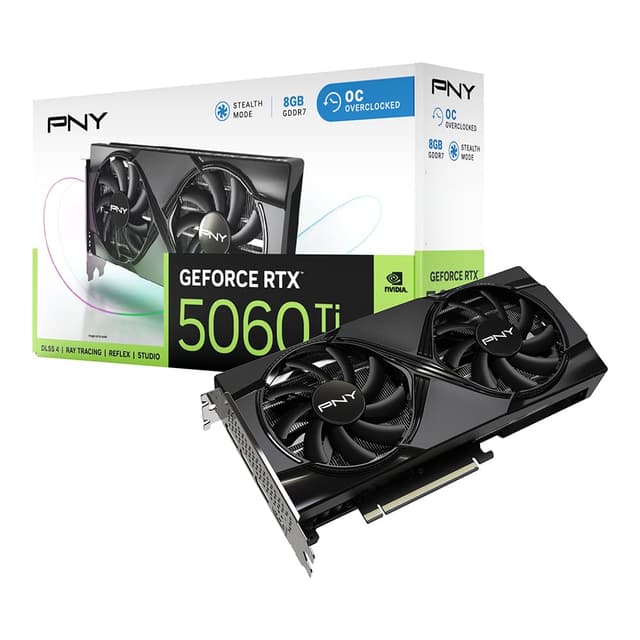
This is the fastest chip on the list, and the most modern. Blackwell architecture, GDDR7 memory running at 28Gbps, PCIe 5.0. On paper it should walk away from the older Ampere cards. And in raw compute it does. The catch is the same one that keeps it below the ASUS 3060: 8GB of VRAM on a 128-bit bus. For gaming that's a growing annoyance. For machine learning it's a harder ceiling, because a model that overflows 8GB won't train on this no matter how quick the cores are.
So the pitch here is about what you gain elsewhere. The GDDR7 delivers strong bandwidth despite the narrow 128-bit bus, which our review calls out as a genuine strength, and the newer Tensor cores handle ML maths efficiently. It also brings the ninth-gen NVENC with AV1 encode, useful if your machine doubles as a streaming or content rig, something the 3060 and 3060 Ti both lack. The 5060 Ti also exists in a 16GB variant, and our review is blunt that the 16GB version is the smarter long-term buy if your budget allows. For ML specifically, that advice lands hard.
The card is a compact 227mm dual-slot design with two STORMFORCE fans and a zero-RPM idle mode, drawing 180W through a single 8-pin. MSI lists HDMI 2.1b and DisplayPort 2.1b outputs. Against the RTX 5060 lower down, this Ti version gives you more compute for a modest step up in price and power, but the same 8GB memory, so the choice between them is compute, not capacity. Against the ASUS 3060, you're trading 4GB of VRAM for newer architecture and AV1. For most budget ML builders loading anything sizeable, that's a trade the 3060 wins.
Amazon UK owners rate it 4.5 stars over 312 ratings. A capable modern card, best suited to smaller models, inference and mixed gaming-plus-ML use rather than heavy training. We covered the memory limits in our MSI RTX 5060 Ti review.
Pros
- GDDR7 at 28Gbps gives strong bandwidth despite the narrow bus
- Ninth-gen NVENC with AV1 encode, absent on both Ampere cards here
- Compact 227mm dual-slot body fits most mid-towers
- Newest Tensor cores of the Nvidia options
Cons
- 8GB VRAM is the hard limit for larger ML models
- A 16GB variant of the same GPU exists and suits ML far better
- 128-bit bus is narrow for the tier
Buy on Amazon£425.00Read full review
Best for VRAM Headroom
If you're just starting out with ML and want a modern Nvidia card that won't stress your PSU, this is the gentle entry point. At 145W it's the most efficient card on the list, well under the 3060's 170W and the 5060 Ti's 180W, so it drops into modest builds without a beefy power supply. That low draw and the dual TORX FAN 5.0 cooler with zero-RPM idle keep it quiet and cool.
The chip is Blackwell with GDDR7 at 28Gbps, so bandwidth is respectable for the tier, and you get CUDA plus the ninth-gen NVENC AV1 encoder for streaming. The limit is the familiar one: 8GB of VRAM. For learning the ropes, running inference or fine-tuning small models, that's fine. Load something larger and you'll hit the wall the 12GB ASUS 3060 and 16GB Sapphire clear easily. It's a compact 197mm 2-slot card on a single 8-pin.
Against its Ti sibling above, this plain 5060 trades compute for lower power and price while keeping the same 8GB memory, so it's the choice when efficiency and budget matter more than raw speed. Amazon UK owners rate it 4.7 stars across 458 ratings, tied for the top score here. A tidy beginner card, just don't expect it to grow with heavy training. Our MSI RTX 5060 review has more.
Pros
- 145W draw, the most PSU-friendly card on the list
- Compact 197mm body, the shortest here
- CUDA plus AV1 encode for mixed ML and streaming use
- 4.7-star owner rating across 458 ratings
Cons
- 8GB VRAM caps it at smaller models and inference
- Least compute of the Blackwell cards here
Buy on Amazon£419.99Read full review
Best Budget
Buying Guide: What to Look For
For machine learning on a budget, forget the gaming benchmarks for a second and look at three numbers in this order: VRAM, memory bandwidth, and the software ecosystem.
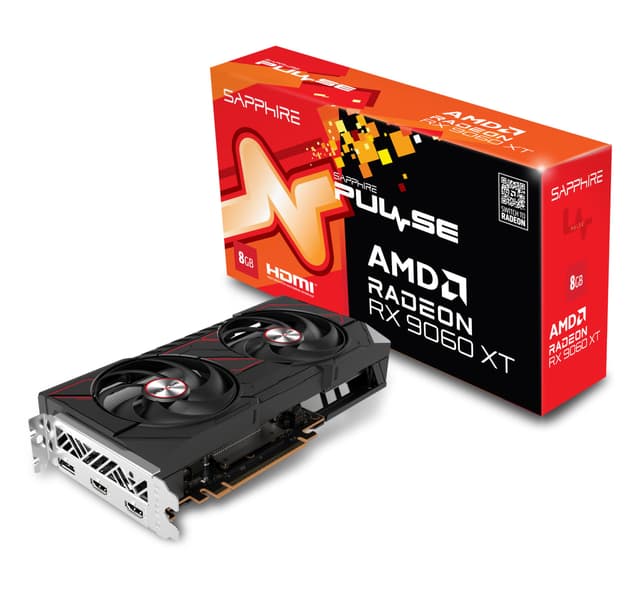
VRAM first, always. This is the number that decides whether a model runs at all. Once you exceed the card's memory, training crashes or spills to system RAM and slows to a crawl. On this list that's the line between the 12GB ASUS 3060 and 16GB Sapphire RX 9060 XT on one side, and the three 8GB cards on the other. If you're loading larger models or want bigger batch sizes, more VRAM beats more compute every time. If you're learning the basics or running inference on small networks, 8GB is workable.
Bandwidth second. Memory bus width times memory speed sets how fast data moves. The RTX 3060 Ti's 256-bit bus is the widest here and shifts more per clock than the 128-bit buses on the 5060 pair and the Sapphire, though modern GDDR7 speeds narrow that gap. For memory-bound workloads, bandwidth can matter nearly as much as capacity.
Ecosystem third, but don't skip it. Nvidia's CUDA is what most ML frameworks target out of the box, and every RTX card here adds Tensor cores. AMD runs ML through ROCm, which has improved a lot but involves more setup. The Sapphire's 16GB is a genuine prize, but only if you're happy troubleshooting a driver stack.
Mistakes to avoid. Don't buy an 8GB card expecting to train large models on it. Don't ignore power draw and connectors: the 3060 Ti pulls 200W and needs a 12-pin adapter, while the RTX 5060 sips 145W. And don't assume the newest card is best for ML; the older 12GB 3060 outranks the newer 8GB 5060 Ti here precisely because memory wins.
How We Compared These
We ranked these five cards on the specifications that decide machine learning value under budget: VRAM capacity, memory bandwidth from bus width and speed, architecture and software ecosystem, then power draw and physical size. We weighted VRAM heaviest because it sets what a card can and can't run. Alongside published manufacturer specs we read verified Amazon UK owner ratings and counts, and drew on our own research-led reviews for each model. We hold no test bench and handled none of these cards; every figure here comes from published specifications and owner feedback, compared side by side.
Best Overall
ASUS GeForce RTX 3060 12G DUAL V2 OC
12GB of VRAM and CUDA support make it the safest budget ML starting point, with room to grow that the 8GB cards don't offer.
Check Price£398.98Best Value
GeForce Nvidia RTX 3060 Ti Founders Edition 8GB
The widest memory bus here at 256-bit gives strong bandwidth per pound, backed by CUDA and a quiet cooler for today's lighter ML workloads.
Check Price
Final Verdict: Best Graphics Cards for Machine Learning Under £500
For most budget ML builders, the ASUS RTX 3060 12G is the pick: 12GB of VRAM and CUDA give you room to work and the least setup friction, and that combination outweighs the newer but 8GB-limited Blackwell cards. If your budget is tighter, the RTX 3060 Ti Founders Edition is the value play, trading capacity for the widest memory bus on the page. And if VRAM is your priority above all and you're comfortable in AMD's ROCm ecosystem, the 16GB Sapphire Pulse RX 9060 XT gives you more memory than anything else here. Match the card to your models, not the benchmarks.