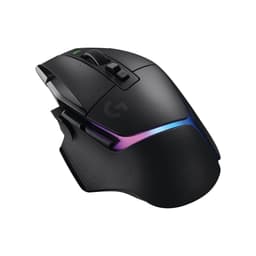
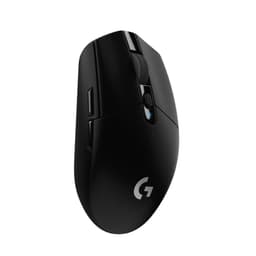
The Logitech G502 X Wired Gaming Mouse sits in a weird spot in the market. It's a proper upgrade over the original G502 in some meaningful ways, but it also costs noticeably more than its predecessor, and that gap needs justifying. So does it? Pull apart the spec sheet, dig through what 1,190 owners have actually said about living with it, and a pretty clear picture emerges of who this mouse is built for and where it quietly lets you down.
The short version: yes, it's a good mouse. The HERO 25K sensor is genuinely excellent, the LIGHTFORCE switches are a real step forward from the old mechanical clicks, and if you've got medium-to-large hands and you like a right-handed ergonomic shape with a bit of weight behind it, this is going to feel very comfortable indeed. But it's not for everyone, and there are a few things that'll genuinely annoy some people. We'll get to all of that.
Core Specifications
The headline here is the sensor. Logitech's HERO 25K is one of the better sensors you'll find in a gaming mouse at this price point. It's a Logitech-designed sensor (developed in partnership with PixArt) rated to 25,600 DPI maximum, though you'd be mad to run it that high. Most competitive players sit between 800 and 1,600 DPI. The sensor supports 1 DPI step increments, which is genuinely useful for dialling in your sensitivity precisely. Polling rate sits at 1000Hz, which is the standard for wired gaming mice at this level. That's 1ms report rate. Fine.
The mouse weighs 89g. That's not ultralight territory (ultralight is typically under 70g) but it's meaningfully lighter than the original G502, which came in at a chunky 121g. So Logitech has trimmed nearly a third of the weight off the old design, which is a big deal. The G502 X is wired only in this base version (there's a Plus variant with wireless if you want it), connecting via USB. Button count is 13, which is a lot. That's the G502 DNA right there: a mouse built for people who want every function mapped to something physical.
The main switches are where things get interesting. Logitech calls them LIGHTFORCE hybrid optical-mechanical switches. More on those in the buttons section, but the short version is: they're not purely optical and they're not purely mechanical. They use optical detection for the actuation signal while retaining a physical mechanism. The result is supposed to give you the crisp feel of a mechanical switch with the speed and reliability of optical. In practice, owner feedback suggests this mostly works. The mouse is compatible with both Windows and macOS, which matters if you're on a Mac setup.
| Specification | Detail |
|---|---|
| Sensor | HERO 25K |
| Max DPI | 25,600 (1 DPI steps) |
| Polling Rate | 1000Hz |
| Weight | 89g |
| Connectivity | Wired (USB) |
| Main Switches | LIGHTFORCE hybrid optical-mechanical |
| Buttons | 13 programmable |
| Compatibility | PC, macOS, Windows |
| Colour (this variant) | Black |
| Price | £49.99 |

Shape & Ergonomics
The G502 X keeps the same fundamental shape as the original G502, which is a right-handed ergonomic design with a pronounced thumb shelf on the left side and a fairly tall, arched hump that sits towards the rear-centre of the shell. That rear hump position makes this a palm-grip mouse, really. If you drape your hand over it with your palm resting on the back of the shell, it fits properly. Claw grip is workable on it too, particularly if your hands are on the larger side. Fingertip grip? Probably not. The shell is too big and the weight distribution too far back for fingertip to feel natural.
Hand size matters here. This is a mouse built for medium to large hands. Rough guide: if your hand is below about 17cm from wrist to middle fingertip, you might find the mouse feels a bit much. If you're in the 18 to 21cm range, this is likely going to feel very comfortable. The thumb rest is a proper sculpted shelf rather than a vague curve, and the two side buttons on the left sit naturally under the thumb without requiring any awkward reach. That's something the original G502 got right and Logitech has sensibly kept.
The right side of the shell has a textured grip area, and the overall silhouette is clearly designed for right-handers only. There's no ambidextrous version of this shape. Left-handed gamers, this isn't your mouse, full stop. For everyone else, the ergonomic shape is one of the G502 X's genuine strengths. It's not trying to be a neutral, one-size-fits-all design. It knows what it is: a big, comfortable, right-handed palm-grip mouse with a lot of buttons. And for the people that description fits, it's a very comfortable thing to use for long sessions.
Sensor Performance
The HERO 25K sensor is Logitech's current top-tier sensor, and it's legitimately good. The 25K in the name refers to the 25,600 DPI ceiling, but as mentioned, that number is almost entirely marketing. What actually matters is tracking accuracy at real-world DPI settings, lift-off distance, and how the sensor handles fast movements without spinning out or producing erratic cursor behaviour. On all three counts, the HERO 25K performs well. Owner reports consistently describe tracking as accurate and smooth with no jitter at sensible DPI settings. Spin-outs (where the cursor loses tracking and jumps wildly during very fast swipes) are not a commonly reported complaint.
Lift-off distance is the distance the cursor stops tracking when you lift the mouse off the pad. Lower is generally better for gamers who reposition frequently. The HERO 25K is rated for low lift-off distance, and owner feedback backs this up. You're not going to get unwanted cursor movement when you pick the mouse up to recentre. This matters more than most people realise, especially if you play on low sensitivity where repositioning is constant. It's one of those things you only notice when it goes wrong, and with this sensor, it generally doesn't.
The sensor also handles a wide range of surfaces well. Logitech rates it for use on most mousepads, including cloth, hard, and glass surfaces (with the right pad). It supports surface calibration through G HUB software, which lets you tune the lift-off distance for your specific mousepad. That's a nice touch. One thing clearly: the sensor is not the reason to buy or skip this mouse. At this price point, sensors are largely a solved problem. The HERO 25K is excellent, but so are the PixArt PAW3395 and PAW3370 found in competing mice. You're not going to notice a meaningful difference in day-to-day use between top-tier sensors. The sensor is fine. Great, even. But it's not the deciding factor.
Weight & Glide
89g. That's the number, and it's worth putting in context. The original G502 weighed 121g, and that weight was a genuine complaint for years. People loved the shape and the sensor but found the mouse tiring over long sessions. Logitech has addressed this properly with the G502 X, dropping 32g through redesigning the shell and removing the old adjustable weight system (more on that in a moment). 89g puts the G502 X in the medium weight category. It's not ultralight like a Logitech G Pro X Superlight 2 (60g) or a Razer Viper V2 Pro (58g), but it's also not the wrist-strainer the original was.
The removal of the adjustable weight system is worth talking about because it was a defining feature of the original G502. You could add or remove small brass weights to tune the feel. Some people loved it. Logitech has dropped it entirely for the G502 X, presumably to hit the lower weight target. This will annoy some long-time G502 fans. But honestly, most people who used the original removed all the weights anyway because the mouse was already heavy enough. So in practice, losing the weight system is a reasonable trade-off for a lighter overall mouse.
The PTFE feet (skates) on the G502 X are decent. Owner reports generally describe glide as smooth, though a few people note the edges of the feet could be better finished. Rough edges on PTFE skates can cause a scratchy feeling on cloth pads, particularly during slow, deliberate movements. It's not a universal complaint, but it's about. If you're fussy about glide, aftermarket PTFE skates from brands like Corepad are a cheap and easy upgrade that many owners fit as a matter of course. The stock feet are fine for most people, but they're not the best in class at this price.
Buttons & Switches
The LIGHTFORCE hybrid optical-mechanical switches are the most technically interesting thing about the G502 X. Traditional optical switches use a light beam to detect actuation, which means zero debounce delay and essentially infinite rated lifespan (no physical contacts to wear out). But some gamers find pure optical switches feel slightly different from what they're used to, sometimes described as lacking the tactile snap of a good mechanical click. LIGHTFORCE tries to split the difference: a physical mechanism provides the tactile feel, while optical detection handles the actuation signal. The result, according to Logitech, is a switch rated for 100 million clicks with no double-click issues.
Owner feedback on the main clicks is largely positive. People consistently describe them as crisp and responsive, with a satisfying click feel that doesn't feel mushy or vague. Double-clicking (where a single click registers as two) is one of the most common complaints about gaming mice over time, and the optical detection in LIGHTFORCE is specifically designed to prevent this. Early reports suggest this holds up, though obviously long-term durability data is still accumulating. The pre-travel on the main buttons is low, meaning the click actuates early in the button press rather than requiring you to push all the way down. That's what you want for fast clicking.
The scroll wheel on the G502 X has a dual-mode feature: you can switch between a stepped (notched) scroll mode and a free-spinning mode. This is inherited from the original G502 and it's genuinely useful. Stepped mode for precise scrolling through documents or inventory screens; free-spin for fast scrolling through long pages. The mode switch button is just behind the scroll wheel. Some owners report the scroll wheel feels a bit stiff in stepped mode, and the sensitivity in free-spin mode can feel excessive at first. If the scroll wheel is too sensitive for you, the fix is straightforward: G HUB software lets you adjust scroll wheel speed independently. The side buttons on the left are well-placed for thumb access, and the sniper button (which temporarily drops DPI while held) is still there on the left side, just below the thumb buttons. 13 programmable buttons in total gives you a lot to work with, especially for MMO players.
Build Quality
The shell on the G502 X is plastic, as you'd expect at this price, but it's solid plastic. Owner reviews don't commonly flag shell flex or creaking under grip pressure, which is a good sign. Some gaming mice at this price point have shells that flex noticeably when you squeeze them, which feels cheap and can be distracting. The G502 X doesn't seem to have this problem in any consistent way, though a small number of owners have mentioned minor creaking near the right click button area. It's not a widespread complaint.
The textured grip areas on the thumb shelf and right side of the shell are designed to maintain grip during intense gaming sessions. The texture is described by owners as grippy without being abrasive. The shell surface doesn't appear to be a rubberised coating (which tends to peel and degrade over time) but rather a textured hard plastic, which should hold up better over years of use. The overall build impression from owner reports is of a mouse that feels solid and well-assembled, not premium in a way that screams luxury, but properly built in a way that suggests it'll last.
Button wobble on the main clicks is minimal according to owner reports, which matters because excessive side-to-side wobble on the main buttons is both annoying and can affect click consistency. The side buttons have a slightly hollow sound when clicked, which some owners mention, but this is largely a cosmetic complaint rather than a functional one. The scroll wheel feels solid in its housing with no lateral wobble reported. Overall build quality is appropriate for the price. It's not the tightest construction you'll find on a gaming mouse, but it's well above average and there are no consistent quality-control horror stories in the owner reviews.
Connectivity
The Logitech G502 X Wired Gaming Mouse is, as the name makes very clear, wired only. The cable connects via USB and is braided, which helps with durability and reduces tangling compared to a plain rubber cable. Braided cables do tend to have slightly more drag on the mousepad than thin, flexible paracord-style cables, and a few owners mention the cable stiffness as a minor irritant. If cable drag is a genuine concern for you, a bungee is a cheap fix that most wired-mouse users end up buying anyway.
At 1000Hz polling rate, the mouse reports its position to the computer 1,000 times per second, giving you 1ms latency in the connection. That's the standard for competitive gaming mice and it's perfectly adequate. Some newer mice now offer 4000Hz or 8000Hz polling rates (Razer's HyperPolling, for instance), but the practical benefit of polling rates above 1000Hz is genuinely marginal for most players and can actually increase CPU load. 1000Hz is fine. It's what the pros use.
There's no wireless option on this variant. If you want the G502 X without a cable, you need the G502 X Plus, which adds LIGHTSPEED 2.4GHz wireless (Logitech's proprietary wireless system, which has an excellent reputation for low latency) at a higher price. For purely wired use, the G502 X delivers exactly what you'd expect: a solid, low-latency connection with no interference concerns. Wired mice have zero battery anxiety, zero pairing faff, and zero latency variation. For competitive gaming, wired is still the default choice for many players, and there's nothing wrong with that.
Battery Life
This is a wired mouse. There is no battery. No charging, no battery life to worry about, no USB-C charging cable to lose, no waking up to find your mouse dead mid-session. You plug it in and it works. That's the entire story here.
This is worth stating plainly because it's actually one of the practical advantages of going wired. Wireless mice have come a long way and the best of them (including Logitech's own LIGHTSPEED variants) are genuinely competitive with wired in terms of latency, but they all require charging. The G502 X Wired sidesteps that entirely. If you've ever had a wireless mouse die during a ranked match, you'll understand why some people actively prefer wired.
If battery life is a factor in your decision because you're comparing this to the G502 X Plus wireless variant, the Plus is rated for approximately 130 hours without lighting. That's genuinely impressive. But for the wired G502 X, the question doesn't apply. Power comes from the USB connection. It's always on, always ready, always at full performance. For a lot of people, that simplicity is a genuine selling point rather than a compromise.
Software & Customisation
The G502 X works with Logitech G HUB, which is Logitech's current software platform for all their gaming peripherals. G HUB lets you set DPI stages (you can configure multiple DPI levels and cycle through them with the DPI button on the mouse), adjust polling rate, remap any of the 13 buttons, set up macros, configure the RGB lighting, and calibrate the sensor for your specific mousepad surface. It also handles on-board profile storage, meaning you can save your settings directly to the mouse's memory and use them on any computer without needing the software installed.
G HUB has had a mixed reputation over the years. Earlier versions were genuinely buggy and some users found it resource-heavy. The current version is considerably more stable, and owner reviews of the G502 X don't flag software issues as a major complaint. That said, it's not the leanest piece of software, and if you're the type who hates background apps, you'll want to configure everything, save it to the mouse's on-board memory, then close G HUB and forget about it. The mouse works perfectly without the software running once your profiles are saved.
DPI adjustment goes from 100 to 25,600 in 1 DPI increments, which gives you extremely fine control over your sensitivity. The polling rate is fixed at 1000Hz on this model. The macro support is full-featured: you can record complex button sequences, set timing, and assign them to any of the programmable buttons. For MMO players in particular, having 13 programmable buttons with macro support is a significant quality-of-life feature. The software also lets you adjust scroll wheel speed, which is the answer to the commonly asked question about the scroll wheel feeling too sensitive. Go into G HUB, find the scroll wheel settings, and dial it back. Sorted.

Gaming Experience
For FPS gaming, the G502 X is a solid performer. The HERO 25K sensor handles fast flick shots without spin-outs, the LIGHTFORCE switches give you crisp, fast main clicks, and the shape provides a stable, comfortable platform for long sessions. The weight at 89g is not going to hold you back. It's heavier than an ultralight, yes, but it's not so heavy that it becomes tiring. Most players adapt to it quickly. The sniper button (the small button on the left that temporarily drops your DPI while held) is a nice touch for precise aiming in games where you need to switch between fast movement and careful aiming.
For MMO and MOBA gaming, the G502 X is arguably even better suited. The 13 programmable buttons are the draw here. You can map abilities, consumables, and macros across the mouse without reaching for the keyboard mid-fight. The thumb buttons are well-positioned for quick access, and with macro support in G HUB, you can set up complex sequences on a single button press. If you play games like World of Warcraft, Final Fantasy XIV, or Path of Exile where having quick access to lots of abilities matters, the G502 X's button layout is a genuine advantage over simpler 6-button mice.
For everyday use beyond gaming, the G502 X is perfectly usable. The ergonomic shape is comfortable for productivity work, the scroll wheel's dual-mode is actually very handy for document navigation, and the precise DPI adjustment means you can set it up exactly how you like for desktop use. A few owners specifically mention using it as their daily driver for both work and gaming. The main caveat is the size: if you're at a small desk or you use a small mousepad, the G502 X's larger footprint might feel like a lot. But for most setups, it works fine as an all-day mouse.
How It Compares
The two most relevant comparisons here are the original Logitech G502 HERO (the predecessor) and the Razer DeathAdder V3, which is a popular alternative in a similar price bracket for right-handed ergonomic mice. The G502 X Plus (wireless) is also as the obvious sibling.
Against the original G502 HERO, the G502 X wins on weight (89g versus 121g), switch quality (LIGHTFORCE versus standard mechanical), and build refinement. The original G502 HERO is significantly cheaper now, and if you genuinely don't mind the extra weight, it's still a decent mouse. But the weight difference is substantial enough that most people upgrading from the original will notice the G502 X feels considerably more agile. The adjustable weight system is gone from the X, which some will miss, but the lighter baseline weight compensates for most people.
Against the Razer DeathAdder V3, the comparison gets interesting. The DeathAdder V3 is lighter (64g), uses Razer's optical switches, and has a similarly comfortable right-handed ergonomic shape. It has fewer buttons (6 versus 13) and lacks the scroll wheel dual-mode. If you're an FPS player who wants a lighter mouse and doesn't need the extra buttons, the DeathAdder V3 is a serious competitor. If you want the button count, the scroll wheel versatility, and you're happy with 89g, the G502 X makes more sense.
| Feature | Logitech G502 X Wired | Logitech G502 HERO | Razer DeathAdder V3 |
|---|---|---|---|
| Sensor | HERO 25K | HERO 25K | Focus Pro 30K |
| Weight | 89g | 121g | 64g |
| Main Switches | LIGHTFORCE hybrid optical-mechanical | Mechanical (Omron) | Optical |
| Button Count | 13 | 11 | 6 |
| Connectivity | Wired | Wired | Wired |
| Scroll Wheel | Dual-mode (stepped/free-spin) | Dual-mode (stepped/free-spin) | Standard stepped |
| Adjustable Weight | No | Yes | No |
| Shape | Right-handed ergonomic | Right-handed ergonomic | Right-handed ergonomic |
The G502 X Plus (wireless) deserves a mention because it's the obvious "should I just spend a bit more?" question. The Plus adds LIGHTSPEED wireless, which Logitech's own documentation describes as operating at sub-1ms connection speed, and a rechargeable battery rated at around 130 hours. It's a meaningful upgrade if wireless matters to you. But it's also heavier than the wired G502 X (because of the battery) and costs considerably more. If you don't care about wireless and you're not going to miss the cable, the wired G502 X is the smarter buy. You're getting the same sensor and the same LIGHTFORCE switches for less money.
Final Verdict
The Logitech G502 X Wired Gaming Mouse is a genuinely good gaming mouse. Not perfect, but good. The HERO 25K sensor is excellent, the LIGHTFORCE switches are a real improvement over the old mechanical clicks, and the shape is one of the most comfortable right-handed ergonomic designs on the market for medium to large hands. Logitech has taken the G502 formula, addressed its biggest flaw (the weight), upgraded the switches, and produced a mouse that's easy to recommend to the right buyer.
Who is the right buyer? Right-handed players with medium to large hands who want a palm or claw grip, appreciate having lots of programmable buttons, and don't need an ultralight. FPS players who want maximum buttons alongside good tracking. MMO players who want to map abilities across the mouse. People upgrading from the original G502 who found it too heavy. All of these people will probably be very happy with the G502 X.
Who should skip it? Left-handed players (obviously). Fingertip grip users who'd be better served by a smaller, lighter mouse. Pure FPS players who want the absolute lightest possible mouse and don't care about button count, in which case something like the Logitech G Pro X Superlight 2 or the Razer Viper V2 Pro is a better fit. And anyone who finds 89g genuinely heavy should look at the ultralight options instead.
The scroll wheel sensitivity complaint that comes up in owner reviews is real but easily fixed through G HUB. The cable drag is a minor annoyance that a bungee solves. The PTFE skates are decent but not exceptional. These are minor issues on an otherwise well-sorted mouse. The 4.1-star average across 1,195 reflects a product that mostly does what it promises and occasionally frustrates people with small, fixable niggles rather than fundamental design flaws.
One honest caveat: if you're on a tighter budget and the button count and LIGHTFORCE switches aren't priorities, the original G502 HERO is significantly cheaper now and still a capable mouse. Same shape, same sensor generation, more weight, older switches, lower price. If you can live with those trade-offs, so check it before spending up for the X. But if you want the improved switches, the lighter weight, and you're buying new in 2024, the G502 X is the right version to buy. It earns a solid 8 out of 10. Good sensor, good switches, great shape for the right hands, minor gripes that don't undermine the overall package.
Which mouse is better, the G502 or the G502 X?
The G502 X is the better mouse in almost every measurable way. It's 32g lighter than the original G502 HERO (89g versus 121g), which is a meaningful difference over a long gaming session. The LIGHTFORCE switches are a genuine upgrade over the original's mechanical Omron switches, with optical detection for faster response and no double-click issues. The only things you lose going from the original to the X are the adjustable weight system and a lower price. If you're buying new and the budget stretches to it, the G502 X is the one to get. If you're on a tight budget, the original G502 HERO is still capable and significantly cheaper.
Is the Logitech G502 X mouse a good mouse?
Yes. It's a good gaming mouse. The HERO 25K sensor tracks accurately, the LIGHTFORCE switches click crisply, the shape is comfortable for right-handed palm and claw grip users with medium to large hands, and the 13 programmable buttons give you a lot of flexibility. The 4.1-star average from 1,190 owners backs this up. It's not flawless (the cable has some drag, the stock skates are average, the scroll wheel can feel oversensitive out of the box) but the core mouse is well-designed and well-built.
My G502 X mouse wheel is too sensitive. How can I fix it?
This is a common complaint and the fix is easy. Open Logitech G HUB, select your G502 X, go to the scroll wheel settings, and reduce the scroll speed. You can adjust both the stepped scroll and free-spin sensitivity independently. Once you've found a setting that feels right, save it to the mouse's on-board memory so it works on any machine. Most owners who report this issue find a comfortable setting within a few minutes of playing with the G HUB controls.
What are the common problems with the G502 mouse?
The original G502 had two well-known issues: its weight (121g is heavy for extended use) and eventual double-clicking on the main buttons as the mechanical switches aged. The G502 X addresses both: the weight is down to 89g, and the LIGHTFORCE optical-mechanical switches are designed to eliminate double-clicking. Remaining complaints from G502 X owners include cable stiffness causing some drag, scroll wheel sensitivity being too high out of the box (fixable in software), and the stock PTFE skates not being quite as smooth as aftermarket alternatives. None of these are deal-breakers, but they're about.

Is the G502 good for everyday use?
Yes, it works well for everyday use beyond gaming. The ergonomic shape is comfortable for long productivity sessions, the dual-mode scroll wheel is genuinely useful for document navigation, and the precise DPI settings mean you can dial in a comfortable desktop sensitivity. Several owners specifically mention using it as their daily driver for both work and gaming. The main consideration is size: it's a large mouse, so if you have a small desk or work in a cramped space, it might feel like a lot. But for a standard desk setup, it's a perfectly good all-day mouse.
What works. What doesn’t.
6 + 6What we liked6 reasons
- HERO 25K sensor tracks accurately at real-world DPI settings with no spin-out issues reported
- LIGHTFORCE hybrid optical-mechanical switches are crisp, responsive, and designed to prevent double-clicking
- 32g lighter than the original G502 HERO, making long sessions noticeably less tiring
- 13 programmable buttons with full macro support make it excellent for MMO and MOBA players
- Dual-mode scroll wheel with stepped and free-spin modes is genuinely useful for both gaming and productivity
- Comfortable right-handed ergonomic shape well-suited to palm and claw grip for medium to large hands
Where it falls6 reasons
- Wired only on this variant; wireless requires upgrading to the pricier G502 X Plus
- Braided cable has some drag on the mousepad and can feel stiff compared to thin paracord cables
- Stock PTFE skates are average and not as smooth as quality aftermarket alternatives
- Scroll wheel sensitivity feels excessive out of the box in free-spin mode, requiring a G HUB adjustment
- No adjustable weight system, which will disappoint some long-time G502 fans
- Shape is right-handed only and too large for fingertip grip users or those with smaller hands
Full specifications
8 attributes| Buttons | 13 |
|---|---|
| Connectivity | USB wired |
| DPI MAX | 25600 |
| Polling rate HZ | 1000 |
| RGB | true |
| Sensor | HERO 25K |
| Switches | LIGHTFORCE hybrid optical-mechanical |
| Weight G | 89 |
If this isn’t right for you
2 options 9.0 / 10
Rapoo VT2 MAX Wireless Gaming Mouse, True 8K Wireless Polling Rate, 53g Lightweight, Up to 750 Hr Battery, Nordic nRF54L15 MCU, 120-Million Optical Switch, 10 Programmable Buttons, Macro Enabled
£45.59 · Rapoo
 8.5 / 10
ASUS ROG Scabbard II Extended Gaming Mouse Pad | Nano Technology Smooth Glide Tracking | Protective Coating for Water, Oil, Dust-Repelling Surface | Anti-Fray Flat-Stitched Edges | Non-Slip Rubber Bas
£33.96 · ASUS
Frequently asked
7 questions01Which mouse is better, the G502 or the G502 X?+
The G502 X is the stronger mouse in almost every measurable way. It is 32g lighter than the original G502 HERO (89g versus 121g), which makes a noticeable difference over a long session. The LIGHTFORCE switches are a genuine improvement over the original Omron mechanical clicks, with optical detection for faster actuation and no double-click degradation over time. The only meaningful losses going from the original to the X are the adjustable weight system and the lower price. If your budget stretches to it and you are buying new, the G502 X is the version to choose.
02Is the Logitech G502 X a good mouse?+
Yes. The HERO 25K sensor tracks accurately, the LIGHTFORCE switches click crisply and are designed to resist double-clicking, and the right-handed ergonomic shape is comfortable for palm and claw grip users with medium to large hands. The 13 programmable buttons add significant flexibility for MMO and FPS players. Minor complaints around cable drag, scroll wheel sensitivity out of the box, and average stock skates exist, but none undermine the core mouse. A 4.1-star average across over 1,190 owners reflects a product that delivers on its main promises.
03My G502 X mouse wheel is too sensitive. How can I fix it?+
This is a common complaint and straightforward to fix. Open Logitech G HUB, select your G502 X, navigate to the scroll wheel settings, and reduce the scroll speed to your preference. You can adjust stepped scroll and free-spin sensitivity independently. Once you have found a comfortable setting, save it to the mouse's on-board memory so it carries over to any computer without needing G HUB installed. Most owners who report this issue find a workable setting within a few minutes of adjusting the software controls.
04What are the common problems with the G502 X?+
The original G502 was criticised for its 121g weight and for developing double-click faults as the mechanical switches aged. The G502 X addresses both: weight is reduced to 89g and the LIGHTFORCE switches use optical detection to prevent double-clicking. The remaining complaints from G502 X owners centre on three things: the braided cable causing some drag on the mousepad, the scroll wheel feeling overly sensitive in free-spin mode straight out of the box (fixable in G HUB), and the stock PTFE skates being average rather than exceptional. None of these are fundamental design flaws.
05Is the G502 X good for everyday use beyond gaming?+
Yes. The ergonomic shape is comfortable for long productivity sessions, the dual-mode scroll wheel is genuinely handy for document navigation, and the precise DPI adjustment means you can find a comfortable desktop sensitivity easily. Several owners specifically use it as their full-time daily driver for both work and gaming. The main consideration is size: it is a large mouse, and a cramped desk setup may make it feel unwieldy. For a standard desk, it works well as an all-day mouse.
06Does the G502 X work without G HUB software installed?+
Yes. You can configure your DPI stages, button remapping, and scroll wheel settings in G HUB, save everything to the mouse's on-board memory, then close the software entirely. The saved profile travels with the mouse and works on any computer without G HUB running. G HUB is only required if you want to change settings or update firmware. Once your profile is saved, the mouse operates independently of the software.
07How does the G502 X compare to the G502 X Plus wireless?+
The G502 X Plus adds Logitech's LIGHTSPEED 2.4GHz wireless, which operates at sub-1ms connection speed, and a rechargeable battery rated for around 130 hours without lighting. It uses the same HERO 25K sensor and LIGHTFORCE switches as the wired G502 X. The trade-offs are higher cost and slightly more weight due to the battery. If wireless genuinely matters to your setup, the Plus is. If you are happy with a cable and do not want to pay the premium, the wired G502 X gives you the same core performance for less money.