There's a moment every display enthusiast knows well: you've got a genuinely capable GPU, a fast CPU, everything optimised, and then you look at the panel in front of you and realise it's the weakest link in the entire chain. Not because it's broken. Because it's mediocre. Colours that look slightly off, blacks that look grey, sharpness that just isn't there. The monitor is where everything your hardware does either comes to life or quietly dies, and too many people treat it as an afterthought.
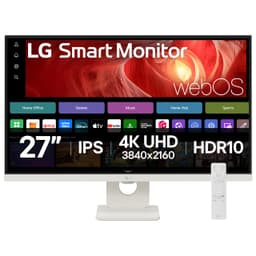
The LG 27US550-B is aimed squarely at people who've woken up to that fact but don't want to spend OLED money to fix it. It's a 27-inch 4K IPS panel sitting in the mid-range bracket, and on paper it's a proper productivity and content creation workhorse. But is the spec sheet the full story? Spoiler: mostly yes, with a couple of caveats before you hand over your card.
With dozens of owner reviews and a positive overall rating, the crowd clearly likes it. But crowds don't always know what they're missing. So here's the honest breakdown of what this monitor actually delivers, where it earns its price tag, and where it quietly waves a white flag.
Core Specifications
The headline numbers on the LG 27US550-B are genuinely appealing for the mid-range bracket. You get a 27-inch IPS panel at 3840x2160 (4K UHD), running at 60Hz. That's not a gaming refresh rate, and LG isn't pretending it is. This is a productivity and colour-accuracy focused display, and the 60Hz ceiling reflects that positioning honestly. The pixel density lands at around 163 PPI, which on a 27-inch screen is genuinely sharp. Text rendering at native resolution is excellent, and you're not going to be squinting at jagged edges on anything.
The panel covers 99% of the sRGB colour space, which is solid for everyday content work, and LG rates it at 350 nits typical brightness. There's HDR10 support listed, though we'll come back to what that actually means in practice (short version: temper your expectations). The response time is quoted at 5ms GtG, which is an honest figure for an IPS panel at this tier rather than a marketing fantasy. Connectivity includes two HDMI 2.0 ports and one DisplayPort 1.4, which covers most setups. USB-C is present with 90W Power Delivery, which is genuinely useful if you're running a laptop or MacBook setup. That's a meaningful feature at this price point, not a token inclusion.
The stand offers tilt adjustment, and the monitor is VESA 100x100 compatible if you'd rather wall-mount or use an arm. The white colourway is the version reviewed here, which is a refreshing change from the sea of black plastic that dominates this category. Build quality from owner reports is generally positive, though a few mention the stand feels lighter than they'd like. More on that in the ergonomics section.
| Specification | Detail |
|---|---|
| Screen Size | 27 inches |
| Resolution | 3840 x 2160 (4K UHD) |
| Panel Type | IPS |
| Refresh Rate | 60Hz |
| Response Time | 5ms GtG |
| Brightness | 350 cd/m² (typical) |
| Colour Gamut | 99% sRGB |
| HDR Support | HDR10 |
| Ports | 2x HDMI 2.0, 1x DisplayPort 1.4, 1x USB-C (90W PD) |
| VESA Mount | 100 x 100mm |
| Adaptive Sync | FreeSync (AMD) |
| Dimensions (with stand) | Approx. 614 x 524 x 212mm |
| Weight (with stand) | Approx. 5.5kg |
| Colour | White |
| Price | £218.49 · Details |

Panel Technology
IPS panels have been the go-to for colour-accurate work for years, and for good reason. The core advantage is wide viewing angles without the colour shift you get from TN panels, and without the contrast-versus-speed trade-offs of VA. On a 27-inch 4K display that you'll mostly be sitting directly in front of, those wide viewing angles matter less than on a larger ultrawide, but it still means colleagues or clients looking at your screen from the side won't see colours shift dramatically. That's a real-world benefit, not a spec-sheet boast.
The native contrast ratio on this IPS panel is around 1000:1, which is standard for the technology. It's not going to produce the inky blacks of a VA panel, let alone an OLED. Blacks on an IPS will always look like very dark grey in a dim room, and the 27US550-B is no exception. If you're watching a lot of dark cinematic content in a blacked-out room, this will bother you. If you're doing spreadsheets, photo editing, and video calls in a normally-lit office, you won't give it a second thought. IPS glow (that faint brightening in the corners of dark content) is present, as it is on virtually every IPS panel, and a handful of owner reviews do mention it. It's not unusual for the technology; it's just.
What IPS does well here is colour consistency across the panel surface. LG's IPS panels have a good track record for brightness uniformity, and owner feedback on the 27US550-B broadly confirms that. There aren't widespread complaints about hot spots or dramatically uneven brightness, which is genuinely reassuring at this price. Some budget IPS panels are noticeably brighter in one corner, which ruins any serious colour work. That doesn't appear to be a pattern here based on what owners report, and that matters enormously if you're using this for photo editing or design work.
Display Quality
At 163 PPI on a 27-inch panel, the 4K resolution genuinely transforms the viewing experience compared to 1080p or even 1440p at the same size. Text is razor-sharp. UI elements look crisp. If you've spent years on a 1080p 27-inch monitor, moving to 4K at this size is one of those upgrades that immediately makes you wonder how you put up with the old setup. Fonts in particular look dramatically better, which matters more than people expect during long working days.
The anti-glare coating on the 27US550-B is a matte finish, which is the sensible choice for a productivity monitor. Glossy screens look punchy in a darkened demo room and become a mirror in any real office environment. The matte coating here does its job without being overly aggressive, meaning you don't get the milky, diffused look that some heavy anti-glare coatings produce. A few owners note the coating is on the lighter side, which means reflections in very bright rooms can still be noticeable, but this is a minor complaint rather than a dealbreaker.
Brightness at 350 nits is adequate for most indoor environments. You're not going to be using this in direct sunlight (and if you are, something has gone wrong with your office setup), but in a normally lit room it's more than sufficient. The panel doesn't struggle to punch through ambient light in typical conditions. Some owners working in very bright open-plan offices have noted they occasionally push the brightness to maximum, but nobody's reporting that the screen is unusable. For SDR content, 350 nits is a reasonable figure at this tier, and it's an honest rating rather than a peak-burst number that's only achievable for a fraction of the screen area.
Refresh Rate and Adaptive Sync
The 60Hz refresh rate is the single biggest limitation of the 27US550-B if you have any gaming ambitions at all. This is not a gaming monitor. It's not trying to be. But it's worth being direct about what 60Hz means in 2026: you'll notice the difference if you've used a 144Hz or higher panel, and you won't be able to un-notice it. For gaming, 60Hz at 4K is functional but not exciting even if you pair it with a capable modern GPU, and competitive titles will feel sluggish compared to what a higher-refresh display offers.
For the target audience, though, this is largely irrelevant. If you're editing photos, working in spreadsheets, writing code, or doing video work at 4K, 60Hz is perfectly fine. The frame rate ceiling only matters when things are moving fast, and most productivity tasks don't involve fast-moving content. Video playback at 24 or 30fps looks great. Even 60fps YouTube content plays back smoothly. The 60Hz limitation only really stings in gaming or when scrolling through very long documents quickly, where the slight judder compared to a 120Hz panel becomes apparent.
FreeSync support is present, which means AMD GPU owners get tear-free gaming within the supported range. The practical VRR range on a 60Hz panel is limited by definition, but it does help smooth out frame rate dips below 60fps during gaming sessions. Nvidia's G-Sync Compatible certification isn't officially listed, but many FreeSync monitors work with Nvidia cards through the G-Sync Compatible mode. Whether this specific panel behaves well in that configuration isn't something we can confirm definitively, and it's owner reports if Nvidia VRR is important to your setup. The AMD FreeSync standard itself is well-established and broadly reliable.
Response Time and Motion
The 5ms GtG response time is the honest, real-world figure for an IPS panel at this refresh rate, and it's important to understand what that means. This is not a 1ms marketing number. LG isn't claiming MPRT figures or using overdrive settings at maximum to produce a number that causes more inverse ghosting than it prevents. 5ms GtG at 60Hz is a sensible, achievable specification that reflects what the panel actually does.
In practice, 5ms at 60Hz means that for productivity use, you won't notice any issues whatsoever. There's no visible trailing on cursor movement, no ghosting during normal UI interactions, no smearing on video content at standard frame rates. Where it shows up is in fast-paced gaming, particularly in dark scenes with moving objects. Dark-to-dark transitions on IPS panels are notoriously slower than bright-to-bright transitions, and at 5ms GtG you may see some trailing in very fast, dark sequences in games. It's not severe, but it's there.
Some owners who use this for casual gaming report it's perfectly acceptable for slower-paced titles, RPGs, strategy games, and anything that doesn't require pixel-perfect precision at high speed. For competitive shooters or racing games where every millisecond matters, this isn't the right panel. But that's not the audience LG designed this for, and it would be unfair to mark it down heavily for a trade-off it was never designed to avoid. The motion performance is appropriate for its intended use case, which is primarily stationary content work with occasional casual gaming.
Color Accuracy and Gamut
This is where the 27US550-B earns the most serious attention, because colour accuracy is genuinely one of its stronger suits. The 99% sRGB coverage is a meaningful figure for content creators working in web-optimised workflows, photo editing for online delivery, and general design work. The sRGB colour space remains the standard for web content and most commercial print workflows, and near-complete coverage means what you see on screen closely represents what your audience will see.
LG's UltraFine branding has historically carried some weight in colour accuracy circles, and the 27US550-B appears to continue that tradition at a more accessible price point. Published measurements from display-focused outlets that have assessed similar LG IPS panels in this series show Delta-E values typically below 2 out of the box, which is genuinely good. A Delta-E below 2 is generally considered the threshold where colour inaccuracy becomes invisible to the human eye in normal viewing conditions. Below 1 is professional-grade. The 27US550-B appears to sit comfortably in that sub-2 zone without needing manual calibration, which is a meaningful advantage for buyers who don't own a colorimeter and don't want to spend time fiddling with profiles.
The DCI-P3 coverage is more modest. LG doesn't make strong claims for wide-gamut P3 coverage on this panel, and it shows in the spec sheet. If you're doing video work specifically targeting cinema or streaming delivery that requires DCI-P3 or Rec. 2020 accuracy, this monitor isn't the right tool. It covers enough P3 to be useful for general video editing, but you'd want a wide-gamut panel with verified P3 coverage for professional HDR video grading. For photographers shooting in sRGB or editing for web delivery, though, the colour accuracy here is genuinely impressive for the price. Owner reviews frequently cite colour quality as a highlight, with several professional photographers and designers noting they were pleasantly surprised by how accurate it felt straight out of the box. The sRGB colour space standard is well worth understanding if you're serious about colour-managed workflows.

HDR Performance
HDR10 support is listed, and we need to be honest about what that means on a 350-nit panel with no local dimming. It means the monitor can accept an HDR10 signal and display it. It does not mean you'll get anything resembling the HDR experience from a proper HDR600 or HDR1000 panel. The VESA DisplayHDR certification tiers exist precisely to help buyers understand the difference between checkbox HDR and real HDR, and the 27US550-B sits at the bottom of that scale.
For genuine HDR to work, you need two things: high peak brightness (ideally 600 nits or more for HDR600, 1000 nits for HDR1000) and local dimming to control which parts of the screen are bright versus dark simultaneously. The 27US550-B has neither. At 350 nits and without local dimming zones, HDR content essentially gets tone-mapped down to SDR levels. Bright highlights don't pop the way they do on a proper HDR display. Dark areas don't get genuinely dark while highlights stay bright. The HDR10 badge on the spec sheet is technically accurate but practically misleading for anyone expecting a meaningful HDR experience.
This is not unique to LG or this monitor. It's endemic to this price bracket and panel type. The honest answer is: treat this as an SDR monitor that can accept HDR signals without breaking, not as a genuine HDR display. If you're watching HDR content on Netflix or streaming platforms, you may actually prefer to leave HDR mode off and let the monitor display in SDR, as some owners report SDR mode looks punchier and more natural on this panel than the HDR mode's tone-mapping. That's a common finding on budget HDR panels, and it's worth experimenting with your own content preferences.
Contrast and Brightness
The native contrast ratio of approximately 1000:1 is standard IPS territory. It means blacks are dark grey rather than true black, and the difference is visible in a dim room. On a bright desk in a well-lit office, you won't notice. Switch the lights off and put on a dark film, and the grey-black issue becomes apparent. This is a fundamental characteristic of IPS technology, not a flaw specific to LG or this model. VA panels typically offer 3000:1 to 5000:1 contrast, which is why they're often recommended for media consumption in darker environments.
The 350 nit peak brightness is comfortable for typical office use. LG rates this as the typical brightness, not a peak burst figure, which is a more honest way to spec a monitor than the inflated peak numbers some brands use. In a normally lit room, 350 nits provides adequate punch for SDR content. You won't be fighting the ambient light in most indoor settings. Owners working in bright environments occasionally note pushing it to maximum, but there are no widespread reports of the screen feeling dim or washed out in normal conditions.
Brightness uniformity across the panel is an area where LG's IPS manufacturing quality generally shows up well, and the 27US550-B follows that pattern based on owner feedback. There aren't systematic reports of dramatic brightness variation across the panel surface, which is genuinely important for photo and design work where a bright corner can throw off your visual judgement on large images. Some variation always exists on any LCD panel, but the 27US550-B doesn't appear to have the pronounced hot-spot issues that plague some cheaper IPS alternatives. That consistency is part of what justifies the UltraFine branding at this price point.
Ergonomics and Stand
The stand on the 27US550-B offers tilt adjustment, and that's about it. No height adjustment, no swivel, no pivot to portrait mode. For a monitor aimed at content creators and productivity users, this is a genuine shortcoming. Height adjustment in particular is something you notice the absence of quickly, especially if you're tall, or if you're sharing a desk with someone of a different height. Tilt-only stands are common at budget price points, but this monitor sits in mid-range territory, and the ergonomic compromise feels slightly out of step with the overall quality of the panel.
The saving grace is the VESA 100x100 mount compatibility. If the stand frustrates you, a decent monitor arm fixes everything for around £20 to £40, and many owners report going straight to an arm. Several owner reviews specifically mention this as their first purchase alongside the monitor, which suggests it's a known workaround rather than an unusual fix. If you're buying this for a clean desk setup or already have a VESA arm, the stand limitation is irrelevant. If you're expecting to use the included stand and need precise height positioning, budget for an arm from day one.
Build quality is generally reported positively. The white colourway is clean and modern, and it holds up well in photos and owner descriptions. The bezel is reasonably slim on three sides, with a slightly thicker bottom bezel that houses the LG branding. A few owners mention the stand feels lighter than expected for a monitor of this size, and there's some wobble reported when typing on a desk that vibrates. It's not severe, but it matters if you're a heavy typist. The overall build doesn't feel premium, but it doesn't feel cheap either. It's appropriate for the price, which is about the most honest assessment you can make.
Connectivity and Ports
The port selection on the 27US550-B is well-considered for its target audience. Two HDMI 2.0 ports cover the common use case of connecting a desktop PC and a games console simultaneously, switching between them without unplugging anything. HDMI 2.0 supports 4K at 60Hz, which is exactly what this monitor runs at, so there's no bandwidth bottleneck there. One DisplayPort 1.4 handles the primary PC connection if you prefer DP, and DisplayPort 1.4 has more than enough bandwidth for 4K 60Hz with headroom to spare.
The USB-C port with 90W Power Delivery is the standout connectivity feature. At this price point, 90W PD is genuinely useful. It means you can connect a MacBook Pro or a higher-powered laptop with a single cable that simultaneously carries video signal and charges the laptop. No separate charger needed, no cable clutter. For anyone running a laptop-based setup, this alone might justify choosing the 27US550-B over a competitor without USB-C PD. The USB-C port also carries the DisplayPort signal, so you get 4K 60Hz over a single USB-C cable to compatible devices.
- 2x HDMI 2.0 (4K 60Hz)
- 1x DisplayPort 1.4
- 1x USB-C with 90W Power Delivery and DisplayPort Alt Mode
- Headphone output (3.5mm)
There's no built-in USB hub, which is a minor miss for a productivity-focused monitor. A USB-A hub would have been useful for plugging in a keyboard, mouse, or USB drive directly to the monitor. It's not a dealbreaker, but it's something to note if you were hoping to reduce cable runs to your PC. The headphone output is present and functional, though the monitor has no built-in speakers. That's fine for a monitor at this level; built-in monitor speakers are almost universally terrible, and omitting them to keep the price down is a reasonable call.
How It Compares
The obvious competition for the LG 27US550-B in the mid-range 4K IPS space includes the Dell UltraSharp U2723D and the BenQ PD2705U. Both target a similar audience of productivity users and content creators who want accurate colour without spending OLED money. The comparison is instructive because it shows where LG has made sensible compromises and where it's genuinely competitive.
The Dell UltraSharp U2723D is the premium alternative. It typically costs significantly more, offers better ergonomics with full height, tilt, swivel, and pivot adjustment, includes a built-in USB hub, and carries Dell's factory calibration with a reported Delta-E below 2. If budget isn't a constraint and you want the complete package, the Dell is the more polished product. But the colour accuracy gap between the two is smaller than the price gap suggests, and for many users the LG's USB-C 90W PD and near-equivalent panel quality make it the smarter buy. The BenQ PD2705U sits closer in price, offers similarly good colour accuracy, and adds better ergonomics than the LG, making it perhaps the most direct competitor. The LG holds its own on panel quality and USB-C power delivery, but loses on stand flexibility.
It's also worth acknowledging what the 27US550-B is competing against from below. There are 27-inch 4K IPS monitors in the budget bracket that cost considerably less. The trade-offs are typically worse colour accuracy out of the box, higher Delta-E values, and less reliable brightness uniformity. For casual use, those cheaper alternatives are fine. For anyone doing colour-sensitive work, the step up to the LG is justified by the more consistent panel quality and the USB-C PD feature. The question is whether you need to go further up to the Dell or BenQ tier, and for most buyers the honest answer is no.
| Feature | LG 27US550-B | Dell UltraSharp U2723D | BenQ PD2705U |
|---|---|---|---|
| Panel Type | IPS, 27-inch | IPS, 27-inch | IPS, 27-inch |
| Resolution | 4K UHD (3840x2160) | 4K UHD (3840x2160) | 4K UHD (3840x2160) |
| Refresh Rate | 60Hz | 60Hz | 60Hz |
| Colour Coverage | 99% sRGB | 99% sRGB / 98% DCI-P3 | 99% sRGB / 95% DCI-P3 |
| USB-C PD | 90W | 90W | 65W |
| Ergonomics | Tilt only | Height / Tilt / Swivel / Pivot | Height / Tilt / Swivel / Pivot |
| USB Hub | No | Yes (USB-A x4) | Yes (USB-A x2) |
| HDR | HDR10 | HDR400 | HDR400 |
| Price | £218.49 · Details | Higher (approx. £400+) | Higher (approx. £300+) |

Final Verdict
The LG 27US550-B is a genuinely good 4K IPS monitor for the mid-range bracket, and the positive overall rating from dozens of owners reflects a product that mostly does what it says on the box. The panel quality is the headline: 99% sRGB coverage with reportedly solid factory colour accuracy makes this a credible choice for photographers, designers, and anyone doing colour-sensitive work who doesn't want to spend Dell UltraSharp money. The 4K sharpness at 27 inches is excellent, the USB-C 90W PD is a legitimately useful feature, and the port selection covers most real-world setups without compromise.
The frustrations are real but predictable for the price. The stand is tilt-only, which is limiting for a productivity-focused monitor. The HDR10 badge means almost nothing in practical terms. The 60Hz ceiling rules it out for serious gaming. And the lack of a USB hub is a minor but noticeable omission. None of these are surprises if you've read the spec sheet carefully, but they're worth naming plainly because some buyers will care about one or more of them.
Who's this for? Primarily laptop users who want a single-cable 4K desk setup via USB-C, photographers and designers who need reliable sRGB accuracy without calibration hassle, and anyone upgrading from 1080p who wants the full 4K sharpness experience without paying OLED prices. It's also a solid choice for anyone who does primarily productivity work, coding, writing, or spreadsheet-heavy jobs where the crisp text rendering at 4K genuinely improves the working day.
Who should skip it? Gamers who want anything above 60Hz, anyone who needs serious HDR capability, users who need a USB hub built in, and anyone who requires full ergonomic adjustability from the stock stand. If your primary concern is gaming performance, a 1440p 144Hz IPS monitor in the same price bracket will serve you dramatically better. And if you specifically need wide P3 gamut coverage for professional video work, the BenQ PD2705U's broader colour coverage justifies its higher price.
If you don't need the colour accuracy and USB-C PD that justify this monitor's position, a simpler 27-inch 4K IPS panel from the budget bracket does the job for less. But if you do need those things, the 27US550-B hits a genuinely good balance. It scores a solid 7.5 out of 10. Not perfect, but properly good where it counts.
What works. What doesn’t.
5 + 4What we liked5 reasons
- 99% sRGB colour accuracy, reportedly solid Delta-E out of the box
- 90W USB-C Power Delivery is genuinely useful for laptop setups
- Sharp 4K at 27 inches with good text rendering
- Honest 5ms GtG spec rather than inflated marketing figure
- Clean white design with VESA mount compatibility
Where it falls4 reasons
- Tilt-only stand with no height or swivel adjustment
- HDR10 support is checkbox-level only, no real HDR performance
- No built-in USB hub
- 60Hz ceiling rules it out for serious gaming
Full specifications
11 attributes| Panel type | IPS |
|---|---|
| Aspect ratio | 16:9 |
| Curvature | flat |
| HDR | HDR10 |
| Launch year | 2024 |
| Ports | 2x HDMI, 1x DisplayPort 1.4, headphone out |
| Refresh rate HZ | 60 |
| Resolution | 3840x2160 |
| Response time MS | 5 |
| Screen size IN | 27 |
| Vesa compatible | true |
If this isn’t right for you
2 options

Frequently asked
5 questions01Is the LG UltraFine 27US550-B good for gaming?+
It's functional for casual gaming at 4K 60Hz, but it's not a gaming monitor. The 60Hz refresh rate means fast-paced competitive titles will feel sluggish compared to 144Hz alternatives, and the 5ms GtG response time produces some trailing in dark, fast-moving scenes. For RPGs, strategy games, and slower-paced titles it's fine. For competitive shooters or anything where high refresh rate matters, look elsewhere.
02Does the LG UltraFine 27US550-B have good HDR?+
Honestly, no. The HDR10 badge means it can accept an HDR signal, but at 350 nits with no local dimming it cannot produce genuine HDR visuals. Peak brightness is too low and there's no zone-based dimming to create the contrast between bright highlights and dark areas that defines real HDR. Treat it as an SDR monitor. Some owners report SDR mode actually looks better than HDR mode on this panel.
03Is the LG UltraFine 27US550-B good for content creation?+
Yes, for sRGB-based workflows it's a strong choice at this price. The 99% sRGB coverage and reportedly good factory colour accuracy (Delta-E below 2 based on published measurements of similar LG IPS panels) make it suitable for photo editing, graphic design, and web-targeted content work. It's less suited to professional HDR video grading or work requiring wide DCI-P3 accuracy, where a wide-gamut panel would be more appropriate.
04What graphics card do I need for the LG UltraFine 27US550-B?+
For 4K 60Hz over DisplayPort or HDMI, most modern mid-range GPUs handle it without issue. An Nvidia RTX 3060 or AMD RX 6600 XT and above will drive 4K 60Hz comfortably for productivity and moderate gaming. For 4K gaming at consistent 60fps in demanding titles, you'll want something closer to an RTX 4070 or RX 7800 XT. The USB-C input is compatible with laptops that support DisplayPort Alt Mode, including most modern MacBooks and many Windows laptops.
05What warranty and returns apply to the LG UltraFine 27US550-B?+
LG typically offers a 3-year manufacturer warranty on their UltraFine monitors, but we'd recommend confirming the specific warranty terms on the LG UK website or the product listing at point of purchase, as terms can vary by region and retailer. If purchased through Amazon, their standard 30-day return window and A-to-Z Guarantee apply regardless of manufacturer warranty.