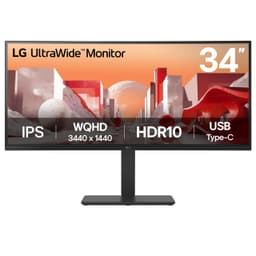
Display tech is genuinely exciting right now. OLED panels are trickling into mid-range territory, mini-LED is making HDR actually mean something, and ultrawide formats have gone from niche enthusiast flex to mainstream productivity staple. So when a 34-inch curved VA ultrawide lands in the mid-range bracket, the question isn't just "does it work" but "why would you choose this over everything else competing for the same money?" That's the question worth answering properly.
The LG 34WR50QK is LG's attempt at an accessible entry point into the 34-inch 21:9 UltraWide QHD space. It's got the resolution (3440x1440), it's curved, it's got a VA panel, and it sits at a price that makes it genuinely tempting if you're upgrading from a 27-inch 1080p flat panel. But the mid-range monitor market in 2026 is brutal. There are IPS alternatives with better viewing angles, there are panels with higher refresh rates, and the spectre of OLED is always lurking just above this price bracket. Does the 34WR50QK earn its place? Based on the spec sheet, here's the honest picture.
The LG UltraWide Curved PC Monitor 34WR50QK sits in a genuinely interesting spot. It's not trying to be a gaming beast, and it's not pretending to be a professional colour tool. It's a big, curved, high-resolution panel aimed at people who want more screen real estate for work and casual gaming without spending OLED money. Whether that's the right call depends entirely on your priorities, and those priorities matter a lot with VA panels specifically.
Core Specifications
Start with what's actually on the box. You're getting a 34-inch curved VA panel running at 3440x1440 (that's UltraWide QHD, or UWQHD if you prefer), with a 100Hz refresh rate and a quoted 5ms response time. The aspect ratio is 21:9, which is the standard ultrawide format. Connectivity covers two HDMI 2.0 ports and one DisplayPort 1.4, which is a solid set for this price tier. HDR10 support is included. LG's Smart Energy Saving feature is listed as a highlight, which is essentially brightness management to reduce power consumption.
The 3440x1440 resolution on a 34-inch panel gives you a pixel density of around 109 PPI. That's not razor-sharp by modern standards (a 27-inch 1440p panel hits around 109 PPI too, so you're not gaining density by going ultrawide at this size), but it's perfectly comfortable for everyday use, text is readable without squinting, and icons don't look blocky. The 21:9 format is the real draw here, giving you that panoramic field of view that makes spreadsheets, video editing timelines, and gaming feel genuinely different from standard 16:9.
The 1800R curvature (standard for 34-inch panels at this size) wraps the edges into your peripheral vision. It reduces eye travel on a screen this wide. Whether you love or hate curves is personal, but for a 34-inch ultrawide it makes practical sense in a way it doesn't for a 27-inch flat panel.
| Specification | Detail |
|---|---|
| Screen Size | 34 inches |
| Resolution | 3440x1440 (UltraWide QHD) |
| Aspect Ratio | 21:9 |
| Panel Type | VA |
| Refresh Rate | 100Hz |
| Response Time | 5ms (GtG) |
| HDR | HDR10 |
| Colour Gamut | sRGB 99% (Typ.) |
| HDMI | 2x HDMI 2.0 |
| DisplayPort | 1x DisplayPort 1.4 |
| Eye Care | Reader Mode, Flicker Safe |
| Price | £288.79 |

Panel Technology
VA panels are the most misunderstood panel type in the monitor world. People dismiss them as "not IPS" without thinking about what VA actually does well, and what it genuinely struggles with. The headline advantage is contrast. Vertical Alignment panels typically deliver native contrast ratios in the 3000:1 to 4000:1 range, compared to IPS which generally sits around 1000:1. On a monitor without local dimming (which this one doesn't have, as far as the spec sheet indicates), that native contrast is the only tool you have for making blacks look black rather than dark grey. For movies, dark game environments, and general evening use with the lights low, VA wins this fight convincingly over IPS.
The trade-off is viewing angles. VA panels suffer from contrast and colour shift when you move off-axis, more so than IPS. For a curved ultrawide this is actually less of a problem than it sounds, because you're almost always sitting directly in front of the panel and the curve brings the edges closer to perpendicular with your line of sight. Where it does matter is if you share your screen with someone sitting beside you, or if you're using it in a multi-person setup. For solo use at a desk, it's a non-issue in practice. The other VA quirk is black smearing, where dark pixels transitioning to other dark pixels can leave a visible trail. More on that in the response time section.
What VA also does well is colour depth and richness. The 99% sRGB coverage LG quotes here is typical for a good VA panel, and VA panels tend to produce saturated, punchy colours that look great for content consumption. The LG 34WR50QK isn't a wide-gamut panel (there's no DCI-P3 coverage figure quoted), so it's not going to impress professional colorists, but for general use and gaming the colours will look vivid and pleasing. The key thing to understand is that this is a panel optimised for contrast and colour richness, not for the clinical accuracy or off-axis consistency you'd get from an IPS alternative.
Display Quality
At 109 PPI, the 34WR50QK sits in comfortable territory for a desktop monitor used at normal viewing distances (60cm to 80cm from the screen). Text is sharp enough for long reading sessions, fine detail in games is rendered cleanly, and you're not going to be squinting at UI elements. It's not the pixel density of a 4K panel, but 4K ultrawide at this size would be pushing GPU requirements significantly higher and would cost considerably more. For the price tier this sits in, the resolution is exactly right.
The anti-glare coating on VA panels at this price point is typically a matte finish, which handles reflections well in brightly lit rooms. You lose a little of the "pop" that glossy panels have, but practically speaking it means you can use this monitor with a window behind you without fighting your own reflection all day.
The Picture by Picture (PBP) feature is worth flagging for anyone running dual workstations or connecting a laptop alongside a desktop. You can split the 3440x1440 screen between two input sources simultaneously, which on a 34-inch panel gives each source a reasonable chunk of real estate. It's not a feature everyone needs, but for IT professionals, developers running a work laptop alongside a personal machine, or anyone with a KVM-style setup, it's genuinely useful. LG has included this on UltraWide panels for years.
Brightness uniformity is always a question with VA panels on larger screens. The physics of VA backlight uniformity can produce slight clouding or backlight bleed in corners, particularly on dark content. Some units exhibit more corner clouding than others, which is partly a panel lottery issue, and it's worth knowing the risk exists if you're planning to use it primarily for dark cinematic content.
Refresh Rate and Adaptive Sync
100Hz on a VA ultrawide in the mid-range bracket is exactly where the market sits right now. It's not 144Hz, it's not 165Hz, and it's definitely not the 240Hz you'd find on a competitive gaming panel. But 100Hz is a meaningful step up from 60Hz in everyday use, and the difference is visible in everything from scrolling web pages to cursor movement, not just in games. If you're coming from a 60Hz panel, the jump to 100Hz will feel noticeably smoother across the board.
LG lists FreeSync support on the UltraWide range, and the 34WR50QK follows that pattern. AMD FreeSync adaptive sync eliminates screen tearing by synchronising the monitor's refresh rate to your GPU's frame output. For AMD GPU owners this works natively. NVIDIA GPU owners can use G-Sync Compatible mode, which works on most FreeSync monitors, though NVIDIA doesn't officially certify every panel.
The honest conversation about 100Hz for gaming is this: if you play competitive shooters at high frame rates, 100Hz is a ceiling that will frustrate you. Games like Valorant, CS2, and Apex Legends run well above 100fps on capable hardware, and you won't be using all those frames. For those games, a 144Hz or 165Hz IPS panel at 1080p or 1440p makes more sense. But if your gaming is more varied, including open-world titles, RPGs, racing games, and strategy, 100Hz at 3440x1440 is a genuinely good experience. The ultrawide format transforms games like Cyberpunk 2077, Forza Horizon, and Total War in a way that a faster but narrower panel simply can't match. It's a trade-off.
Response Time and Motion
The 5ms GtG figure on the box is the number LG wants you to see. In practice, what matters more is how the panel actually handles pixel transitions across different grey-to-grey combinations, and this is where VA panels earn their reputation for being tricky. The specific weakness of VA technology is dark-to-dark transitions. When pixels need to move between two similar dark shades, the response can be noticeably slower than the quoted average, producing visible smearing or trailing on dark content. This is sometimes called "black smearing" and it's a genuine characteristic of VA panels, not a defect.
Whether dark-transition smearing is visible in practice depends on the content. Fast-paced first-person shooters with lots of dark environments will show it. Slower games, productivity work, and video content are much less likely to trigger it in a way you'd notice. The 5ms marketing figure is achieved under optimal conditions, not worst-case dark transitions.
LG's overdrive implementation can reduce smearing but risks introducing inverse ghosting (bright halos around moving objects) if pushed too hard. The usual advice is to use a moderate overdrive setting rather than the maximum. At 100Hz the refresh rate itself helps somewhat, as faster frame delivery reduces the window in which ghosting is visible. For the target audience of this monitor, which is productivity users and casual to mid-core gamers, the response time is perfectly adequate. Hardcore competitive gamers should look elsewhere, and that's not a knock on this monitor, it's just not what it's designed for.
Colour Accuracy and Gamut
LG quotes 99% sRGB coverage (typical) for the 34WR50QK. For the vast majority of content you'll consume and create, sRGB is the relevant colour space. Web content, most games, streaming video, and general photography are all mastered or displayed in sRGB. Hitting 99% of that gamut means colours are reproduced completely, with no significant gaps in the palette. This is a strong result for a mid-range monitor and one of the genuine strengths of the VA panel in this model.
LG does list the 34WR50QK as colour calibrated in the factory, with a paper calibration report in the box. For content creation work where colour precision matters, you'd still want DCI-P3 coverage, and LG quotes no DCI-P3 figure. This monitor doesn't claim that territory and isn't priced for it.
The Reader Mode feature LG includes is a blue light reduction mode that shifts the white point warmer, reducing the high-frequency blue light that contributes to eye strain during long sessions. For evening use or long reading sessions it's a practical addition. Flicker Safe (essentially DC dimming or a high-frequency PWM implementation to eliminate visible flicker) is the other eye care feature listed. For professionals doing colour-critical work, these modes should be turned off, as they alter colour temperature and accuracy.
There's no wide-gamut DCI-P3 or Adobe RGB coverage figure in the spec sheet, which tells you this isn't positioned as a creative professional display. If you're editing video for cinema delivery or doing print work requiring Adobe RGB, this isn't the right tool. But for photographers doing casual editing, content creators working in sRGB-native workflows, or anyone who just wants pleasing colours for everyday use, the 99% sRGB coverage is more than sufficient.
HDR Performance
HDR10 support is listed as a feature, and this is where some honest expectation management is needed. HDR10 is the baseline high dynamic range standard, and simply supporting it doesn't tell you how well a monitor actually renders HDR content. The two things that make HDR genuinely impactful are peak brightness (ideally 600 nits or more for HDR600, and 1000 nits for HDR1000) and local dimming (the ability to control backlight zones independently to achieve deep blacks alongside bright highlights simultaneously).
The 34WR50QK doesn't carry an HDR400, HDR600, or HDR1000 VESA DisplayHDR certification in its listed specs. The HDR10 compatibility is real, meaning the monitor can receive and process HDR10 signals, but without the peak brightness and local dimming to back it up, the HDR experience is what the industry calls "checkbox HDR." The monitor will accept the HDR signal and display it, but the dynamic range improvement over a well-calibrated SDR image will be modest at best. Blacks won't be dramatically deeper (the VA panel's native contrast helps here more than the HDR processing does), and highlights won't be genuinely blinding.
This isn't unique to the 34WR50QK. Most monitors under around £400 that claim HDR support are in the same boat. True HDR requires hardware investment that pushes prices significantly higher. The honest framing is: if you're buying this monitor for HDR gaming or HDR movie watching and expecting a genuine HDR experience, you'll be disappointed. If you're buying it for the 34-inch ultrawide format, the VA contrast, and the 100Hz refresh rate, the HDR10 support is a minor bonus rather than a headline feature.

Contrast and Brightness
This is where the VA panel genuinely shines. Native contrast on VA panels typically lands in the 3000:1 to 4500:1 range, compared to around 1000:1 for IPS. What this means in practice is that dark scenes in games and films look genuinely dark rather than washed out grey. Shadow detail in dark environments is better preserved because the panel can produce deeper blacks without the IPS glow that plagues the corners of IPS screens in dark rooms. For anyone who uses their monitor in a darkened room or watches a lot of dark content, VA's contrast advantage is immediately visible and meaningful.
LG rates the 34WR50QK at 300 cd/m² typical brightness, which is adequate for a moderately lit room but won't fight direct sunlight on a desk by a window. If your workspace is very bright, this is worth factoring in. The Smart Energy Saving feature can reduce brightness automatically to save power, which is fine for the environment but can be annoying if it dims the panel unexpectedly during use. It's worth checking the OSD to understand how aggressively it's set.
IPS glow is a known issue with IPS panels in dark rooms, where the backlight bleeds through the panel in the corners producing a milky grey glow. VA panels don't suffer from IPS glow in the same way, though they can exhibit backlight bleed and clouding in their own right. The difference is that VA clouding tends to be more uniform and less distracting than IPS glow in the corners, particularly on a curved panel where the corners are angled toward you. For dark room use, VA is the better choice at this price point, and that's a genuine argument in the 34WR50QK's favour compared to IPS alternatives.
Ergonomics and Build
LG describes the stand as an "Ergonomic Stand" with tilt adjustment and a one-click assembly mechanism. The tilt adjustment is the most basic form of ergonomic adjustment, letting you angle the panel forward or backward to suit your seated position. LG lists no height adjustment, swivel, or pivot for this model's stand. For a 34-inch ultrawide you're not going to be pivoting to portrait mode anyway, but height adjustment is genuinely useful for getting the panel at the right eye level, and its absence is a real limitation.
The one-click assembly LG mentions is a practical quality-of-life feature. Setting up a 34-inch monitor is awkward enough without fiddling with multiple screws and misaligned brackets. The footprint of a 34-inch curved ultrawide stand is substantial though. You're looking at a wide base that will dominate a smaller desk. If your desk is under 120cm wide, measure carefully before ordering.
The 34WR50QK takes a 100 x 100 mm VESA mount, so if you're planning to use a monitor arm (which is a great solution for a 34-inch panel, giving you full height, tilt, and reach adjustment), check the arm supports that pattern. A monitor arm would solve the ergonomic limitations of the basic stand comprehensively, so it's worth investigating if you care about positioning flexibility.
Connectivity and Ports
The port selection on the 34WR50QK is clean and practical for its price tier. Two HDMI 2.0 ports and one DisplayPort 1.4 give you three input sources simultaneously, which is more than enough for most setups. The dual HDMI 2.0 ports mean you can connect a console (PlayStation 5 or Xbox Series X both output at resolutions and frame rates the 34WR50QK can handle) alongside a PC without unplugging anything. The DisplayPort 1.4 connection is the recommended route for your main PC, as it supports the full 3440x1440 at 100Hz without any bandwidth compromises.
- 2x HDMI 2.0
- 1x DisplayPort 1.4
HDMI 2.0 supports up to 18 Gbps bandwidth, which is sufficient for 3440x1440 at 100Hz with 8-bit colour. DisplayPort 1.4 offers up to 32.4 Gbps, providing headroom for higher colour depth or HDR metadata. For gaming at the panel's native resolution and refresh rate, either connection will work, but DisplayPort is generally the more stable and feature-complete option for PC gaming.
There's no USB hub or USB-C, though LG does fit a headphone output. If you need USB passthrough for peripherals or want to connect a laptop via a single cable with video and power delivery, this monitor doesn't offer that. The PBP (Picture by Picture) feature works across the available inputs, so you can split the screen between a HDMI source and a DisplayPort source simultaneously, which is a useful workflow feature for multi-device users.
Value Analysis
In the mid-range monitor bracket (broadly £150 to £300), the 34WR50QK represents solid value for what it delivers. You're getting a 34-inch curved ultrawide at 3440x1440 with a VA panel, 100Hz, FreeSync, and a mature feature set from a brand that has been making UltraWide monitors longer than almost anyone else. LG's UltraWide lineup is genuinely one of the reasons the format went mainstream.
The honest limitation is the refresh rate. 100Hz in 2026 is not a premium spec. Panels at similar prices now frequently offer 144Hz or 165Hz, and if gaming performance is a significant part of your use case, that gap matters. The question is whether the LG's other qualities (brand reliability, dual HDMI 2.0, PBP, eye care features, LG's OSD software) justify choosing 100Hz over a faster competitor. For productivity-first buyers who game occasionally, the answer is probably yes. For gaming-first buyers who also work, it's closer.
The mid-range bracket is also where the shadow of OLED starts to appear. Entry-level OLED monitors are pushing into the £400 to £500 range, and the contrast and response time advantages of OLED technology are genuinely transformative compared to any VA or IPS panel. If your budget stretches that far, the conversation changes significantly. But within the mid-range bracket specifically, the 34WR50QK is a well-executed product that delivers on its core promise: a big, immersive, colour-rich ultrawide display at an accessible price.
Final Verdict
The LG UltraWide Curved PC Monitor 34WR50QK is a monitor that knows what it is and delivers it well. It's a 34-inch curved VA ultrawide for people who want more screen real estate, rich colours, good contrast, and a step up from standard 16:9 formats, without spending OLED money. The 3440x1440 resolution fills the panel properly, the 21:9 format genuinely changes how you use a computer (for productivity especially), and the VA panel's contrast advantage over IPS alternatives is real and visible in everyday use.
The limitations are real too. 100Hz is not a gaming-focused spec in 2026, and VA black smearing in dark transitions is a genuine characteristic you need to be comfortable with. The HDR10 support is checkbox HDR rather than genuine HDR performance. The stand only tilts, which could be a frustration for ergonomics-conscious buyers. And the absence of USB-C or a USB hub means it's not a one-cable solution for laptop users.
But here's the thing: for the buyer it's actually aimed at, which is someone upgrading from a 27-inch flat panel who wants a bigger, more immersive display for mixed work and gaming use, the 34WR50QK is a genuinely good monitor. LG knows how to make UltraWide monitors, and the image quality for the price is hard to argue with. Score: 7.5 out of 10. Recommended for productivity-led buyers and mixed-use owners. Look elsewhere if competitive gaming is your primary use case.

Full Specifications
| Specification | Detail |
|---|---|
| Model | LG 34WR50QK |
| Screen Size | 34 inches |
| Resolution | 3440x1440 (UltraWide QHD) |
| Aspect Ratio | 21:9 |
| Panel Type | VA |
| Refresh Rate | 100Hz |
| Response Time | 5ms (GtG) |
| HDR | HDR10 |
| Colour Gamut | sRGB 99% (Typ.) |
| Connectivity | 2x HDMI 2.0, 1x DisplayPort 1.4 |
| Adaptive Sync | FreeSync |
| Eye Care | Reader Mode, Flicker Safe |
| Multi-Input | Picture by Picture (PBP) |
| Energy | Smart Energy Saving |
| ASIN | B0DCZXW6D7 |
What works. What doesn’t.
4 + 4What we liked4 reasons
- VA panel delivers genuine contrast advantage over IPS rivals in dark content
- 3440x1440 on 34 inches is a proper ultrawide experience for productivity and gaming
- 99% sRGB coverage produces rich colours for everyday use
- PBP feature genuinely useful for dual-computer workflows
Where it falls4 reasons
- 100Hz is a modest ceiling for gaming-focused buyers in 2026
- VA black smearing on dark-to-dark transitions is a real characteristic
- HDR10 support is checkbox HDR without the brightness or local dimming to back it up
- Stand ergonomics are limited to tilt only
Full specifications
12 attributes| Refresh rate | 100Hz |
|---|---|
| Screen size | 34 inches |
| Panel type | VA |
| Aspect ratio | 21:9 |
| Curvature | 1000R |
| HDR | HDR10 |
| Launch year | 2024 |
| Ports | 2x HDMI 2.0, 1x DisplayPort 1.4 |
| Refresh rate HZ | 100 |
| Resolution | 3440x1440 |
| Response time | 5ms |
| Response time MS | 5 |
If this isn’t right for you
2 options

Frequently asked
5 questions01Is the LG UltraWide Curved PC Monitor 34WR50QK good for gaming?+
It's a solid choice for casual to mid-core gaming. The 3440x1440 ultrawide format transforms open-world games, racing titles, and RPGs in a way a standard 16:9 panel can't. FreeSync adaptive sync eliminates tearing, and 100Hz is a noticeable step up from 60Hz. The limitation is the 100Hz ceiling - competitive gamers who run titles like CS2 or Valorant at high frame rates will find 100Hz restrictive. VA black smearing on dark transitions can also be visible in fast dark-scene gameplay. For mixed gaming and productivity use it's well suited; for competitive-only gaming, a 144Hz or 165Hz alternative makes more sense.
02Does the LG UltraWide Curved PC Monitor 34WR50QK have good HDR?+
The honest answer is no, not really. It supports HDR10, which means it can receive and display HDR signals, but without a VESA DisplayHDR certification (HDR400, HDR600, or higher), the peak brightness and local dimming needed for a genuine HDR experience aren't present. The VA panel's native contrast ratio does produce good dark scenes in SDR, which can feel HDR-like in comparison to IPS panels, but true HDR performance requires hardware that pushes into a higher price bracket. Treat the HDR10 support as a bonus rather than a headline feature.
03Is the LG UltraWide Curved PC Monitor 34WR50QK good for content creation?+
For general content creation in sRGB workflows it's a capable monitor. The 99% sRGB coverage means web content, social media graphics, and photography edited for screen display will look complete. The VA panel's colour richness is a genuine asset for visual work. LG factory-calibrates it and includes a paper calibration report, but there's no DCI-P3 coverage figure quoted, so it's not positioned for professional video editing, print work, or cinema-grade colour grading. For those applications you'd need a panel with wide-gamut coverage. For enthusiast photographers and general creative work, it's more than adequate.
04What graphics card do I need for the LG UltraWide Curved PC Monitor 34WR50QK?+
For productivity and general use, almost any modern GPU will drive 3440x1440 at 100Hz without issue. For gaming at this resolution, you'll want something capable of pushing reasonable frame rates at UWQHD. An NVIDIA RTX 3070 or AMD RX 6700 XT and above will handle most modern games at high settings at 3440x1440, though demanding titles may require lowering settings to stay near 100fps. The ultrawide resolution is roughly 2.4 times the pixel count of 1080p and about a third more than standard 1440p, so it's noticeably more demanding than either. Older mid-range cards like an RTX 2060 or RX 5700 will still work but may struggle in newer titles at high settings.
05What warranty and returns apply to the LG UltraWide Curved PC Monitor 34WR50QK?+
Amazon offers 30-day returns on most items, which is helpful for checking for dead pixels or backlight uniformity issues when the monitor arrives. LG's UK warranty guide lists 24 months for parts and labour on its monitors. You're also covered by Amazon's A-to-Z guarantee for purchases made through Amazon. It's worth checking the specific warranty terms on LG's UK support pages at the time of purchase, as terms can vary by region and retailer.