Specs on paper only tell you half the story. The other half comes from how a laptop actually holds up day to day: whether the keyboard makes your fingers ache after an hour, whether the fan kicks in every time you open a new tab, whether the build feels like it'll survive a bag full of gym kit and a commute. That's why owner reviews matter as much as the spec sheet, and it's why a ★★★★☆ (4.2) from 71 owners carries real weight when you're deciding whether to part with your money.
So here's the verdict upfront: the Lenovo IdeaPad 3 Chromebook is a genuinely decent budget laptop for the right person. But if you need Windows, serious local storage, or anything beyond everyday tasks, this isn't your machine. Know what you're buying, and you'll be happy. Get it wrong, and you'll be frustrated within a week.
This is a Lenovo IdeaPad 3 Chromebook review built from the verified specs, what real owners are saying, and how this sits against the competition at the budget end of the market. No lab, no test bench. Just straight talk about whether it's worth your money.
Core Specifications
The processor here is the Intel Pentium Silver N6000, a quad-core chip built on Intel's Tremont architecture. It's a low-power processor, designed to sip battery rather than sprint through workloads. At its peak it'll boost to around 3.3GHz, but sustained performance is modest. Think of it like a reliable small engine: fine for cruising, not built for overtaking. For ChromeOS tasks like browsing, Google Docs, YouTube, and the occasional video call, it's adequate. Ask it to run a dozen Chrome tabs with a Google Meet session open and things will start to feel sticky.
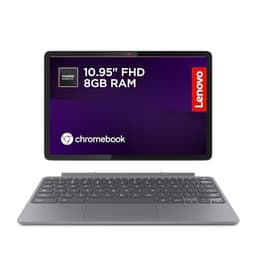
You get 8GB of RAM, which is actually a decent amount for ChromeOS. ChromeOS is famously light on memory compared to Windows, so 8GB gives you proper breathing room for multitasking within the ecosystem. That's genuinely one of the stronger points of this spec sheet at this price. Storage is 128GB of eMMC, which is fine for ChromeOS since most things live in the cloud anyway, but it's eMMC is slower than a proper SSD. Not painfully slow, but you'll notice it if you're used to NVMe speeds. For Chromebook use cases though, it's rarely the bottleneck.
Graphics are handled by Intel UHD Graphics integrated into the N6000. There's no discrete GPU here, and nobody should expect one at this price. For streaming video, casual browsing, and anything web-based, the Intel UHD does the job without complaint. Gaming is largely off the table unless you're talking about Android games through the Play Store, and even then, keep your expectations grounded. The GPU is a passenger, not a driver, in this machine's everyday performance.
One thing: eMMC storage has a ceiling in terms of read and write speeds that a SATA or NVMe SSD simply doesn't have. For a Chromebook, where your files mostly live in Google Drive and your apps are web-based, this matters less than it would on a Windows machine. But if you're used to a modern laptop with an NVMe drive, the storage speed difference is real. It won't ruin the experience, but it's part of why this machine suits certain users and not others.
| Specification | Detail |
|---|---|
| CPU | Intel Pentium Silver N6000 |
| GPU | Intel UHD Graphics |
| RAM | 8GB |
| Storage | 128GB eMMC |
| Display | 15.6 inch FHD IPS, 1920x1080 |
| Operating System | ChromeOS |
| Ports | 2x USB-C, 1x USB-A, 1x microSD, 1x 3.5mm |
| Wireless | Wi-Fi 6 |
| Colour | Arctic Grey |

Performance Benchmarks
The N6000 sits at the lower end of the performance spectrum even within the budget tier. In published benchmark databases, the Pentium Silver N6000 scores in the region of 2,800 to 3,200 in multi-threaded tests, which puts it below the Celeron N5100 in some comparisons and well behind the more capable Intel Core i3 chips you'll find in slightly pricier Chromebooks. Single-core performance is the bigger concern for day-to-day snappiness, and the N6000 is modest there too. Don't expect it to feel like a premium machine.
In ChromeOS, though, the context matters. ChromeOS is optimised to run lean. Google has spent years tuning the OS to boot fast, open tabs quickly, and handle streaming without needing beefy hardware. Owner reviews back this up: most buyers report the machine feels quick enough for their actual use, which tends to be browsing, YouTube, and Google Workspace apps. The disconnect between benchmark numbers and real-world satisfaction is bigger on Chromebooks than on Windows laptops. A 4.1 star average from 71 owners suggests most people are getting what they expected.
Where the performance ceiling becomes obvious is multitasking. Open fifteen tabs, stream a video, and keep a Google Meet call running simultaneously and the N6000 starts to show its limits. Owners who push the machine harder report occasional sluggishness and lag, particularly when the browser cache fills up. This isn't a machine for someone who genuinely needs to multitask aggressively. But for a student doing homework, a parent browsing and video calling, or someone who wants a big-screen laptop for the sofa, the performance is more than adequate.
It's also worth understanding that ChromeOS's automatic updates and built-in virus protection (no third-party antivirus eating CPU cycles) help keep the machine feeling responsive over time. Windows laptops at this price often slow down noticeably after a year of updates and bloatware accumulation. ChromeOS doesn't have that problem, which means the N6000's modest performance tends to stay consistent rather than degrading. That's a genuine advantage that raw benchmark numbers don't capture.
Display Analysis
The 15.6 inch IPS panel running at 1920x1080 is genuinely one of the best things about this laptop. Full HD on a 15.6 inch screen gives you a pixel density that looks sharp and clean for everyday use. Text is crisp, images look decent, and you're not squinting at a blurry 768p panel like you would on some budget rivals. The IPS panel type matters too: you get proper viewing angles, so watching a film with someone next to you on the sofa doesn't mean they're looking at a washed-out mess. IPS technology has been the standard for colour accuracy and viewing angle performance for years, and even at the budget end it beats TN panels convincingly.
Lenovo's marketing mentions narrow bezels, and the product listing highlights the wider viewing angles and fewer distractions. In practice, the bezels are reasonably slim for a budget machine, which helps the screen feel more modern than some competitors at this price. The Arctic Grey finish around the display looks clean rather than cheap. Brightness is where budget IPS panels often fall short, and this one is no exception. Indoors it's fine. Near a bright window or outside, you'll be fighting reflections and a screen that doesn't get bright enough to compensate. This is a laptop for indoor use, not al fresco working.
Colour accuracy is adequate rather than impressive. For streaming Netflix, watching YouTube, and doing general work, it's perfectly fine. If you're doing any kind of photo editing or colour-critical work, this isn't the right tool, but that's not what this machine is designed for. Owner feedback on the display is generally positive, with most buyers commenting that it looks good for the price. For a budget Chromebook, a proper FHD IPS panel is a meaningful win, and Lenovo deserves credit for not cutting that corner.
Battery Life
Lenovo doesn't publish a specific battery capacity or hour-rating in the verified spec data for this model, so any precise figure would be guesswork. What we can say is that the N6000 is a genuinely low-power processor, with a thermal design power of just 6W. That's a good sign for battery life. Low-power chips paired with ChromeOS (which is far less demanding on hardware than Windows) typically produce solid all-day battery performance in real use.
Owner reviews give a mixed but broadly positive picture. Most buyers report getting through a full day of light to moderate use on a single charge, which for a budget laptop is genuinely useful. Heavy streaming or sustained workloads will drain it faster, as you'd expect from any laptop. The 15.6 inch display is the main power draw here: bigger screens use more juice, and a 15 inch laptop will always trail a 13 inch equivalent on battery life, all else being equal. If you're planning to use this away from a plug for extended periods, factor that in.
The laptop supports USB-C charging, which is a proper convenience. Two USB-C ports means you've got flexibility about which side you charge from, and if you already own a USB-C charger (for a phone, tablet, or another laptop), there's a chance it'll work here too, depending on wattage. That's a small but genuinely useful feature that some budget laptops still skip. Exact charge times aren't specified in the verified data, so we won't invent a number, but USB-C charging at budget price is as a positive.
In practical terms, this is a laptop you'd comfortably take to a coffee shop for a few hours without panicking about finding a socket, and on shared café or hotel Wi-Fi it's worth running a good VPN to keep your connection safe from snooping. A full day of office or home use on a charge is realistic for most people's actual usage patterns. Just don't expect it to last two days between charges or match the battery life of a premium ultrabook with a massive cell and an efficient ARM chip.
Portability
A 15.6 inch laptop is never going to be a backpack hero. It's a big machine by definition, and the IdeaPad 3 Chromebook is aimed at people who want a proper desk-sized screen rather than maximum portability. If you're looking for something to slip into a small bag and forget about, a 13 or 14 inch model would suit you better. This one is for the kitchen table, the home office, the student desk, or the sofa. It'll fit in a laptop backpack or a 15 inch sleeve, but it's not what you'd call a travel-light machine.
Weight isn't specified in the verified data, so we won't guess a number. Budget 15 inch laptops in this class typically land somewhere around 1.8kg to 2kg, which is manageable for occasional carrying but noticeable if you're doing it every day. The charger adds to that. For most buyers in this category, portability is secondary to screen size and value, which is exactly what this machine prioritises. If you're buying this for a teenager to use at home and occasionally take to school, it's fine. If you're a frequent traveller who needs something light, look elsewhere.
The Arctic Grey finish is inoffensive and practical. It won't show every fingerprint like a glossy black lid would, and it looks neutral enough to not stand out in a classroom or office. Build-wise, it's a budget plastic chassis, and it feels like one. That's not a catastrophic criticism at this price point, but it's worth being honest: this doesn't feel like a premium machine in the hand. It feels like a budget laptop, which is what it is.
Keyboard & Trackpad
One of the genuine advantages of a 15.6 inch chassis is that there's space for a proper keyboard layout. Lenovo has used that space sensibly here. The keyboard is a standard Chromebook layout, which means no Windows key but a dedicated search/launcher key and the usual ChromeOS shortcuts. For anyone coming from a Windows laptop, there's a brief adjustment period, but it's not a big deal. Owner feedback on the keyboard is broadly positive, with most people finding it comfortable for extended typing sessions. That matters: if you're using this for essays, emails, or Google Docs work, a keyboard you can actually type on without fatigue is important.
Key travel on budget Lenovo keyboards tends to be adequate rather than exceptional. It's not the clicky, satisfying travel you'd get on a ThinkPad, but it's not the flat, mushy experience of some ultra-budget rivals either. The IdeaPad line sits in the middle ground: functional and comfortable enough for daily use. There's no backlight specified in the verified data, which is a common omission at this price tier and if you often work in dim conditions. Typing in a dark room without a backlit keyboard gets old quickly.
The trackpad on budget Chromebooks is often the weak link, and owner reviews on this model are mixed on that front. Most people find it adequate for everyday navigation, but precision for tasks like photo editing or detailed document work is limited. ChromeOS supports multi-finger gestures natively, so two-finger scrolling and three-finger tab switching work as expected. For general use it's fine. For anything requiring precise cursor control, a USB or Bluetooth mouse would be a worthwhile addition. The good news is that USB-A and USB-C ports mean you've got options.
There's no number pad on this keyboard, which might surprise some buyers expecting a full layout from a 15 inch machine. Some 15 inch budget laptops do squeeze in a numpad; this one doesn't, which means the main keyboard gets more space and the keys aren't cramped. Whether that's a positive or a negative depends entirely on whether you use a numpad. For most people, it's a non-issue.
Thermal Performance
The N6000's 6W TDP is the key number here. This is a chip designed to run cool, and in practice that means the IdeaPad 3 Chromebook handles light and moderate workloads without breaking a sweat. Browsing, streaming, video calls, and document work all sit well within the chip's thermal comfort zone. Owner reviews don't flag heat as a significant complaint, which is consistent with what you'd expect from a low-power processor in a relatively large chassis with room to dissipate heat.
Under sustained load, like a long video call with screen sharing, or running Android apps alongside browser tabs, temperatures will rise. But the 15 inch form factor helps here: there's more surface area to spread heat across compared to a compact 13 inch machine. The palm rest and keyboard deck should stay comfortable for the vast majority of use cases. The underside may get warm under load, which is normal, but it shouldn't be uncomfortable on a lap during typical use.
Throttling is possible if you push the chip hard for extended periods, as is the case with most low-power budget processors. In practice, ChromeOS workloads rarely sustain the kind of continuous load that triggers aggressive throttling. The machine is designed for tasks that are bursty rather than sustained, and the N6000 handles that pattern well. If you were somehow trying to use this for video rendering or intensive local computation, you'd hit the ceiling. But that's not what this machine is for, and most buyers won't go anywhere near that scenario.
The fan, when it does spin up, is reported by owners to be quiet. The N6000's low power draw means the fan doesn't need to work hard very often. For quiet environments like libraries or shared offices, this is genuinely useful. More on that in the acoustic section below.

Acoustic Performance
At idle and during light use, this laptop is effectively silent. The N6000 generates so little heat during browsing and streaming that the fan has little reason to spin at all, or spins at a speed that's inaudible in a normal room. Owner reviews consistently mention that the machine is quiet, which is one of the underrated benefits of a low-power chip in an everyday laptop. Nobody wants to be the person in a quiet office with a laptop that sounds like a hair dryer.
Under heavier loads, the fan does become audible, but reports suggest it stays at a low, steady hum rather than a sudden loud whoosh. That's the better kind of fan behaviour: predictable and unobtrusive rather than erratic and distracting. For video calls, where microphone pickup of fan noise can be an issue, this machine should perform well. The fan noise is unlikely to be picked up by the microphone during a typical call, which is a practical win for remote workers and students doing online lessons.
The speakers are user-facing stereo units, which Lenovo describes as "remarkably loud and clear" in the product listing. Owner feedback is mixed here: most people find the speakers decent for a budget laptop, with reasonable volume for watching content in a quiet room. They won't replace a Bluetooth speaker for music, but for YouTube, Netflix, and video calls, they do the job. The 3.5mm headphone jack is there if you want better audio quality, and that's the right answer for anything where sound quality actually matters.
Ports & Connectivity
The port selection on this Chromebook is genuinely good for the price. Two USB-C ports give you flexibility for charging and accessories. One USB-A port covers legacy peripherals like older mice, keyboards, or USB sticks without needing an adapter. The microSD card slot is useful for expanding storage cheaply, which matters more on a Chromebook with 128GB eMMC than it would on a machine with a 1TB SSD. And the 3.5mm audio jack is there for wired headphones, which is still the best option for call quality and audio fidelity. The product listing also references an HDMI port, which would make connecting to an external monitor or TV straightforward.
Wi-Fi 6 is a proper upgrade over the Wi-Fi 5 you'll find on older budget machines. In practice, the difference matters most in busy environments with lots of connected devices, like a family home with multiple streaming devices, or a shared office. Wi-Fi 6 handles congestion better and maintains more consistent speeds in those conditions. For a Chromebook that lives online, having a capable wireless connection is arguably more important than raw CPU performance. This is a good spec to have at this price.
The privacy shutter on the webcam is a thoughtful inclusion that's increasingly standard on business-oriented laptops but still not universal on budget consumer machines. Being able to physically block the camera gives peace of mind during video calls and when the laptop is just sitting open on a desk. Small feature, but owners consistently appreciate it.
- 2x USB-C
- 1x USB-A (USB 3.0)
- 1x microSD card reader
- 1x 3.5mm audio combo jack
- Wi-Fi 6
Webcam & Audio
The webcam resolution isn't specified in the verified data, so we won't invent a number. Budget Chromebook webcams are typically 720p, which is adequate for video calls but not flattering in low light. The privacy shutter is the standout feature here: a physical lens cover that blocks the camera entirely, independent of any software setting. For anyone who uses this laptop for work calls or online lessons, that's a genuinely useful security feature. Owner reviews mention it positively, and it's the kind of detail that builds trust in a product.
The stereo speakers are user-facing, which is better than the downward-firing speakers you get on some budget laptops where the sound gets muffled by whatever surface the laptop is sitting on. Lenovo's claim of "remarkably loud and clear" is marketing language, but the underlying point is valid: user-facing speakers do sound noticeably better in practice. For streaming content, video calls, and casual music listening, most owners find the audio acceptable. Don't expect bass or audiophile quality, but for a budget 15 inch Chromebook, the speakers are above average.
The 3.5mm combo jack handles both headphones and microphone input, which is standard. If you're using wired earbuds with an inline mic for calls, they'll work fine here. For anyone doing regular video calls who wants to sound clear and professional, a decent headset connected via the 3.5mm jack will always outperform the built-in microphone and speakers. The jack's presence is appreciated; some budget laptops have started dropping it, which is annoying.
Build Quality
The IdeaPad 3 is a plastic chassis machine. That's the honest starting point. At this price, you're not getting magnesium alloy or aluminium, and you shouldn't expect it. The question is whether the plastic construction is solid enough to feel trustworthy in daily use, and the answer from owner reviews is broadly yes. Most buyers describe the build as decent for the money: not premium, not flimsy, but somewhere in between that's acceptable for a budget everyday laptop.
Lid flex is a common concern with budget plastic laptops, and the IdeaPad 3 does show some flex when you push on the lid. It's not alarming, but it's there. The keyboard deck is more rigid, which matters more for typing comfort. Hinge feel is reported as adequate: it holds the screen in position without wobbling during use, which is the baseline requirement. Some owners note the hinge feels a bit stiff initially, which tends to loosen with use. That's preferable to a hinge that's loose out of the box and gets worse over time.
The Arctic Grey finish is understated and practical. It doesn't attract fingerprints the way glossy finishes do, and it looks neutral enough for school, work, or home use. Lenovo's IdeaPad line has a consistent reputation for decent build quality at the budget tier: not exciting, not worrying. The brand's manufacturing quality control is generally reliable, which is part of why the IdeaPad 3 consistently earns reasonable owner ratings even when the specs are modest.
Durability over the long term is harder to assess without extended owner data, but the N6000's low thermal output means the machine isn't going to be stress-tested by heat the way a higher-performance laptop might be. Laptops that run cool tend to age better. The eMMC storage is also more durable than a spinning hard drive, with no moving parts to fail. For a budget machine that's going to be used daily for a few years, the fundamentals are in reasonable shape.
How It Compares
The main competition at this price tier comes from two directions: other budget Chromebooks and entry-level Windows laptops. For the Chromebook comparison, the Acer Chromebook 315 is the most obvious rival: similar screen size, similar price bracket, and a comparable chip. For the Windows side, you're looking at machines running Intel Celeron or Pentium processors with Windows 11 Home, where the OS itself eats into the performance headroom significantly more than ChromeOS does.
The Acer Chromebook 315 typically comes with similar specs at a similar price, but Lenovo's IdeaPad 3 generally edges it on build quality perception and the inclusion of Wi-Fi 6, which is a meaningful upgrade for modern home networks. The display quality is comparable between the two. Neither is dramatically better than the other; it comes down to brand preference and what's available at the time of purchase. Lenovo's after-sales support and warranty tend to get slightly better owner feedback than Acer's at the budget tier, which is worth factoring in.
Against budget Windows laptops at a similar price, the Chromebook wins on responsiveness and longevity of performance. A Windows machine with a Celeron or Pentium processor has to run a much heavier operating system, and the performance gap is real in everyday use. ChromeOS simply runs better on modest hardware. The trade-off is the ChromeOS ecosystem: if you need Windows-specific software, a Chromebook isn't the right answer, full stop. But if your life lives in a browser and Google's apps, ChromeOS is the smarter choice at this price.
| Feature | Lenovo IdeaPad 3 Chromebook | Acer Chromebook 315 | Budget Windows Celeron Laptop |
|---|---|---|---|
| CPU | Intel Pentium Silver N6000 | Intel Celeron N4500 / N5100 (varies) | Intel Celeron N4020 (typical) |
| RAM | 8GB | 4GB to 8GB (varies) | 4GB (typical) |
| Storage | 128GB eMMC | 64GB to 128GB eMMC | 64GB to 128GB eMMC |
| Display | 15.6 inch FHD IPS | 15.6 inch FHD IPS | 15.6 inch HD or FHD (varies) |
| OS | ChromeOS | ChromeOS | Windows 11 Home |
| Wi-Fi | Wi-Fi 6 | Wi-Fi 5 (typical) | Wi-Fi 5 (typical) |
| USB-C Charging | Yes (2x USB-C) | Yes | Often no |
| Best For | Google ecosystem users wanting a big screen and Wi-Fi 6 | Budget Chromebook buyers where price is the only priority | Anyone who genuinely needs Windows software |

Final Verdict
The Lenovo IdeaPad 3 Chromebook is a good budget laptop for the right buyer. If you're in the Google ecosystem, you want a big 15 inch screen, and your computing life involves browsing, streaming, video calls, and Google Workspace apps, this machine does exactly what it promises at a price that's hard to argue with. The FHD IPS display is genuinely good for the money. Wi-Fi 6 is a proper spec that most rivals at this price skip. Eight gigabytes of RAM gives ChromeOS real multitasking headroom. And the low-power N6000 keeps things quiet and cool in everyday use. That's a solid package.
The caveats are real but not deal-breakers for the right user. The N6000 is a modest chip and it shows when you push it. The eMMC storage is slower than an SSD. The build is plastic and feels budget. There's no keyboard backlight. And if you need Windows, this simply isn't the machine for you, no matter how good the price looks. ChromeOS is brilliant for what it is, but it's a different ecosystem and some people will find that limiting. Be honest with yourself about which camp you're in before buying.
For students, older family members who live in a browser, or anyone who just wants a big, reliable screen for everyday tasks without spending serious money, this is a strong recommendation. The ★★★★☆ (4.2) rating from 71 owners reflects that most buyers got exactly what they expected. That's the sign of a product that's priced and marketed honestly. A solid 7 out of 10 for the budget tier. It doesn't try to be more than it is, and that's actually one of its best qualities.
One honest note: if your needs are even lighter than described above, say you just want something for one person to browse the web and watch catch-up TV, a smaller and cheaper Chromebook like the Lenovo IdeaPad Flex 3 Chromebook 11 or an entry-level Acer Chromebook 311 would save you money and give you a more portable machine. The 15 inch screen and 8GB RAM of this model are genuine upgrades worth paying for if you'll use them. But don't pay for them if you won't.
What works. What doesn’t.
6 + 6What we liked6 reasons
- FHD IPS display at 15.6 inches is genuinely sharp and offers wide viewing angles for the price
- 8GB of RAM gives ChromeOS proper multitasking headroom, well above budget rivals that ship with 4GB
- Wi-Fi 6 is a meaningful connectivity upgrade that most competitors at this price tier still skip
- Low-power N6000 processor keeps the laptop quiet and cool during typical everyday use
- Two USB-C ports plus USB-A and a microSD slot make for a versatile port selection at this price
- Physical webcam privacy shutter is a thoughtful security feature not always found on budget machines
Where it falls6 reasons
- Intel Pentium Silver N6000 shows its limits quickly when multitasking aggressively or running many browser tabs simultaneously
- eMMC storage is noticeably slower than an SSD, even if it rarely becomes a bottleneck in ChromeOS use
- No keyboard backlight is a genuine omission for anyone who regularly works in dim conditions
- Plastic chassis shows flex on the lid and feels budget in the hand, as expected at this price
- Screen brightness is insufficient in bright ambient light or near windows, limiting outdoor and al fresco use
- ChromeOS locks out Windows-specific software entirely, which will frustrate buyers who do not research this beforehand
Full specifications
12 attributes| Storage type | eMMC |
|---|---|
| Battery life H | 10 |
| CPU | Intel Pentium Silver N6000 |
| Display resolution | 1920x1080 |
| Display size IN | 15.6 |
| GPU | integrated Intel UHD Graphics |
| Launch year | 2024 |
| OS | Chrome OS |
| Panel type | IPS |
| Ports | 2x USB-C, 1x USB-A, 1x microSD, 1x 3.5mm |
| RAM GB | 8 |
| RAM type | LPDDR4X |
If this isn’t right for you
2 options

Frequently asked
7 questions01Does the Lenovo IdeaPad 3 Chromebook run Windows?+
No. This laptop runs ChromeOS, Google's operating system. It cannot run Windows natively. If you need Windows software, this is not the right machine for you, regardless of price.
02Can you install Microsoft Office on this Chromebook?+
You cannot install the desktop version of Microsoft Office. However, you can use the web-based Microsoft 365 apps through a browser, or use Google's own Docs, Sheets, and Slides as alternatives. Android versions of Office apps may also be available through the Google Play Store, though functionality is more limited than the full desktop suite.
03Is 128GB of eMMC storage enough for a Chromebook?+
For most ChromeOS users, yes. ChromeOS is designed around cloud storage, so your files typically live in Google Drive rather than locally on the device. The eMMC is slower than an SSD but rarely becomes a bottleneck for browsing, streaming, or Google Workspace tasks. The microSD card slot also allows cheap local storage expansion if needed.
04How does the battery life hold up in real-world use?+
Owner reviews suggest most buyers get through a full day of light to moderate use on a single charge. The Intel Pentium Silver N6000 has a very low thermal design power of 6W, which helps. Heavy streaming or sustained workloads will drain the battery faster. The laptop supports USB-C charging, giving you flexibility over which charger and which side you plug into.
05Is the 15.6-inch screen good for this price?+
It is one of the strongest points of this laptop. The FHD IPS panel at 1920x1080 gives sharp, clear text and decent colour accuracy with wide viewing angles. It is not bright enough for use near windows or in strong ambient light, so it is best suited to indoor use. For streaming, browsing, and everyday work, it is a genuine step above the lower-resolution panels found on some budget rivals.
06How does the Lenovo IdeaPad 3 Chromebook compare to the Acer Chromebook 315?+
Both are 15.6-inch budget Chromebooks at similar price points. The Lenovo generally edges ahead on Wi-Fi 6 support, which the Acer Chromebook 315 typically lacks, and slightly stronger build quality perception from owners. Specifications like RAM and storage are comparable. Neither is dramatically superior; brand preference and availability at time of purchase are often the deciding factors.
07Does it work well for video calls and online lessons?+
Yes, for typical use it works well. The low-power processor keeps fan noise very low, so background noise during calls is minimal. The physical webcam privacy shutter is a useful security feature. The built-in microphone and speakers are adequate for calls, though a wired headset via the 3.5mm jack will always give better clarity if call quality is important to you.