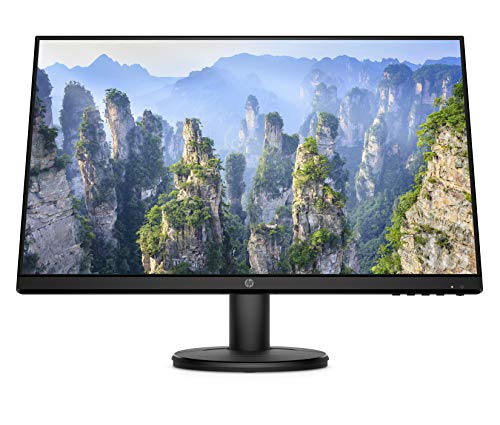
Pick a panel type, any panel type. IPS, VA, TN, OLED. They all have their thing. But the real question with any budget monitor isn't which panel technology sounds best on paper, it's whether the actual product in front of you does what you need without making you regret the purchase two weeks later. The HP v24i lands in the budget bracket (under £150), it's a 23.8-inch IPS panel at 1080p, and based on the spec sheet plus hundreds of owner reviews with a positive overall rating, it's genuinely one of the more sensible options at this price. Not perfect. But sensible.
The verdict upfront: if you're after a clean, no-fuss office or home monitor that looks decent, won't cost a fortune, and comes from a brand that's been making business displays for decades, the HP v24i is a solid pick. But if you're a gamer, or you need DisplayPort, or you want meaningful HDR, look elsewhere. This monitor knows what it is and mostly delivers on that. The competition at this price point includes the likes of the AOC 24B2XH and the BenQ GW2480, both of which are worth a mention, and we'll get into those comparisons properly later on.
Core Specifications
The HP v24i is a 23.8-inch monitor running a 1920x1080 (Full HD) IPS panel with a 60Hz refresh rate. That's the whole story in one sentence, really. No adaptive sync, no high refresh rate, no HDR to speak of. What you do get is a clean IPS panel with decent colour handling for the money, a matte anti-glare coating, and a slim-ish bezel design that doesn't look embarrassing on a desk. The pixel density works out at around 93 PPI at this size and resolution, which is fine for a general-use monitor sitting at normal desk distance.
Connectivity is where things get limited, and it's this before you buy. You get one HDMI port and one VGA port. That's it. No DisplayPort, no USB-C, no USB hub. If you're connecting a modern laptop or desktop, HDMI is your route. The VGA is there for legacy kit, and honestly it's more of a nod to office environments with older machines than something you'd choose to use in 2026. The response time is rated at 5ms GtG by HP, which is realistic for an IPS panel at this tier. Brightness is rated at 250 nits, which is on the lower end but workable in most indoor environments.
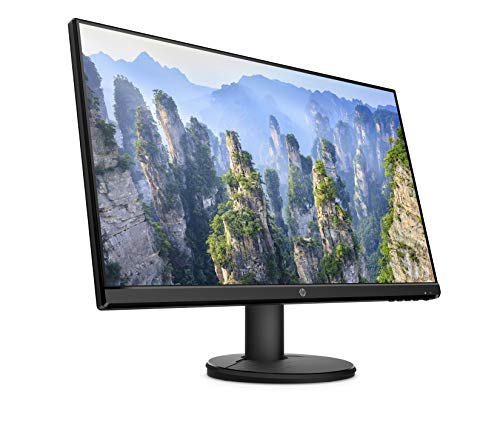
HP rates the contrast ratio at 1000:1 typical, which is standard for IPS. The panel covers sRGB colour space, and HP claims 99% sRGB coverage on the official HP product page. The stand offers tilt adjustment only (minus 5 degrees to plus 20 degrees), and there's no height adjustment, no swivel, and no pivot. VESA compatibility is 100x100mm, so you can ditch the stand if you want. Weight is around 3.5kg without the stand.
| Specification | Detail |
|---|---|
| Screen Size | 23.8 inches |
| Resolution | 1920 x 1080 (Full HD) |
| Panel Type | IPS |
| Refresh Rate | 60Hz |
| Response Time | 5ms GtG |
| Brightness | 250 cd/m² (nits) |
| Contrast Ratio | 1000:1 (typical) |
| Colour Coverage | 99% sRGB |
| Ports | 1x HDMI, 1x VGA |
| Stand Adjustment | Tilt only (-5° to +20°) |
| VESA Mount | 100 x 100mm |
| HDR | None |
| Adaptive Sync | None |
| Pixel Density | ~93 PPI |
| Current Price | £119.95 · Details |

Panel Technology
IPS (In-Plane Switching) is the right choice for this kind of monitor, and HP made the sensible call here. The alternative at this price would be a TN panel, which gives you faster pixel transitions but genuinely rubbish viewing angles and washed-out colours. Nobody should be buying a TN panel for office work or general use in 2026. VA panels offer better contrast, but they tend to have slower response times and more noticeable colour shift at angles. IPS sits in the middle: decent contrast, good colours, wide viewing angles. It's the right trade-off for a monitor that's going to sit on a desk and be looked at all day.
The viewing angles on IPS panels are typically rated at 178 degrees horizontal and vertical, and the HP v24i follows that standard. In practice, this means you can have someone sitting next to you, or you can tilt the screen slightly off-axis, and the image doesn't go weird on you. Colours stay consistent. Brightness doesn't drop dramatically. This matters more than people realise, especially if you work with documents, spreadsheets, or anything where colour consistency across the panel actually affects how comfortable the experience is.
One thing to be aware of with IPS panels is IPS glow. This is where the backlight bleeds through at the corners, especially in dark content or low-light environments. It's a characteristic of the technology rather than a defect, and the HP v24i is no exception. Owner reviews do mention this occasionally, though most report it as minor and not distracting during normal use. If you're watching a lot of dark films in a dark room, you might notice it. For spreadsheets and browser work, you almost certainly won't. The matte anti-glare coating helps in brighter rooms, which is where most people use a monitor like this anyway.
Display Quality
At 1920x1080 on a 23.8-inch panel, the pixel density sits at around 93 PPI. That's not going to blow anyone away compared to a 4K display, but it's perfectly fine for this screen size at normal desk distances (around 50 to 70cm). Text is sharp enough for reading and writing without any obvious pixelation. Spreadsheets, documents, web browsing, all of that looks clean. You're not going to be squinting at fuzzy text. Where the lower PPI becomes more noticeable is if you're doing detailed photo editing or looking at high-resolution images, but that's not really what this monitor is designed for.
The matte anti-glare coating is one of the genuinely good things about the HP v24i. Glossy screens look punchy in a dark room but become mirrors the moment any light source is behind you. If you're in an office with overhead lighting, or near a window, a matte coating makes a real difference to usability. Owner reviews consistently praise this aspect of the monitor, with many mentioning that it works well in bright office environments without producing the kind of reflections that drive you mad. The coating does soften the image very slightly compared to a glossy panel, but for everyday work that's a trade-off most people are happy to make.
Brightness uniformity is decent for this price tier. HP rates the panel at 250 nits peak brightness, which is enough for indoor use in a reasonably lit room. It's not going to compete with outdoor visibility or very bright environments, but for a typical office or home setup it's adequate. Some owners mention that the maximum brightness feels a touch low in very bright rooms, which is fair given the 250 nit rating. Lowering room brightness or adjusting curtains sorts it for most people. The OSD (on-screen display) controls are accessible via buttons on the back-right of the panel, and owners generally report them as functional if not particularly elegant to use.
Refresh Rate and Adaptive Sync
The HP v24i runs at 60Hz. Full stop. There's no 75Hz mode, no 144Hz option, and no adaptive sync of any kind. No FreeSync, no G-Sync Compatible certification. If you're upgrading from an older monitor, 60Hz is probably what you've been using anyway, so it won't feel like a step backwards. But if you're coming from a gaming monitor or you're planning to use this for anything faster-paced than a spreadsheet, the 60Hz ceiling will be noticeable.
The lack of adaptive sync means that if your GPU's frame output doesn't match the monitor's 60Hz refresh rate, you can get screen tearing. For office work, video playback, and general browsing, this is completely irrelevant because you're not pushing frame rates in any meaningful way. For gaming, even casual gaming, it can be an issue. You'd either need to lock your frame rate to 60fps in your game settings or accept the occasional tear. It's not a disaster, but it's a limitation about if gaming is any part of your use case.
At this price point, some competitors do offer 75Hz panels, which gives a slightly smoother feel even for general desktop use. The AOC 24B2XH, for example, runs at 75Hz with FreeSync support. That's a meaningful difference if you're comparing the two side by side. HP has kept the v24i at 60Hz, which is a cost decision that keeps the price down but does mean it falls behind some rivals on this specific metric. For pure office use, 60Hz is fine. For anyone who uses their monitor for more than just work, it's worth factoring in.
Response Time and Motion
HP rates the v24i at 5ms GtG (grey-to-grey). That's the manufacturer's figure, and for an IPS panel at 60Hz it's a realistic number rather than a marketing fantasy. Compare that to the "1ms" claims you see on gaming monitors, which typically refer to MPRT (Moving Picture Response Time), a different measurement that describes how long a pixel is illuminated per frame rather than how fast it actually transitions. The 5ms GtG figure here is the more honest metric, and for a 60Hz panel it's perfectly adequate.
In practice, at 60Hz the frame time is already 16.67ms, so a 5ms pixel transition sits well within that window. You're not going to see ghosting on text, UI elements, or normal video content. Where response time starts to matter more is in fast-moving game content, particularly dark scenes with fast camera movement. Some owners who've used the v24i for gaming note that it's fine for slower-paced games but not ideal for competitive first-person shooters where every millisecond of motion clarity counts. That's an honest assessment that matches what the specs predict.
There's no overdrive setting mentioned in HP's specifications for this model, which isn't surprising at this price tier. Overdrive pushes pixel transitions faster but can introduce inverse ghosting (a bright halo around moving objects) if set too aggressively. The absence of an overdrive option means you get consistent, predictable motion handling without the risk of overshoot artefacts. For the target audience of this monitor, that's absolutely the right call. Office workers and casual users don't need overdrive. Competitive gamers need a different monitor entirely.
Color Accuracy and Gamut
HP claims 99% sRGB coverage for the v24i, which is a strong figure for a budget IPS panel. The sRGB colour space is the standard for web content, office documents, and general consumer use. If a monitor covers 99% of it, colours in photos, web pages, and productivity applications should look accurate and consistent. For the price, that's genuinely good. You're not getting DCI-P3 coverage here (that's the wider colour space used in cinema and increasingly in creative work), but for everyday tasks sRGB is what matters.
Factory calibration on budget monitors is often the weak link. Manufacturers set panels up to look bright and vivid out of the box, which can mean colours are slightly oversaturated and whites have a blue tint. The HP v24i doesn't ship with a calibration report, and there's no Delta-E figure published by HP. Owner reviews suggest the out-of-box colour is decent, with a few people noting they tweaked the colour temperature from the default setting to something warmer. That's pretty standard behaviour for a monitor in this tier. If you're doing colour-critical work like photo editing for print, you'd want to calibrate properly with a hardware colorimeter. For everything else, the factory settings are reportedly fine.
The IPS panel technology itself contributes to colour consistency in a way that TN panels simply can't match. Colours don't shift as you move your head, and the gamut coverage means everyday content looks natural rather than dull or washed out. A handful of owner reviews specifically mention being pleasantly surprised by how good the colours look for the price, which aligns with what 99% sRGB coverage should deliver in practice. It's not a content creator's monitor. But it's a monitor that won't make your photos look wrong or your videos look grey, which is more than you can say for some budget alternatives.
HDR Performance
The HP v24i does not support HDR. There's no HDR10 badge, no DisplayHDR certification, no local dimming. This is not a criticism, it's just the reality of what you're buying. Genuine HDR requires significant peak brightness (typically 400 nits minimum for DisplayHDR 400, and realistically much higher for meaningful HDR impact) and some form of local dimming to manage contrast between bright and dark areas. At 250 nits with a standard IPS backlight, there's simply no meaningful HDR experience to be had.
The VESA DisplayHDR certification scheme is worth understanding here. DisplayHDR 400 is the entry-level tier, and even that is widely considered to deliver a pretty underwhelming HDR experience. The HP v24i doesn't even reach that bar. Some monitors in the budget bracket do carry a DisplayHDR 400 badge, but in practice the difference between checkbox HDR and no HDR is minimal. You're not missing out on a real HDR experience by choosing the v24i over a DisplayHDR 400 monitor. You're just missing out on a marketing sticker.
For the target user of this monitor, the absence of HDR is genuinely not a problem. Office documents, spreadsheets, video calls, and general web browsing don't benefit from HDR. Even streaming HDR content on a non-HDR monitor is fine because the platform will tone-map the content to SDR automatically. Where you'd actually notice the lack of HDR is in HDR gaming or HDR film viewing, and if those are priorities for you, you need a different monitor at a higher price point. The v24i is honest about being an SDR monitor, and that's the right call for what it is.
Contrast and Brightness
The native contrast ratio is 1000:1, which is standard for IPS technology. It's not going to produce the deep blacks of a VA panel (which can hit 3000:1 or higher) or anything approaching OLED's effectively infinite contrast. But 1000:1 is enough for comfortable everyday viewing. Blacks look dark rather than truly black, and in a bright room you won't really notice. It's only in a dark room watching dark content that the IPS contrast limitation becomes apparent, and that's where the IPS glow mentioned earlier also shows up.
The 250 nit peak brightness is the spec that some owners flag as a mild limitation. In a typical office environment with overhead lighting, 250 nits is fine. In a very bright room or near a south-facing window on a sunny day, you might find yourself wanting more headroom. For comparison, many mid-range monitors sit at 300 to 350 nits, and higher-end panels push 400 nits or more. The gap between 250 and 300 nits isn't dramatic, but it does mean the v24i is best suited to controlled indoor environments rather than bright or variable lighting conditions.
Brightness uniformity across the panel is generally reported as good by owners. A few mention slight brightness variation toward the edges, which is typical of edge-lit IPS panels, but nothing that disrupts normal use. The matte coating helps here too, because it diffuses light more evenly across the surface compared to a glossy panel. Overall, the contrast and brightness performance is exactly what you'd expect from a well-executed budget IPS panel. No surprises in either direction. It's not exciting, but it works.
Ergonomics and Stand
The stand is where the HP v24i shows its budget credentials most clearly. You get tilt adjustment, ranging from minus 5 degrees (tilting the top toward you) to plus 20 degrees (tilting it away). That's it. No height adjustment, no swivel, no pivot to portrait mode. If you need to raise the screen, you're putting books under it or buying a separate monitor arm. This is a common compromise at this price point, but it's because ergonomics genuinely matter if you're sitting in front of a screen for eight hours a day.
The good news is that the VESA 100x100mm compatibility means you can remove the stand entirely and mount the monitor on a wall mount or monitor arm. A decent monitor arm costs £20 to £40 and gives you full height, tilt, swivel, and reach adjustment. If you're setting up a proper workstation, that's probably the better route anyway. The stand itself is described by owners as stable enough for daily use, not wobbly, and the monitor doesn't move around once positioned. A few owners mention the stand feels a bit plasticky, which is fair for the price tier.
The bezel design is fairly slim on three sides with a slightly thicker bottom bezel, which is typical for monitors in this class. The overall build quality is described as solid rather than premium. It doesn't feel like it's going to fall apart, but it's not going to impress anyone either. The physical footprint of the stand is modest, which is useful if desk space is limited. Buttons for the OSD are on the back-right edge of the panel, which is a common design choice that some people find fiddly but most get used to quickly. There are no speakers built in, so if you need audio output you'll need external speakers or headphones via your PC or laptop.
Connectivity and Ports
The port situation on the HP v24i is simple. You get one HDMI 1.4 port and one VGA port. That's the complete list. No DisplayPort, no USB-C, no USB hub, no audio passthrough from the monitor itself. For a lot of people connecting a single desktop PC or laptop via HDMI, this is perfectly adequate. HDMI 1.4 handles 1080p at 60Hz without any issues, so the connection is fine for what the monitor does.
The VGA port is there for older machines. If you've got a desktop from 2010 with a graphics card that only has VGA output, or an older laptop, you can connect it. VGA is an analogue signal, so there's a slight quality penalty compared to digital connections, but at 1080p on a 23.8-inch screen it's not going to be dramatically obvious. Most people buying this in 2026 will use HDMI and ignore the VGA entirely. It's a legacy inclusion rather than a feature.
The lack of DisplayPort is the connectivity limitation most likely to matter. DisplayPort supports higher refresh rates and daisy-chaining, and it's the standard connection for many modern graphics cards and monitors. If you're using a GPU that only has DisplayPort outputs (some do), you'll need an active DisplayPort to HDMI adapter, which adds cost and a potential point of failure. Similarly, no USB-C means laptop users with USB-C only outputs need an adapter. The HP v24i is designed for straightforward single-cable HDMI connections, and if that fits your setup, great. If you need more flexibility, it's a genuine limitation.
- 1x HDMI 1.4
- 1x VGA (D-Sub)
- No DisplayPort
- No USB-C
- No USB hub
- No built-in speakers
- No audio jack on monitor
How It Compares
The two most relevant competitors to the HP v24i at this price tier are the AOC 24B2XH and the BenQ GW2480. Both are 23.8-inch IPS monitors at 1080p, both are aimed at the same office and home productivity market, and both sit in a similar price bracket. The differences between them are real but not dramatic, which tells you something about how competitive this segment is.
The AOC 24B2XH is arguably the most direct rival. It runs at 75Hz rather than 60Hz and includes FreeSync support, which gives it an edge for anyone who wants a slightly smoother desktop experience or occasional gaming. It also includes a 3.5mm audio jack and built-in speakers (2W, nothing special, but they're there). The AOC typically comes in at a similar or slightly lower price to the HP v24i. If refresh rate or audio output matters to you, the AOC has a genuine advantage. The BenQ GW2480 is another strong option, known for its eye-care features (flicker-free backlight, low blue light mode) and solid build quality. BenQ's Brightness Intelligence technology adjusts the backlight based on ambient light, which some people find genuinely useful. The GW2480 also runs at 60Hz and has a similar port selection, though it does include a headphone jack and built-in speakers.
Where the HP v24i holds its own is on colour coverage (the 99% sRGB claim is competitive) and brand reliability. HP has a long history of making business displays, and owner confidence in the brand shows up in the review numbers. Hundreds of reviews with a positive overall rating is a strong signal that this monitor consistently meets expectations. The AOC has strong reviews too, but the HP's owner satisfaction rate is hard to argue with. Ultimately, if you want 60Hz office performance and trust the HP brand, the v24i is a solid choice. If you want 75Hz or built-in audio, the AOC 24B2XH is worth a look.
| Feature | HP v24i | AOC 24B2XH | BenQ GW2480 |
|---|---|---|---|
| Screen Size | 23.8 inch | 23.8 inch | 23.8 inch |
| Resolution | 1920x1080 | 1920x1080 | 1920x1080 |
| Panel Type | IPS | IPS | IPS |
| Refresh Rate | 60Hz | 75Hz | 60Hz |
| Adaptive Sync | None | FreeSync | None |
| Response Time | 5ms GtG | 4ms GtG | 5ms GtG |
| Brightness | 250 nits | 250 nits | 250 nits |
| Ports | HDMI, VGA | HDMI, VGA | HDMI, DisplayPort, VGA |
| Speakers | None | 2W built-in | 2W built-in |
| HDR | None | None | None |
| VESA | 100x100mm | 100x100mm | 100x100mm |
| sRGB Coverage | 99% | ~96% | 99% |
| Price | £119.95 · Details | Similar tier | Similar tier |

Final Verdict
The HP v24i is a good monitor for what it is. A clean, reliable, 23.8-inch IPS display at 1080p that covers 99% sRGB, has a matte anti-glare coating that actually works, and comes from a brand with a track record in business displays. Hundreds of owners have given it a positive overall rating on average, and reading through those reviews, the consistent themes are that it looks good out of the box, colours are accurate, and it just works without fuss. That's honestly what most people need from a monitor.
The limitations are real though. Sixty Hz with no adaptive sync means it's not a gaming monitor. The stand only tilts, so if you care about ergonomics you're buying a monitor arm separately. No DisplayPort and no USB-C means connectivity is limited to HDMI and legacy VGA. No built-in speakers, no audio jack on the monitor itself. And 250 nits of brightness means it's best in a controlled indoor environment rather than a bright, sunny room. None of these are dealbreakers for the target audience, but they're.
Who should buy this? Anyone setting up a home office or work desk who needs a reliable, good-looking monitor for everyday productivity tasks. Document editing, spreadsheets, video calls, web browsing, casual video streaming. Students, home workers, people setting up a secondary display. Anyone upgrading from a really old monitor who just wants something that looks decent without overthinking it. The HP brand name also carries some reassurance for people who aren't deep into the monitor specs rabbit hole and just want something that works.
Who should skip it? Gamers. Anyone who needs DisplayPort. Anyone who wants built-in speakers without adding external ones. Anyone in a very bright room who needs more than 250 nits. And anyone considering colour-critical creative work who needs DCI-P3 coverage or a factory calibration report. For those people, you need to spend more and look at something like a 144Hz IPS panel with FreeSync for gaming, or a wider-gamut display for creative work.
One honest note: if your use case is genuinely just basic home or office productivity and you're not bothered about refresh rate, the AOC 24B2XH is at the same price tier. It adds 75Hz, FreeSync, and built-in speakers. If any of those matter to you even slightly, it's the smarter buy. The HP v24i wins on brand confidence and the strength of its owner review base, but the AOC gives you more on paper for similar money. Know what you actually need before committing.
Editorial score: 7.5 out of 10. Solid, honest, does the job well. Just don't ask it to be something it isn't.
What works. What doesn’t.
5 + 4What we liked5 reasons
- 99% sRGB colour coverage is strong for the price
- IPS panel gives wide viewing angles and consistent colours
- Matte anti-glare coating works well in bright office environments
- A positive overall rating from hundreds of owners is a reliable confidence signal
- VESA 100x100mm support means easy monitor arm compatibility
Where it falls4 reasons
- Only 60Hz with no adaptive sync, not suitable for gaming
- No DisplayPort or USB-C, connectivity is limited
- Stand only tilts, no height or swivel adjustment
- 250 nit brightness can feel low in very bright rooms
Full specifications
9 attributes| Panel type | IPS |
|---|---|
| Aspect ratio | 16:9 |
| Curvature | flat |
| HDR | none |
| Ports | 1x VGA, 1x HDMI |
| Refresh rate HZ | 60 |
| Resolution | 1920x1080 |
| Response time MS | 5 |
| Screen size IN | 23.8 |
If this isn’t right for you
2 options 8.0 / 10
UPERFECT 15.6" Portable Monitor Touchscreen w/8000mAh Rechargeable Battery
£159.98 · UPERFECT · Details
 7.5 / 10
Z-Edge 24.5 Inch Gaming Monitor 300Hz 240Hz 1ms IPS 1080P 99% sRGB DP HDMI
£119.99 · Z Z-Edge · Details
Frequently asked
5 questions01Is the HP v24i Full HD Monitor (1920 x 1080) 23.8 Inch (1 VGA, 1 HDMI) - Black good for gaming?+
Not really. The HP v24i runs at 60Hz with no adaptive sync (no FreeSync, no G-Sync). For casual gaming at 60fps it's usable, but you'll notice screen tearing without frame rate capping, and the 60Hz ceiling means fast-paced games won't feel as smooth as on a 144Hz panel. If gaming is any significant part of your use case, look at a 75Hz or 144Hz monitor with FreeSync instead.
02Does the HP v24i Full HD Monitor (1920 x 1080) 23.8 Inch (1 VGA, 1 HDMI) - Black have good HDR?+
The HP v24i has no HDR support at all. There's no HDR10, no DisplayHDR certification, and at 250 nits of peak brightness it doesn't have the hardware to deliver meaningful HDR. For office and productivity use this doesn't matter, but if HDR content is important to you, you'll need to budget for a monitor with at least DisplayHDR 400 certification and ideally much higher peak brightness.
03Is the HP v24i Full HD Monitor (1920 x 1080) 23.8 Inch (1 VGA, 1 HDMI) - Black good for content creation?+
For casual content creation it's reasonable. HP claims 99% sRGB coverage, which means colours in photos and web graphics should look accurate for general use. However, there's no published Delta-E figure or factory calibration report, and there's no DCI-P3 coverage for video work. If you're doing professional photo editing or video colour grading, you'd want a wider-gamut monitor with verified calibration. For hobbyist or occasional creative work, it's adequate.
04What graphics card do I need for the HP v24i Full HD Monitor (1920 x 1080) 23.8 Inch (1 VGA, 1 HDMI) - Black?+
Almost anything. The HP v24i runs 1080p at 60Hz, which is a very modest demand on any modern GPU. Even integrated graphics from current Intel or AMD processors can drive it without issue. The only connectivity consideration is that the monitor only has HDMI and VGA outputs, so if your GPU only has DisplayPort outputs you'll need an active DisplayPort to HDMI adapter. Any GPU from roughly the last decade with an HDMI port will work fine.
05What warranty and returns apply to the HP v24i Full HD Monitor (1920 x 1080) 23.8 Inch (1 VGA, 1 HDMI) - Black?+
HP typically offers a one-year warranty on their consumer monitors, but you should verify the specific warranty terms on the HP support page or the Amazon product listing at the time of purchase. If you buy through Amazon, you're also covered by Amazon's standard 30-day return policy and the A-to-Z Guarantee, which provides additional peace of mind if there's a problem with the order or the product.