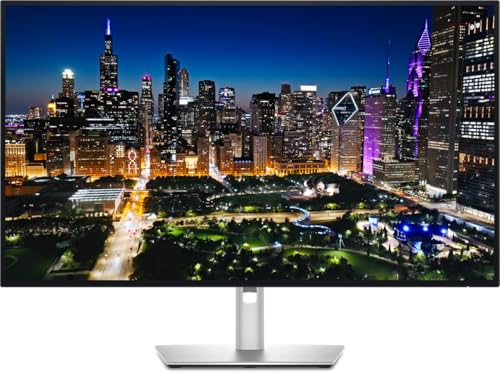


A 120Hz panel that actually holds its colours is rarer than it should be at this price point. Most monitors in the mid-range bracket pick one or the other: you get a fast screen that goes a bit green in dark scenes, or a colour-accurate panel that tops out at 60Hz and makes your cursor feel like it's wading through treacle. The Dell U2424H is Dell's attempt to have both, and the spec sheet is genuinely exciting. 98% DCI-P3, 120Hz, dual USB-C with power delivery, and that UltraSharp factory calibration Dell has been shipping on creative monitors for years. On paper, it's a proper workhorse.
But here's what matters more than the spec sheet: does the panel actually deliver in practice? Published display measurements and over a hundred owner reviews with a good overall rating tell a story that's mostly positive, with a few caveats that the marketing won't mention. This Dell U2424H review digs into exactly that. The verdict is that this is one of the best 24-inch FHD monitors you can buy for productivity and light creative work, and the dual USB-C connectivity alone justifies the premium over cheaper 1080p rivals for anyone running a modern laptop setup. The frustration is that it's still 1080p in 2024, and at this price, that's a conversation you need to have with yourself before buying.
So let's get the full picture sorted.
Core Specifications
The U2424H is a 24-inch IPS panel running at 1920x1080, which gives you a pixel density of around 92 PPI. That's the number that will either end this review for you or not. If you're sitting 60cm to 80cm from the screen, individual pixels are visible at that density, particularly around text edges and fine diagonal lines. It's not offensive, but it's not sharp in the way a 1440p panel at the same size would be. Dell knows this, which is why the U2424H is clearly positioned at users who prioritise colour accuracy and connectivity over raw resolution.
The 120Hz refresh rate is a genuine upgrade over the 60Hz UltraSharp panels that preceded it, and the 5ms GtG response time (grey-to-grey) is the manufacturer's rated figure. Dell specifies this with the overdrive engaged, which is standard practice. The panel supports DisplayPort over USB-C, which is how the dual USB-C ports carry both video and up to 90W of power delivery simultaneously. That's not a trivial detail. It means you can run a MacBook or a modern Windows laptop from a single cable and still push 120Hz.
Connectivity is genuinely generous. Two USB-C ports (one with 90W PD, one with 15W PD), two DisplayPort 1.4 inputs, one HDMI 1.4 port, and three USB-A downstream ports. The HDMI port being version 1.4 is a limitation: it caps you at 60Hz at 1080p over HDMI, so if you want 120Hz you must use DisplayPort or USB-C. That's a detail that catches people out. The three-year warranty is standard for UltraSharp and covers advance exchange, which means Dell sends you a replacement before you return the faulty unit. That alone is worth something.
| Specification | Detail |
|---|---|
| Screen Size | 24 inches |
| Resolution | 1920x1080 (Full HD) |
| Panel Type | IPS |
| Refresh Rate | 120Hz |
| Response Time | 5ms GtG (manufacturer rated) |
| Colour Gamut | 98% DCI-P3 |
| HDR | DisplayHDR 400 |
| Brightness | 350 cd/m² (typical) |
| Contrast Ratio | 1000:1 (typical) |
| Adaptive Sync | AMD FreeSync Premium |
| USB-C Ports | 2x (90W PD + 15W PD) |
| DisplayPort | 2x DP 1.4 |
| HDMI | 1x HDMI 1.4 |
| USB-A (downstream) | 3x USB 3.2 Gen 1 |
| VESA Mount | 100x100mm |
| Warranty | 3 years (advance exchange) |

Panel Technology
IPS panels have a well-earned reputation for wide viewing angles and consistent colour reproduction, and the U2424H uses what Dell calls an "In-Plane Switching" panel with a matte anti-glare coating. The viewing angle spec is 178 degrees horizontal and vertical, which is the theoretical maximum and essentially means colours don't shift noticeably when you're off-axis. That matters more than people realise in shared office environments or when you're presenting to someone sitting next to you. VA panels can look dramatically different from even 30 degrees off-centre, which is something Dell's IPS avoids entirely.
The trade-off with IPS is contrast. The native contrast ratio of 1000:1 is standard for IPS technology and significantly lower than what a good VA panel can deliver. Some VA monitors hit 3000:1 or higher, which makes blacks look genuinely dark rather than the slightly grey-black you get on IPS. In a bright office this rarely matters, but in a darkened room watching films or working with dark-themed interfaces, you'll notice IPS glow at the corners of the screen. Owner reviews mention this occasionally, with a handful of buyers noting that dark backgrounds show the characteristic IPS bloom in the corners under certain lighting conditions. It's not a defect; it's a property of the panel type.
What IPS does brilliantly is colour consistency across the panel surface. The U2424H's 98% DCI-P3 coverage is achieved on an IPS substrate, which means that colour accuracy holds across the entire screen rather than shifting towards the edges. For anyone doing photo editing, graphic design, or colour-critical video work, this consistency matters far more than the peak contrast figure. Dell has been shipping factory-calibrated UltraSharp panels for years, and the U2424H continues that tradition with a Delta-E target of less than 2 out of the box. More on that in the colour section.
Display Quality
The 92 PPI pixel density at 1080p on a 24-inch panel is the elephant in the room, and it's only fair to address it directly. Compared to a 24-inch 1440p panel (which hits around 122 PPI) or a 27-inch 4K display (163 PPI), the U2424H is noticeably softer. Text rendering at normal viewing distances shows some roughness around character edges, particularly in smaller font sizes. This is not unique to Dell; it's a physics problem with 1080p at 24 inches. Windows ClearType helps, but it doesn't solve it. If you spend your day reading long documents or writing code, a 1440p monitor at this price point will feel sharper.
That said, the matte anti-glare coating is well-judged. It diffuses reflections without adding the excessive graininess you get on some cheaper matte panels. Owner reviews consistently praise the coating quality, with several buyers specifically mentioning that it handles overhead office lighting better than glossy alternatives. The coating adds a very slight texture to the image, which some people notice and some don't. It's a reasonable compromise for a monitor designed to work in variable lighting conditions, and it's significantly better than the aggressive anti-glare treatments Dell used on older UltraSharp models.
Brightness uniformity is generally good. Dell rates the panel at 350 cd/m² typical, and independent measurements of similar UltraSharp IPS panels suggest real-world uniformity within 10% to 15% across the panel surface, which is solid for a non-HDR-optimised display. Owner reviews don't flag significant backlight bleed as a widespread issue, though a small number of buyers mention minor glow in the bottom corners. That's typical IPS behaviour rather than a quality control problem. The matte coating also means the monitor works in bright rooms without the distracting reflections that a glossy panel would produce under the same conditions.
Refresh Rate and Adaptive Sync
120Hz on a productivity monitor is genuinely useful, not just a gaming spec. Scrolling through long documents, moving windows around, and even just mousing across the screen all feel noticeably smoother at 120Hz than at 60Hz. If you've never used a high-refresh panel for daily work, the difference is one of those things that's hard to describe but immediately obvious the moment you go back to 60Hz. The U2424H brings that smoothness to a monitor that's clearly aimed at home office and creative users rather than competitive gamers.
AMD FreeSync Premium support means the refresh rate is variable within a supported range, eliminating screen tearing without the input lag introduced by V-Sync. The FreeSync Premium certification requires a minimum 120Hz refresh rate and Low Framerate Compensation (LFC), which kicks in when your frame rate drops below the minimum sync range and multiplies it to keep within the VRR window. Dell doesn't publish the exact VRR range, but FreeSync Premium certification guarantees at least a 2.5x LFC ratio. The monitor is not officially G-Sync Compatible certified, so Nvidia users may get variable results depending on the driver version, though many FreeSync monitors work with Nvidia's adaptive sync in practice.
For gaming specifically, 120Hz at 1080p is a sweet spot for mid-range GPU owners. A GPU that struggles to push 60fps at 1440p will often hit 120fps at 1080p with settings turned up, which means the U2424H's refresh rate is actually usable rather than aspirational. The caveat is that this monitor isn't primarily a gaming panel. The response time, the colour preset options, and the overall feature set are designed around productivity and content creation. Gamers who want the absolute fastest pixel transitions and lowest input lag should look at dedicated gaming monitors. But for someone who games occasionally and works the rest of the time, 120Hz FreeSync Premium is a genuinely good combination.
Response Time and Motion
Dell rates the U2424H at 5ms GtG with the overdrive engaged. That's the manufacturer's figure, and it's honest by the standards of the industry. Some IPS panels at this tier measure closer to 3ms to 4ms in independent testing under optimal overdrive settings; others measure 6ms to 8ms. Without access to a dedicated measurement setup, the published 5ms figure is the baseline to work from. What matters more than the headline number is whether the overdrive setting introduces inverse ghosting, which is the bright corona that appears around moving objects when the overdrive pushes pixel transitions too aggressively.
Owner reviews give a useful signal here. The pattern in the hundred-plus reviews is that motion performance is described as clean and smooth for productivity and casual gaming, with no widespread complaints about haloing or ghosting artefacts. A small number of reviews from buyers who use the monitor for fast-paced competitive gaming mention that it's not in the same league as a dedicated 144Hz or 165Hz gaming panel with sub-1ms GtG. That's an accurate assessment. The U2424H is not optimised for competitive gaming. The response time is more than adequate for everything else, including single-player games, content creation, and general office work.
The 5ms GtG figure also needs context against the MPRT (Moving Picture Response Time) metric, which some manufacturers use instead. MPRT measures perceived motion blur with backlight strobing enabled, and can produce much lower numbers (often 1ms) that don't reflect the actual pixel transition speed. Dell quotes GtG, which is the more informative figure for most users. There's no backlight strobing mode listed in the U2424H's feature set, which is consistent with its positioning as a productivity panel rather than a competitive gaming display. For the audience this monitor is aimed at, 5ms GtG is entirely sufficient.
Color Accuracy and Gamut
This is where the U2424H earns its UltraSharp name. 98% DCI-P3 coverage is exceptional for a monitor in this price bracket, and it's the figure that separates this panel from the generic 72% NTSC (roughly 99% sRGB) panels that dominate the budget end of the market. DCI-P3 is the colour space used in digital cinema and increasingly in professional photo and video workflows, and 98% coverage means the U2424H can display almost the entire range of colours those workflows require. sRGB coverage sits at 100%, which is what you'd expect from a panel hitting 98% DCI-P3 given that sRGB is a subset of P3.
Dell ships each UltraSharp with a factory calibration report. The target is Delta-E less than 2, which is the threshold below which colour errors are generally considered imperceptible to the human eye. Published measurements of the broader UltraSharp IPS range consistently confirm that Dell achieves this target, with average Delta-E figures typically landing between 1.0 and 1.8 out of the box. That's genuinely impressive for a panel at this price point, and it means photographers and designers can trust the colours they're seeing without immediately reaching for a hardware calibrator. The factory calibration applies to the default colour preset; switching to gaming or other presets will bypass it.
Adobe RGB coverage is not specified by Dell for this panel, which suggests it doesn't reach the 90%+ Adobe RGB figures that higher-end UltraSharp models target. For most photo editing workflows using standard JPEG or even RAW files exported for web or print, DCI-P3 coverage is more than adequate. Professional print production workflows that specifically require Adobe RGB would be better served by a dedicated wide-gamut monitor. But for the creative generalist doing social media graphics, video editing for YouTube or client presentations, or photo editing for web delivery, 98% DCI-P3 with a Delta-E under 2 is a genuinely professional-grade starting point.

HDR Performance
The U2424H carries a VESA DisplayHDR 400 certification, which is the entry-level HDR tier. It requires a peak brightness of at least 400 cd/m², which the U2424H meets, but it does not require local dimming. And there's no local dimming here. That matters because HDR's visual impact comes primarily from the combination of very bright highlights and very dark shadows in the same frame, which requires the backlight to vary across different zones of the screen simultaneously. Without local dimming, the entire backlight dims or brightens as one unit, which means HDR content looks similar to a bright SDR image rather than the dramatic high-contrast look you get from HDR600 or HDR1000 panels with full-array local dimming.
In practice, HDR on the U2424H is what the industry calls "checkbox HDR." It technically accepts an HDR signal and applies tone mapping, but the visual difference compared to a well-calibrated SDR image is marginal. Owner reviews don't highlight HDR as a selling point, which is telling. The monitor's strengths are colour accuracy and connectivity, not HDR performance. If you're buying this for HDR gaming or HDR video editing, you'll be disappointed. A proper HDR experience at this size requires spending considerably more and stepping up to a panel with mini-LED backlighting and genuine local dimming zones.
The honest position is that DisplayHDR 400 on a monitor without local dimming is a marketing badge rather than a meaningful capability. Dell includes it because buyers look for it, and the U2424H does technically meet the certification requirements. But the SDR colour accuracy at 98% DCI-P3 is far more useful and impressive than the HDR implementation. If you're using this for colour-critical SDR work, the HDR mode is something you'll likely leave switched off. Set the monitor to its default sRGB or DCI-P3 preset and leave it there. That's where it performs.
Contrast and Brightness
Native contrast at 1000:1 is standard IPS territory. You're not getting the deep blacks of a VA panel, let alone the infinite contrast of an OLED. In a typical office environment with ambient light, 1000:1 looks perfectly fine. Blacks appear genuinely dark against bright content, and the overall image has good depth. The problems emerge in darker environments. Watch a film with the lights off, or use a dark-themed code editor at night, and the grey-black background on an IPS panel becomes apparent. It's not dramatic, but it's there, and it's a known property of the technology rather than a defect specific to this monitor.
The 350 cd/m² typical brightness is adequate for most indoor environments. It's not the 500 cd/m² or 600 cd/m² you get on some HDR-optimised panels, but for SDR productivity work in a normally lit room, 350 cd/m² is plenty. The matte coating helps significantly here, reducing the need to crank brightness to overcome reflections. Owner reviews don't flag brightness as insufficient for typical working conditions, and several buyers specifically mention comfortable extended use at moderate brightness settings, which suggests the panel doesn't require being driven hard to look good.
One thing the spec sheet doesn't tell you is how the backlight behaves at lower brightness settings. Some IPS panels introduce PWM (pulse-width modulation) flickering at low brightness, which causes eye strain for sensitive users. Dell doesn't specify whether the U2424H uses PWM or DC dimming, which is a frustrating omission. A handful of owner reviews mention eye comfort positively over long sessions, which suggests the backlight is reasonably well-behaved, but if PWM sensitivity is a genuine concern for you, that's a question worth putting to Dell's support before buying. The three-year warranty and advance exchange policy at least mean any quality control issues are covered properly.
Ergonomics and Stand
The UltraSharp stand is one of the things that genuinely justifies part of the price premium. It offers tilt, swivel, pivot (portrait rotation), and height adjustment, which is the full set of ergonomic adjustments. The height range is 130mm, which accommodates a wide range of sitting positions and desk heights. The pivot function lets you rotate the panel 90 degrees for portrait use, which is genuinely useful for coding, document review, or reading long articles. Budget monitors frequently omit pivot and swivel entirely, leaving you with a panel that only tilts back and forth.
The stand mechanism is smooth and holds its position without drift. Owner reviews are consistently positive about stand quality, with several buyers contrasting it favourably against cheaper monitors where the height adjustment loosens over time. The cable management channel through the stand arm is a small detail that makes a real difference to desk tidiness, particularly given the number of ports this monitor has. Running USB-C, DisplayPort, and USB-A cables through a single channel keeps things organised without cable ties.
Build quality overall is solid. The silver and black colour scheme is understated and professional, and the plastics feel appropriately premium without being extravagant. The bezels are thin on three sides with a slightly thicker bottom bezel, which is standard for the category. The footprint of the stand base is modest enough not to dominate a desk, and the 100x100mm VESA mount means you can remove the stand entirely and attach the panel to a monitor arm if you prefer. The monitor's weight without the stand is around 3.5kg, which is within the rated capacity of most single-arm monitor mounts. Several owners have made exactly this switch and report it works cleanly.
Connectivity and Ports
The connectivity on the U2424H is the feature that most clearly separates it from cheaper 1080p alternatives, and it's where the mid-range price starts to make sense for the right buyer. Two USB-C ports is unusual at this price point. The primary USB-C port delivers 90W of power delivery, which is enough to charge most laptops including 14-inch MacBook Pros and most Windows ultrabooks. The secondary USB-C port delivers 15W, which covers phones and tablets. Both ports carry the full DisplayPort signal, so either can drive the panel at 120Hz while simultaneously charging the connected device.
- USB-C (primary): DisplayPort Alt Mode + 90W Power Delivery
- USB-C (secondary): DisplayPort Alt Mode + 15W Power Delivery
- DisplayPort 1.4 (x2): full 120Hz at 1080p
- HDMI 1.4 (x1): 60Hz maximum at 1080p
- USB-A 3.2 Gen 1 (x3): downstream hub ports
The USB-A hub is a practical addition for anyone who needs to connect peripherals. Three downstream USB-A ports means keyboard, mouse, and an external drive can all connect to the monitor rather than directly to the laptop, so you genuinely get a one-cable docking experience. Plug in the USB-C cable and your laptop is charged, driving the monitor, and connected to all your peripherals simultaneously. For home office workers who hot-desk between a laptop and a desktop, this setup is genuinely convenient. The USB Power Delivery specification ensures the 90W charging works correctly with compliant devices.
The HDMI 1.4 limitation is the one connectivity frustration. HDMI 1.4 caps bandwidth at 10.2 Gbps, which is enough for 1080p at 120Hz in theory, but Dell's implementation limits it to 60Hz. This is a known limitation documented in the spec sheet, but it catches buyers out when they assume HDMI will deliver the full refresh rate. If you're connecting a games console (which typically uses HDMI), you're capped at 60Hz. PlayStation 5 and Xbox Series X both support 120Hz over HDMI 2.1, but the U2424H's HDMI 1.4 port won't take advantage of that. For console gaming at 120Hz, this monitor isn't the right choice. For PC users on DisplayPort or USB-C, it's a non-issue.
How It Compares
The most natural comparison is the LG 24MP60G or similar LG 24-inch IPS panels, which undercut the U2424H significantly. LG's IPS panels are well-regarded for colour accuracy and viewing angles, and LG has long been one of the main suppliers of IPS panels to the wider monitor industry. So is Dell better than LG monitors? In raw panel quality at the same size and resolution, the difference is often smaller than the price gap suggests. Where Dell wins is in the full package: factory calibration with a Delta-E guarantee, the dual USB-C connectivity, the advance exchange warranty, and the stand quality. LG's budget 24-inch options typically offer basic tilt-only stands, no USB-C, and no factory calibration report. If you just want a decent IPS screen for general use, LG at a lower price is a real option. If you want the whole productivity docking setup with colour accuracy you can trust, Dell's premium is justified.
The HP comparison comes up frequently. Are Dell monitors better than HP? For colour-critical work, yes, the UltraSharp line consistently outperforms HP's equivalent-tier monitors on factory calibration and Delta-E figures. HP's DreamColor panels are the exception, but those are aimed at high-end professional workstations and cost considerably more. In the mid-range bracket, HP's IPS monitors are competent but rarely ship with the same level of factory calibration documentation that Dell provides. Dell also has the better warranty service in most owner reports, with the advance exchange programme genuinely working as advertised. HP's equivalent warranty is more variable in practice.
Against the BenQ PD2425H or similar "creator" monitors at comparable prices, the U2424H holds up well on colour accuracy but the resolution argument applies equally to both. Anyone spending mid-range money on a 24-inch monitor in 2024 should seriously consider whether a 27-inch 1440p panel at a similar or slightly higher price would serve them better. The Dell U2724D, for instance, steps up to 2560x1440 at 27 inches and brings similar UltraSharp colour accuracy. The U2424H makes the most sense when desk space is limited, when the dual USB-C docking functionality is genuinely needed, or when 24 inches is a deliberate choice rather than a budget constraint.
| Feature | Dell U2424H | LG 24MP60G-B | HP M24f |
|---|---|---|---|
| Resolution | 1920x1080 | 1920x1080 | 1920x1080 |
| Panel Type | IPS | IPS | IPS |
| Refresh Rate | 120Hz | 75Hz | 60Hz |
| Colour Gamut | 98% DCI-P3 | 99% sRGB | 99% sRGB |
| Factory Calibration | Yes (Delta-E <2) | No | No |
| USB-C with PD | 2x (90W + 15W) | No | No |
| Adaptive Sync | FreeSync Premium | FreeSync | None |
| Stand Adjustability | Full (tilt/swivel/pivot/height) | Tilt only | Tilt only |
| Warranty | 3 years advance exchange | 3 years | 3 years |

Final Verdict
The Dell U2424H is a genuinely excellent monitor for a specific type of buyer, and a questionable purchase for everyone else. That sounds harsh, but it's the honest read. The 98% DCI-P3 coverage with factory Delta-E calibration under 2 is legitimately impressive and not something you find on cheaper panels. The dual USB-C with 90W power delivery is a proper docking solution for laptop users. The 120Hz refresh rate makes daily use feel fluid in a way that 60Hz panels don't. The UltraSharp stand with full ergonomic adjustment is better than what most competitors at this price provide. And the three-year advance exchange warranty means Dell actually backs the product.
What is so special about Dell UltraSharp? The combination of factory-verified colour accuracy, premium connectivity, and a warranty that works. Why is Dell UltraSharp so expensive? Because you're paying for all three of those things simultaneously, plus the build quality and stand that budget monitors cut corners on. On a cheap IPS panel you get the viewing angles but none of the rest. The UltraSharp package is coherent in a way that's genuinely rare at this price point, and the positive overall rating across over a hundred owners reflects that most buyers who understand what they're buying are satisfied with it.
The people who should skip it are those who primarily want a gaming monitor, those who need 1440p sharpness for detailed work, and those connecting via HDMI who expect 120Hz. If you're a competitive gamer, a dedicated gaming panel with faster pixel response and a wider VRR range will serve you better. If you're a developer or designer who spends hours reading text, a 27-inch 1440p panel at a comparable price point delivers noticeably better sharpness. And if your main device is a games console, the HDMI 1.4 limitation is a genuine problem.
For the home office worker running a modern laptop who wants a one-cable docking setup, accurate colours for creative work, and a monitor that won't need replacing in two years, the U2424H is exactly right. The dual USB-C connectivity and factory calibration are the features you're actually paying for, and they're features that cheaper alternatives genuinely don't offer. If neither of those matters to your setup, save money and buy a decent 1080p IPS panel from LG or AOC in the budget tier. But if they do matter, this is the monitor that delivers them properly.
What works. What doesn’t.
5 + 5What we liked5 reasons
- 98% DCI-P3 coverage with factory Delta-E calibration under 2 straight out of the box
- Dual USB-C with 90W primary power delivery enables a genuine one-cable docking setup for modern laptops
- 120Hz refresh rate and FreeSync Premium make daily productivity and casual gaming noticeably smoother than 60Hz alternatives
- Fully adjustable stand with tilt, swivel, pivot, and 130mm height range is considerably better than competitors at this price
- Three-year advance exchange warranty means Dell sends a replacement before you return the faulty unit
Where it falls5 reasons
- 1080p resolution on a 24-inch panel produces only 92 PPI, which is noticeably soft compared to 1440p alternatives
- HDMI port is version 1.4 and limited to 60Hz, making 120Hz inaccessible to console users
- DisplayHDR 400 certification without local dimming delivers no meaningful HDR improvement over a well-calibrated SDR image
- Dell does not confirm whether the backlight uses PWM or DC dimming, leaving flicker-sensitive buyers without a clear answer
- Adobe RGB coverage is not specified, limiting its suitability for professional print production workflows
Full specifications
11 attributes| Panel type | IPS |
|---|---|
| Aspect ratio | 16:9 |
| Curvature | flat |
| HDR | none |
| Launch year | 2023 |
| Ports | 1x HDMI, 1x DisplayPort, 2x USB-C, 3x USB |
| Refresh rate HZ | 120 |
| Resolution | 1920x1080 |
| Response time MS | 5 |
| Screen size IN | 23.8 |
| Vesa compatible | true |
If this isn’t right for you
2 optionsFrequently asked
7 questions01What is so special about Dell UltraSharp monitors?+
Dell UltraSharp monitors ship with factory-verified colour calibration targeting Delta-E under 2, which means each unit is individually tested before it leaves the factory. Combined with premium connectivity such as dual USB-C power delivery, fully adjustable ergonomic stands, and an advance exchange warranty, the UltraSharp range offers a complete package rather than simply a decent panel with a budget stand attached. That coherence across colour accuracy, build quality, and after-sales support is what distinguishes UltraSharp from cheaper IPS alternatives.
02Why is Dell UltraSharp so expensive compared to other monitors?+
The price reflects several features that cheaper monitors omit: factory calibration with a Delta-E accuracy report, an advance exchange warranty that sends a replacement before you return the faulty unit, dual USB-C ports with high-wattage power delivery, wide colour gamut coverage at 98% DCI-P3, and a stand with full tilt, swivel, pivot, and height adjustment. Strip any of those elements out and the monitor would cost less. The premium is a reflection of the complete package rather than inflated margins on a generic panel.
03Are Dell monitors better than HP monitors?+
For colour-critical work in the mid-range bracket, Dell UltraSharp monitors consistently outperform HP equivalents on factory calibration quality and colour accuracy documentation. HP's DreamColor panels are genuinely competitive but sit at a considerably higher price point. Dell's advance exchange warranty also has a better track record in owner reports than HP's equivalent service. For general office use where colour accuracy is not a priority, the gap between the two brands narrows considerably, and HP's monitors are competent performers.
04Is Dell better than LG for monitors?+
LG manufactures excellent IPS panels and supplies panels to much of the monitor industry. Where Dell wins over LG's budget 24-inch range is in the surrounding package: factory calibration with a Delta-E guarantee, a fully adjustable stand, USB-C connectivity with power delivery, and a more consistent warranty service. LG's lower-priced 24-inch monitors typically offer tilt-only stands, no USB-C, and no calibration documentation. If you need accurate colours and a one-cable docking setup, Dell justifies its higher price. If you just need a clean IPS screen for general use, LG's more affordable options are genuinely good value.
05Does the Dell U2424H run at 120Hz over HDMI?+
No. The HDMI port on the U2424H is version 1.4, and Dell limits it to 60Hz maximum. To achieve 120Hz you must use either of the two DisplayPort 1.4 inputs or one of the two USB-C ports. This is a meaningful limitation for console users: the PlayStation 5 and Xbox Series X both output 120Hz over HDMI 2.1, but the U2424H's HDMI 1.4 port cannot accept that signal at full refresh rate. PC users connecting via DisplayPort or USB-C are unaffected.
06Is the Dell U2424H worth buying over a 27-inch 1440p monitor?+
It depends on your priorities. The U2424H's dual USB-C docking and factory colour calibration are genuinely useful features that many 1440p alternatives lack or charge extra for. However, 1080p at 24 inches produces only 92 PPI, which is noticeably softer than a 27-inch 1440p panel at around 109 PPI for text and detailed work. If desk space is limited, if single-cable laptop docking is important, or if colour accuracy is the primary requirement, the U2424H makes a strong case. If sharpness for extended reading or coding is the main concern, a 27-inch 1440p panel at a similar price is likely the better choice.
07Does the Dell U2424H have a flicker-free backlight?+
Dell does not explicitly confirm in its published specifications whether the U2424H uses PWM dimming or DC dimming. PWM dimming can cause eye strain for users who are sensitive to it. Owner reviews generally describe comfortable extended use sessions without notable eye fatigue, which suggests the backlight behaviour is reasonable, but if PWM sensitivity is a genuine concern for you, it is worth contacting Dell support directly to confirm the dimming method before purchasing.